Specialist Accounting Digital Presence Pricing & Packages Website Template
Ledger is a finance dashboard landing page template built for accounting firms that serve small businesses, startup founders, and e-commerce operators. It pairs an animated Feature Tab Switcher with a three-tier comparison table, a before-and-after ledger view, and a lead generation form. The result is a focused, data-forward site that turns financial complexity into confident, qualified leads.
by Rocket studio
Quick summary
Ledger is a single-page template designed for accounting and bookkeeping firms. It opens with an interactive dashboard hero, escalates through hard-hitting financial data, and closes with a conversion-focused lead capture form. Every section is built to reflect the quiet authority of a firm that has its numbers in order and wants visitors to feel the same.
Who this template is for
Accountants and bookkeeping professionals need a site that speaks the language of their clients before a single word is read. This template is built for that exact situation. It gives finance teams a credible, structured foundation to attract and convert the right leads.
- Small business owners and startup founders facing their first tax season or a backlog of messy accounts
- E-commerce operators dealing with miscategorized expenses, invoice gaps, or cash flow blind spots
- Accounting firms and independent accountants who want a polished digital presence without building from scratch
What problem this template solves
Most accounting firm pages bury their value in dense paragraphs. Potential clients arrive stressed and leave unconvinced. This template flips that process. It leads with the cost of inaction, then shows exactly what the firm does to fix it.
- Visitors struggle to understand the difference between service tiers and what each one costs
- Business owners need to see proof before they trust a firm with their general ledger and financial records
- Accountants lose leads because their site has no clear path from interest to a booked assessment
What you get with this template
This template delivers a fully structured layout with interactive components, a comparison table, and a multi-step lead form. Every section is designed to track visitor attention and guide it toward a specific action.
- A Feature Tab Switcher hero with three animated dashboard panels covering Tax Prep, Monthly Bookkeeping, and CFO Advisory
- A three-tier service comparison table with pricing, checkmarks, and a highlighted Most Popular column
- A lead generation form with business type dropdown, revenue range, pain point multi-select, and a secondary PDF gate for the tax deduction checklist
Feature list
This template includes purpose-built components that work together to create a compelling, conversion-ready experience for accounting firms.
Animated Feature Tab Switcher
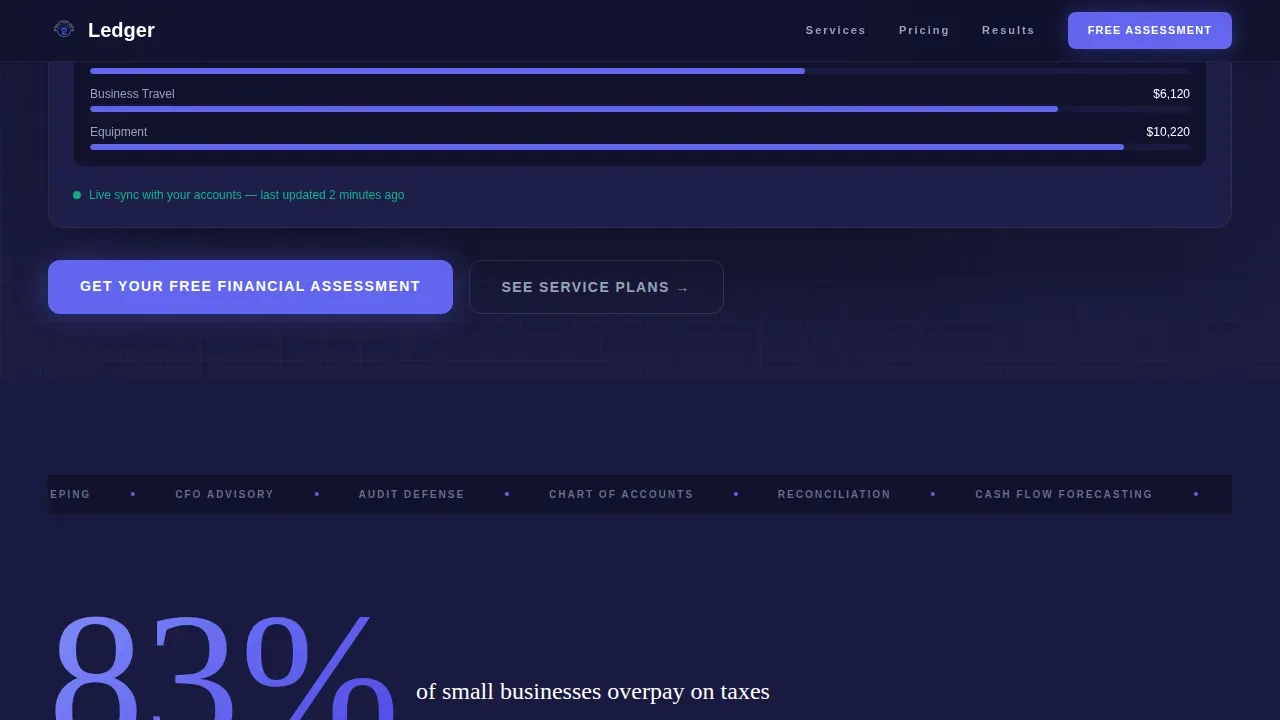
Three clickable tabs sit above a simulated dashboard panel. Switching between Tax Prep, Monthly Bookkeeping, and CFO Advisory swaps the data view live. Counters roll, bars fill, and percentages tick upward so visitors can see the firm's services in action rather than just reading about them.
Stats-First Impact Section
The first section below the fold opens with an oversized indigo stat before any explanation. This structure puts hard financial data in front of the visitor immediately, setting the tone for clear, number-backed services. It is an example of letting the data do the persuading.
Three-Tier Comparison Table
Three service tiers sit side by side with descriptions, checkmarks, and a glowing Most Popular column. Visitors can review exactly what each tier includes and simply click the call-to-action button that matches their needs. Clear descriptions help potential clients make confident decisions without needing to request a call first.
Before-and-After Ledger View
A split view shows messy categorization on the left and a clean general ledger chart of accounts on the right. An animated reconciliation accuracy percentage climbs in the center. This section builds trust by showing the transformation the firm delivers, not just describing it.
Lead Generation Form with PDF Gate
The primary call-to-action form asks for business type, annual revenue range, and biggest pain points before collecting name and email. A secondary path offers a downloadable tax deduction checklist, capturing emails from visitors who are not yet ready to book. Both paths support the firm's lead generation process.
Sticky Mobile Call-to-Action Bar
On mobile devices, a sticky bottom bar keeps the primary call to action visible at all times. This ensures the form remains accessible regardless of scroll depth, supporting lead capture across all screen sizes.
Page sections overview
| Section | Purpose |
|---|---|
| Hero Tab Switcher | Showcase Tax Prep, Bookkeeping, CFO Advisory with animated panels |
| Stats Impact Block | Lead with oversized financial data before the comparison table |
| Service Comparison Table | Display three tiers side by side with pricing and checkmarks |
| Before-and-After Ledger | Visualize clean accounts versus. messy records with animated accuracy counter |
| Testimonials Block | Reinforce trust with specific client outcomes and dollar amounts |
| Lead Gen Form | Capture business type, revenue, pain points, name, and email |
| PDF Checklist Gate | Secondary conversion path for visitors saving research time |
| Footer | Single-row linear layout with firm links and compliance context |
Design & branding system
The visual identity follows a finance dashboard aesthetic. Deep navy and electric indigo create the feeling of a focused control panel where every illuminated number earns its place. The layout rewards visitors who scroll with data that escalates in weight and specificity.
- Color palette: deep dashboard navy (#1A1A40) as the primary background, electric indigo (#6366F1) on active states and data highlights, cool slate gray (#94A3B8) for secondary text and table borders, and crisp ledger white (#FAFBFF) for card backgrounds and alternating table rows
- Typography: DM Sans for clean interface text and Fraunces as the serif display face for headlines, giving the site the authority of a printed financial report with the clarity of modern software
- Animation style: high interactivity including tab switcher counter roll-ups, scroll reveals, before-and-after slider, and count-up numbers on key stats
Mobile & speed optimization
The template is desktop-first by design, matching the finance dashboard aesthetic. On smaller screens, the layout adapts so the most important conversion elements remain visible and functional.
- Sticky bottom bar on mobile keeps the "Get Your Free Financial Assessment" call-to-action anchored at all times
- Server Components handle static content while Client Components manage interactive dashboard elements, keeping the site responsive during animated sequences
- The form is optimized for mobile input with dropdown and multi-select fields that are easy to manage on a touchscreen
How this template helps you convert
Every section in this template is sequenced to move a visitor from skepticism to action. The structure does not rely on persuasive writing alone. It uses financial data, visual proof, and a low-friction form to reduce drop-off at every stage.
- The animated tab hero immediately shows what the firm handles, giving visitors confidence that their specific problem (tax prep, bookkeeping, or cash flow visibility) is covered before they scroll
- The stats section and comparison table work together to highlight the cost of inaction and then offer a clear, priced solution in the same visual sequence
- The dual-path lead form captures both ready buyers and early-stage researchers, ensuring the firm can follow up with every visitor who provides an email
Other information about this template
This template is built with tools and techniques that reduce the need for specialized development resources. Non-technical users can customize the layout, update copy, and manage content without extensive programming knowledge. No-code platforms and this template's structured layout make that process straightforward.
- Accountants and finance teams can customize reject any default section copy and reflect their firm's voice throughout the template
- The general ledger aesthetic extends to every visual element: organized accounts, labeled tabs, and structured data panels that feel audit-ready from the first scroll
- Using a pre-formatted template like this one helps accountants and their partners ensure accuracy across the site before launch, reducing errors that can undermine trust
- The template's integration-friendly structure means it can support future automation tools, including platforms that automate the invoice-to-pay process and improve compliance visibility
- For accountants exploring Excel-based workflows, this template provides a digital foundation that complements spreadsheet-driven processes while presenting financial data in a more accessible, client-facing format
- The template supports regular updates to schedules, pricing, and service descriptions so the site always reflects current offerings
- It is absolutely suitable for firms that also support retirement planning or wealth management services, with sections that can be adapted to highlight those accounts and resources



Theme
Dashboard Pro
Creative direction
Stats-First Impact
Color system
Electric Indigo
Style
Comparison Table
Direction
Lead Generation
Page Sections
Animated Feature Tab Switcher Hero
Stats-first Impact Block
Three-tier Service Comparison Table
Before-and-after Ledger View
Dual-path Lead Generation Form
Sticky Mobile Call-to-action Bar
Related questions
Can I customize the service tiers and pricing in the comparison table?
Does this template support a secondary lead capture path for visitors not ready to book?
Is this template suitable for accountants serving both small businesses and e-commerce clients?
How does the before-and-after ledger section help build trust?
Can finance teams update the animated stats and dashboard panel data?



