Cannabis Billing Landing Page Template
Ledger is a compliance-first cannabis billing and invoicing landing page template built for dispensaries, cultivators, and multi-state operators. The split-screen layout pairs billing pain points with platform specifications, guiding visitors from solo license holders to vertically integrated operators. A dark glass panel header, iridescent color system, and app-download call to action make this template immediately credible and conversion-ready.
by Rocket studio
Quick summary
Ledger is a single-page cannabis billing platform template designed around a 50/50 split-screen layout. It opens with dark glass panels showing a live invoice and payment dashboard side by side. Each scroll section matches a real billing pain point to a technical specification, building confidence at every step before directing visitors to download the app.
Who this template is for
This template was built for cannabis finance professionals who need a credible, data-forward landing page that reflects the complexity of their work. It speaks directly to operators who live inside invoicing systems and compliance workflows every day.
- Dispensary controllers managing Metrc tag reconciliation alongside accounts receivable
- Chief financial officers at vertically integrated operators consolidating invoicing across cultivation, manufacturing, and retail entities
- Solo license holders in emerging markets who built their first chart of accounts on a spreadsheet
What problem this template solves
Cannabis billing is legally and operationally complex. Operators lose hours reconciling 280E tax codes, tracking excise payments across jurisdictions, and chasing distributor invoices that arrive on no predictable schedule. A generic software landing page fails to communicate that depth. Ledger solves the presentation problem by matching the professionalism of the platform it promotes.
- No clear way to show compliance depth, multi-entity invoicing, and track-and-trace integration in a single page
- Visitors in different operational tiers (solo dispensary, multi-location, multi-state operator) leave before they self-identify as the right user
- Generic templates lack the clinical, data-driven visual language that cannabis finance professionals trust
What you get with this template
You get a fully structured single-page layout with a clear visual hierarchy built for a compliance-focused cannabis billing product. Every section is purposeful, and the scroll sequence is designed to escalate in complexity so visitors naturally self-select their tier.
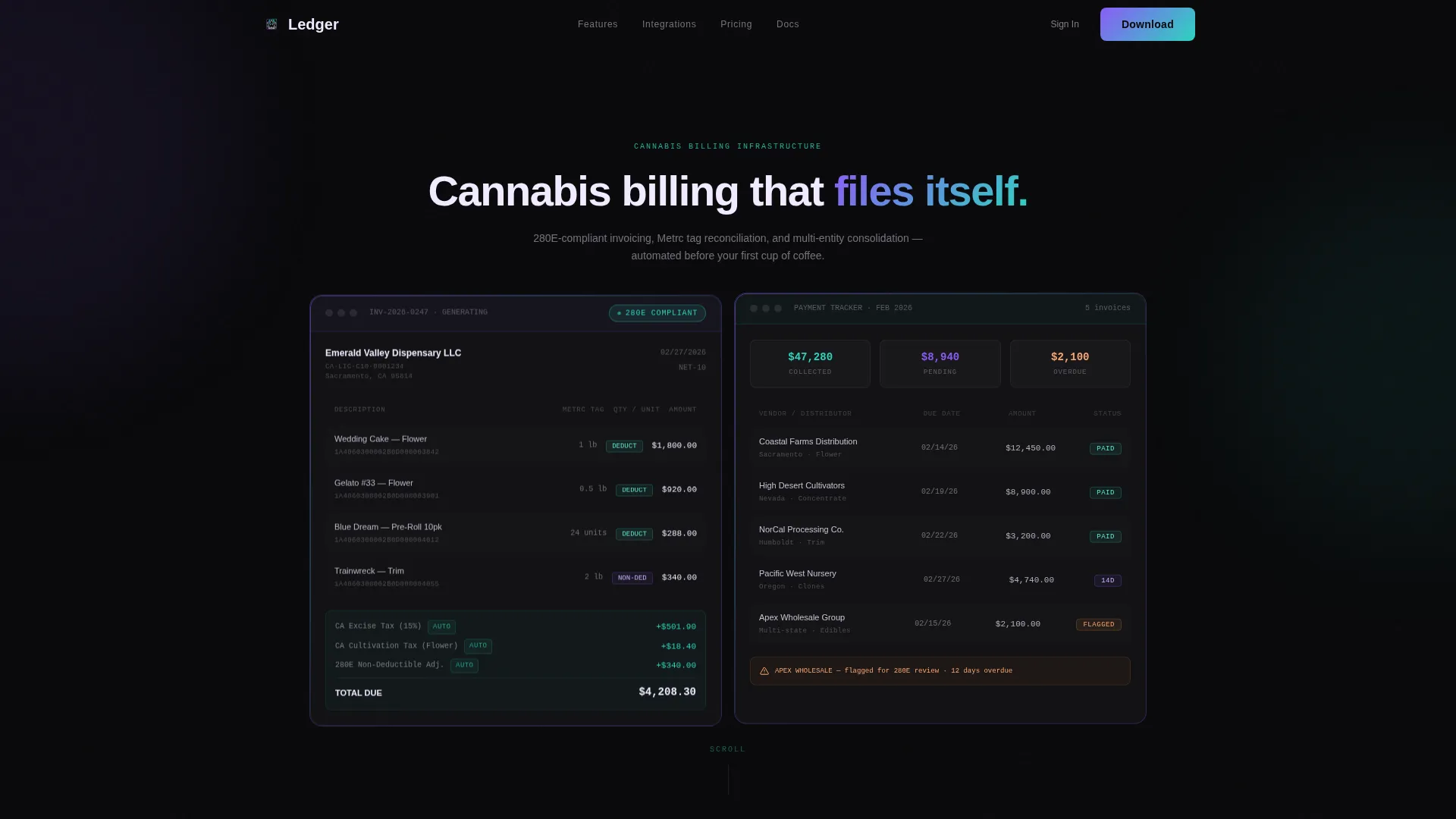
- A dark glass panel header showing a sample invoice and payment status dashboard side by side
- Three spec-sheet scroll sections pairing billing pain points with platform technical details and real interface screenshots
- A primary app-download call to action with App Store and Google Play badge placements, a desktop QR code deep-link, and a secondary "See It With Your Data" demo request form
Feature list
This template comes with a carefully defined set of sections and visual components drawn directly from the brief. Each one serves a specific role in the conversion flow.
Dark Glass Panel Header
Two frosted, semi-transparent panels sit side by side against a pitch-black background. The left panel displays a sample cannabis invoice in progress, including line items, auto-calculated excise tax, partially visible Metrc tag numbers, and a compliance badge. The right panel shows the corresponding payment status dashboard with color-coded invoice rows indicating urgency from violet to teal.
Spec Sheet Scroll Sections
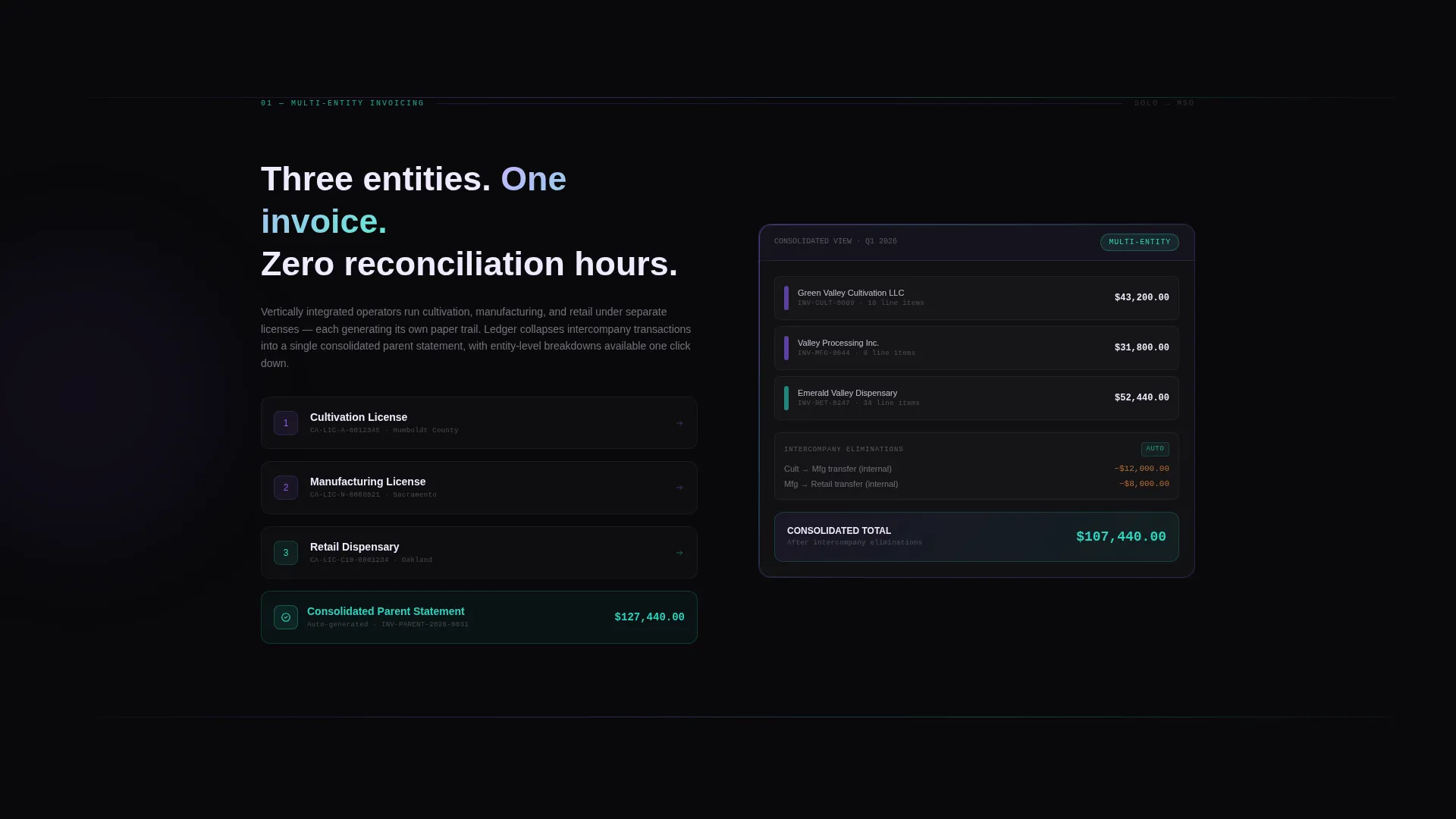
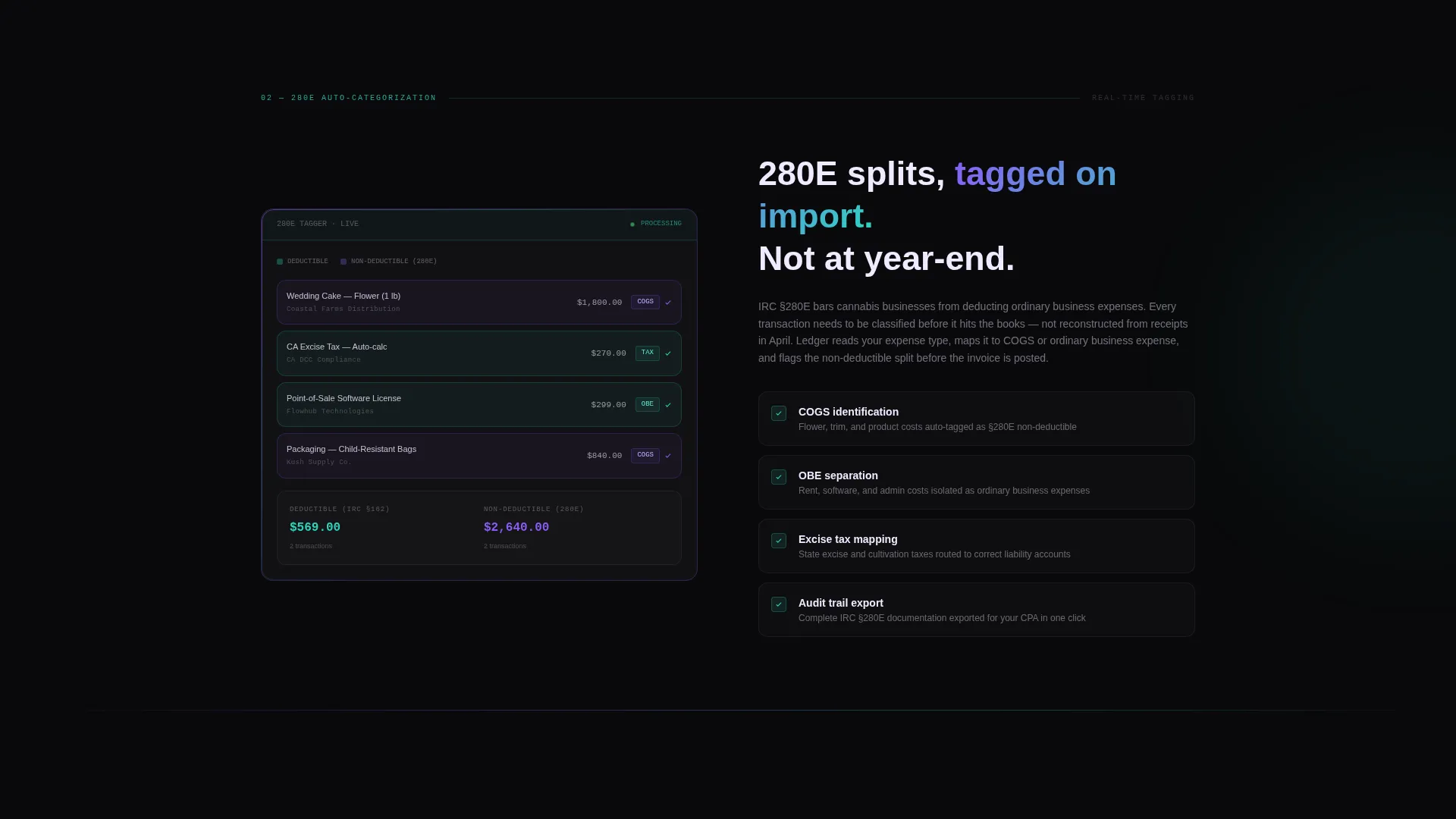
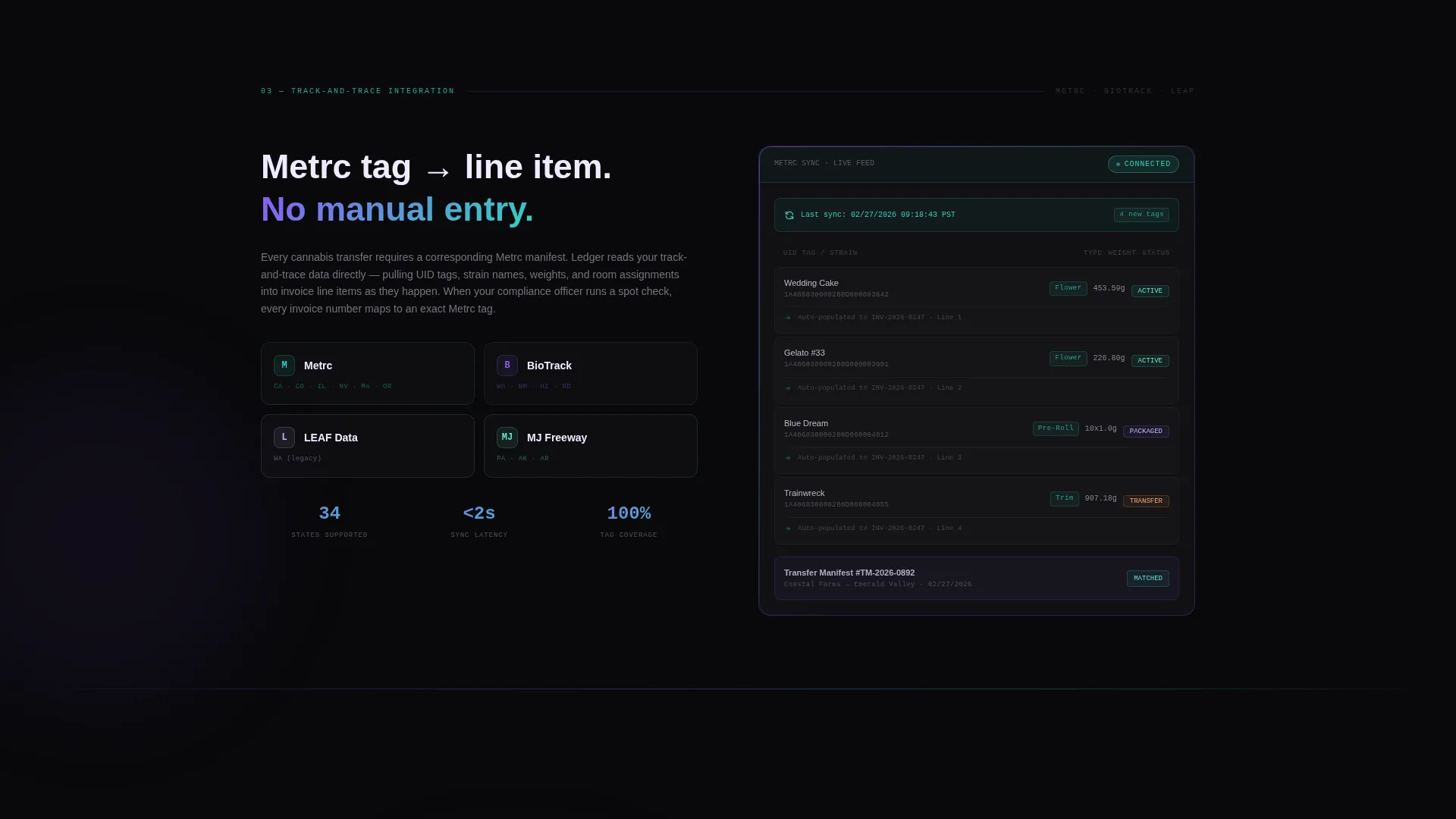
Three dedicated scroll sections each pair a billing pain point on the left with a platform specification on the right. Section one covers multi-entity invoicing with a consolidated parent statement. Section two shows automatic 280E expense categorization with real-time deductible and non-deductible splits. Section three displays Metrc and BioTrack tag-level line items auto-populating from track-and-trace data.
Tiered Complexity Progression
The scroll sequence escalates deliberately: solo dispensary first, then multi-location operator, then multi-state operator. This structure lets visitors self-select their tier as they move down the page, making the platform feel relevant to their exact situation before they reach the download prompt.
App Download Call to Action
The primary call to action is "Download and Start Invoicing," supported by App Store and Google Play badge placements alongside a QR code sized for desktop visitors. The QR code deep-links directly to the appropriate device store, removing friction for users arriving on non-mobile devices.
Personalized Demo Request Form
A secondary conversion path labeled "See It With Your Data" leads to a short form collecting state of operation, license type, and monthly invoice volume range. Submission triggers a demo environment pre-loaded with dummy data matching the visitor's operational profile.
Monospaced Number Typography
All numeric data across the template uses a monospaced typeface. This applies to invoice line items, tax figures, and payment status rows. The choice reinforces the precision and compliance focus of the platform and makes every number feel audit-ready rather than decorative.
Page sections overview
| Section | Purpose |
|---|---|
| Dark Glass Header | Pair live invoice and payment dashboard side by side to establish platform credibility immediately |
| Multi-Entity Invoicing | Show consolidated parent statement collapsing three subsidiary invoices into one view |
| 280E Categorization | Display real-time deductible and non-deductible expense tagging for a single transaction |
| Track-and-Trace Integration | Show Metrc and BioTrack tag-level line items auto-populating from compliance data |
| App Download call to action | Drive primary conversion with App Store, Google Play badges, and a desktop QR deep-link |
| Demo Request Form | Capture secondary leads with a profiled form triggering a personalized demo environment |
Design & branding system
The visual identity follows a Directory and Discovery theme rendered in an AI Iridescent color system. The palette evokes light refracting through a glass prism onto a matte black surface. Every color feels functional, not decorative, which is exactly right for a compliance-focused finance product.
- Core palette: void black (#09090B) for backgrounds, holographic violet (#8B5CF6) and spectral teal (#2DD4BF) for accents and gradient borders, soft iridescent white (#F0EAFF) for text and panel surfaces
- Panel treatment: frosted glass white panels with violet-to-teal gradient borders so thin they read as light leaks, interactive elements pulse with spectral teal on hover
- Typography: sharp sans-serif for body and headlines, monospaced typeface exclusively where numbers appear to reinforce precision and compliance
Mobile & speed optimization
The template is structured with a split-screen layout that adapts across device sizes. The 50/50 panel format is defined in the brief as a layout foundation, with the app-download section specifically designed to serve both mobile visitors and desktop users arriving via QR code.
- Split-screen panels are designed to stack cleanly for smaller viewports without losing the data-forward visual hierarchy
- The QR code component on desktop deep-links directly to the correct device app store, reducing steps for non-mobile visitors
- Interface screenshots embedded in each spec section give mobile visitors a tangible product preview before they reach the download prompt
How this template helps you convert
The conversion strategy is built into the page structure itself. Visitors are shown real product data at every scroll step, so they arrive at the call to action already oriented to the platform. There is no moment where the page feels like a pitch without proof.
- The dark glass header leads with actual invoice and payment data rather than headlines and hero imagery, establishing trust with finance-minded visitors in the first scroll position.
- The tiered spec-sheet sections let visitors self-identify by operational complexity, solo dispensary through multi-state operator, so the platform feels relevant before any form or download prompt appears.
- The dual call-to-action structure captures both high-intent visitors ready to download and research-stage visitors who need a personalized demo, covering the full spectrum of buyer readiness in one page.
Other information about this template
This template is categorized under Technology, specifically within the Cannabis Software and Software-as-a-Service subcategory, targeting the Cannabis Billing and Invoicing niche. The Spec Sheet creative direction is well-matched to financial and compliance software audiences who prefer evidence over marketing language. The header concept, Dark Glass Panels, gives the page an immediately professional and clinical feel that generic software templates do not deliver.
- Template style: Split Screen (50/50), a layout format that keeps product evidence and platform benefits visible at the same time
- Color system: AI Iridescent, applied with restraint so the palette reads as precision rather than decoration
- The "See It With Your Data" secondary path supports operators who need organizational buy-in before downloading, giving the page a longer conversion window
- This template is built for a single-page landing flow, not a multi-page site, so all conversion paths live within one continuous scroll experience
Theme
Directory & Discovery
Creative direction
Spec Sheet
Color system
AI Iridescent
Style
Split Screen (50/50)
Direction
App Download
Page Sections
Dark Glass Panel Header
Spec Sheet Scroll Layout
280E Expense Categorization View
App Download Call to Action
Personalized Demo Request Form
Monospaced Financial Typography
Related questions
Who is this landing page template designed for?
Does the template include a demo request form?
Can this template serve both solo operators and large multi-state operators?
What does the app download section include?
Is this a single-page template or a multi-page site?



