Ledger - Dynamic Sportsbilling Landing Page Template
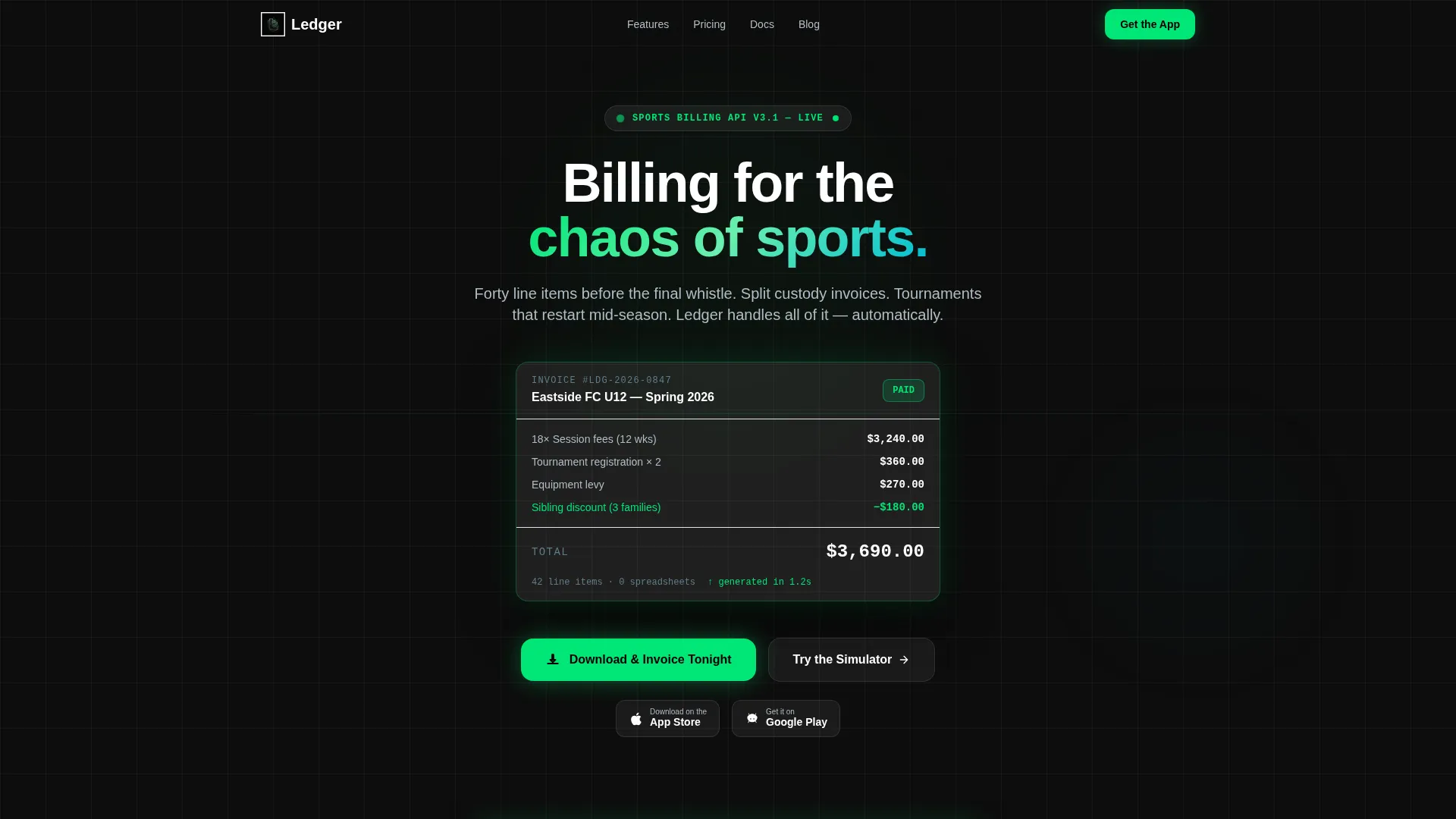
Ledger is a sports billing and invoicing landing page template built for the full complexity of club finance. It opens with a live-typing code animation that resolves into a glassmorphic invoice card, then drops visitors into an interactive billing simulator. The result is a confident, dashboard-driven page that turns curious visitors into app downloads.
by Rocket studio
Quick summary
Ledger is a single-page template designed for sports billing and invoicing platforms. It pairs a dramatic code-snippet header with an interactive billing simulator, letting visitors build their own invoice before reading a single line of marketing copy. The dark glassmorphic design and fluid data-grid layout communicate precision and power from the first scroll.
Who this template is for
This template is built for teams shipping software products that handle the financial complexity of organized sports. It speaks directly to buyers in the sports software and SaaS space who need a landing page that earns trust through demonstration, not description.
- Club treasurers and academy directors looking for a billing tool that matches how their finances actually work
- League administrators managing registration payments, tournament fees, and multi-team reconciliation
- Founders and product teams launching a sports billing or invoicing app and needing a high-impact download page
What problem this template solves
Sports finance is genuinely complicated. Rosters split mid-season, tournaments generate dozens of line items overnight, and shared-custody families need invoices split between two households. A generic SaaS landing page cannot hold that context. Visitors arrive skeptical, and a wall of feature bullets does nothing to change that.
- Club and league finance teams cannot picture how unfamiliar software handles their specific edge cases
- App developers lose potential downloads when visitors cannot interact with the product before committing
- Standard templates lack the visual weight to position a billing engine as both technically capable and easy to use
What you get with this template
You get a fully structured, single-page layout built around demonstration and momentum. Every section is designed to move a visitor forward, from the opening code animation through the billing simulator and into the app download call to action.
- A live-typing code snippet header that resolves into a completed glassmorphic invoice card, bridging technical depth with interface clarity
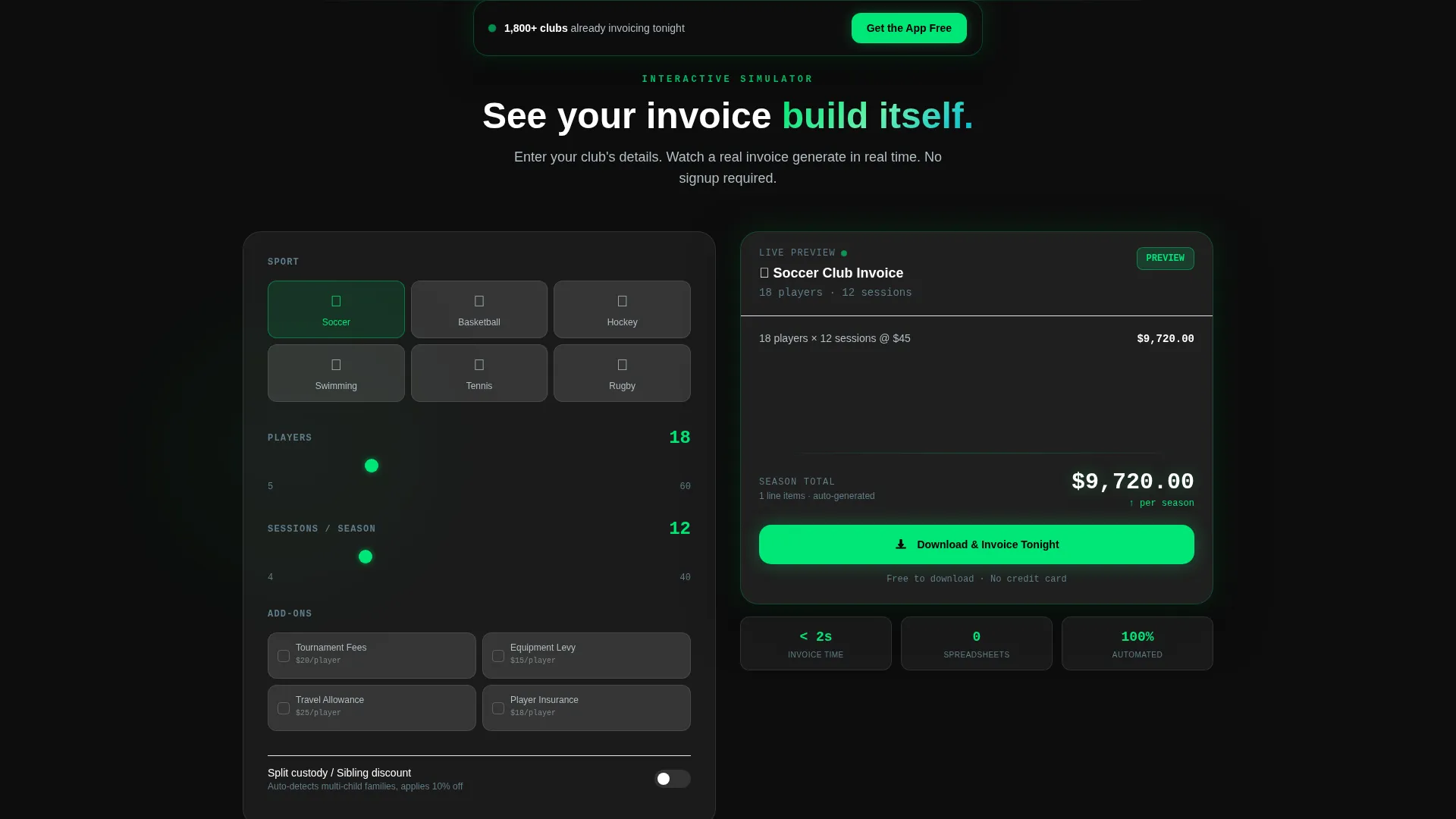
- An interactive billing simulator where visitors select a sport, enter player counts, and toggle add-ons to watch a real-time invoice build beside their inputs
- A scrolling data-grid feature section with lateral slide animations, a sticky secondary call-to-action bar, and auto-detected iOS and Android download badges
Feature list
This template is built around components that work together to simulate the product before asking for a commitment.
Live-Typing Code Snippet Header
The header renders a six-line API call character by character, as though someone is typing it in real time. When the final line executes, the code dissolves into a glassmorphic dashboard card showing a completed invoice with team name, itemized session fees, an applied sibling discount, and a green payment status badge.
Interactive Billing Simulator
Before any marketing copy appears, visitors interact with a billing calculator. They choose a sport, enter a number of players, and toggle add-ons such as tournament fees or equipment levies. A floating glassmorphic panel beside the inputs renders the invoice live as each selection changes.
Animated Data-Grid Feature Section
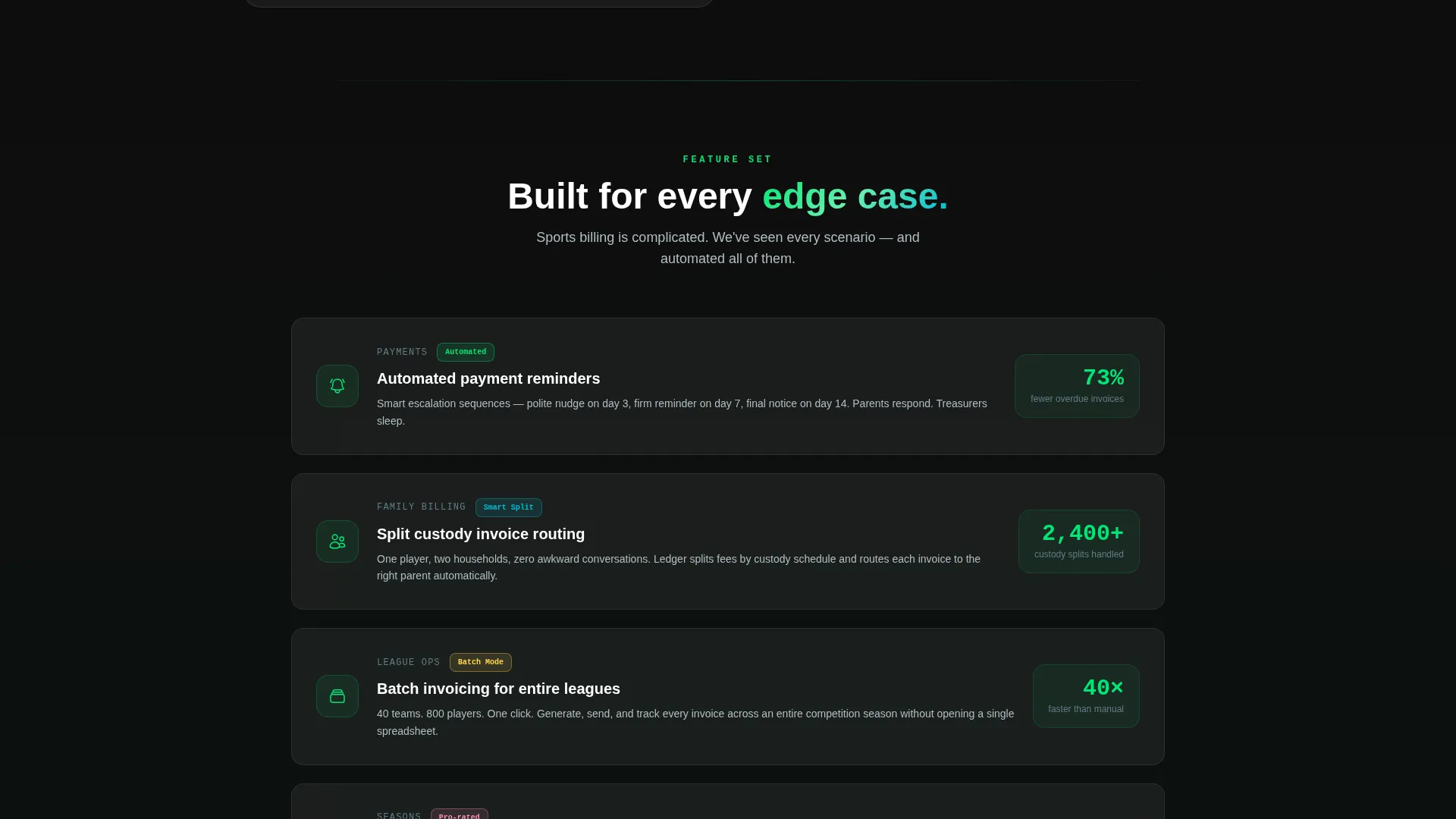
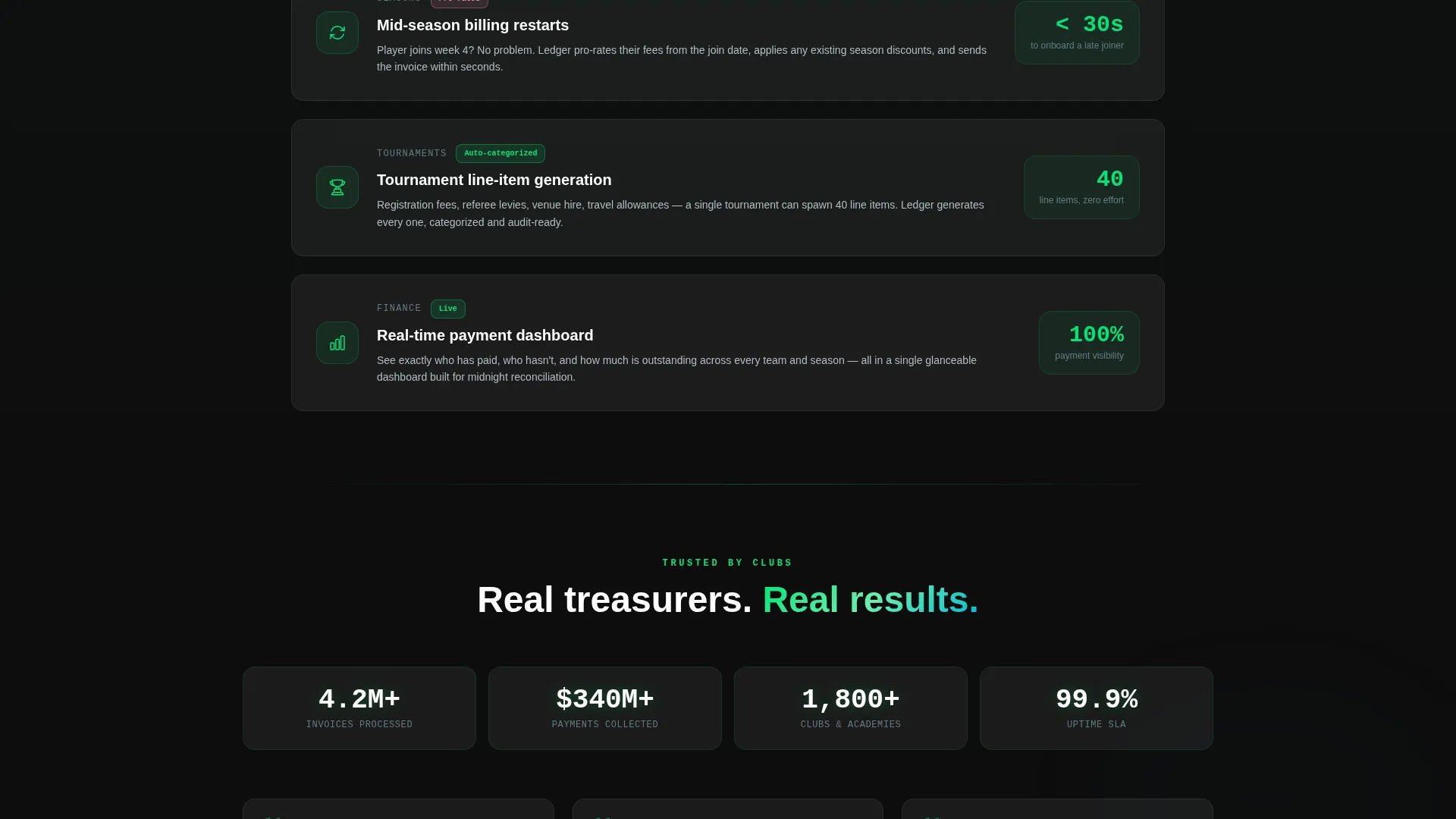
Features are presented in a scrolling data grid where each row animates into view with a subtle lateral slide. Covered capabilities include automated payment reminders, split billing for shared-custody families, and batch invoicing for entire leagues. The rhythm is steady and purposeful, never distracting.
Primary App Download Call to Action
The main call to action reads "Download and Invoice Tonight" and appears directly beneath the billing simulator. It includes auto-detected iOS and Android badges so each visitor sees the correct download option for their device without any extra steps.
Sticky Secondary Call-to-Action Bar
After a visitor scrolls past sixty percent of the page, a sticky bar surfaces with the message "Get the App Free." The timing is deliberate: by that point the simulator and feature grid have already made the case, and the bar simply closes the loop.
Glassmorphic Invoice Card Component
The invoice card used throughout the page demonstrates the product's output in a real, readable format. It displays a team name, line-item session fees, applied discounts, and a color-coded payment status badge, giving visitors a concrete preview of what their own invoices will look like.
Page sections overview
| Section | Purpose |
|---|---|
| Code Snippet Header | Opens with a live-typing API call that resolves into a completed invoice card |
| Billing Simulator | Lets visitors build a real-time invoice using their own sport, player count, and add-ons |
| Feature Data Grid | Presents billing capabilities row by row with lateral slide animations on scroll |
| Primary Download call to action | Converts simulator engagement into an app download with platform-detected badges |
| Sticky Download Bar | Resurfaces the download prompt after sixty percent scroll depth |
Design & branding system
The visual identity follows a Dynamic Motion theme built on a Glassmorphic color system. The palette is intentional and precise, designed to feel like a stadium floodlight cutting through fog: everything behind the glass is alive and in motion, but the surface stays calm and readable.
- Core colors: deep pitch black (#0D0D0D) as the base, frosted glass panels using white at twelve percent opacity, electric sideline green (#00E676) for active states and status badges, and cool invoice gray (#B0BEC5) for secondary text and dividers
- Motion language: constant but controlled animation throughout, including the character-by-character header, lateral row slides in the feature grid, and the dissolve transition from code to invoice card
- Typography and layout follow a dashboard and data-grid structure, keeping information dense but scannable, as though the page itself is a well-organized financial tool
Mobile & speed optimization
The template is designed to translate its interactive, motion-heavy components into a clear and usable mobile experience. The floating simulator panel and data-grid layout adapt to smaller screens without losing the core demonstration flow.
- The billing simulator remains the first interactive touchpoint on mobile, keeping the calculator-first creative direction intact across all screen sizes
- Auto-detected iOS and Android download badges ensure mobile visitors see the correct app store link immediately, reducing friction at the point of conversion
How this template helps you convert
The conversion strategy is built into the structure of the page itself. The simulator does the selling before a single marketing claim appears.
- Visitors interact with the billing simulator first, entering their own numbers and watching a personalized invoice render in real time. By the time they reach the download call to action, the product has already proven its value in their specific context.
- The sticky secondary bar at sixty percent scroll catches visitors who engaged with the content but did not convert at the primary call to action, giving the download prompt a second, well-timed appearance.
Other information about this template
This template is categorized under Technology, within the Sports Software and SaaS subcategory, and targets the Sports Billing and Invoicing niche specifically. It is built for teams who need their landing page to carry the weight of a product demo.
- The template style is Dashboard and Data Grid, making it well suited for platforms that handle complex, multi-variable financial data
- The header concept is a Code Snippet, which positions the product credibly for technical buyers while the dissolve animation makes the interface feel approachable for non-technical club administrators
- The landing page direction is App Download, and every section from the simulator to the sticky bar is sequenced to support that single conversion goal
- The intersection match score for this template is 13, reflecting a tightly aligned combination of theme, creative direction, color system, template style, and landing page direction
Theme
Dynamic Motion
Creative direction
Calculator/Tool First
Color system
Glassmorphic
Style
Dashboard/Data Grid
Direction
App Download
Page Sections
Live-typing Code Snippet Header
Interactive Billing Simulator
Animated Data-grid Feature Section
Primary App Download Call to Action
Sticky Secondary Download Bar
Glassmorphic Invoice Card Component
Related questions
Who is this template designed for?
Can I adjust the billing simulator inputs to match my product?
What makes the header different from a standard hero section?
Does the template include both iOS and Android download links?
Is this template suitable for a league administrator audience, not just app developers?



