Nonprofit Pricing Landing Page Template | Dashboard Style
Ledger is a dashboard-style nonprofit pricing landing page template built for executive directors, development officers, and operations managers who need exact software costs before picking up the phone. It combines an animated stats wall, an interactive org-size calculator, a filterable feature comparison grid, and a sticky lead-capture bar into one focused, data-dense landing page.
by Rocket studio
Quick summary
Ledger is a single-page pricing engine designed specifically for mission-driven nonprofit organizations. It opens with animated counters, moves visitors through a lightweight org-size calculator, and resolves in a full filterable data grid. Every section serves one goal: help the right person find the right tier before they ever talk to sales.
Who this template is for
This landing page template is built for organizations where budget decisions carry real weight. It speaks directly to the people sitting with spreadsheets open at midnight, comparing options line by line.
- Executive directors and development officers at nonprofits with annual budgets between $500K and $2M who need board-ready pricing numbers fast.
- Operations managers who must confirm exact per-record costs, donor record limits, and feature scope before requesting internal approval.
- Fundraising teams running an active fundraising campaign who need to justify software costs to finance leads and board members.
What problem this template solves
Most pricing landing pages for non profit software leave the hardest questions unanswered. Visitors arrive with specific numbers in mind and leave without them. That gap kills conversions and wastes everyone's time.
- Potential donors and procurement decision-makers cannot find exact costs tied to their org size, so they abandon the page or delay the decision.
- Charity landing pages and generic SaaS pricing pages rarely address sector-specific concerns like overhead ratios or grant-tracking requirements.
- Fundraising goals go unmet when the donation process or software procurement process is unclear, slow, or buried behind a sales call.
What you get with this template
This is a fully structured, visually appealing single-page layout with high interactivity built in from the start. Every section is designed to reduce friction and move the right visitor toward the right outcome.
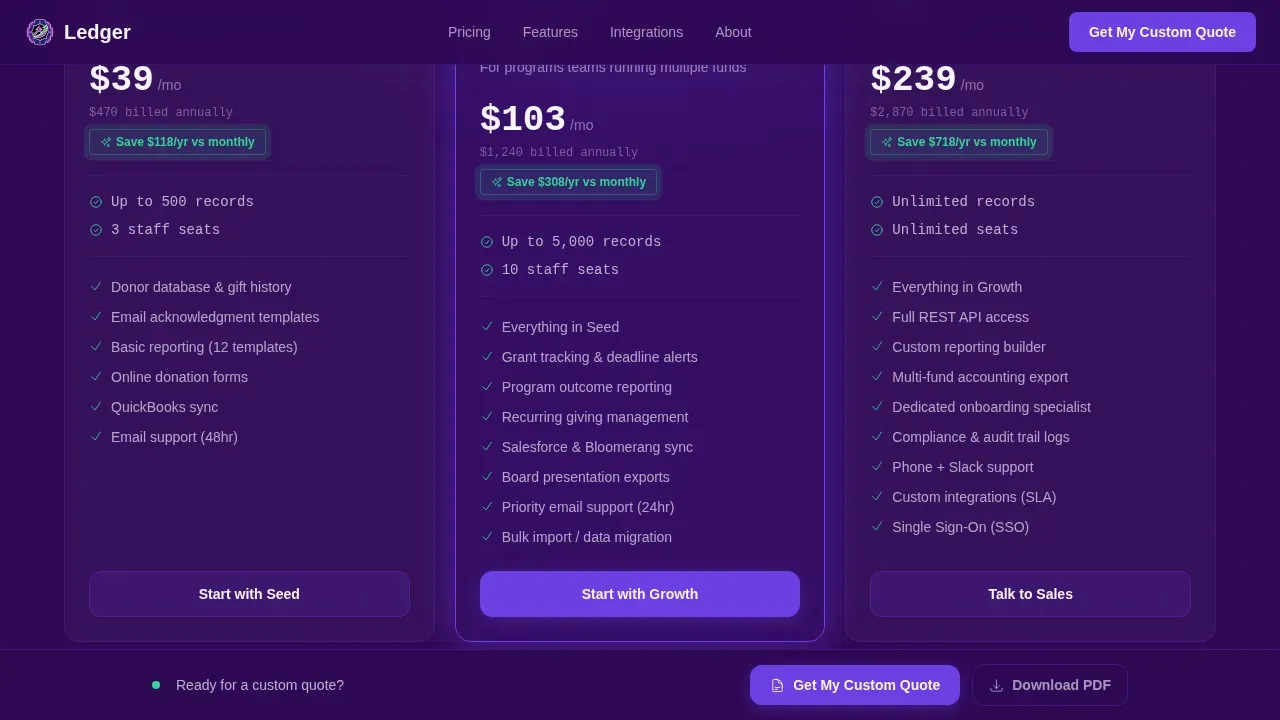
- An animated stats wall hero, an interactive org-size calculator, a violet-highlighted recommended tier card, a filterable comparison data grid, a social proof section, an accordion frequently asked question, and a sticky lead-capture bar with a secondary PDF download path.
- A complete Electric Indigo color system with deep indigo backgrounds, live-data violet accents, dashboard-surface white cells, and signal green savings callouts applied consistently across all design elements.
- JetBrains Mono typography for all counters and data labels, paired with Plus Jakarta Sans for body text and headings throughout the page.
Feature list
This landing page template ships with a focused set of interactive and structural capabilities. Each one is grounded in what non profit procurement teams actually need from charity landing pages.
Animated Stats Wall Hero
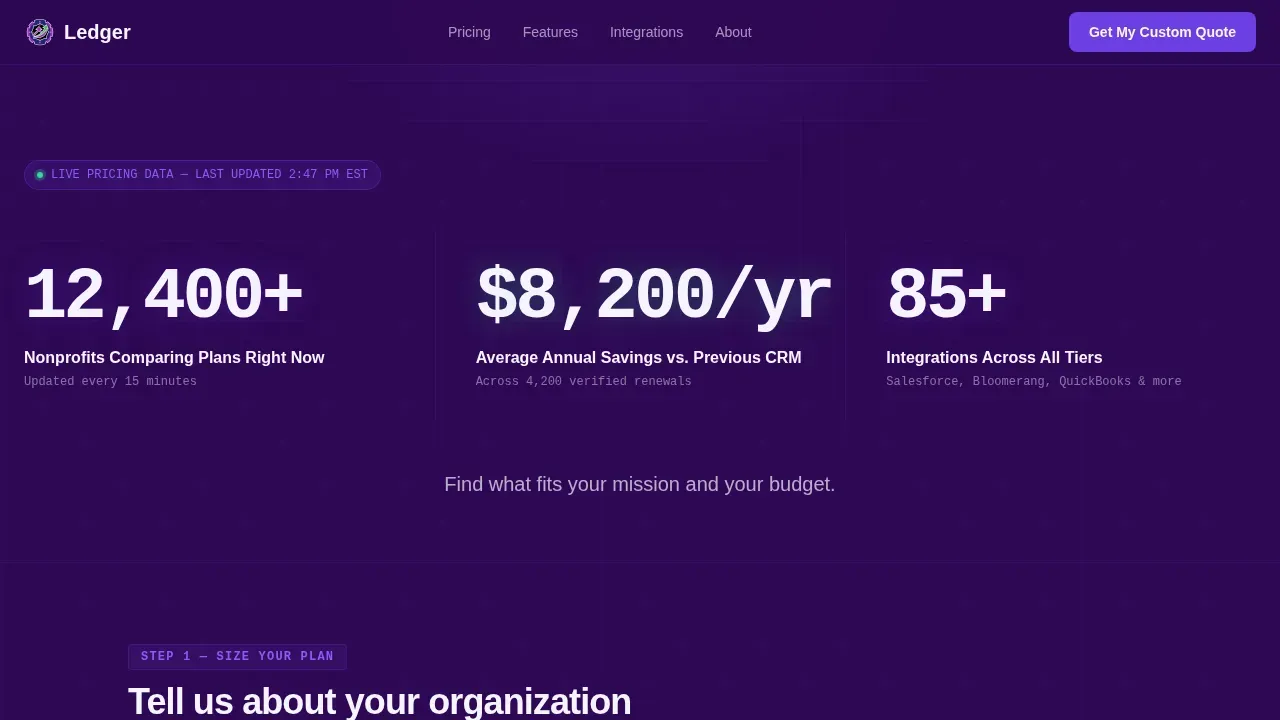
Three monospace counters animate upward on load, displaying live-style metrics including active nonprofits comparing plans, average annual savings, and total integrations across tiers. The counters are rendered in JetBrains Mono against deep indigo, creating an immediate emotional connection with data-oriented visitors. A single tagline sits below the wall to anchor the call to action.
Interactive Org-Size Calculator
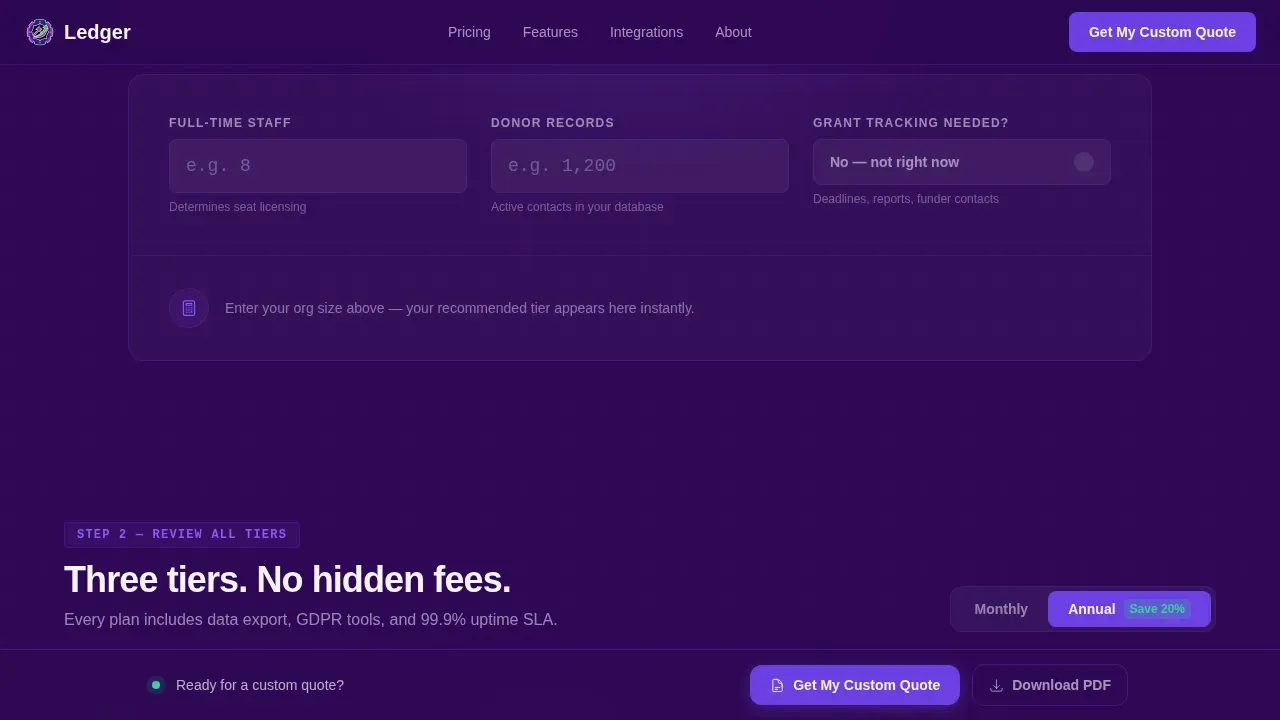
Before any pricing grid appears, visitors interact with a lightweight calculator. They enter number of staff, donor records, and whether grant tracking is needed. The page responds instantly, highlighting the recommended tier in violet with a signal green savings badge. This interactive element removes guesswork and delivers urgent messaging before the visitor scrolls.
Filterable Feature Comparison Grid
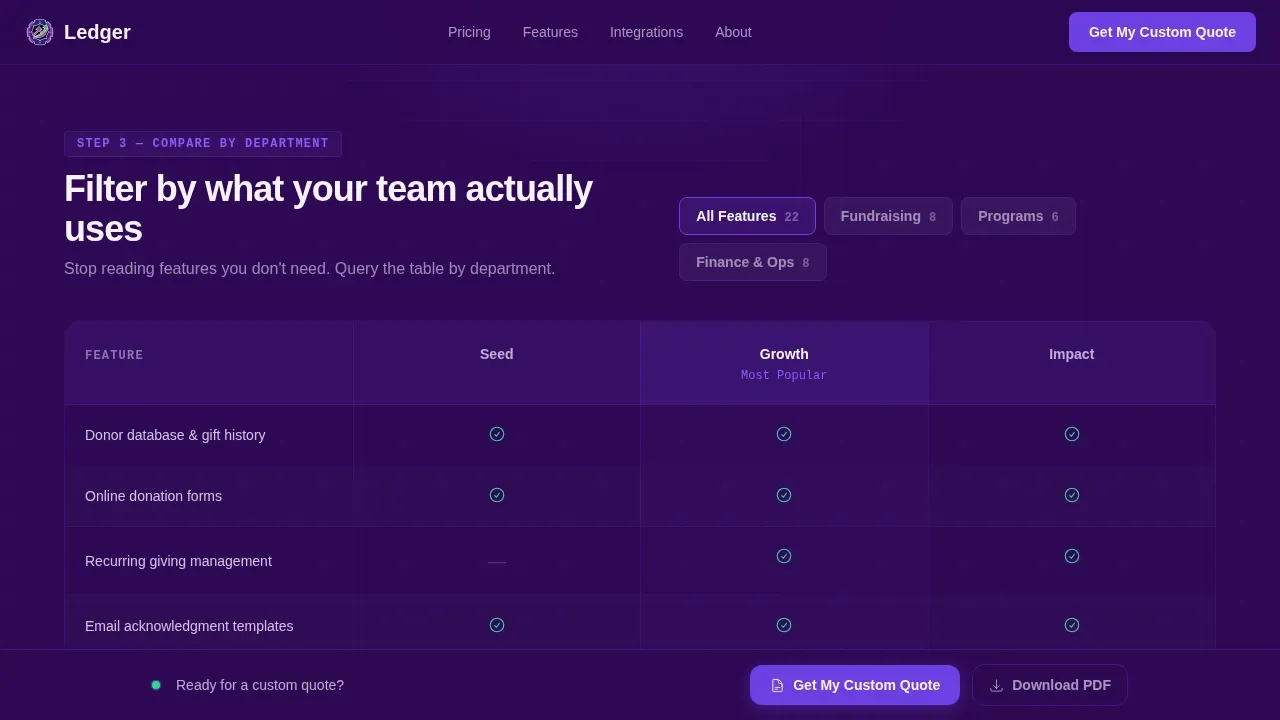
The full comparison grid lets visitors filter every feature row by department need: fundraising, programs, or finance. This turns the donation pages experience into something closer to querying a database. Each row is scannable, each column is clearly labeled, and the scroll feels purposeful rather than exhausting. Urgent messaging surfaces only for the rows that matter to each visitor's role.
Sticky Lead Capture Bar
Once the calculator returns a result, a sticky bottom bar reveals itself with a primary call to action: "Get My Custom Quote." The donation form captures organization name, annual budget range via dropdown, primary need via single select, and work email in that order. A secondary path offers a downloadable comparison PDF for board-presentation shoppers. This dual-path approach keeps the donation process moving for every visitor type.
Social Proof Section
Testimonials from nonprofit executive directors are displayed with org type and budget range included. Personal stories and donor stories tied to real org context build trust faster than generic quotes. Using testimonials as social proof enhances credibility and motivates others to act by showing that peers in the same sector have already committed. Feature testimonials here are designed to inspire action in visitors who are still comparing options.
Accordion frequently asked question Section
An accordion-style frequently asked question section directly addresses board-presentation objections. Each question is written for the decision-maker who needs to educate readers and colleagues before approving a software renewal. The section is user friendly and keeps answers focused, so the audience stays engaged without feeling overwhelmed.
Page sections overview
| Section | Purpose |
|---|---|
| Animated Stats Wall | Open with credibility metrics |
| Org-Size Calculator | Personalize tier recommendation |
| Recommended Tier Card | Highlight best-fit option |
| Feature Comparison Grid | Compare all tiers by department |
| Social Proof Strip | Build trust with peer testimonials |
| frequently asked question Accordion | Address board-level objections |
| Sticky Lead Bar | Capture qualified leads |
Design & branding system
The visual identity follows a Directory and Discovery theme. The palette feels like a grant management portal built by someone who understands the sector. It is luminous without being frivolous, data-dense without being clinical.
- Color system: deep mission-night indigo (#2E0854) for backgrounds and navigation rails, live-data violet (#6C3FE2) for tier headers and toggle switches, dashboard-surface white (#F6F4FF) for comparison cells, and signal green (#34D399) for savings callouts and confirmation moments.
- Typography: JetBrains Mono handles all counters, data labels, and monospace figures. Plus Jakarta Sans handles all body copy, headings, and form labels for a readable, professional online presence.
- The design elements work together to make the page visually appealing and immediately legible to a visitor scanning for key details under time pressure.
Mobile & speed optimization
This landing page template is built with responsive design as a core requirement, not an afterthought. Fundraising efforts increasingly happen across devices, and the page is structured to adapt cleanly across all screen sizes.
- Responsive design ensures the calculator, comparison grid, and donation form all reflow correctly on smaller screens. Mobile responsiveness is maintained by using fluid layouts and minimum readable font sizes so no content gets clipped or compressed.
- The sticky lead capture bar remains accessible on mobile, and call to action buttons are sized for easy tapping. Fast loading speeds are supported by using server components for static content sections and client components only for interactive elements like the calculator and filterable grid.
- The page prioritizes desktop-first layout for the executive director comparing options on a laptop, while providing a solid mobile fallback for users on smartphones and tablets across varying screen sizes.
How this template helps you convert
A well-designed fundraising landing page is the foundation for an effective online fundraising campaign, and Ledger is structured around that principle. Every section reduces doubt and removes friction before asking for a commitment.
- The calculator delivers a personalized result immediately, which turns visitors from passive readers into engaged decision-makers. Urgent messaging tied to a specific recommended tier and savings badge gives potential donors and procurement leads a clear reason to act now rather than later.
- The sticky lead capture bar with the "Get My Custom Quote" form keeps the primary conversion goal visible without interrupting the research flow. The donation form is ordered from easiest to hardest commitment, which keeps the donation process feeling low-pressure and intuitive. The secondary PDF download path serves board-presentation shoppers who need to collect donations of attention internally before returning to complete the form.
Other information about this template
This template is designed as a pre-designed, customizable template that non profit teams can adapt without deep coding skills. The well commented code makes it straightforward for a developer to modify colors, copy, and section order to align with the organization's branding and fundraising goals.
- The template can support donation options including recurring donations and multiple donation options, making it suitable for organizations looking to collect donations across giving levels. Impact-Based Giving Tiers can be configured to show real world impact tied to each level, for example showing how a specific dollar amount provides meals for a week.
- The donation button, progress bars, and call to action buttons are all positioned as key elements within the layout, making it easy to inspire action at every scroll depth. Visuals and compelling images can be added to any section to create emotional connection and show impactful stories from the field.
- Free nonprofit teams working with limited budgets will appreciate that this is a structured pre designed template, removing the need for drag and drop builders or custom development from scratch. It includes pre designed sections for charity events, volunteer sign ups, volunteer sign up forms, and event management blocks that can be activated or hidden based on the organization's needs.
- The page structure supports donor engagement strategies including urgent messaging tied to fundraising goals, success stories, and donor stories displayed alongside key details about how contributions are used. Transparency about how donations are used builds donor confidence, and this template makes that transparency easy to present.
- The layout is designed to boost engagement by keeping the audience engaged through interactive elements, progress bars, and scroll-linked highlights that reveal relevant information progressively. Non profits connect with potential donors more effectively when the page inspires visitors rather than overwhelming them.
- Additional capabilities this template can support include: displaying upcoming events, sharing social media posts, raising awareness through impact metrics, and expanding organization's reach through a focused charity landing page that keeps all donation pages consistent in voice and messaging.
- For teams that use tracking tools, the template structure is compatible with integrations such as google analytics to monitor user engagement and optimize donation pages over time. The page is built with search engines in mind, using semantic structure and clear headings that help nonprofit websites gain visibility.
- The Ledger mission driven nonprofit pricing landing page template is the specific product this page describes. It represents a focused, honest approach to pricing transparency for the non profit sector.
Theme
Directory & Discovery
Creative direction
Calculator/Tool First
Color system
Electric Indigo
Style
Dashboard/Data Grid
Direction
Lead Generation
Page Sections
Animated Stats Wall with Monospace Counters
Interactive Org-size Calculator
Filterable Feature Comparison Grid
Sticky Lead Capture Bar with Dual Paths
Social Proof and Testimonial Section
Accordion Frequently Asked Question for Board Objections
Related questions
Does this template require coding skills to customize?
Can this template support a donation form and multiple donation options?
Is the landing page mobile friendly?
What sections are included out of the box?
Can this template support charity events and volunteer sign ups?



