Stats-First Accounting CRM Comparison Landing Page Template
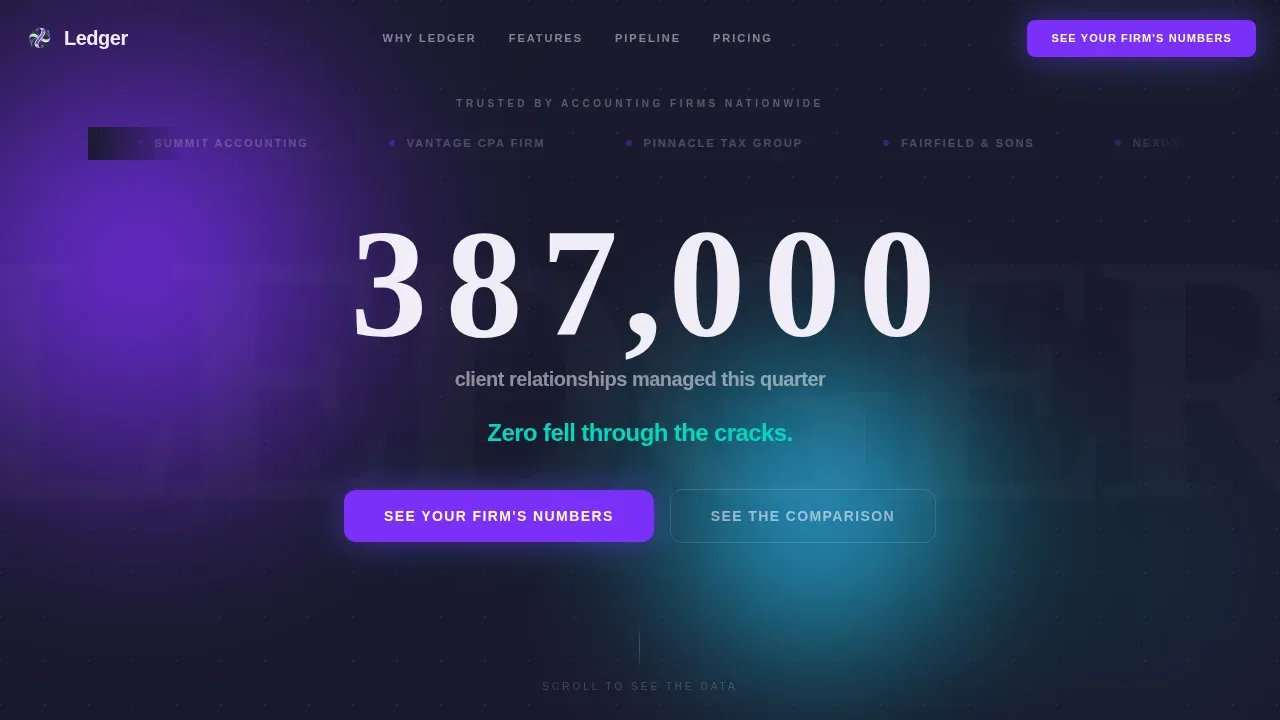
The Ledger stats-first accounting CRM comparison landing page template is built for accounting professionals who need to convert visitors into demo leads. It opens with a marquee logo bar and hard-hitting counter stats, then walks prospects through three side-by-side comparison tables. The result is a single, clean landing page that makes the business case before a prospect can second-guess it.
by Rocket studio
Quick summary
The Ledger template is a single-page, stats-first comparison layout designed for an accounting CRM platform. A scrolling logo bar and three animated odometer counters anchor the social proof. Each scroll stop leads with a number, then reveals a structured comparison table. The primary call to action, "See Your Firm's Numbers," stays visible in a sticky nav and closes every table section.
Who this template is for
This template is built for B2B SaaS companies operating in the accounting vertical. It speaks directly to buyers who manage real financial data every day and need a platform that understands how entries flow through a general ledger.
- Managing partners at mid-size accounting firms handling hundreds of tax returns during peak season
- Solo practitioners who keep client records in their heads and need a structured ledger template to replace scattered notes
- Operations managers responsible for staff onboarding and institutional knowledge transfer
What problem this template solves
Generic landing pages cannot carry the weight of a specialized accounting pitch. Visitors who work with a general ledger, trial balance, and chart of accounts every day will not trust a page that treats their business like any other software sale. This template closes that gap.
- It replaces vague benefit copy with specific, verifiable stats that speak to deadline compliance, payroll accuracy, and cash flow visibility
- It lets prospects compare the platform directly against spreadsheets and generic CRMs on criteria like accounts payable tracking, accounts receivable follow-up, and client communication logging
- It captures leads at two levels: visitors ready for a demo and those who just want the migration checklist
What you get with this template
You get a complete, ready-to-deploy landing page built around the Stats-First Impact creative direction. Every section is pre-wired for scroll-triggered reveals, odometer counter animations, and iridescent shimmer effects that make the data feel alive rather than static.
- A header hero with a seamless logo marquee, two oversized stat lines, and a primary call-to-action button
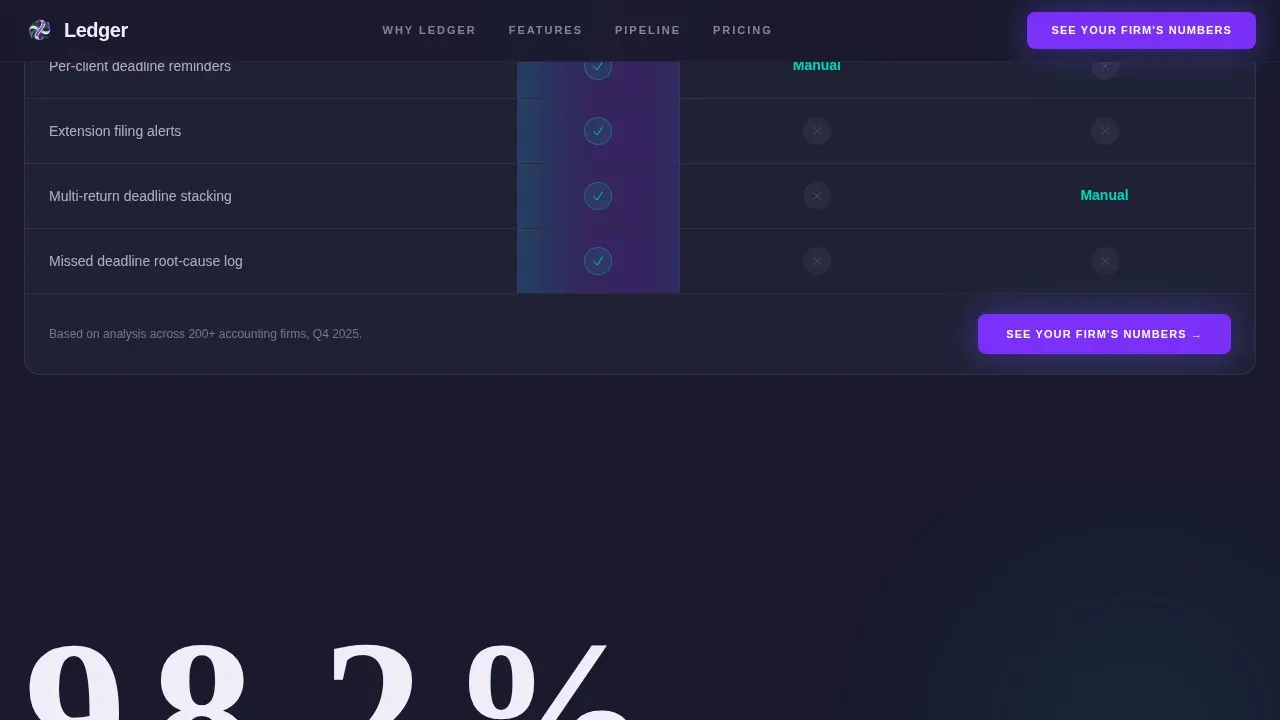
- Three full comparison table sections, each leading with an animated counter stat and closing with a "See Your Firm's Numbers" form trigger
- A dual-path lead generation section with a demo request form and a gated checklist download for visitors still evaluating the switch
Feature list
This template ships with purposeful, accounting-specific components. Every feature listed here comes directly from the source brief.
Animated Odometer Counter Stats
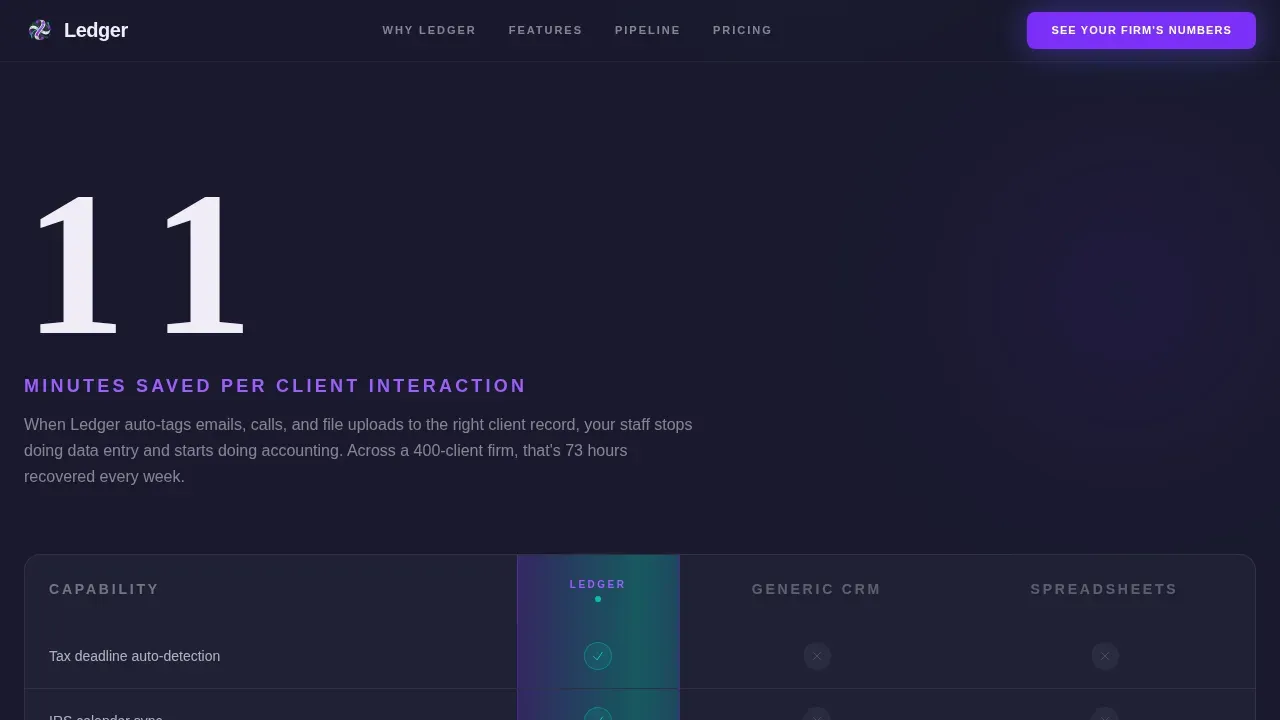
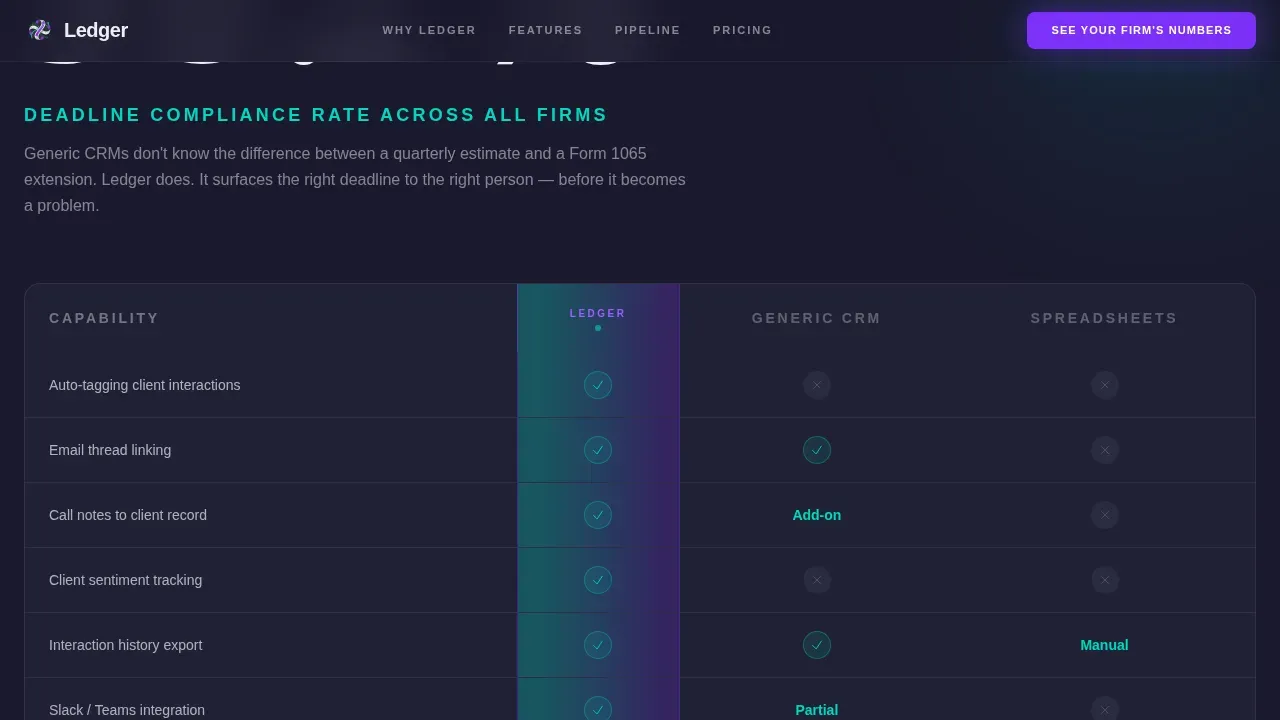
Three scroll-triggered counters display key performance figures: time saved per client interaction, deadline compliance rate, and pipeline visibility improvement. Each counter uses a fluid digit-tumble animation before the supporting paragraph and comparison table slide into view. The stats do the selling before a single word of copy lands.
Seamless Logo Marquee Header
A horizontal scroll of fifty-plus accounting firm logos loops left to right in a continuous CSS animation. Each logo renders slightly desaturated at rest and returns to full color on hover. This header replaces a traditional hero image; the data and social proof are the visual.
Side-by-Side Comparison Tables
Three structured tables pit the platform against generic CRMs and spreadsheets. Columns cover accounting-specific criteria such as tax deadline automation, client communication logging, and staff onboarding time. The platform's column carries a teal checkmark system and a violet highlight that shimmers on scroll, reinforcing the iridescent color identity through motion.
Dual-Path Lead Generation Section
The primary path collects firm name, active client count via dropdown, and work email for a demo request. The secondary path gates a downloadable "CRM Migration Checklist for Accounting Firms" behind a single email field. Both paths sit in the same section, catching prospects at different stages of their decision.
Sticky Navigation Call to Action
The "See Your Firm's Numbers" button lives in the sticky nav and repeats at the close of every comparison table section. Visitors never scroll past a conversion moment without encountering the next step.
Page sections overview
| Section | Purpose |
|---|---|
| Logo Marquee Hero | Opens with social proof and two oversized stat lines |
| "11 Minutes" Counter | Leads the first comparison table with a time-saved stat |
| Tax Deadline Table | Compares deadline automation across platforms |
| "98.2%" Counter | Opens the second comparison block with a compliance rate |
| Communication Logging Table | Compares client interaction records head to head |
| "3.4x" Counter | Anchors the third comparison block with a pipeline stat |
| Pipeline and Onboarding Table | Compares visibility and staff ramp-up time |
| Lead Gen Section | Demo form and checklist download gate side by side |
| Footer | Linear single-row pattern with brand and legal links |
Design & branding system
The visual identity follows a Dynamic Motion theme built on an AI Iridescent color palette. Deep graphite anchors every background, while violet pulses through calls to action and active table column highlights. Teal marks winning checkmarks and stat callouts. Pearl lifts comparison rows so the data breathes inside each table cell.
- Typography pairs Plus Jakarta Sans for body and interface copy with Fraunces serif for oversized display stats, creating a contrast between command-center precision and editorial impact
- Iridescent blob backgrounds, GPU-accelerated transforms, and shimmer table columns reinforce the professional-yet-futuristic identity at every scroll stop
Mobile & speed optimization
The template is desktop-first, reflecting the reality that managing partners review platforms at a desk. Full mobile support is included so the layout holds at every viewport. Animations use Intersection Observer for counters and CSS-only logic for the logo marquee, keeping the motion layer efficient.
- Scroll-triggered reveals and GPU-accelerated transforms keep motion smooth without heavy JavaScript dependencies
- The comparison tables reflow cleanly on smaller screens so debit and credit columns, running balance data, and feature checkmarks stay readable on any device
How this template helps you convert
Every structural decision in this template is built to move a skeptical accounting professional from curiosity to commitment.
- Stats land before explanations, so the business case is already forming in the visitor's mind before they reach the comparison table. Specific figures tied to daily transactions, cash flow visibility, and deadline compliance build trust faster than generic claims.
- Two conversion paths serve different buyer readiness levels. The demo form captures decision-ready partners. The checklist download catches ops managers who are already planning a migration but need one more reason to commit.
Other information about this template
This template is a strong fit for any accounting CRM platform that wants to compare its approach against tools like general-purpose CRMs or manual spreadsheet systems. It is equally useful for teams positioning a purpose-built general ledger template experience against entry-level accounting software.
- A general ledger is the central record of all a business's financial transactions. Maintaining a general ledger is critical for startups and established companies alike, tracking every dollar across assets, liabilities, equity, revenue, and expenses. This template's comparison tables are designed to surface exactly that difference.
- The general ledger template structure built into this page helps visitors understand how a purpose-built system outperforms a generic chart of accounts setup in Microsoft Excel or Google Sheets, especially when managing payroll, accounts payable, accounts receivable, and multiple revenue streams simultaneously.
- A well-organized general ledger reduces costly errors. Automated calculations in general ledger templates help prevent mathematical errors, and regular reconciliation with bank statements is essential for maintaining accuracy. Visitors who already reconcile regularly will immediately recognize the value framed in each comparison row.
- The template supports messaging around audit trail integrity, trial balance accuracy, and the ability to identify unusual transactions before they become problems. Neglecting a proper general ledger can lead to missed tax deductions and late filings, a pain point this page addresses directly in its comparison sections.
- The general ledger organizes financial data by account type following a chart of accounts with five categories: assets, liabilities, equity, revenue, and expenses. This template can support copy that walks through how each entry flows from daily transactions into accurate financial statements, a balance sheet, and a trial balance.
- Using a general ledger template can simplify year-end financial reporting. Tracking transaction dates supports accurate cash flow analysis, and clear descriptions in every entry simplify the audit trail during reviews.
- This template is relevant for small businesses and small business owners who are outgrowing spreadsheet bookkeeping. Small businesses benefit from a structured ledger template that keeps records clean, supports a running balance view, and reduces the risk of a zero balance discrepancy going unnoticed until tax time.
- The template positions the platform against competitors discussed in the accounting CRM space. Tools like Karbon, Canopy, TaxDome, and Method CRM each take a different approach to ledger integration and client management. Zoho CRM integrates natively with Zoho Books, while Xero Practice Manager offers highly rated reporting and deeper insights into client work. The comparison table sections in this template are purpose-built to frame those differences clearly and professionally.
- Accounting CRM platforms are shifting toward all-in-one solutions that combine client relationship management with practice management and financial data integration. This template is designed to communicate that shift and capture leads who are ready to move beyond expense accounts tracked in a spreadsheet and office supplies categorized manually.
- The money ledger concept behind this template goes beyond simple bookkeeping. It frames the platform as a save hours, save time solution for firms managing financial activity across dozens of client accounts every week.
Theme
Dynamic Motion
Creative direction
Stats-First Impact
Color system
AI Iridescent
Style
Comparison Table
Direction
Lead Generation
Page Sections
Animated Odometer Counter Stats
Seamless Logo Marquee Header
Side-by-side Comparison Tables
Dual-path Lead Generation Section
Sticky Navigation Call to Action
Related questions
What sections are included in this landing page template?
Can this template support a two-path lead generation flow?
Is this template suitable for small businesses or only large firms?
How do the comparison tables work in this template?
What animation and motion features does this template include?



