Financial Services Software Professional Website Template
Ledger is a bold brutalist donor management landing page template built for nonprofits and foundations that need financial clarity fast. It showcases a terminal-style header, live-updating data grids, and a freemium signup flow. The design uses deep gunmetal and sky blue to make donor records, pledge statuses, and fund-level data feel like a real command center.
by Rocket studio
Quick summary
Ledger is a single-page donor management landing page template with a dashboard and data grid layout. It uses a bold brutalist visual identity, a code-snippet header, and a freemium trial conversion model. The design is built for mid-size nonprofits, development directors, and foundation controllers who need to present financial clarity without clutter.
Who this template is for
This template was designed for organizations and individuals who work with complex donor data every day. It speaks directly to the professionals who live inside spreadsheets and pledge records.
- Development directors at mid-size nonprofits who manage recurring gifts and grant cycles
- Foundation controllers who need audit-ready reporting on demand
- Capital campaign managers tracking multi-year, seven-figure pledge commitments
What problem this template solves
Managing donor data across disconnected spreadsheets creates real operational risk. Reconciliation takes too long, pledge records fall out of sync, and reporting becomes a manual scramble before every deadline.
- Scattered donor records make it hard to see the full financial picture in one place
- Manual reconciliation slows down reporting and increases the chance of errors
- No unified view of fund-level performance leaves campaign managers guessing
What you get with this template
You get a fully structured, single-page landing page layout designed to showcase a donor management platform with confidence. Every section is a working interface concept, not a placeholder.
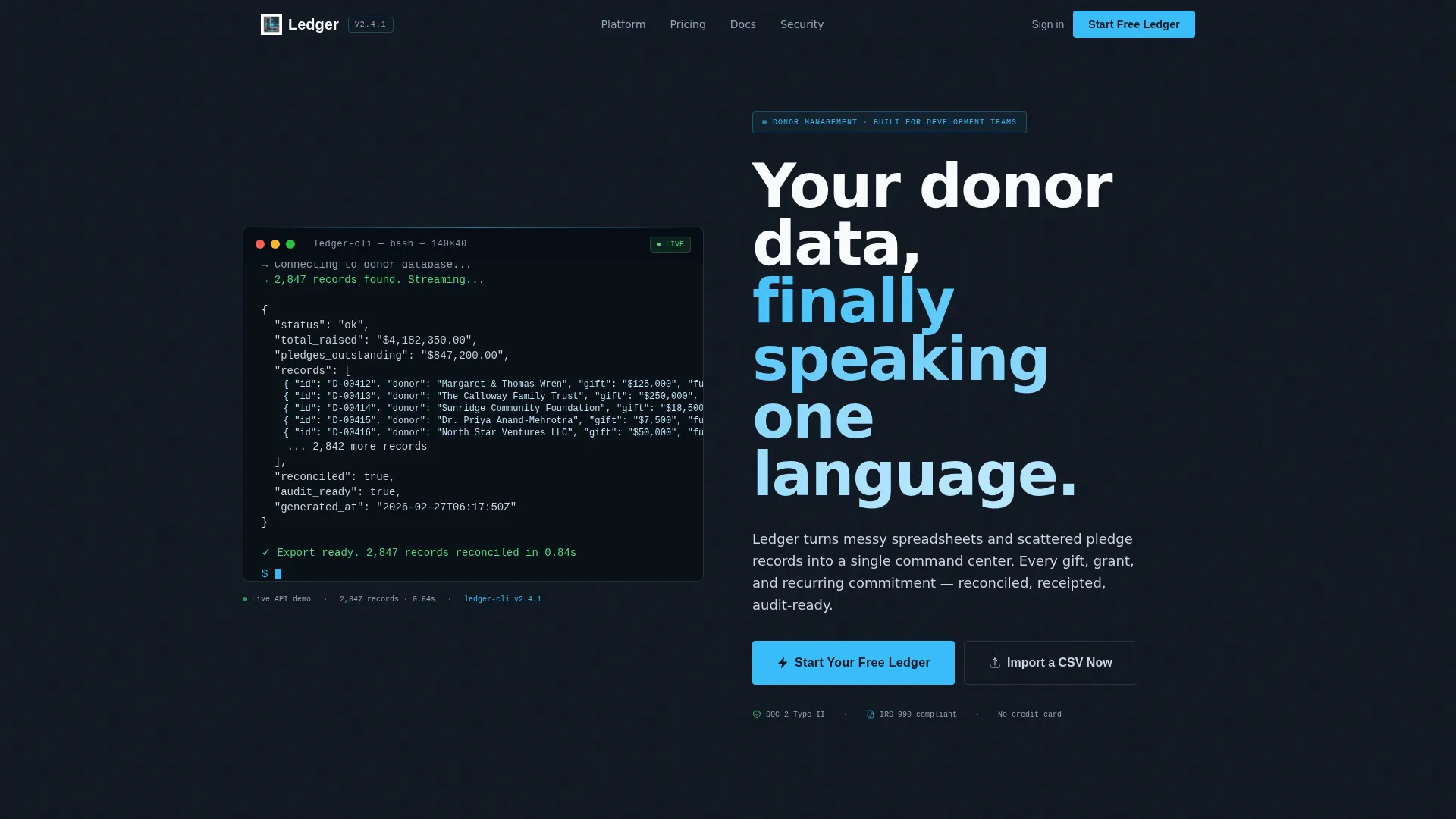
- A brutalist terminal header with a live API code snippet and cascading JSON donor output
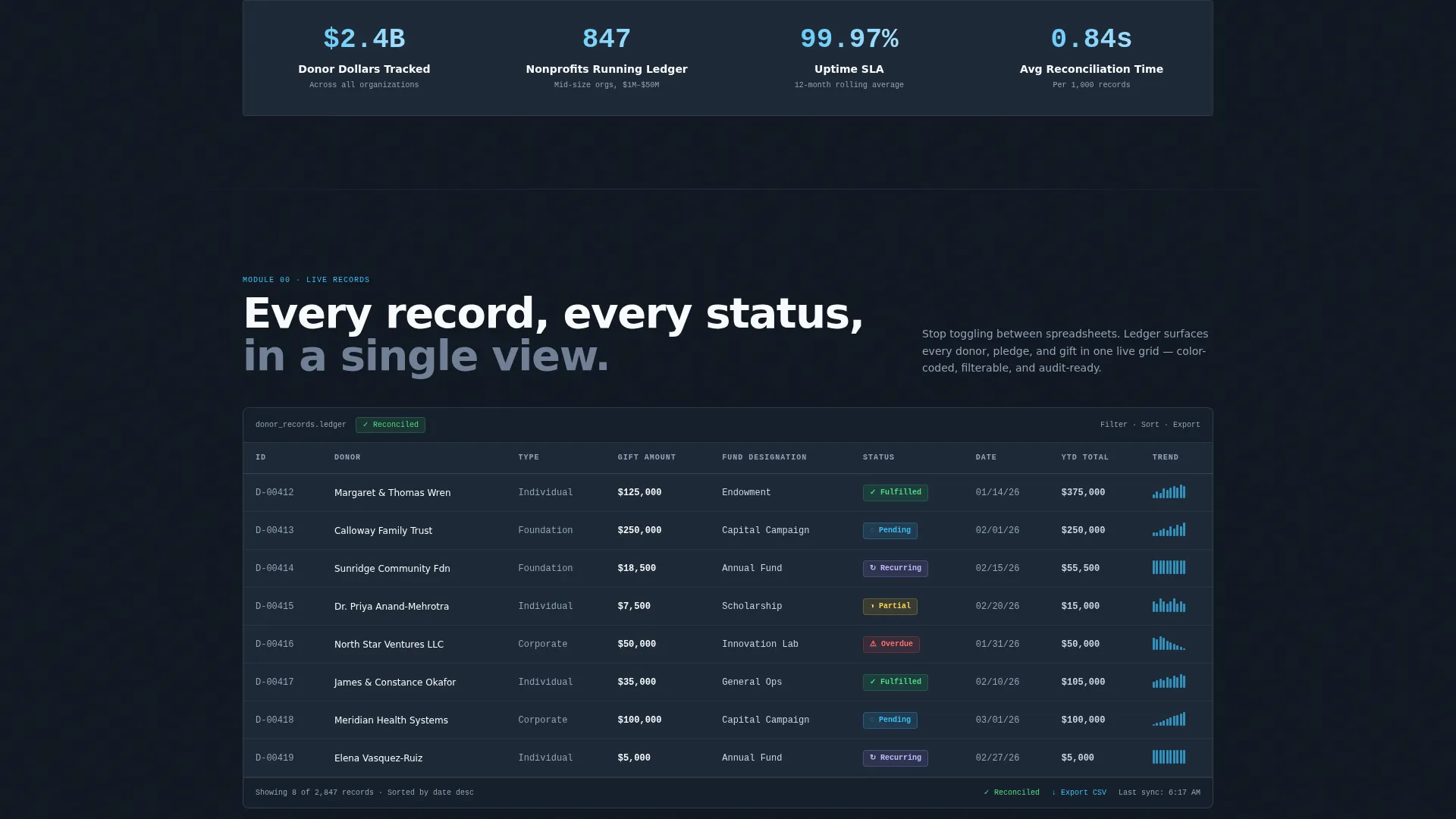
- A scroll-driven data grid with mock donor records, pledge status indicators, and inline sparkline charts
- A freemium conversion flow with a two-field signup form and a secondary CSV import path
Feature list
This template packs a focused set of purpose-built sections that escalate in visual density as the visitor scrolls. Each feature is grounded in the source brief and designed to carry real persuasive weight.
Terminal-Style Code Snippet Header
The full-viewport header renders a monospaced API call pulling donor records. The JSON response populates live, showing gift amounts, donor names, fund designations, and pledge statuses in syntax-highlighted output. Below it, a single oversized grotesque headline anchors the message.
Scroll-Driven Data Grid Reveal
The main data section fades in row by row as the visitor scrolls. Mock donor records appear with realistic figures, color-coded pledge statuses, and inline sparkline charts that visualize giving trends over time.
Capability Escalation Sections
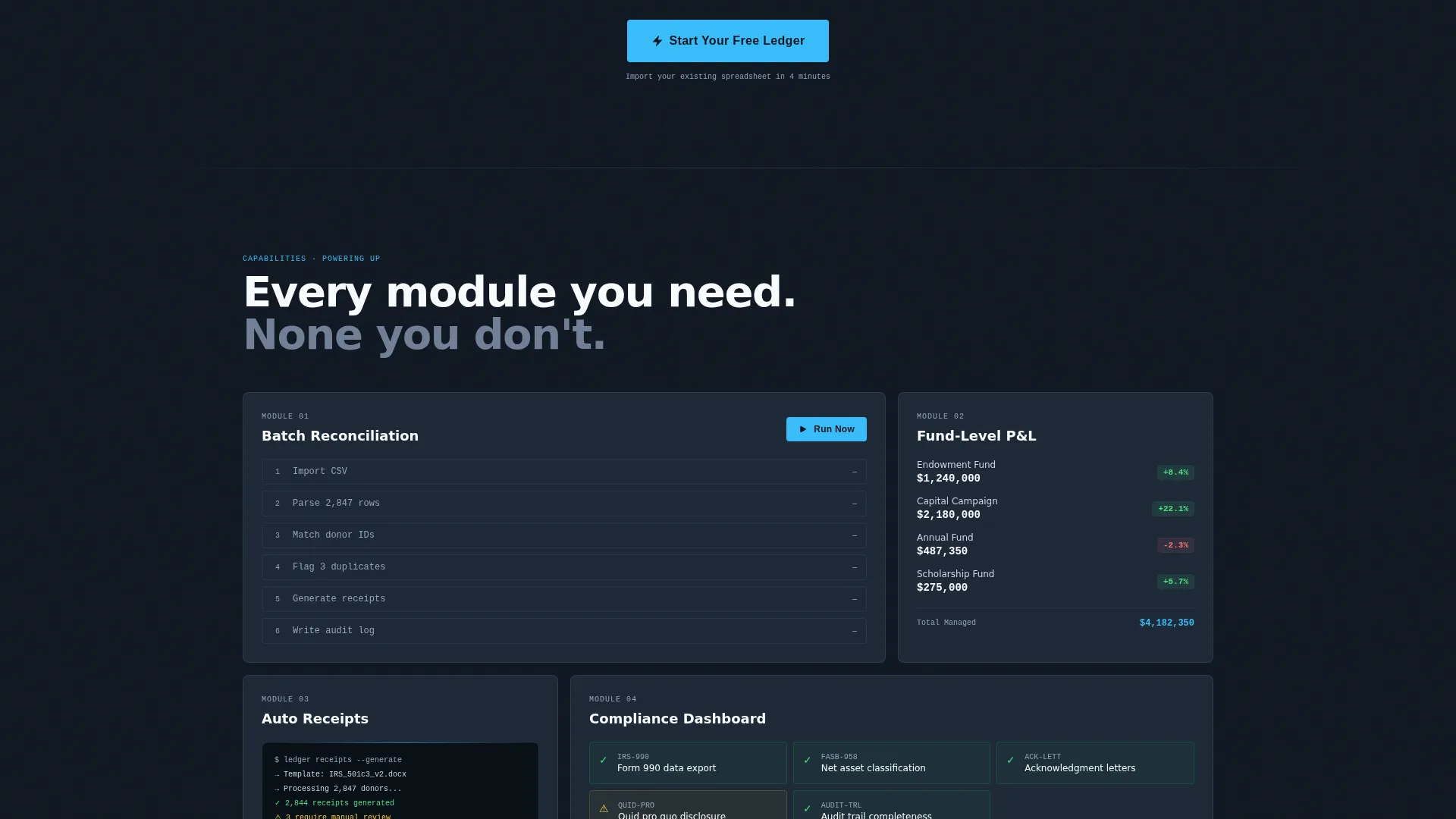
Each scroll increment reveals a new platform capability. Batch reconciliation, automated receipt generation, fund-level profit and loss views, and compliance flags each surface in their own dense, grid-rich section. The layout mimics a system powering up module by module.
Full Operational Dashboard Frame
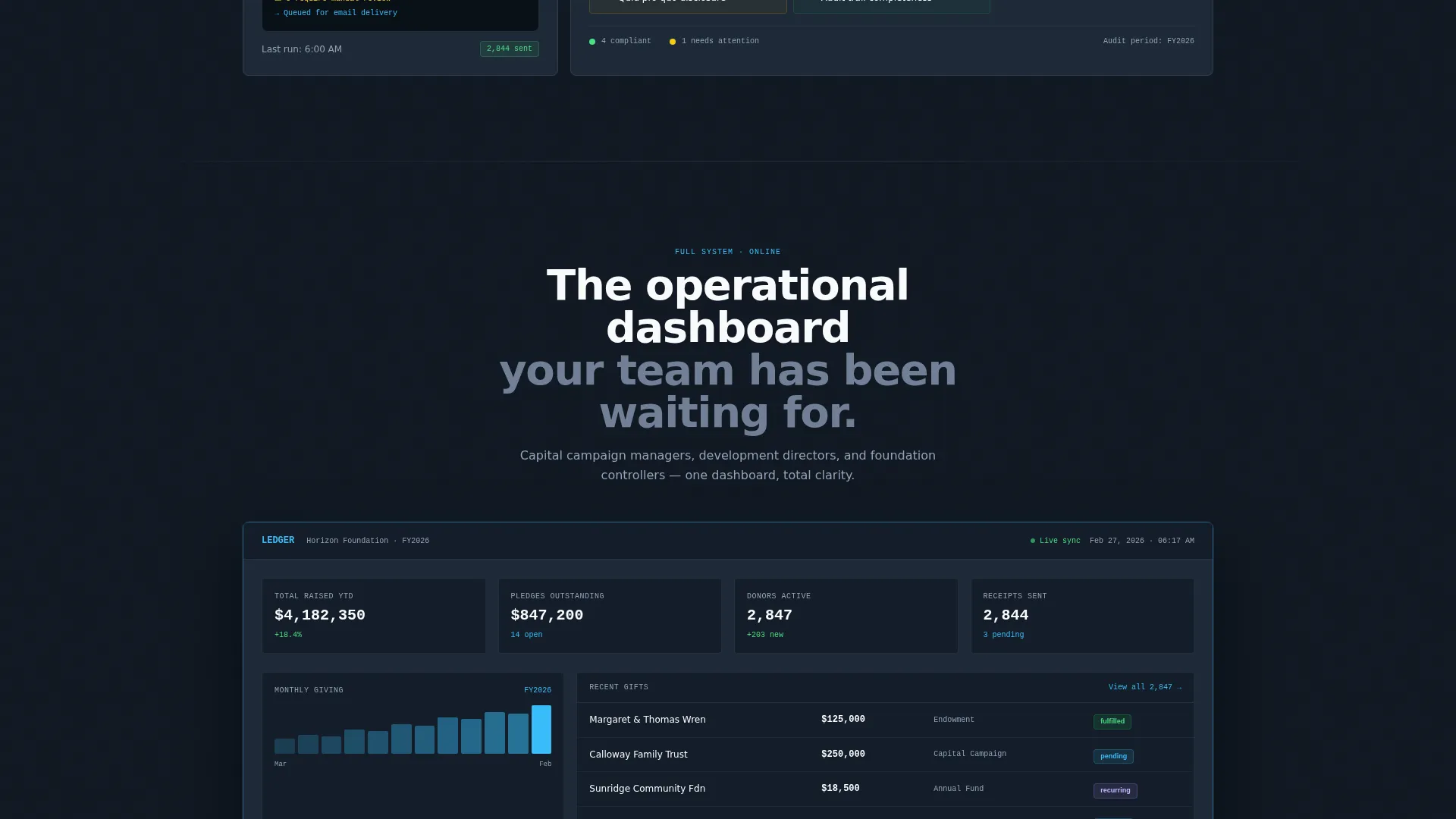
The final section presents a wide, single brutalist dashboard frame showing the complete operational view. It serves as the payoff moment before the final call to action and gives visitors a clear sense of what the product delivers.
Freemium Signup with CSV Import Path
The primary call to action asks only for a work email and organization name. No credit card or phone number is required. A secondary path lets visitors import a comma-separated values file directly into a sandbox for a formatted data preview.
Repeating call to action Placement
The "Start Your Free Ledger" call to action appears three times: at the header, mid-scroll after the reconciliation demo, and at the final dashboard reveal. Each placement matches a natural decision moment in the visitor's journey.
Page sections overview
| Section | Purpose |
|---|---|
| Terminal Header Block | Opens with a live API code snippet and oversized headline |
| Data Grid Reveal | Displays scrolling donor records with status indicators and sparklines |
| Batch Reconciliation Demo | Shows the reconciliation capability with dense grid layout |
| Receipt Generation Section | Highlights automated receipt output as a distinct module |
| Fund-Level P&L View | Presents fund performance data in a grid-rich brutalist frame |
| Compliance Flag Section | Surfaces compliance indicators as the content density escalates |
| Full Dashboard Frame | Delivers the complete operational dashboard as the visual payoff |
| Final call to action Block | Closes with the freemium signup form and CSV import option |
Design & branding system
The visual identity is bold brutalist, built on a Slate and Sky color system. Every color has a specific job, and nothing is decorative.
- Deep gunmetal (#1E2A38) dominates backgrounds and card containers; poured-concrete gray (#4A5568) separates grid rows
- Open-sky blue (#38BDF8) activates on hover targets, active states, and live-updating figures; chalk white (#F8FAFC) carries all primary text
- Typography uses oversized grotesque display type for headlines and monospaced fonts for all data and code output
Mobile & speed optimization
The template is structured for responsive display across screen sizes. The brutalist grid layout adapts to narrower viewports while preserving the density and hierarchy of each data section.
- Data grids and dashboard frames scale down without losing their visual structure
- The terminal header block and code snippet remain legible at smaller font scales
- call to action placement is maintained across breakpoints so the signup form is always reachable
How this template helps you convert
The conversion strategy in this template is built on proof, not promises. Every section functions as a visible interface, so visitors arrive at the call to action already feeling familiar with the product.
- The code-snippet header creates immediate credibility by showing a real API response format rather than marketing copy, signaling technical depth to the target audience from the first second.
- The scroll-driven escalation builds confidence section by section, with each new capability appearing as a working data view rather than a feature bullet.
- The two-field freemium form and the CSV import sandbox lower the barrier to entry at the exact moment when visitor trust is highest.
Other information about this template
This template is category-matched to the Technology sector, specifically the Financial Services Software subcategory with a focus on financial services donor management. It is built for a niche audience with high expectations for data fidelity and visual precision.
- The template style is Dashboard and Data Grid, designed to feel like a real operational interface
- The creative direction is Launch Energy, meaning each scroll increment adds visible power and momentum
- The header concept is Code Snippet, a specific choice that signals technical credibility to development directors and controllers
- The landing page direction is Freemium and Trial, optimized for low-friction email capture with a secondary sandbox conversion path
- This template does not include photography or illustration; the product interface is the visual
- Intended for use on platforms that support custom HTML and CSS with full layout control
Theme
Bold Brutalist
Creative direction
Launch Energy
Color system
Slate & Sky
Style
Dashboard/Data Grid
Direction
Freemium/Trial
Page Sections
Terminal Code Snippet Header
Row-by-row Data Grid Reveal
Capability Escalation Sections
Full Operational Dashboard Frame
Two-field Freemium Signup Form
CSV Import Sandbox Path
Related questions
Who is this template designed for?
What does the freemium conversion flow include?
Does this template use photography or illustration?
Can the color system and typography be customized?
What makes this different from a generic software landing page template?



