Education Software Education Website Template
Ledger is a Bold Brutalist education accounting landing page template built for K-12 district finance teams. It showcases a unified fund accounting dashboard through a data-dense, monospaced design system. The template guides district CFOs and business managers toward downloading the app, replacing spreadsheet chaos with one clear screen of fund visibility.
by Rocket studio
Quick summary
Ledger is a single-page app download template for K-12 education accounting software. It uses a Bold Brutalist visual system with hard-cut section transitions and a data-dense dashboard aesthetic. The page walks district finance professionals from a full-viewport product screenshot through grant tracking grids, board report previews, and a gated download form.
Who this template is for
This template is built for EdTech and GovTech software teams shipping fund accounting tools to K-12 districts. It speaks directly to the people who actually open the software at 7 a.m.
- District business managers and CFOs managing fund reconciliation before board meetings
- Charter school controllers handling per-pupil allocations across multiple campuses
- EdTech product teams who need a credible, data-forward landing page for a desktop-first finance application
What problem this template solves
District finance teams live inside a maze of fund codes, grant drawdowns, encumbrances, and compliance requirements. Most software landing pages fail to reflect that reality. This template solves the credibility gap between what buyers need to see and what generic SaaS pages actually show.
- Generic templates hide the product behind abstract visuals; this one leads with a dense, legible dashboard screenshot
- Finance buyers need proof of domain fluency, not aspirational lifestyle imagery
- The page structure mirrors the buyer's decision path: see the product, understand the value, download it
What you get with this template
You get a complete single-page layout built around a real-feeling K-12 accounting dashboard. Every section is designed to escalate confidence and move the visitor toward the download gate.
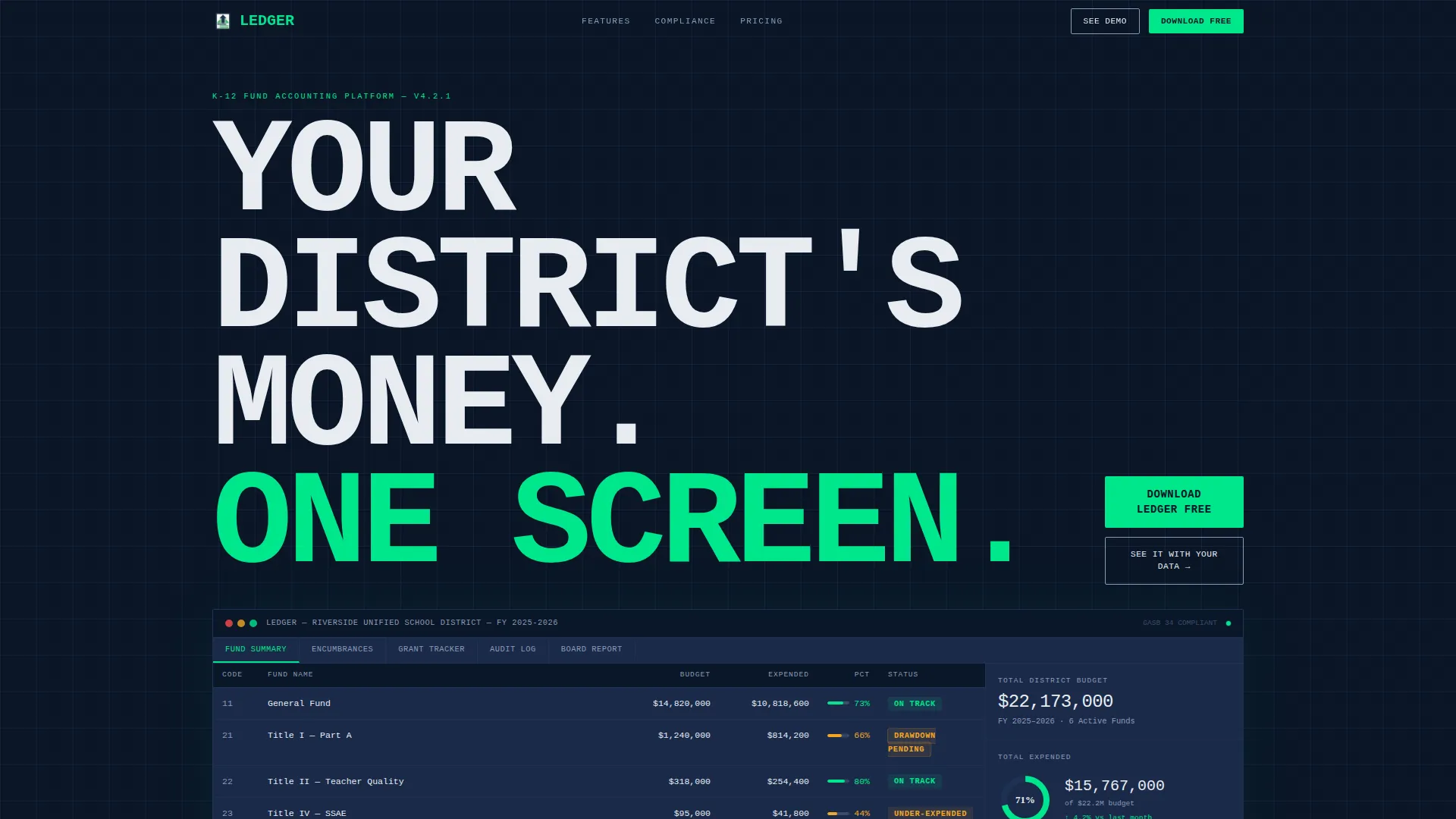
- A full-viewport hero section with a product screenshot, monospaced headline, and primary call-to-action button
- A scrolling sequence of data grid vignettes covering grant tracking, board report generation, and audit trail logs
- A two-field download gate with platform links for Windows, Mac, and Chromebook, plus a secondary demo path with a district-size selector
Feature list
This template includes purpose-built sections and interactive components drawn directly from the brief. Each one is designed to carry weight in a finance buyer's decision.
Full-Viewport Dashboard Hero
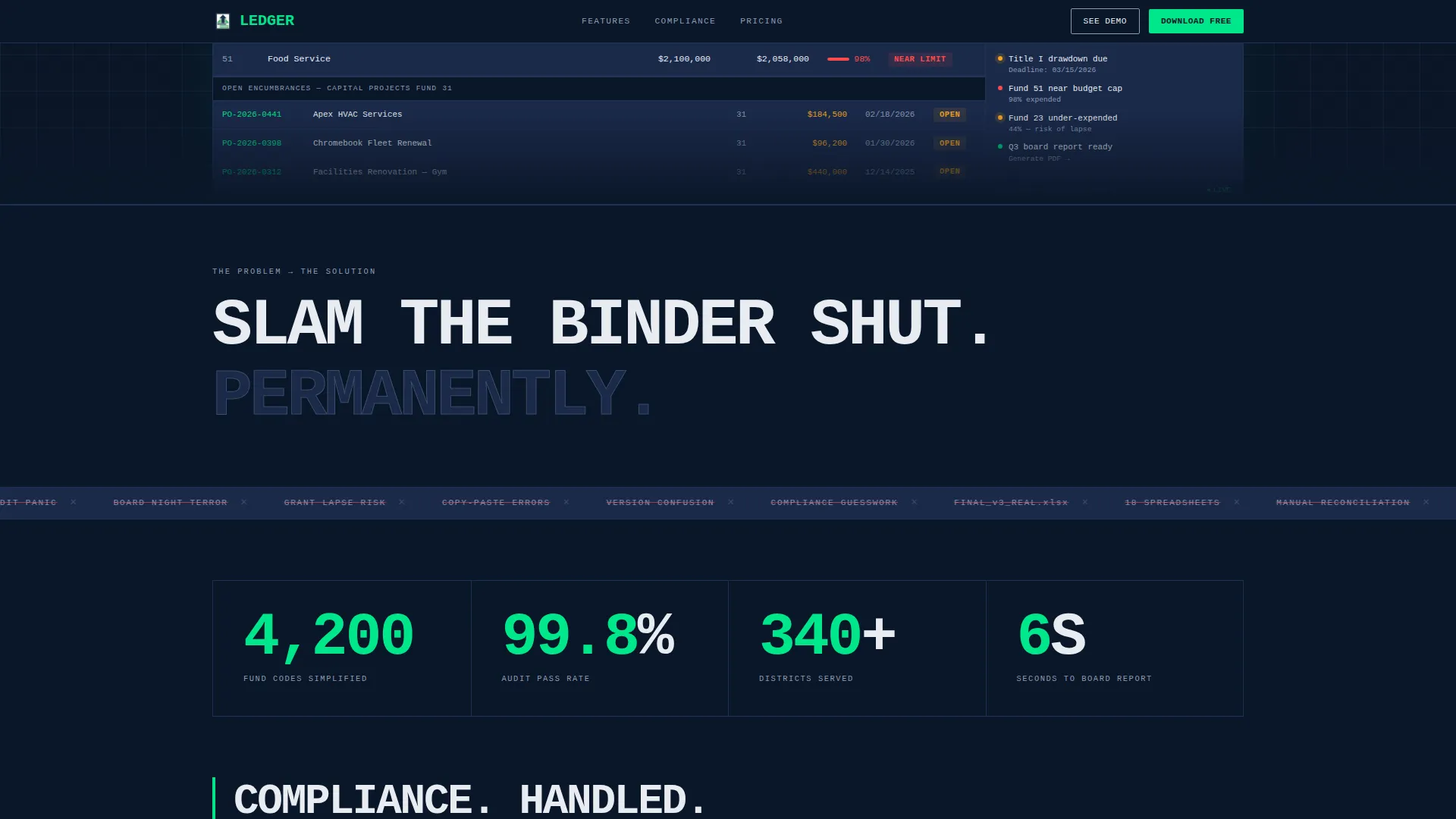
The hero section displays a pixel-perfect render of the Ledger dashboard mid-session. It shows real district fund data including General Fund status, a flagged Title I drawdown, and an open purchase order encumbrance table. The screenshot floats on the deep navy background with no device frame, projecting raw product confidence.
Typographic Counter and Manifesto Block
A massive monospaced counter slams into view below the hero: "4,200 FUND CODES SIMPLIFIED." This section uses hard-cut transitions and a marquee of replaced pain points. It sets the escalating data-density tone for every section that follows.
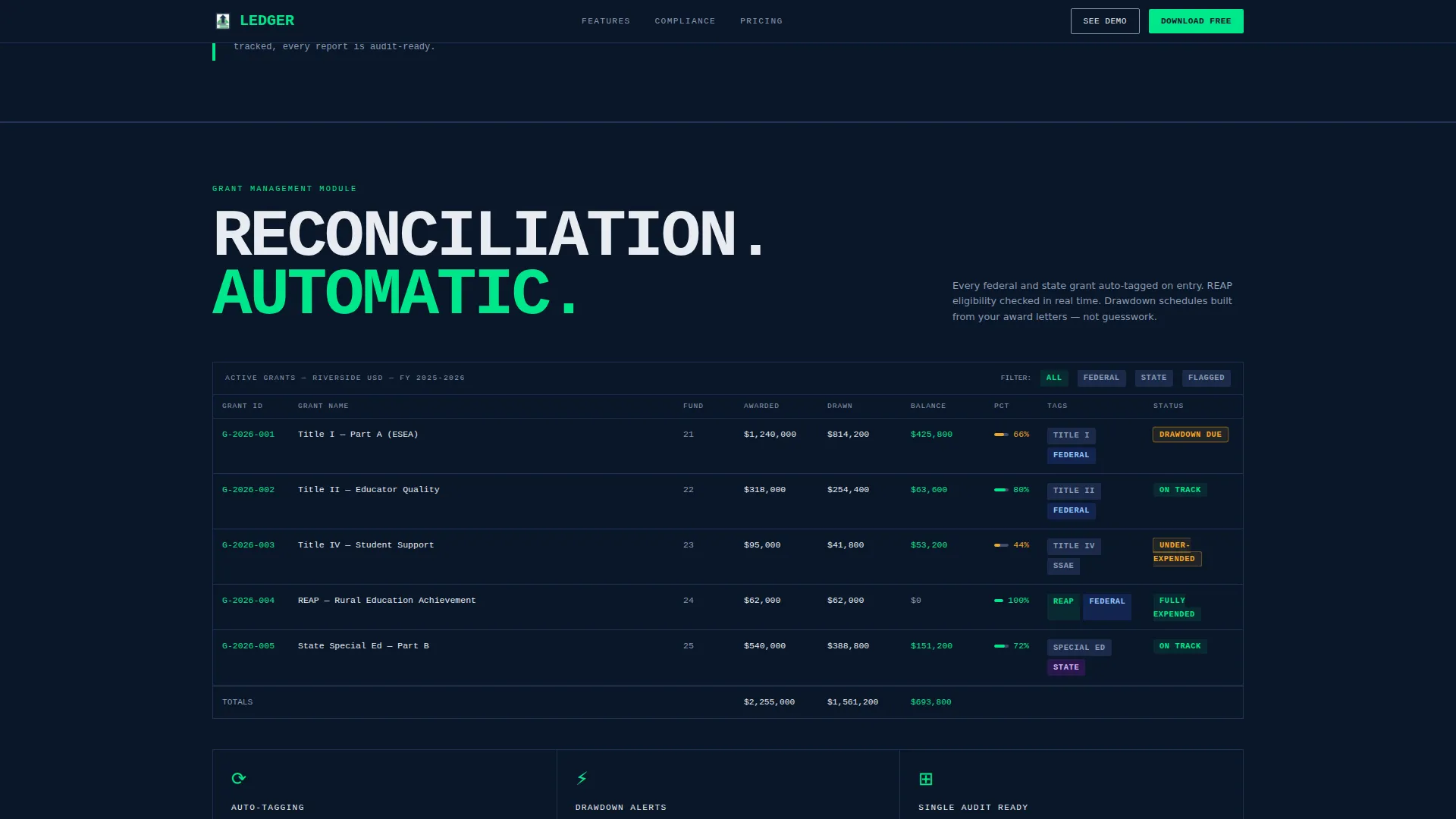
Grant Tracking Data Grid
A dense vignette shows automatic tagging for Rural Education Achievement Program (REAP), Title I, and Title IV grants. The grid layout demonstrates that the software already understands how federal fund codes are organized, building immediate domain credibility with district finance buyers.
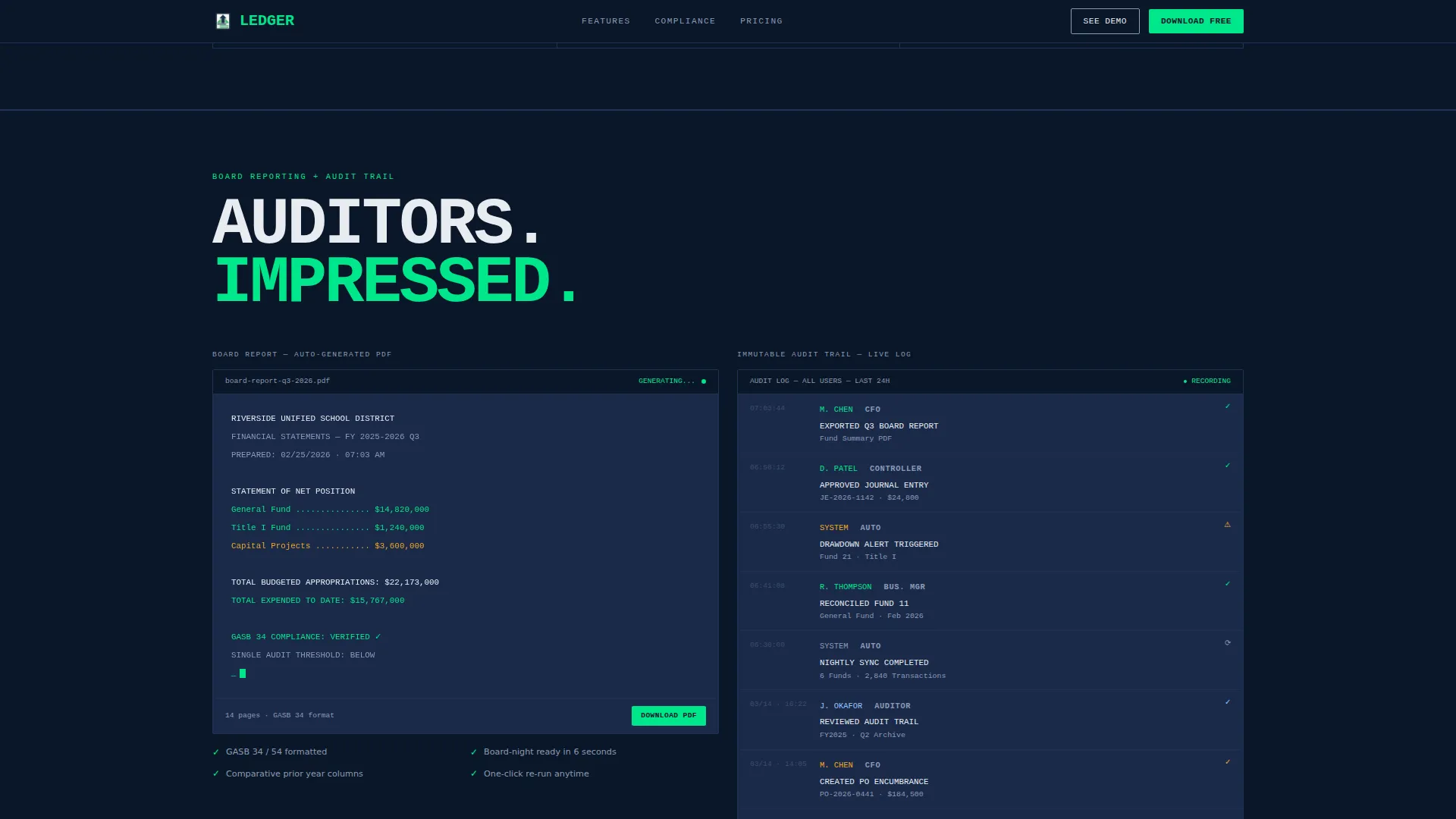
Board Report and Audit Trail Section
A PDF board report preview assembles visually on scroll. Alongside it, timestamped audit logs display with user badges. This section answers the compliance question before the buyer has to ask it.
Gated Download Form
A two-field modal captures work email and district name before delivering platform download links. A secondary call-to-action offers a guided demo with a district-size selector covering under 2,000 students, 2,000 to 10,000, and over 10,000. The gate is minimal and friction-aware.
Persistent Mobile Call-to-Action Bar
On mobile viewports, a sticky bottom bar keeps the primary download button visible at all times. This ensures the conversion path stays accessible without disrupting the desktop-first layout logic.
Page sections overview
| Section | Purpose |
|---|---|
| Hero Dashboard Screenshot | Anchor the page with a credible, data-dense product view and primary download call-to-action |
| Counter Manifesto Block | Slam the core value claim into view with typographic force and a pain-point marquee |
| Grant Tracking Grid | Show automatic fund code tagging for federal grant categories in a dense data vignette |
| Board Report Preview | Demonstrate PDF report assembly and audit trail logs to answer compliance questions |
| Download Gate Form | Capture minimal lead data and deliver platform-specific download links |
| Demo District Selector | Offer a guided demo path segmented by district enrollment size |
| Minimal Footer | Single-row footer with copyright and navigation links, no visual noise |
Design & branding system
The template follows a Bold Brutalist design system built on a Midnight Blue color palette. Every color choice is intentional and tied to meaning within the finance context.
- Background uses deep terminal navy (#0A1628); card surfaces and data containers use administrative steel (#1B2A4A); typography and grid lines use chalk-white (#E8ECF1)
- Electric budget-green (#00E68A) appears only on positive balances, active states, and call-to-action elements, creating a reward signal as the eye moves across the grid
- JetBrains Mono serves as the primary typeface for headlines and data; DM Sans handles secondary body text; oversized uppercase type acts as section dividers with tight tracking and no gradients
Mobile & speed optimization
The template is designed desktop-first for business managers on workstations, with specific mobile accommodations built in for on-the-go access.
- A persistent sticky call-to-action bar on mobile keeps the download button visible throughout the scroll experience
- Server Components handle static sections to reduce load overhead; Client Components manage animations and interactive elements such as the download gate modal and demo selector
- Medium-high animation intensity uses IntersectionObserver reveals and hard-cut section transitions, keeping motion purposeful rather than decorative
How this template helps you convert
Every design and copy decision in this template is engineered to move a skeptical district finance buyer from "what is this?" to "I need to download this."
- The hero section earns attention immediately by showing the product working with real-looking district data, removing the need to imagine what the software looks like in use.
- The escalating data-grid sequence answers the unspoken objection that most tools cannot handle the volume and complexity of K-12 fund accounting.
- The gated download form appears only after the page has delivered full proof of value, so the two-field ask feels earned rather than premature.
Other information about this template
This template is built for a specific intersection: EdTech and GovTech software targeting the K-12 education finance market in the United States. A few additional details worth knowing before you use it.
- All date formats, currency references, and fund terminology follow United States conventions, including the MM/DD/YYYY date format and USD currency
- The footer follows a GitHub Developer Minimal pattern: a single row with copyright on the left and navigation links centered, with no decorative noise
- Social proof placeholders are structured for role-based testimonials from CFOs and district business managers, alongside specific metrics for districts served, fund codes handled, and audit pass rates
- The template is intended for desktop-first use but includes a mobile persistent call-to-action bar as a deliberate secondary conversion path
- The design language is intentionally institutional and terminal-coded, designed to resonate with finance professionals who spend their days inside data-heavy software environments
Theme
Bold Brutalist
Creative direction
Launch Energy
Color system
Midnight Blue
Style
Dashboard/Data Grid
Direction
App Download
Page Sections
Full-viewport Product Screenshot Hero
Typographic Counter and Manifesto
Federal Grant Tracking Grid
Board Report and Audit Trail Preview
Two-field Gated Download Form
Persistent Mobile Download Bar
Related questions
Who is this template designed for?
Does this template show the actual software or just describe it?
What conversion paths does this template include?
Can I adapt this template for a different education software product?
What does the footer look like?



