Ledger - Powerful Franchise Landing Page Template
Ledger is a split-screen landing page template built for franchise payment processing services. It combines a live-styled API code header, an interactive savings estimator, and glassmorphic data visualizations to show multi-location operators exactly where their money goes. The design feels like a command terminal, dark, precise, and built for operators who read numbers before they read pitches.
by Rocket studio
Quick summary
Ledger is a single-page, click-through landing page template for franchise payment processing. It opens with a syntax-highlighted API code block, drops visitors directly into an interactive savings calculator, and builds a data-driven case through glassmorphic dashboard sections. Every section is a tool or a visualization. Nothing asks for trust before earning it.
Who this template is for
This template is built for payment processors, fintech platforms, and software providers targeting multi-unit franchise operators. If your buyers manage locations by the dozens and care about basis points, interchange fees, and settlement timelines, this template speaks their language from the first scroll.
- Franchise operations directors overseeing 40-location quick-service restaurant brands
- Multi-unit franchisees who have recently expanded into new territories and want cost visibility
- Chief Financial Officers at emerging franchise groups who suspect their processor has been padding fees
What problem this template solves
Most payment processing landing pages lead with trust statements and testimonials. Franchise operators do not have time for that. They want numbers. This template skips the preamble and puts the cost comparison in front of them immediately, so they can calculate their own savings before a single sales conversation happens.
- Removes friction by replacing a contact form with a frictionless click-through to a qualification page
- Eliminates vague pricing claims by showing an interactive cost breakdown, interchange, markup, and net difference, in real time
- Replaces generic imagery with data visualizations that match how operators already think about their business
What you get with this template
You get a fully structured, single-page layout with a clear visual hierarchy and every section serving a specific conversion role. The design system is pre-built and consistent, so no branding decisions need to be made from scratch.
- A split-screen (50/50) page layout with a code snippet header, savings calculator, chargeback dashboard mock, settlement timeline comparison, and franchise rollout map
- A glassmorphic color system using deep terminal black, frosted glass panels, electric ledger green, and cool slate, pre-configured and ready to customize
- A click-through call-to-action flow with a persistent frosted glass bar that appears after 40 percent scroll depth, routing visitors to a qualification page
Feature list
This template packs several purpose-built components that work together as a single conversion flow.
Live-Styled API Code Header
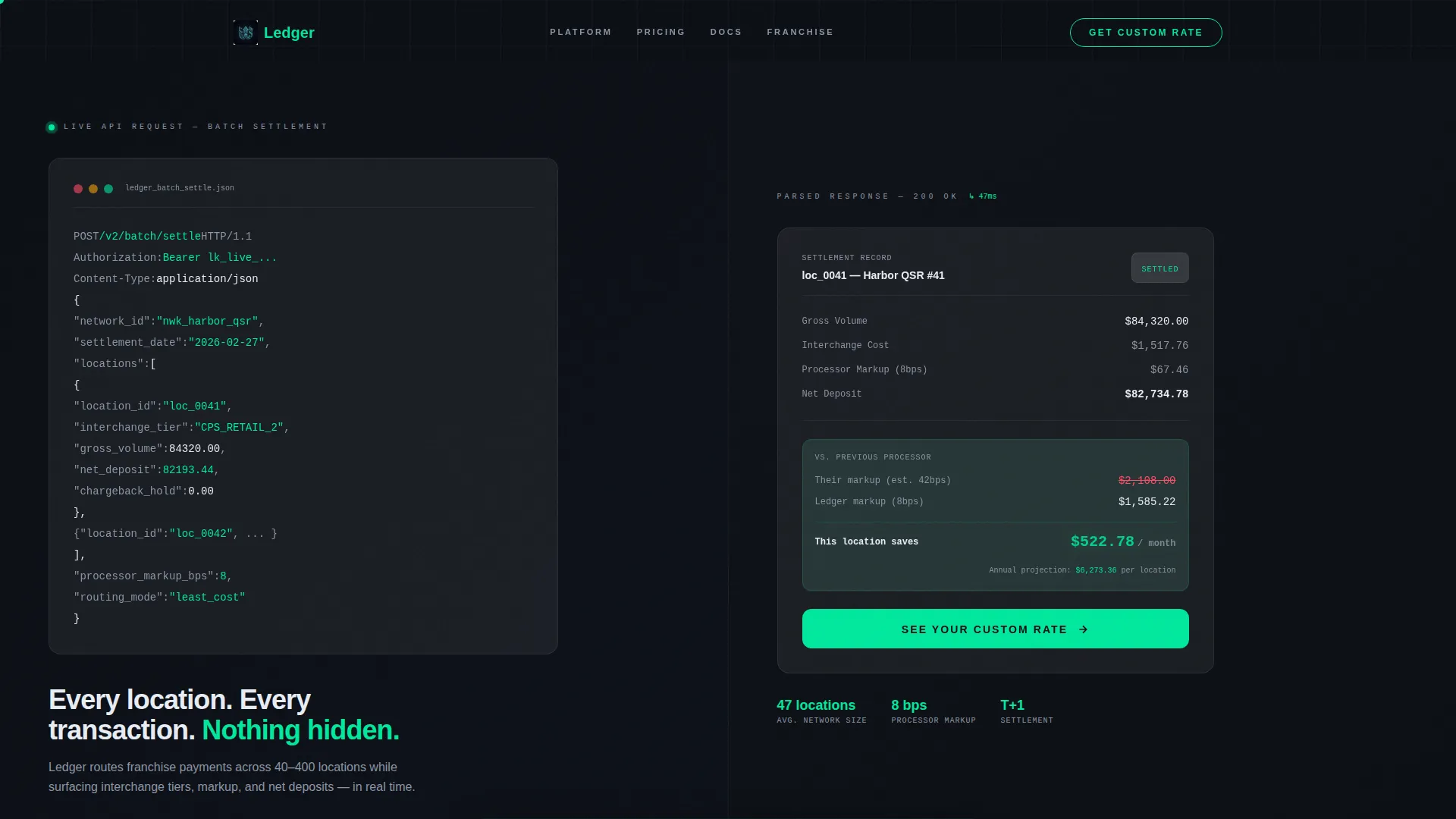
The header splits the screen between a syntax-highlighted franchise payment API call on the left and a parsed response card on the right. Field names like location_id, interchange_tier, and net_deposit are styled in ledger green and slate. The block loads character by character, like a terminal printing live results, making the code itself the opening pitch.
Interactive Savings Estimator
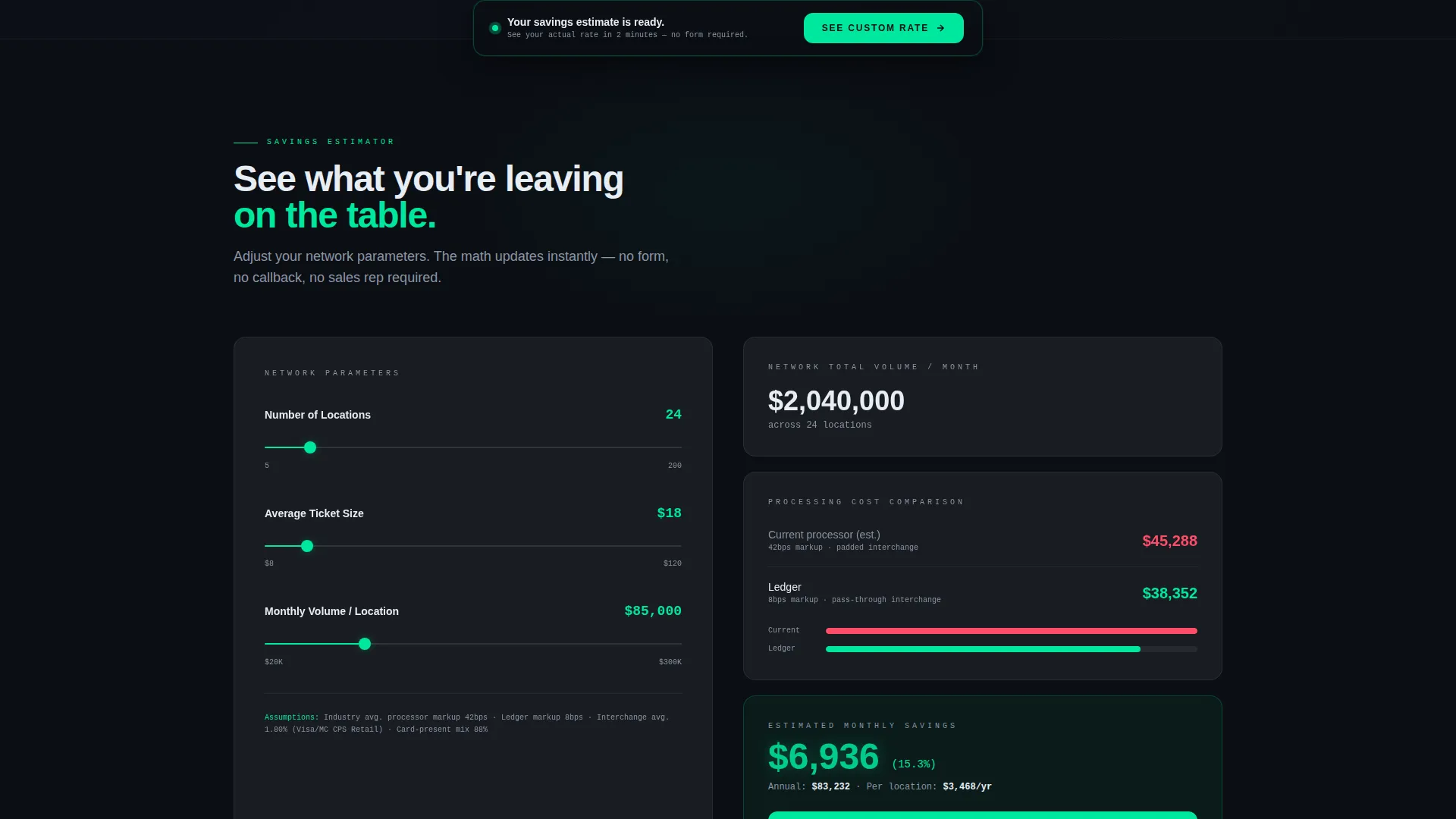
The calculator sits above the fold and is the first interactive element a visitor encounters. Left-panel sliders control number of locations, average ticket size, and monthly volume per store. The right panel updates in real time, showing current estimated processing cost versus optimized cost, with the savings delta highlighted in pulsing ledger green.
Glassmorphic Chargeback Dashboard
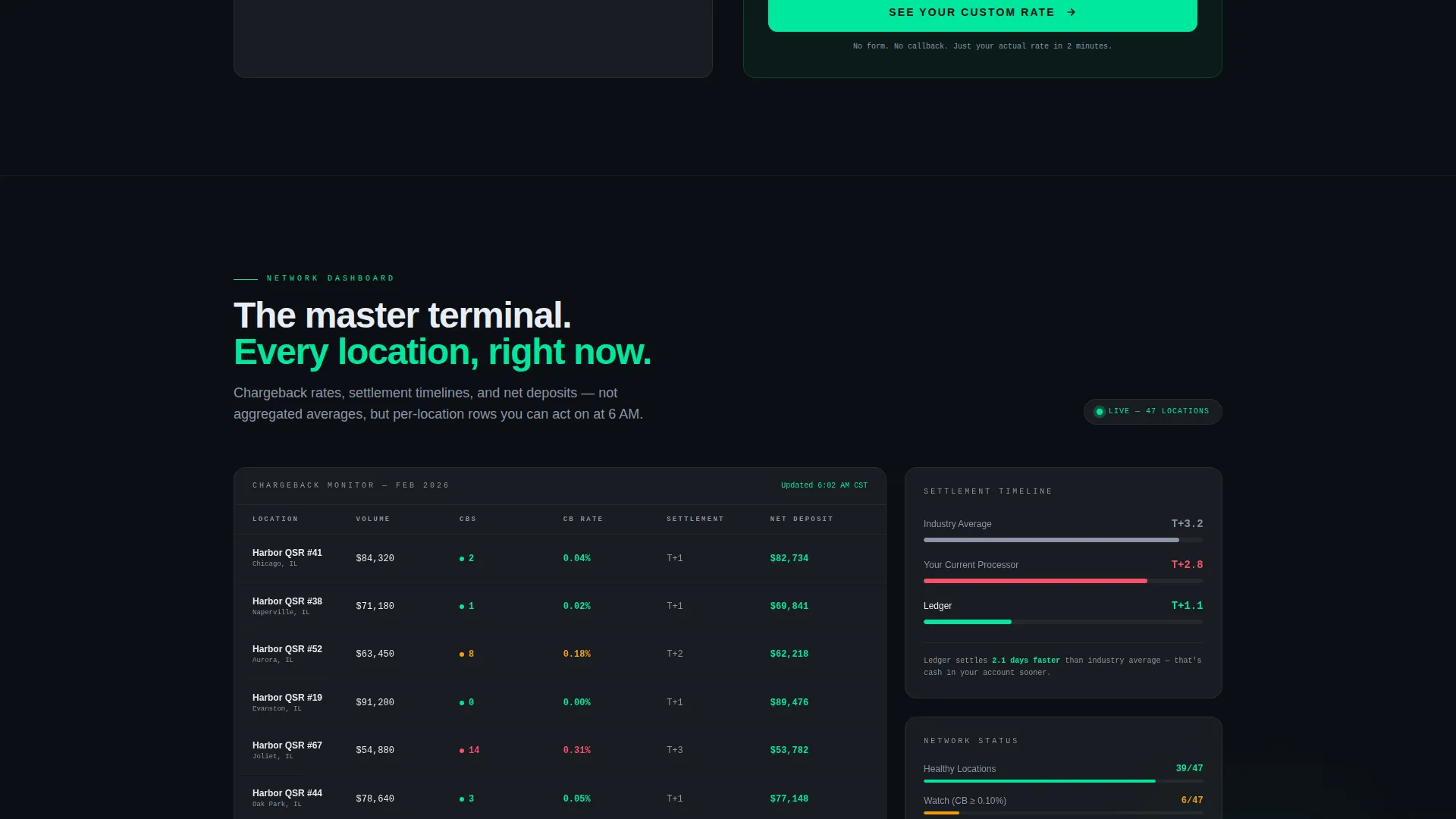
Below the calculator, a frosted glass dashboard mock displays chargeback rates broken down by location. It gives franchise operators a visual reference for how location-level data can look when it is surfaced clearly, reinforcing the product's promise of visibility across the entire network.
Settlement Timeline Comparison
A dedicated section presents a side-by-side settlement timeline: the visitor's current timeline versus the industry average. This visualization turns an abstract benefit into a concrete, scannable data story without requiring any sales copy to explain it.
Franchise Rollout Map
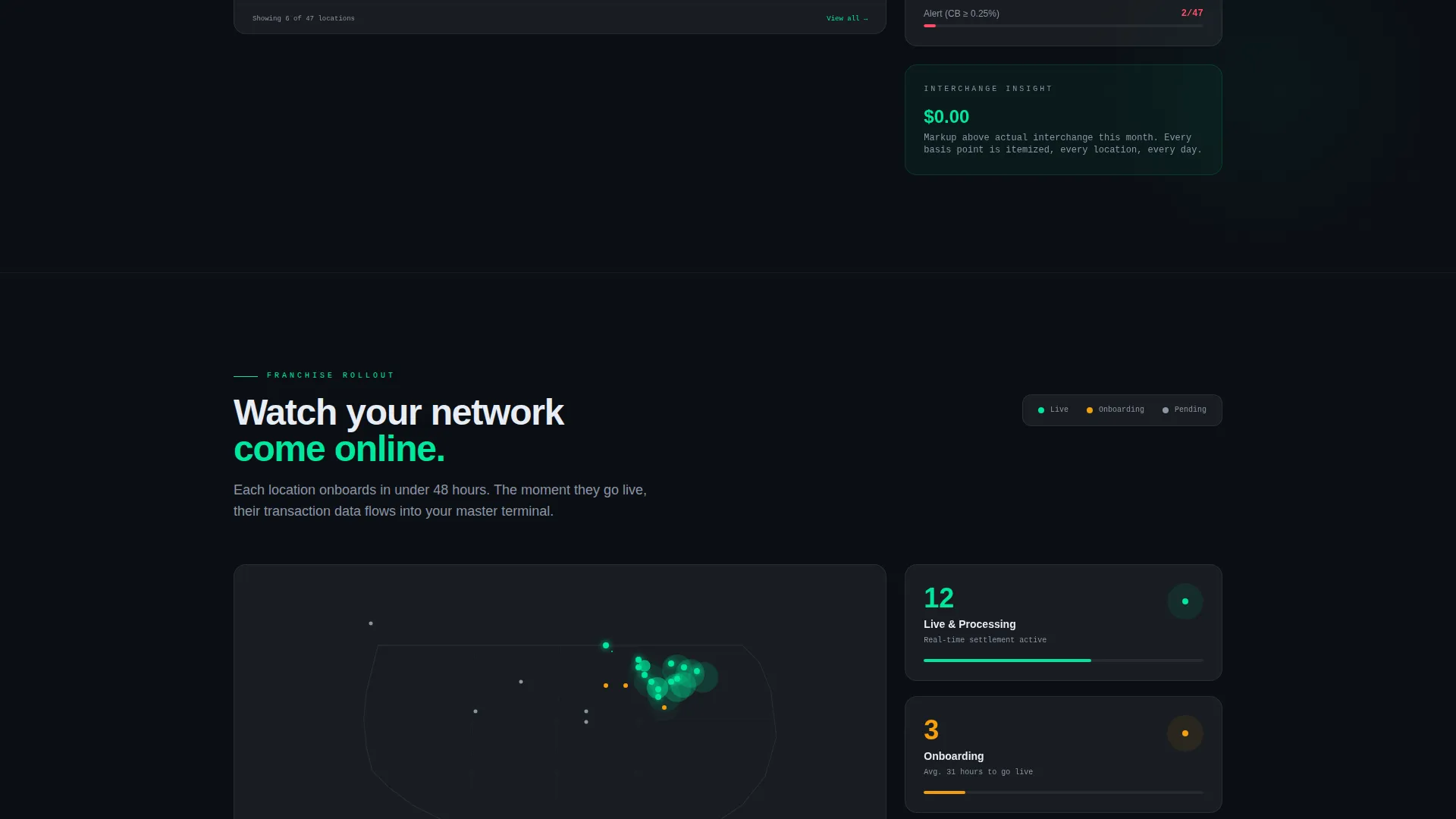
A visual map shows franchise locations lighting up as they onboard. It communicates network scale and momentum, making the product feel proven and already in use across a real franchise system.
Persistent Click-Through Call to Action
A frosted glass bar slides up from the bottom of the viewport once scroll depth reaches 40 percent. The call to action reads "See Your Custom Rate" and routes to a dedicated qualification page. The same call to action appears beneath the calculator results, so the click is always one step away from where the business case is made.
Page sections overview
| Section | Purpose |
|---|---|
| API Code Header | Opens with a syntax-highlighted batch settlement request and parsed savings response |
| Savings Calculator | Lets visitors input location count, ticket size, and volume to see live cost comparisons |
| Chargeback Dashboard Mock | Shows per-location chargeback rates in a frosted glass data panel |
| Settlement Timeline | Compares current settlement speed against industry average side by side |
| Franchise Rollout Map | Visualizes network onboarding with locations lighting up progressively |
| Persistent call to action Bar | Slides up at 40 percent scroll depth with a frictionless click-through to qualification |
Design & branding system
The visual identity follows a Data Command theme. Every element is built around the feeling of a live financial terminal, information-dense but breathable, with translucent cards that let the dark background bleed through like depth behind glass.
- Core palette: deep terminal black (#0B0E14) for backgrounds, frosted glass panels (#FFFFFF at 8% opacity with 12px blur) for cards, electric ledger green (#00E89D) for live data and interactive accents, and cool slate (#8B95A5) for secondary text and dividers
- No stock photography or lifestyle imagery; the visual language is entirely data-driven, using code blocks, dashboard mocks, maps, and timeline charts
- The overall aesthetic references the density of a Bloomberg terminal with the spatial refinement of a Zurich design studio
Mobile & speed optimization
The template layout is designed to stay readable and functional as screen sizes change. The split-screen structure adapts so that stacked content on smaller displays preserves the logical flow from code block to calculator to results.
- Frosted glass card components are sized to remain legible on mobile viewports without losing the layered depth effect
- Interactive slider inputs in the savings calculator are touch-friendly by design, keeping the estimator usable on phones and tablets
- The persistent call to action bar is positioned to avoid interfering with scrollable content on smaller screens
How this template helps you convert
The conversion strategy in this template is built entirely around proof before ask. Every scroll section adds to the business case before any commitment is requested.
- The savings calculator builds a personalized cost comparison in real time, so the visitor has already calculated their own ROI before the call to action appears.
- The persistent frosted glass call to action bar appears only after a visitor has scrolled 40 percent of the page, ensuring the click is earned by the content, not forced by placement.
- The click-through flow removes all form friction from the landing page itself, sending qualified visitors to a dedicated page where deeper information can be collected at the right moment.
Other information about this template
Ledger is categorized under Technology and specifically targets the franchise software and franchise payment processing niche. It is a strong fit for teams building a go-to-market presence in the franchise vertical who need a template that signals data fluency immediately.
- The template style is Split Screen (50/50), making it easy to present paired information, such as input versus output or code versus result, throughout the page
- The creative direction is Calculator/Tool First, which means the interactive estimator is the primary engagement driver, not written copy or testimonials
- The header concept is a Code Snippet, which positions the product as technically credible without requiring a product demo or video asset
- This template is well suited for franchise payment processing platforms, point-of-sale software providers, and financial technology companies serving multi-unit operators
Theme
Data Command
Creative direction
Calculator/Tool First
Color system
Glassmorphic
Style
Split Screen (50/50)
Direction
Click-Through
Page Sections
Live-styled API Code Header
Interactive Savings Estimator
Glassmorphic Dashboard Mock
Settlement Timeline Comparison
Franchise Rollout Map
Persistent Click-through Call to Action Bar
Related questions
Is coding knowledge required to use this template?
Can I change the calculator inputs to match my pricing model?
Does this template include the qualification page it routes to?
Who is the ideal business to use this template?



