Medical Billing Vertical SaaS Professional Website Template
Ledger is a medical billing landing page template built for revenue cycle professionals who need clarity fast. It combines an interactive claim pipeline, filterable workflow modules, and a progressive lead-gen form into a single, scroll-driven experience. The design is desktop-first, data-dense, and built to convert billing managers into qualified leads the moment they feel the product working.
by Rocket studio
Quick summary
Ledger is a single-page template designed for medical billing software platforms. It pairs a live-feel claim pipeline header with expandable workflow modules and a three-step lead qualification form. The result is a landing page that earns trust through interactivity before it ever asks for an email address.
Who this template is for
This template speaks directly to the people who live inside revenue cycle workflows every single day. It was built for teams and individuals who know the difference between a CO-4 denial code and a CO-97, and who need a platform that speaks their language from the first scroll.
- Billing managers at multi-provider practices who spend mornings buried in aging reports
- Revenue cycle directors at regional hospital groups reconciling large-volume claim denials
- Solo practitioners who keep hitting repeated payer rejections on the same procedure codes
What problem this template solves
Most medical billing platforms sell themselves with generic feature lists and stock photography. Neither builds trust with a skeptical billing professional who has already tried three tools this year. This template solves the credibility gap by showing the product working before the visitor reads a single headline.
- Visitors interact with a draggable claim card in the header before they scroll
- Each workflow module expands into a mini-demo, so the product explains itself
- The progressive lead form qualifies intent gradually, reducing drop-off at the most critical conversion step
What you get with this template
You get a complete, scroll-driven landing page structure ready to adapt for any medical billing or revenue cycle management platform. Every section serves a specific job: build recognition, demonstrate value, and convert the right visitor.
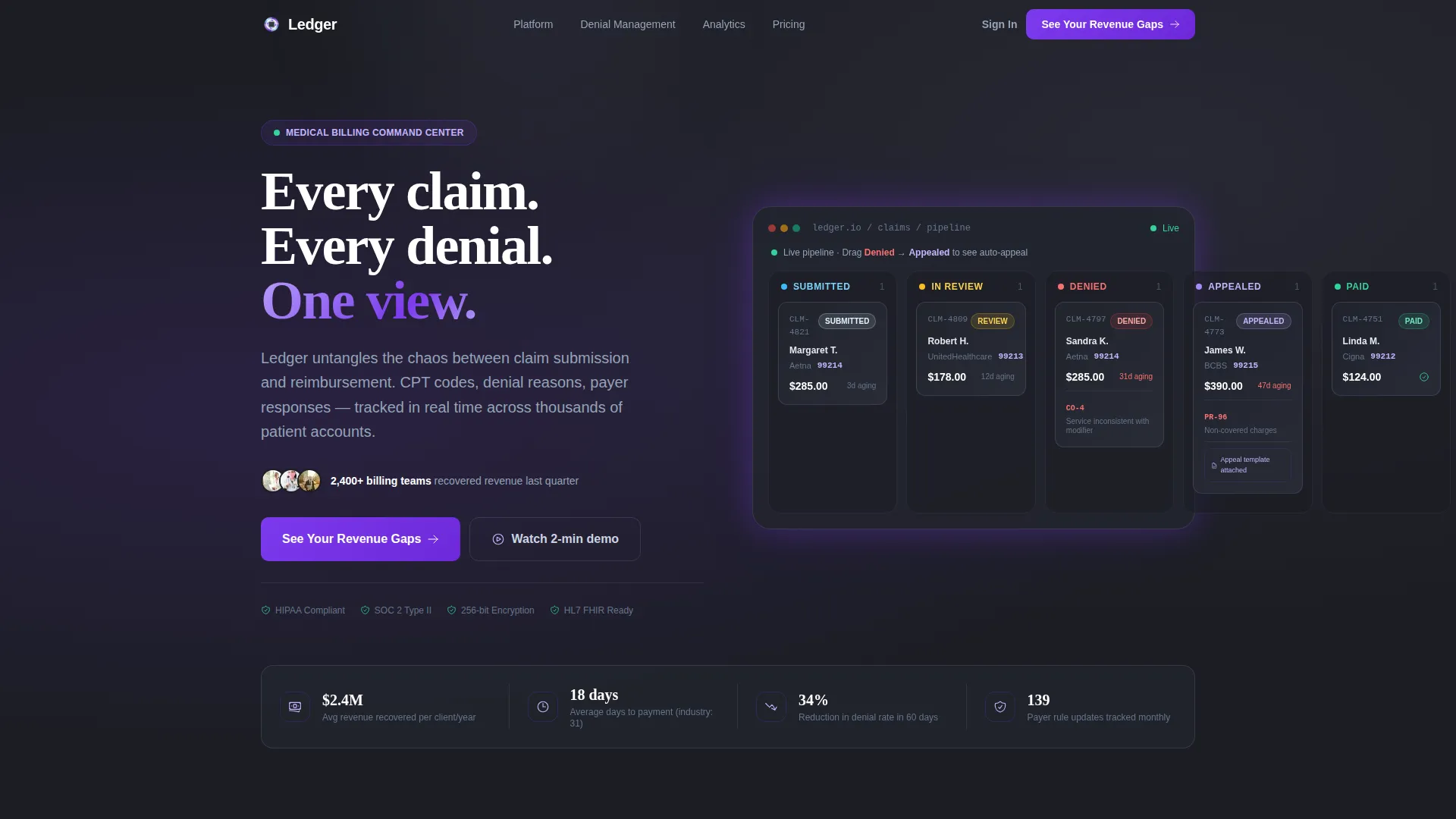
- An interactive hero with a live claim pipeline showing real payer names, CPT codes, and denial reasons
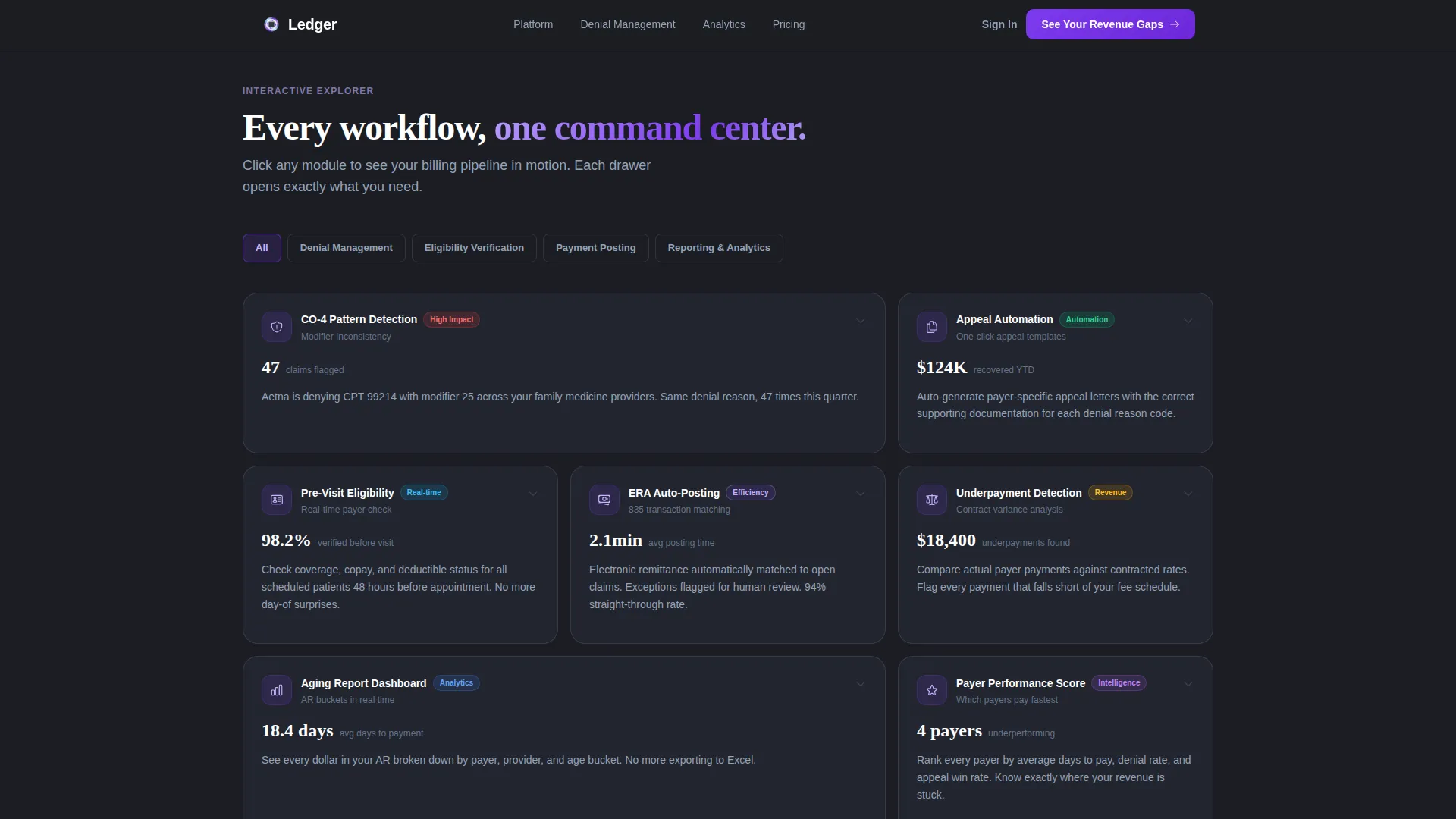
- A filterable card grid covering Denial Management, Eligibility Verification, Payment Posting, and Reporting and Analytics
- A progressive three-step lead qualification form plus a secondary gated offer for a Denial Rate Benchmark Report
Feature list
This template includes purpose-built sections and interaction patterns designed specifically for the revenue cycle management market.
Interactive Claim Pipeline Header
The header fills the full viewport with a mock claim pipeline. Visitors can drag a sample claim card from the Denied column to the Appealed column. The system auto-populates an appeal template, updates the aging counter, and flags the denial reason code. It uses specific details like CPT 99214 and denial code CO-4 so billing professionals recognize the scenario immediately.
Filterable Workflow Module Grid
A card grid below the hero lets visitors click into four workflow categories: Denial Management, Eligibility Verification, Payment Posting, and Reporting and Analytics. Each card expands into a mini-demo with animated data flows showing claims moving through that pipeline stage. Visitors explore at their own pace rather than being walked through a scripted tour.
Progressive Three-Step Lead Form
The lead generation form qualifies visitors across three steps. Step one captures practice size and specialty. Step two collects current billing software and monthly claim volume. Step three asks for name, email, and an optional checkbox for a specific payer issue. This approach reduces friction and delivers higher-intent leads.
Secondary Gated Benchmark Report
A second conversion path offers a free Denial Rate Benchmark Report in exchange for just an email address. This captures curious visitors who are not yet ready to book a demo. It widens the top of the funnel without distracting from the primary call to action.
Denial Intelligence Visualization
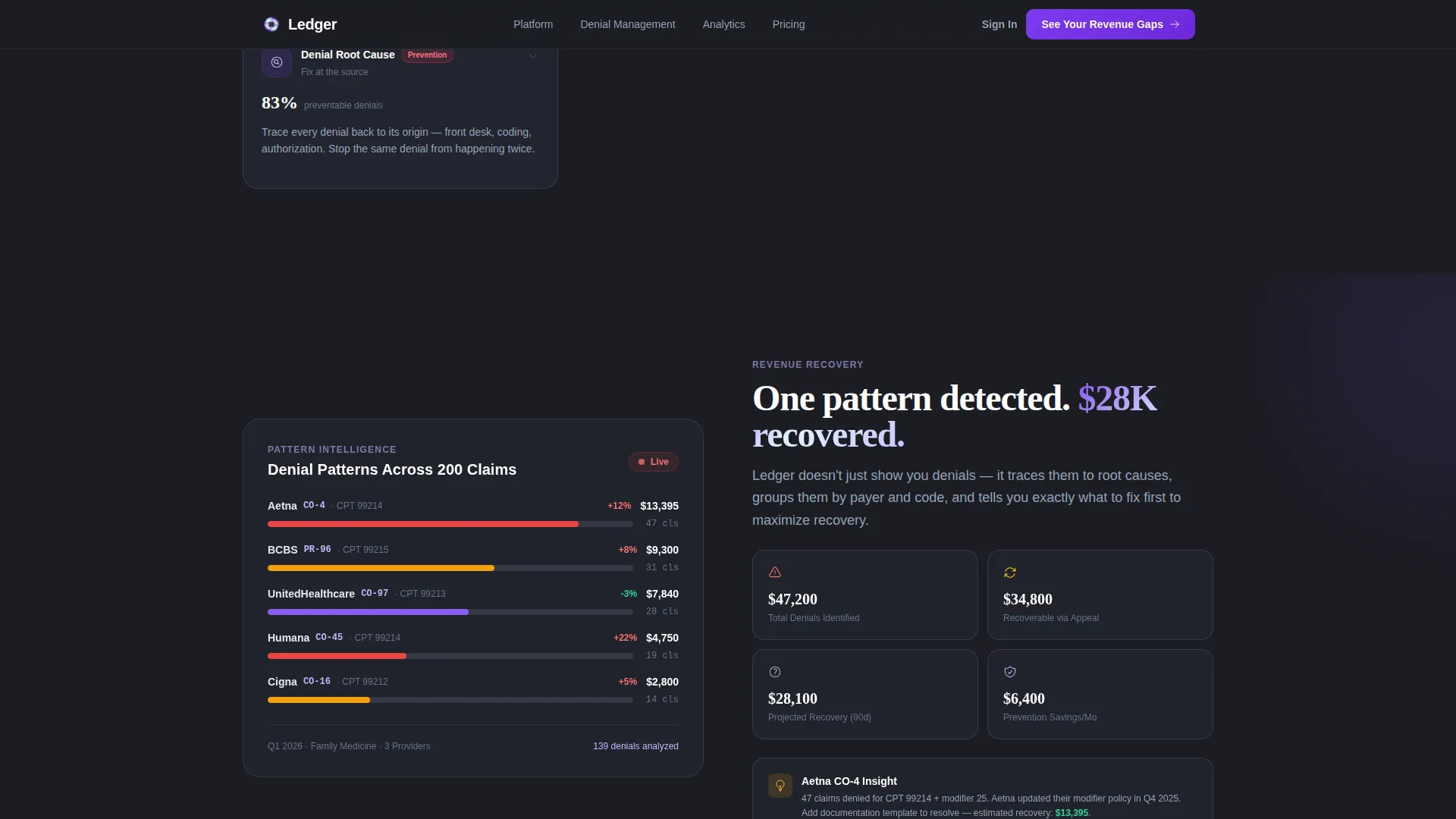
A dedicated section shows pattern detection across a claim portfolio using animated data visualization. The narrative moves from a single resolved claim to a denial pattern detected across 200 claims, then to a revenue recovery projection. This escalation makes the return on investment tangible before the visitor reaches the form.
Persistent Navigation call to action
The primary call to action, labeled "See Your Revenue Gaps," appears both fixed in the navigation bar and at the close of each card module. This ensures the conversion path is always one click away, regardless of where the visitor is on the page.
Page sections overview
| Section | Purpose |
|---|---|
| Hero Pipeline | Demonstrate live claim tracking with draggable cards |
| Stats Strip | Show platform-level metrics at a glance |
| Workflow Module Grid | Let visitors explore four billing workflow categories |
| Denial Intelligence | Visualize claim pattern detection and revenue recovery |
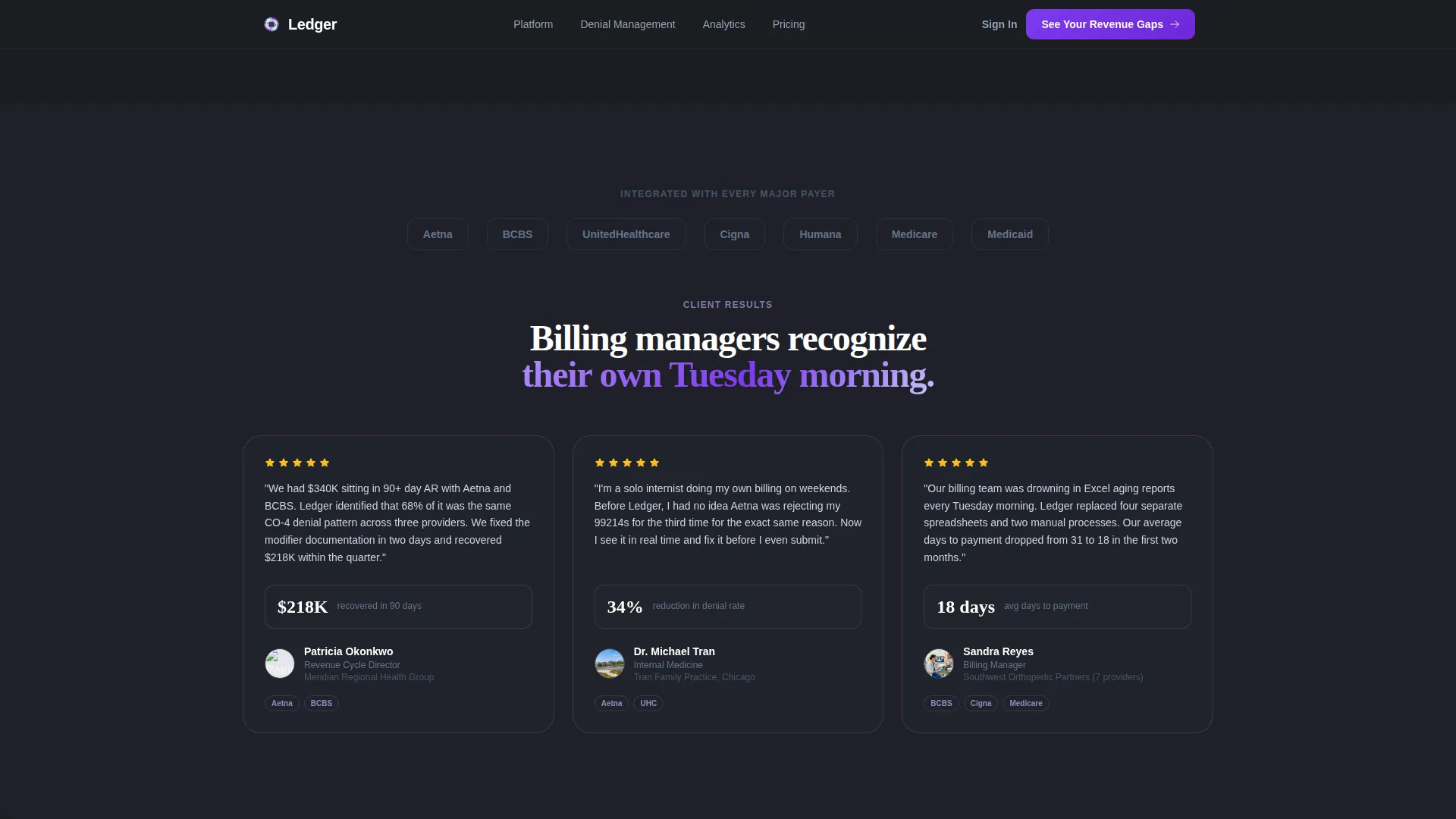
| Social Proof | Build trust with metric-backed billing manager testimonials |
| Lead Gen Form | Qualify and capture leads via a three-step progressive form |
| Benchmark Report Offer | Capture early-stage visitors with a gated email offer |
| Footer | Single-row linear links and brand navigation |
Design & branding system
The visual identity follows an iridescent operational style. It reads like a surgical instrument catching fluorescent light: sterile and precise, with an unexpected shimmer that signals intelligence underneath the surface.
- Color palette: deep charcoal (#1B1D23) for backgrounds and data-dense areas, clinical ice blue (#E0F2FE) for cards and containers, soft holographic lavender (#C4B5FD) for tags and secondary navigation, and iridescent violet (#7C3AED) for calls to action, active filters, and real-time status indicators
- Typography: Plus Jakarta Sans for interface and body copy, Fraunces serif for display headings, creating a contrast between operational clarity and editorial authority
- The violet accent shifts to warm violet on hover states, reinforcing interactive affordances throughout the filterable grid and pipeline columns
Mobile & speed optimization
The template is built desktop-first to match how billing managers actually work: at workstations, across wide monitors, with multiple tabs open. The layout respects that context without abandoning smaller screens.
- Responsive mobile layout adapts the card grid and pipeline columns for touch-based browsing
- Server Components handle static sections while Client Components power the interactive pipeline and filterable grid, keeping the heavy interactivity isolated from passive content
How this template helps you convert
The conversion strategy is built on a simple principle: let the visitor feel the product working before asking for anything in return. Every interactive element serves the lead generation goal.
- The draggable claim card in the hero creates a hands-on moment that builds product confidence before the visitor has read a single marketing claim
- The filterable workflow modules let billing professionals self-qualify by exploring the specific pipeline stage most relevant to their daily pain, which means they arrive at the form already convinced
- The secondary Benchmark Report offer captures email addresses from visitors who are still in research mode, ensuring no curious lead leaves the page empty-handed
Other information about this template
Ledger fits within the Directory and Discovery theme, using the Interactive Explorer creative direction and the AI Iridescent color system. These design decisions work together to give the page a discoverable, module-by-module feel rather than a linear scroll.
- The template style is Card Grid (Modular), making individual sections easy to rearrange or extend with additional workflow categories
- The header concept is an Interactive Preview, meaning the first thing a visitor does is use the product, not read about it
- Localization is set for United States markets: English language, USD currency, US date format, and US payer names throughout the demo content
- The template sits in the Medical Billing Vertical SaaS subcategory under the broader Technology category
Theme
Directory & Discovery
Creative direction
Interactive Explorer
Color system
AI Iridescent
Style
Card Grid (Modular)
Direction
Lead Generation
Page Sections
Interactive Claim Pipeline Header
Filterable Workflow Module Grid
Progressive Three-step Lead Form
Denial Intelligence Visualization
Secondary Benchmark Report Offer
Persistent Revenue Gap Call to Action
Related questions
Can I customize the payer names and CPT codes in the demo pipeline?
Is this template suitable for both solo practitioner products and enterprise platforms?
How does the filterable workflow card grid work?
What is the secondary conversion path on this landing page?
Can the three-step lead form be modified or shortened?



