Property Management Landing Page Template
Ledger is a bento grid landing page template built for property management platforms. It combines a dark Dashboard Pro aesthetic with a Void and Violet color system, an interactive ROI calculator, and a product screenshot header. The result is a focused, conversion-driven page that helps mid-market landlords and property managers see the value of centralized portfolio tracking before they ever sign up.
by Rocket studio
Quick summary
Ledger is a single-page bento grid landing page template designed for real estate software products. It features a striking dark interface, an above-the-fold ROI calculator, and a repeated call-to-action strategy that moves portfolio landlords and property management firms toward a live demo with quiet, data-backed confidence.
Who this template is for
This template is built for software companies, product teams, and founders selling property management tools to an audience that lives inside dashboards all day. The visual language and content structure speak directly to people who track dozens or hundreds of rental units at once.
- Mid-market landlords managing forty to four hundred rental units
- Property management firms replacing spreadsheets with scalable software
- Real estate syndicators who need clean, investor-ready reporting
What problem this template solves
Selling a property management platform is hard when your landing page looks like a brochure. Prospects need to feel the product before they commit. This template solves the credibility and engagement gap by leading with value instead of claims.
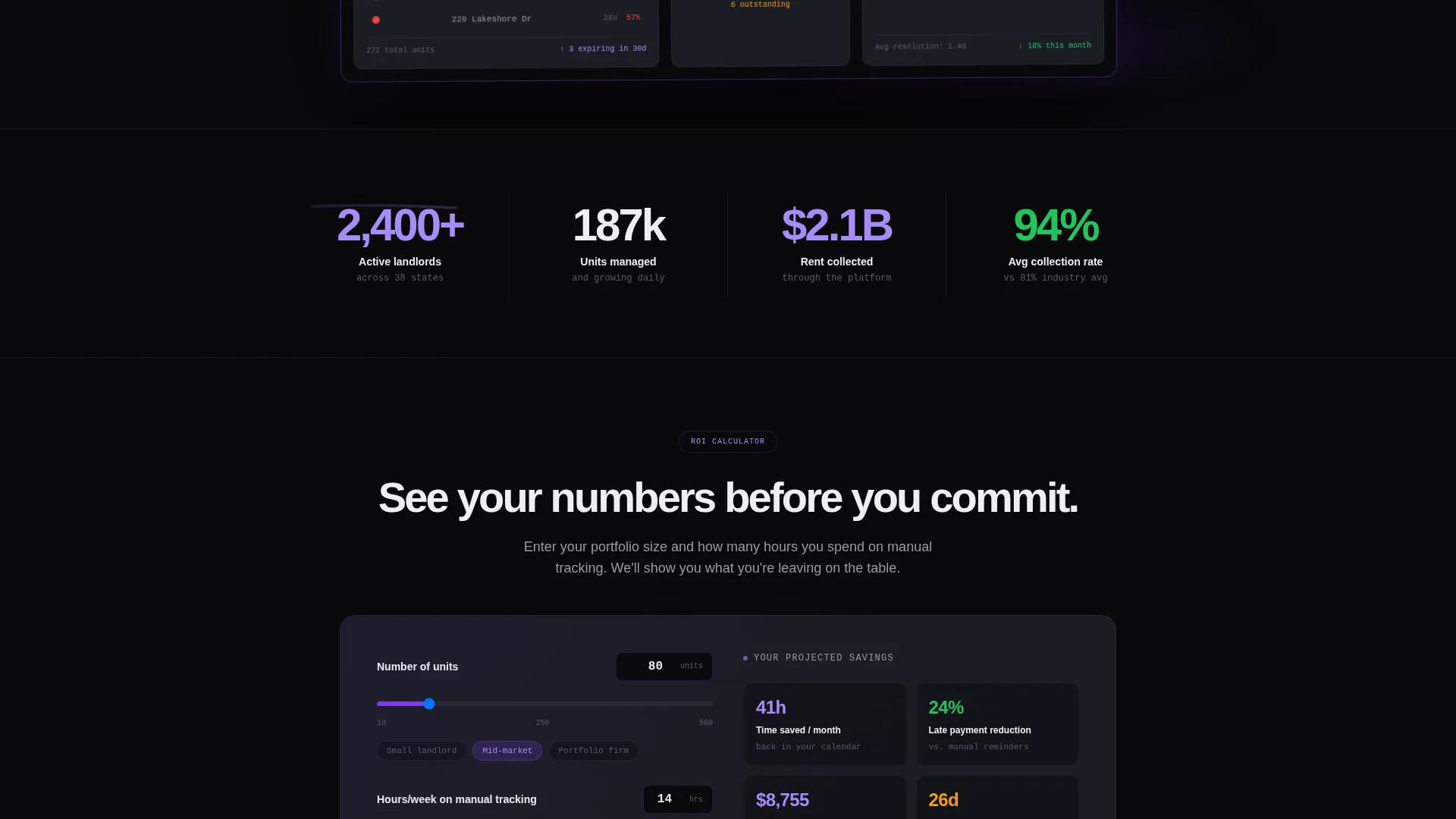
- Visitors get projected time savings before they are asked to do anything
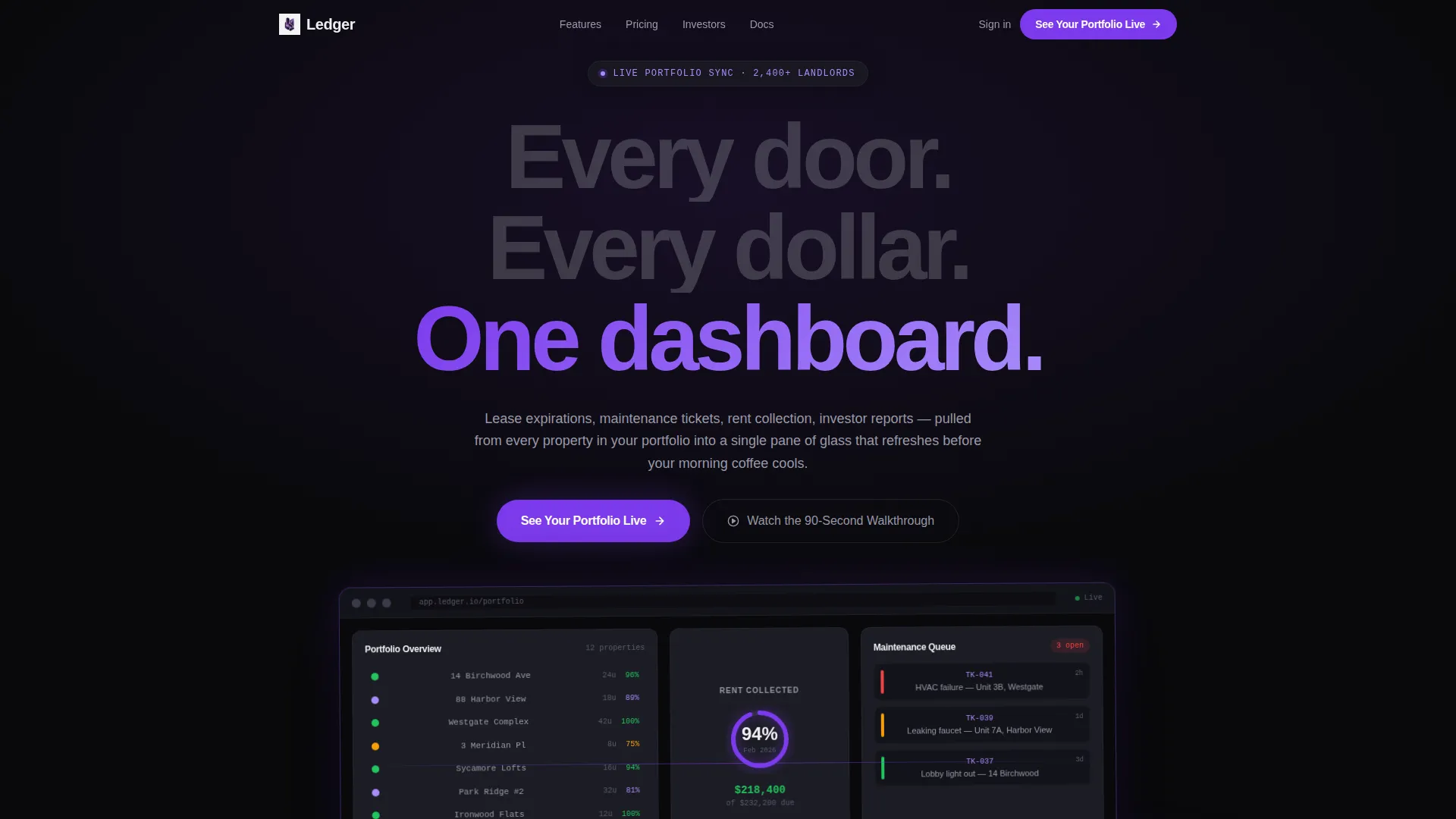
- A dashboard screenshot makes the product feel real and usable at a glance
- Clear bento sections separate feature clusters so nothing feels overwhelming
What you get with this template
The template delivers a fully structured landing page layout ready to adapt for any property management or real estate software product. Every section is purposeful and conversion-aware from the first pixel to the final call to action.
- A bento grid layout with distinct cells for each feature cluster
- An interactive ROI calculator wired to unit count and manual tracking hours
- Three strategically placed "See Your Portfolio Live" calls to action
- A product screenshot header with a violet glow effect on a void black background
- A secondary video path labeled "Watch the 90-Second Walkthrough" for hesitant visitors
Feature list
This template is built around a small set of high-impact components. Each one is described below.
Interactive ROI Calculator
Visitors enter their unit count and hours spent on manual tracking. The calculator instantly returns projected time saved per month and estimated late-payment reduction. This gives the page immediate, personal relevance before a single scroll.
Bento Grid Feature Sections
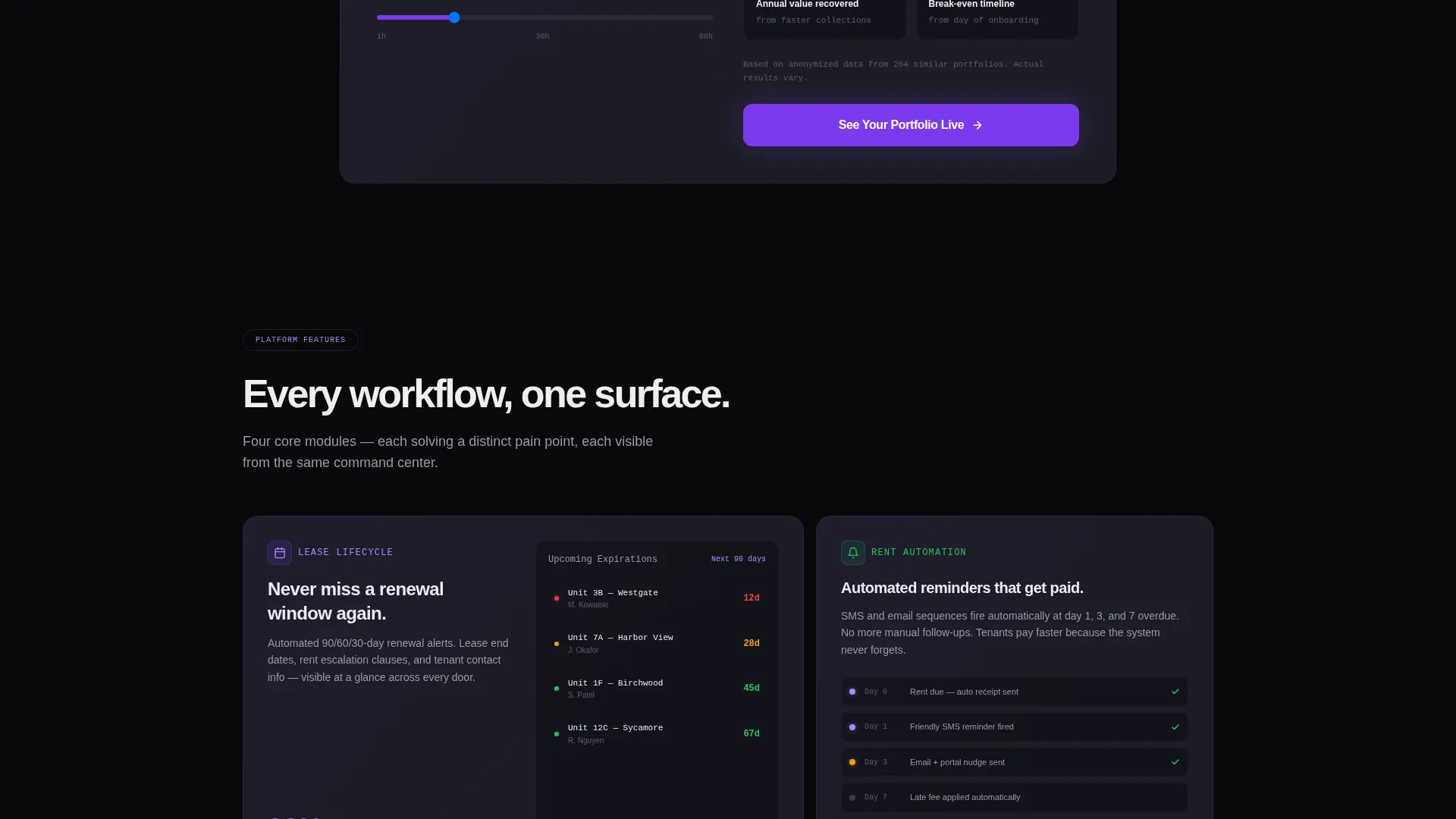
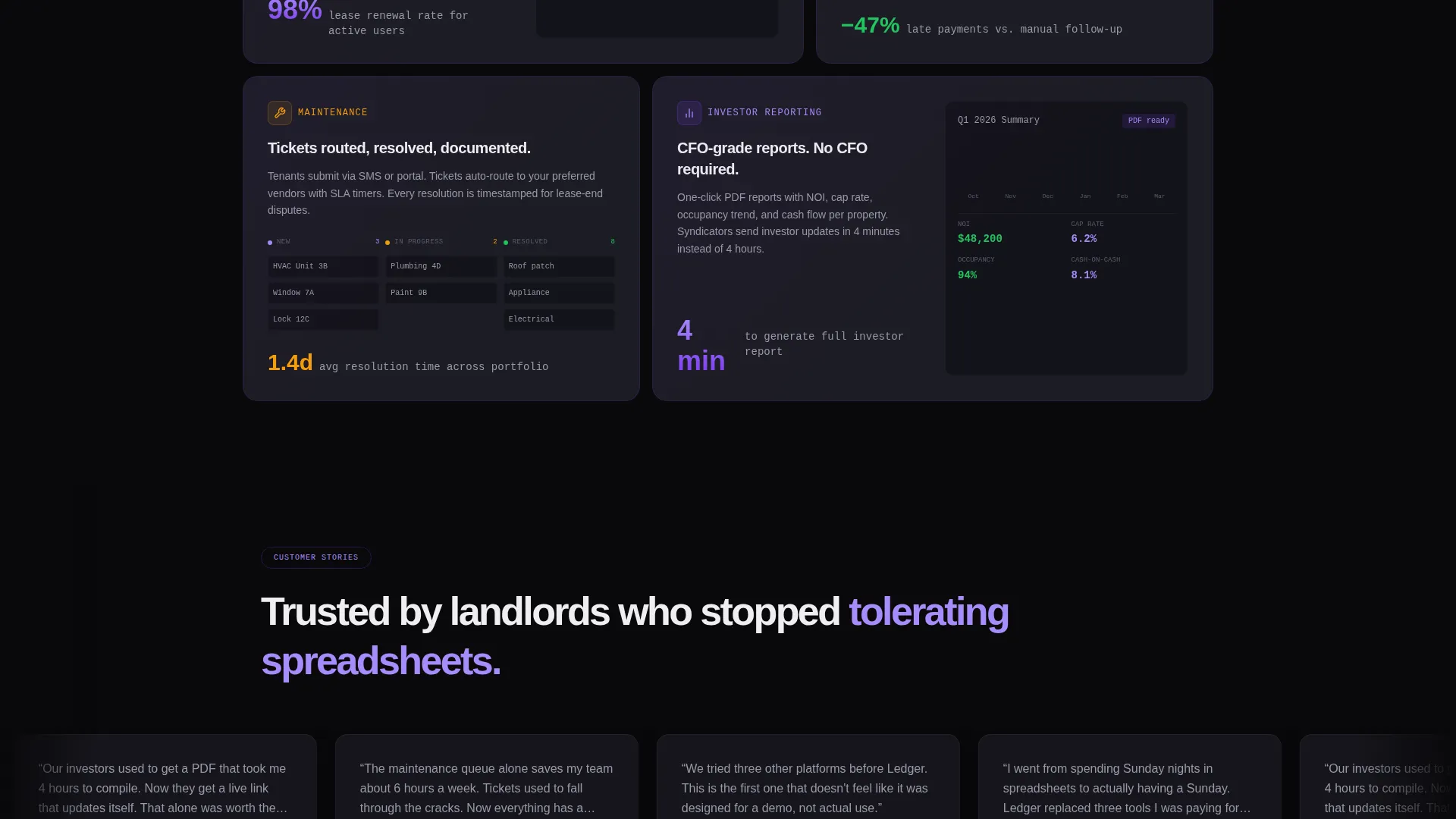
Feature clusters are organized into distinct bento cells, each containing a cropped screenshot and a single supporting stat. The layout covers lease lifecycle tracking, automated rent reminders, maintenance workflow, and investor reporting in a visually clean grid.
Product Screenshot Header
The above-the-fold header shows a pixel-perfect dashboard screenshot mid-use. It includes a twelve-property portfolio tile color-coded by occupancy, a rent-collection progress ring at 94 percent, and a maintenance queue with three open tickets sorted by urgency.
Three-Point Call-to-Action System
The primary call to action appears in the top navigation, beneath the ROI calculator results, and in a full-width closing cell. Each instance routes to a pre-populated demo environment seeded with sample properties.
Secondary Video Path
A "Watch the 90-Second Walkthrough" option is available for visitors who are not ready to enter the demo. This secondary path reduces drop-off by giving hesitant buyers a lower-commitment next step.
Void and Violet Color System
The template uses absolute void black for backgrounds, deep orbital violet for calls to action and active borders, muted titanium for card surfaces, and phosphor white for primary text. The palette is designed for extended screen time without visual fatigue.
Page sections overview
| Section | Purpose |
|---|---|
| Top Navigation Bar | Pins primary call to action and site orientation |
| Product Screenshot Header | Anchors trust with a real dashboard view |
| ROI Calculator | Delivers personalized value above the fold |
| Calculator Results Block | Shows projected savings and conversion prompt |
| Lease Lifecycle Cell | Highlights lease tracking feature cluster |
| Rent Reminders Cell | Showcases automated payment reminder workflow |
| Maintenance Workflow Cell | Displays open ticket management feature |
| Investor Reporting Cell | Presents portfolio reporting capabilities |
| Closing call to action Cell | Full-width final conversion prompt |
Design & branding system
The visual identity follows a Dashboard Pro theme. The overall impression is a Bloomberg terminal redesigned by a minimalist studio, dark enough for hours of use and accented with violet that reads like a live status indicator.
- Void black (#09090B) fills all negative space so data elements breathe
- Deep orbital violet (#7C3AED) drives calls to action, active borders, and chart highlights
- Muted titanium (#1C1C24) separates bento cells as card surfaces
- Phosphor white (#EEEEF0) carries all primary text for clean legibility
Mobile & speed optimization
The bento grid structure adapts naturally to smaller screens. Each cell is self-contained, which means the layout reflows without losing its visual hierarchy or data clarity.
- Bento cells stack vertically on mobile while preserving individual cell context
- The ROI calculator remains fully interactive on touch devices
- The product screenshot header scales proportionally to maintain visual impact
How this template helps you convert
Every layout decision in Ledger is aimed at reducing friction and building trust. The page earns attention first, then asks for commitment.
- The ROI calculator delivers a personalized result before the visitor scrolls, creating a reason to stay and explore.
- The bento grid reveals feature value drawer by drawer, building confidence through specificity rather than generic claims.
- Three calls to action placed at high-intent moments ensure the conversion path is always one click away, regardless of where the visitor stops reading.
Other information about this template
Ledger is well-suited for teams building in the real estate software category, particularly those targeting landlords, property managers, or investors who already use data-heavy tools in their daily work.
- The template style is Bento Grid, a layout pattern that performs well for software and dashboard-led products
- The header concept is Product Screenshot, which reduces the need for long descriptive copy at the top of the page
- The creative direction is Calculator/Tool First, making it a strong fit for products with measurable, quantifiable benefits
- The landing page direction is Click-Through, optimized to route qualified visitors toward a demo or trial environment
Theme
Dashboard Pro
Creative direction
Calculator/Tool First
Color system
Void & Violet
Style
Bento Grid
Direction
Click-Through
Page Sections
Interactive ROI Calculator
Bento Grid Feature Layout
Product Screenshot Header
Three-point Call to Action Strategy
Secondary Video Path
Void and Violet Visual System
Related questions
Who is this template designed for?
Can I adapt the ROI calculator for my specific metrics?
Does the template include a video embed section?
How many times does the primary call to action appear?
Is this template suitable for a dark-mode audience?



