Ledger - Precision Telecom Landing Page Template
Ledger is a telecommunications billing and invoicing landing page template built for platforms that eliminate revenue leakage and billing chaos. It pairs a stark split-screen layout with a Data Command visual identity, guiding billing operations teams, CFOs at MVNOs, and revenue assurance professionals from raw CDR disorder to clean, automated precision in a single scroll.
by Rocket studio
Quick summary
Ledger is a single-page template designed for telecom billing and invoicing platforms. It uses a 50/50 split-screen structure and a Monochrome Steel color system to dramatize the gap between broken legacy billing stacks and automated precision. The page follows a Problem to Solution arc that builds trust with technically fluent buyers and drives qualified lead generation.
Who this template is for
This template is built for telecom software companies and SaaS platforms targeting operators who manage complex billing pipelines. It speaks directly to people who have lived inside spreadsheet reconciliations and late-night mediation audits.
- Billing operations managers at regional carriers drowning in manual Call Detail Record (CDR) reconciliation
- Chief Financial Officers at Mobile Virtual Network Operators (MVNOs) who discovered rating errors erased last quarter's margin
- Revenue assurance teams at tier-two telcos still hand-auditing mediation files after hours
What problem this template solves
Telecom billing platforms struggle to explain deeply technical value to buyers who are busy, skeptical, and already burned by bad tooling. Generic SaaS templates fail this audience because they use stock photography and vague benefit statements. Ledger closes that gap.
- It shows the exact billing pain points buyers recognize, such as misparsed CDRs, disputed invoices, and silent revenue leakage, before offering the solution
- It replaces warm lifestyle imagery with living data panels that feel like a real operations environment
- It compresses a complex product story into a focused, scrollable arc that earns trust before asking for contact details
What you get with this template
You get a complete, structured landing page layout with every section pre-designed and purpose-built for a telecom billing platform. No placeholder imagery, no generic copy blocks.
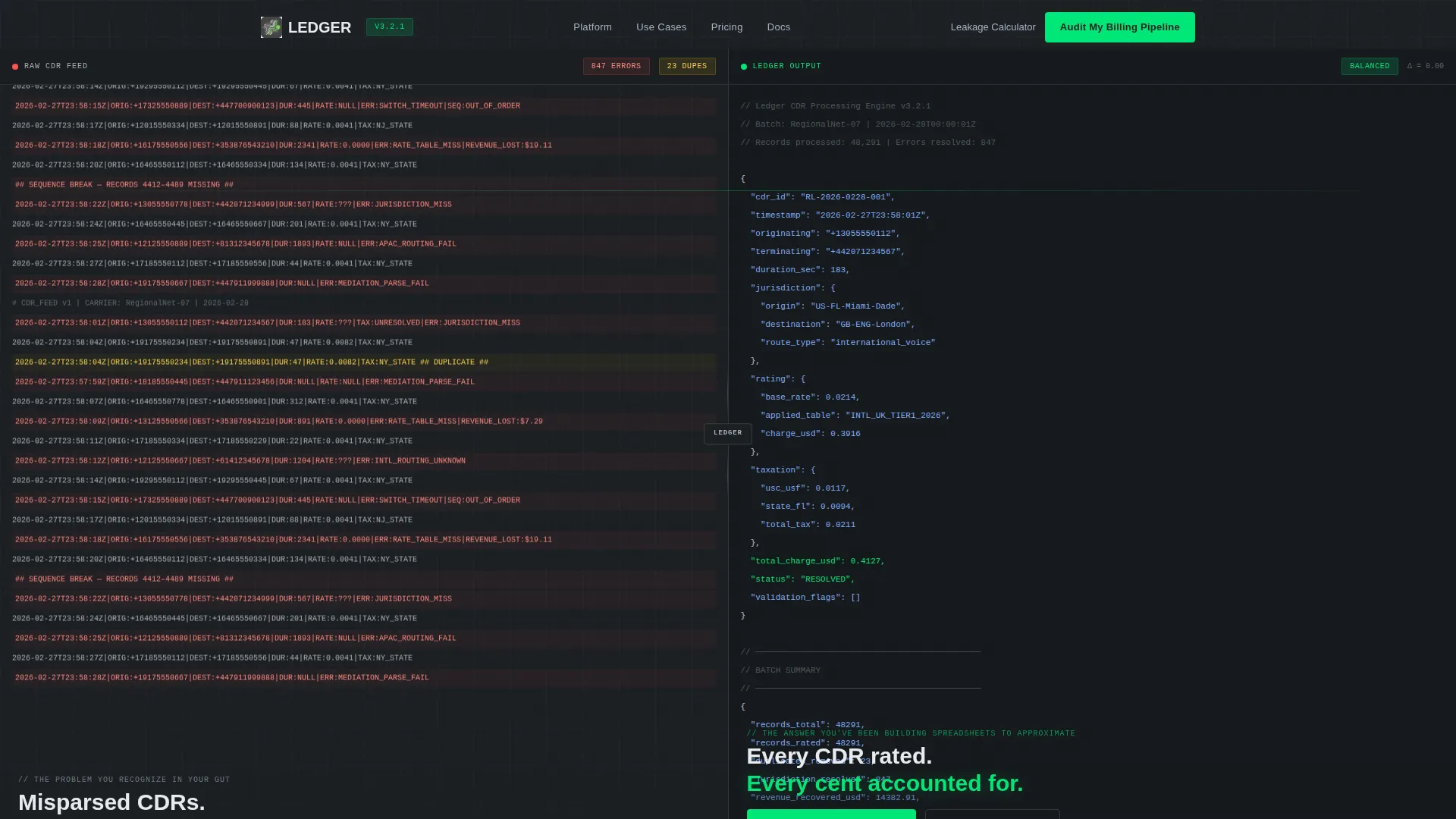
- A full-viewport split-screen header with a raw CDR feed panel on the left and a clean validated output panel on the right
- A progressive three-step lead capture form plus a secondary mid-page gated download path for earlier-stage visitors
- Sections covering revenue leakage quantification, legacy pipeline comparison, per-pain-point product showcases, and a final resolution call to action
Feature list
This section covers the core capabilities built into the Ledger template layout.
Split-Screen Header with Live Data Panels
The header occupies the full viewport and divides into two equal panels. The left side displays a raw CDR feed in monospaced Fira Code font, with misaligned fields, muted red error flags at 40 percent opacity, out-of-sequence timestamps, and flickering duplicate records. The right side shows the same data after processing: clean JSON output, every field validated, rated, and tax-applied, with the resolved total rendered in signal green.
Animated Revenue Leakage Counter
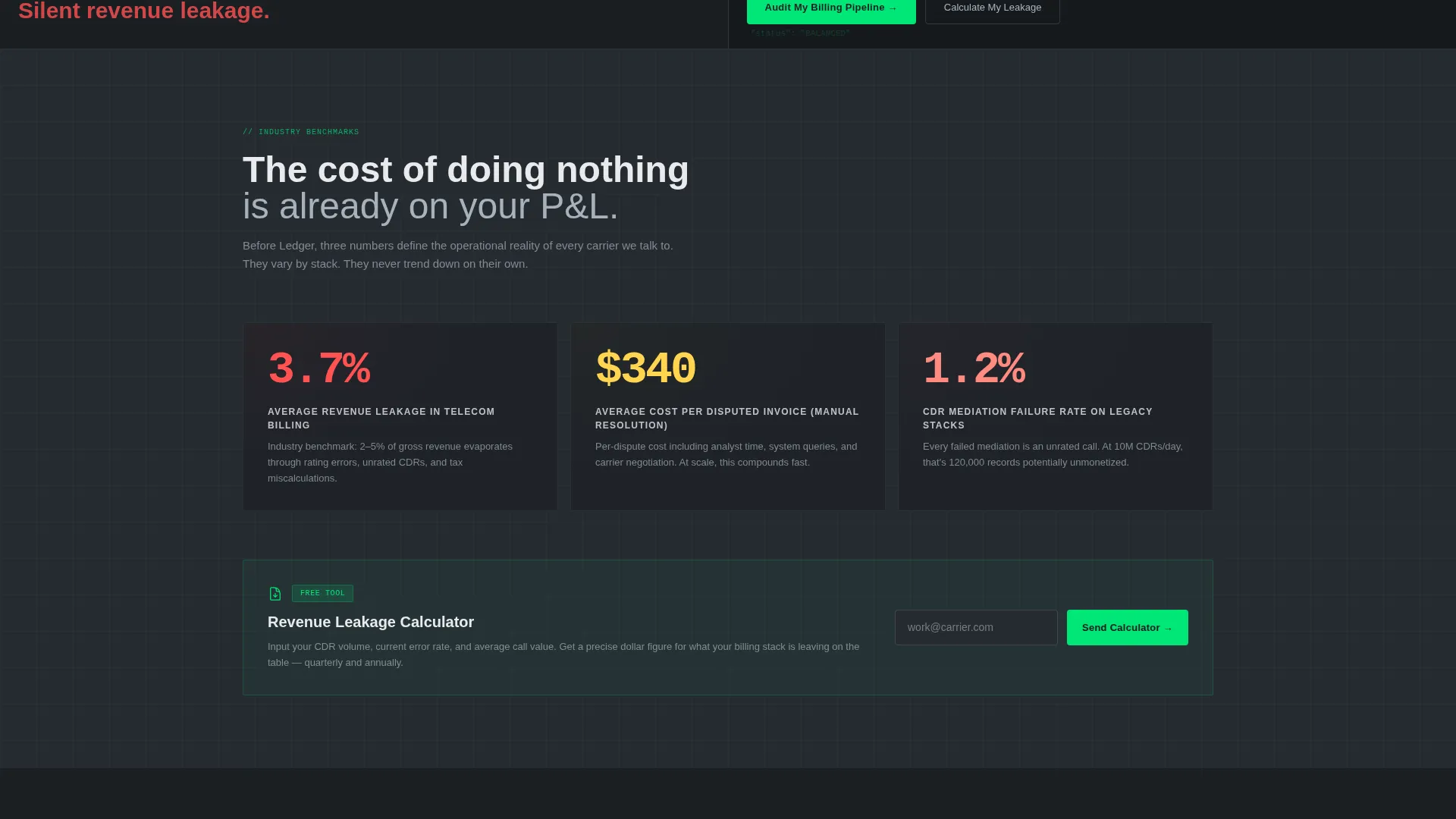
Section two features an animated counter that ticks upward through industry-average revenue leakage percentages. This component quantifies the cost of billing errors visually before the solution is introduced, making the stakes concrete and urgent for CFOs and revenue assurance leads.
Legacy versus. Unified Pipeline Diagram
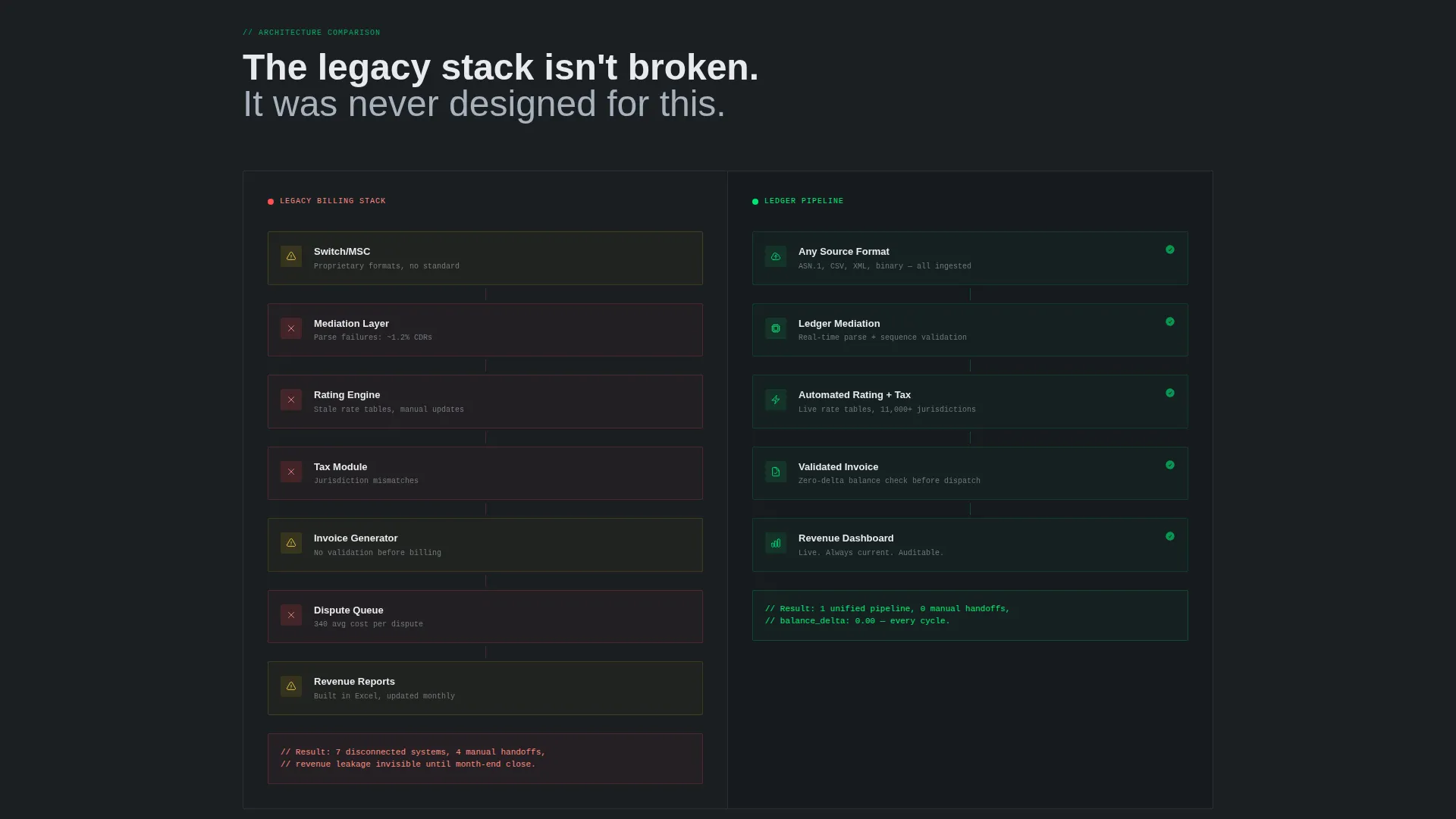
Section three uses another 50/50 split. The left panel renders a tangled workflow diagram of a legacy billing stack, showing mediation, rating, taxation, invoice generation, and dispute handling as disconnected components. The right panel collapses the same workflow into a single clean pipeline, communicating the platform's consolidation value at a glance.
Per-Pain-Point Solution Sections
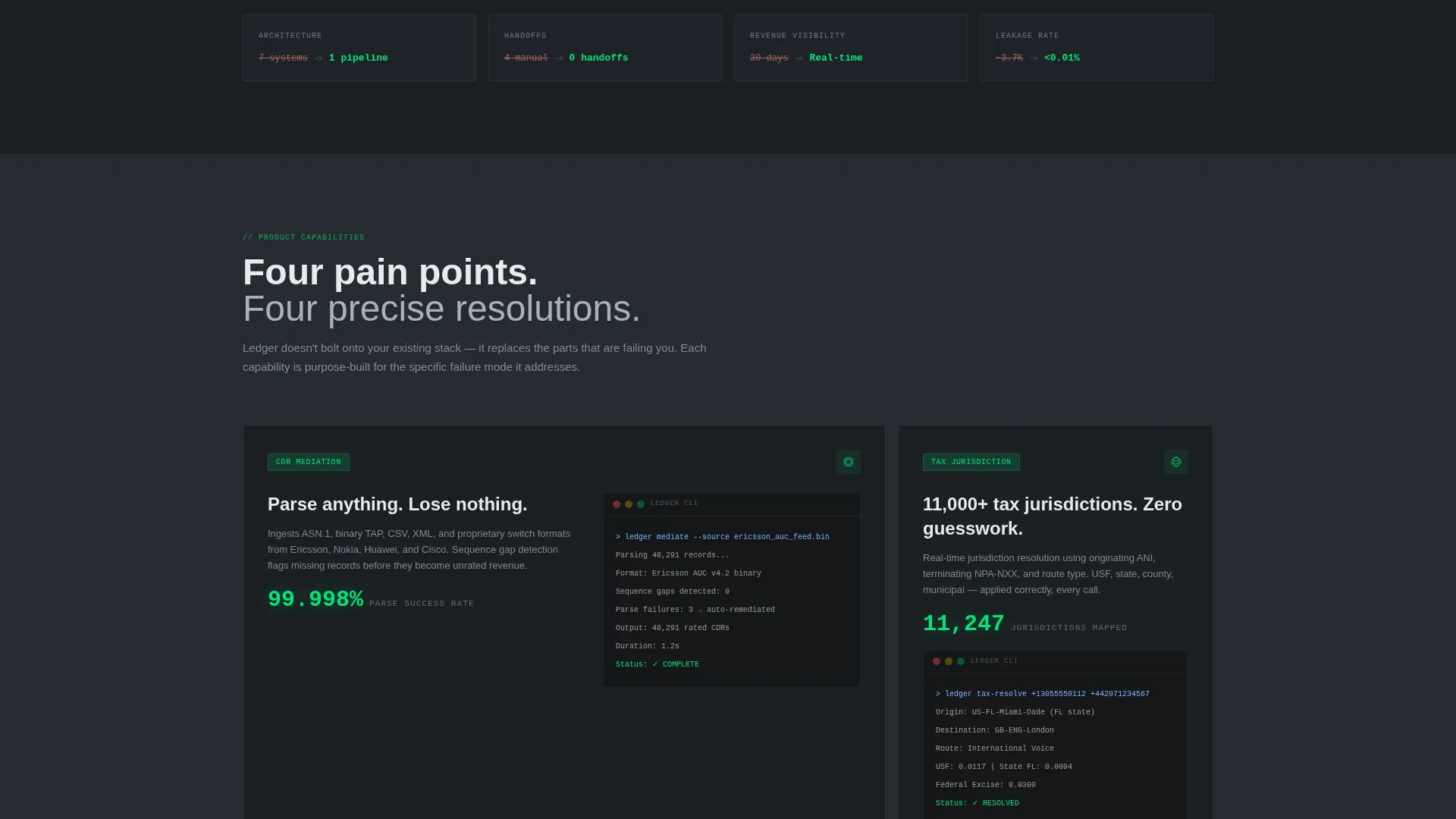
Each subsequent section isolates one billing failure, such as CDR mediation errors, tax jurisdiction mismatches, or late invoice disputes, and pairs it with a live interface screenshot showing the product capability that resolves it. The escalating structure keeps technically fluent readers engaged through the full scroll.
Progressive Three-Step Lead Form
The primary conversion form is a micro-flow built across three steps. Step one captures subscriber volume range via a dropdown. Step two collects the most urgent billing pain point via checkboxes. Step three asks for name, company, and work email. This staged approach reduces friction and improves lead qualification.
Secondary Gated Download Path
A mid-page secondary conversion block offers a gated PDF described as a Revenue Leakage Calculator. It captures email only, giving early-stage visitors a lower-commitment entry point while keeping the primary call to action reserved for high-intent prospects.
Page sections overview
| Section | Purpose |
|---|---|
| Split-Screen Header | Show raw versus. resolved CDR data side by side |
| Revenue Leakage Counter | Quantify the financial cost of billing errors |
| Legacy Pipeline Comparison | Contrast disconnected legacy stack with unified flow |
| CDR Mediation Section | Address CDR parsing failures with a product view |
| Tax Jurisdiction Section | Resolve tax mismatch pain with a capability showcase |
| Invoice Dispute Section | Show how late disputes are handled and closed |
| Gated Calculator Download | Capture mid-funnel emails with a low-commitment offer |
| Final Resolution call to action | Close the arc and prompt high-intent visitors to convert |
Design & branding system
The visual identity follows a Data Command theme built on a Monochrome Steel palette. Every color decision prioritizes legibility and signals operational precision rather than warmth or lifestyle.
- Core colors: deep gunmetal (#1B1F23) as the primary background, brushed chromium (#A8B2BD) for secondary surfaces and data table borders, cold white (#E8EAED) for all typography and cell values, and signal green (#00E676) used exclusively for success states, resolved totals, and call-to-action buttons
- Section backgrounds alternate between gunmetal and a slightly lifted charcoal (#262B31) to create visual depth without breaking monochrome discipline
- Typography uses monospaced Fira Code for all data panel content, giving the raw and processed feed panels an authentic terminal aesthetic that resonates with technically fluent buyers
Mobile & speed optimization
The template is structured with a single-page, section-led scroll flow that keeps layout complexity manageable across screen sizes. The split-screen panels are the most layout-intensive elements and are designed to restack cleanly on narrower viewports.
- The 50/50 split sections are built to collapse into single-column stacks on mobile, preserving the problem-solution narrative in a vertical scroll format
- The progressive lead form is a lightweight three-step micro-flow that avoids loading a long single form, keeping the interaction smooth on touch devices
How this template helps you convert
The entire page is engineered around a single conversion goal: generating qualified leads from technically sophisticated telecom buyers. Every structural decision supports that outcome.
- The split-screen header creates immediate recognition for visitors who know CDR chaos firsthand, earning attention before a single claim is made in prose
- The escalating Problem to Solution arc deepens engagement section by section, so by the time the primary call-to-action appears, the visitor has seen their specific pain addressed and resolved
- The two-path conversion structure, a progressive form for high-intent prospects and a gated calculator for earlier-stage visitors, maximizes capture across different buyer readiness levels
Other information about this template
Ledger is purpose-built for the telecommunications billing and invoicing niche, where generic SaaS templates consistently underperform. A few additional details worth noting:
- The template style is classified as Split Screen (50/50), making the side-by-side data contrast the primary storytelling mechanism throughout the entire page
- The header concept is Code Snippet, meaning the opening visual is raw and processed data in a terminal-style environment, not an illustration or hero image
- The lead generation direction is reinforced by a persistent top navigation call-to-action reading "Audit My Billing Pipeline," ensuring the conversion path is always visible
- This template fits within the Technology category and the Telecommunications Software and SaaS subcategory, making it suitable for platforms serving regional carriers, MVNOs, and tier-two telcos
Theme
Data Command
Creative direction
Problem→Solution Arc
Color system
Monochrome Steel
Style
Split Screen (50/50)
Direction
Lead Generation
Page Sections
Split-screen CDR Data Header
Animated Revenue Leakage Counter
Legacy Versus. Unified Pipeline Diagram
Per-pain-point Solution Sections
Progressive Three-step Lead Form
Mid-page Gated Calculator Download
Related questions
Who is this landing page template designed for?
Does this template include two different conversion paths?
What does the split-screen header actually show?
How many sections does this landing page template include?
Can this template work for a telecom platform with a different billing focus?



