Trade Finance Landing Page Template
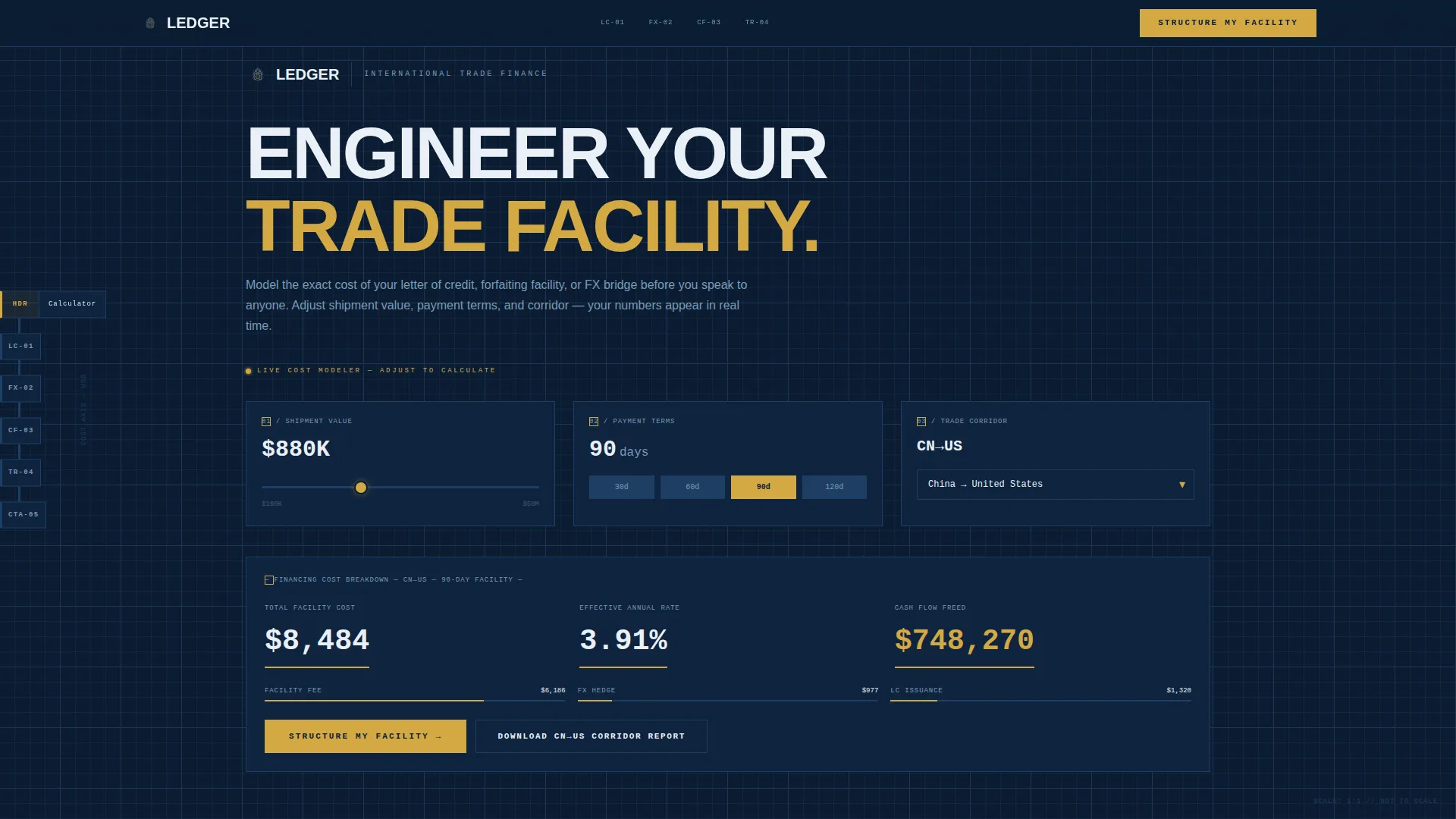
Ledger is a hub-and-spoke landing page template built for international trade finance firms. It opens with a live cost-estimator tool as the header, guides visitors through blueprint-styled sections via a fixed vertical navigation, and drives action with a primary "Structure My Facility" call to action. Every design decision serves credibility, clarity, and conversion for mid-market CFOs managing cross-border cargo finance.
by Rocket studio
Quick summary
Ledger is a precision-engineered landing page template for international trade finance firms. It leads with an interactive financing cost estimator, uses an Engineering Blueprint visual theme, and structures the page as a hub-and-spoke navigation flow. The result feels like a detailed technical schematic: authoritative, data-forward, and purpose-built to move serious buyers toward a funded facility.
Who this template is for
This template is built for firms that structure trade finance products for importers and exporters operating across multiple trade corridors. It suits businesses that need to signal technical depth and institutional confidence to sophisticated financial buyers.
- Trade finance firms offering letters of credit, forfaiting, or receivables financing
- Financial services firms targeting mid-market CFOs managing $20M to $200M in annual imports
- Cross-border cargo finance businesses that need a credibility-first, tool-led landing page
What problem this template solves
Mid-market CFOs evaluating trade finance providers arrive skeptical. They want numbers, not promises. Standard landing pages with hero images and vague benefit statements fail to hold their attention or earn their trust.
- Visitors leave before they see proof of capability or understand cost structure
- Generic financial services templates lack the technical gravitas that institutional buyers expect
- There is no mechanism to qualify leads before they reach the contact form
What you get with this template
You get a fully designed, section-structured landing page that puts a working cost estimator front and center. Every section is built around data-first presentation, reinforcing credibility at each scroll point.
- A live trade finance cost modeler in the header, with inputs for shipment value, payment terms, and trade corridor
- A fixed vertical hub navigation with alphanumeric spoke codes that expand on hover to reveal full section names
- Stats-first scroll transitions, a primary "Structure My Facility" call to action, and a secondary lead-capture path tied to the estimator output
Feature list
This section covers the core capabilities built into the Ledger template based on its design and structural brief.
Interactive Financing Cost Estimator
The header replaces a traditional hero image with a functional cost modeler. Visitors input shipment value via a slider from $100K to $50M, select payment terms of 30, 60, 90, or 120 days, and choose a trade corridor from a dropdown of the top 20 global trade lanes. The estimator renders a real-time financing cost breakdown showing total facility cost, effective annual rate, and cash-flow-freed in large signal-white numerals with amber underlines.
Fixed Hub-and-Spoke Navigation
A vertical spoke diagram stays fixed on the left as visitors scroll. Each node carries a blueprint-style alphanumeric code such as LC-01, FX-02, or CF-03. On hover, nodes expand to reveal the full section name, giving visitors an instant structural overview of the page and allowing them to jump directly to any section.
Stats-First Scroll Architecture
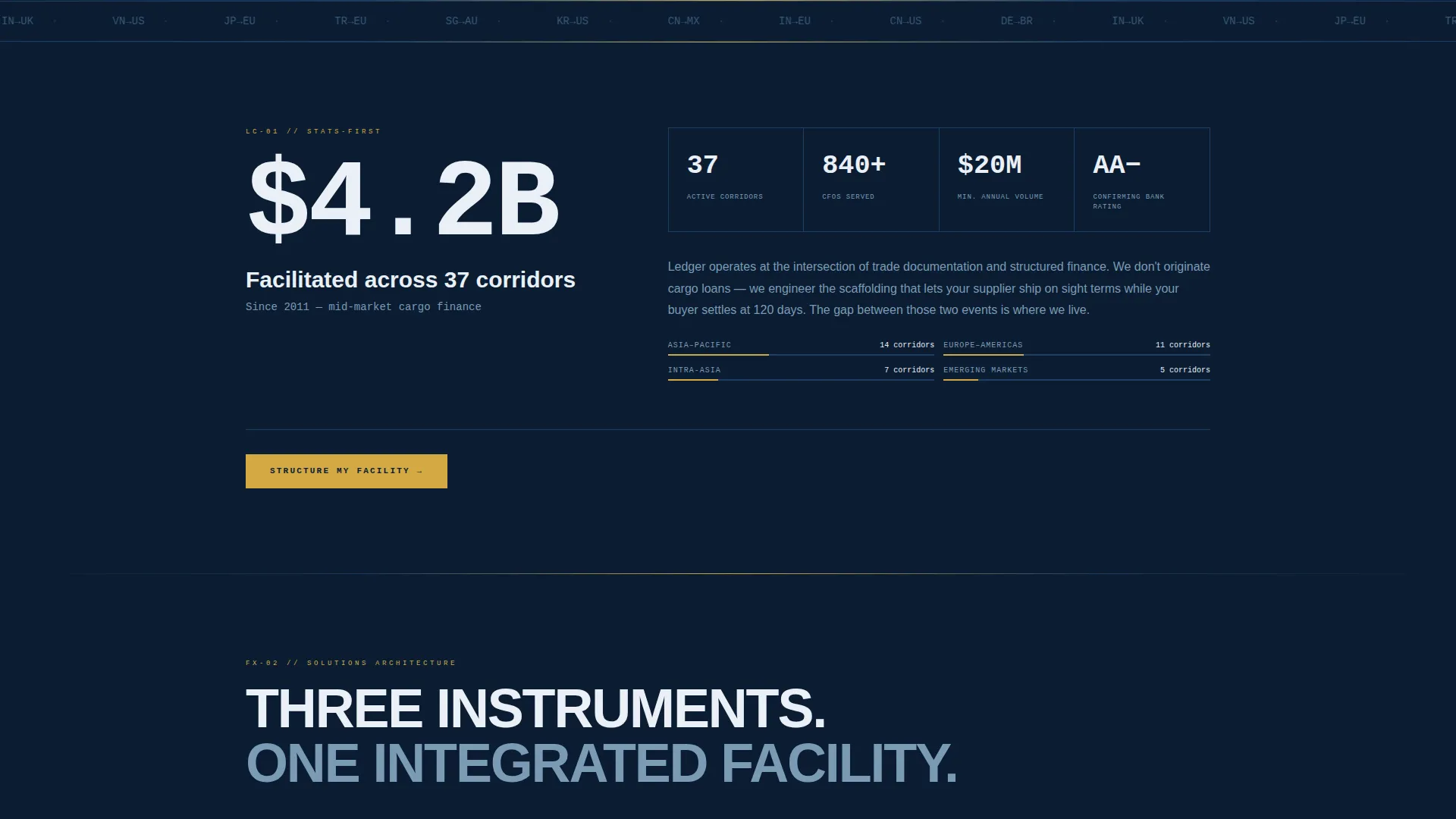
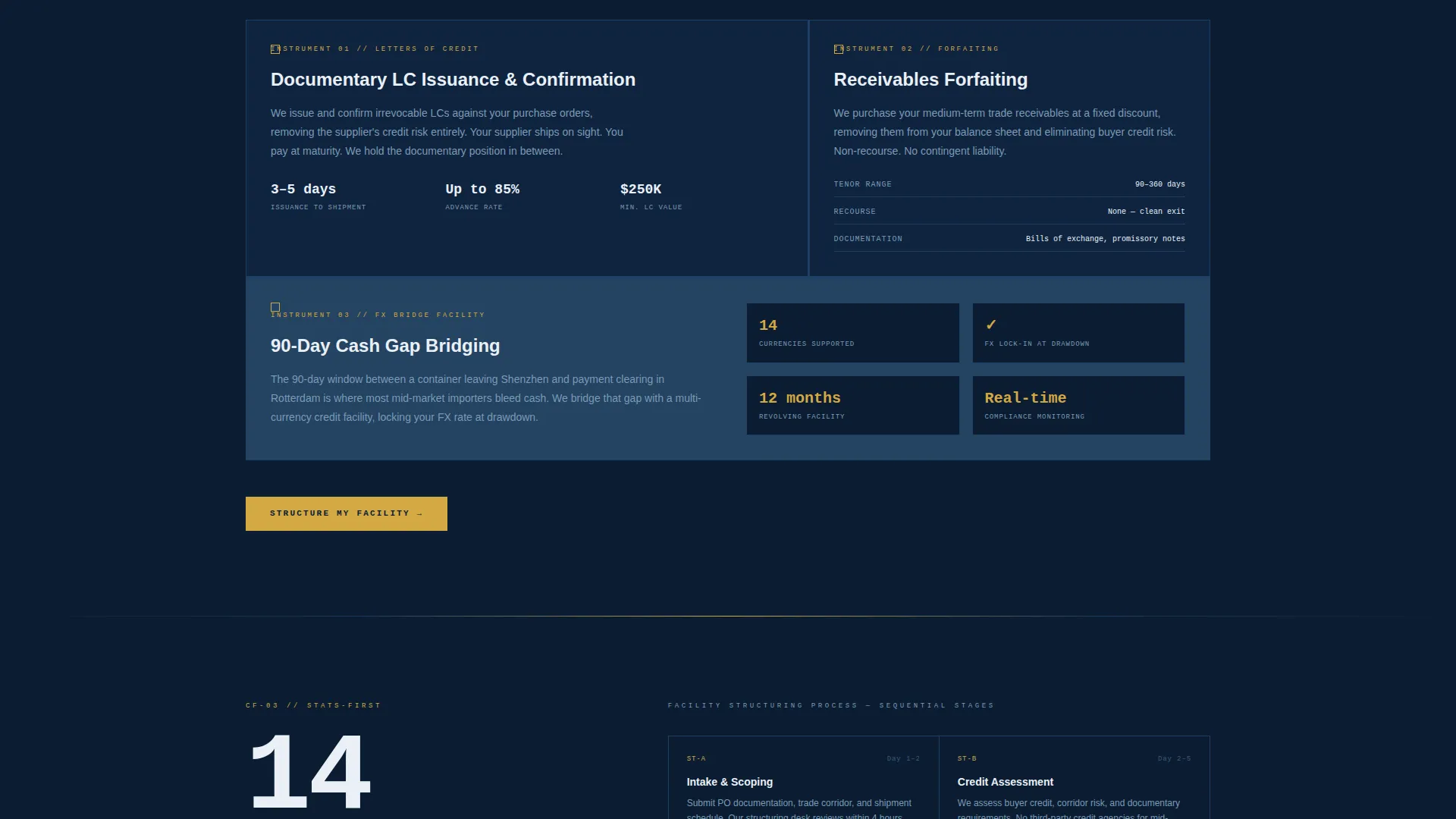
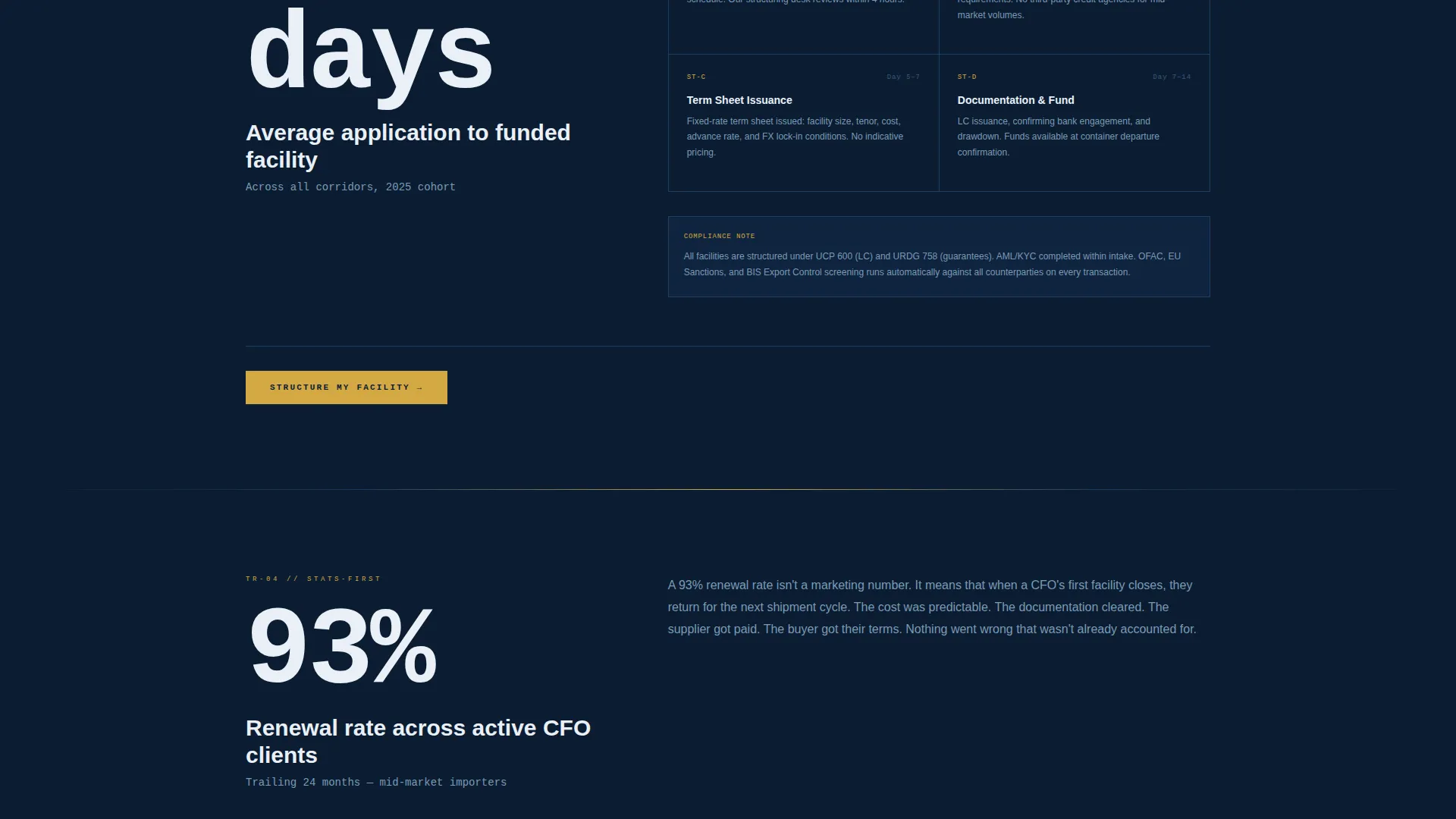
Every major section opens with a single oversized statistic before any explanatory copy appears. Key figures such as "$4.2B facilitated across 37 corridors", "14-day average from application to funded facility", and "93% renewal rate" anchor each scroll transition, building cumulative trust through data before narrative.
Recurring Amber call to action Placement
The primary call to action "Structure My Facility" appears first beneath the calculator output and recurs at each spoke section's conclusion. This creates a consistent, low-friction conversion path without overwhelming the page design.
Corridor-Specific Lead Capture
A secondary conversion path lets visitors download a corridor-specific rate report. The download is gated by email input and tied to the trade lane selected in the header estimator. This turns the tool into a lead-qualifying filter before the visitor ever navigates away.
Engineering Blueprint Visual System
The entire page is built around a Navy Authority color palette with a blueprint-grid aesthetic. Section dividers, diagram lines, and layout geometry reinforce the technical schematic feel throughout the scroll experience.
Page sections overview
| Section | Purpose |
|---|---|
| Header Cost Estimator | Opens the page with an interactive trade finance cost modeler |
| Credibility Stats Block | Anchors authority with oversized facilitated-volume figures |
| Process Timeline Spoke | Explains application-to-funded steps with a 14-day benchmark |
| Trust and Renewal Spoke | Presents the 93% renewal rate and client confidence data |
| Letters of Credit Spoke | Details structured letter-of-credit financing capabilities |
| Receivables Forfaiting Spoke | Covers receivables and forfaiting product scope |
| Cash Flow Bridge Spoke | Addresses the 90-day payment gap and corridor-specific solutions |
| Corridor Report Capture | Secondary lead form tied to the selected trade lane |
| Recurring call to action Sections | Repeats "Structure My Facility" at each spoke conclusion |
Design & branding system
The Ledger template uses a Navy Authority color system built around the visual language of a cargo vessel's bridge instruments at night. Every color serves a functional role, not a decorative one.
- Deep admiralty navy (#0B1D33) as the primary background, technical grid blue (#1B3A5C) for section dividers and diagram lines, and bright signal white (#EAF0F7) for all typography and data callouts
- Precision amber (#D4A843) is reserved exclusively for interactive elements, active navigation states, and call-to-action buttons
- The typography and grid geometry follow an Engineering Blueprint theme, with blueprint-gridded backgrounds in the header and consistent alphanumeric labeling throughout the spoke navigation
Mobile & speed optimization
The template is designed so that the hub-and-spoke structure and cost estimator translate cleanly across screen sizes. The fixed vertical navigation adapts to smaller viewports without losing its functional clarity.
- The estimator inputs, slider controls, and dropdown selections are touch-friendly and sized for accurate interaction on mobile screens
- Oversized statistic callouts and the amber call to action buttons remain prominent and readable at all breakpoints
- Section transitions and the spoke navigation collapse gracefully on smaller screens to preserve the scroll-through experience
How this template helps you convert
Ledger is built around a specific conversion philosophy: show the visitor their own numbers before asking them to act. This approach removes doubt at the moment it forms.
- The header estimator delivers a personalized cost breakdown immediately, so the visitor arrives at the first call to action with a specific figure already in mind rather than a vague promise
- The stats-first scroll architecture layers in institutional proof points at every section, replacing the need for marketing copy with data the visitor can evaluate directly
- The dual conversion path captures both high-intent buyers ready to apply and earlier-stage visitors willing to share their email in exchange for a corridor-specific rate report
Other information about this template
The Ledger template is designed specifically for the international trade finance niche within the broader logistics and supply chain sector. It fits firms operating across customs and trade corridors globally.
- The template style is a hub-and-spoke anchor navigation layout, making it suited for long-form, multi-spoke financial services landing pages
- The creative direction is Stats-First Impact, which aligns with how institutional buyers in trade finance evaluate providers
- The header concept is a Calculator/Estimator, a format that works particularly well for finance firms where showing a real cost upfront builds more trust than any headline could
- The landing page direction is Click-Through, routing visitors to a detailed application page via the primary call to action
- This template fits firms handling trade finance instruments including letters of credit (LC), foreign exchange (FX) exposure management, and cash flow (CF) gap financing across corridors such as China to United States, Germany to Brazil, and India to United Kingdom
Theme
Engineering Blueprint
Creative direction
Stats-First Impact
Color system
Navy Authority
Style
Hub & Spoke (Anchor Nav)
Direction
Click-Through
Page Sections
Interactive Trade Finance Cost Estimator
Fixed Hub-and-spoke Navigation
Stats-first Section Architecture
Recurring Contextual Call to Action Blocks
Corridor-specific Lead Capture Path
Engineering Blueprint Visual Theme
Related questions
Can I change the trade corridors listed in the estimator dropdown?
Does the estimator use real calculation logic out of the box?
Can I update the oversized statistics shown in each section?
Can I add more spoke sections to the hub navigation?
What type of firm is this landing page template built for?