Family First Accounting Study Guide Landing Page Template
Ledger is a warm, focused accounting study landing page built for students who study in stolen hours between family life and work. It guides CPA, ACCA, and university candidates through a four-step path from exam selection to a full resource library. The Electric Indigo color system and Family First theme make every scroll feel purposeful, personal, and close to done.
by Rocket studio
Quick summary
Ledger is a single-column flow landing page for accounting exam prep resources. It blends real study content with an emotionally grounded design so that busy students, parents, and career-changers feel supported from the first scroll. The page walks visitors through four clear steps and leads them toward a free chapter and flashcard download before asking for anything in return.
Who this template is for
This template is built for creators and educators who sell accounting study resources to time-pressured students. It works best when the audience balances serious study goals with real-world responsibilities.
- Second-year accounting majors preparing for intermediate university exams
- CPA and ACCA (Association of Chartered Certified Accountants) candidates who are also parents or career-changers
- Working adults who squeeze study sessions into commute windows and school-pickup gaps
What problem this template solves
Most accounting study pages feel clinical, overwhelming, or built for someone with unlimited time. This template solves the trust gap between a busy student and a resource they have never tried before. It gives real study value first, so visitors feel competent before they ever submit an email address.
- Students abandon pages that lead with a paywall before proving the content works
- Parents and career-changers need a page that respects their limited time and emotional load
- Generic study pages fail to address specific exams like FAR, AUD, REG, BEC, or university intermediate courses
What you get with this template
You get a ready-to-customise single-column landing page structured around a guided scroll experience. Every section is intentional, moving the visitor from curiosity to confidence to conversion without distraction.
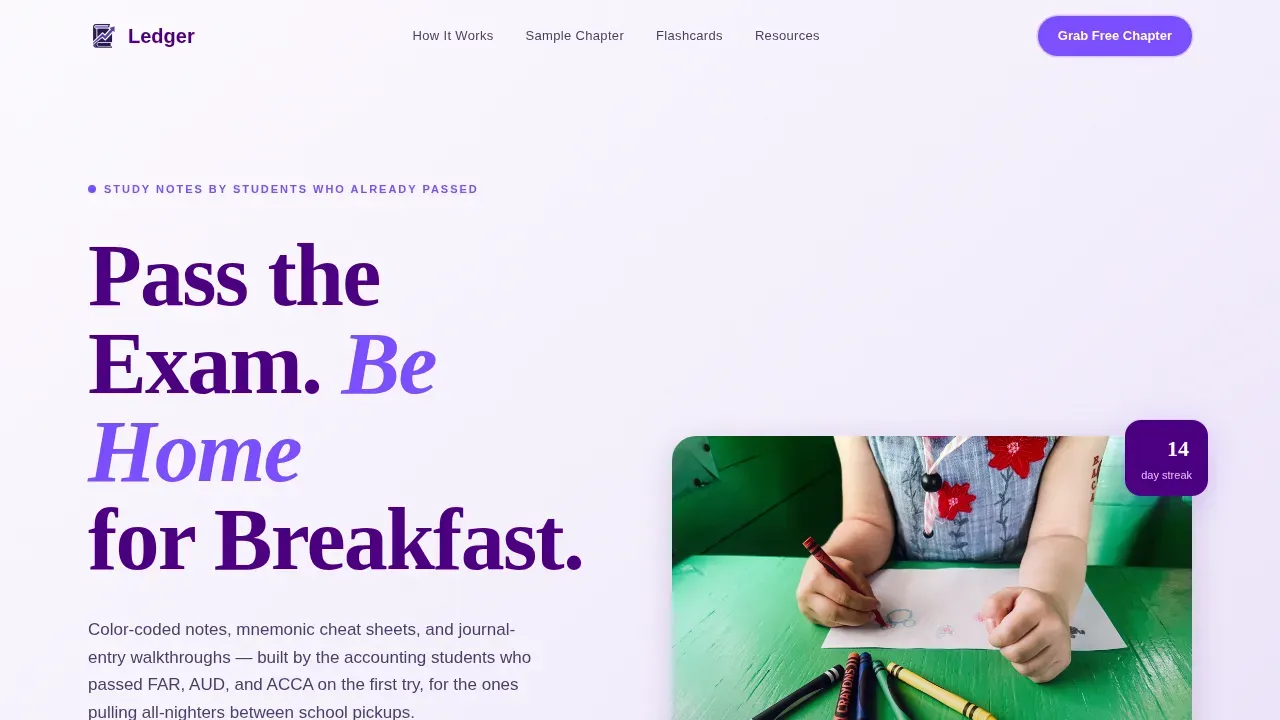
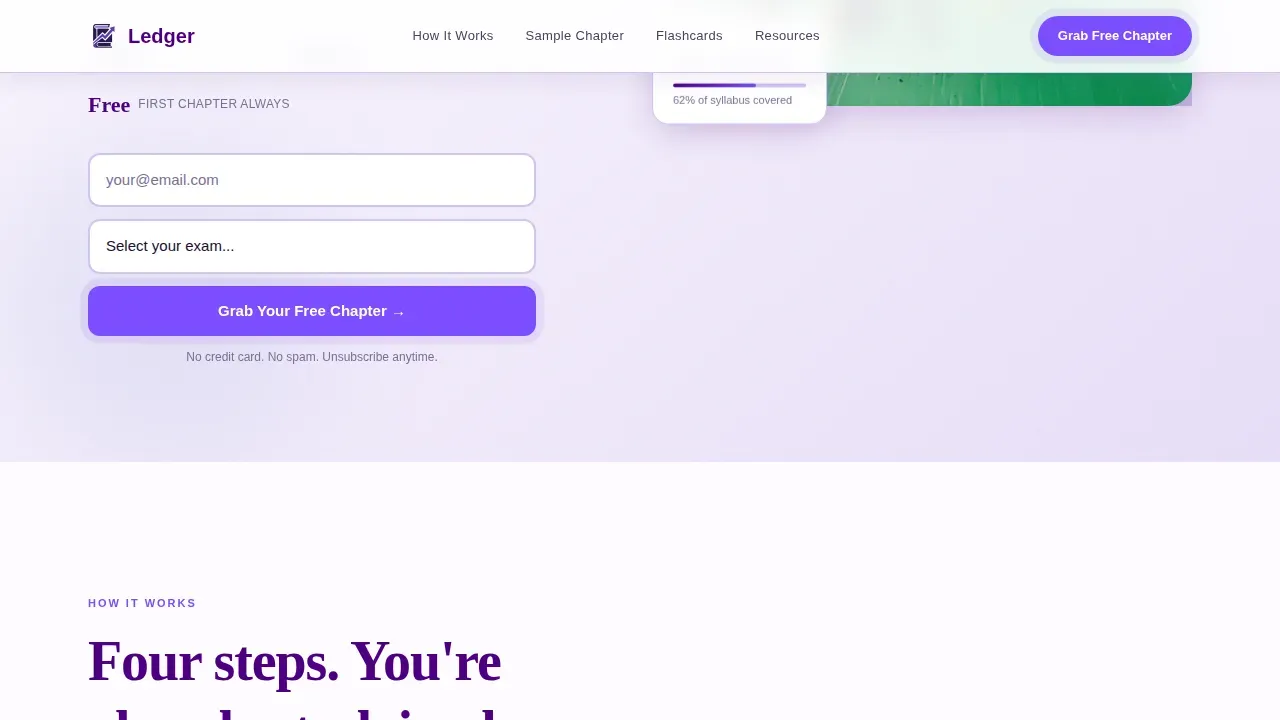
- A half-page hero with a bold headline, warm photography, and a focused email-capture form with an exam-selector dropdown
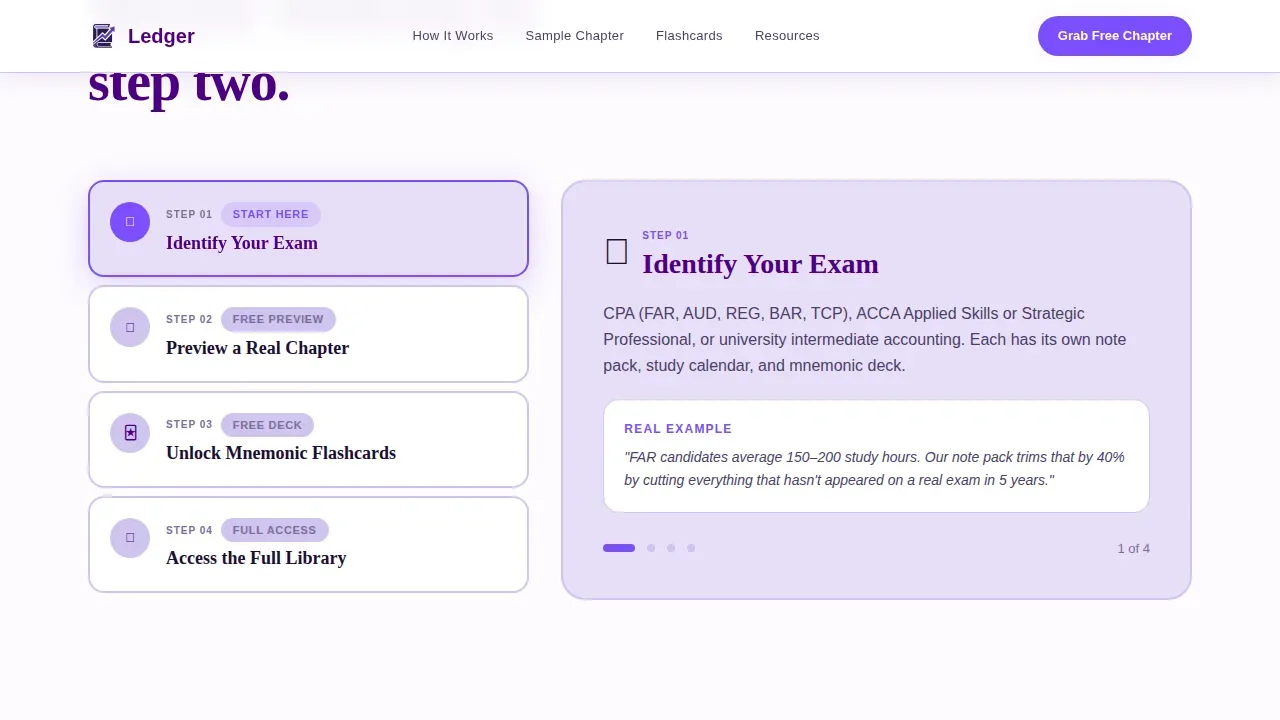
- A four-step interactive guide section that walks visitors through exam identification, content preview, flashcard unlock, and the full resource library
- A social proof section, a resource library block with a secondary call to action, and a horizontal-flow footer
Feature list
A brief introduction to the core capabilities built into this template. Each feature below reflects a deliberate design and content decision grounded in the Family First theme and the needs of accounting students.
Four-Step Interactive Study Path
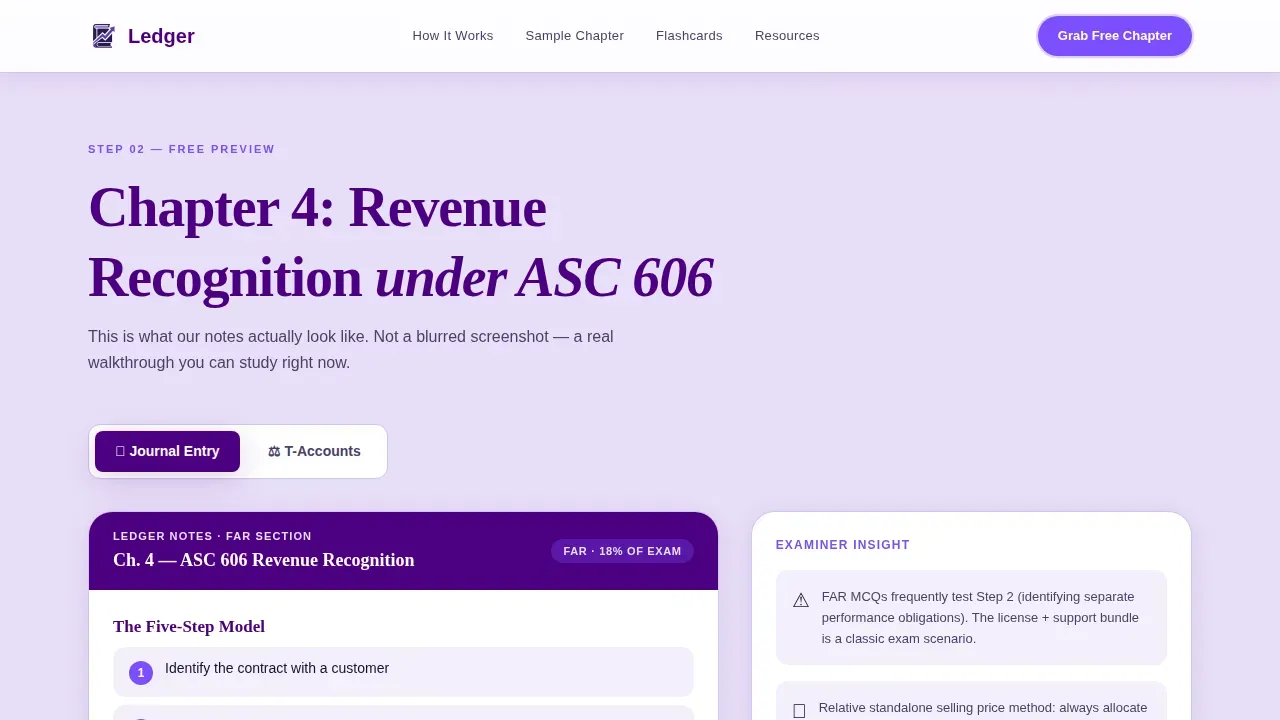
The template's centerpiece is a numbered guide that moves visitors through four distinct steps. Step one asks them to identify their exam. Step two previews a sample chapter with journal entry walkthroughs and interactive T-account diagrams. Step three unlocks a free mnemonic flashcard deck. Step four presents the full resource library. Each step builds genuine confidence and keeps visitors engaged rather than passive.
Hero with Email Capture and Exam Selector
The front page opens with a half-page photo and text composition. A bold, left-aligned headline sits beside a warm photograph of a parent studying at a kitchen table. A single email field and an exam-selector dropdown serve as the primary call to action. The form keeps fields minimal so visitors are not discouraged from signing up.
Interactive T-Account and Journal Entry Preview
The sample content section lets visitors interact with real accounting material before committing. T-account diagrams respond to hover interactions, and journal entry walkthroughs show an account number, a transaction date, a transaction amount, and a clear description. Visitors practice tracking debit and credit entries in context, which builds trust in the resource immediately.
Student Testimonials with Specificity
The social proof section displays testimonials that include the exam section passed, the pass date, and the number of study hours saved. These authority signals give prospective students a clear, credible picture of what the resource delivers. Real, specific testimonials outperform generic praise and help visitors make informed decisions faster.
Secondary Flashcard Download Path
Below the main conversion point, a secondary call to action offers a free flashcard pack download. This path serves visitors who want a quicker win before committing to the full chapter. It lowers the barrier to entry and keeps more visitors moving toward the resource library.
Horizontal-Flow Footer
The footer follows a clean horizontal-flow pattern that anchors the page without cluttering the scroll experience. It provides the final structural close to the single-column layout and keeps the visitor's attention on content rather than navigation.
Page sections overview
| Section | Purpose |
|---|---|
| Hero with email capture | Introduces the headline, warm imagery, and primary call to action with exam selector |
| Four-step guide | Walks visitors through exam selection, content preview, flashcard unlock, and library access |
| Sample content preview | Delivers interactive T-account and journal entry practice to prove study value |
| Student testimonials | Provides specific social proof with exam section, pass date, and hours saved |
| Resource library block | Presents the full resource collection and secondary flashcard download call to action |
| Horizontal-flow footer | Closes the page with a clean, distraction-free structural anchor |
Design & branding system
The Electric Indigo color system carries the Family First theme throughout every section. The palette is deliberately warm rather than corporate, designed to feel like the glow of a laptop screen in a quiet house after the family has gone to bed.
- Deep indigo (#4B0082) anchors headers and navigation; soft iris (#5C6BC0) tints section backgrounds; warm lavender (#E8DEF8) creates breathing room as the base color; bright violet (#7C4DFF) highlights buttons and progress indicators
- Fraunces serif typeface drives headlines for warmth and academic credibility; DM Sans handles body text for clean, readable scanning on any screen
- Photography direction is table-lamp warm, showing a parent's hand on an open accounting textbook with a child's crayon drawing at the edge of the frame
Mobile & speed optimization
The template is built mobile-first because accounting students study on phones during commutes, school pickups, and lunch breaks. Every section is designed for readability and usability on small screens before scaling up to desktop.
- Scroll-reveal word animations and staggered card reveals are set to medium intensity so they feel purposeful without slowing down the reading experience
- Interactive elements including the step selector, T-account hover diagrams, and exam dropdown are built as client-side components while static sections use server-rendered markup for faster initial load
- The lead form uses only a name field, an email field, and an exam-selector dropdown to keep friction low and conversion rates high on mobile
How this template helps you convert
This template earns the click by delivering genuine study value before asking for anything. Visitors leave every section feeling more capable than when they entered it, which creates the kind of trust that converts.
- The hero's action-oriented headline addresses the student's core pain point immediately, and the focused high-contrast call-to-action button stands out clearly against the lavender background
- The four-step guide turns passive scrolling into active studying, so by the time a visitor reaches the email form at Step 3, they have already used the resource and experienced its value firsthand
- Specific student testimonials, including pass dates and study hours saved, act as credibility indicators that reduce doubt and move hesitant visitors toward submitting their email
Other information about this template
This is the Ledger Family First accounting study guide landing page template, a purpose-built single-column page for accounting education creators who need to convert busy, time-pressured students into subscribers. The template bridges the gap between complex accounting principles and practical application by presenting study content in a warm, guided format.
Understanding how a general ledger works is central to the study resources this page promotes. A general ledger is the main accounting record that contains all financial transactions for a business. It holds all the accounts that will appear on financial statements at the end of an accounting period. The general ledger must balance, meaning total debits must equal total credits. It serves as the basis for generating financial statements such as the income statement and balance sheet.
The general ledger template concept explored in the study guide teaches students that a general ledger template is a master sheet of all a business's accounting. A well-structured general ledger template includes the transaction date, description, journal reference, transaction amount, and debit and credit balances. The balance of an accounting ledger template reflects the difference of credits from debits. General ledger templates are optimised for generating accurate financial statements, analysing financial performance, and supporting sound bookkeeping practices.
The study content also covers the accounting cycle in depth. The accounting cycle consists of four steps: gathering source documents, posting journal entries, recording entries in the general ledger, and generating financial reports. Every journal entry includes an account number, a date, a dollar amount, and a description. You must first post your transactions in a general journal before posting them in a ledger. A full ledger details every single general ledger account so anyone can quickly see how much cash, revenue, or expenses flow through each category.
The general ledger includes data from subledgers such as accounts receivable, accounts payable, fixed assets, cash management, and purchasing. It holds the chart of accounts, which is a comprehensive list of all accounts used by the business, each with an account name and account type. Maintaining an accurate general ledger is crucial for understanding a business's financial health. Businesses use ledger accounts to accurately track changes to assets, owner's equity, credit balances, and account balances across every accounting period.
- This template suits small businesses and freelance accounting educators as well as exam-prep content creators
- A small business owner building a business ledger resource site will find the layout adaptable for financial accounting courses and bookkeeping guides
- The layout supports a business accounting system overview page with minor copy adjustments
- Reference numbers, account information, and journal reference fields are illustrated within the interactive sample section
- The template covers how to compare assets and liabilities, how to read credit transactions, and how to reconcile a trial balance
- Financial records, financial data, and financial information sections of the study guide are presented in a format that helps students gain insight into real-world business transactions
- The template can support content about financial status reporting and how to read overall financial health indicators such as the balance sheet and income statement
- Students preparing for tax returns questions in the CPA exam will find the ledger template examples directly relevant
- The comprehensive collection of notes, cheat sheets, and flashcard decks is framed as a comprehensive record of what students need to pass
Theme
Family First
Creative direction
Step-by-Step Guide
Color system
Electric Indigo
Style
Single Column Flow
Direction
Content/Resource
Page Sections
Four-step Interactive Study Path
Hero with Email Capture and Exam Selector
Interactive T-account and Journal Entry Preview
Specific Student Testimonials Block
Secondary Flashcard Download Call to Action
Electric Indigo Design and Typography System
Related questions
Who is this landing page template designed for?
What sections does this template include?
Can I adapt this template for a different accounting exam or course?
Does this template include the actual study content?
Why does the template use such a minimal lead form?



