Healthcare Software & SaaS Cost Calculator Website Template
Ledger is a hub-and-spoke healthcare billing landing page template built for revenue cycle teams who need to move fast. A Feature Tab Switcher hero, five anchor-nav spoke sections, and an inline recovery estimator work together to show billing professionals exactly what they gain, and what inaction costs, before asking for a single click.
by Rocket studio
Quick summary
Ledger is a single-page, anchor-nav landing page template for a healthcare billing and revenue cycle management platform. It pairs a live-mockup tab switcher hero with five deep comparison-grid sections, animated metrics, and an inline recovery estimator. The template is designed to drive qualified visitors toward a demo request with zero form friction.
Who this template is for
This template is built for teams and individuals who live inside the revenue cycle every day. If you manage claims at scale or watch reimbursement rates move in the wrong direction, this layout speaks your language directly.
- Billing managers at multi-provider practices handling large volumes of ERA (Electronic Remittance Advice) files daily
- Independent physicians who need a cleaner path through clearinghouse failures and payer rejections
- Revenue cycle directors at rural hospitals tracking denial rates and aging accounts receivable
What problem this template solves
Medical billing platforms are hard to sell on a page. The audience is skeptical, technically literate, and tired of vendor promises. Generic SaaS layouts do not earn trust from people who spend their days inside claim queues and payer portals.
- Buyers cannot quickly compare what the platform does versus their current manual or legacy workflow
- Animated, data-forward proof points are missing, so the cost of staying with a broken system never becomes real
- No mechanism exists on most pages to make the financial consequence of inaction personally visible before asking for a demo
What you get with this template
You get a fully structured, interactive landing page template built around the revenue cycle workflow. Every section is designed to move a billing professional from skepticism to action without overwhelming them with copy.
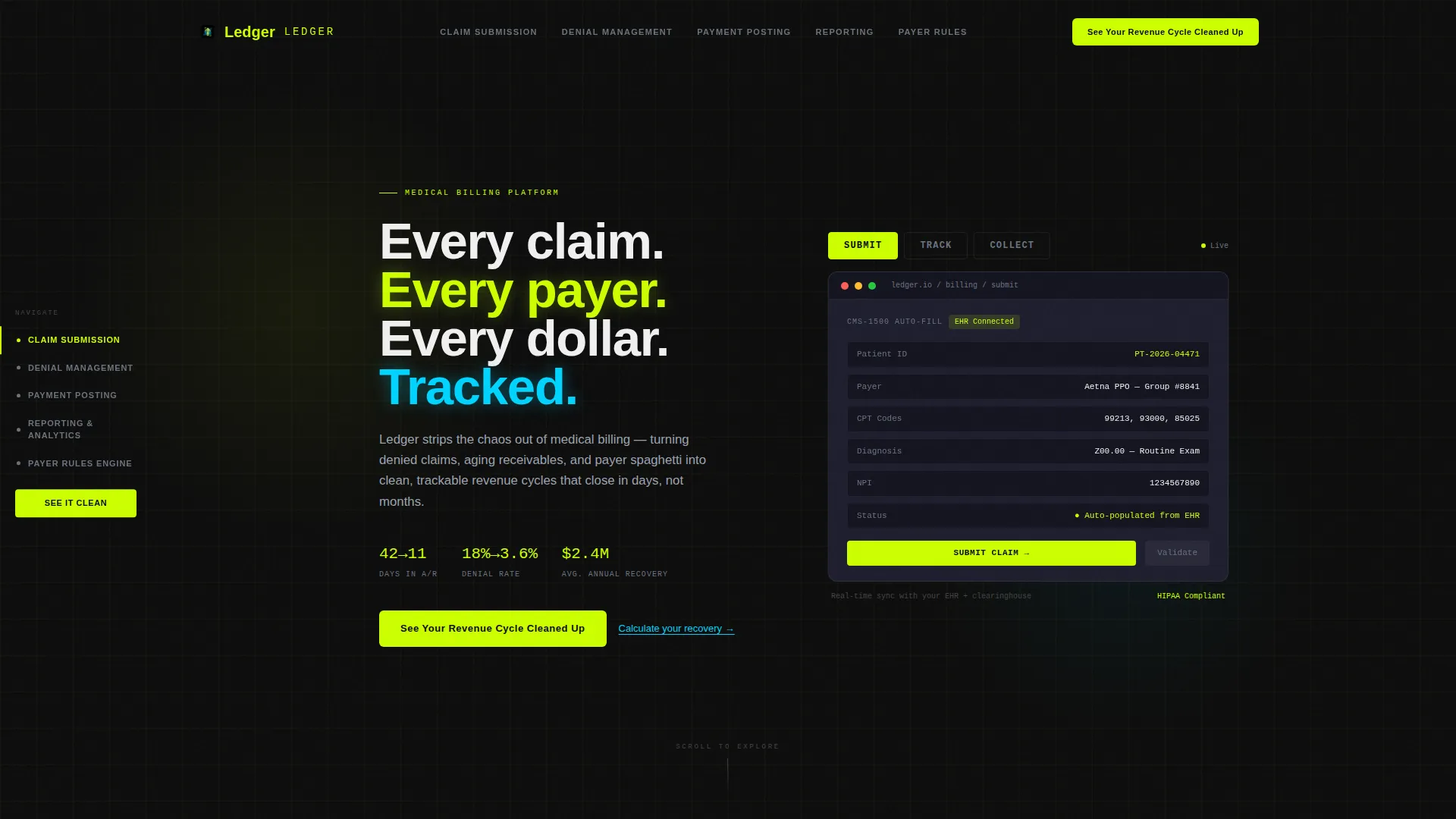
- A Feature Tab Switcher hero with three animated product mockup states: Submit, Track, and Collect
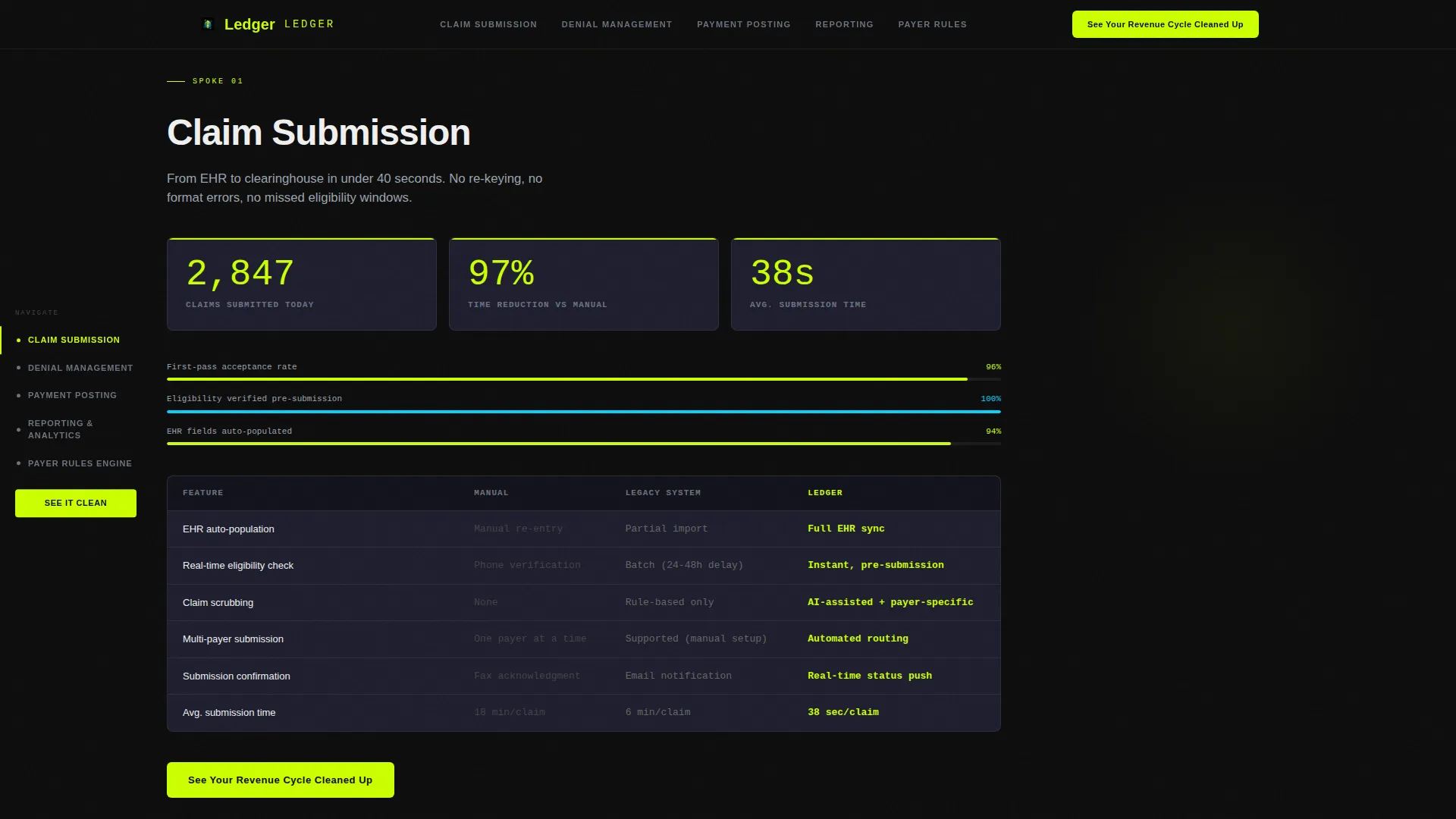
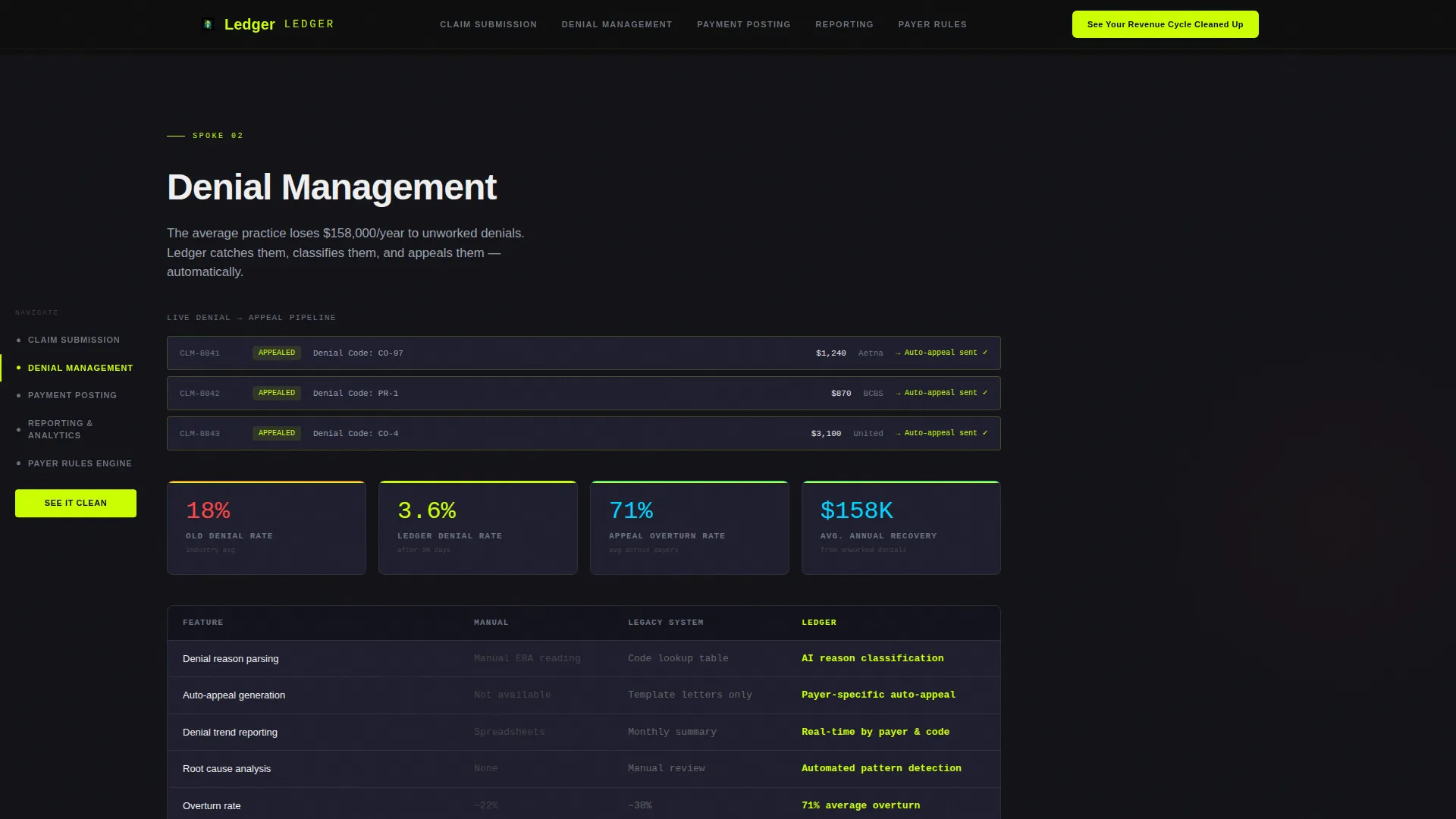
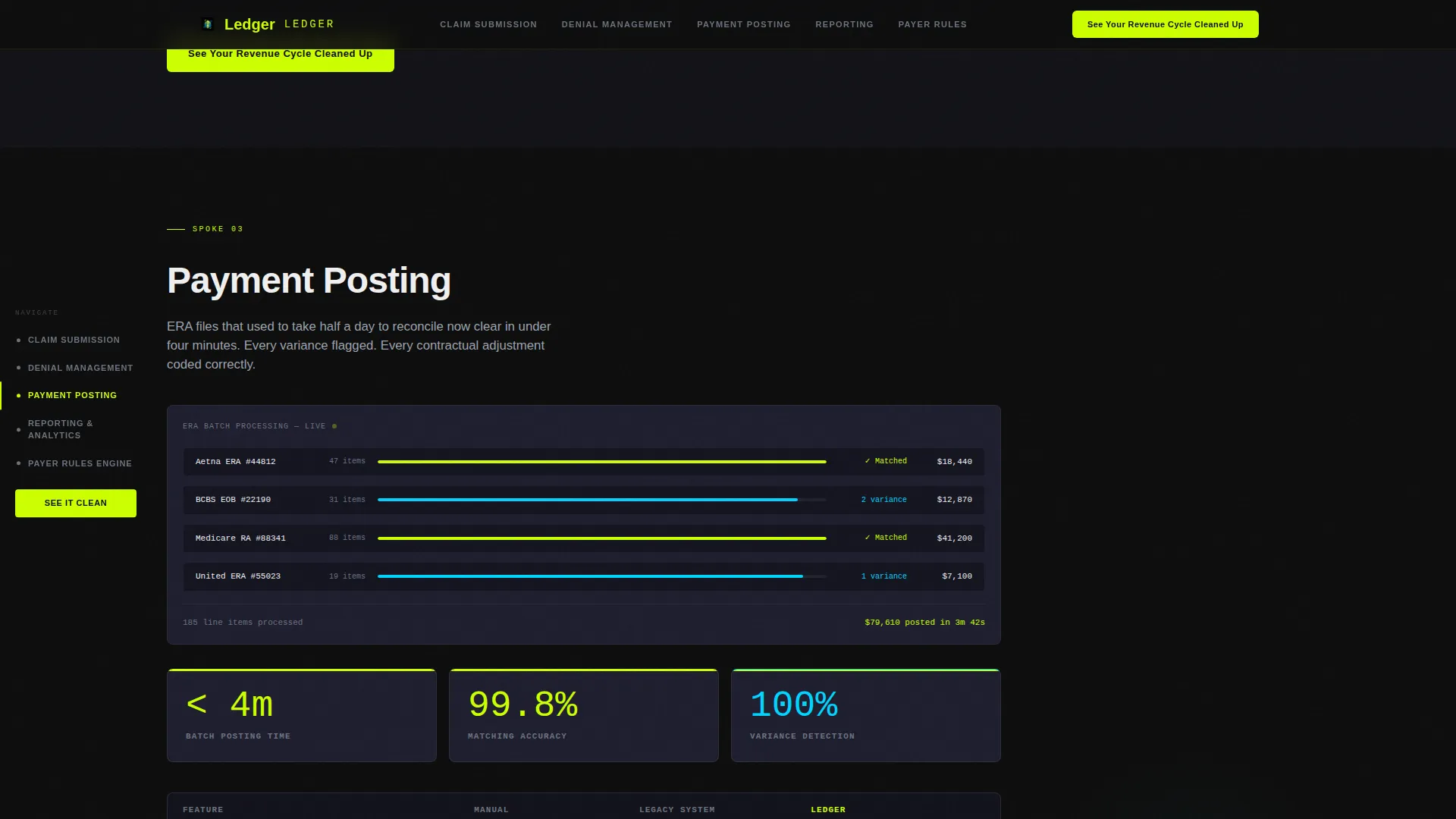
- Five spoke sections built as feature comparison grids, each with its own micro-animation and a persistent call-to-action button
- An inline recovery estimator that takes monthly claim volume and current denial rate as inputs, then outputs a projected annual recovery figure
Feature list
This template includes six core capabilities drawn directly from the source brief.
Animated Feature Tab Switcher Hero
The header contains three clickable tabs labeled Submit, Track, and Collect. Each tab triggers a spring-physics animated transition inside a live product mockup frame. Submit shows a claim form auto-populating, Track reveals a color-coded pipeline view, and Collect displays a real-time reconciliation dashboard.
Fixed Anchor Navigation with Five Spokes
A persistent left-side anchor navigation links to five spoke sections: Claim Submission, Denial Management, Payment Posting, Reporting and Analytics, and Payer Rules Engine. Visitors can jump directly to the capability most relevant to their role, keeping the page scannable for time-pressed billing professionals.
Feature Matrix Comparison Grids
Each spoke section uses a comparison grid with rows for individual features and three columns: Manual, Legacy System, and This Platform. Chartreuse checkmarks and animated count-up metrics visualize the performance gap, including accounts receivable days dropping from 42 to 11 and denial rate shrinking from 18 percent to 3.6 percent.
Inline Revenue Recovery Estimator
A secondary text link labeled "Calculate your recovery" opens a lightweight inline estimator. Users enter their monthly claim volume and current denial rate. The tool outputs a projected annual revenue recovery figure in phosphor blue, and the primary call-to-action label updates to reflect that specific dollar amount.
Per-Section Micro-Animations
Each spoke section carries its own motion treatment. Animations include data flowing across the screen, status bars filling, and denied claim cards flipping to an approved state. These touches reinforce the Dynamic Motion theme and keep the page from feeling static as visitors scroll.
Persistent Primary Call-to-Action
The call-to-action button labeled "See Your Revenue Cycle Cleaned Up" appears in the anchor navigation and repeats at the close of every spoke section. This pattern keeps the path to the demo always one click away without relying on a form on this page.
Page sections overview
| Section | Purpose |
|---|---|
| Hero Tab Switcher | Introduce the platform with three animated mockup states and the primary headline |
| Claim Submission Grid | Compare manual and legacy submission workflows against the platform using a feature matrix |
| Denial Management Grid | Show animated denial-to-approval flips and benchmark denial rate improvements |
| Payment Posting Grid | Display real-time reconciliation metrics and payment-to-line-item matching |
| Reporting and Analytics | Present count-up metrics and accounts receivable visualization with animated data |
| Payer Rules Engine | Cover payer compatibility features and host the inline recovery estimator |
| Footer | Single-row linear footer with navigation and closing call-to-action link |
Design & branding system
The visual identity follows an Acid Digital color system layered over a Dynamic Motion interaction framework. The result feels like a monitoring dashboard running at night, where every data point glows with purpose and the hierarchy is always clear.
- Electric chartreuse (#CCFF00) for primary action buttons, checkmarks, and data highlights; deep terminal black (#0D0D0D) for section backgrounds; clinical phosphor blue (#00D4FF) for secondary indicators, hover states, and the recovery estimator output
- Muted graphite (#1E2E2E) on card surfaces; pure white (#F0F0F0) for body text; monospace DM Mono for all data values; Plus Jakarta Sans for headings and paragraph copy
Mobile & speed optimization
This template is built desktop-first, matching the real working environment of billing managers and revenue cycle directors who operate at full-size workstations. The interaction layer uses native CSS scroll behavior for anchor navigation and GSAP for complex spring-physics animations and count-up sequences.
- Spring-physics easing via GSAP controls tab transitions and micro-animations so elements slide and settle with mechanical weight
- Native CSS scroll handles anchor-nav jumps without JavaScript overhead, keeping the spoke navigation smooth and reliable across modern browsers
How this template helps you convert
This landing page is structured as a click-through page with a single conversion goal: sending qualified visitors to a live product demo. Every design and content decision supports that outcome.
- The inline recovery estimator makes the cost of inaction numerically visible by producing a personalized revenue figure before the visitor is ever asked to click through, shifting the call-to-action from a generic prompt to a specific dollar amount tied to their own practice data.
- The persistent anchor navigation and per-section call-to-action repetition mean a billing professional who finishes reading any single spoke section always has an immediate, low-friction path to the demo without scrolling back to the top.
Other information about this template
This template is suited for revenue cycle management platforms, medical billing software providers, and healthcare SaaS companies targeting the United States market. All date formats follow the MM/DD/YYYY convention and all currency outputs use USD.
- The page is localized for USA billing workflows, using familiar terminology such as ERA files, accounts receivable days, denial rates, and payer rules
- Typography combines Plus Jakarta Sans for readable heading hierarchy with DM Mono for monospace data display, reinforcing the terminal-dashboard aesthetic throughout
- The footer uses a linear single-row pattern, keeping the closing section clean and uncluttered so the final call-to-action remains the dominant visual element
Theme
Dynamic Motion
Creative direction
Feature Matrix
Color system
Acid Digital
Style
Hub & Spoke (Anchor Nav)
Direction
Click-Through
Page Sections
Animated Tab Switcher Hero
Fixed Anchor Navigation
Feature Matrix Comparison Grids
Inline Revenue Recovery Estimator
Per-section Micro-animations
Persistent Primary Call-to-action
Related questions
Does this template include a contact form or lead capture form?
How does the inline recovery estimator work?
What animation library powers the tab switcher and micro-animations?
Can the feature matrix column labels be changed during customization?
Is this template suited for both small practices and larger hospital systems?



