AI-Powered Enterprise Software Specialist Cost Calculator Website Template
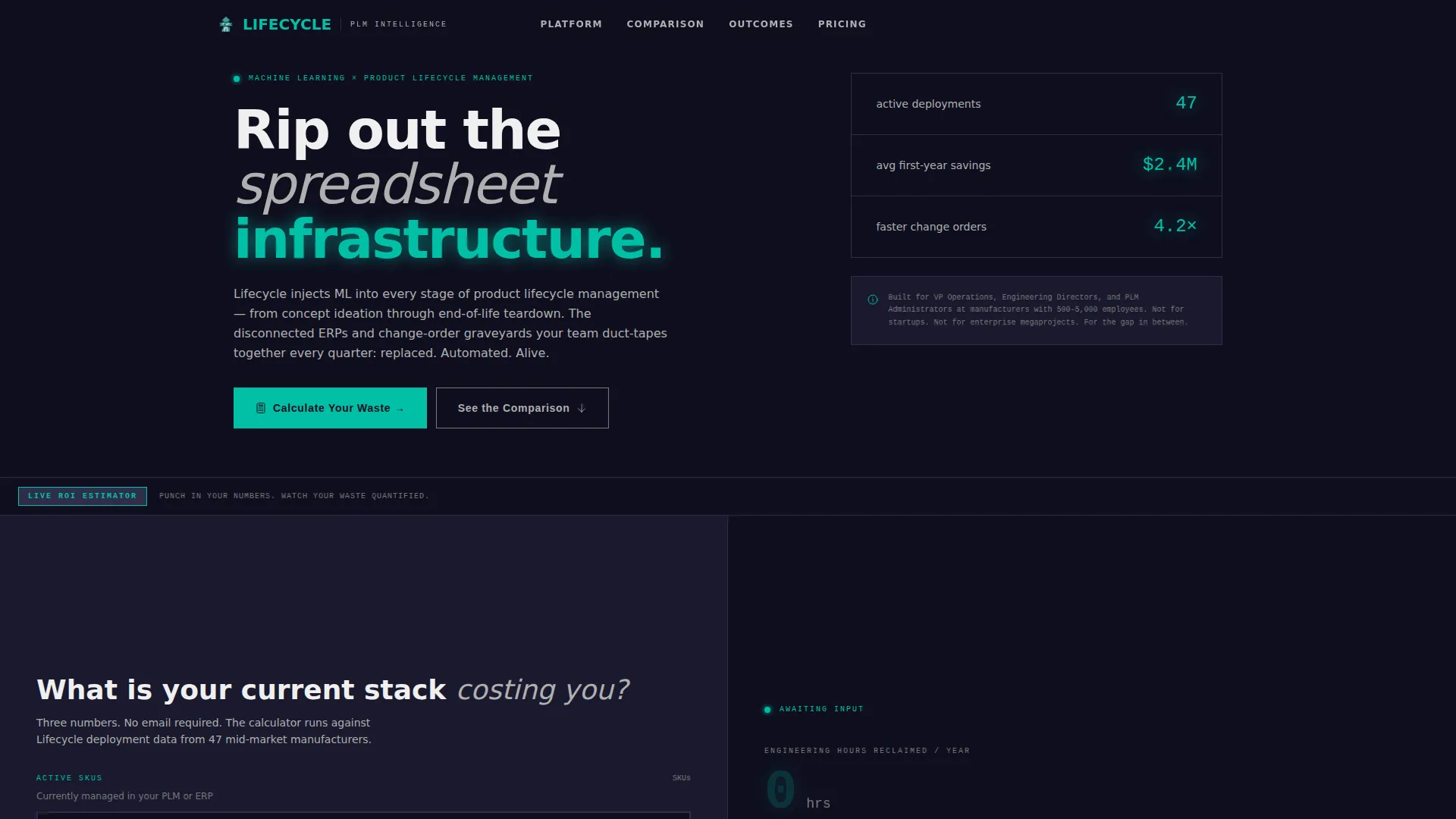
Lifecycle is a bold brutalist landing page template built for AI-powered product lifecycle management platforms. It features a live ROI calculator header, a six-row feature matrix comparing legacy systems against AI-driven capabilities, and a dual conversion path. The split-screen layout and teal-on-charcoal visual system make complex enterprise value immediately tangible for VP-level and engineering audiences.
by Rocket studio
Quick summary
Lifecycle is a single-page, split-screen landing page template designed for AI-powered product lifecycle management (PLM) platforms. It opens with an interactive ROI calculator and drives scroll through a confrontational feature matrix. The design uses a Bold Brutalist aesthetic to communicate industrial confidence. Two conversion paths capture both sales-ready buyers and research-stage visitors.
Who this template is for
This template speaks directly to the people who feel the daily cost of disconnected product operations. It is built for enterprise software marketers and growth teams promoting AI-native PLM platforms to a skeptical, data-driven audience.
- VP-level operations leaders at mid-market manufacturers who need hard numbers before any conversation starts
- PLM administrators managing overloaded change-order queues who want proof, not promises
- Engineering directors who have watched multiple digital transformation pilots stall before reaching production
What problem this template solves
Most enterprise software landing pages lead with feature lists that mean nothing to someone buried in a broken workflow. This template flips that approach. It forces visitors to quantify their own waste before presenting any solution claim.
- Teams rely on spreadsheets and disconnected ERP systems that create manual reconciliation work across every product stage
- Change-order cycle times stretch because routing is manual, approvals are siloed, and revision traceability lives in email threads
- Buyers arrive skeptical after failed transformation initiatives and need confrontational evidence, not polished marketing copy
What you get with this template
You get a complete, conversion-focused landing page layout that uses interactive inputs, scroll-driven comparisons, and two distinct calls to action to move different buyer types toward engagement. Every section is designed to build the case before asking for a click.
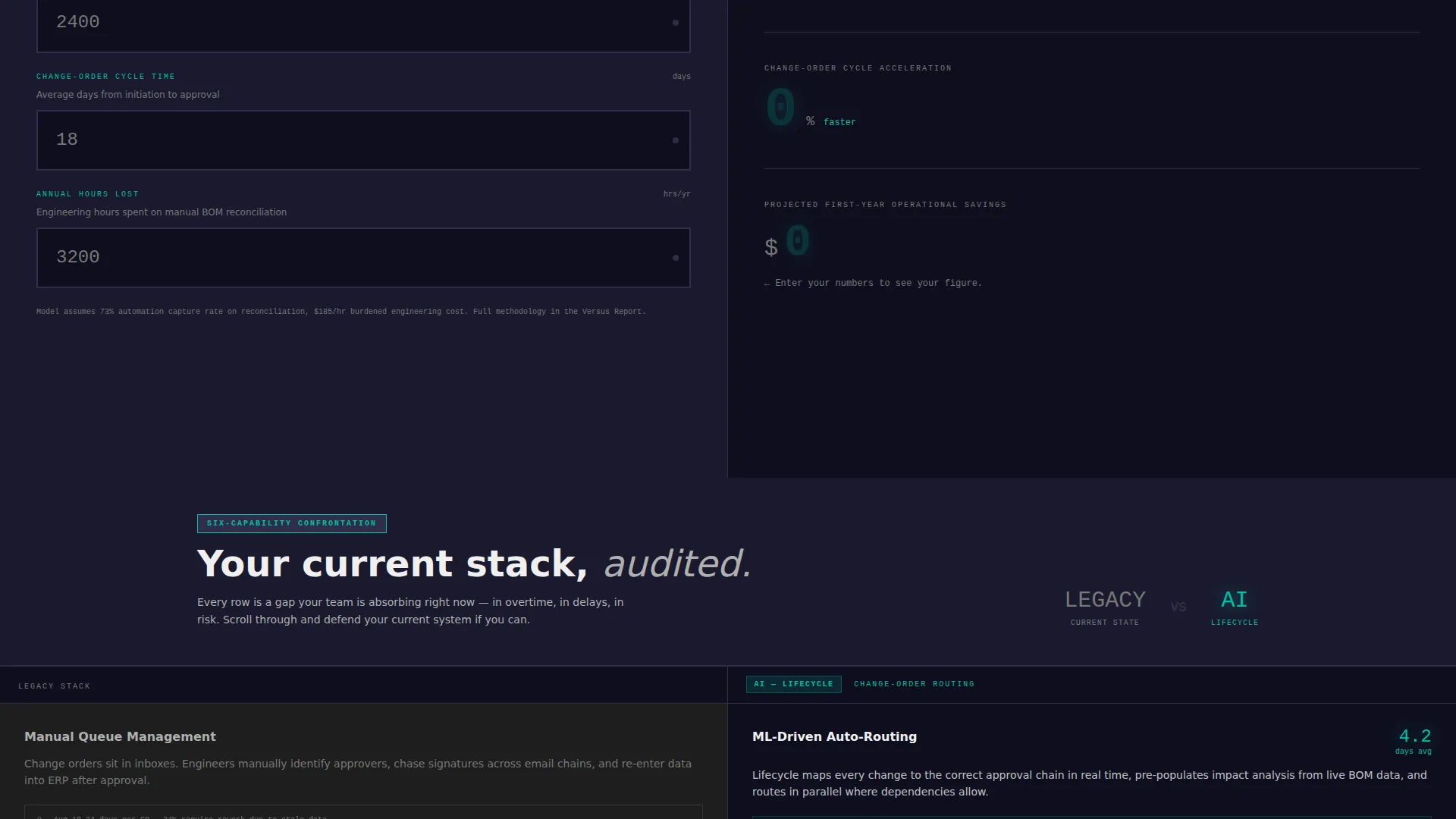
- A live ROI calculator header with three brutalist input blocks and a real-time results panel showing reclaimed hours, cycle-time acceleration, and first-year savings
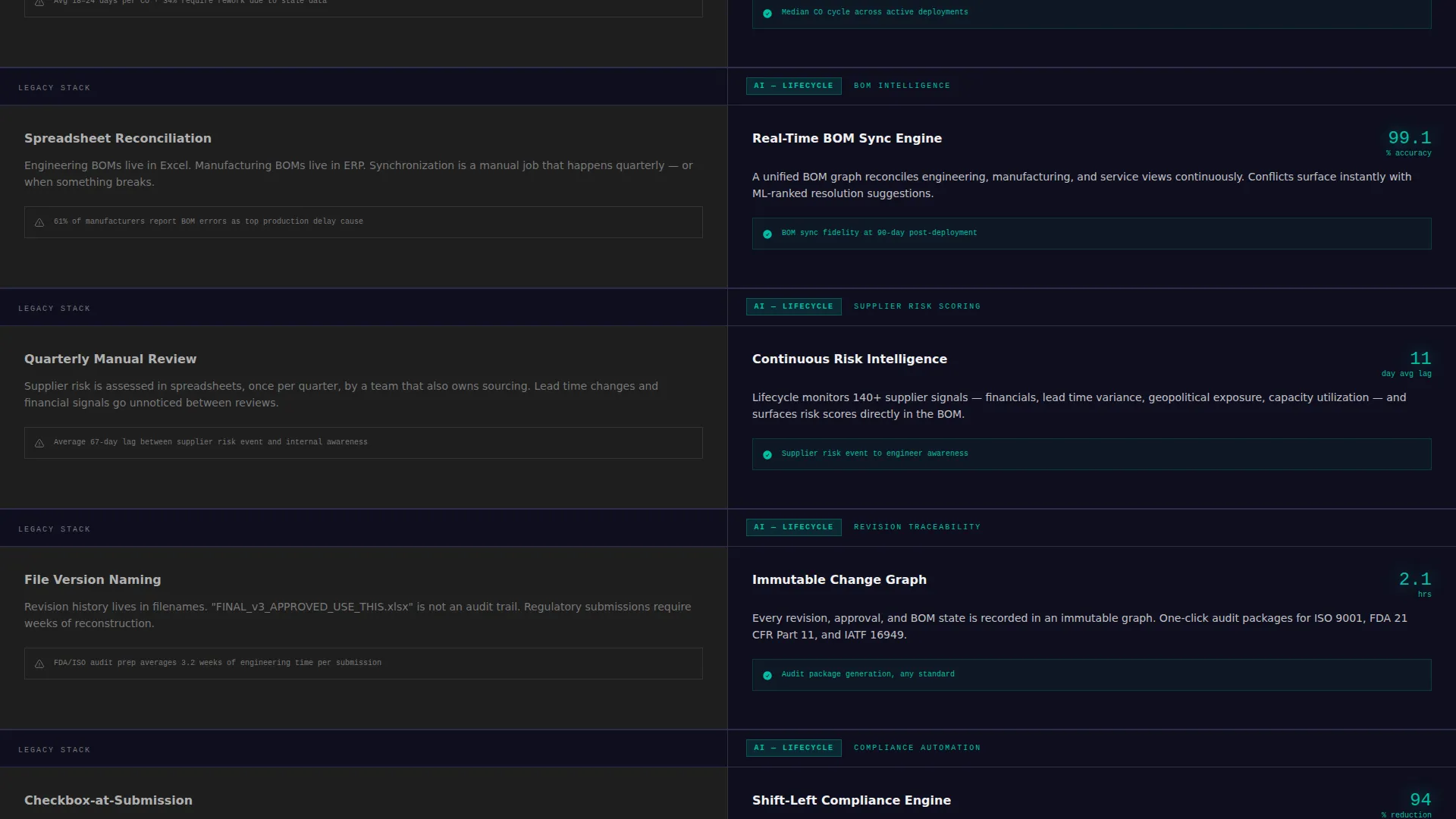
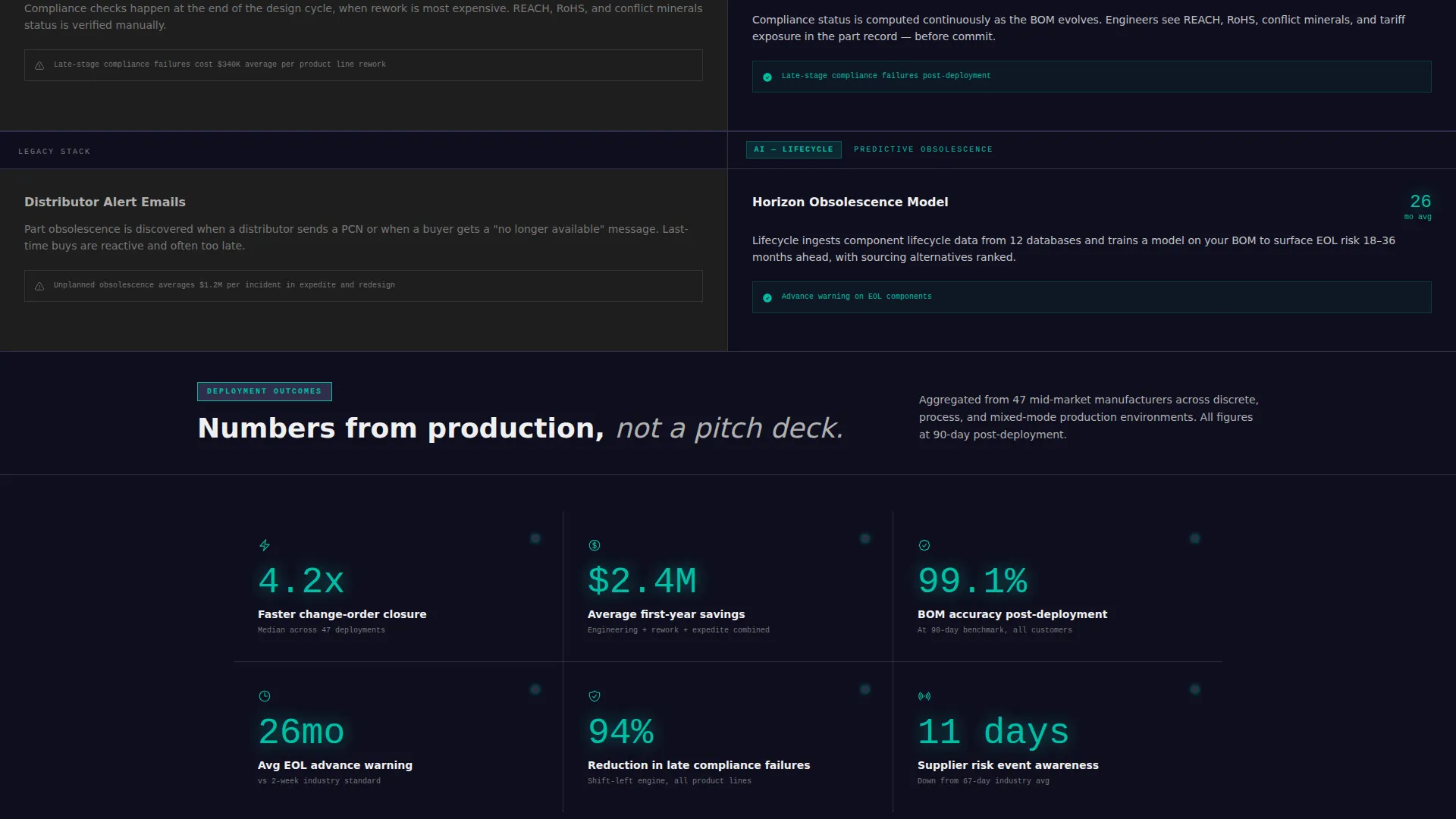
- A six-row, split-screen feature matrix walking through change-order routing, BOM intelligence, supplier risk scoring, revision traceability, compliance automation, and predictive obsolescence
- Dual conversion paths: a primary "Run Your Full Benchmark" qualification form and a secondary "Download the Versus Report" gated PDF capture
Feature list
This template delivers a structured set of interactive and persuasive components, each doing a specific job in the buyer journey.
Live ROI Calculator Header
The header splits 50/50. The left panel holds three brutalist input blocks where visitors enter active SKU count, average change-order cycle time in days, and annual engineering hours lost to manual BOM reconciliation. The right panel renders projected savings in oversized monospaced teal numerals that tick upward like a factory floor counter.
Six-Row Feature Matrix
Below the calculator, the page maintains persistent left and right columns. The left column shows the legacy PLM state in concrete gray. The right column animates in AI-powered capabilities in teal-on-charcoal with real interface screenshots and metric callouts. Six capability rows cover change-order routing, BOM intelligence, supplier risk scoring, revision traceability, compliance automation, and predictive obsolescence.
Dual Conversion Path System
The primary call to action, "Run Your Full Benchmark," anchors both the sticky header (after scroll) and the final section. It leads to a short qualification form with a company size selector, a current PLM vendor dropdown, and a work email field. The secondary path offers "Download the Versus Report" as a gated PDF, capturing email only for visitors not yet ready to engage sales.
Sticky Header Call to Action
After the visitor scrolls past the calculator, the header locks a persistent call-to-action button into view. This keeps the primary conversion path available at all times without interrupting the scroll rhythm of the feature matrix sections.
Bold Brutalist Visual System
The template uses a Teal Catalyst color palette with deep slab charcoal as the primary background, reactor teal as the active accent, exposed concrete gray for secondary type and dividers, and clinical white for content surfaces. Teal appears only where the AI is working, never as decoration.
Page sections overview
| Section | Purpose |
|---|---|
| ROI Calculator Header | Quantifies visitor waste before any product claim appears |
| Real-Time Results Panel | Displays reclaimed hours, cycle gains, and first-year savings |
| Feature Matrix Rows | Walks six capability comparisons between legacy and AI-powered states |
| Legacy PLM Column | Shows current-state pain in static, dense concrete gray |
| AI Capabilities Column | Animates AI-powered features with screenshots and metric callouts |
| Primary call to action Section | Anchors the "Run Your Full Benchmark" qualification form |
| Gated PDF Capture | Offers "Download the Versus Report" for research-stage visitors |
| Sticky Header call to action | Keeps the primary conversion path visible throughout scroll |
Design & branding system
The visual identity is built around industrial confidence. Nothing decorates. Every color choice carries meaning, and the layout never lets ornamentation soften the message.
- Deep slab charcoal (#1A1A2E) for primary backgrounds, reactor teal (#00BFA6) for every interactive and AI-driven element, exposed concrete gray (#B0B0B0) for secondary type and dividers, and clinical white (#F0F0F0) for content surfaces
- Monospaced typography in the results panel communicates precision and data velocity, reinforcing the factory-floor counter metaphor
- The split-screen 50/50 layout enforces visual confrontation at every scroll step, keeping the legacy-versus-AI contrast structurally present
Mobile & speed optimization
The split-screen layout and scroll-driven animations are designed to adapt across device sizes without losing the core confrontational structure. The calculator inputs and results panel remain usable and legible at smaller viewports.
- The 50/50 column layout stacks vertically on narrower screens so the calculator inputs and results panel each receive full-width treatment
- Feature matrix rows reflow into a sequential single-column view on mobile, preserving the legacy-then-AI reveal order
How this template helps you convert
The conversion architecture works in sequence. By the time a visitor reaches the call to action, they have already done the math on their own operational cost and watched six categories of evidence build the case for change.
- The ROI calculator personalizes the value proposition before any product copy appears, so visitors arrive at the feature matrix already invested in the numbers they entered
- The feature matrix creates cumulative pressure across six scroll steps, each one widening the visible gap between the legacy state and the AI-powered alternative
- Two conversion paths capture buyers at different readiness levels: the qualification form captures sales-ready leads, and the gated PDF captures research-stage visitors who are not yet ready to talk to anyone
Other information about this template
This template is built specifically for the AI-powered PLM category and reflects the buying psychology of enterprise technology audiences who have experienced failed implementations before.
- The template style is Split Screen (50/50), the theme is Bold Brutalist, the header concept is a Calculator/Estimator, and the creative direction is a Feature Matrix
- The landing page direction is Comparison/Versus, which means every structural decision is oriented around making the cost of inaction visible
- The color system is named Teal Catalyst and is described as a freshly poured server room floor interrupted by a single glowing status indicator
- This template fits platforms targeting mid-market manufacturers and engineering-led organizations where data credibility matters more than visual polish
Theme
Bold Brutalist
Creative direction
Feature Matrix
Color system
Teal Catalyst
Style
Split Screen (50/50)
Direction
Comparison/Versus
Page Sections
Live ROI Calculator with Real-time Output
Six-row AI Versus. Legacy Feature Matrix
Dual Conversion Path Architecture
Sticky Header Call to Action
Bold Brutalist Split-screen Layout
Related questions
Who is the target visitor for this landing page template?
Can I adapt the ROI calculator inputs for a different set of metrics?
What are the two conversion paths included in this template?
Does the feature matrix require real product screenshots?
Is this template suitable for enterprise software outside the PLM category?



