Real Estate Job Board Bento Grid Landing Page
Listings is a bento grid landing page built for real estate job boards. It uses a dark glass visual identity and a Problem→Solution Arc to prove your platform's value before visitors ever search. The layout speaks directly to agents, analysts, and brokers who are tired of generic career sites and ready for a board that knows their industry.
by Rocket studio
Quick summary
Listings is a single-page bento grid landing page designed for real estate job boards. It opens with a wall of live-looking job snippets inside dark glass panels and then walks visitors through a side-by-side comparison that makes generic job boards feel obsolete. The template is built for platforms serving agents, brokers, and commercial real estate professionals.
Who this template is for
This template is built for teams who run or want to launch a real estate job board. It speaks directly to the niche professionals who use those boards every day.
- Real estate job board founders and product teams who need a conversion-focused landing page
- Newly licensed agents, commercial analysts, and veteran brokers who are the target audience this page is written for
- Hiring managers at brokerages, development firms, and property management companies who need to post roles quickly
What problem this template solves
Generic career sites bury real estate roles under thousands of irrelevant results. A professional searching for a brokerage seat or a commercial analyst position does not want to scroll past customer service listings and home-staging gigs. This template frames that frustration clearly and then resolves it.
- It shows the real cost of using general job boards through a stat card reading "83% of CRE professionals say general job boards waste their time"
- It contrasts messy generic results against a clean, filtered feed of brokerage, development, and property management roles
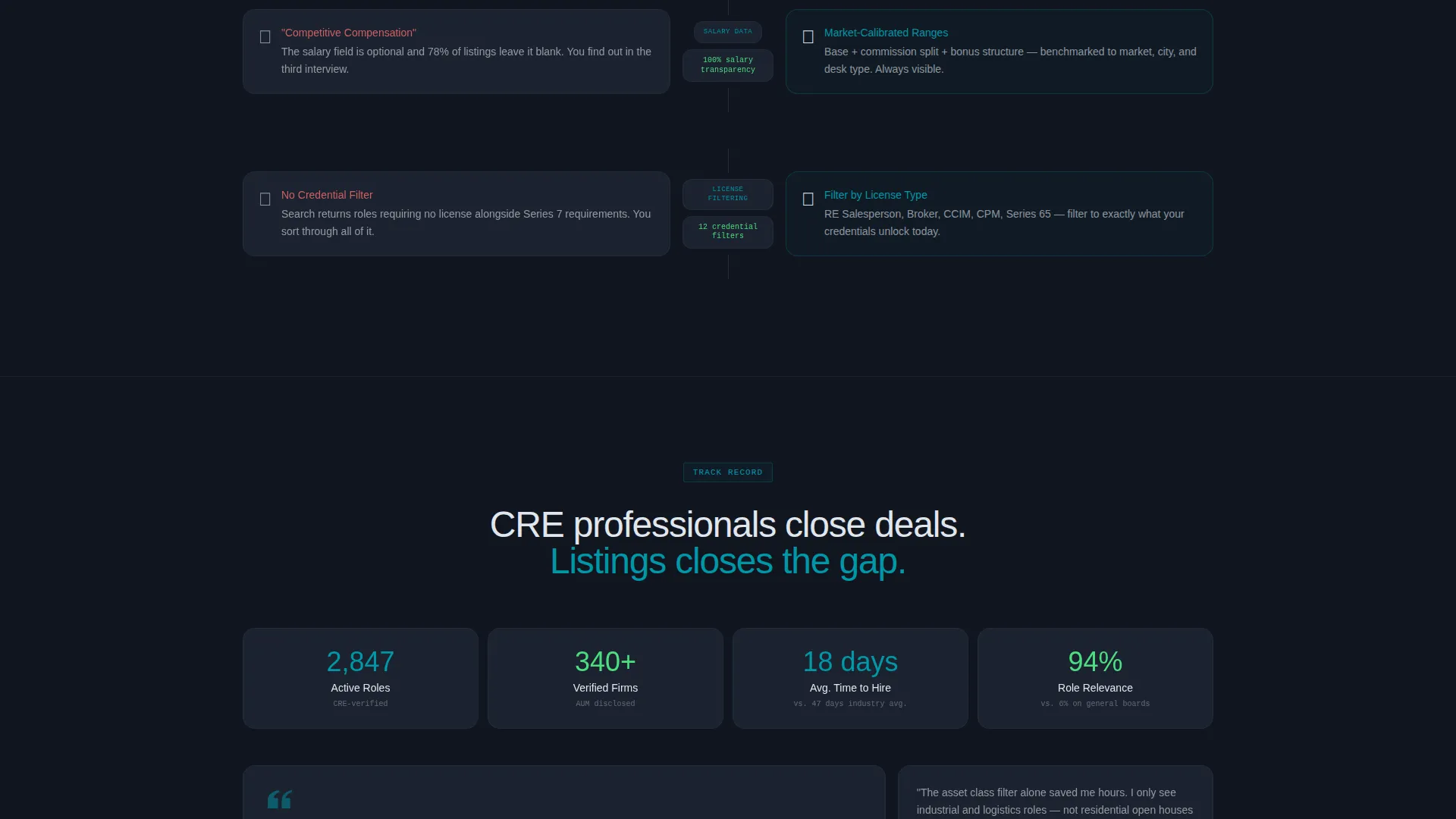
- It replaces vague "competitive compensation" language with salary transparency calibrated to market and desk type
What you get with this template
You get a fully structured bento grid landing page that builds a closing argument across every scroll row. The layout does not rely on stock photography. The content itself acts as the visual proof.
- A staggered header grid of dark glass panel cards, each showing a real job snippet with title, firm name, city, and salary band
- A sticky bottom conversion bar with a primary search input and a secondary ghost button for hiring managers
- A scrolling comparison arc that escalates from problem to solution across multiple bento rows, each one richer than the last
Feature list
This section covers the core built-in capabilities of the Listings template.
Dark Glass Panel Header
The header is a wall of translucent charcoal cards arranged in a staggered bento grid. Each card holds a real job snippet: role title, firm name, city, and salary band. Text glows faintly in platinum and teal as if lit through smoked glass. The panels drift with a subtle parallax effect on scroll, creating layered depth without a single hero image.
Problem-to-Solution Bento Arc
The page opens with a split bento tile naming the pain point directly. A stat card highlights that most real estate professionals find general job boards wasteful. Each subsequent row flips to the solution, showing filtered role feeds, region-aware alerts, and firm profiles with deal volume. The argument builds naturally as the visitor scrolls.
Comparison Bento Rows
Every scroll row is a side-by-side receipt comparing the old experience against this one. Comparisons cover search quality, alert relevance, firm profile depth, and salary transparency. The grid tightens as the visitor scrolls down, with cards growing larger and data points growing richer.
Sticky Conversion Bar
A sticky bottom bar appears after the first problem panel. It holds a primary call-to-action button labeled "Search Real Estate Roles" and a search input pre-filled with ghost text reading "Brokerage, asset class, or city..." A secondary teal-outlined ghost button reads "Post a Role - Free for 30 Days" to capture hiring managers who arrive curious.
Signal Green Live Badges
New posting badges use signal green (#4ADE80) as a live-data accent. These badges sit inside the dark bento cards to signal activity and freshness without cluttering the layout.
Teal Interactive Surface System
All interactive surfaces use catalyst teal (#0097A7). Buttons, hover states, and active filters share this single accent color. The consistency makes every clickable element instantly recognizable across the dark charcoal and platinum layout.
Page sections overview
| Section | Purpose |
|---|---|
| Dark Glass Header | Opens with live-feeling job snippet panels in a staggered bento grid |
| Problem Split Tile | Surfaces the generic job board pain point with a stat card |
| Solution Filter Row | Shows real estate-specific search results and filter options |
| Alerts Comparison Row | Contrasts region-aware MLS alerts against zip-code spam |
| Firm Profile Row | Displays firm profiles with deal volume versus faceless logos |
| Salary Transparency Row | Compares market-calibrated pay data against vague compensation copy |
| Sticky Conversion Bar | Anchors the primary search call to action and the hiring manager ghost button |
Design & branding system
The visual identity follows a Directory and Discovery theme powered by the Teal Catalyst color system. The palette was designed to feel like a Bloomberg terminal rebuilt by an architecture firm: dark, information-dense, but every element has room to breathe.
- Core colors are deep charcoal glass (#1A1F2B) for card tiles, catalyst teal (#0097A7) for interactive surfaces, soft platinum (#E0E7EE) for body text, and signal green (#4ADE80) for live-data badges
- Teal owns every interactive surface including buttons, hover states, and active filter indicators
- Platinum text floats cleanly against the dark field, keeping the layout readable at high information density
Mobile & speed optimization
The bento grid layout is structured to reflow cleanly across screen sizes. The dark glass cards and sticky bar are designed with compact viewports in mind so the conversion path stays visible on smaller screens.
- Bento cards stack vertically on narrow screens while preserving the side-by-side comparison logic
- The sticky conversion bar remains anchored at the bottom of the viewport on all screen sizes
- Signal green badges and teal interactive elements retain their contrast ratios inside the dark layout at any size
How this template helps you convert
The Listings template earns the click by making the alternative feel like a step backward. Every scroll row deepens the case before the visitor reaches the search field.
- The parallax header grid proves the board is already populated with real roles. Visitors see job titles, firm names, and salary bands before reading a single headline, which removes doubt about platform activity.
- The Problem→Solution Arc escalates across each bento row. By the time the sticky bar becomes visible, the visitor has already watched the generic board fail them in four distinct ways, making the "Search Real Estate Roles" action feel like the obvious next step.
Other information about this template
This template is part of a niche-specific library built at the intersection of real estate digital presence and technology. It is designed for the real estate job board niche where industry-specific language and role clarity matter.
- The template style is a bento grid, which allows dense information layouts without sacrificing visual hierarchy
- The creative direction is a Problem→Solution Arc, a Comparison/Versus landing page format suited to audiences who already know generic options have failed them
- The header concept is Dark Glass Panels, a design pattern that treats content density as a visual asset rather than a liability
- The theme is Directory and Discovery, which positions the job board as a professional tool rather than a generic listings aggregator



Theme
Directory & Discovery
Creative direction
Problem→Solution Arc
Color system
Teal Catalyst
Style
Bento Grid
Direction
Comparison/Versus
Page Sections
Dark Glass Panel Header
Problem-to-solution Bento Arc
Side-by-side Comparison Rows
Sticky Conversion Bar
Signal Green Activity Badges
Teal Interactive Surface System
Related questions
Who is the target visitor for this landing page?
Does this template include actual job listings or live data?
Can hiring managers use this page too?
What makes the bento grid format right for a real estate job board landing page?
Is this a multi-page template or a single landing page?



