AI Restaurant Pricing Dashboard Landing Page Template
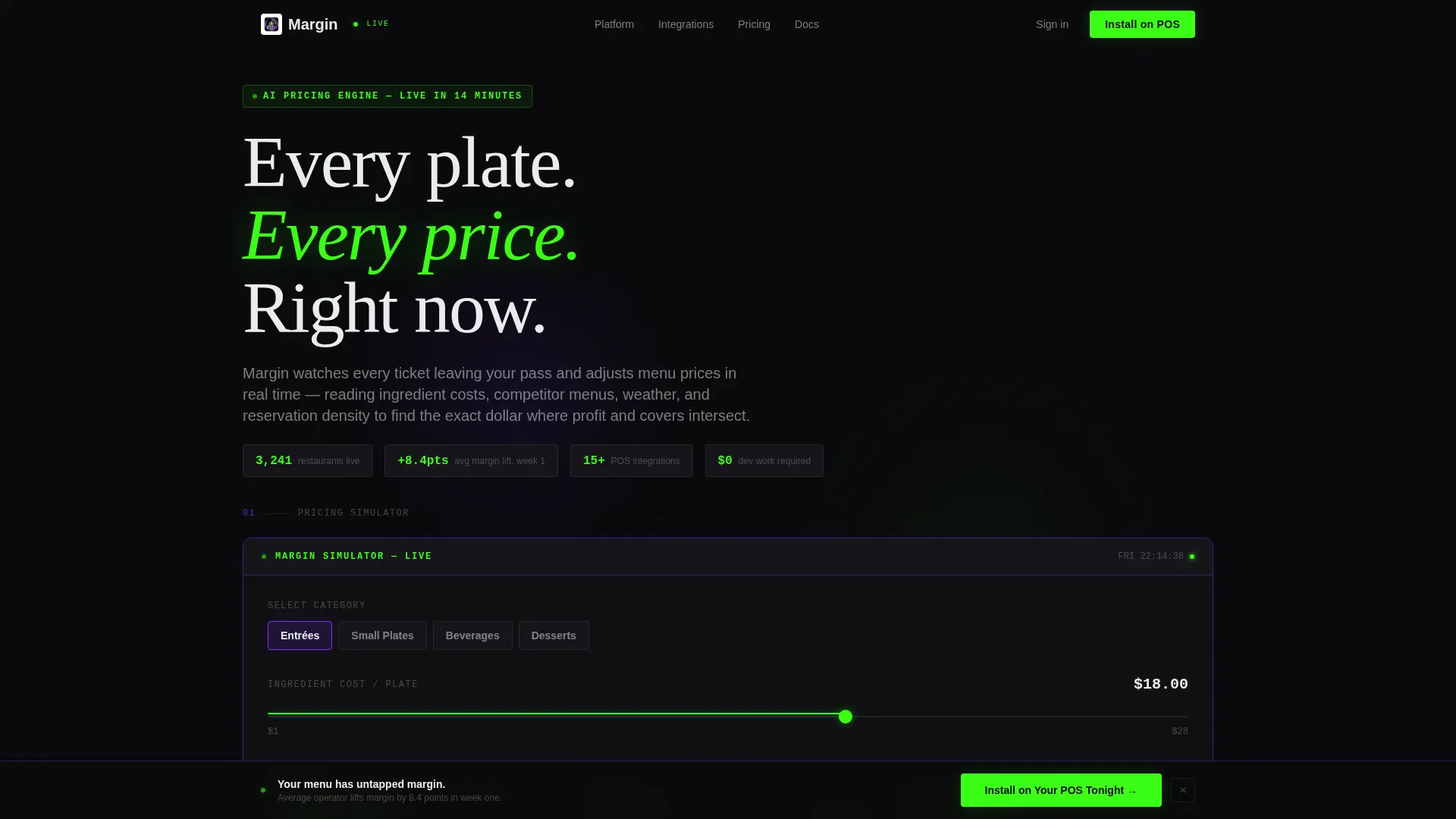
Margin is a dashboard-style landing page template built for AI-powered restaurant menu price optimization. It leads with a live pricing simulator above the fold, then layers in competitive radar charts, ingredient cost trend lines, and demand elasticity curves. Designed for multi-unit operators and hospitality finance leaders, it drives installs and qualified leads through proof-first, data-forward design.
by Rocket studio
Quick summary
Margin is a single-page, dashboard-style template for a restaurant AI price optimization platform. It opens with a functioning pricing simulator, then guides visitors through competitive pricing data, cost forecasting, and demand curves. Every section is a discrete data card. The page converts through two paths: a direct point-of-sale install flow and a free menu audit lead capture.
Who this template is for
This template is built for teams launching or marketing a restaurant AI pricing tool. It speaks directly to operators who manage numbers at scale and need to see proof before they commit.
- Multi-unit restaurant operators running fifteen or more locations
- Executive chefs and hospitality finance leaders who own their profit-and-loss statements
- Software founders and marketers positioning an AI menu pricing product to a data-literate audience
What problem this template solves
Traditional menu pricing is slow, reactive, and detached from real-time data. Operators reprint menus quarterly and the numbers are already stale. This template frames that pain clearly and then answers it with visible, interactive intelligence.
- Static pricing tools cannot react to ingredient cost swings, competitor moves, or sudden demand shifts
- Restaurant operators lack a fast way to trust a new pricing platform before committing to an installation
- Generic landing pages cannot demonstrate dynamic AI behavior, so they fail to convert skeptical finance-minded buyers
What you get with this template
You get a complete, scroll-driven landing page that doubles as a live product demonstration. Every section earns trust by showing the AI at work, not describing it.
- An interactive pricing simulator with dish category selection, ingredient cost slider, and real-time margin calculations displayed above the fold
- A sequence of dashboard cards covering competitive pricing radar, ingredient cost forecasting, demand elasticity curves, and a point-of-sale integration map
- Two conversion paths: a direct install call-to-action flow with point-of-sale system selection plus email capture, and a secondary free menu audit upload for warm leads
Feature list
This template ships with purpose-built components that reflect how the underlying platform actually thinks. Each section is designed to be explored, not just read.
Live Pricing Simulator Header
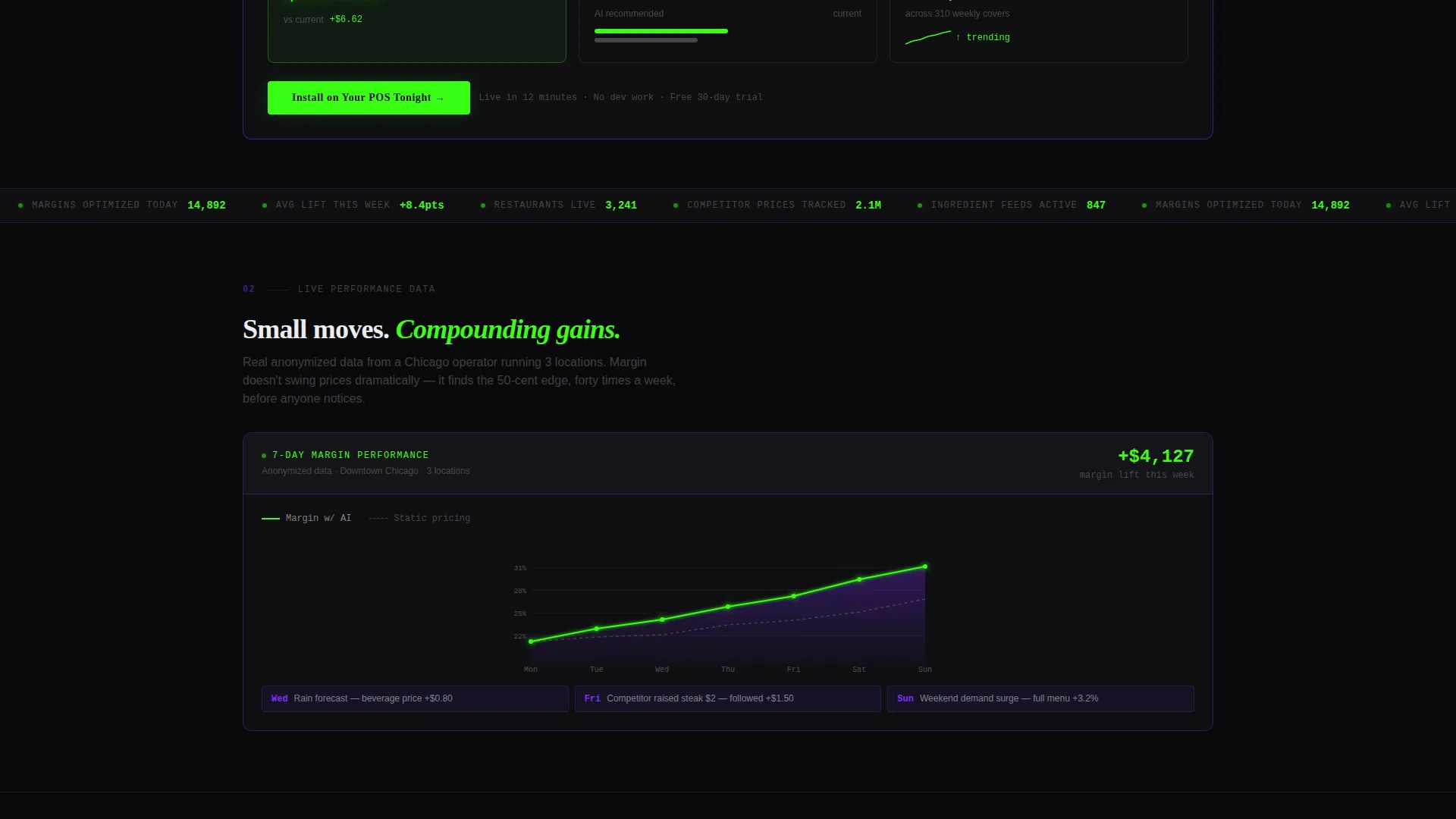
Visitors select a dish category, drag an ingredient cost slider, and watch the AI-recommended price, projected margin percentage, and estimated weekly revenue delta update instantly. Numbers animate like a stock ticker. A seven-day anonymized margin chart sits below the simulator, showing the compounding staircase pattern of incremental AI adjustments.
Competitive Pricing Radar
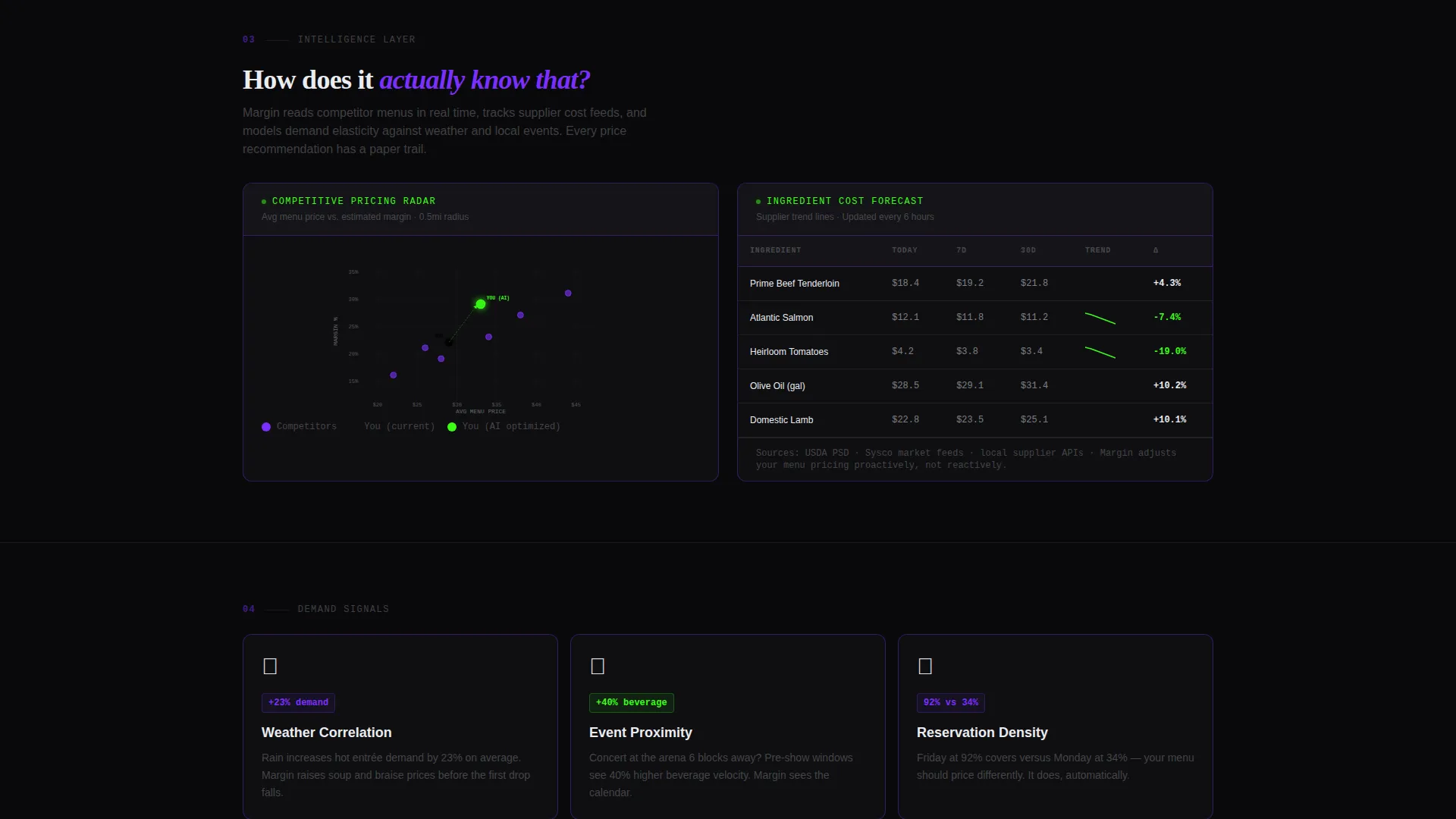
A scatter plot section visualises nearby restaurant price positions relative to the user's own menu. It answers the question "how does the AI know what competitors charge?" with a visible, explorable data grid rather than a written claim.
Ingredient Cost Forecasting Panel
Supplier trend lines display projected ingredient cost movements over time. This section gives operators and finance leaders a direct view of how cost inputs feed the pricing model, building confidence in the AI's forward-looking logic.
Demand Elasticity Curve Display
Elasticity curves shift with weather and event data, showing how customer price sensitivity changes across different conditions. Sortable data grids and sparkline charts inside table cells make this section skimmable and interactive.
Point-of-Sale Integration Map
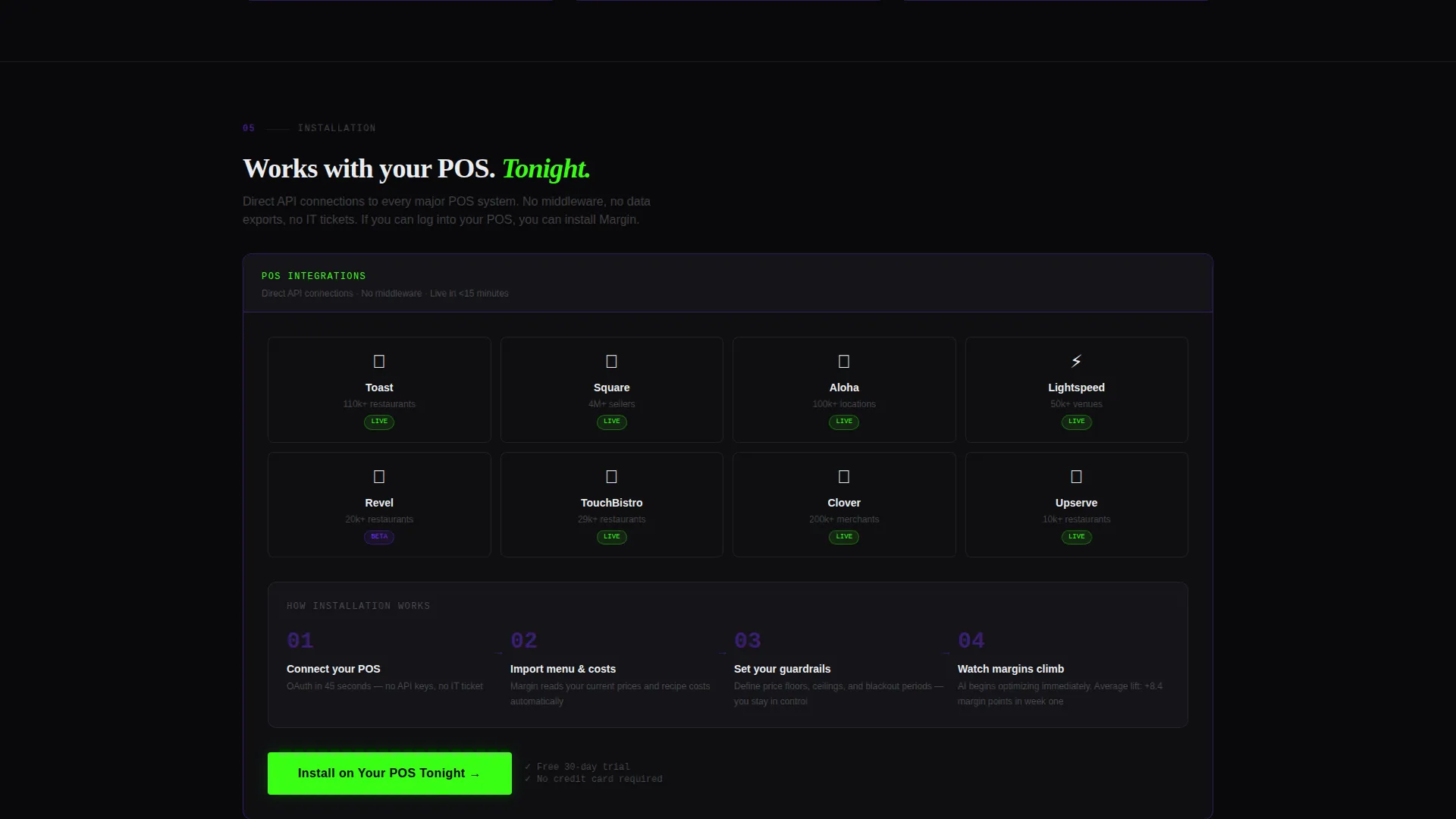
A visual integration map shows compatible point-of-sale systems clicking into place. The layout reinforces installation confidence and reduces technical hesitation before the primary call-to-action.
Dual Conversion Flow
The primary call-to-action, "Install on Your POS Tonight", appears first inside the simulator results and again as a sticky bottom bar after the third dashboard section. A secondary path offers a free menu audit via PDF upload, capturing leads who want proof before committing to installation.
Page sections overview
| Section | Purpose |
|---|---|
| Pricing Simulator Header | Interactive above-the-fold tool showing live AI margin recommendations |
| Seven-Day Margin Chart | Anonymised real restaurant data showing compounding AI price adjustments |
| Competitive Pricing Radar | Scatter plot of nearby competitor price positions |
| Cost Forecasting Panel | Supplier trend lines feeding the AI pricing model |
| Demand Elasticity Curves | Weather and event-adjusted price sensitivity curves with data grids |
| Integration Map | Visual display of compatible point-of-sale systems |
| Primary Install call to action | Two-step flow for point-of-sale selection and email capture |
| Sticky call to action Bar | Persistent install prompt appearing after the third dashboard section |
| Menu Audit Lead Capture | PDF upload field for the free AI menu scoring path |
Design & branding system
The visual identity follows a Data Command theme built on an Acid Digital color palette. Every design decision reinforces the feeling of a live trading floor built specifically for restaurant operations.
- Core colors: void black (#09090B) backgrounds, terminal phosphor green (#39FF14) for live data and positive deltas, ultraviolet (#7B2FFF) for graph fills and secondary accents, and seared white (#EAECEF) for typography and grid lines
- Cards float on single-pixel ultraviolet borders against the void background, and every interactive element shifts to phosphor green on hover, making the interface feel reactive and alive
- No hero images or stock photography appear anywhere; the simulator and data grids are the visual centrepiece from the first pixel
Mobile & speed optimization
The template is built for performance on the devices restaurant operators actually use during a busy service. Speed and touch usability are built into the layout logic.
- Dashboard cards are structured to reflow cleanly at smaller viewport widths without losing the data-grid character of each section
- The pricing simulator slider and category selector are designed for touch interaction, keeping the above-the-fold experience functional on mobile screens
- Sticky call-to-action bar positioning is optimized for thumb reach on smaller devices, reducing friction at the moment of conversion
How this template helps you convert
This template converts through demonstrated intelligence rather than written persuasion. Every scroll stop answers a buyer objection with a visible, interactive data point.
- The pricing simulator creates a personalised proof moment above the fold, showing the visitor their own potential margin lift before they read a single marketing sentence, which earns trust faster than any headline could.
- The sticky install call-to-action bar re-engages visitors who scroll deep into the data sections, catching high-intent buyers at the exact moment they finish evaluating the product.
- The free menu audit path captures warm leads who are not ready to install, giving the sales pipeline a qualified, data-rich entry point from visitors who have already shared their pricing information.
Other information about this template
Margin is a Webflow-compatible template designed for the restaurant technology category. It is well-suited for teams building in the AI for restaurant space who need a landing page that can carry both a product-led growth motion and a direct sales assist.
- The template's Calculator/Tool First creative direction is the right fit for AI pricing products where the algorithm's output is the most convincing sales argument
- The two-step point-of-sale selection flow references compatible systems including Toast, Square, and Aloha, giving operators an immediate sense of whether the platform fits their current stack
- The free menu audit secondary path works especially well as a demand generation tool at industry events and in email campaigns where operators want a low-commitment first step
Theme
Data Command
Creative direction
Calculator/Tool First
Color system
Acid Digital
Style
Dashboard/Data Grid
Direction
App Download
Page Sections
Live Pricing Simulator Above the Fold
Competitive Pricing Radar Chart
Ingredient Cost Forecasting Panel
Demand Elasticity Curve Display
Point-of-sale Integration Map
Dual Conversion Flow Design
Related questions
Who is the Margin template designed for?
Does the pricing simulator need a live backend to work?
Can I customise the dashboard cards and data sections?
What are the two conversion paths included in the template?



