AI for Home Complete Professional Website Template
Match is a scroll reveal landing page template built for AI-powered home services platforms. It guides visitors through a Problem-to-Solution arc, from raw failure statistics to ranked contractor matches, and converts them through a three-step progressive lead form. The Bold Brutalist design and Teal Catalyst color system make every scroll feel purposeful and urgent.
by Rocket studio
Quick summary
Match is a single-page, scroll-driven landing page template for home services AI recommendation platforms. It opens with a glowing house wireframe scan, walks visitors through real failure data, and closes with a fixed "Scan My Home" call-to-action button. Every section builds trust before asking for a commitment.
Who this template is for
This template is built for founders, product teams, and marketers launching an AI-driven home services platform. If your product helps homeowners stay ahead of costly repairs, this layout was designed with your audience in mind.
- First-time homeowners who feel overwhelmed by deferred maintenance and do not know where to start
- Landlords managing scattered rental portfolios from a single phone screen
- Property managers who need one clear dashboard instead of juggling fourteen vendor spreadsheets
What problem this template solves
Most homeowners react to home failures instead of preventing them. They search frantically for contractors after a pipe bursts or a compressor dies. A platform that predicts failures needs a landing page that earns trust fast and turns anxiety into action.
- Visitors arrive skeptical and need proof before they share their address or contact details
- The page must show the AI logic clearly, not just claim it exists
- Friction in long sign-up forms causes drop-off before a single lead is captured
What you get with this template
You get a fully structured, scroll reveal landing page with a clear visual narrative from problem through solution to conversion. Each scroll trigger reveals a new layer of detail, giving visitors a reason to keep reading.
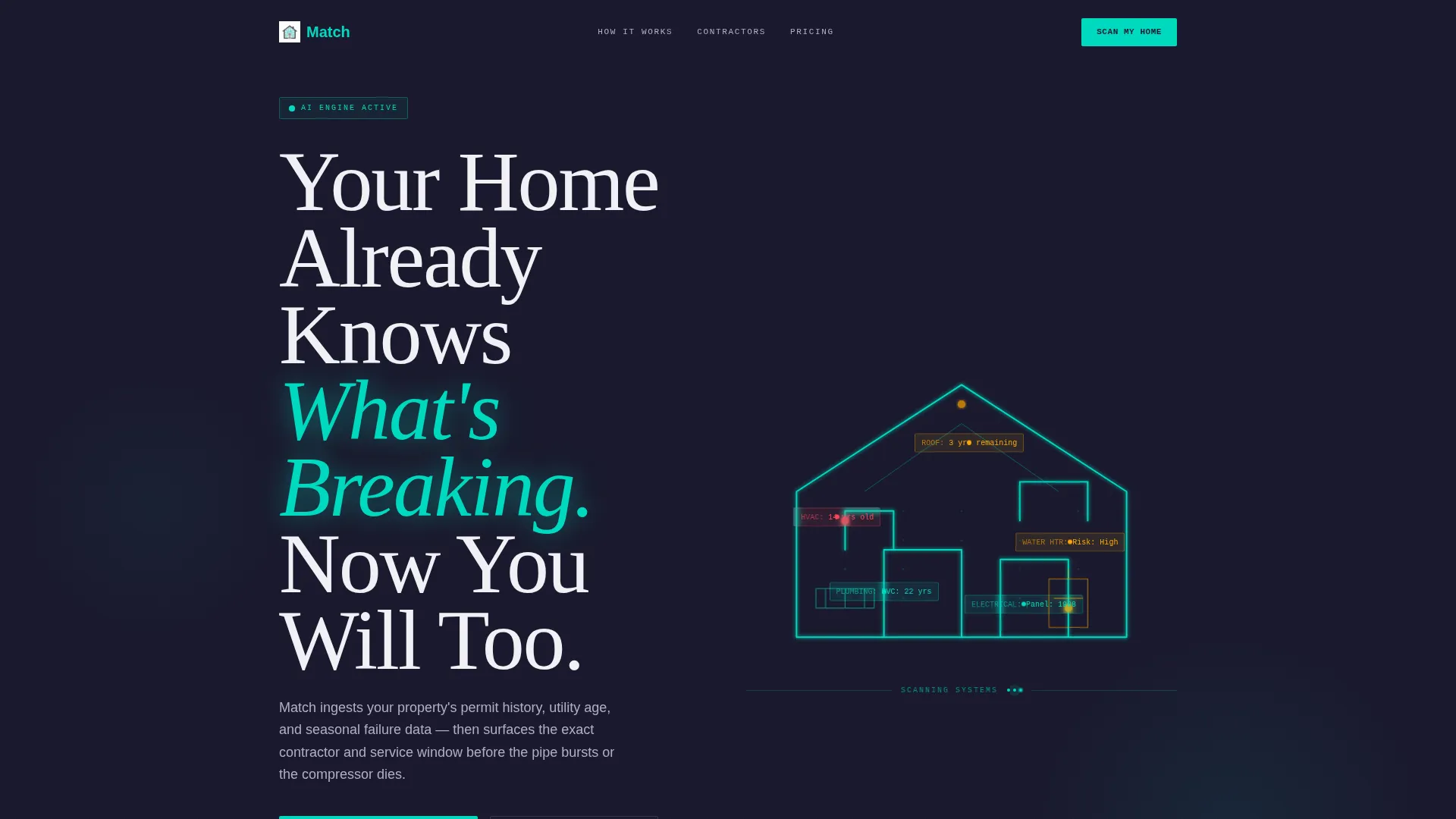
- A dark full-bleed header with an animated house wireframe and data label blooms per room
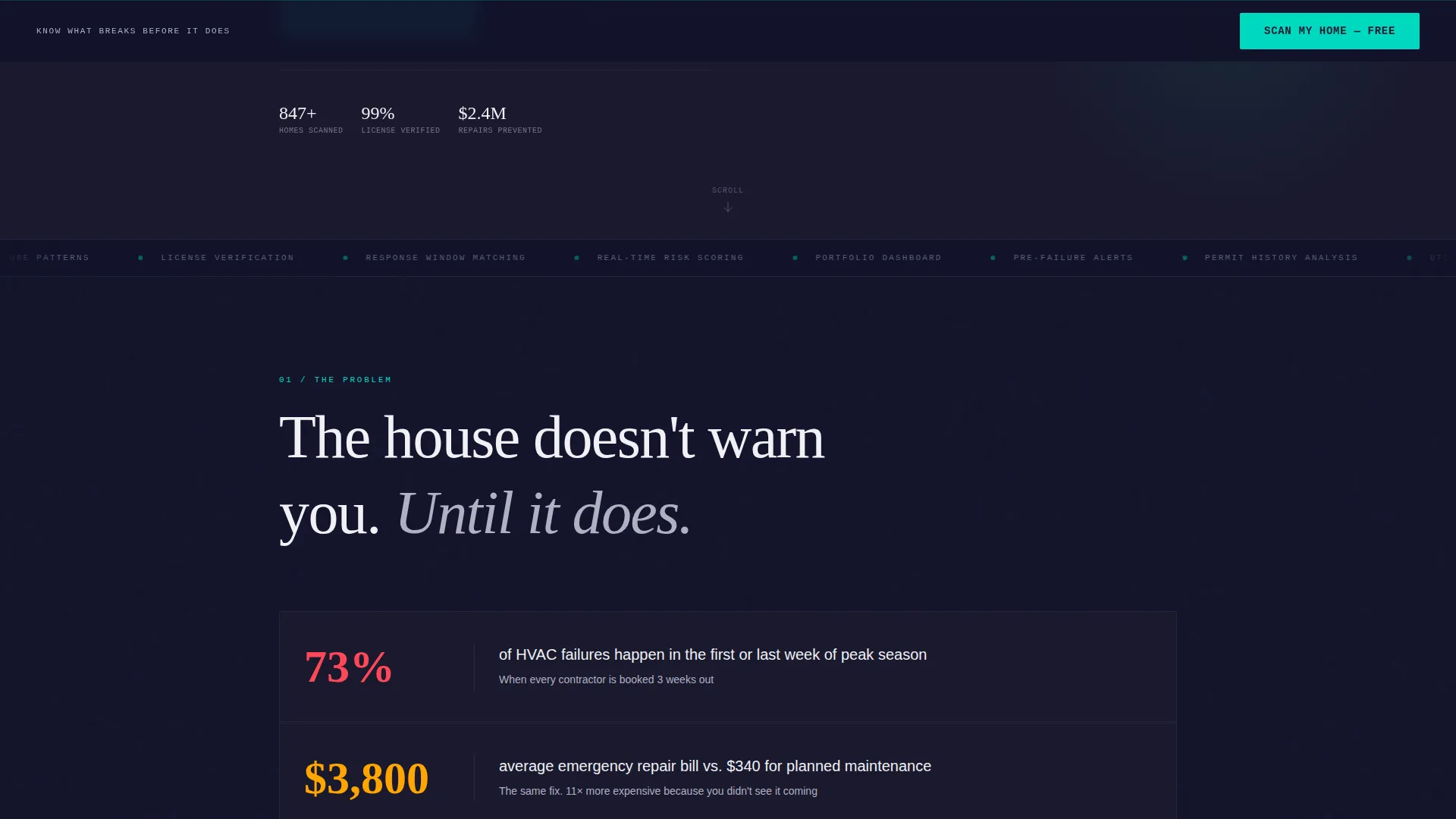
- Three progressive scroll reveal sections covering failure statistics, AI logic, and contractor match profiles
- A fixed bottom call-to-action button and a three-step progressive lead capture form
Feature list
This template includes a focused set of design and interaction components drawn directly from the source brief.
Animated House Wireframe Header
A teal line traces a house wireframe room by room on page load, as if an AI is scanning the property in real time. Data labels bloom from each room showing system age and risk level, then the headline lands in oversized brutalist slab type.
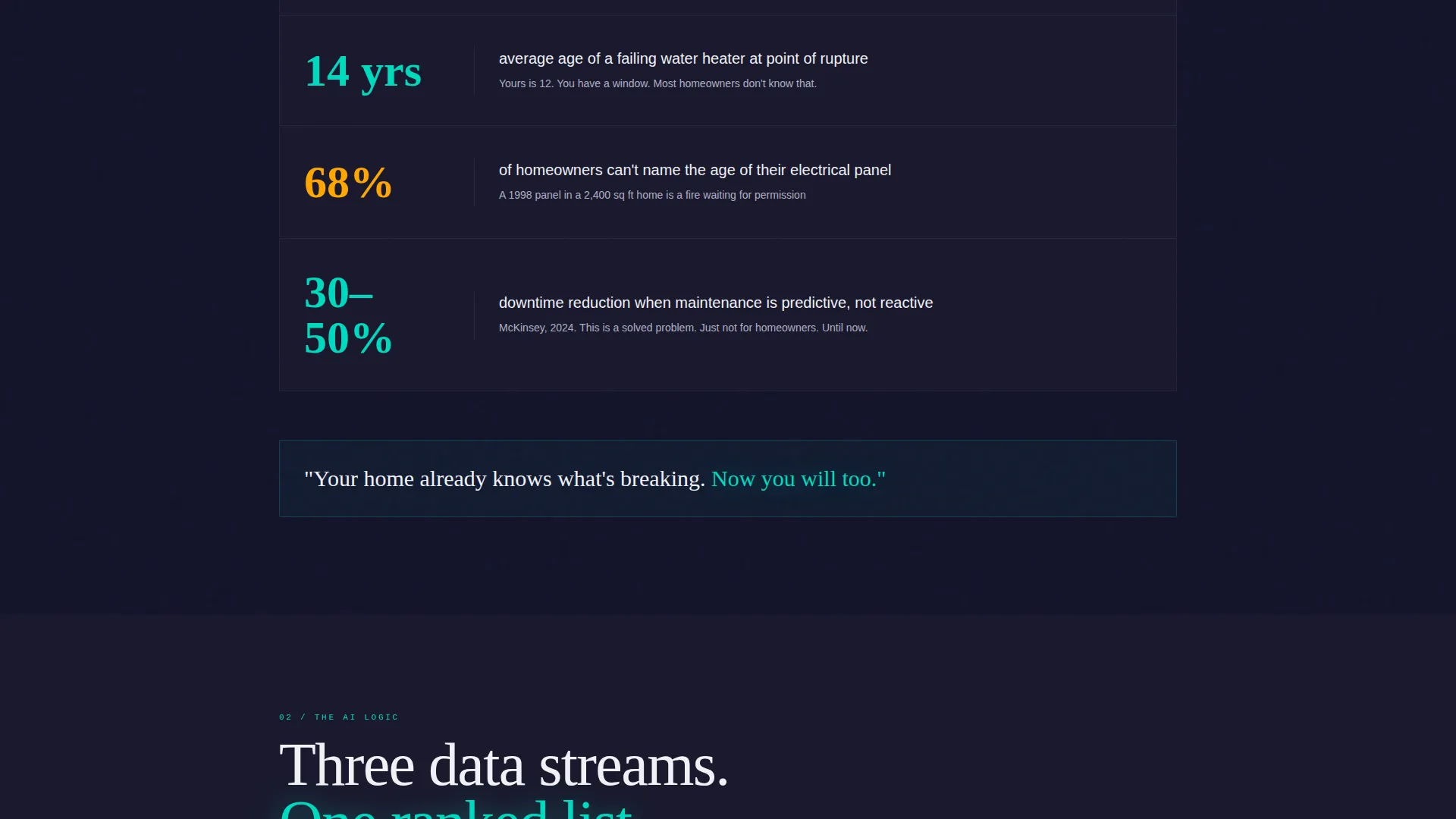
Scroll Reveal Problem Arc
Stacked monolithic text blocks slam into view as the visitor scrolls, each displaying real home failure statistics. The effect feels like poured concrete landing with weight, giving the data visual authority before any solution is introduced.
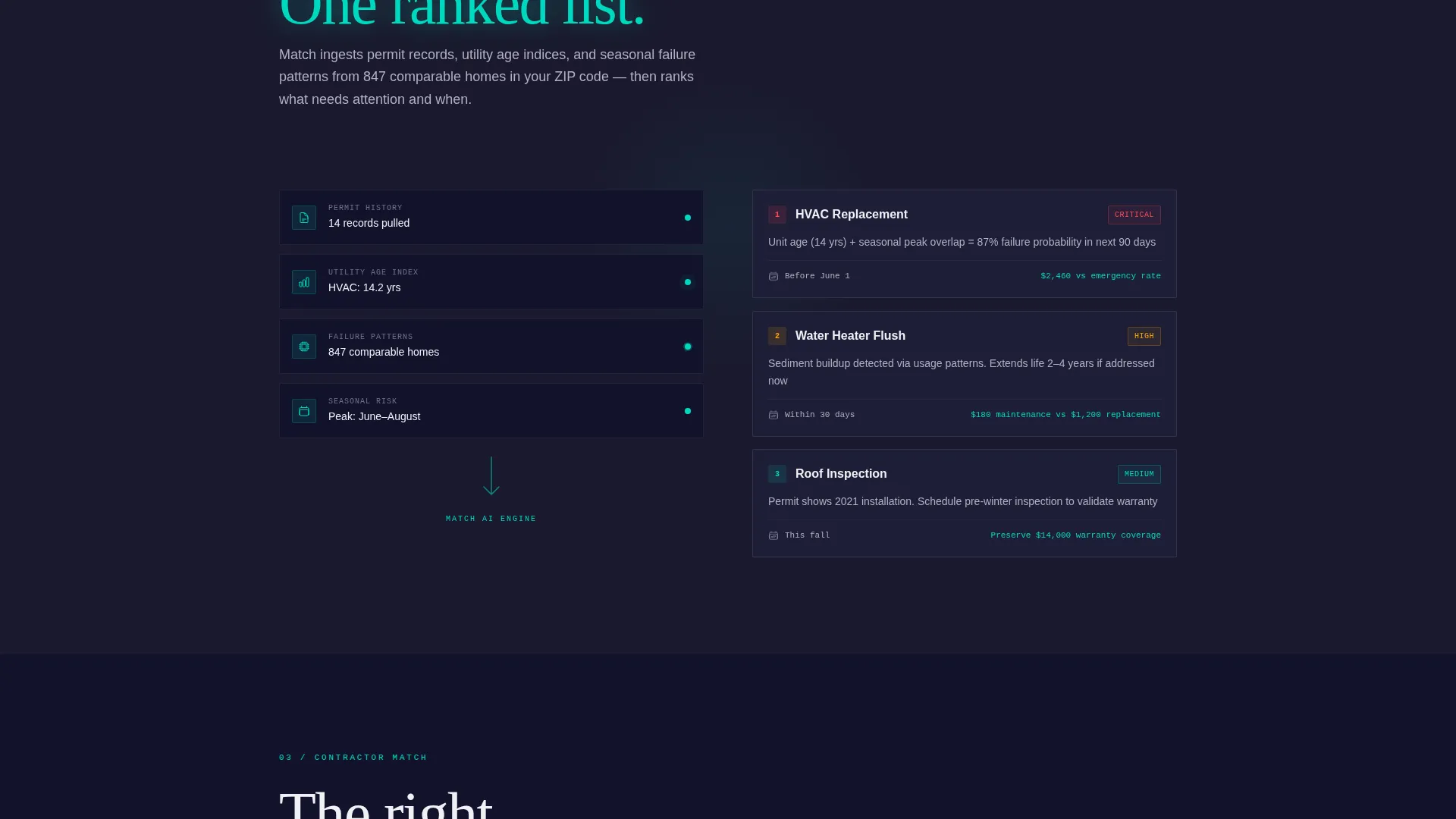
AI Logic Data Stream Animation
A teal data stream flows from a home silhouette into ranked recommendation cards on the second scroll reveal. This visual shows how the platform processes address data, permit history, utility age, and seasonal failure patterns into a clear output.
Contractor Match Profile Cards
Verified contractor profile cards emerge from the dark background on the third scroll reveal. Each card shows a response window, star rating, and a verified license badge, building credibility through visible proof rather than claims.
Fixed Viewport Call-to-Action Button
A brutalist teal "Scan My Home" button stays fixed to the bottom of the viewport after the header clears. It remains visible throughout the entire scroll journey so the conversion path is never more than one click away.
Three-Step Progressive Lead Form
Clicking the fixed button opens a form that reveals only one step at a time. Step one captures the property address with auto-complete. Step two asks for home age and top concern via a visual icon selector. Step three collects email and preferred contact window.
Page sections overview
| Section | Purpose |
|---|---|
| Full-Bleed Header | Open with dark void, wireframe scan, and headline |
| Failure Statistics Block | Slam real home failure data into view on scroll |
| AI Logic Layer | Show data stream flowing to ranked recommendations |
| Contractor Match Cards | Surface verified profiles with ratings and license badges |
| Fixed call to action Button | Keep conversion entry point visible throughout the page |
| Progressive Lead Form | Capture address, concern, and contact in three micro-steps |
Design & branding system
The visual identity follows a Bold Brutalist theme powered by the Teal Catalyst color system. Every color choice is deliberate and carries a specific visual role across the layout.
- Deep slab charcoal (#1A1A2E) fills massive background panels, electric teal (#00D9C0) pulses through headlines and interactive states, cold concrete gray (#B0B0C3) handles body text and dividers, and hot signal white (#F0F0F5) appears only where the eye must land
- Typography uses oversized brutalist slab type for headlines, creating a heavy, industrial feel that matches the serious stakes of home maintenance
- The overall palette reads like a circuit board lit by a single status LED in a dark server room: industrial, unadorned, and alive only where it matters
Mobile & speed optimization
The template is structured for a mobile-first browsing experience. The fixed call-to-action button and single-column scroll layout adapt naturally to smaller screens without losing the dramatic visual hierarchy.
- Scroll reveal triggers and full-bleed dark panels are designed to work within a single-column mobile flow
- The three-step progressive form shows one field at a time, which keeps the interface clean and uncluttered on any screen size
How this template helps you convert
The page earns trust through a deliberate sequence rather than a single persuasion moment. Every scroll trigger moves the visitor one step closer to feeling ready to act.
- The animated header creates immediate curiosity and signals that this product is different from a standard contractor directory
- The Problem-to-Solution arc builds credibility by showing the AI logic visually, so visitors understand how the platform works before they are asked for anything
- The three-step progressive form reduces friction by asking for only one piece of information at a time, which lowers the perceived commitment at each micro-step
Other information about this template
This template is part of a matched intersection between the Technology category and the AI for Home Services subcategory. It is designed specifically for the Home Services AI Recommendation Engine niche and carries an intersection match score of 13.
- The template style is Scroll Reveal (Progressive), meaning each section is hidden until the visitor reaches it through natural scrolling
- The creative direction follows a Problem-to-Solution Arc, which is a proven structure for platforms that need to educate before they convert
- The header concept is classified as Dark Full-Bleed with a Glow effect, reflecting the signature house wireframe scan animation
- The lead generation direction makes this template most suitable for platforms collecting qualified homeowner or property manager leads before routing them to contractors
Theme
Bold Brutalist
Creative direction
Problem→Solution Arc
Color system
Teal Catalyst
Style
Scroll Reveal (Progressive)
Direction
Lead Generation
Page Sections
Animated House Wireframe Header
Scroll Reveal Problem Arc
AI Logic Data Stream Animation
Contractor Match Profile Cards
Fixed Viewport Call to Action Button
Three-step Progressive Lead Form
Related questions
Can I customize the room labels and risk data shown in the wireframe animation?
Does the progressive form support more or fewer than three steps?
Is the fixed 'Scan My Home' button visible on mobile screens?
Who is this landing page template best suited for?



