Printing Digital Presence Professional Website Template
This menu scannable digital menu landing page template is built for restaurant tech services that replace static menus with live, QR-code-powered digital experiences. It features a split-screen hero, interactive style switcher, capabilities bento grid, and a freemium signup flow. The result is a high-impact landing page that turns curious visitors into active users in seconds.
by Rocket studio
Quick summary
This template is a split-screen landing page designed for a restaurant tech service that turns static restaurant menus into scannable, real-time digital experiences. Guests scan a restaurant menu QR code printed on table tents, window decals, or receipt footers and open a crisp mobile menu instantly. The page converts on a freemium model with zero friction.
Who this template is for
This template is built for founders, product teams, and marketers launching or growing a QR menu platform. It speaks directly to the people selling the service and the operators they serve.
- Taqueria and cafe owners tired of reprinting laminated menus every time ingredient prices shift
- Franchise operators who need hundreds of restaurant menus synced quickly and reliably
- Restaurant tech teams who want a landing page that teaches by doing, not by telling
What problem this template solves
Physical menus are expensive, slow to update, and out of date the moment they are printed. A cafe that changes its seasonal drinks list or a taqueria adjusting prices faces the same problem: reprint or go without. This template addresses that pain head-on.
- Reprinting costs add up fast, and printed menus cannot reflect real-time changes in dishes or prices
- Guests who cannot easily access current menu information have a worse dining experience
- Restaurant owners need a landing page that communicates the value of a digital menu quickly and builds trust before asking for a sign-up
What you get with this template
You get a complete single-page layout that demonstrates the product while selling it. Every section is interactive and informative, moving guests through the value story at their own pace.
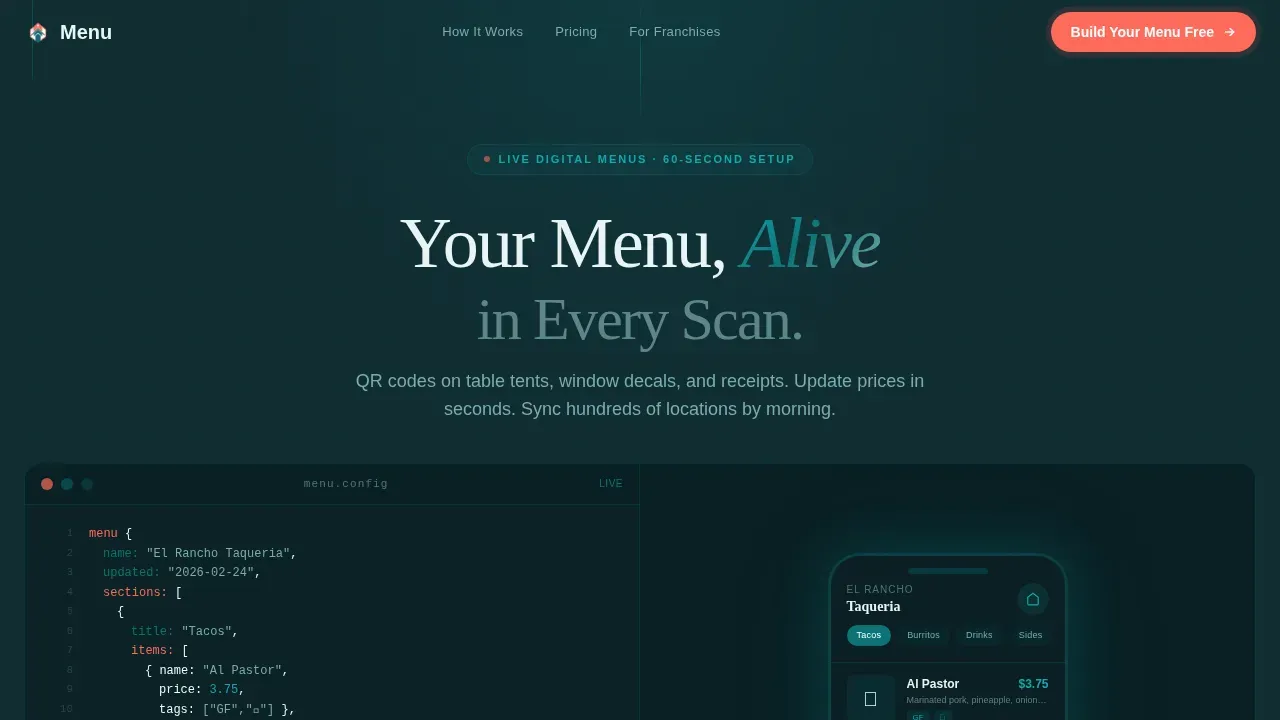
- A split-screen hero with a live code editor on the left and a phone-framed digital menu render on the right, including a blinking typing cursor and live update animation
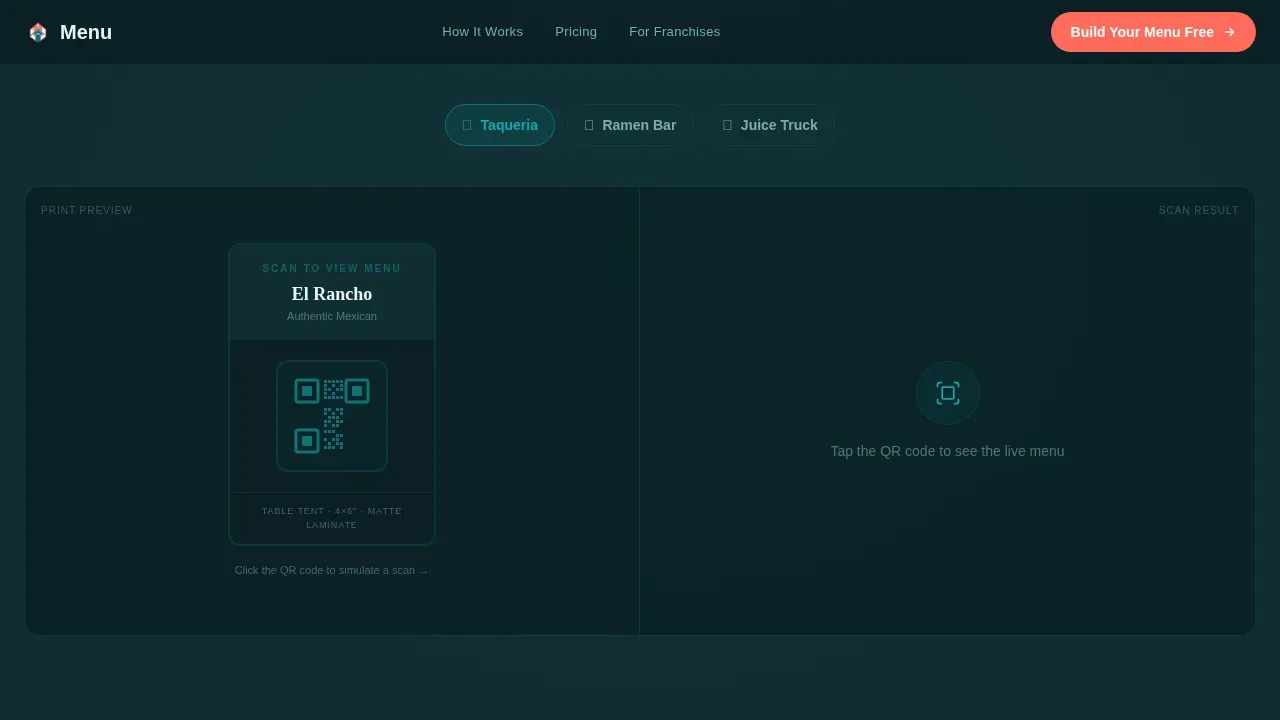
- An interactive style switcher showing how one QR menu system adapts across fine dining, ramen bar, and juice truck restaurant styles
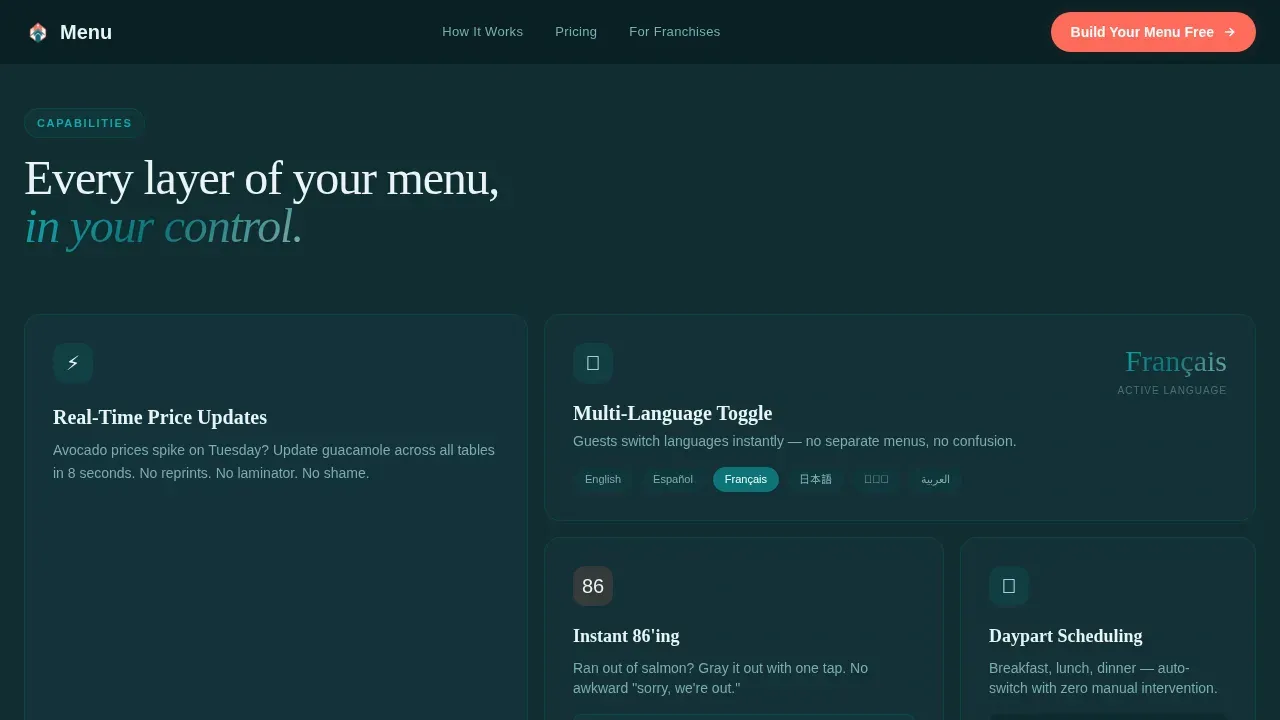
- A capabilities bento grid covering multi-language toggling, sold-out item graying, and daypart scheduling, plus a freemium two-step signup form and a PDF import conversion path
Feature list
This template includes purpose-built sections and interactions that reflect how the product actually works. Every feature below comes directly from the design brief.
Split-Screen Live Code Hero
The hero splits 50/50. The left panel displays syntax-highlighted menu markup with dish names, prices, and allergen tags nested in readable code. The right panel renders that same code as a phone-framed digital menu. A blinking cursor types a new seasonal menu item in real time, and the rendered menu updates live with a micro-animation. No stock photography needed. The code is the visual.
Interactive QR Style Switcher
Below the hero, visitors see a print preview of a QR table tent on the left. On the right, clicking the QR code transitions the panel through three restaurant styles, showing how the same system serves different venue types. This section lets guests experience the product before they sign up.
Capabilities Bento Grid
An asymmetric bento grid display covers the platform's core capabilities. Cells show multi-language menu toggling, 86'd item graying so sold-out dishes disappear automatically, and daypart scheduling so breakfast and dinner menus swap without manual updates. Each cell teaches a feature through a small interactive moment.
Freemium Two-Step Signup Form
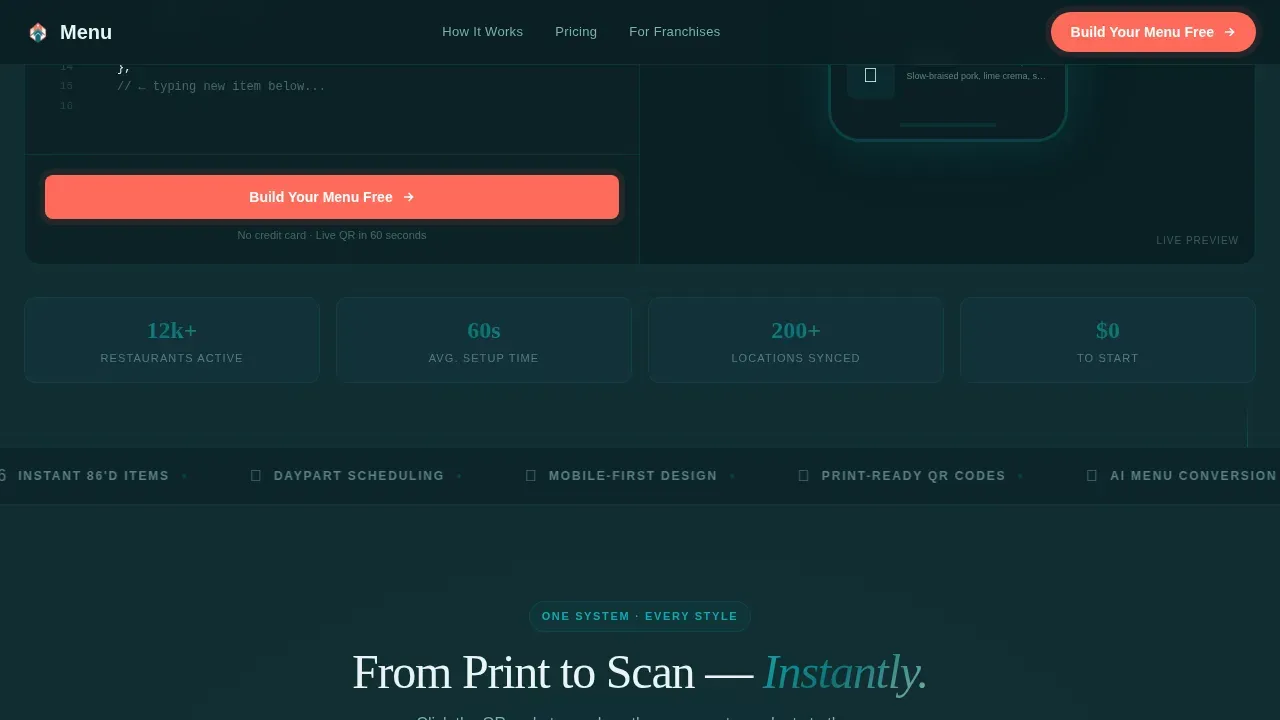
The primary call to action, "Build Your Menu Free," appears inside the hero code panel and resurfaces after each interactive section. Clicking it opens a two-step form. Step one collects restaurant name and cuisine type from a dropdown with thirty-plus options. Step two collects location count and email. No credit card required. The platform generates a live QR code and a shareable menu link within sixty seconds.
PDF Import Conversion Path
A secondary call to action lets visitors paste an existing PDF version of their menu to see an instant converted preview. Users can upload their menu in PDF format or link to an online menu they already have. This path removes nearly all friction for restaurant owners who already have a formatted menu ready.
Testimonial Spotlight Cards
Social proof appears as spotlight testimonial cards from taqueria owners, cafe managers, and franchise operators. Each card includes a role, restaurant type, and a key metric such as locations synced or reprint savings eliminated. Animated card transitions keep the section engaging without slowing the page.
Page sections overview
| Section | Purpose |
|---|---|
| Split-Screen Hero | Demonstrate live code-to-menu rendering with typing animation and primary call to action |
| QR Style Switcher | Show how one QR menu system adapts across three distinct restaurant styles |
| Capabilities Bento | Display multi-language, daypart, and sold-out features in interactive grid cells |
| Social Proof Cards | Build trust with testimonials from real operator types and key performance metrics |
| Final call to action Section | Drive sign-ups with full-width coral gradient, primary call to action, and PDF import path |
| Footer Flow | Provide navigation, links, and brand messages in a clean horizontal layout |
Design & branding system
The visual identity follows a Directory and Discovery theme. The palette is the Teal Catalyst color system, designed to feel like the moment a phone camera locks focus on a QR code, that flash of recognition before the menu loads.
- Deep scanner teal (#0D7377) anchors the brand; midnight ink (#112D32) fills backgrounds to read like a freshly printed menu board; bright catalyst white (#F0FAFA) surfaces content clearly
- Signal coral (#FF6B5B) is reserved exclusively for calls to action and interactive hotspots, so every clickable moment stands out with immediate visual contrast
- Typography uses DM Sans for body text and Fraunces as a serif accent for headlines, pairing the technical precision of a code editor with the warmth of a restaurant brand
Mobile & speed optimization
About 73% of diners use mobile devices to view menus, so this template is built mobile-first from the ground up. The product itself is a mobile experience, and the landing page mirrors that priority.
- Single-column layout on mobile devices ensures linear navigation and easy access to every section without horizontal scrolling
- Client components handle high-interactivity sections such as the style switcher, PDF import field, and two-step signup form, while server rendering covers static sections to keep loading efficient
- The phone-framed menu render in the hero communicates instantly to mobile visitors that the product was designed for their device first
How this template helps you convert
This landing page is structured to move restaurant owners from curious to committed without friction. The freemium model, interactive proof, and zero-commitment signup combine into a clear conversion path.
- The hero delivers immediate product proof. Visitors see a restaurant menu QR code scenario unfold in real time before they read a single line of marketing copy, which builds trust faster than any description paragraph.
- The interactive sections teach by doing. Each scroll depth adds a new capability demonstration, so by the time guests reach the final call to action they have already experienced the value of a digital menu firsthand.
- The two-step signup form and the PDF import path give visitors two different ways to start. Low-commitment entry points let restaurant owners choose their own level of readiness without feeling pressured to pay.
Other information about this template
This template is built for the printing digital presence niche within the restaurant technology category. It is designed for a business offering freemium services, with the landing page itself acting as the product demo. Several practical details are worth noting for teams evaluating this template.
- The qr code generator flow is integrated directly into the signup experience, generating unique qr codes for each new restaurant account within sixty seconds of form completion
- A custom qr code can be styled with the restaurant's logo and brand colors to enhance brand recognition, since QR codes can be customized to fit the color and feel of any restaurant or cafe
- Unlike a static qr code, the dynamic QR codes used in this system allow menu updates without reprinting or changing the printed code itself
- Restaurant menus can be displayed across table tents, window decals, receipt footers, and food packaging, giving operators multiple physical touchpoints that link back to the same online menu
- The platform supports multiple languages and currencies, which helps restaurant menus enhance accessibility for diverse guest bases
- High-contrast color schemes used in the menu display improve the scannability of content-heavy menus, consistent with best practices for digital menu design
- Placing high-margin menu items in the upper-right quadrant of the screen captures attention where 67% of visual attention lands, a layout principle baked into the phone-framed menu render
- Maintaining five to six items per display panel keeps the screen uncluttered and readable on small mobile screens
- The template supports videos and high-quality food imagery in menu cells, since high-quality visuals of dishes can increase sales by up to 30%
- Grouping menu items into sections like Appetizers, Entrées, and Drinks enables quick navigation for guests who want to browse without scrolling through a single long list
- Clear dietary tags in the menu display help customers filter menu options quickly, reducing decision time at the table
- A cloud-based Content Management System allows for instant price updates and menu changes based on the time of day, consistent with the daypart scheduling capability shown in the bento grid
- The PDF import path accepts a pdf version or pdf format upload so restaurant owners can convert an existing menu without starting from scratch
- Pricing tiers referenced in this space typically include a free starter plan for basic digital menu creation, with professional plans around $19 per month and expert plans around $49 per month for comprehensive restaurant services
- The search results benefit when a restaurant's menu is accessible via a shareable url and linked from the restaurant's website, giving the business a stronger digital presence
- The template's website layout is formatted to support the restaurant's brand across every section, from logo placement in the header code panel to brand color application throughout the call to action buttons
Theme
Directory & Discovery
Creative direction
Interactive Explorer
Color system
Teal Catalyst
Style
Split Screen (50/50)
Direction
Freemium/Trial
Page Sections
Split-screen Live Code Hero
Interactive QR Style Switcher
Capabilities Bento Grid
Freemium Two-step Signup Form
PDF Import Conversion Path
Testimonial Spotlight Cards
Related questions
Does this template work for single-location restaurants and large franchises?
Can guests place orders and pay directly from the QR menu?
How do I get started if I already have a menu in PDF format?
Do the restaurant menu QR codes work on Android devices?
Can I customize the QR code design to match my restaurant's branding?



