Developer Documentation Specialist Reviews Website Template
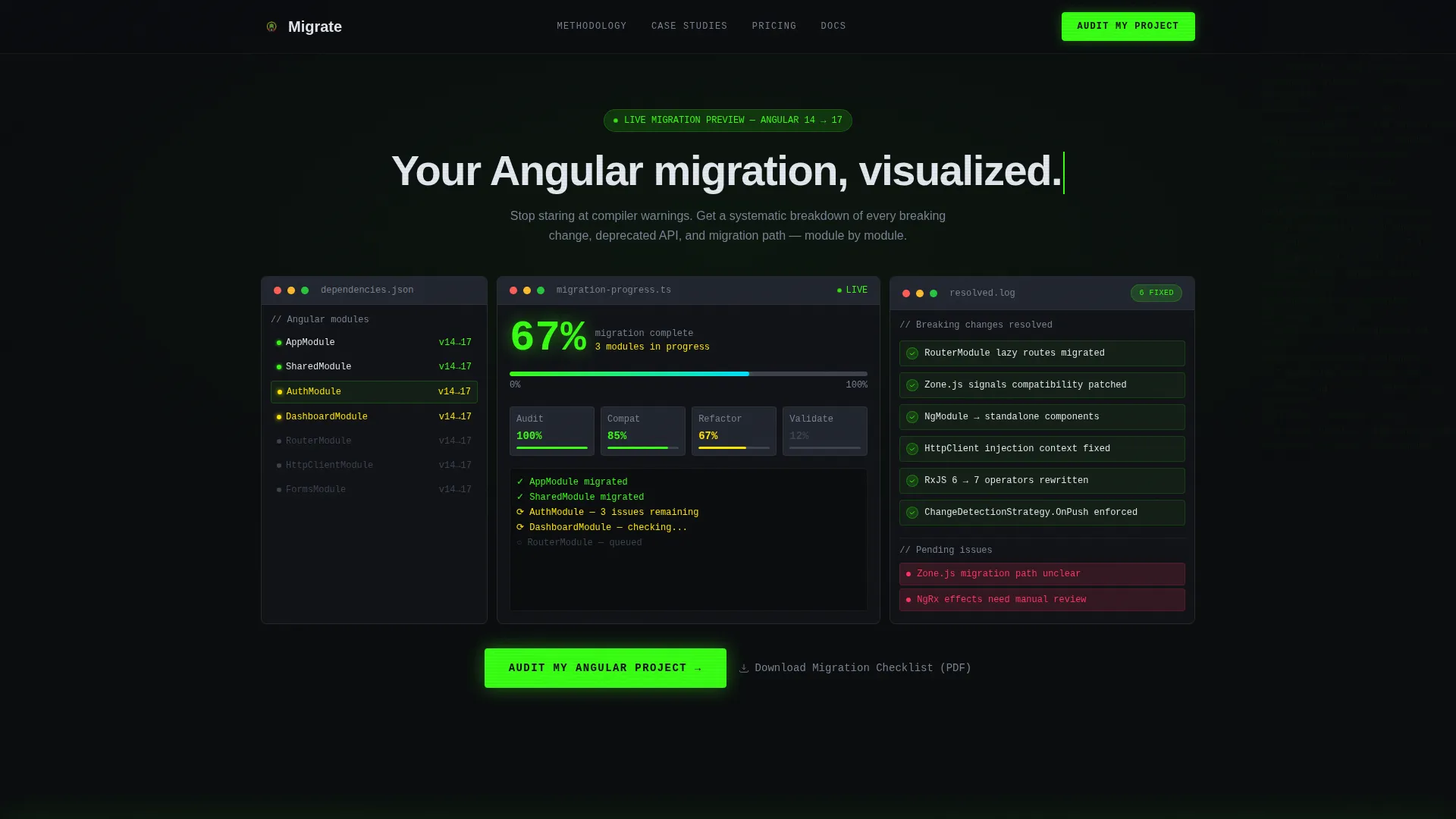
Migrate is a dynamic Angular landing page template built for enterprise teams managing version upgrade projects. It combines a live-feeling migration dashboard, animated pipeline phases, code diff previews, and a progressive lead capture form. The Acid Digital color system and Launch Energy scroll motion make it feel like a build terminal that's already solving the problem.
by Rocket studio
Quick summary
Migrate is a single-page Angular migration guide template that turns a complex upgrade process into a visual, confidence-building experience. It opens with a simulated live dashboard, walks visitors through four migration phases, shows real before-and-after code changes, and closes with a focused lead capture form, all inside a dark, electric Acid Digital design system.
Who this template is for
This template is built for technical teams and decision-makers who own Angular upgrade projects inside large engineering organizations. It speaks directly to the people who feel the pain of a failed ng update run.
- Frontend leads managing compiler warnings and broken lazy routes after a version bump
- Engineering managers whose continuous integration pipelines have turned red across multiple micro-frontends
- CTOs who need a structured migration roadmap that does not stall feature delivery
What problem this template solves
Angular version upgrades carry real risk. Deprecated application programming interfaces (APIs), RxJS operator rewrites, and standalone component adoption all require careful, phased handling. Most teams lack a clear, visual plan to communicate progress to stakeholders while the work is underway.
- No unified view of migration status across modules, breaking changes, and test coverage
- No structured way to present the upgrade roadmap to non-technical decision-makers
- No conversion path that earns trust before asking an enterprise team to commit
What you get with this template
You get a complete, single-page lead generation landing page designed specifically for the Angular migration guide use case. Every section is pre-built and purpose-matched to the upgrade journey.
- A full-viewport dashboard preview header with animated progress indicators and version badges
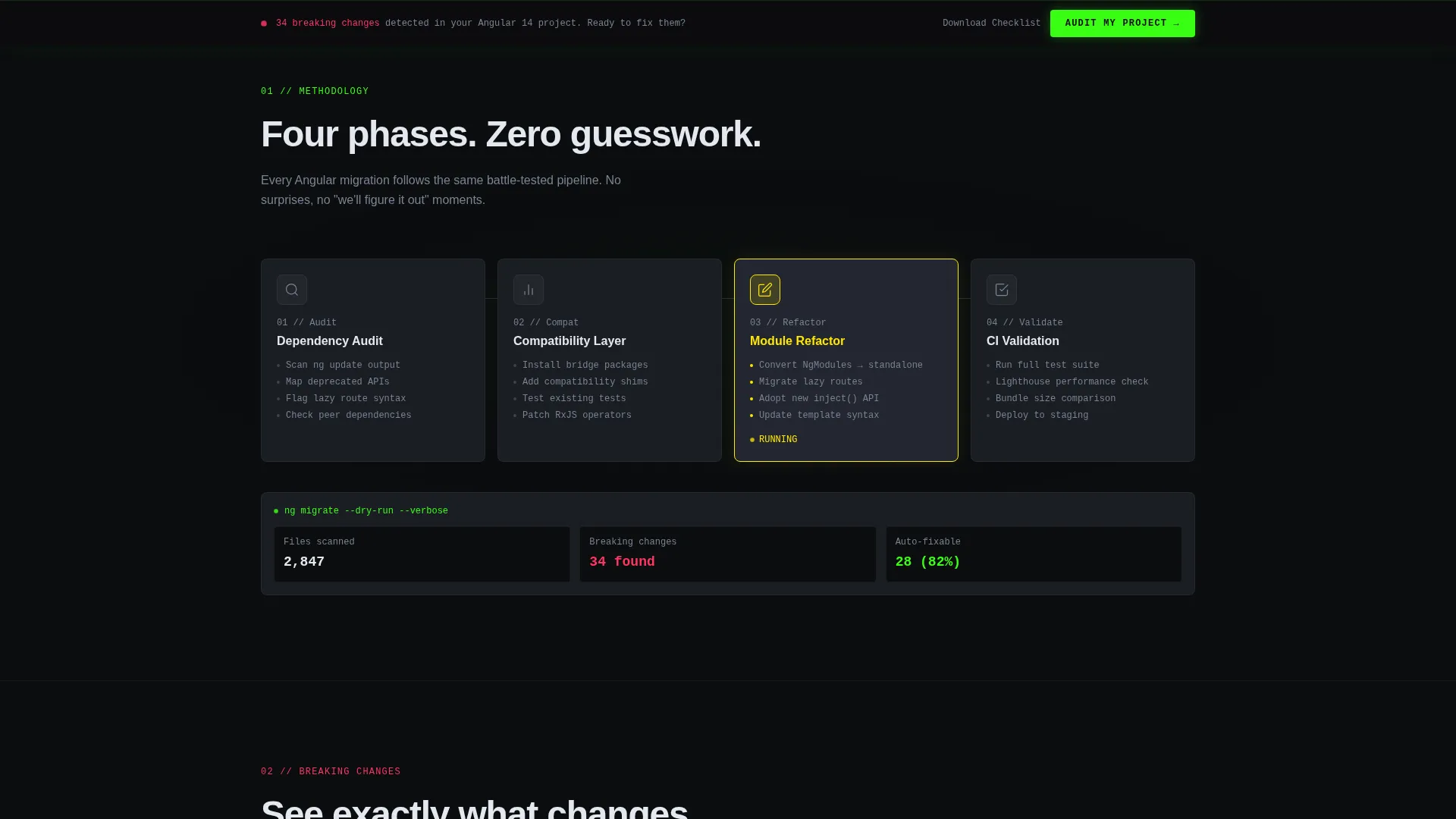
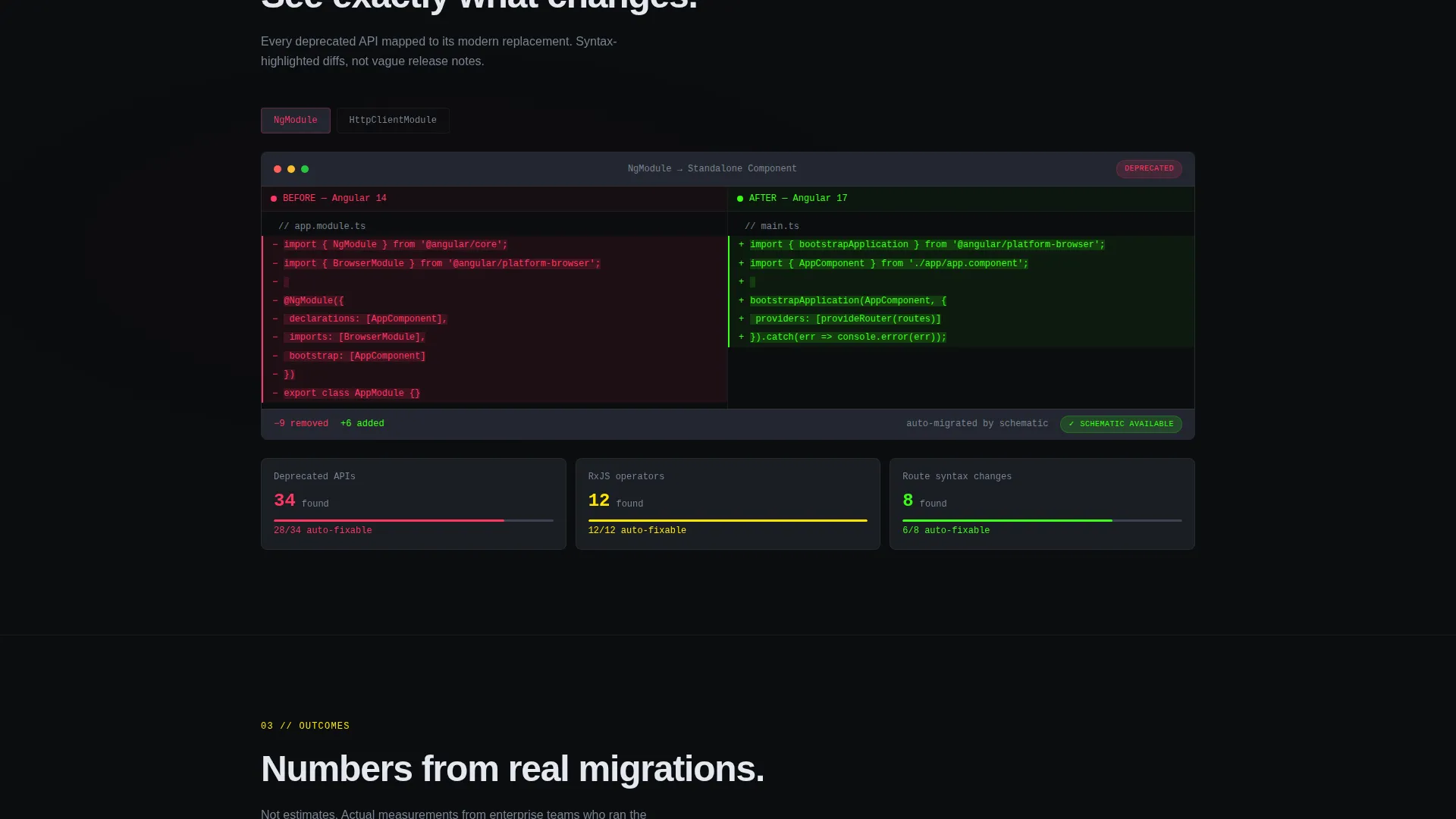
- An animated four-phase migration pipeline, a code diff section, and a metrics grid
- A three-step progressive lead capture form and a secondary gated checklist download path
Feature list
This template delivers six purpose-built components that work together across the full page scroll.
Simulated Live Migration Dashboard
The header renders a full-viewport dashboard showing a simulated Angular project mid-upgrade. A dependency tree displays version badges from Angular 14 through 17. A center progress bar sits at 67 percent with module names ticking upward. The right panel lists resolved breaking changes with green checkmarks animating in sequence.
Animated Migration Pipeline
A schematic breakdown renders the four migration phases: audit, compatibility check, refactor, and validate. Each phase connects to the next with data flowing left to right in a continuous animated pipeline. This section makes the methodology feel systematic and trustworthy at a glance.
Code Diff Preview Section
Before-and-after code snippets show deprecated @NgModule declarations dissolving into clean standalone component syntax. Syntax-highlighted transitions make the change readable for technical visitors and reassuring for managers reviewing the approach.
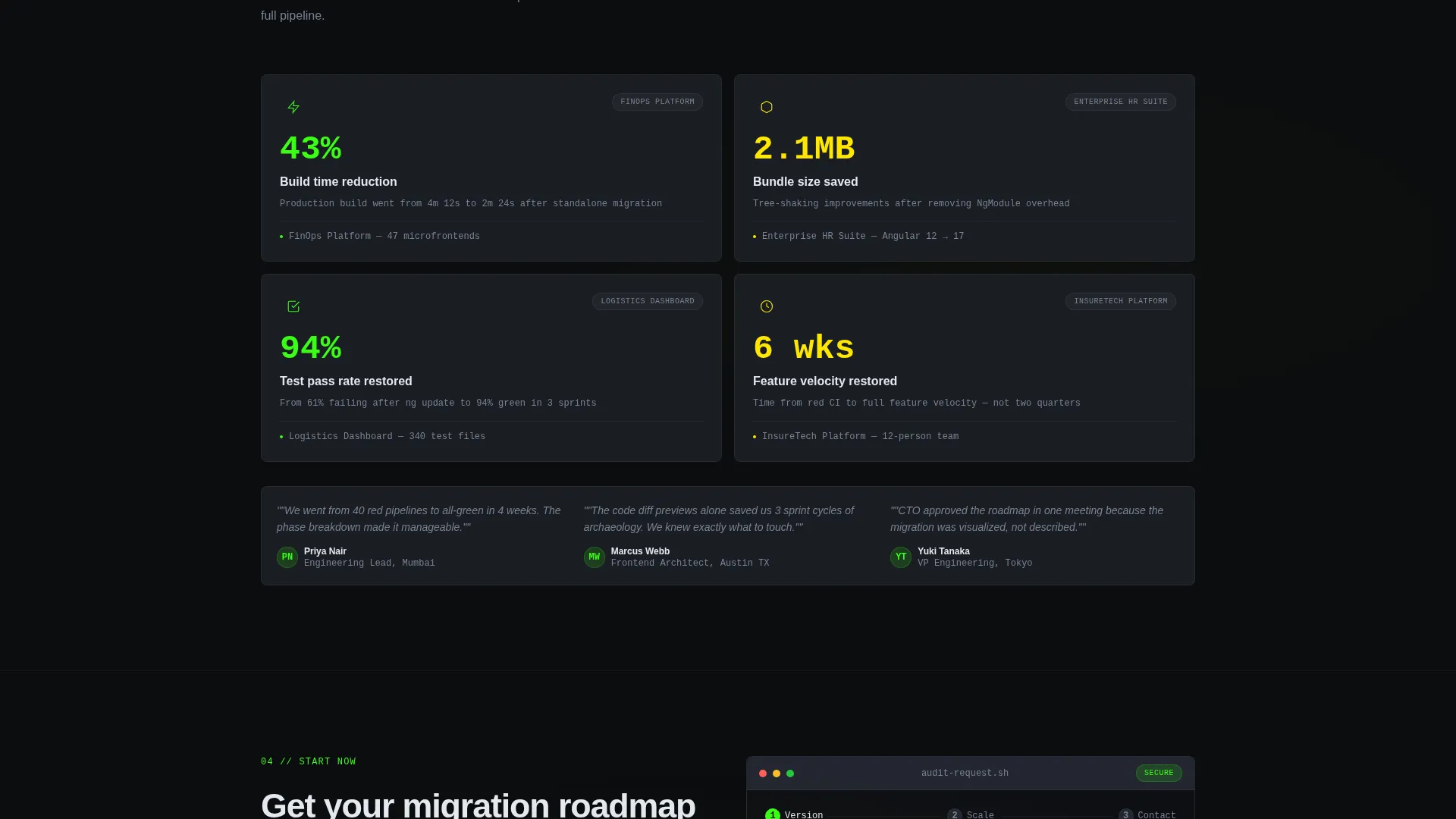
Metrics Grid with Scroll Counters
A dedicated metrics section displays real client outcome numbers: build times reduced, bundle sizes cut, and test coverage restored. Each number counts upward on scroll, giving the data a sense of live progress rather than a static report.
Progressive Three-Step Lead Form
The primary conversion form unfolds across three steps. Step one captures the current Angular version via a dropdown covering version 8 through version 16. Step two asks for the approximate module count using radio buttons. Step three collects a work email address.
Sticky Conversion Bar and Secondary Download Path
A sticky bottom bar appears after the first scroll, keeping the primary call to action visible at all times. A secondary conversion path offers a gated migration checklist PDF download for visitors who want value before committing to a full audit.
Page sections overview
| Section | Purpose |
|---|---|
| Dashboard Preview Header | Opens with a simulated live Angular migration dashboard at full viewport width |
| Sticky Mini-Bar | Compresses the dashboard into a persistent top bar as the visitor scrolls down |
| Migration Pipeline | Animated four-phase audit-to-validate flow rendered as a left-to-right schematic |
| Code Diff Panel | Before-and-after syntax-highlighted snippets showing standalone component migration |
| Metrics Outcome Grid | Scroll-triggered counters showing build time, bundle size, and coverage improvements |
| Lead Capture Form | Three-step progressive form collecting Angular version, module count, and work email |
| Sticky call to action Bar | Bottom bar anchored after first scroll with the primary audit call to action |
| Checklist Download | Secondary gated PDF offer requiring only an email address |
Design & branding system
The Acid Digital color system gives every element a specific signal value. Nothing is decorative for decoration's sake. The palette reads like a build terminal where each color communicates status.
- Void black (#0B0D0F) as the primary background, cool graphite (#1A1D23) for card surfaces, terminal phosphor green (#39FF14) for success states and primary accents
- Warning plasma yellow (#FFE600) for in-progress indicators, error signal red (#FF3562) for deprecation highlights
- Dynamic Motion animations include scroll-triggered upward slide-and-fade section entrances, status pills flipping from yellow to green, and progress percentages incrementing live
Mobile & speed optimization
The template is built with a mobile-responsive layout so the dashboard grid and metrics panels reflow cleanly on smaller viewports. The scroll behavior and sticky elements are designed to remain functional across device sizes.
- The full-viewport dashboard header scales down gracefully without losing the live-dashboard visual effect
- Sticky bars and the progressive form remain accessible and usable on touch-based mobile devices
- Micro-animations are scoped to meaningful status changes, keeping the page purposeful rather than visually overwhelming
How this template helps you convert
The page is structured to build confidence before it asks for anything. Each scroll step adds proof, which earns the lead.
- The live-feeling dashboard proves the methodology works before any copy makes a claim. Visitors see the problem being solved in motion, which reduces skepticism immediately.
- The metrics grid with counting numbers gives engineering managers and CTOs the outcome evidence they need. Real numbers land harder than promises.
- The three-step progressive form reduces friction by breaking the commitment into small steps. The secondary checklist download captures email from visitors who are not yet ready for a full audit conversation.
Other information about this template
This template fits naturally inside a broader Angular documentation and support content strategy. It is designed to serve the Angular migration guide niche directly, where the buyer is already technically informed and needs proof of process rather than a high-level pitch.
- The template style is a Dashboard and Data Grid layout, matched to the Dynamic Motion theme and Launch Energy creative direction
- It is categorized under Documentation and Support, with a subcategory focus on Angular documentation
- The Acid Digital color system is purpose-built for developer-facing interfaces where color carries functional meaning
- The page works as a standalone lead generation asset or as the entry point to a larger Angular upgrade service offering
Theme
Dynamic Motion
Creative direction
Launch Energy
Color system
Acid Digital
Style
Dashboard/Data Grid
Direction
Lead Generation
Page Sections
Live-feeling Migration Dashboard Header
Animated Four-phase Migration Pipeline
Syntax-highlighted Code Diff Panel
Scroll-triggered Metrics Grid
Three-step Progressive Lead Capture Form
Sticky Call to Action Bar and Gated Checklist Download
Related questions
What kind of team is this template designed for?
Can I customize the Angular version range shown in the lead form dropdown?
Does the dashboard animation require a live data connection?
What is the secondary conversion path for visitors not ready to request an audit?
How does the sticky bottom bar behave during scroll?



