Migrate — Seamless Platform Conversion Landing Page Template
Migrate is a bento grid landing page template built for freelance designers, small agency owners, and e-commerce founders ready to leave the Wix platform behind. It combines a live stats dashboard header, a five-phase migration flow, before-and-after performance comparisons, and a free site audit form into one high-converting, visually engineered single-page experience.
by Rocket studio
Quick summary
Migrate is a focused, data-driven landing page template purpose-built for Wix migration services. It uses a Tech Glass visual identity, asymmetric bento grid layout, and a freemium conversion model to turn wix site visitors into audit leads. The primary call to action, "Run Your Free Site Audit", appears instantly and resurfaces in a sticky bar after scroll depth, making the conversion path impossible to miss.
Who this template is for
This template speaks directly to professionals who have hit a ceiling on the wix platform and need a credible, conversion-ready page to launch their migration service or showcase their process to clients.
- Freelance designers who have outgrown drag-and-drop and need a professional page that reflects their technical capability
- Small agency owners who want a sharp, trustworthy front for their website migration offer
- E-commerce founders whose stores are straining under platform limits and need a clear path to an open, scalable new website platform
What problem this template solves
Website migration is widely understood as a daunting task. Failing to plan for it can lead to significant drops in search engine rankings, lost link equity, broken links, and months of wasted seo efforts. Designers and agencies often lack a polished, conversion-optimized page that communicates the process clearly and builds client trust before a single meeting.
- It gives migration professionals a ready-to-launch page that explains the process, reduces client anxiety, and quantifies the risk of staying on an old site
- It removes the guesswork from the audit step by providing a built-in form that captures a Wix site url and delivers an instant complexity score, page count, and estimated timeline
- It protects the credibility of the migration offer by grounding every claim in real metrics, site count, seo retention rate, and measured speed improvement
What you get with this template
You get a complete, one-page bento grid layout with six distinct visual sections, a working audit form, animated metric cards, and a sticky conversion bar. Every design decision supports the single goal of turning a visitor into an audit lead.
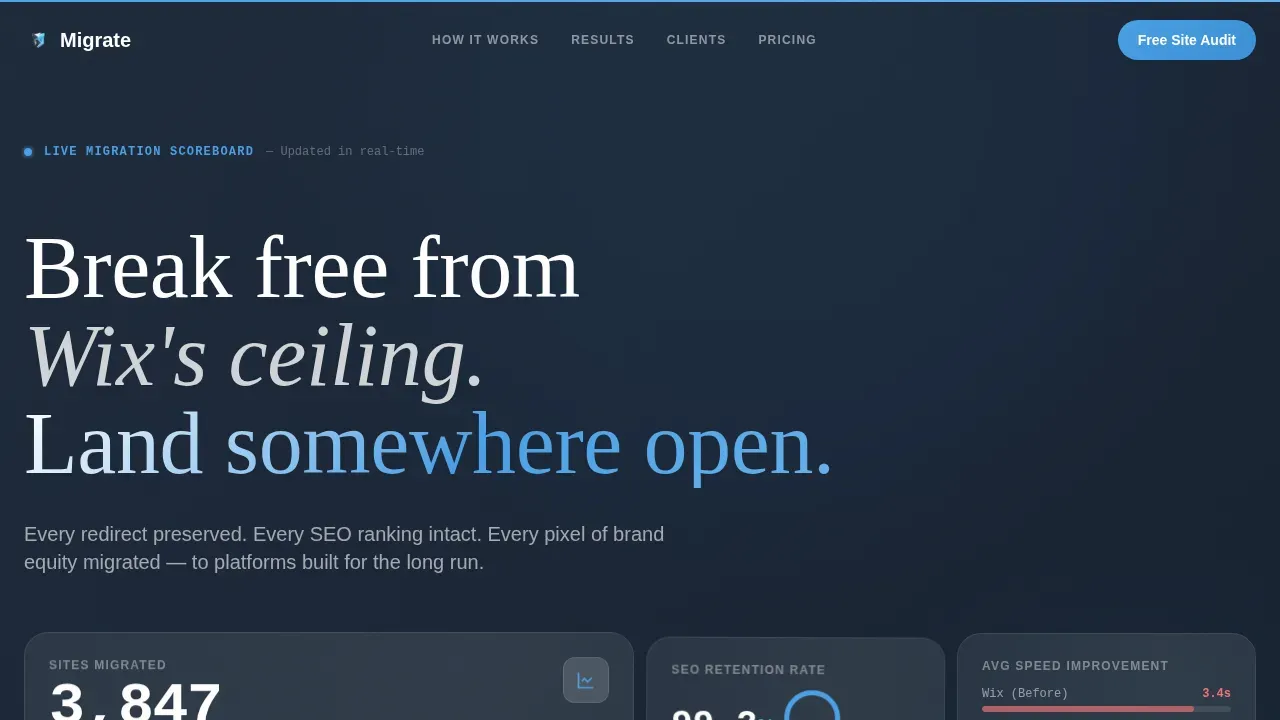
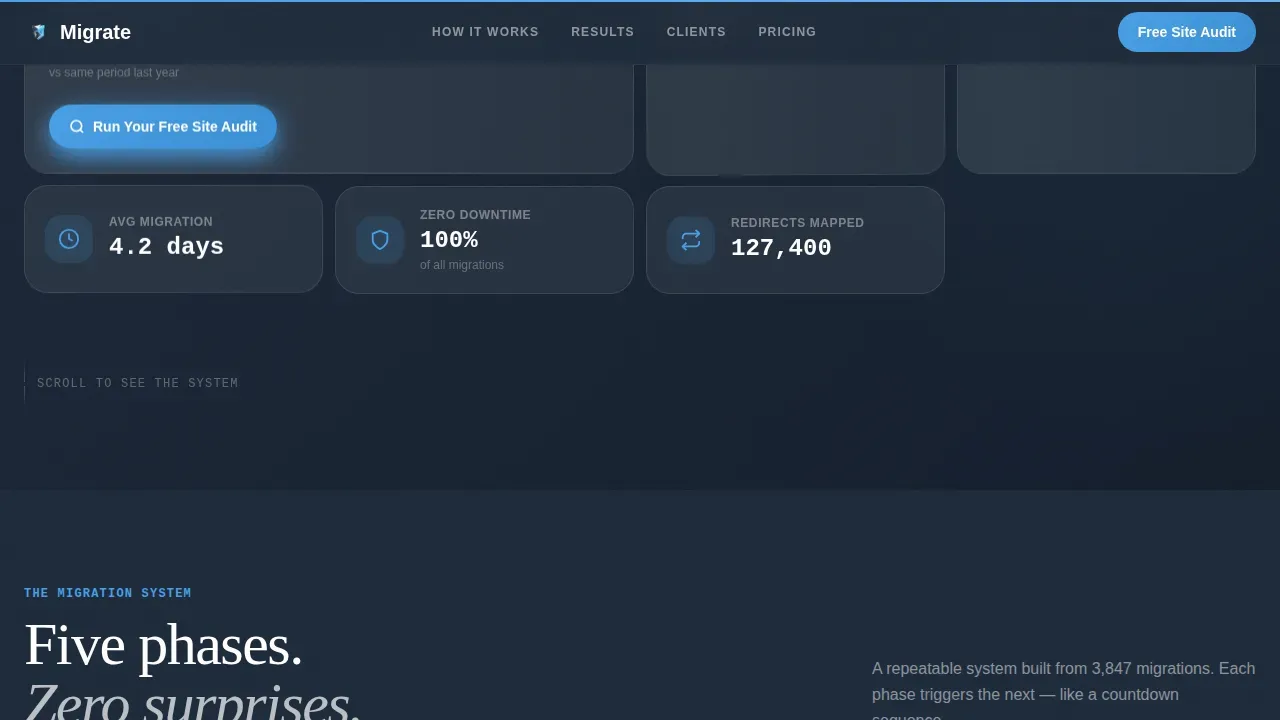
- A live stats dashboard header with frosted glass metric cards showing 3,847 sites migrated, 99.2% seo retention, and speed improvement from 3.4 seconds to 0.8 seconds
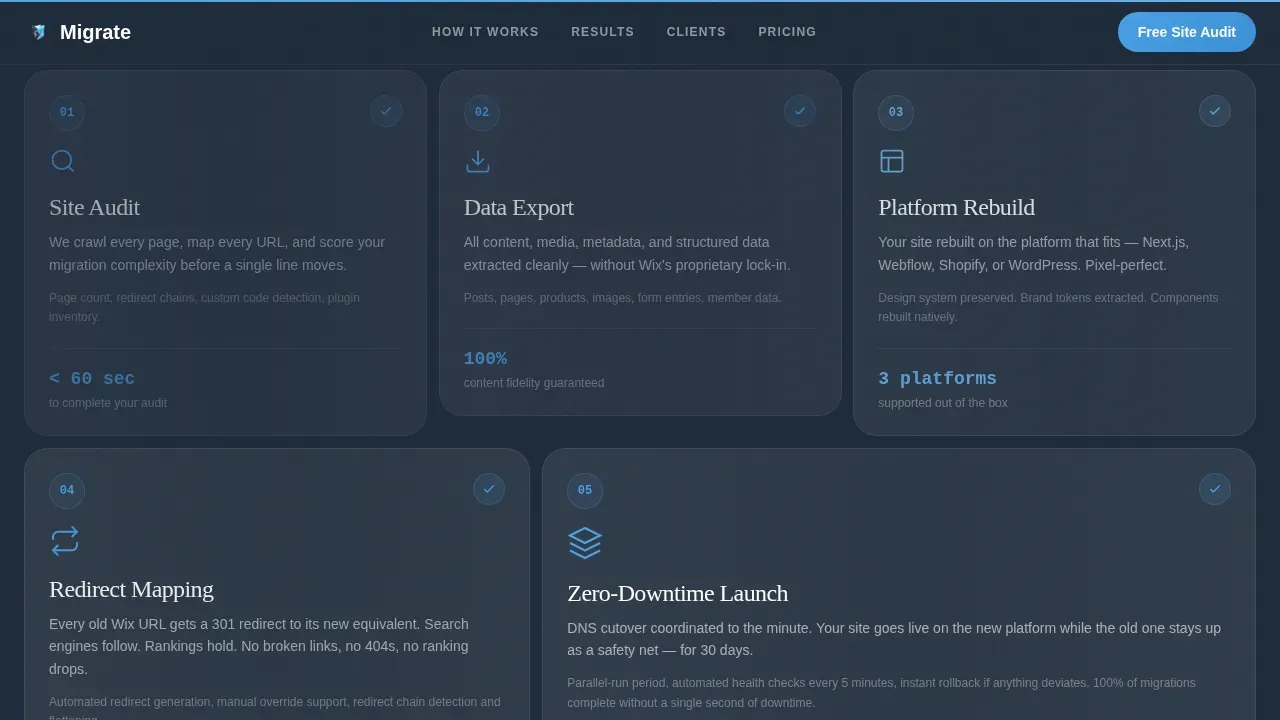
- A five-phase migration bento grid covering Audit, Export, Rebuild, Redirect, and Launch with scroll-triggered card animations and escalating card sizes
- A secondary conversion path offering a downloadable 12-step migration checklist in exchange for an email address
Feature list
This template ships with a set of clearly defined, prompt-backed features. Each one serves a distinct role in either communicating the migration process or moving the visitor toward the audit call to action.
Live Metrics Dashboard Header
The header opens on a deep slate background with floating frosted glass cards displaying real migration statistics. Numbers tick upward in real time, and a thin sky-blue progress bar animates across the top of the viewport. No stock imagery is used. The numbers do the persuading.
Five-Phase Migration Bento Grid
An asymmetric bento grid maps the full migration process across five escalating card sizes. Each phase, Audit, Export, Rebuild, Redirect, Launch, reveals itself with scroll-triggered micro-animations. Progress rings complete, checkmarks snap into place, and speed graphs climb as each card enters the viewport.
Before and After Performance Section
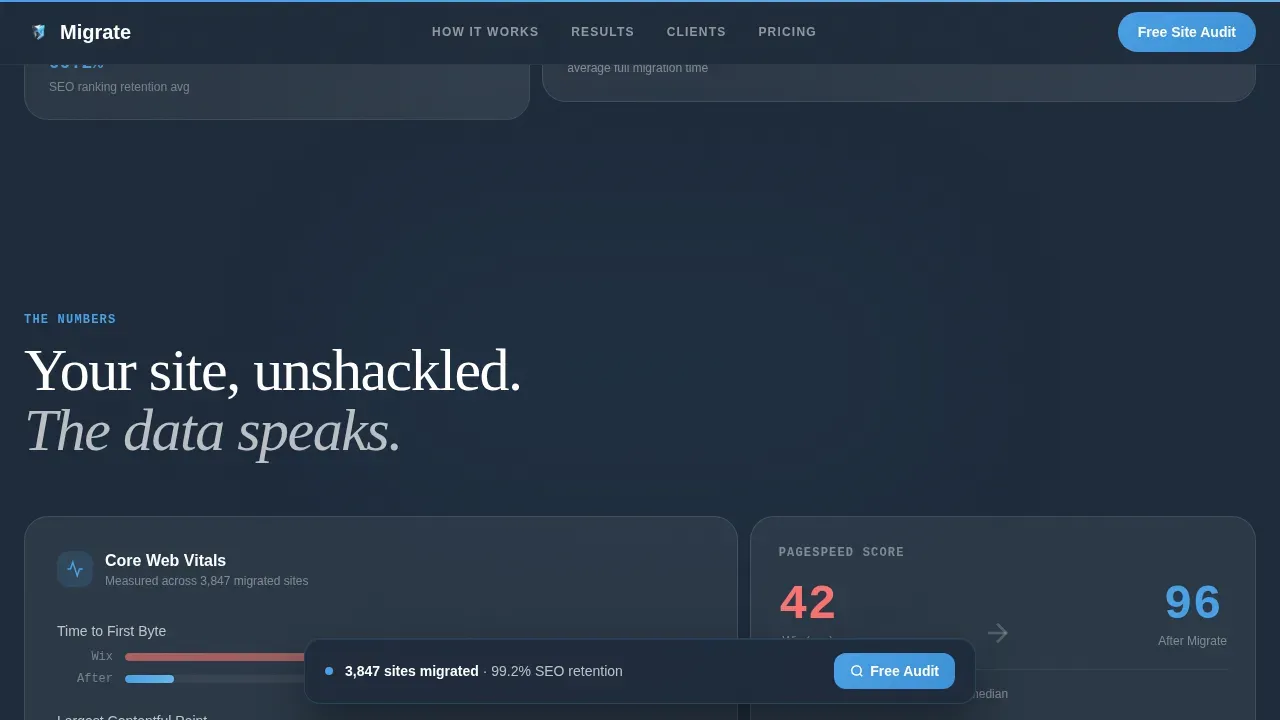
A dedicated section displays side-by-side speed graphs, search engine rankings comparisons, and core web vitals data. This section gives visitors a concrete picture of what changes after leaving the old site behind, making the value of a clean migration process tangible.
Inline Audit Form
The primary call to action opens a minimal single-field form. The visitor pastes their Wix site url and receives an instant migration complexity score, page count, and estimated timeline with no email required. This frictionless entry point does the selling before any sales conversation begins.
Sticky Conversion Bar
After the visitor scrolls past 40 percent of the page, a sticky bottom bar resurfaces the "Run Your Free Site Audit" call to action. The bar stays present without interrupting the reading experience, keeping the conversion path visible throughout the entire scroll journey.
Testimonial Cards with Grayscale-to-Color Reveal
Testimonial cards open in grayscale and transition to full color as they enter the viewport. Named quotes from designers, agency owners, and e-commerce founders add social proof grounded in recognizable roles and real situations.
Page sections overview
| Section | Purpose |
|---|---|
| Hero Stats Dashboard | Opens with live animated metric cards and the primary audit call to action |
| Migration Phases Bento | Maps the five-step process with escalating bento cards and scroll reveals |
| Before and After Performance | Compares old site and new site speed, rankings, and core web vitals |
| Social Proof Testimonials | Displays named quotes with a grayscale-to-color card animation |
| Free Audit Conversion | Hosts the freemium form and secondary checklist download path |
| Footer | Horizontal flow footer with navigation and branding |
Design & branding system
The visual identity follows a Tech Glass theme built on the Slate and Sky color system. The palette is engineered to feel cool, unburdened, and credible, like a tool built by people who understand both design and infrastructure.
- Deep graphite slate (#1E2A3A) anchors backgrounds and body typography; sky blue (#4A9FE5) fires on calls to action, progress indicators, and interactive states; frosted glass panels (rgba 232, 237, 242 at low opacity) create translucent card depth; and signal white (#FFFFFF) keeps surfaces breathable
- DM Serif Display drives headlines with editorial authority while Plus Jakarta Sans keeps body copy clean, readable, and appropriately technical
- Micro-animations include counting numbers, progress rings, bar charts, floating card parallax, and shimmer effects, all GPU-accelerated for smooth rendering
Mobile & speed optimization
The template is desktop-first by design, reflecting the primary audience of designers and developers working on laptops. Full mobile support is included, and every animation decision prioritizes rendering performance.
- All animations use GPU-accelerated CSS transforms only, avoiding layout-triggering properties that cause jank on lower-powered devices
- Scroll-triggered reveals use IntersectionObserver, ensuring cards and metric animations only fire when they enter the viewport rather than on load
How this template helps you convert
The conversion architecture is built around a single insight: once a visitor sees their own site's limitations quantified, the upgrade to guided migration feels like the obvious next step. The template builds that moment in stages.
- The hero section delivers the primary call to action immediately inside the largest metric card, before the visitor has scrolled at all, pairing the offer with live proof of results
- The sticky bar reintroduces the audit prompt after 40 percent scroll depth, ensuring the call to action stays visible as the visitor moves through migration phases and testimonials
- The secondary checklist download path captures email addresses from visitors who are not yet ready to commit, allowing continued follow-up without losing the lead entirely
Other information about this template
This template is categorized under Documentation and Support, specifically within the Wix Documentation and Wix Migration Guide niche. It is designed to function as a lead magnet landing page for migration service providers, making it relevant for anyone building a client-facing audit or consultation offer.
- The audit form is intentionally minimal, asking only for a site url and, on the secondary checklist path, an email address. Keeping the form short maximizes conversion rates, which is consistent with best practice for service landing pages.
- Conducting a comprehensive audit before migrating a wix site helps identify the current url structure, flag crawl errors, surface missing meta tags, and map old urls to new urls before anything goes live. A thorough content inventory at this stage prevents post migration surprises.
- The redirect map is a central part of any responsible migration process. Creating a redirect map that pairs old urls with new ones is essential to prevent broken links and preserve link equity. To avoid redirect chains, each old url should point directly to its new location rather than through intermediate redirects.
- A proper redirect strategy includes setting up 301 redirects, updating the xml sitemap, and submitting it to search engines so they can re-index the new site promptly. Proper redirects protect inbound links from other websites and prevent the loss of existing search engine rankings.
- The migration checklist secondary path in this template reflects best practice: a migration checklist should cover backing up the old site, auditing existing content, building a redirect map, deploying to a staging site for testing, fixing server errors and crawl errors, and conducting a post migration audit before full launch.
- Post migration monitoring is critical. Checking keyword rankings, organic traffic, canonical tags, structured data, internal links, and the internal linking structure through tools connected to the site ensures the new site performs as expected in search engines. Tracking site performance, page titles, title tags, meta descriptions, meta titles, and page loading speed in the weeks after launch catches problems early.
- The wix editor does not allow direct file exports, meaning you must rebuild a wix site from scratch when moving to a new website platform. This is a key reason why having a clear migration process, a solid redirect strategy, and a pre-launch staging site review matters so much for protecting search visibility and the site's visibility overall.
- Wix seo has real limitations at scale. Thorough keyword research before rebuilding a new website ensures the site structure and page titles are planned for the target audience and relevant keywords from day one. Reviewing page titles, meta descriptions, meta tags, and structured data during the rebuild phase keeps seo features intact.
- Using seo tools during both pre-migration and post migration phases helps catch crawl data issues, fix broken links, and verify that the new site renders correctly for search engines. Connecting the new site to tools that surface organic traffic trends, google search results, and google analytics data helps confirm that seo rankings are holding and that the current website transition is complete.
- Google search console plays a central role in confirming which pages are indexed on the new site, monitoring for crawl errors, and verifying that the xml sitemap has been processed. Connecting google search console early in the post migration period gives you the clearest view of how search engines are responding to the new urls and new location of your content.
- The migrate free site audit wix migration landing page template is built specifically for migration service professionals who want a fast, credible, client-facing page that converts on the strength of real results.
Theme
Tech Glass
Creative direction
Launch Energy
Color system
Slate & Sky
Style
Bento Grid
Direction
Freemium/Trial
Page Sections
Live Animated Stats Dashboard
Five-phase Bento Grid Layout
Instant No-gate Audit Form
Sticky Post-scroll Conversion Bar
Grayscale-to-color Testimonial Cards
Checklist Download Secondary Path
Related questions
Does this template include the audit calculation logic?
Can I use this template for migrations to platforms other than a WordPress site?
What makes the audit form approach more effective than a standard contact form?
How does the template handle visitors who are not ready to commit?
Is the bento grid section editable to match my own migration process steps?



