Milestone - Automated Dealer Landing Page Template
Milestone is a dashboard-style auto dealer landing page template built for dealership automation platforms. It showcases a live milestone trigger feed, AI-matched email composer, and revenue attribution grid. With a Bold Brutalist design powered by an iridescent dark palette, it turns complex drip-email logic into a gripping, interactive product demo that earns the install.
by Rocket studio
Quick summary
Milestone is a single-page landing page template for auto dealer milestone email platforms. It puts a live-data dashboard front and center, letting dealers watch customer triggers fire in real time. The Bold Brutalist design and interactive module layout make the product feel alive before anyone signs up.
Who this template is for
This template is built for teams selling or promoting dealership automation software. It speaks directly to the people running dealer operations day to day.
- Dealer group marketing directors managing multiple rooftops who need one platform handling every customer lifecycle touchpoint
- Single-point general managers still running campaigns from spreadsheets who are ready for a faster, automated approach
- Business development center managers buried in orphan leads who need every follow-up trigger handled without manual effort
What problem this template solves
Dealerships lose revenue when service milestones, lease-end dates, and warranty expirations pass without any outreach. The platform this template promotes solves that problem. The template itself solves the challenge of communicating that value quickly and credibly to a skeptical, time-poor audience.
- Dealers struggle to visualize how milestone automation actually works, so this template shows the machine running rather than describing it in bullet points
- Marketing teams need a landing page that captures leads even when visitors are not ready to install, so the secondary scan-and-report flow converts curiosity into contact data
- Product teams need a design that feels native to a dealership tech stack, not a generic SaaS page, so the dashboard-first layout builds instant credibility
What you get with this template
You get a fully structured landing page built around an interactive dashboard metaphor. Every section is designed to feel like a real product screen, not a marketing brochure.
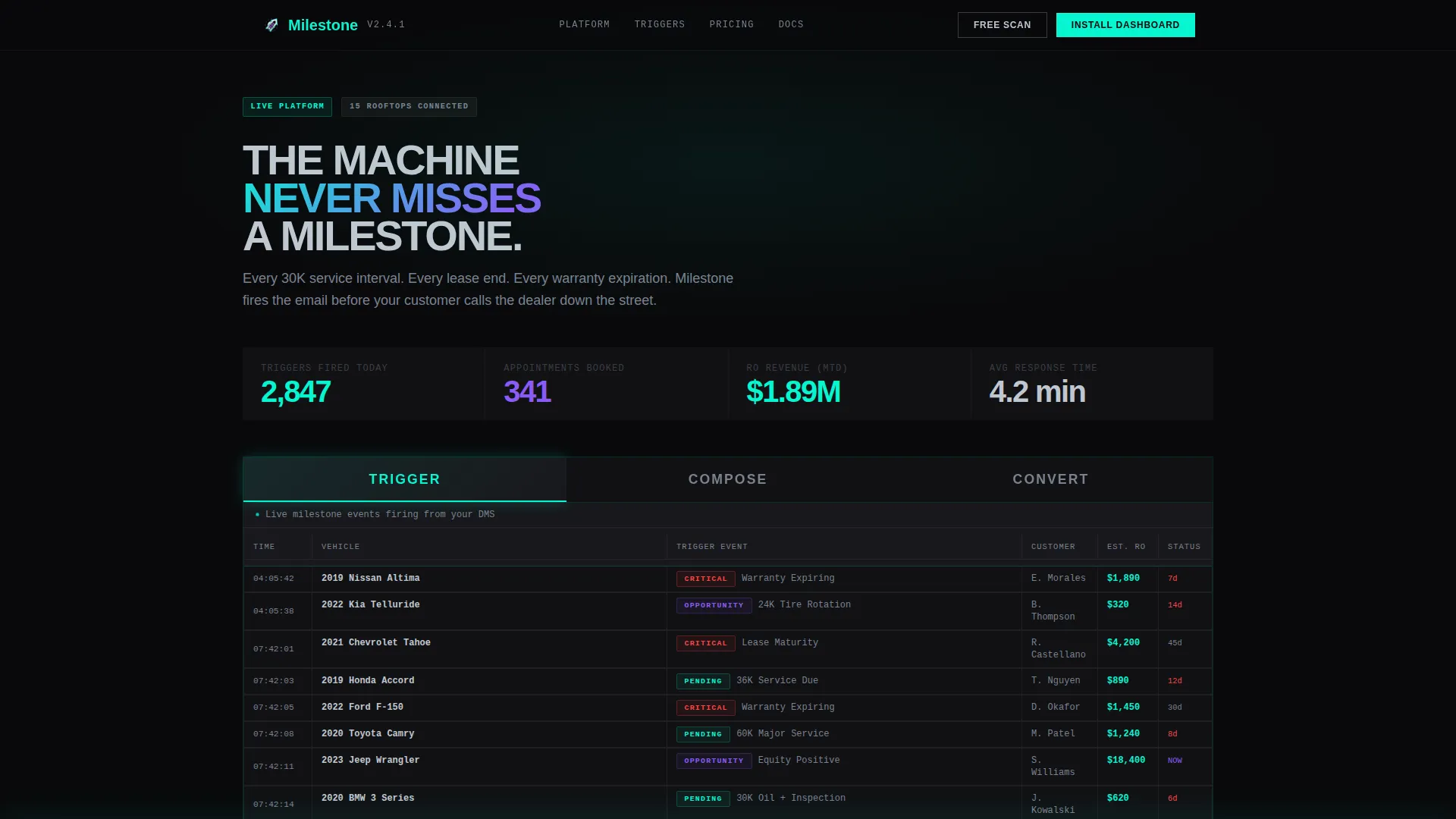
- A Feature Tab Switcher header with three live-state tabs: TRIGGER, COMPOSE, and CONVERT, each revealing a different layer of the platform
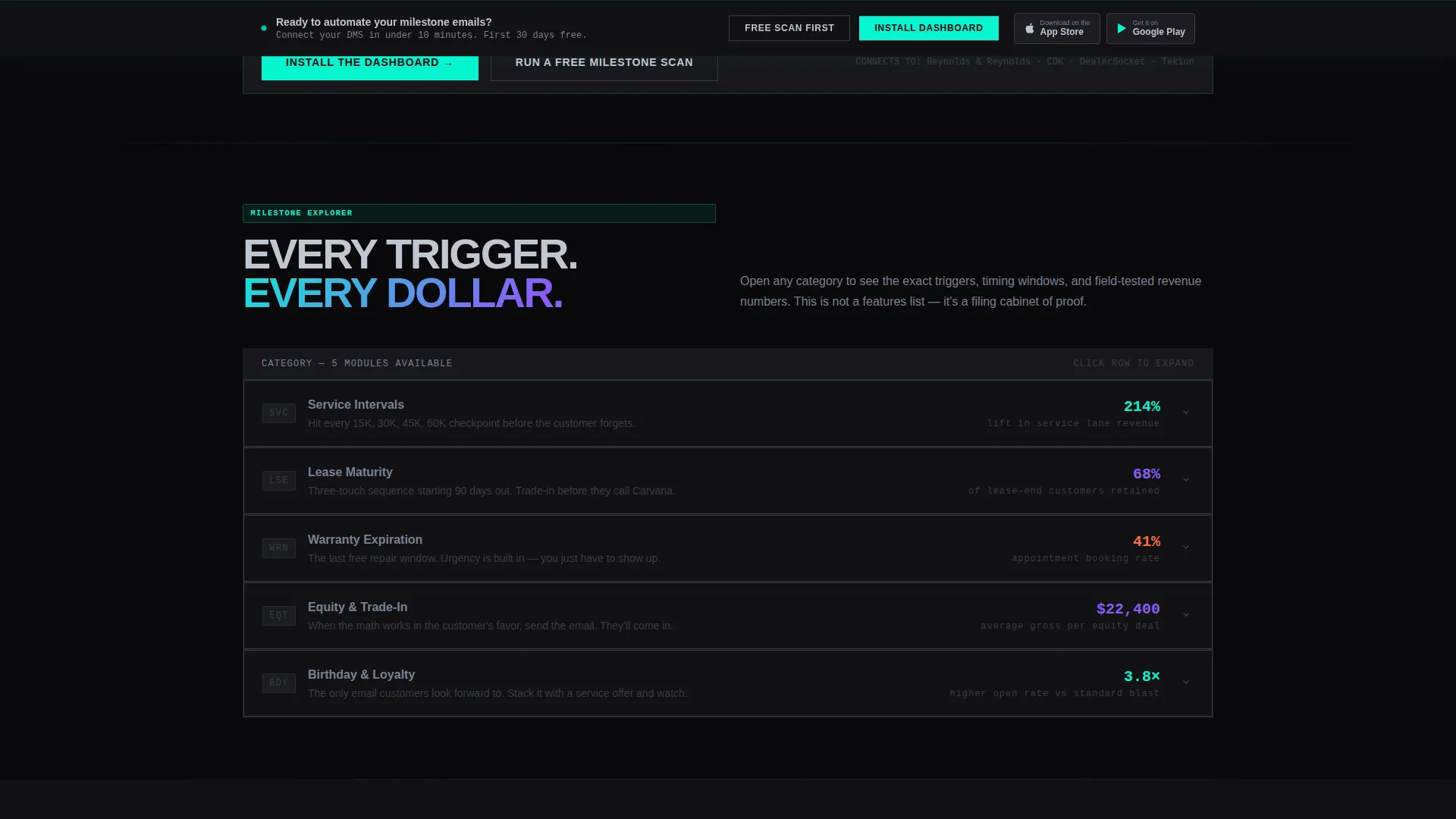
- Collapsible data modules for five milestone categories (service, equity, warranty, lease, and birthday) that visitors open like drawers to reveal proof stats
- A sticky bottom bar with primary and secondary call-to-action paths that activates after the visitor engages with at least one explorer module
Feature list
This template ships with a tightly scoped set of interactive and visual components. Each one is grounded in the dashboard-and-data metaphor that makes the platform feel real.
Feature Tab Switcher Header
Three oversized brutalist tabs sit across the top of the live dashboard mockup. The default TRIGGER tab shows a scrolling feed of customer milestone events firing in real time, with each row pulsing in electric cyan as it populates. COMPOSE reveals AI-generated email drafts matched to each trigger. CONVERT shows a revenue attribution grid mapping sent emails to repair order dollars and trade-in appointments.
Live Milestone Trigger Feed
The TRIGGER view displays rows like "2019 Accord, 36K Service Due in 12 Days" and "2021 Tahoe, Lease Maturity 45 Days" populating in sequence. Each entry pulses cyan on arrival, giving the platform a heartbeat that communicates urgency without a single word of copy doing the work.
Interactive Explorer Modules
Below the tab switcher, five collapsible data panels cover milestone categories: service, equity, warranty, lease, and birthday. Visitors open and close them like filing cabinet drawers. When a panel expands, brutalist typography slams a proof stat into view, such as a 214 percent lift in service lane revenue.
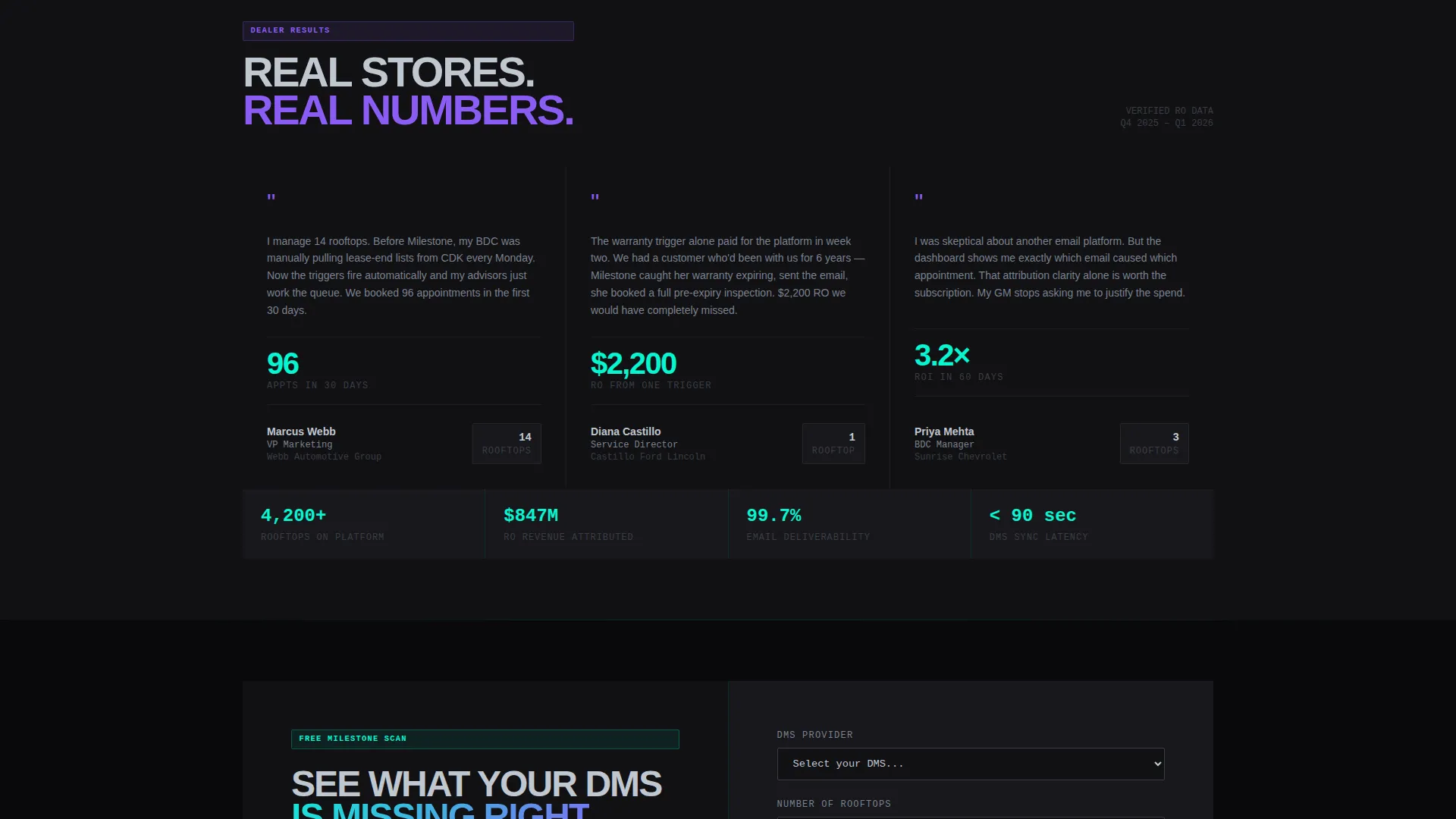
Revenue Attribution Grid
The CONVERT tab presents a data grid that maps outbound emails to real repair order dollars and trade-in appointment bookings. This section reframes the platform from a cost center to a revenue engine, giving marketing directors the numbers they need to justify the install.
Sticky Dual Call-to-Action Bar
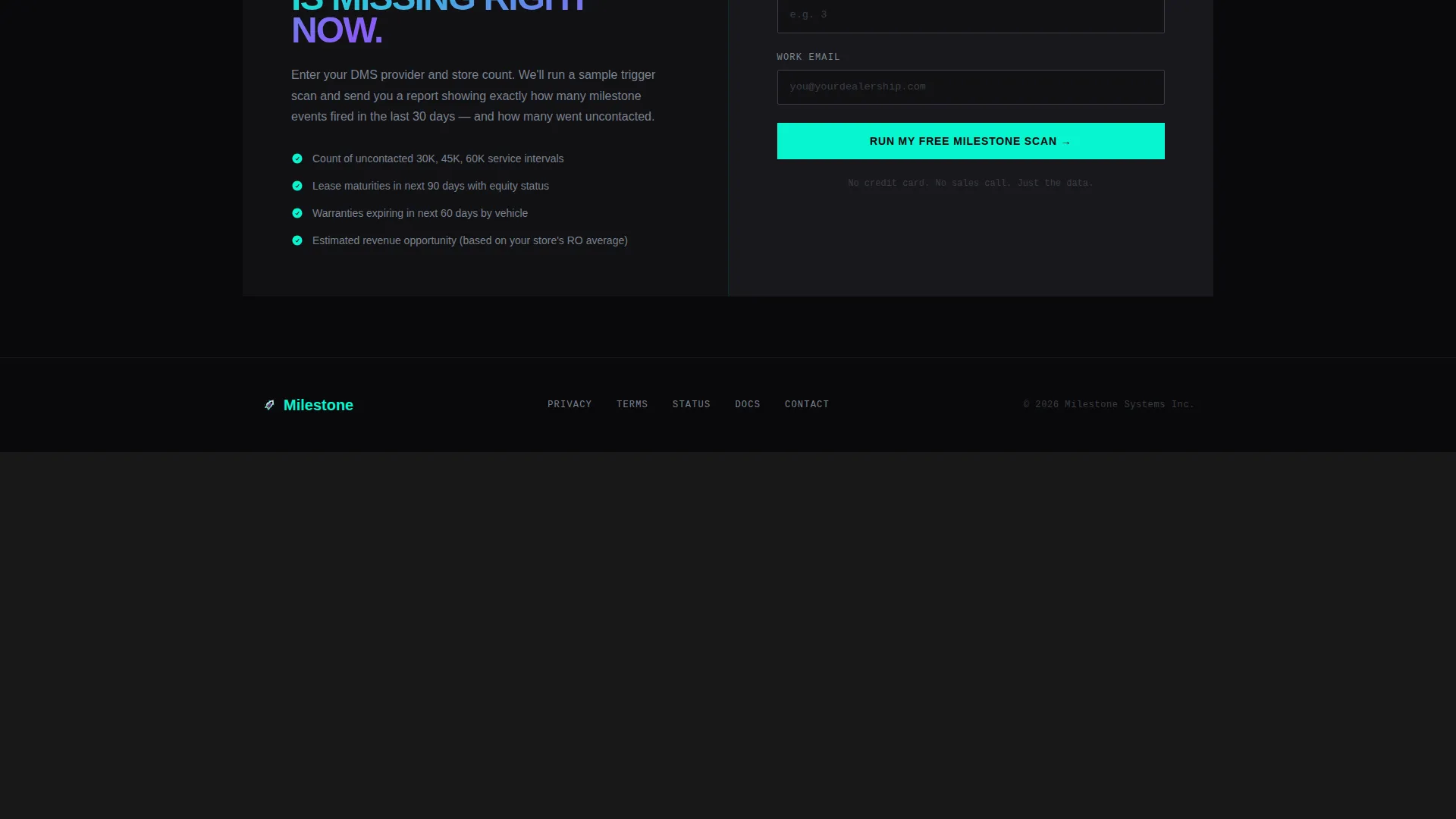
A bottom bar activates after the visitor interacts with at least one module. The primary call to action reads "Install the Dashboard" with paired app store download badges. The secondary path offers "Run a Free Milestone Scan," where the dealer enters their dealer management system provider and store count to receive a sample trigger report by email.
No-Photography Visual System
The template uses zero stock photography and no images of salespeople. Every visual element is a data panel, grid cell, or typographic statement. The design communicates through the product interface itself, which makes the template credible to a technical dealership audience.
Page sections overview
| Section | Purpose |
|---|---|
| Tab Switcher Header | Introduce TRIGGER, COMPOSE, CONVERT views |
| Live Trigger Feed | Show real-time milestone events firing |
| Email Composer View | Display AI-matched draft emails per trigger |
| Revenue Attribution Grid | Map sent emails to repair order dollars |
| Milestone Explorer Modules | Let visitors open service, equity, warranty, lease, birthday panels |
| Proof Stats Display | Surface performance stats as panels expand |
| Sticky call to action Bar | Drive install or free milestone scan |
| Free Scan Form | Capture DMS provider and store count for lead |
Design & branding system
The visual identity runs on a Bold Brutalist theme executed through an AI Iridescent color system. The overall feel is a dealership management screen rebuilt by a machine intelligence lab.
- Core palette uses void black (#09090B) for monolithic dark panels, liquid chrome (#C0C7D0) for grid structures and typography, holographic violet (#8B5CF6) for accents, and electric cyan (#06F5D0) reserved strictly for live data pulses and active call-to-action states
- Typography is oversized and confrontational in the Brutalist tradition, slamming stats and labels into view as panels expand, with density that rewards visitors who scroll deeper
- No stock photography appears anywhere; all visual weight comes from data panels, grid seams, and iridescent light effects that feel earned by real data moving underneath
Mobile & speed optimization
The interactive dashboard layout is designed to translate its desktop density into a focused, tappable mobile experience. The collapsible module structure works naturally on smaller screens because panels open and close on a single tap.
- The sticky call-to-action bar sits at the bottom of the screen on mobile, keeping the "Install the Dashboard" and "Run a Free Milestone Scan" options always reachable without scrolling back up
- The tab switcher compresses into a swipeable or tappable row on narrow viewports, preserving the TRIGGER, COMPOSE, and CONVERT navigation without breaking the dashboard metaphor
How this template helps you convert
The template is engineered around one principle: let dealers experience the product before they commit to it. Every interactive element is a trial run in disguise.
- The live trigger feed and collapsible explorer modules let visitors self-qualify by exploring the milestone categories most relevant to their store, making the install decision feel obvious rather than risky
- The sticky dual call-to-action bar offers two conversion paths, one for buyers who are ready to install and one for leads who want proof first, so no visit ends without a captured intent signal
Other information about this template
This template fits into a broader category of dealership technology marketing tools. A few additional details are worth noting for teams evaluating it.
- The template is categorized under Technology and specifically targets the auto dealer email template and auto dealer milestone email niche
- The Interactive Explorer creative direction means the scroll experience itself is the demo, which suits platforms whose value is hard to explain in static screenshots
- The App Download landing page direction pairs naturally with platforms that have both a web dashboard and a mobile app component, since both store badges are included in the sticky bar
- The dashboard and data grid template style signals technical credibility to dealer group buyers who are accustomed to evaluating software through its interface, not its marketing language
- The intersection match score for this template's category, subcategory, and niche alignment is 13, indicating a tightly targeted fit for auto dealer milestone email platform marketing
Theme
Bold Brutalist
Creative direction
Interactive Explorer
Color system
AI Iridescent
Style
Dashboard/Data Grid
Direction
App Download
Page Sections
Feature Tab Switcher with Live Views
Real-time Milestone Trigger Feed
Collapsible Milestone Explorer Modules
Revenue Attribution Grid
Sticky Dual Call-to-action Bar
Data-first Visual Design
Related questions
Who is the primary audience for this landing page template?
What are the five milestone categories covered by the explorer modules?
How does the secondary conversion path work?
Does the template use any stock photography?
Can this template support both a web dashboard and a mobile app product?



