Real Estate Milestone Email Landing Page Template
Milestone is a single-page real estate milestone email landing page built for agents, team leads, and brokerages who need automated, trigger-based email sequences across every deal stage. From listing day through the one-year anniversary, each transaction milestone fires the right message at the right moment. An interactive ROI calculator and a side-by-side comparison table make the value impossible to miss.
by Rocket studio
Quick summary
Milestone is a focused, single-page landing page template for a real estate milestone email platform. It combines an animated transaction timeline header, an interactive ROI calculator, and a twelve-row comparison table to show agents exactly why timed, trigger-based emails outperform manual follow-up and generic drip sequences.
Who this template is for
This template is built for real estate professionals who manage multiple active deals and need a smarter follow-up system. It speaks directly to the people who feel the cost of missed touchpoints every week.
- Solo agents carrying ten or more active transactions at once
- Team leads who lose referral business because anniversary emails never get sent
- Brokerages watching competitors automate while their own agents still copy-paste from shared documents
What problem this template solves
Managing client communication across a full transaction timeline is exhausting when done manually. Agents forget touchpoints, CRM drip sequences fire on fixed schedules rather than real deal events, and nobody sends the one-year anniversary email that generates the next referral.
- Deals stall in silence because no message fired when the appraisal came back
- Generic drip tools lack the trigger precision to match real transaction milestones
- No consistent system exists to convert closed clients into long-term referral sources
What you get with this template
This template delivers a complete, single-page conversion experience designed around demonstration before commitment. Every section is built to let the product prove itself before asking for a signup.
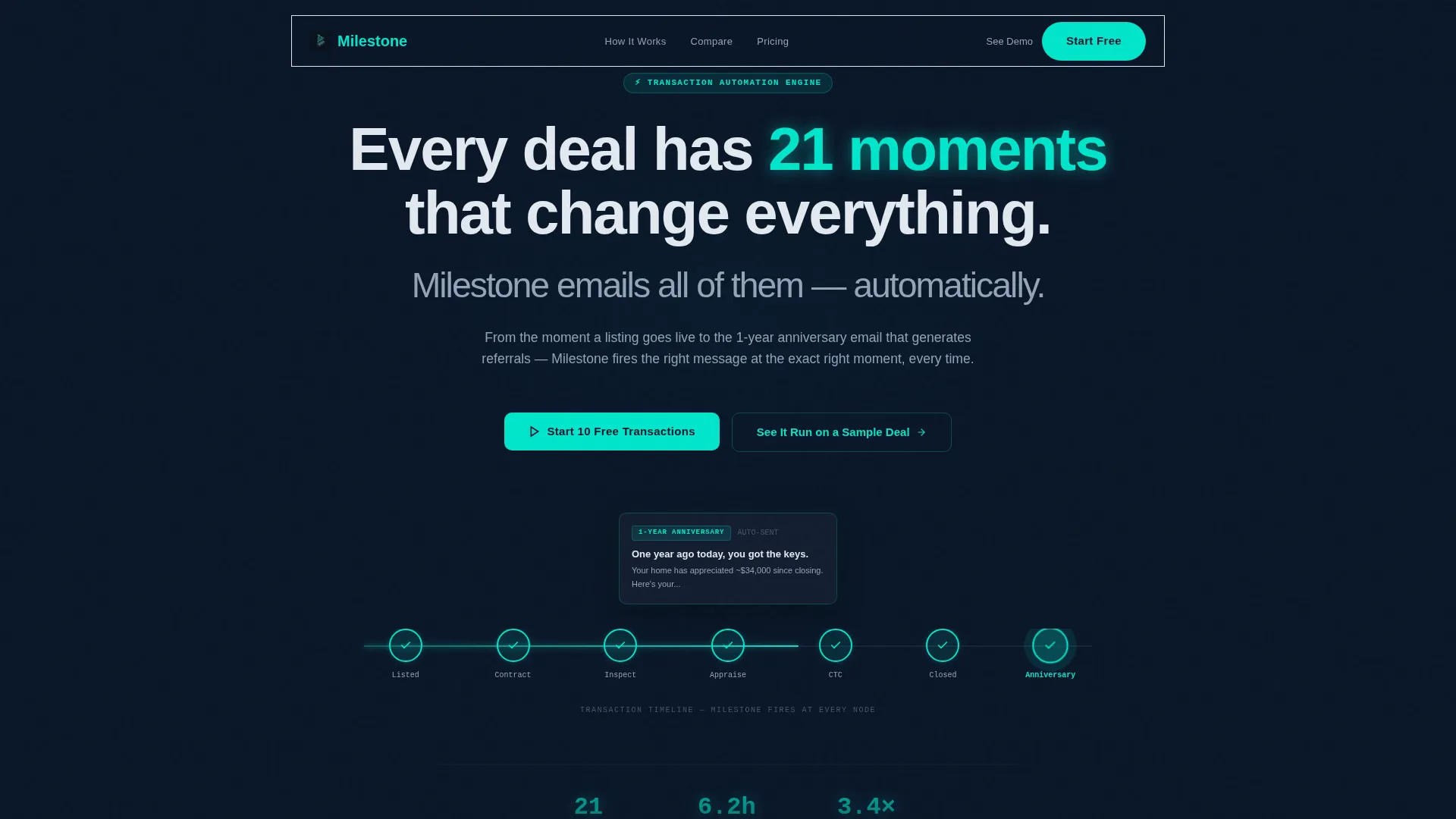
- An animated header timeline showing live milestone triggers from Listed through Closed and the one-year anniversary
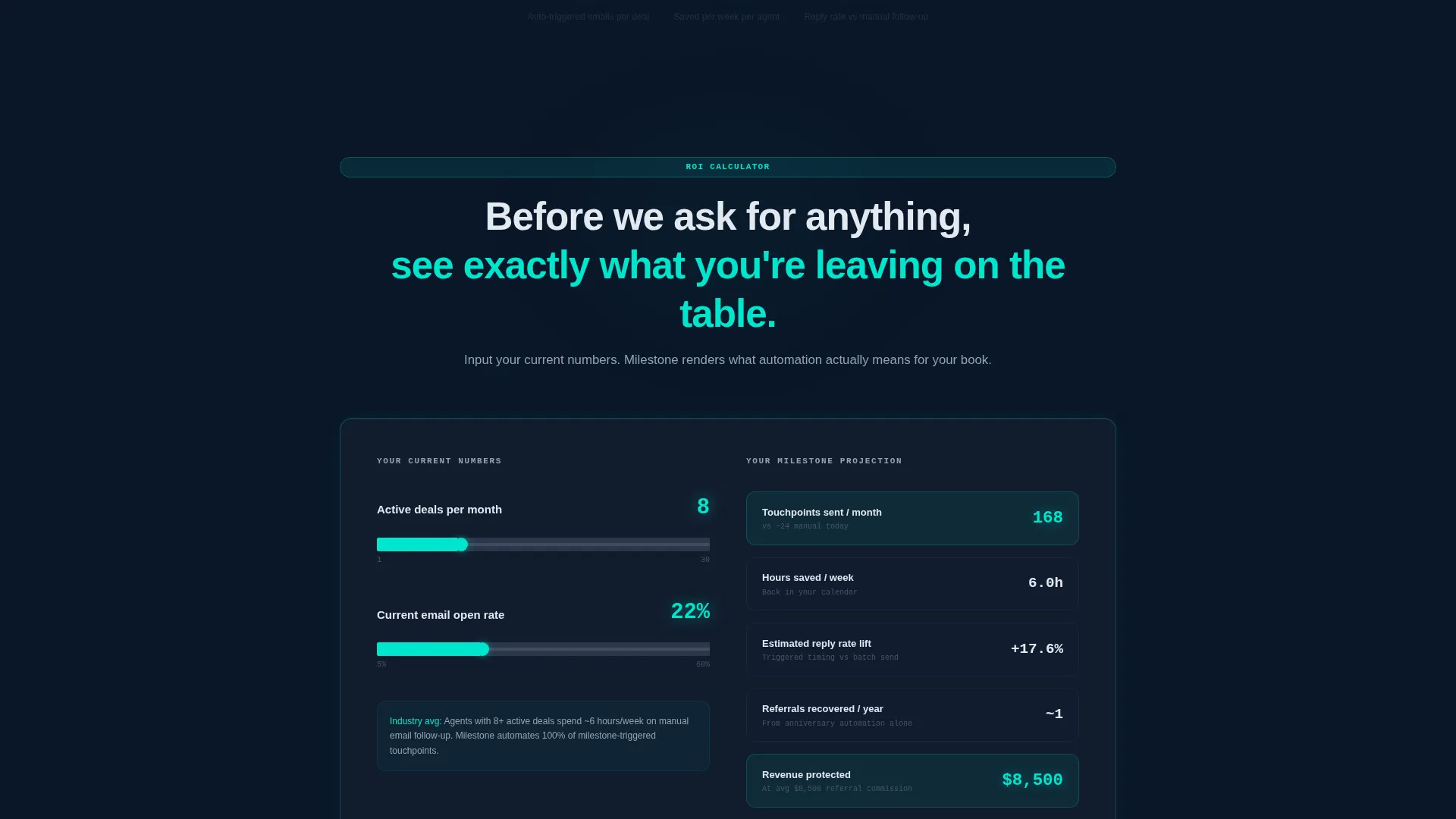
- An interactive ROI calculator where agents enter their deal volume and current open rate to see projected touchpoints, reply rate lift, and hours saved
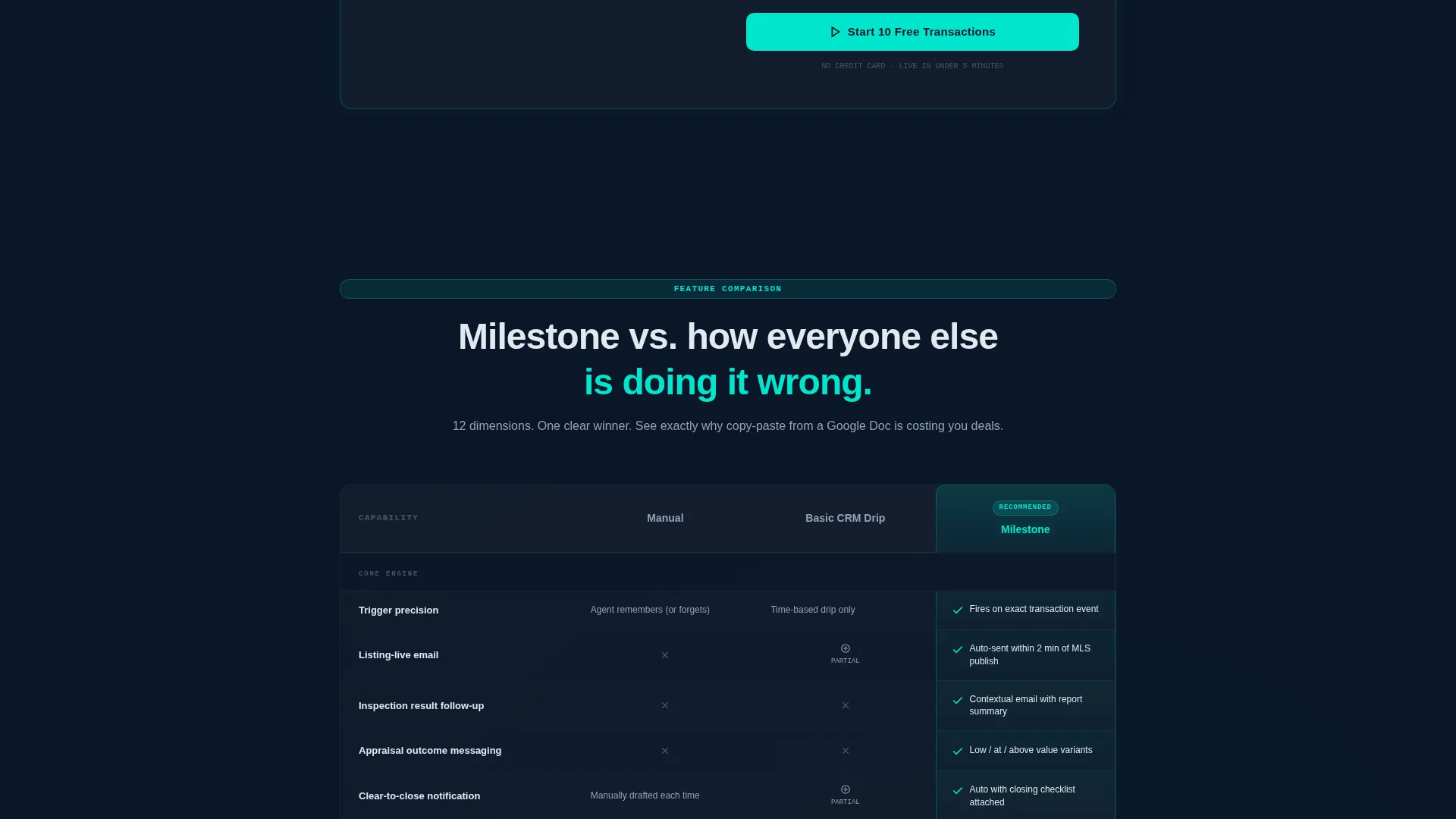
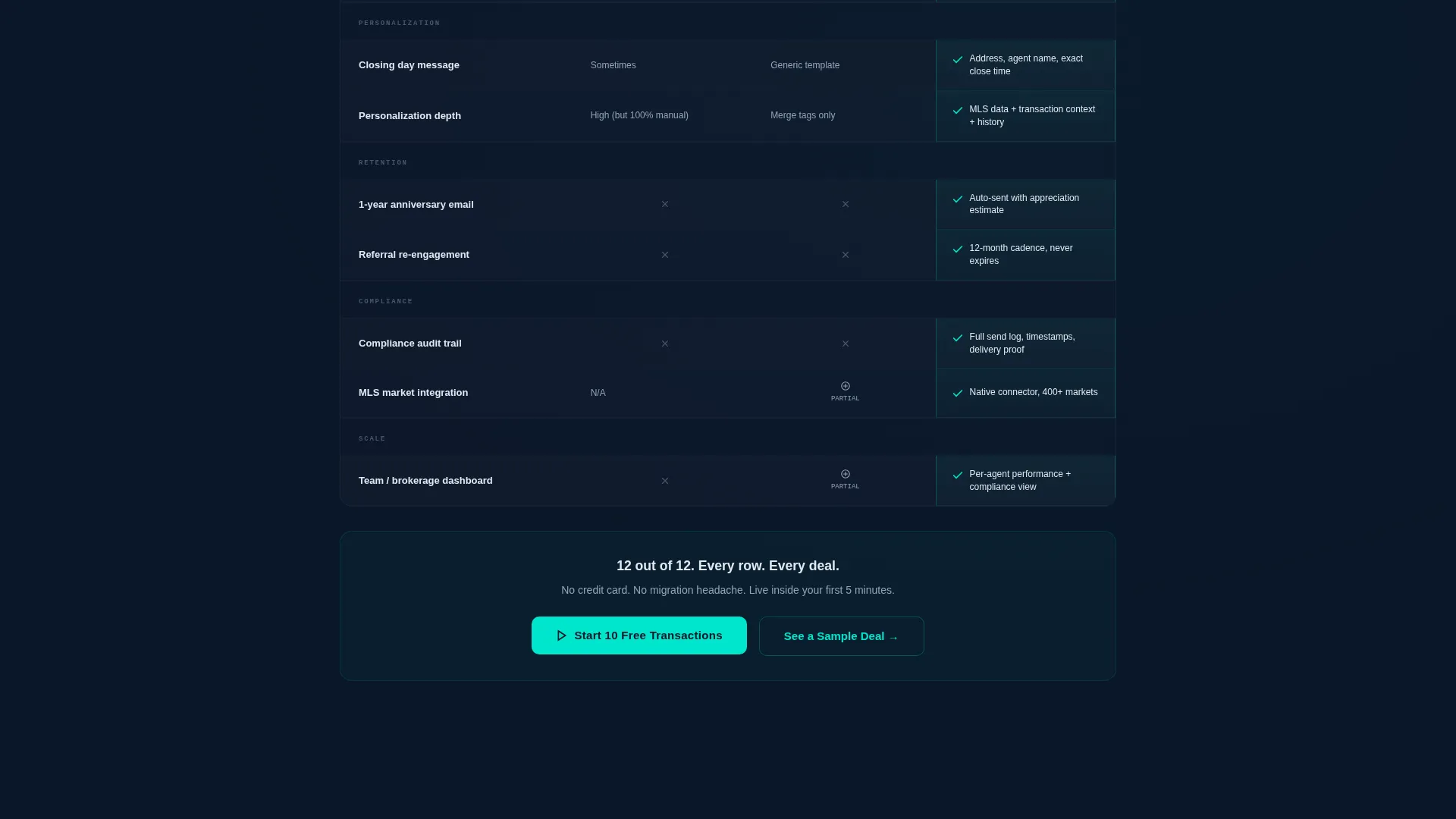
- A twelve-row comparison table across three columns: Manual, Basic CRM Drip, and Milestone
Feature list
This template packs five purpose-built sections into one cohesive, dark-glass layout. Each feature is designed to move a skeptical agent from curious to convinced.
Animated Transaction Timeline Header
The full-bleed header places a glowing horizontal timeline at the center of the viewport. Teal nodes pulse along seven labeled stages from Listed to the one-year anniversary. As each node activates, a translucent glass email card rises showing a real subject line, giving visitors an immediate sense of the system in action.
Interactive ROI Calculator
Positioned directly below the fold, the calculator asks two inputs: average deals per month and current email open rate. It instantly renders three animated outputs on dark glass cards: projected touchpoints sent, estimated reply rate lift, and hours saved per week. Visitors understand the value before reading a single feature claim.
Twelve-Row Comparison Table
The comparison table spans three columns and evaluates trigger precision, personalization depth, compliance tracking, and anniversary automation. Every Milestone column cell carries a faint glow border. Checkmarks pulse once on scroll, directing attention without overwhelming the layout.
Freemium-Optimized Call to Action
The primary call to action, "Start 10 Free Transactions," appears in three locations: pinned below the calculator results, reinforced after the comparison table, and floating as a glass pill in the navigation bar. The signup form captures email, brokerage name, and MLS market area with no credit card required.
Guided Demo Path
A secondary conversion path labeled "See It Run on a Sample Deal" launches a walkthrough of a single transaction's full email sequence in real time. This path converts visitors who need to watch the process before they commit to signing up.
Page sections overview
| Section | Purpose |
|---|---|
| Full-Bleed Header | Animated timeline introduces the milestone trigger concept visually |
| ROI Calculator | Lets agents quantify value using their own deal numbers |
| Comparison Table | Contrasts Manual, Basic CRM Drip, and Milestone side by side |
| Primary call to action Block | Drives "Start 10 Free Transactions" signups after the calculator |
| Reinforced call to action Block | Repeats the signup prompt after the comparison table |
| Floating Nav Pill | Keeps the call to action accessible while scrolling through the page |
| Demo Launch Path | Offers a guided walkthrough for visitors who need proof before committing |
Design & branding system
The visual identity uses a Tech Glass theme built on a Midnight Blue color system. The palette is designed to feel like a mission control dashboard, where darkness makes every lit element earn its place.
- Background layers: deep terminal navy (#0A1628) for the full-bleed canvas and polished obsidian (#141E30) for all card surfaces
- Typography and body text rendered in cool interface silver (#94A3B8) for clear readability against dark backgrounds
- Phosphorescent teal (#00E5CC) reserved exclusively for active node states, call-to-action buttons, glow borders on Milestone table cells, and the trace effects that follow each milestone trigger
Mobile & speed optimization
The layout is structured for clean rendering across viewport sizes, with the dark-glass aesthetic translating well to smaller screens. Key interactive components are sized and spaced for touch interaction.
- The ROI calculator inputs and animated result cards are designed to stack vertically on mobile without losing legibility
- The comparison table columns compress gracefully so all three columns remain visible and scannable on a standard phone screen
How this template helps you convert
Every design decision on this page prioritizes demonstration over declaration. The page earns trust by showing the system working before asking the visitor to act.
- The ROI calculator hands visitors a personalized value estimate using their own numbers, making the benefit concrete and specific before any pricing conversation begins.
- The comparison table removes purchase doubt by placing Manual and Basic CRM Drip side by side with Milestone, letting the gaps speak for themselves without aggressive sales copy.
- The three-placement call to action strategy and the zero-credit-card signup form reduce friction at every decision point, so the moment a visitor is ready, the path forward is always visible.
Other information about this template
This template is part of a broader real estate automation category and fits naturally alongside tools built for transaction coordination and client retention. A few additional details worth noting:
- The template is built as a single landing page, not a multi-page website, keeping the entire conversion journey contained and focused
- The three-field signup form (email, brokerage name, and MLS market area) is intentionally minimal to maximize completion rates among busy agents
- The "See It Run on a Sample Deal" demo path is a secondary conversion route designed for skeptical visitors who need a live walkthrough rather than static comparisons
- This template suits platforms positioned in the real estate email automation space, where trigger-based sequences tied to actual deal events are a clear differentiator from standard scheduled drip tools
- The comparison table structure makes this layout adaptable for any SaaS platform competing against manual workflows and basic CRM drip functionality
Theme
Tech Glass
Creative direction
Calculator/Tool First
Color system
Midnight Blue
Style
Comparison Table
Direction
Freemium/Trial
Page Sections
Animated Transaction Timeline Header
Interactive ROI Calculator
Twelve-row Comparison Table
Three-placement Call to Action Strategy
Guided Demo Conversion Path
Related questions
Who is the Milestone landing page template designed for?
Does this template require a credit card to sign up?
What does the ROI calculator show visitors?
Can visitors try the product before committing to a full signup?
What makes the comparison table useful for conversion?



