Playful Culinary Institute Landing Page Template
Mise is a playful geometric landing page template built for culinary institutes and teaching kitchens. It features a Persona Selector header, a Problem-to-Solution card grid, and a freemium conversion model. The Botanical color palette and modular layout make it easy to surface the right courses, instructors, and skill paths for every type of student.
by Rocket studio
Quick summary
Mise is a single-page culinary institute template with a Playful Geometric visual style and a Botanical color palette. The Persona Selector header reshuffles the card grid based on the visitor's skill level. A Problem-to-Solution scroll arc connects kitchen failures to the courses that fix them. The primary call to action is a free knife skills class requiring only a name and email.
Who this template is for
This template is designed for culinary schools, teaching kitchens, and cooking instructors who want to enroll students online. It works especially well for programs that serve mixed audiences with different skill levels and goals.
- Career-changers preparing for culinary school prerequisites
- Passionate home cooks who want real technique, not just recipes
- Empty-nesters and returning learners ready to master foundational cooking skills
What problem this template solves
Most culinary program pages list courses without helping visitors see themselves in the curriculum. That mismatch causes doubt, and doubt kills sign-ups. This template removes that friction by personalizing the page experience from the very first interaction.
- Visitors do not know which course suits their skill level
- A generic course list fails to connect kitchen struggles to specific lessons
- A hard paywall as the first ask pushes away curious but cautious prospects
What you get with this template
You get a fully structured, modular landing page with every section built around the student journey. The layout guides visitors from self-identification through problem recognition all the way to a confident first enrollment step.
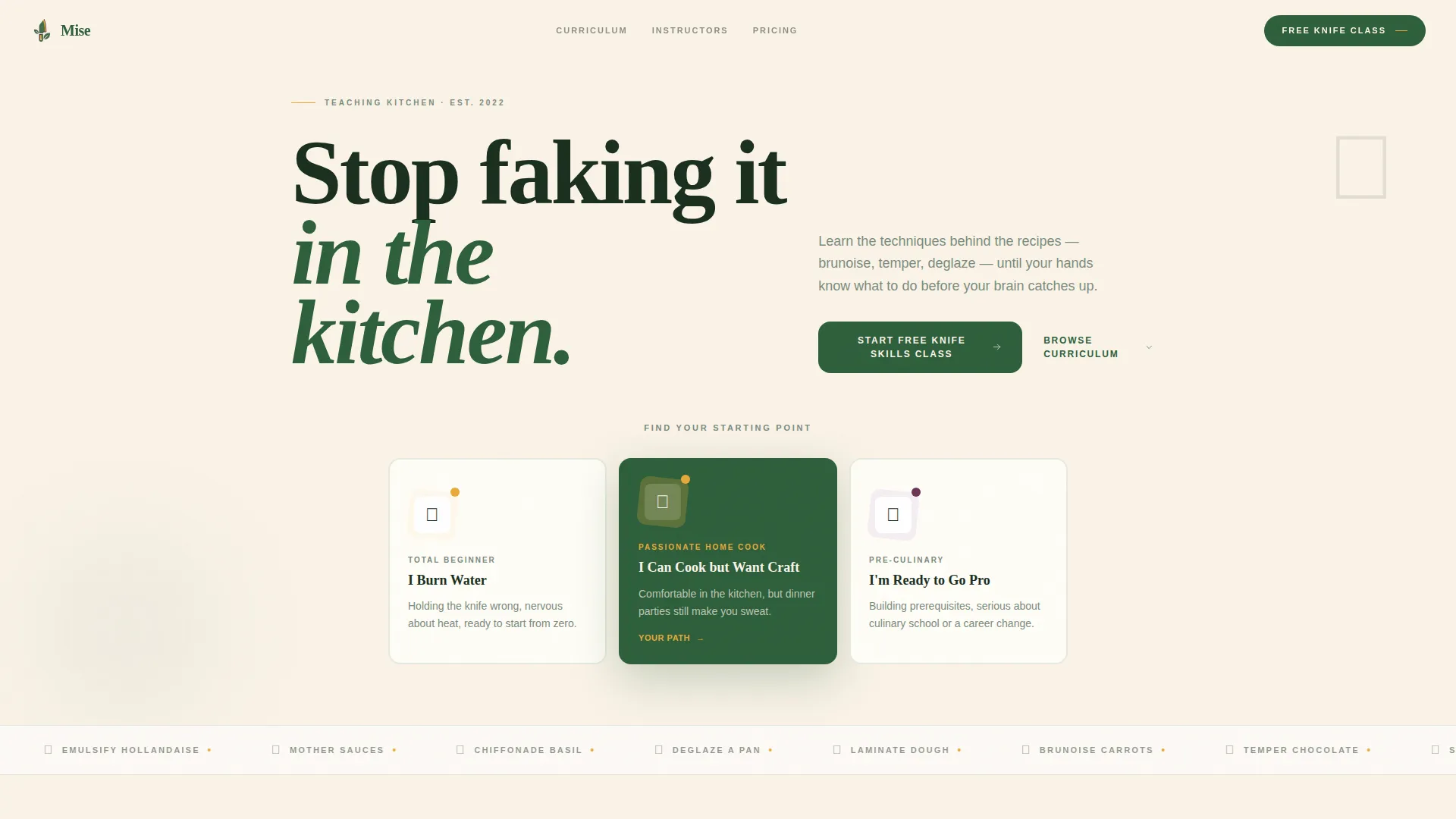
- A Persona Selector header with three illustrated geometric characters and skill-level labels
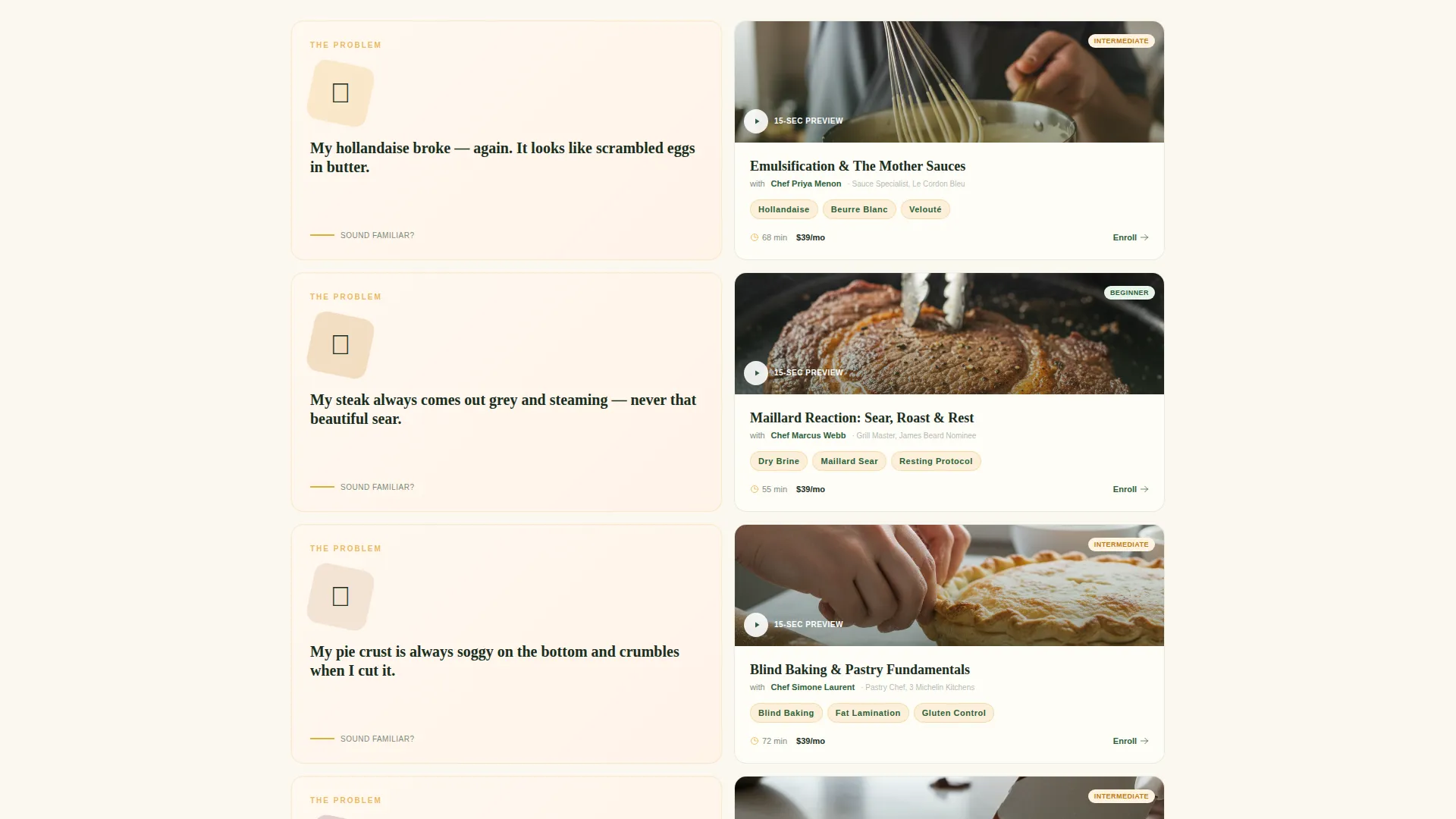
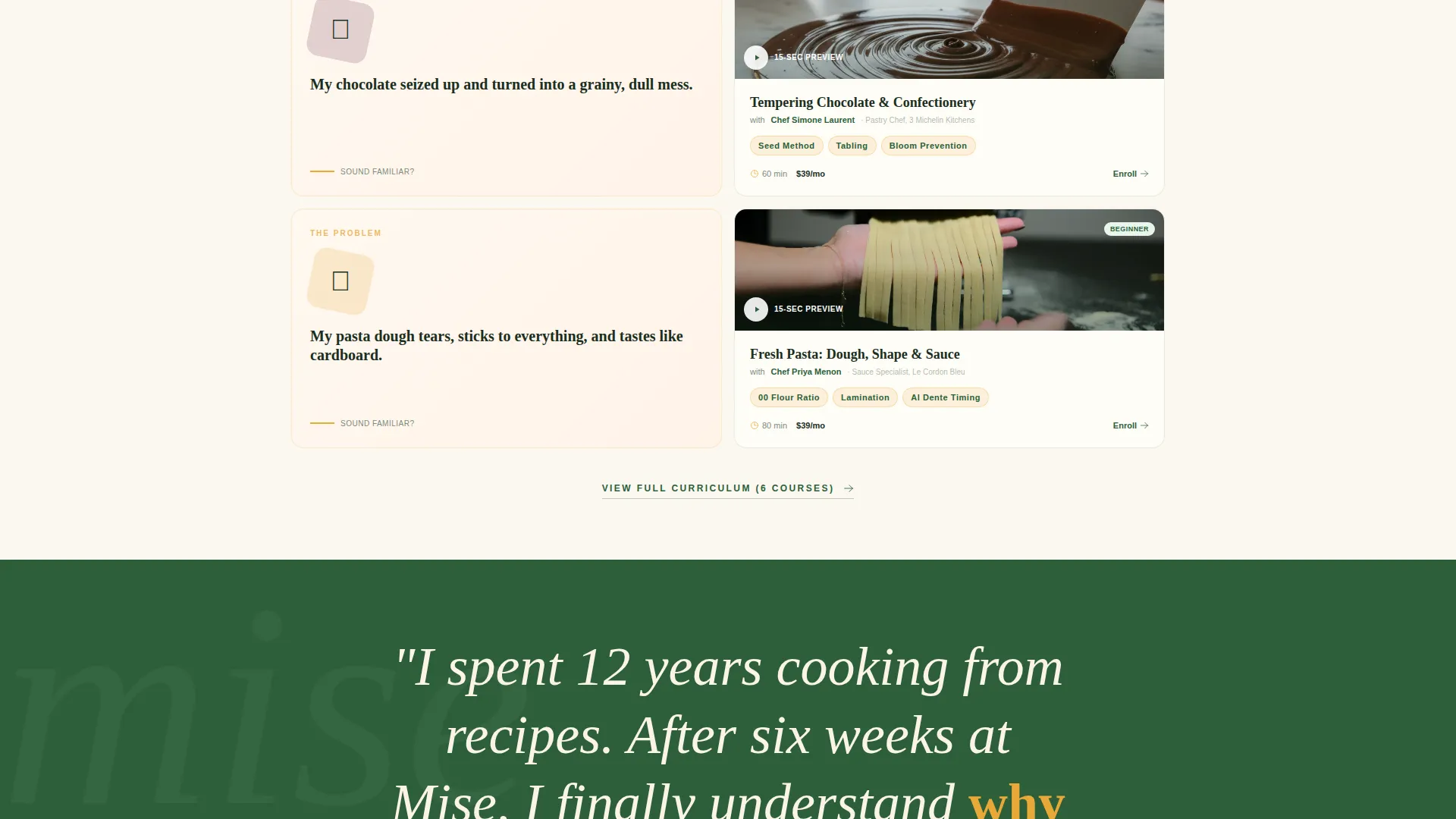
- A scrolling Problem-to-Solution card grid with course cards, instructor details, and looping skill videos
- A freemium conversion flow with a two-field sign-up form and an expandable paid curriculum grid
Feature list
This template includes purpose-built components that address the real conversion challenges of culinary education marketing.
Persona Selector Header
Three illustrated geometric characters stand at different kitchen stations. Visitors tap the one that matches them: "I Burn Water," "I Can Cook but Want Craft," or "I'm Ready to Go Pro." The page card grid reshuffles instantly to surface relevant courses, testimonials, and skill paths. The interaction feels like a personality quiz rather than a filter menu.
Problem-to-Solution Card Grid
Each card row opens with a relatable kitchen disaster rendered as a playful geometric illustration. It then resolves into a course card showing the technique, the instructor, and a fifteen-second looping video of hands executing the skill. Stakes build progressively from pantry basics to restaurant-level plating across the full scroll.
Free Lesson Preview Card
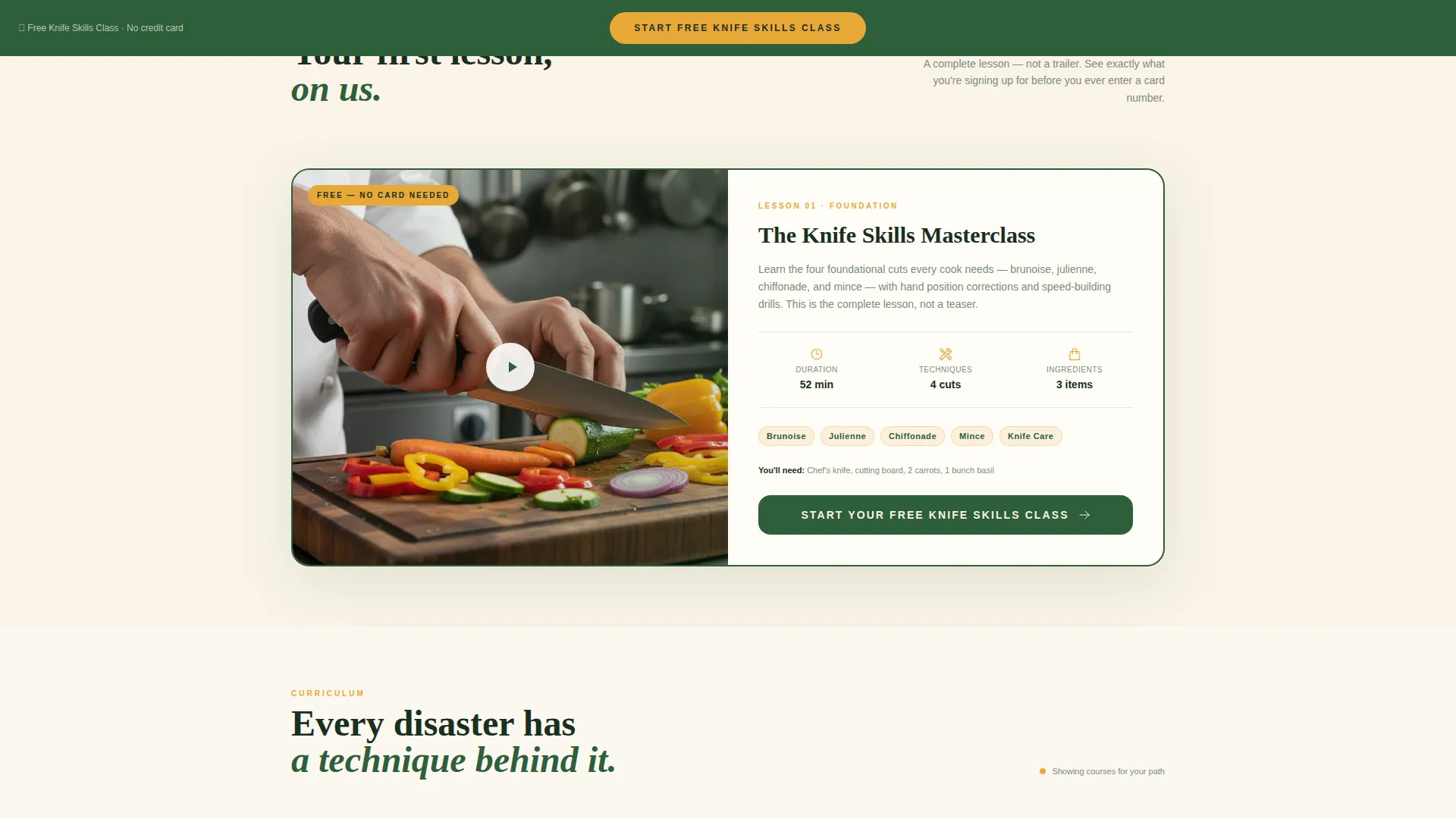
The free knife skills class is presented as a complete lesson preview card. It shows duration, an ingredients list, and a technique count so the visitor knows they are getting real instruction. This transparency earns the click before the sign-up form ever appears.
Two-Field Freemium Sign-Up Form
The primary conversion form asks only for a first name and email address. No credit card is required. The form opens when the visitor clicks "Start Your Free Knife Skills Class" on the first card row or the sticky footer button.
Sticky Footer Call to Action
A persistent footer button keeps the primary call to action visible throughout the entire scroll. It ensures the sign-up option is always one tap away, no matter how far a visitor has explored the card grid.
Curriculum Pricing Toggle
The secondary path, "Browse Full Curriculum," expands the card grid to reveal paid course tiers. A toggle switches between monthly and annual pricing so visitors can compare options before committing.
Page sections overview
| Section | Purpose |
|---|---|
| Persona Selector Header | Match visitor to skill-level path |
| Problem Card Row | Surface relatable kitchen failures |
| Solution Course Card | Connect failure to the fixing technique |
| Instructor Detail Card | Build trust through teacher context |
| Skill Video Loop | Demonstrate the technique in action |
| Free Lesson Preview | Show full lesson value before sign-up |
| Freemium Sign-Up Form | Capture name and email, no card |
| Full Curriculum Grid | Reveal paid course tiers on demand |
| Pricing Toggle | Compare monthly and annual options |
| Sticky Footer Button | Keep primary call to action persistent on scroll |
Design & branding system
The visual identity uses a Playful Geometric theme grounded in a Botanical color palette. Every color choice carries a functional role, so the design communicates hierarchy without needing extra labels or icons.
- Deep rosemary green (#2D5F3A) anchors headlines and navigation for immediate readability
- Warm saffron (#E8A838) highlights progress indicators and active card states across the grid
- Cream linen (#FAF3E8) grounds every card as the base surface, keeping the layout airy and legible
- Ripe fig purple (#6B3654) is reserved for hover states and active selections, rewarding interaction naturally
Mobile & speed optimization
The modular card grid is built to reflow cleanly across screen sizes. Each component is designed as a self-contained block, which keeps the layout predictable on smaller screens without sacrificing the visual richness of the Botanical palette.
- Card rows stack vertically on mobile so the Problem-to-Solution arc remains readable in a single column
- The sticky footer call-to-action button remains fixed and tappable on all viewport sizes
- Looping skill videos are contained within card boundaries so they do not disrupt the surrounding layout
How this template helps you convert
The conversion strategy is built into the page structure itself. Every scroll section is designed to lower doubt and raise confidence before the sign-up moment arrives.
- The Persona Selector immediately makes the page feel relevant by reshuffling content to match the visitor's self-identified skill level, reducing the friction of a one-size-fits-all course list.
- The Problem-to-Solution card arc mirrors the visitor's real kitchen struggles, creating a moment of recognition that makes the course feel necessary rather than optional.
- The free lesson preview card shows real lesson content upfront, so the two-field sign-up form feels like a fair exchange rather than a leap of faith.
Other information about this template
This template is categorized under Education and Training, specifically in the Vocational and Trade School subcategory for culinary institute use cases. It is built as a single-page layout using a Card Grid modular structure, which makes it straightforward to update individual course cards without reworking the full page.
- The template style is Card Grid (Modular), making each section independently editable
- The creative direction follows a Problem-to-Solution Arc, a narrative structure well-suited to skills-based education programs
- The header concept is a Persona Selector, a pattern that works across other vocational and coaching niches beyond culinary education
- The landing page direction is Freemium and Trial, a model common in online education where a free first lesson drives initial enrollment
Theme
Playful Geometric
Creative direction
Problem→Solution Arc
Color system
Botanical
Style
Card Grid (Modular)
Direction
Freemium/Trial
Page Sections
Persona Selector Header
Problem-to-solution Card Grid
Free Lesson Preview Card
Freemium Two-field Sign-up Form
Expandable Curriculum Grid with Pricing Toggle
Sticky Footer Call-to-action Button
Related questions
Can I change the persona labels to match my own program?
Does the free class sign-up form connect to an email platform?
Can I add more course tiers to the pricing section?
Is this template suitable for a solo cooking instructor?
What if I do not want to use a freemium conversion model?



