Nonprofit Organization FAQ Website Template
Missionready is a bento grid nonprofit FAQ landing page built for organizations that need to turn hesitant visitors into confident supporters. It uses a Dynamic Motion theme, a Carbon Fiber color system, and kinetic entrance animations to guide first-time donors, volunteers, and corporate partners through every question standing between them and action.
by Rocket studio
Quick summary
Missionready is a single-page nonprofit FAQ landing page template built on a bento grid layout. It uses spring-physics accordion interactions, staggered entrance animations, and contextual call-to-action tiles to move hesitant visitors toward donating, volunteering, or partnering. The design feels technical and urgent without being cold, making it ideal for nonprofits that want credibility and momentum on the same page.
Who this template is for
This template is built for nonprofits that already have a mission but lose potential supporters at the last moment. If your visitors hover over the donate button and then close the tab, this page is for them and for you.
- Nonprofit communications and fundraising teams launching or refreshing their digital presence
- Organizations that field repeated questions from donors, volunteers, and corporate partners before any commitment is made
- Cause-led teams that want a page that feels energetic and trustworthy rather than bureaucratic and static
What problem this template solves
Most nonprofit FAQ pages feel like filing cabinets. They are comprehensive but not compelling, and they rarely move a visitor closer to giving or signing up. Missionready solves the hesitation gap directly.
- First-time donors need reassurance about how their money is used before they click "give"
- Prospective volunteers are unsure whether they qualify, and a flat text page does not answer the feeling behind their question
- Corporate partners doing due diligence want transparency signals, not just bullet points buried in a footer
What you get with this template
You get a fully designed, animation-ready bento grid landing page built around the nonprofit FAQ experience. Every visual and interactive element in this template is defined in the source design system and ready to customize.
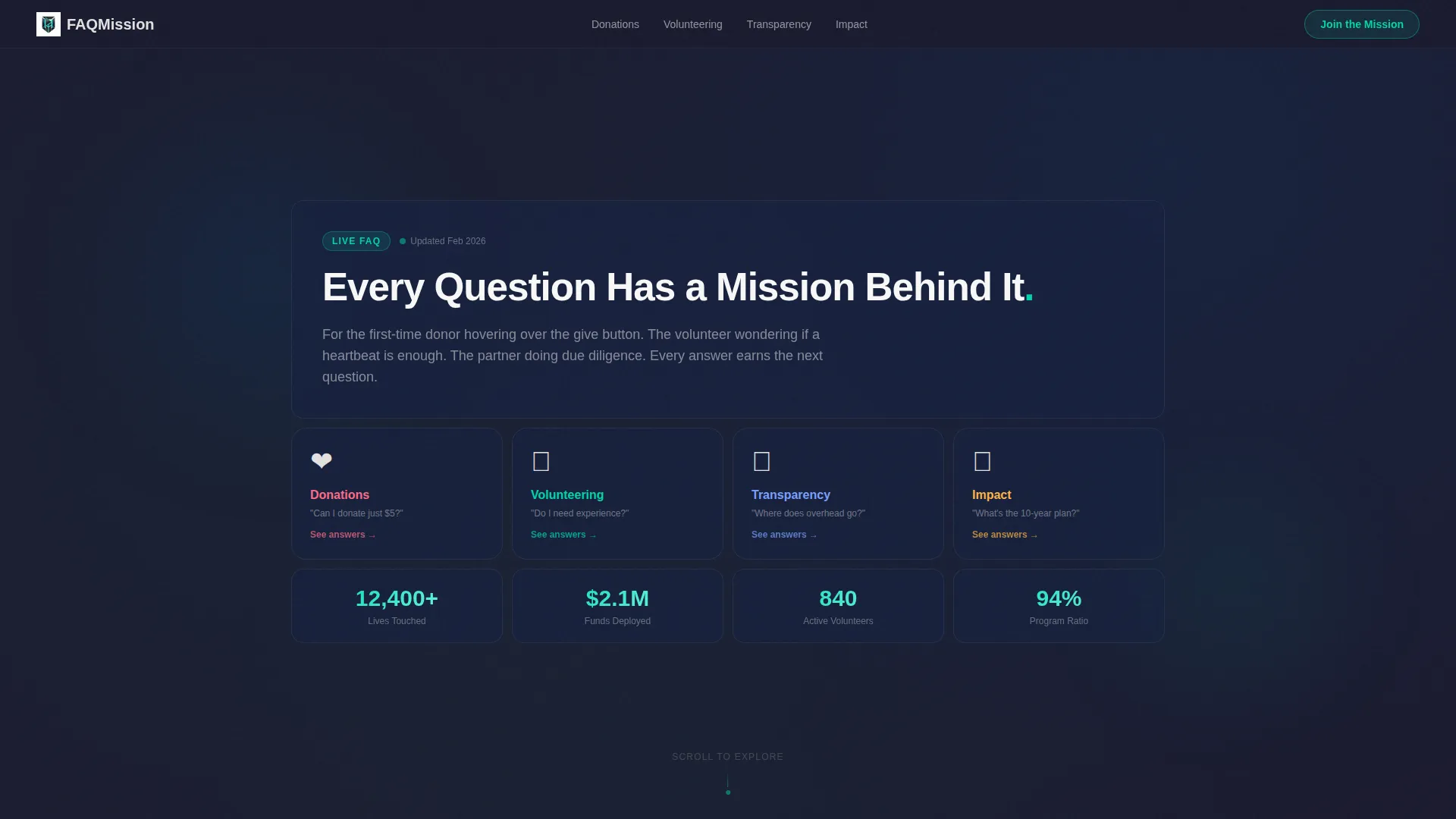
- An interactive bento grid header with category tiles (donations, volunteering, transparency, and impact) that slide and snap into place on page load
- Kinetic entrance animations for each FAQ section, with spring-physics accordion expansions so answers feel active rather than static
- Contextual call-to-action tiles embedded at the end of each FAQ category, plus a floating "Join the Mission" button that appears only after a visitor has opened at least two FAQ tiles
Feature list
This section covers the core interactive and visual features built into the Missionready template.
Animated Bento Grid Header
The header is a live bento grid that assembles itself on page load. Tiles slide and snap into position, each displaying a single FAQ category icon. Cards rotate slightly on hover to reveal the first line of each answer, giving visitors an immediate sense of what the page contains before they scroll.
Typewriter Headline Animation
The headline "Every Question Has a Mission Behind It" types itself letter by letter across the top tile. The cursor blinks once and then dissolves into the grid, creating a focused cinematic opening that draws attention before the visitor starts exploring.
Spring-Physics Accordion Expansions
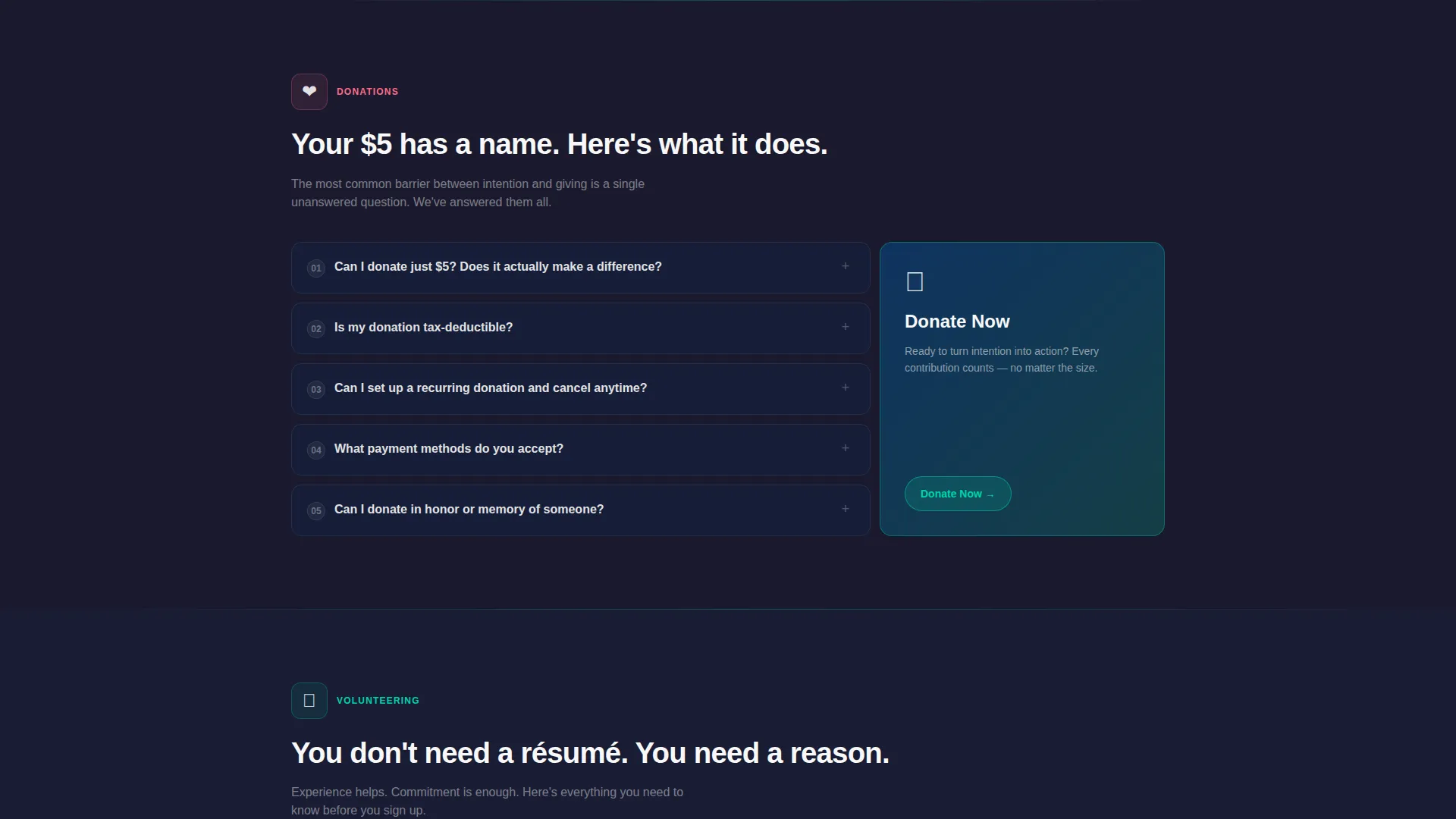
FAQ answers do not simply appear. They launch open using spring-physics animation, making each expansion feel deliberate and energetic. This micro-interaction reinforces the page's Dynamic Motion theme and keeps the experience feeling alive throughout a long FAQ session.
Kinetic Scroll Entrance Animations
Each bento section drops into view with staggered entrance animations as the visitor scrolls. Tiles arrive like a mission-control checklist being cleared, building momentum from personal questions ("Can I donate $5?") up to structural and visionary questions about long-term impact.
Contextual Call-to-Action Tiles
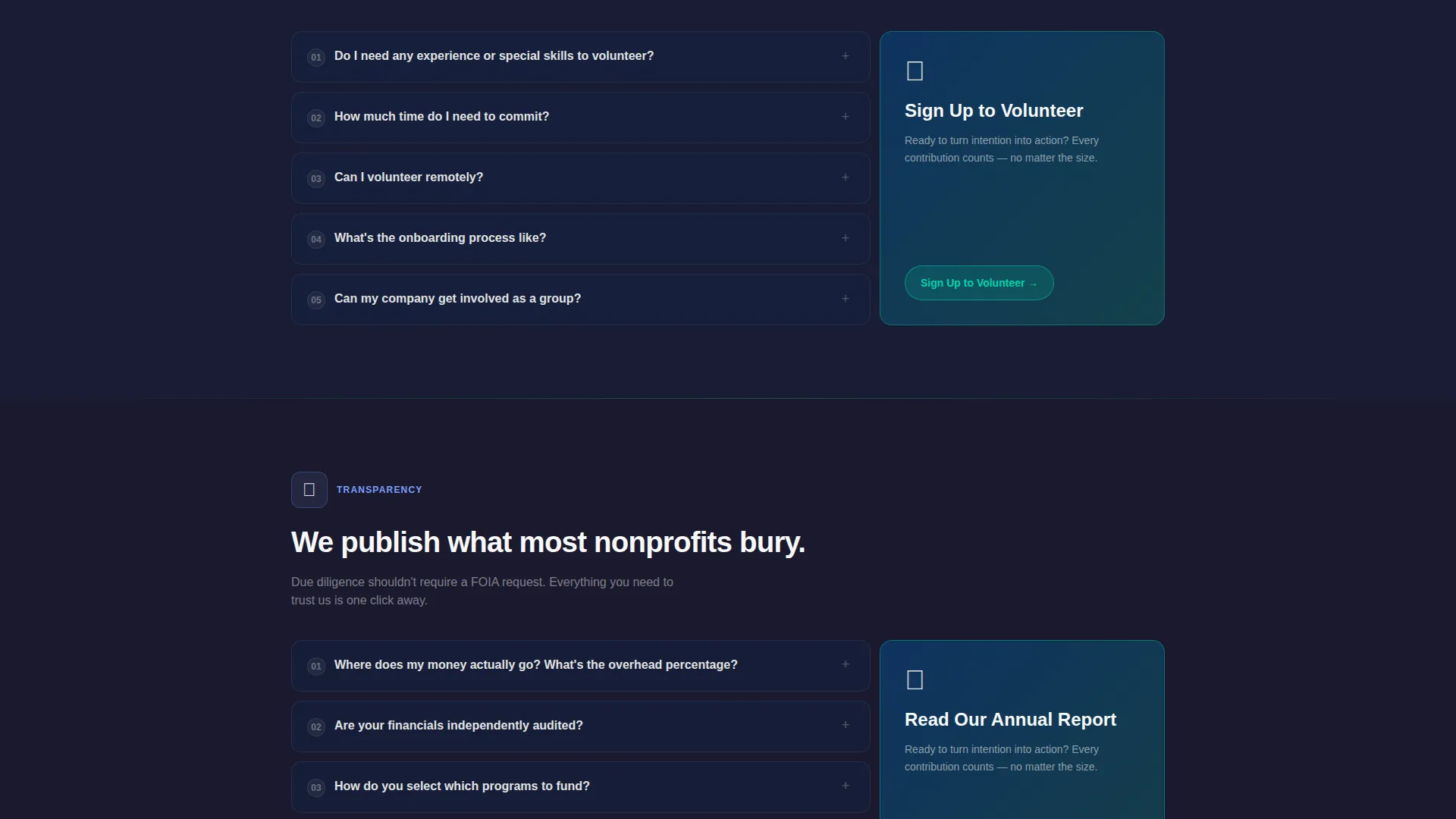
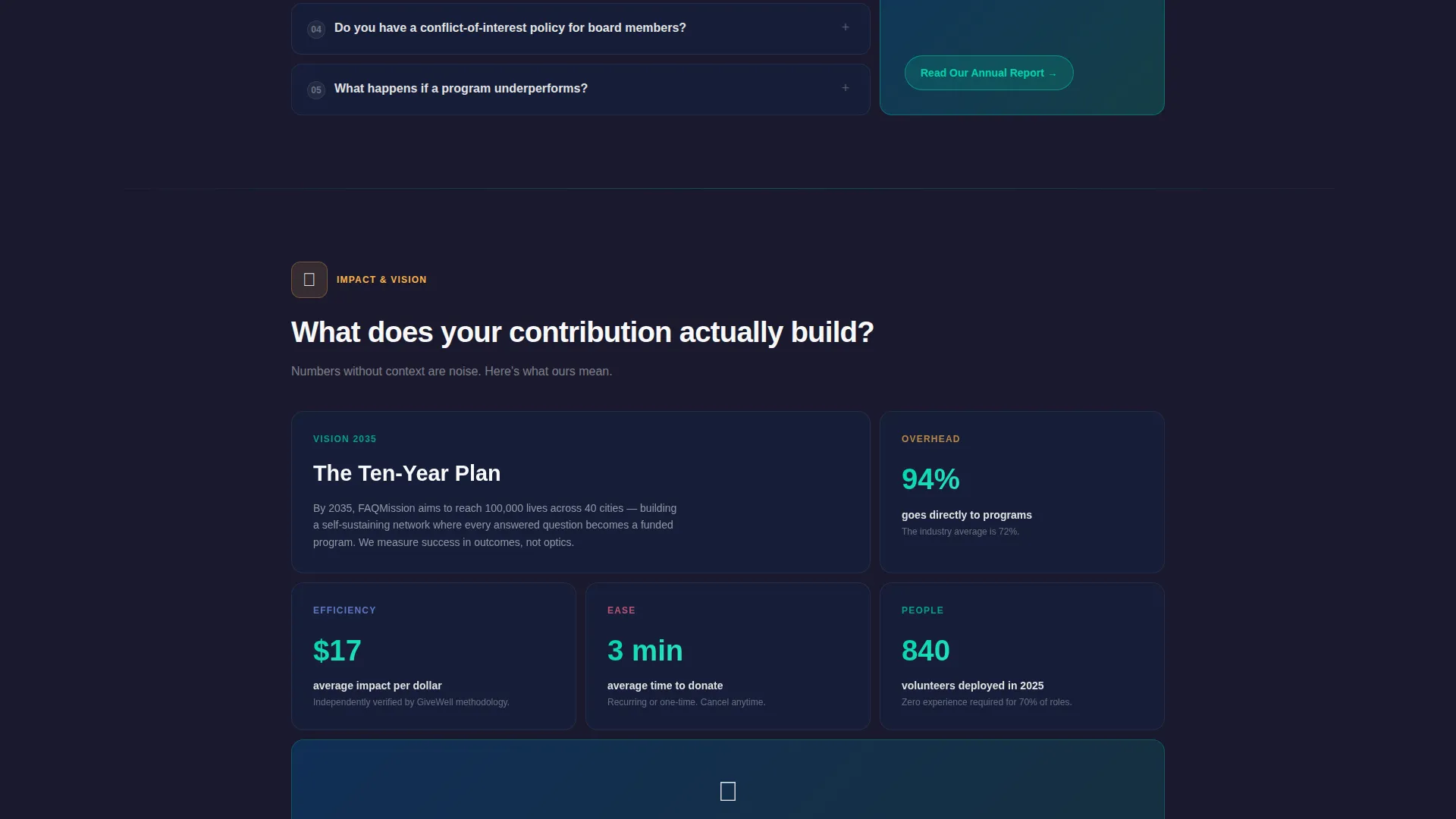
Every FAQ category ends with an embedded action tile matched to that section's topic. "Donate Now" follows financial questions. "Sign Up to Volunteer" follows involvement questions. "Read Our Annual Report" follows transparency questions. The call to action is earned by context, not forced at the top of the page.
Earned Floating call to action Button
The primary "Join the Mission" button is pinned as a floating element in carbon black with an electric green border. It appears only after the visitor has opened at least two FAQ tiles, ensuring the ask arrives after the answers have been delivered.
Page sections overview
| Section | Purpose |
|---|---|
| Animated Header Grid | Introduces FAQ categories with interactive icon tiles and a typewriter headline |
| Donations FAQ | Addresses financial questions from first-time and recurring donors |
| Donate Now call to action | Drives giving action directly after financial reassurance |
| Volunteering FAQ | Answers eligibility and commitment questions for prospective volunteers |
| Volunteer Signup call to action | Converts volunteer interest immediately after relevant answers |
| Transparency FAQ | Builds trust with overhead breakdowns and accountability context |
| Annual Report call to action | Directs due-diligence readers to deeper financial documentation |
| Impact FAQ | Answers visionary questions about organizational reach and long-term plans |
| Floating Join Button | Persistent primary call to action that appears after two FAQ interactions |
Design & branding system
The Carbon Fiber color system gives Missionready a visual identity that feels engineered rather than decorative. Every color choice serves a function: backgrounds recede, interactive elements advance, and text cuts through without effort.
- Color palette: deep carbon black (#1A1A2E) and woven graphite (#16213E) for backgrounds; high-vis mission green (#0F3460) for structural accents; electric activation white (#E2E2E2) for body text and interactive tile labels
- Bento tiles use subtle green border glows on hover, reinforcing interactivity without overwhelming the dark-field composition
- The overall aesthetic sits between a mission-control cockpit and a modern editorial layout, serious without being stiff, and technical without being inaccessible
Mobile & speed optimization
The bento grid layout is designed to reflow and remain scannable on smaller screens, so mobile visitors get the same confidence-building experience as desktop users.
- Bento tiles stack and resize responsively, keeping category icons and accordion controls easy to tap on touch devices
- Entrance animations are scoped to section-level triggers, so the staggered reveal works naturally whether a visitor is scrolling on a phone or a monitor
How this template helps you convert
Missionready is structured to earn trust before asking for anything. The page architecture follows a deliberate confidence curve, moving from personal questions to structural ones, and only surfacing the primary call to action once the visitor is ready.
- The FAQ category progression builds emotional and informational confidence in sequence, starting with small personal concerns and escalating to big-picture organizational credibility, so each scroll adds to the visitor's readiness rather than their hesitation.
- Contextual call to action tiles appear directly after the category most relevant to each visitor type, meaning a donor sees "Donate Now" after their financial questions are answered, a volunteer sees "Sign Up" after eligibility is clarified, and a corporate partner sees "Read Our Annual Report" after transparency is addressed.
- The floating "Join the Mission" button is deliberately withheld until after two FAQ tiles have been opened, making the primary ask feel like a natural next step rather than a pressure tactic.
Other information about this template
Missionready is categorized under nonprofit organization website templates within the technology section of the template marketplace. It is specifically designed for the nonprofit organization FAQ page niche, making it a precise fit for cause-led organizations that need a dedicated answer hub rather than a general homepage.
- Template style: Bento Grid, built for modular content that can be reorganized to match your organization's most-asked questions
- Theme: Dynamic Motion, meaning the page experience is defined by interaction and animation rather than static layout alone
- This template is a strong starting point for any nonprofit looking to build a dedicated FAQ landing page that reduces donor drop-off and volunteer hesitation before they ever reach a staff member
Theme
Dynamic Motion
Creative direction
Launch Energy
Color system
Carbon Fiber
Style
Bento Grid
Direction
Click-Through
Page Sections
Animated Bento Grid Header
Typewriter Headline Animation
Spring-physics Accordion Expansions
Kinetic Scroll Entrance Animations
Contextual Call-to-action Tiles
Earned Floating Call to Action Button
Related questions
Can I customize the FAQ categories to match my organization?
Does the floating call-to-action button work on mobile devices?
Can I add more questions to an existing FAQ category?
Is this template suitable for a nonprofit that does not yet have an annual report?
How does the earned call-to-action behavior work in practice?



