Mobilize — Field Service Landing Page Template
Dispatch is a scroll-reveal landing page template built for field service management apps. It guides visitors through a Problem-to-Solution arc, showcasing scheduling, dispatch, and invoicing features through animated app mockups, live-status visuals, and a sticky demo booking bar. Designed for HVAC, plumbing, and electrical contractors who need to turn chaos into clean, routed operations.
by Rocket studio
Quick summary
Dispatch is a single-page, scroll-reveal landing page template for field service management apps. It opens with a Feature Tab Switcher showing scheduling, dispatch, and invoicing in action. A Problem-to-Solution arc then walks visitors through the chaos of unoptimized field operations and resolves it section by section. The design uses a Midnight Blue palette and motion-forward animations throughout.
Who this template is for
This template is built for teams marketing field service management software to hands-on operations businesses. It speaks directly to the people running trucks, not IT departments.
- HVAC company owners managing multiple vans and technicians from manual tools
- Plumbing and electrical dispatchers losing billable hours to poor routing and scheduling
- Field service app founders and marketers who need a conversion-focused landing page fast
What problem this template solves
Field service businesses often struggle to communicate the real value of dispatch software to prospects who are still using whiteboards and group texts. A generic template cannot carry that emotional weight or show the product in motion.
- Visitors cannot picture the product working until they see it animated in context
- Static pages fail to show the contrast between chaotic and optimized dispatching
- No built-in lead capture path makes it hard to convert interested visitors into demo bookings
What you get with this template
You get a fully designed, animation-ready landing page built around a clear narrative arc. Every section is purpose-built to move a skeptical dispatcher toward booking a demo.
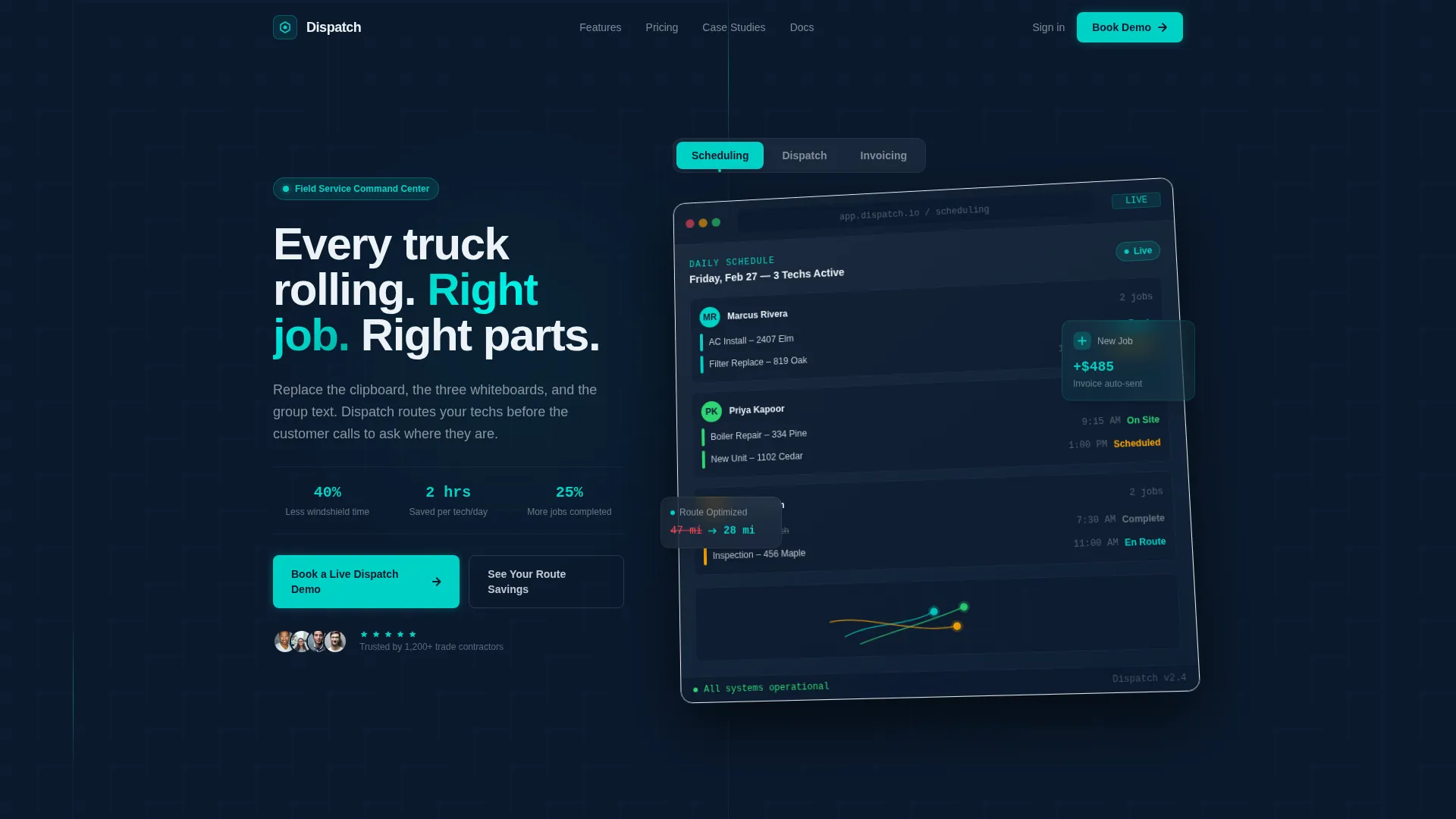
- A Feature Tab Switcher header with an isometric app mockup and three interactive tabs
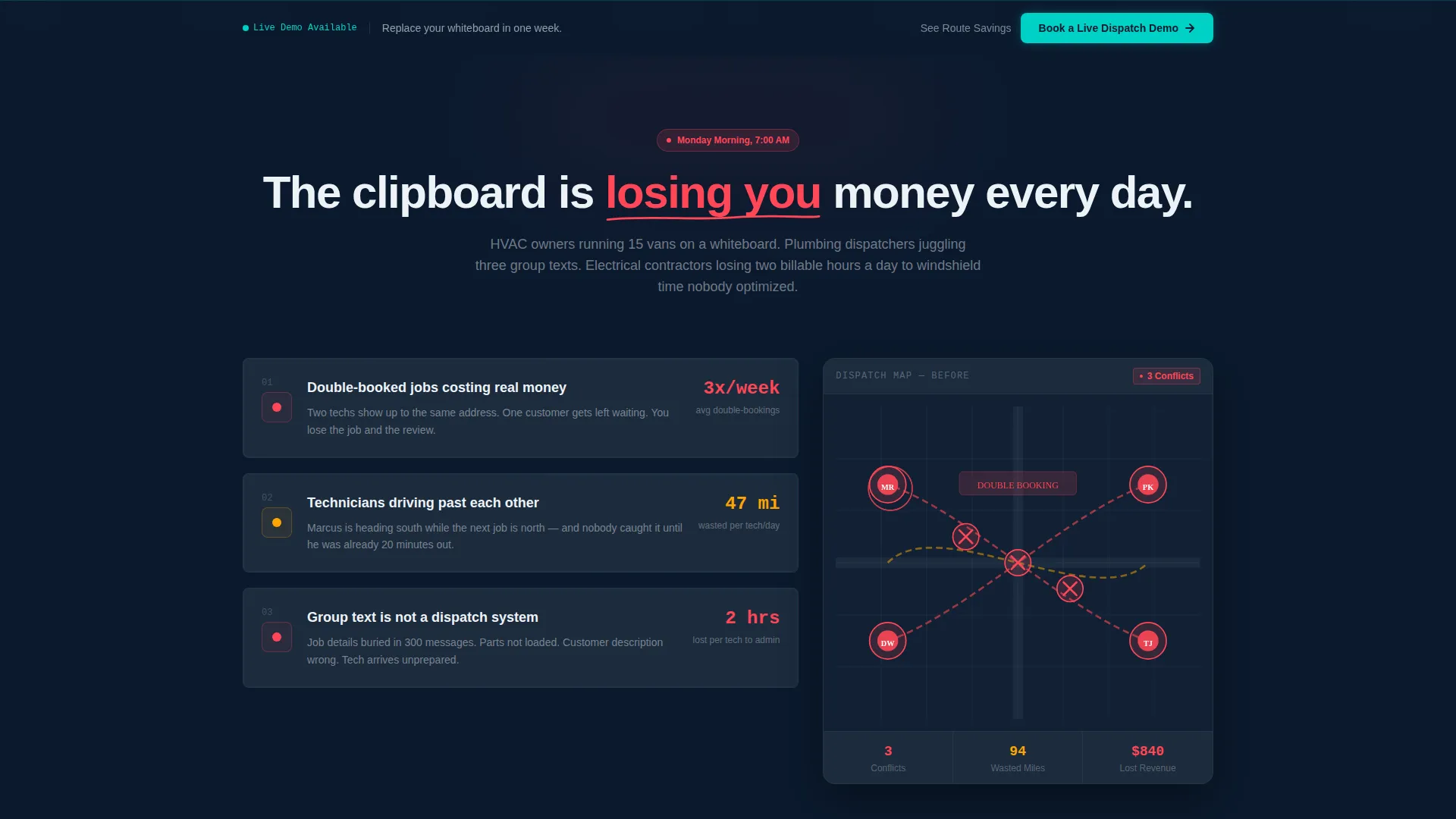
- A scroll-triggered Problem-to-Solution arc with animated stat counters and map visuals
- A sticky bottom bar with a three-field lead generation form and a secondary interactive calculator path
Feature list
This template ships with six purpose-built components that work together to demonstrate the product and capture leads.
Feature Tab Switcher Header
The header displays three labeled tabs: Scheduling, Dispatch, and Invoicing. Each tab swaps the central app mockup using a smooth morph transition. The default view shows a daily schedule board with technician avatars, color-coded job blocks, and a real-time map with animated route lines drawing themselves on screen.
Problem-to-Solution Scroll Arc
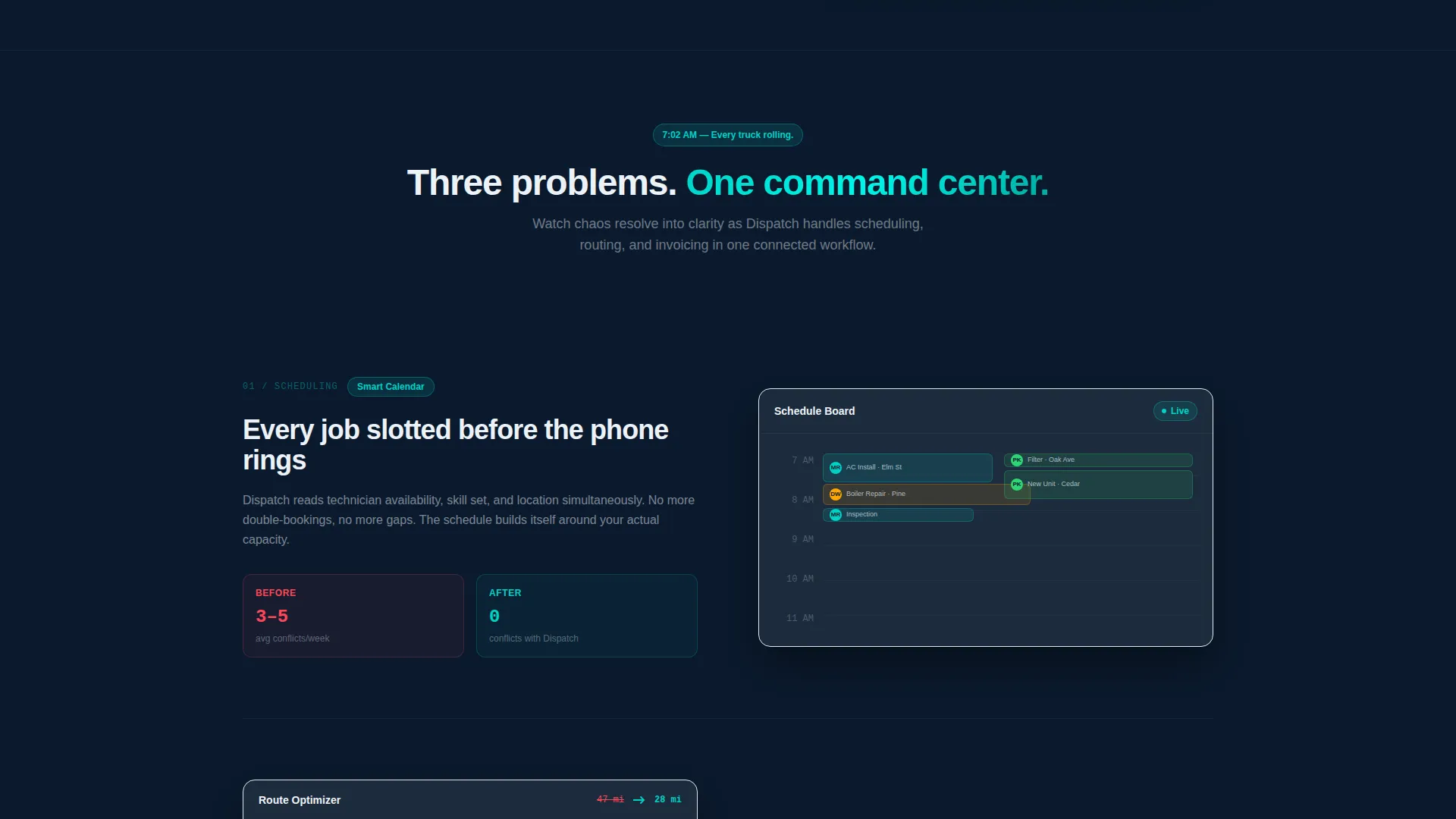
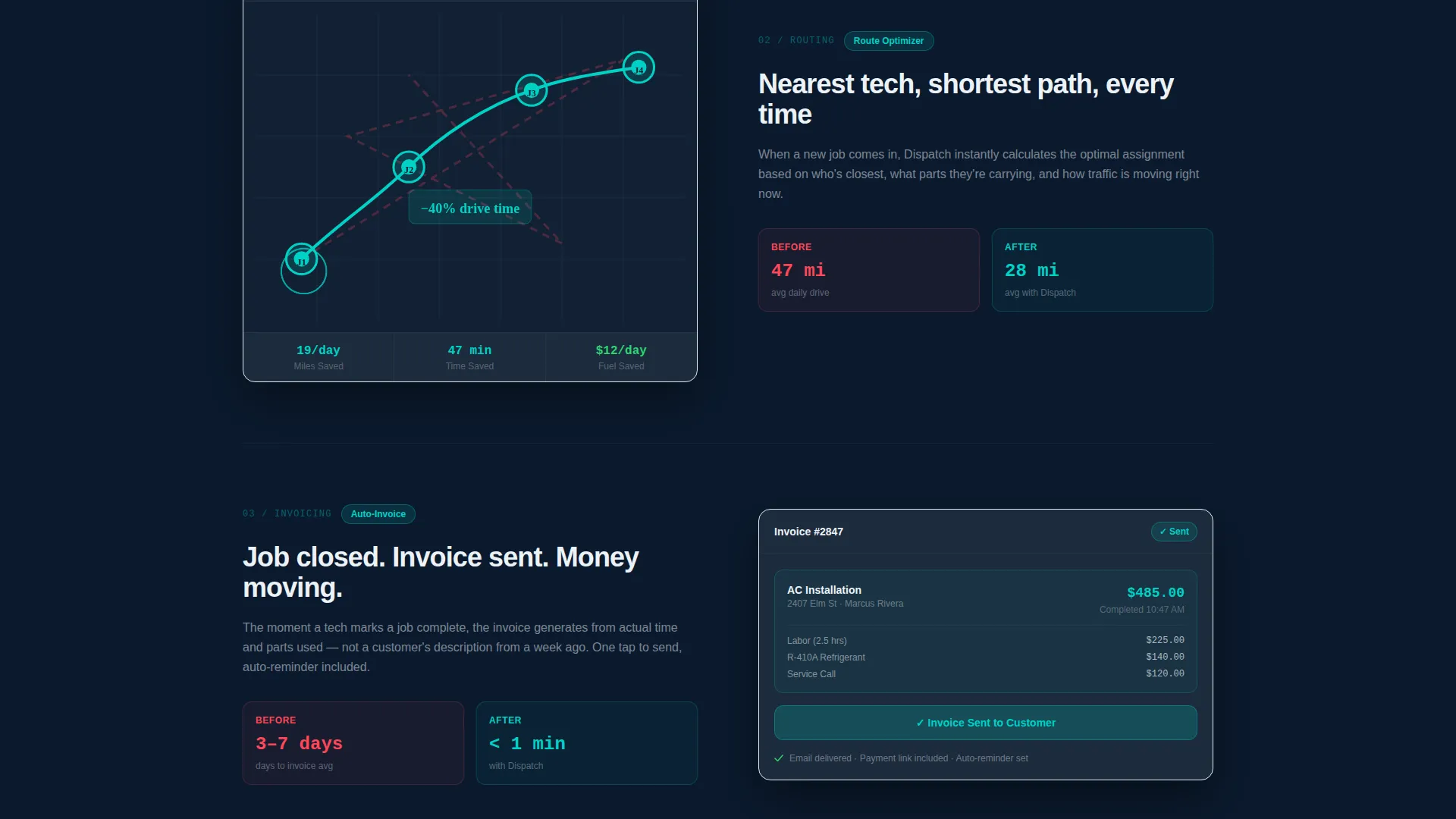
The page opens on a fragmented dispatch scenario complete with red pins and animated chaos indicators. Each scroll section resolves one pain point in sequence. Scheduling snaps clean, routing shows a visible before-and-after mile count, and invoicing closes the loop with a one-tap conversion animation.
Animated Stat Counters and Map Visuals
Scroll-triggered number counters increment as each section enters the viewport. Parallax maps and sliding comparison panels reinforce the sense of a product that is always working. Every entrance animation uses slide and fade motion tied to scroll momentum.
Sticky Lead Generation Bar
A persistent bottom bar appears after the first scroll reveal and stays on screen throughout the entire page. It contains a compact three-field form: company name, fleet size dropdown with three ranges, and work email. The bar never interrupts reading but is always reachable.
Route Savings Calculator
A secondary conversion path offers an interactive calculator. Dispatchers enter their daily job count and service area zip codes. The tool returns an estimated drive-time reduction figure, capturing the lead through demonstrated value before requesting a meeting.
Micro-Animation System
Pins pulse, routes trace themselves, and numbers count up on entry. The float animation on the isometric mockup, the morph transitions between tabs, and the scroll-triggered entrance effects all come pre-built. No motion setup is required from the person customizing the template.
Page sections overview
| Section | Purpose |
|---|---|
| Feature Tab Header | Introduces the product via three interactive app views |
| Chaos State Section | Shows the unoptimized dispatch problem with red-pin map and stat counters |
| Scheduling Resolution | Resolves the missed-appointment pain with a clean calendar animation |
| Routing Optimization | Displays a before-and-after mile count with a sliding comparison panel |
| Invoicing Close | Shows a completed job converting to a sent invoice in one tap |
| Sticky Demo Bar | Persists throughout scroll with the three-field lead form |
| Route Savings Calculator | Captures leads through an interactive drive-time reduction estimate |
Design & branding system
The visual identity follows a Dynamic Motion theme built on a Midnight Blue color system. Every color is functional. Nothing is decorative.
- Deep operations-floor navy (#0B1A2E) for the base background, dashboard charcoal (#1C2B3D) for cards and containers, and signal white (#EDF2F7) for text and negative space
- Live-status teal (#00D2C6) powers all active elements, data pulses, and interactive highlights, hitting the eye the way a new job ping hits a technician's phone
- The overall palette evokes a dispatch screen glowing in a dark office at dawn, calm and purposeful
Mobile & speed optimization
The template is designed with a mobile-first mindset so that field operations teams can evaluate and share it from any device. Animations and layout adapt to smaller screens without losing the core narrative flow.
- Scroll-triggered animations are structured to perform on mobile viewports without requiring custom reconfiguration
- The sticky demo bar and three-field form remain fully accessible and tappable on touch screens
- Isometric mockup sizing and tab switcher interactions scale cleanly across screen widths
How this template helps you convert
Every design decision in this template points toward one outcome: turning a skeptical dispatcher into a booked demo. The page works on two conversion paths simultaneously.
- The sticky bottom bar with the three-field form gives ready-to-convert visitors an immediate, low-friction way to book a live demo without leaving the page flow
- The Route Savings Calculator offers a second path for visitors who need to see value before committing, capturing lead data through a useful interactive tool rather than a cold form
Other information about this template
This template is part of the Scroll Reveal (Progressive) template style category, built specifically for technology products in the mobile app and field service software niche.
- The template style pairs well with field service management software marketed to small and mid-size operations teams
- The Problem-to-Solution Arc creative direction is a proven narrative structure for converting skeptical buyers who have tried and abandoned manual tools
- The Dynamic Motion theme and Midnight Blue color system are designed to feel authoritative and operational, not decorative or consumer-facing
- This template is a single landing page, not a multi-page website, and is optimized for focused lead generation rather than broad content browsing
Theme
Dynamic Motion
Creative direction
Problem→Solution Arc
Color system
Midnight Blue
Style
Scroll Reveal (Progressive)
Direction
Lead Generation
Page Sections
Feature Tab Switcher Header
Problem-to-solution Scroll Arc
Animated Stat Counters
Sticky Lead Generation Bar
Route Savings Calculator
Pre-built Micro-animation System
Related questions
Can I change the tab labels and app mockup content?
Do I need animation coding experience to use this template?
Is the Route Savings Calculator functional out of the box?
Can I add more sections or remove the sticky demo bar?
Who is the primary audience this landing page is designed to reach?



