Nonprofit Software Booking Website Template
Dispatch is a scroll reveal landing page template built for nonprofit appointment scheduling platforms. It combines an interactive code-snippet header, live org-type toggles, and a drag-and-drop shift sandbox to let visitors experience the product before they sign up. The design runs on a dark Electric Indigo palette with mint accent hits that guide every next action.
by Rocket studio
Quick summary
Dispatch is a progressive scroll reveal landing page template purpose-built for nonprofit scheduling software. Visitors don't just read about the product, they toggle org types, drag volunteer shifts, and watch conflict logic resolve in real time. By the time the "Launch Your Free Workspace" call to action appears, they've already built something inside the page.
Who this template is for
This template is made for nonprofit software teams and scheduling platform founders who need to convert time-strapped mission-driven operators. Your audience isn't browsing casually, they're exhausted coordinators looking for immediate relief.
- Program directors at homeless shelters managing rotating case worker schedules
- Executive directors at food banks who need to align delivery windows with volunteer availability
- Development officers and volunteer coordinators who lose hours each week to back-and-forth booking emails
What problem this template solves
Nonprofit operations run on coordination, but most scheduling tools are built for corporate calendars. A single coordinator often juggles volunteer shifts, client intake appointments, donor meetings, and grant deadline check-ins, all from one device, all at once. A generic SaaS landing page can't communicate that kind of operational weight.
- It removes the credibility gap between a technical product and a non-technical buyer
- It eliminates passive reading by replacing static screenshots with interactive modules the visitor actually controls
- It shortens the sign-up decision by letting users build inside the page before they ever see a form
What you get with this template
You get a fully structured, single-page scroll reveal layout that escalates in complexity as the visitor scrolls. Each section activates a new interactive module, from booking a single appointment to coordinating multi-site scheduling across a five-program organization. The progression mirrors the product's own learning curve: simple at the top, powerful underneath.
- A self-typing code-snippet header that transitions into a live calendar view
- Two interactive exploration modules covering org-type switching and drag-and-drop shift scheduling
- A slim pinned bottom bar with the primary call to action after the second scroll module fires
Feature list
This section describes the distinct interactive and structural capabilities built into this template.
Self-Typing Code Snippet Header
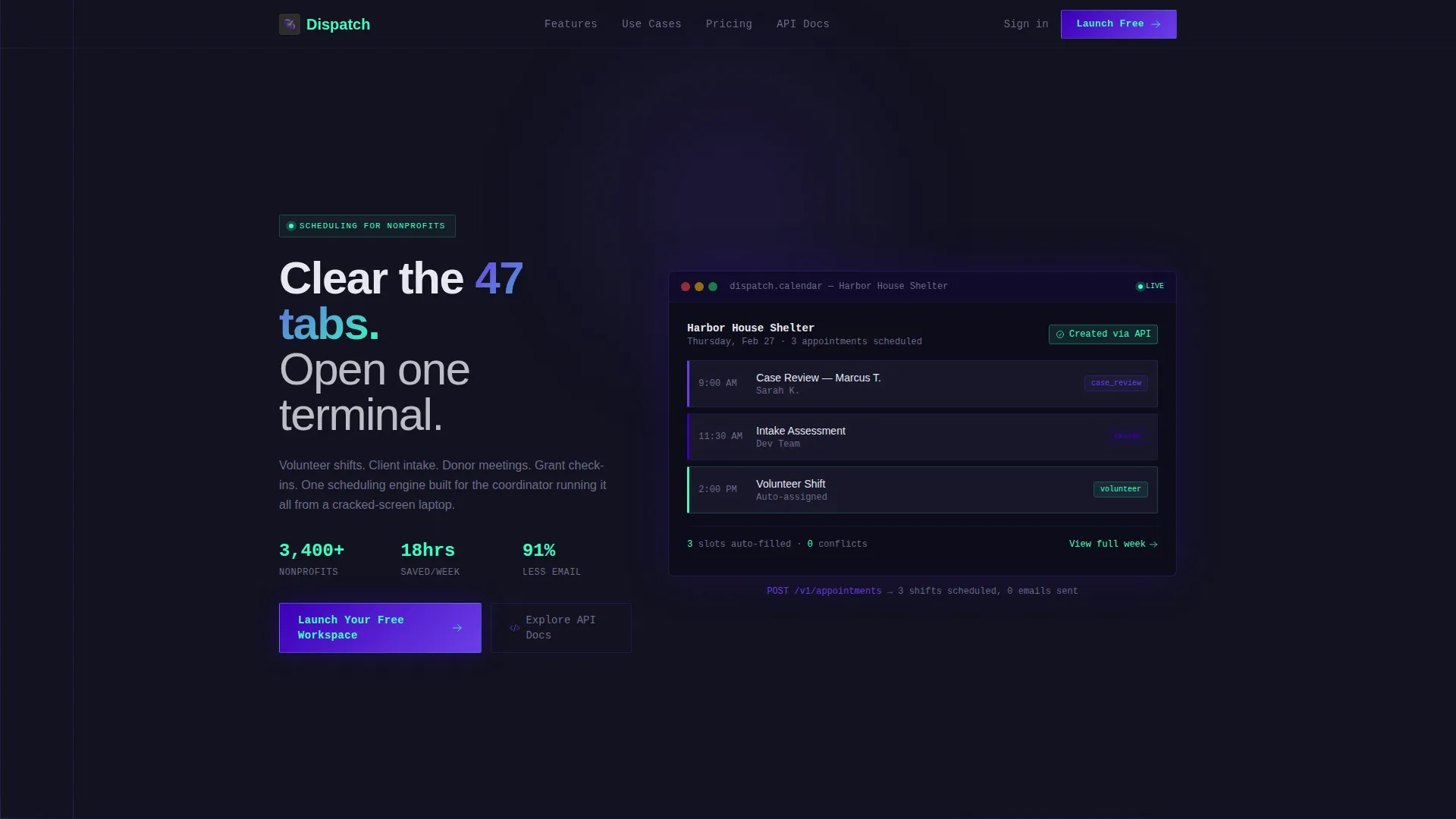
The header opens with a syntax-highlighted POST /v1/appointments API call that types itself out character by character against a charcoal background. Once the last bracket closes, the code dissolves and a calendar interface materializes in its place, showing the appointment just created. It bridges the developer who built it and the program director who needs to use it.
Org-Type Toggle Module
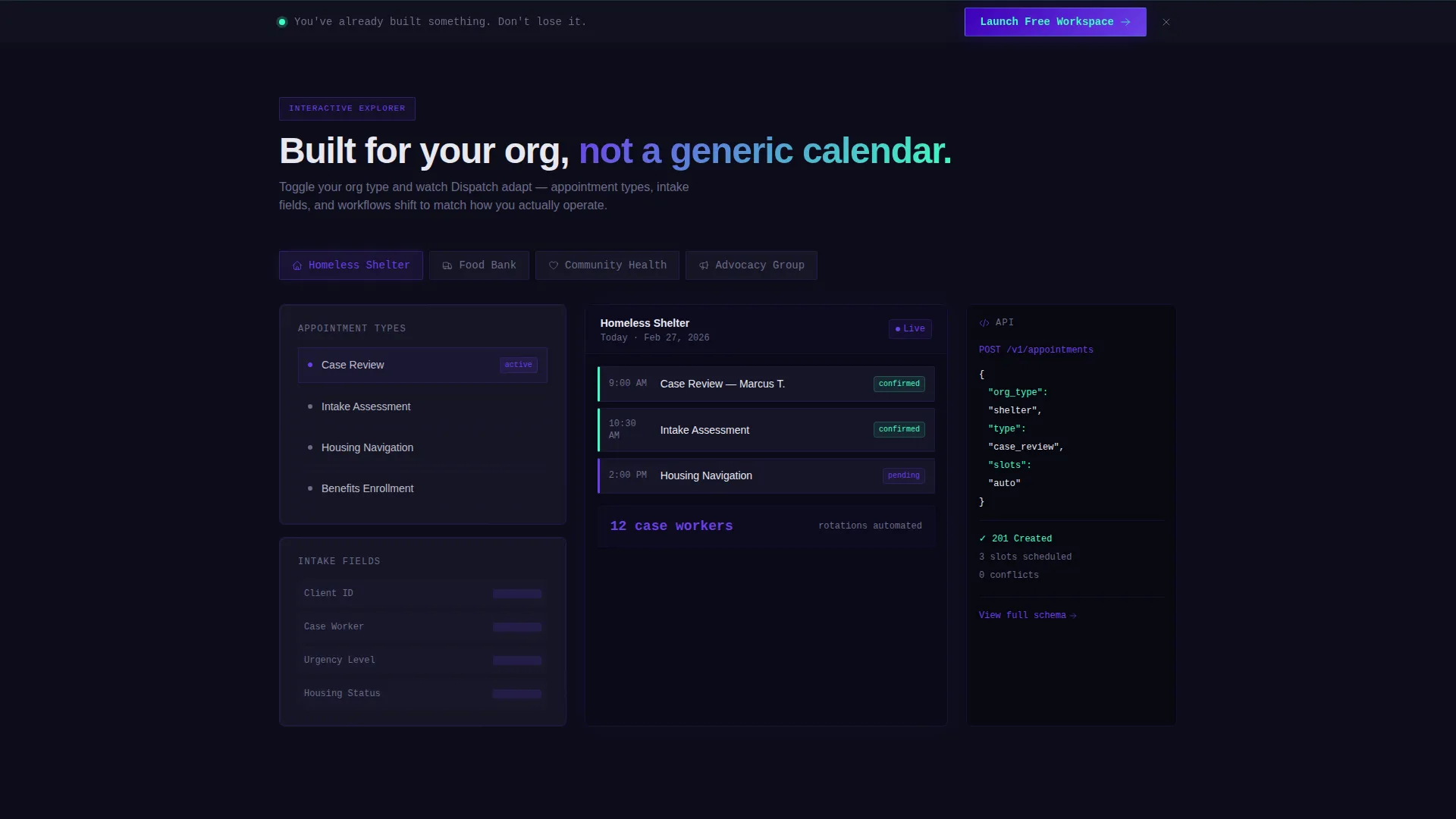
Section one hands the visitor a set of controls to switch between organization types: shelter, food bank, clinic, and advocacy group. As each type is selected, the interface updates with the matching appointment types, intake fields, and branding context. The visitor sees their own org reflected in the product before a single word of sales copy appears.
Drag-and-Drop Shift Sandbox
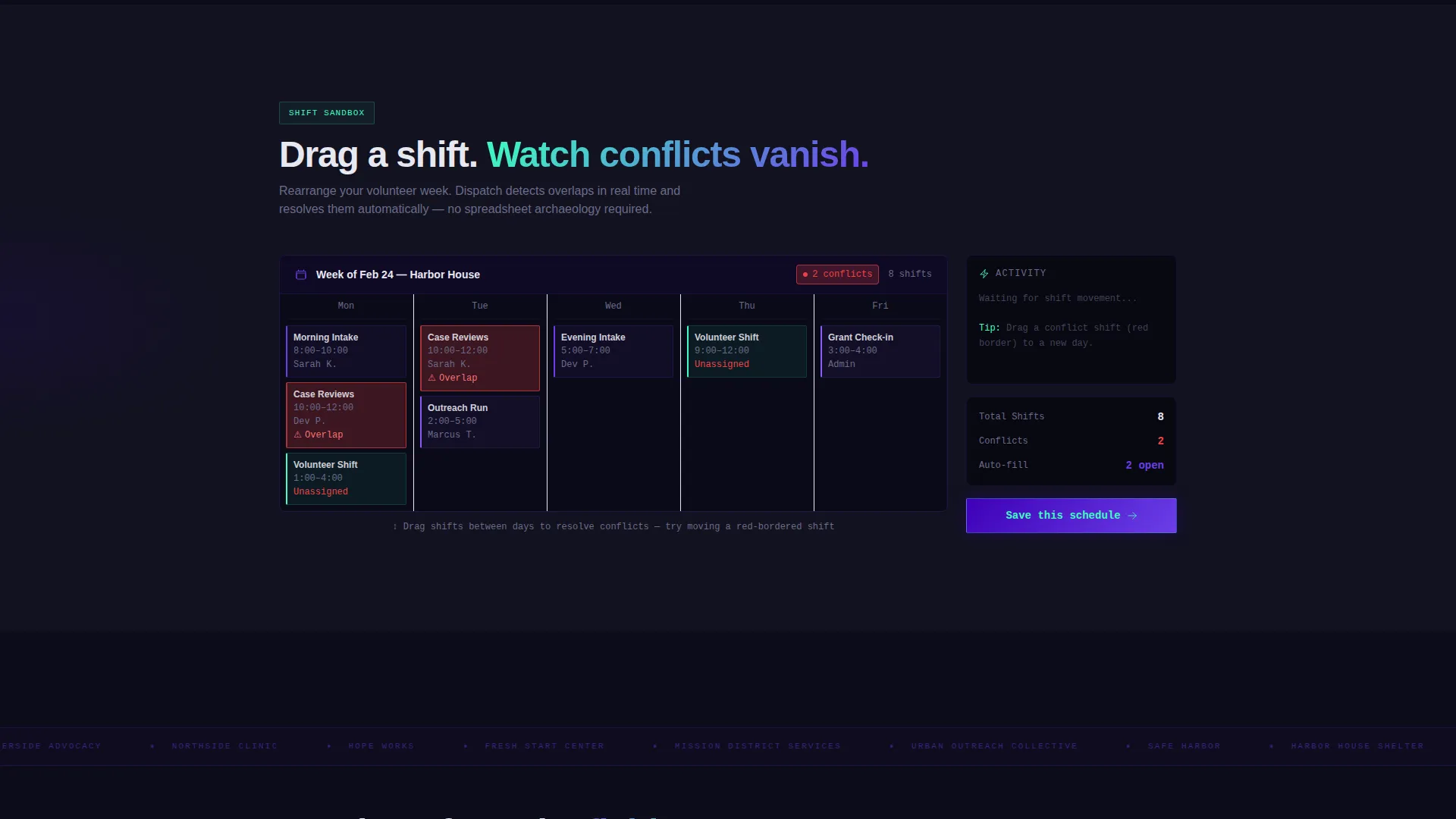
Section two is a live scheduling sandbox. Visitors rearrange a sample week of volunteer shifts by dragging and dropping, and conflict resolution updates in real time as they work. It's the most direct proof of product value on the page, no video, no screenshot carousel.
Progressive Scroll Reveal Flow
Each scroll trigger doesn't just fade in content, it activates an interactive module. The escalation moves from booking one appointment to managing coordination across multiple sites and programs. The structure teaches the product's depth without a single tutorial.
Freemium Signup Form
The primary conversion form asks only for organization name, role from a short dropdown, and work email. No credit card is required. No organization size interrogation. The secondary path links technical evaluators directly to the API documentation.
Pinned Conversion Bar
After the second interactive module activates, a slim bar pins to the bottom of the viewport and holds the primary call to action in view. It stays visible without interrupting the exploration, present when the visitor is ready, not before.
Page sections overview
| Section | Purpose |
|---|---|
| Code Snippet Header | Introduces the product via a self-typing API call that resolves into a live calendar |
| Org-Type Toggle | Lets visitors switch org contexts and watch the interface adapt in real time |
| Shift Drag Sandbox | Gives hands-on experience rearranging volunteer shifts with live conflict resolution |
| Primary call to action Block | Delivers the "Launch Your Free Workspace" signup form after the header demo |
| Multi-Site Escalation | Demonstrates complex coordination across a five-program organization structure |
| Pinned Bottom Bar | Keeps the primary call to action accessible after the second scroll module fires |
Design & branding system
The visual identity runs on an Electric Indigo color system designed to feel like a focused developer environment, dark, precise, and alive. Charcoal dominates the background in full-bleed sections, indigo anchors headers and navigation, and violet washes gradient overlays across transitions. The sharp mint accent fires only on hover states, active toggles, and confirmation pulses, drawing the eye exactly where action is needed.
- Deep terminal indigo (#3D00B8) for headers and navigation anchors
- Live-wire violet (#6C3FE8) for gradient overlays and section transitions
- Dashboard-dark charcoal (#121220) as the dominant background across full-bleed sections
- Sharp mint (#3DFFC0) reserved for hover states, active toggles, and confirmation moments
Mobile & speed optimization
The template's progressive scroll reveal structure is designed to perform on devices that nonprofit coordinators actually use. The brief explicitly grounds this in a real scenario: a single coordinator working from one cracked-screen laptop. The layout prioritizes clarity on constrained screens.
- Interactive modules are structured to remain usable on smaller viewports
- The pinned conversion bar is designed to stay visible without overloading the mobile layout
- The self-typing header animation is built as a foreground-first element so it loads as a priority visual
How this template helps you convert
This template earns the conversion by letting the visitor use the product before asking them to sign up. The page is structured so that by the time the form appears, the visitor has already invested effort inside the interactive modules and doesn't want to lose what they built.
- The org-type toggle and shift sandbox create personal investment before any call to action is visible, the visitor has already shaped the product to their context
- The three-field signup form removes every common friction point: no credit card, no org size field, and a role dropdown that signals the platform understands their job title
- The pinned bottom bar keeps the primary call to action visible during the entire exploration without interrupting it, ready when the visitor decides, not pushing before they do
Other information about this template
This template is built within the Startup Velocity theme, which prioritizes speed-to-trust over elaborate brand storytelling. The Electric Indigo color system and Interactive Explorer creative direction are designed to work together, dark backgrounds reduce visual noise while interactive controls build confidence. The scroll reveal approach also serves a practical purpose for nonprofit software marketing: it compresses what would otherwise be a multi-page product tour into a single, uninterrupted flow.
- The template style is Scroll Reveal (Progressive), meaning each section activates sequentially as the visitor scrolls
- The header concept is Code Snippet, which uses a living syntax-highlighted API call as the first brand impression
- The landing page direction is Freemium and Trial conversion, with a secondary path for technical evaluators via API documentation
- The template sits at the intersection of the Technology category, Nonprofit Software subcategory, and Nonprofit Appointment Scheduling niche
Theme
Startup Velocity
Creative direction
Interactive Explorer
Color system
Electric Indigo
Style
Scroll Reveal (Progressive)
Direction
Freemium/Trial
Page Sections
Self-typing Code Snippet Header
Org-type Toggle Module
Drag-and-drop Shift Sandbox
Progressive Scroll Reveal Structure
Friction-reduced Signup Form
Pinned Conversion Bar
Related questions
Who is this template designed for?
Does this template require a developer to customize?
What is the primary call to action in this template?
Can the org-type toggle be adapted for different nonprofit verticals?
Is there a conversion path for technical buyers?



