Specialist Consulting Firm Software Reviews & Social Proof Website Template
The Mobilize Command Center volunteer management landing page template is built for consulting firms managing large pro bono portfolios. It presents a real-time dashboard hero, a Before/After comparison section, animated impact metrics, a testimonial block, and an inline demo request form. The design follows a high-altitude Dashboard Pro aesthetic in Slate and Sky colors, engineered to convert CSR directors and program managers into demo requests.
by Rocket studio
Quick summary
This is a single-page, high-conversion landing page built for consulting firms that manage volunteers across multiple nonprofit engagements. The layout moves visitors from a live dashboard hero through a sharp Before/After comparison, animated metrics, social proof, and a focused demo request form. Every section is designed to make the old way look painful and the new way look inevitable.
Who this template is for
This template is built for operations-minded professionals inside consulting organizations who are responsible for coordinating volunteers at scale. If you recognize the Monday-morning chaos of reconciling hours across shared drives, this page speaks directly to you.
- CSR directors at large consulting firms juggling 200 or more volunteers across twelve or more nonprofit engagements
- Program managers at boutique strategy shops who need to prove social impact to partners and supporters
- Operations leads at management consultancies hoping to stop losing weekends to spreadsheet reconciliation
What problem this template solves
Volunteer programs at consulting firms grow faster than the tools used to manage them. Teams end up with scattered email threads, duplicate spreadsheets, and Slack messages asking "wait, who is covering Saturday?" The result is wasted time, coverage gaps, and reports that are always a step behind.
- No single place to see every shift, every skill gap, and every hour logged across all active projects
- Staff members spend hours each week manually reconciling volunteer data from shared drives and inboxes
- Reporting on initiatives to senior leadership requires painful manual effort every time
What you get with this template
You get a complete, ready-to-deploy landing page that guides visitors from curiosity to demo request without a single dead end. The page is structured to create urgency, establish trust, and capture qualified leads.
- A full-width animated dashboard hero with glassmorphism details, live metric pulses, and a frosted headline bar
- A screenshot-against-screenshot Before/After section that maps every pain point to a specific dashboard feature
- An animated metrics section, a testimonial card, and an inline demo request form with a secondary gated PDF offer
Feature list
This template includes purpose-built sections and interactive components. Each one is grounded in the workflow of consulting firm volunteer management.
Animated Dashboard Hero
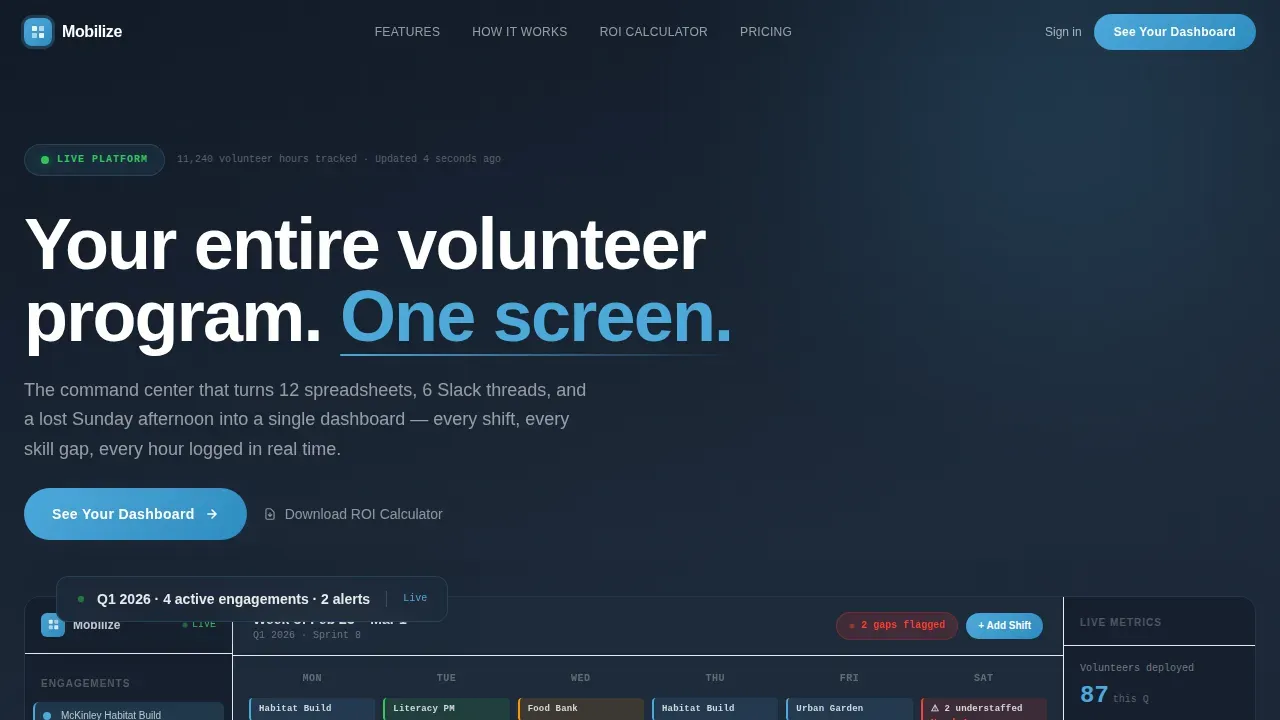
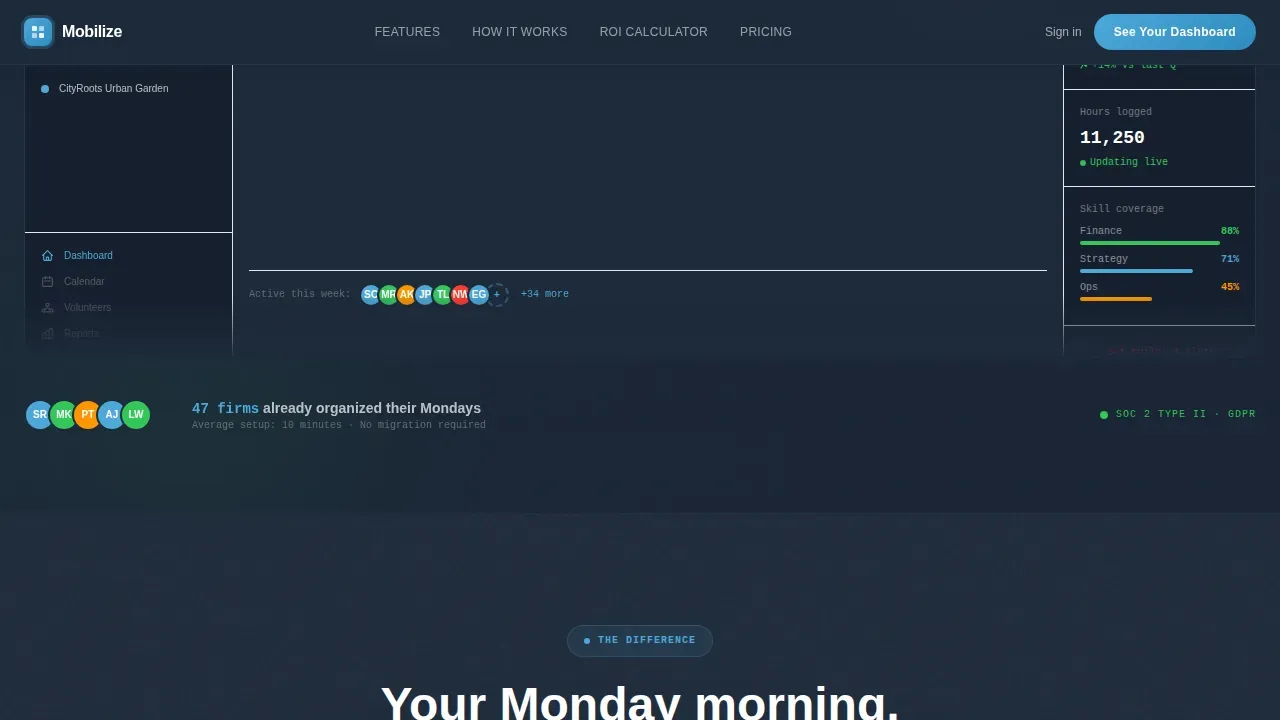
The header is a living product preview. It shows a left sidebar listing nonprofit engagements by name, a central calendar grid with color-coded shift blocks, and a right panel displaying volunteer totals and a rising trendline. A subtle looping animation pulses live metrics, slides a new volunteer avatar into an open slot, and ticks the hours counter upward. A frosted-glass headline bar fades in over the top.
Before/After Comparison Section
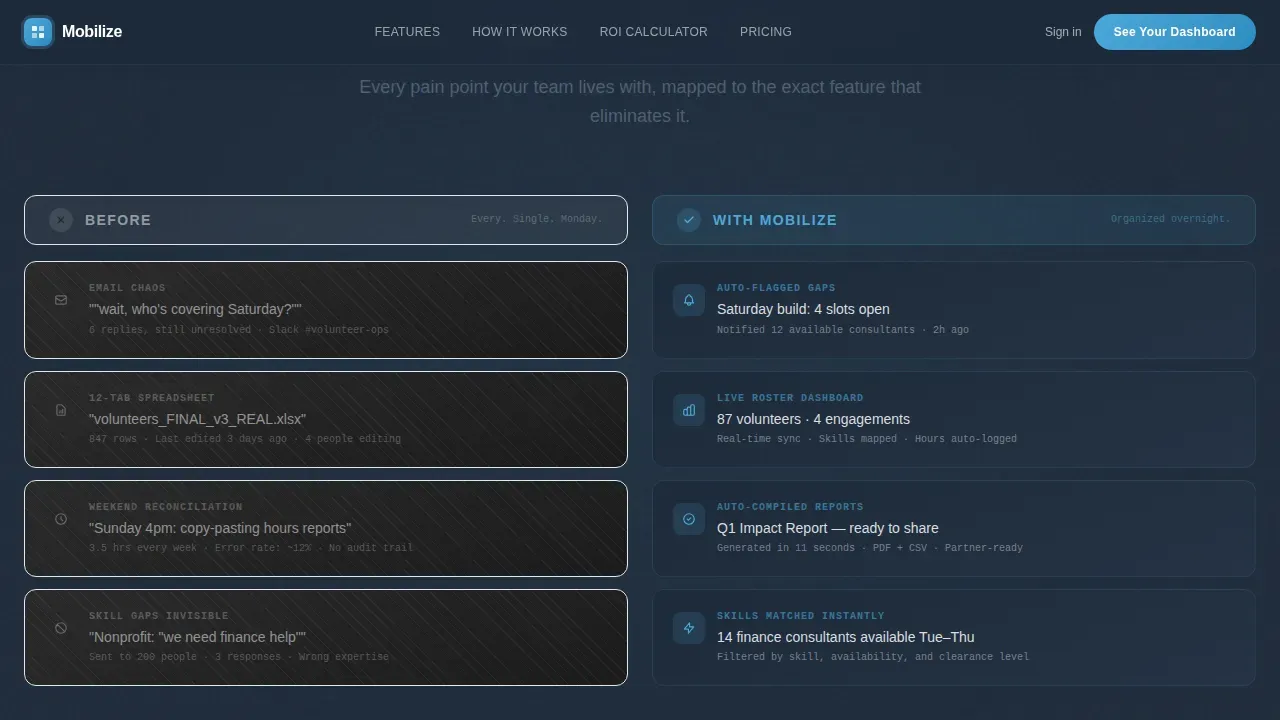
The versus frame places two columns side by side. The left column shows the chaos: grayed-out email threads, mismatched spreadsheets, and a Slack screenshot. The right column mirrors each pain point with the corresponding dashboard feature, glowing in sky blue. This section helps visitors decide quickly by making the contrast impossible to ignore.
Animated Metrics and ROI Section
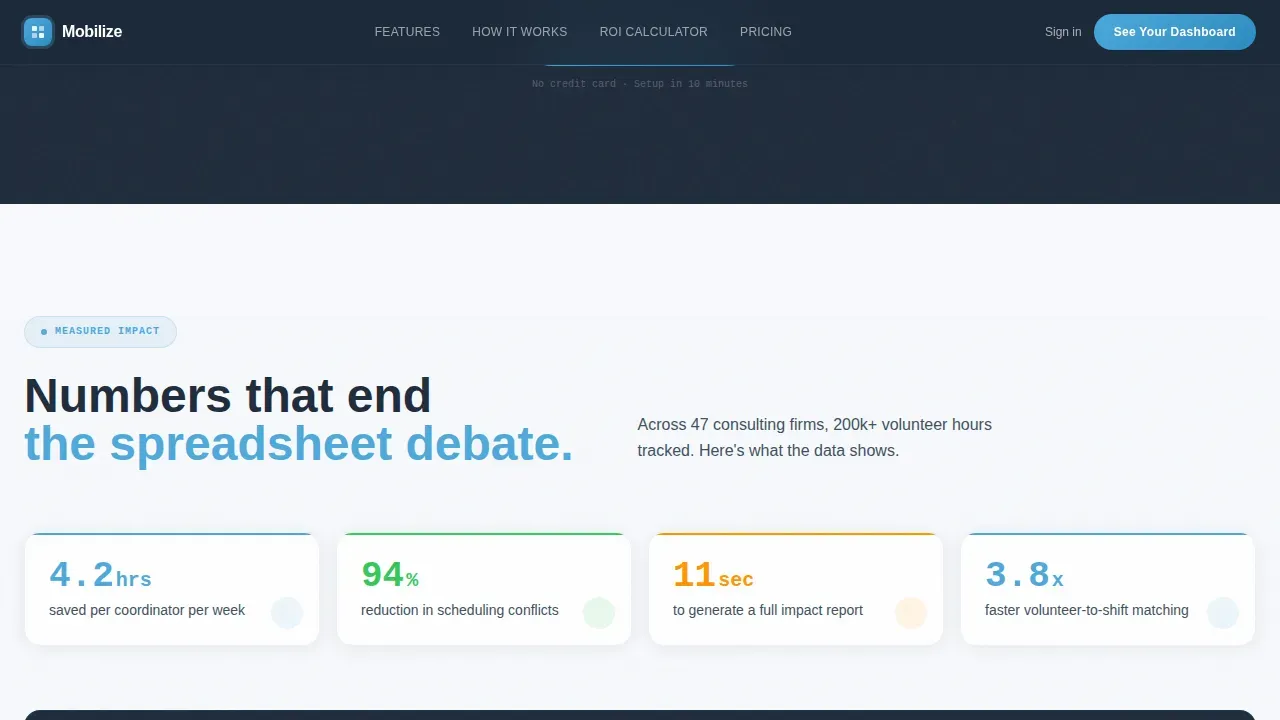
Intersection Observer-triggered counters animate on scroll, showing concrete statistics like hours saved per coordinator per week. A stacked bar chart compares reporting time before and after. A secondary call-to-action lets visitors download a gated ROI calculator PDF, capturing email and firm size to support future follow-up.
Testimonial and Social Proof Block
A named testimonial card from a CSR director lands with the weight of real proof. Firm logos sit alongside the testimonial to provide additional credibility for visitors who are evaluating the platform for the first time.
Inline Demo Request Form
The primary conversion point is an inline form that asks for company name, number of active volunteer programs via a dropdown, and work email. The sticky top navigation repeats the "See Your Dashboard" call-to-action so the option is always visible as visitors scroll.
frequently asked question Accordion
An interactive frequently asked question accordion lets visitors find answers to common questions about the platform without leaving the page. Each question expands inline, keeping the focus on conversion rather than navigation.
Page sections overview
| Section | Purpose |
|---|---|
| Sticky Navigation | Keeps call to action visible while scrolling |
| Dashboard Hero | Showcases live volunteer data preview |
| Before/After Versus | Contrasts chaos with Mobilize features |
| Animated Metrics | Displays impact statistics with counters |
| Testimonial Block | Builds trust with real CSR director proof |
| Demo Request Form | Captures qualified leads inline |
| ROI Calculator call to action | Gated PDF download for secondary conversion |
| frequently asked question Accordion | Answers common buyer questions in place |
| Footer | Single-row linear footer with key links |
Design & branding system
The visual identity follows a Dashboard Pro theme. The palette feels like a high-altitude morning: dark ground, clean air, and data floating in sharp focus above it all.
- Deep charcoal slate (#1E2A3A) dominates the sidebar and navigation frames; mid-tone graphite (#3D4F5F) fills structural backgrounds
- Open-sky blue (#4DA8DA) highlights active states, live numbers, and interactive toggles; signal green (#34C759) marks positive metrics
- Cloud white (#F7F9FC) card backgrounds sit on the gray grid like windows punched into a cockpit wall; typography uses DM Sans for interface copy and JetBrains Mono for data and numbers
Mobile & speed optimization
The template is built desktop-first, reflecting the primary use case of CSR directors opening their laptops on Monday morning. It also functions cleanly on any device a visitor might use.
- Intersection Observer triggers counter animations only when each section enters the viewport, keeping scroll performance smooth
- CSS animations handle the dashboard pulse indicators and slide-in avatar effects without heavy JavaScript dependencies
- The layout adapts across every device type, including desktops, laptops, tablets, and smartphones, so supporters and team members can access the page regardless of how they arrive
How this template helps you convert
Every design and copy decision in this template is built to move a skeptical CSR director toward a single action: requesting a demo. The page earns the click rather than demanding it.
- The hero dashboard preview creates an immediate emotional anchor. Visitors see a product that looks like it already has their data in it, complete with named engagements, shift calendars, and volunteer totals. That specificity builds trust before a single word of copy is read.
- The Before/After section does the persuasion work by making the current state look embarrassing. By the time a visitor reaches the demo form, they are not comparing platforms. They are comparing their current Monday morning to the one the dashboard promised.
Other information about this template
This template is a strong starting point for any consulting organization hoping to promote its volunteer program more effectively. Several practical details are worth noting before you get started.
- Admins can configure organization settings including legal disclaimers that appear on event feeds and sign-up pages, and they can find the organization ID at the top of the Team Settings page
- Custom landing pages can be created for specific volunteer events, projects, and initiatives, and each page can include a sponsor logo to support partner acknowledgment
- Automated communications, such as confirmation emails that outline next steps, are a recognized best practice for volunteer event landing pages and can be set up to send immediately after sign-up
- Integration with data management systems is crucial for tracking volunteer data accurately; impact metrics should display concrete statistics to demonstrate the organization's effectiveness to partners and supporters
- Real-time calendars allow volunteers to sign up for available shifts directly from the page, and volunteer scheduling software can prevent double-booking and inadequate coverage across projects
- Platforms compared in this category include VolunteerHub for hour tracking and recruitment, VolunteerMark for simple scheduling, CERVIS for customizable program management, and POINT for moving organizations beyond spreadsheet management
- The Mobilize Command Center volunteer management landing page template is designed specifically for consulting firms that host their own events and need to manage volunteers across other organizations and nonprofits at the same time
- Months ago, many firms in this space were still reconciling data manually; this template is built to make that approach look visibly outdated by the time a visitor reaches the call-to-action
Theme
Dashboard Pro
Creative direction
Launch Energy
Color system
Slate & Sky
Direction
Comparison/Versus
Page Sections
Animated Dashboard Hero with Live Metrics
Before/after Comparison Section
Animated Impact Metrics Block
Testimonial and Social Proof Card
Inline Demo Request Form
Interactive Frequently Asked Question Accordion
Related questions
What sections are included in this template?
Can admins customize the branding and organization details on the pages?
How does the demo request form work?
Is this template suitable for managing volunteers across multiple nonprofits?
What level of animation and interactivity does this template include?



