Plastics Scheduling Landing Page Template
Mold is a Bold Brutalist landing page template built for a plastics scheduling platform. It uses a three-column comparison table, animated micro-demos, and a freemium signup flow to show production planners and plant managers exactly how the booking grid outperforms spreadsheets and generic tools. Five presses and one planner seat unlock for free.
by Rocket studio
Quick summary
Mold is a single-page, comparison-table landing page for a plastics production scheduling platform. It targets production planners, plant managers, and contract molders who need airtight press booking. The page leads with a raw product screenshot, builds trust through a feature matrix, and converts through a freemium trial with a three-field signup form.
Who this template is for
This template is built for teams in the plastics manufacturing industry who manage press time as a critical resource. It speaks directly to the people who feel the daily cost of unplanned idle time.
- Production planners who split their time between Manufacturing Execution System (MES) dashboards and manual spreadsheets
- Plant managers chasing an Overall Equipment Effectiveness (OEE) target above 85%
- Contract molders running dozens of customer tools across a limited number of presses
What problem this template solves
Scheduling injection presses, blow molders, and extruders across multiple jobs is messy without purpose-built tooling. Generic scheduling software ignores plastics-specific constraints, and spreadsheets cannot enforce tool-to-press compatibility or purge-time buffers. The result is idle machines, missed customer deadlines, and revenue left on the table.
- No way to enforce tool-to-press compatibility rules or cycle-time-based capacity math inside a spreadsheet
- Color-change purge-time buffers and customer purchase order (PO) linking handled manually, creating errors
- No clear visual of which presses are booked, idle, or in changeover across a rolling five-day horizon
What you get with this template
You get a complete, production-ready landing page designed to present a plastics booking system with the clarity and confidence that enterprise buyers expect. Every section serves a specific conversion purpose.
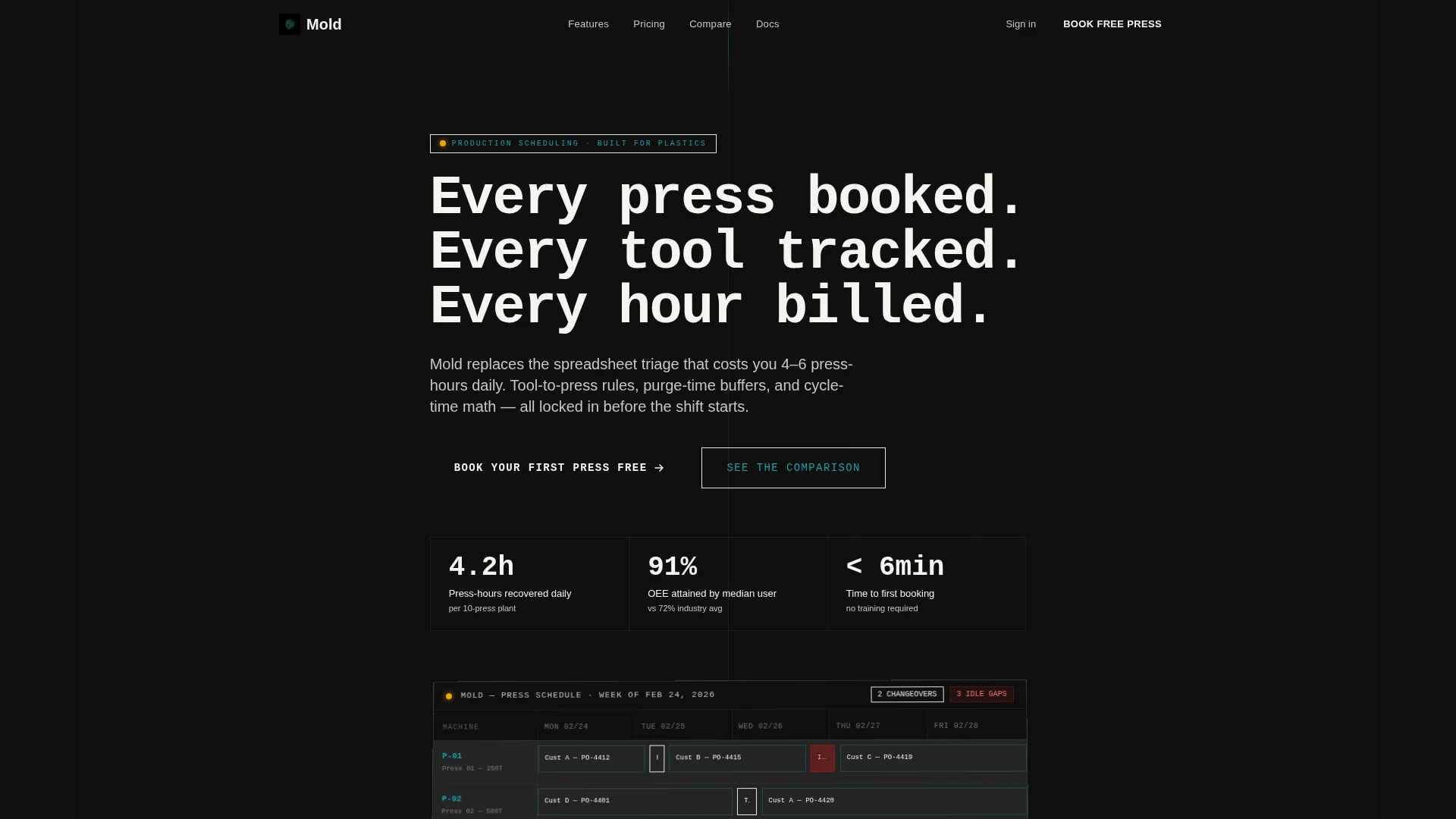
- A full-width product screenshot header showing the live booking grid at native resolution
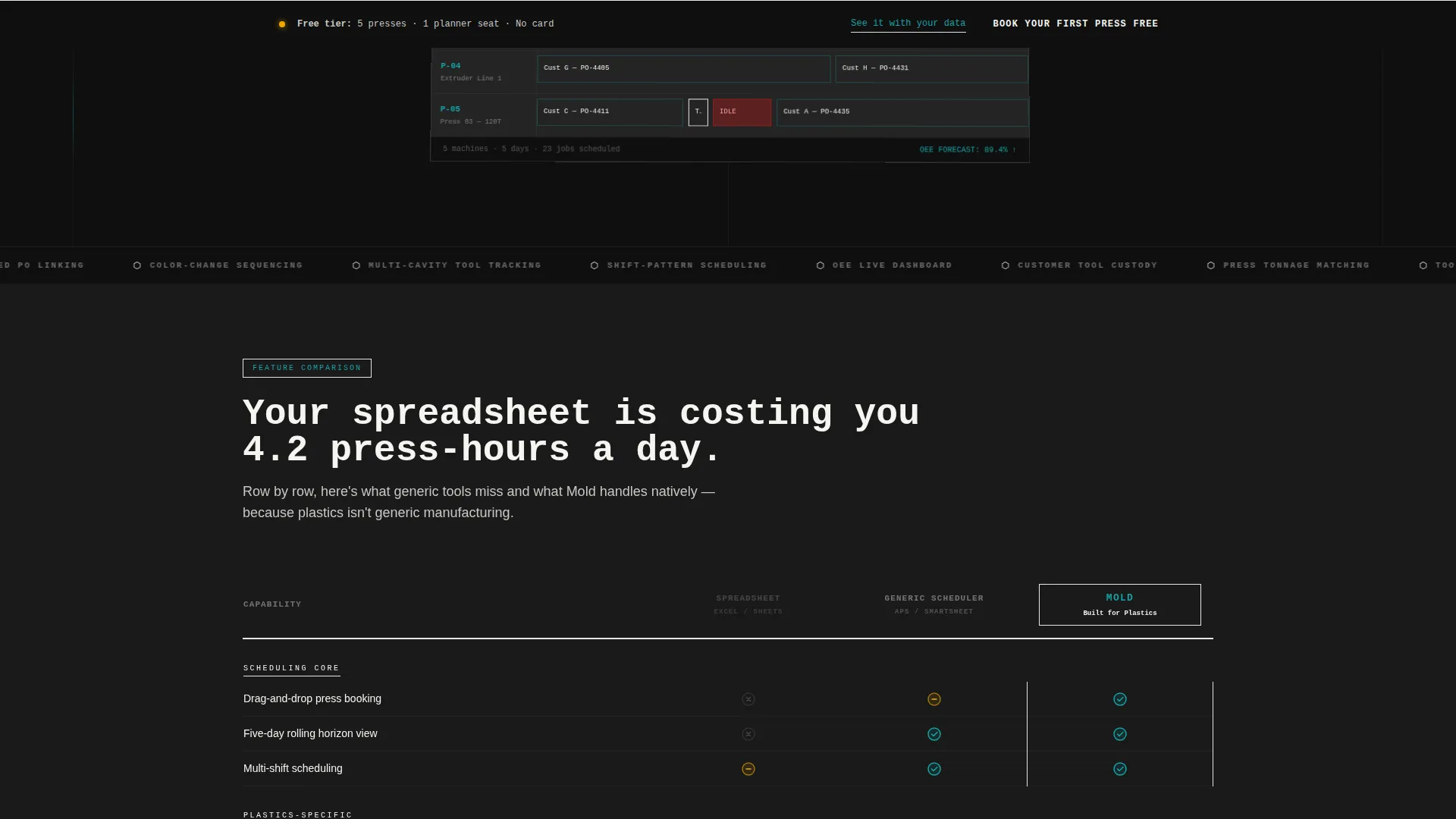
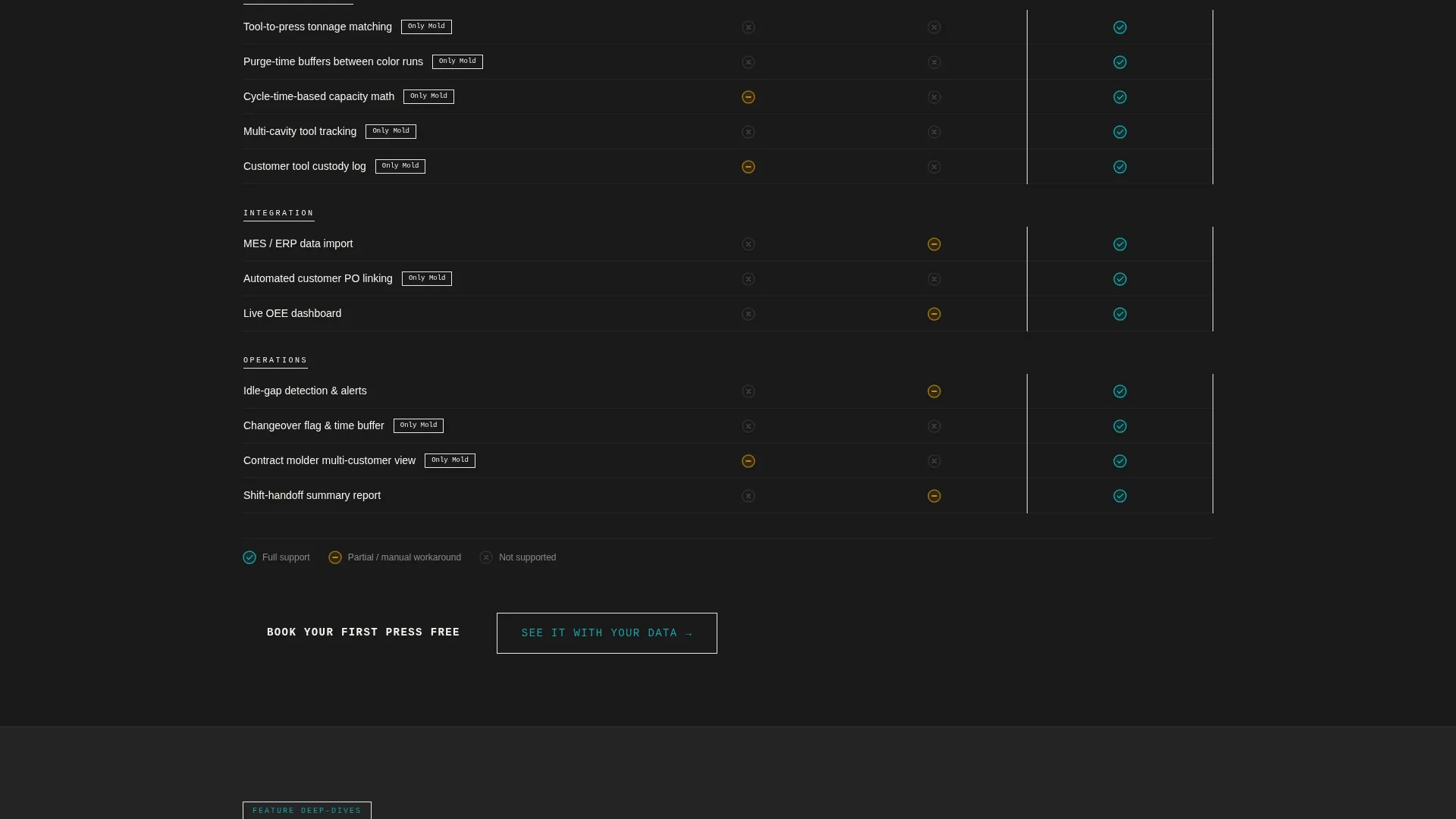
- A three-column feature matrix comparing spreadsheets, generic scheduling tools, and the Mold platform row by row
- A freemium signup form with three fields and a sticky call-to-action (call to action) bar that follows the visitor on scroll
Feature list
This template packages every layout component a plastics scheduling platform needs to move visitors from skepticism to signup. Each section is crafted to do specific work.
Full-Width Booking Grid Header
The header displays a raw product screenshot of the booking grid at native resolution. It is slightly rotated on a brutalist black slab. A single oversized monospace headline reads: "Every press booked. Every tool tracked. Every hour billed." No stock imagery, no illustration.
Three-Column Comparison Table
The feature matrix stacks Spreadsheets, Generic Scheduling, and Mold side by side. Rows cover plastics-specific capabilities: tool-to-press compatibility rules, cycle-time-based capacity math, purge-time buffers between color changes, and automated customer PO linking. Each row lands as a piece of evidence.
Micro-Demo Expansion Sections
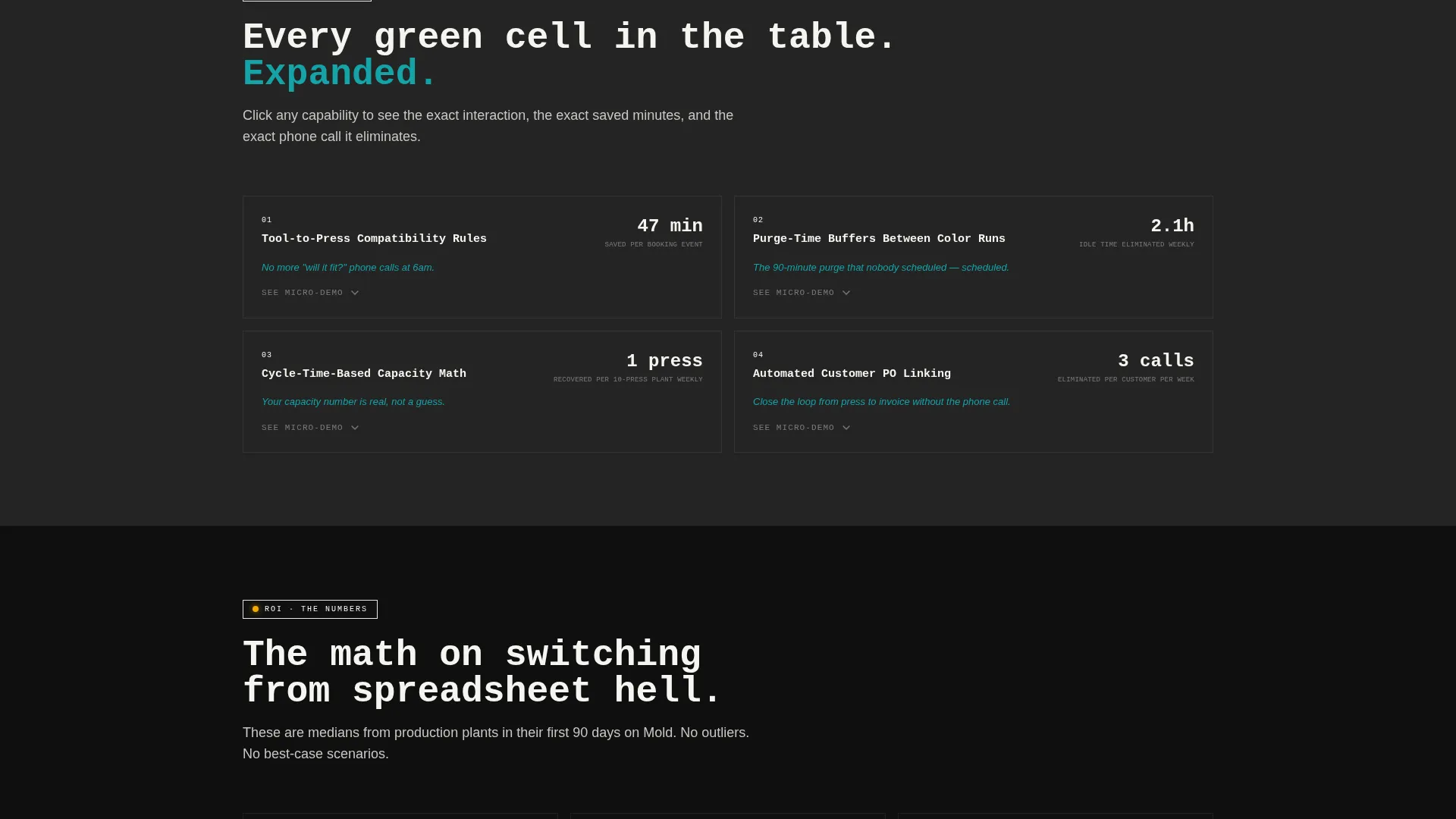
Below the comparison table, each winning cell in the Mold column expands into an animated screenshot. These micro-demos show the exact interaction, the exact minutes saved, and the exact phone call eliminated. Stakes escalate from convenience to financial impact: time saved per planner, presses recovered per week, revenue recaptured per quarter.
Freemium Signup Form
The primary call to action reads "Book Your First Press Free" in amber on black. The signup form captures three fields only: plant name, number of presses, and work email. The free tier unlocks five presses and one planner seat, giving teams enough access to prove the grid works before procurement gets involved.
Sticky Brutalist call to action Bar
A brutalist sticky bar pins the primary call to action to the viewport on scroll. The call to action repeats after the comparison table and stays visible throughout the page. A secondary path labeled "See It With Your Data" links to a guided demo booking for visitors who need a more hands-on evaluation.
Page sections overview
| Section | Purpose |
|---|---|
| Full-Width Header | Anchor attention with the live booking grid screenshot and headline |
| Feature Matrix Table | Compare spreadsheets, generic tools, and Mold across plastics-specific rows |
| Micro-Demo Expansions | Animate each Mold advantage into a concrete, time-saving interaction |
| Primary call to action Block | Drive free signups with a three-field form after the comparison table |
| Sticky call to action Bar | Keep the "Book Your First Press Free" action visible on every scroll position |
| Demo Booking Link | Offer a secondary guided-demo path for visitors not ready to self-serve |
Design & branding system
The template follows a Bold Brutalist visual theme using the Teal Catalyst color system. The palette is factory-floor direct: industrial, high-contrast, and purposeful. No decorative gradients, no soft shadows.
- Reactor-vessel teal (#0D7377) dominates headers and active states; press-platen black (#1A1A1A) anchors backgrounds and data-dense regions
- Molten-polymer amber (#F2A900) fires only on calls to action and status indicators, creating an unmistakable action signal
- Cleanroom white (#F5F5F0) gives tables and form fields the room they need to breathe and scan clearly
Mobile & speed optimization
The template is structured with mobile readability in mind. Dense comparison tables and grid screenshots can be difficult to parse on small screens, so the layout handles this deliberately.
- The comparison table is designed to scroll horizontally on narrow viewports, keeping all three columns legible without collapsing data
- The sticky call to action bar is sized and positioned to remain tappable on touch devices without blocking content
- Oversized monospace type and high-contrast color blocks remain crisp at any screen size
How this template helps you convert
Every design and copy decision in this template is built around moving a skeptical production professional toward a free trial. The page removes friction at each stage of the decision.
- The product screenshot header shows the actual booking grid immediately, replacing abstract claims with visible proof before the visitor reads a single word.
- The comparison table turns the visitor's current reality into a structured argument, with row-level evidence that generic tools miss plastics-specific constraints.
- The three-field signup form and free-tier offer reduce the commitment barrier to a minimum, letting teams validate the platform on five real presses before any purchase decision.
Other information about this template
This template is category-specific to Plastics Vertical SaaS and is not a general-purpose scheduling page. It is designed for teams that already understand press time as a revenue unit and want a landing page that speaks their language.
- The template style is a Comparison Table layout, meaning the feature matrix is the primary content engine, not testimonials or hero copy
- The header concept is a Product Screenshot, requiring a real booking grid image at native resolution for the design to land as intended
- The landing page direction is Freemium and Trial, so the copy and call to action architecture assume a no-credit-card free tier as the primary offer
- The Bold Brutalist theme and Teal Catalyst color system are integral to the template identity and should not be replaced with softer palettes without redesigning the call to action contrast logic
Theme
Bold Brutalist
Creative direction
Feature Matrix
Color system
Teal Catalyst
Style
Comparison Table
Direction
Freemium/Trial
Page Sections
Full-width Booking Grid Header
Three-column Feature Matrix
Animated Micro-demo Sections
Freemium Three-field Signup Form
Sticky Brutalist Call to Action Bar
Related questions
What industries or roles is this landing page template designed for?
Does the free tier limit what a new user can test?
Can I use this template for a generic scheduling tool outside plastics?
What does the 'See It With Your Data' path offer?
How many fields does the signup form require?



