Custom Behavior Tracking Reseller Landing Page Template
Streak is a white-label habit tracker landing page template built for SaaS founders, executive coaches, and HR teams who want to ship a fully branded habit tracker app fast. It features a live in-browser preview, an animated comparison table, and a two-step launch form. No dev team needed. Own every pixel, every goal, every streak.
by Rocket studio
Quick Summary
Streak gives wellness brands, coaching platforms, and HR teams a ready-to-deploy landing page for launching a fully branded habit tracker app. The template features a live re-skin preview, an interactive comparison table, and a two-step conversion form. You can track every goal under your own name, your own colors, and your own domain in under a week.
Who This Template Is For
This template is built for decision-makers who want to own a habit tracker app experience without building one from scratch. It targets people who understand the cost of delay and the value of brand control.
- SaaS founders adding a habit tracker to boost retention inside their existing app
- Executive coaches who want clients to track routines, sessions, and goals inside a branded ecosystem
- Employee-wellness directors ready to stop subsidizing a vendor's brand on their people's screens
What Problem This Template Solves
Most teams that want to launch a habit tracker app face three bad choices: build in-house and spend months plus a six-figure engineering bill, subscribe to a generic app and lose brand equity, or do nothing and lose user engagement entirely. This template makes that decision easy to visualize and easy to act on.
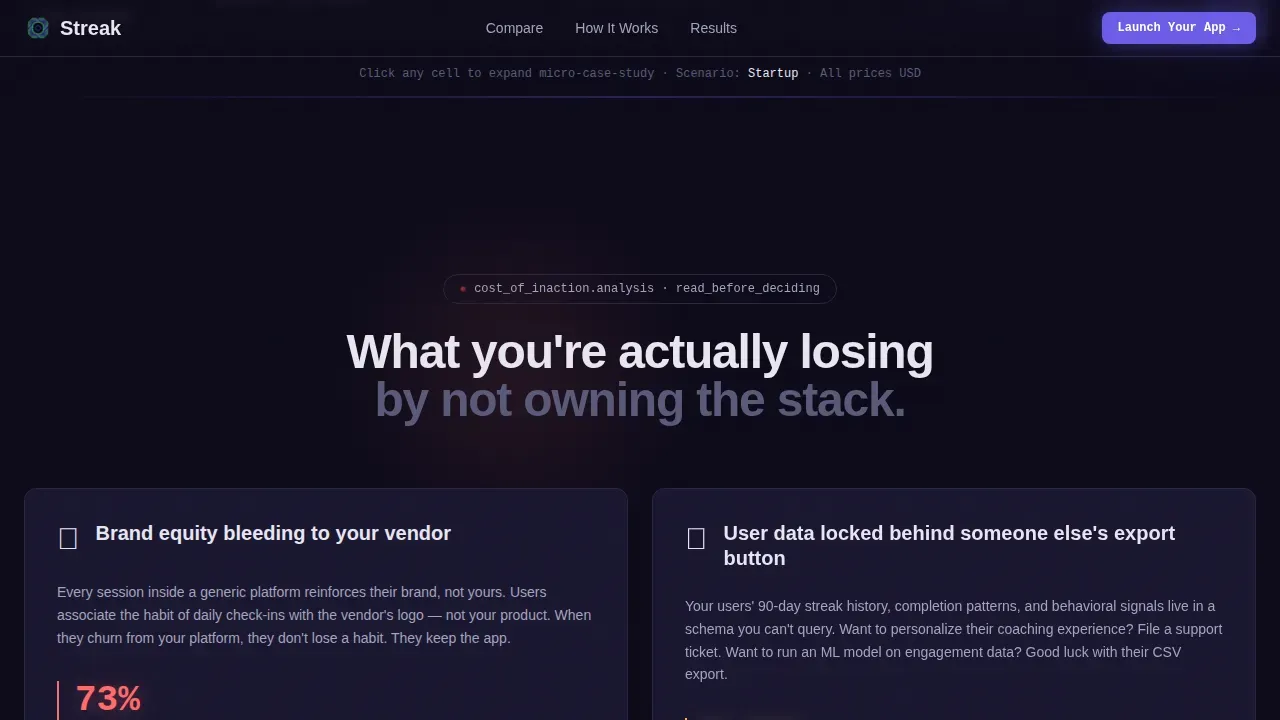
- Users can track habit progress without being exposed to a competitor's branding or locked behind someone else's export button
- Teams spend months trying to create what this template helps them launch in days
- Brand equity bleeds every week a vendor's logo sits on your user's home screen instead of yours
What You Get With This Template
You get a complete, single-page landing experience designed to convert B2B buyers evaluating a white-label habit tracker. Every section is purpose-built to move a skeptical decision-maker from "interesting" to "I need this."
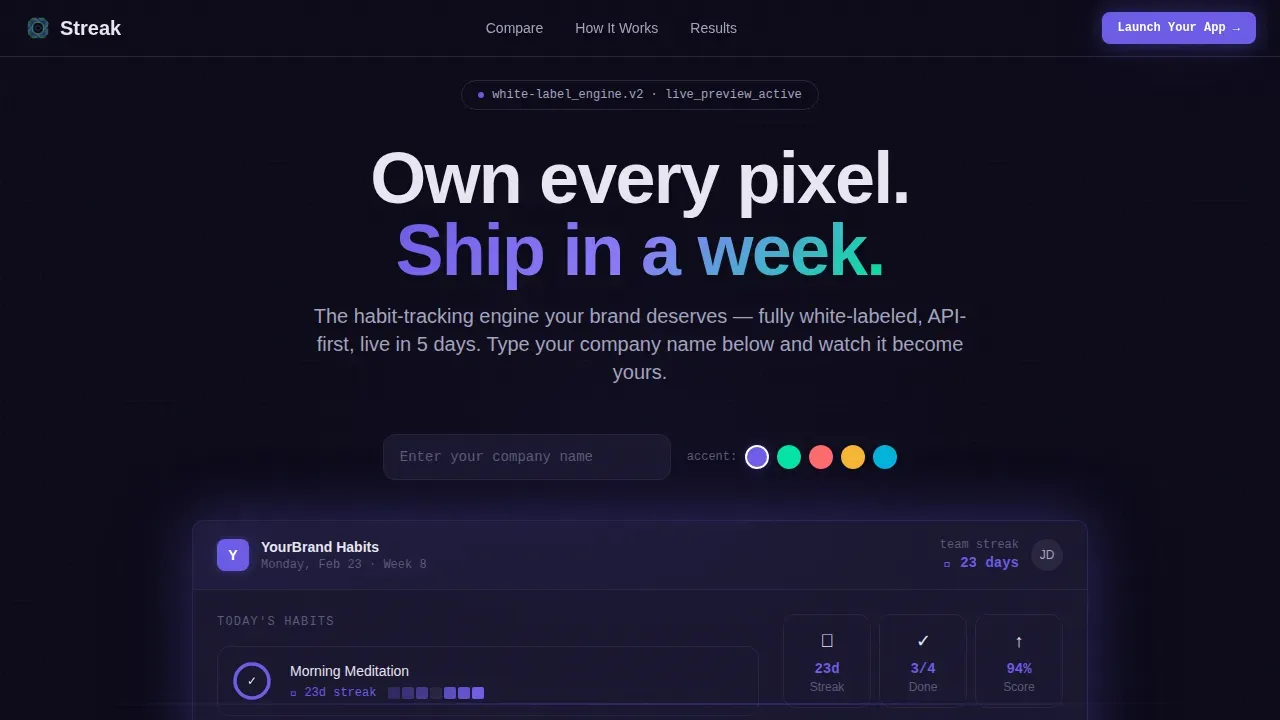
- An interactive live preview header where visitors can type their company name and watch the entire habit tracker app re-skin in real time
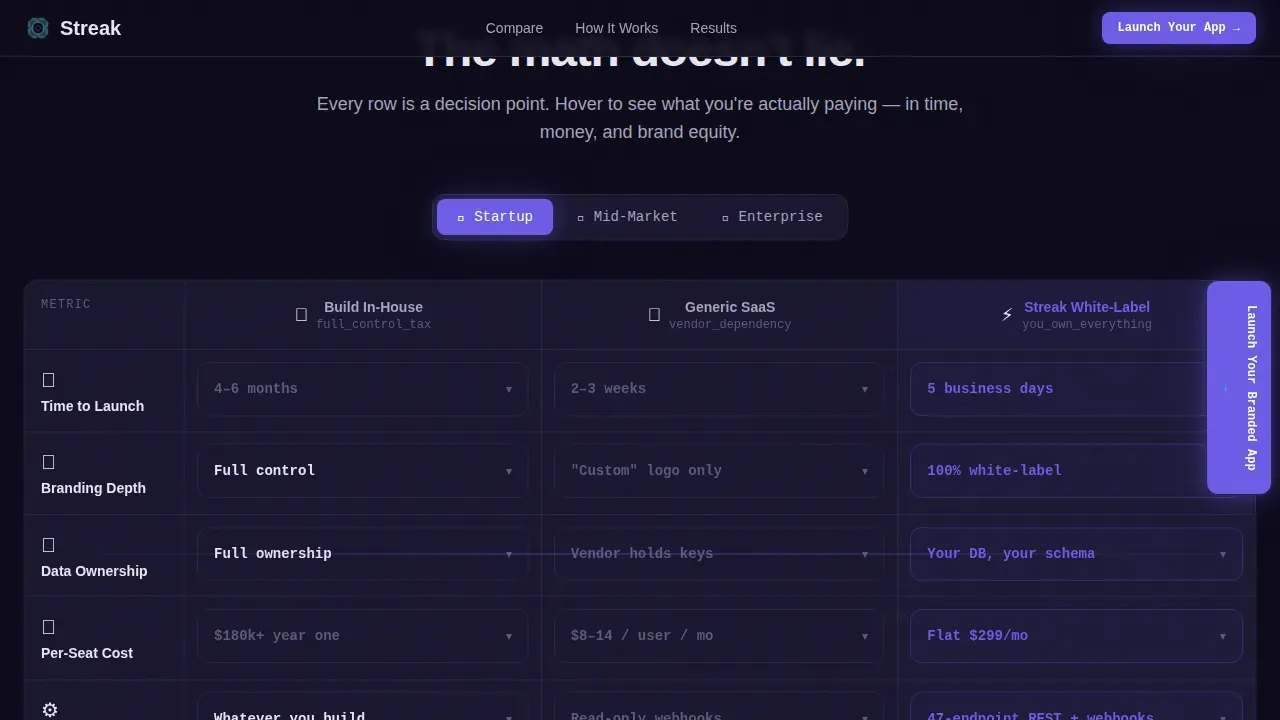
- A three-column animated comparison table with toggleable startup, mid-market, and enterprise scenarios
- A sticky sidebar call-to-action and a two-step launch form asking for platform type and monthly active users
Feature List
This template packs high-interactivity features that let the product sell itself. Here is what is built in.
Live Brand-Swap Preview Header
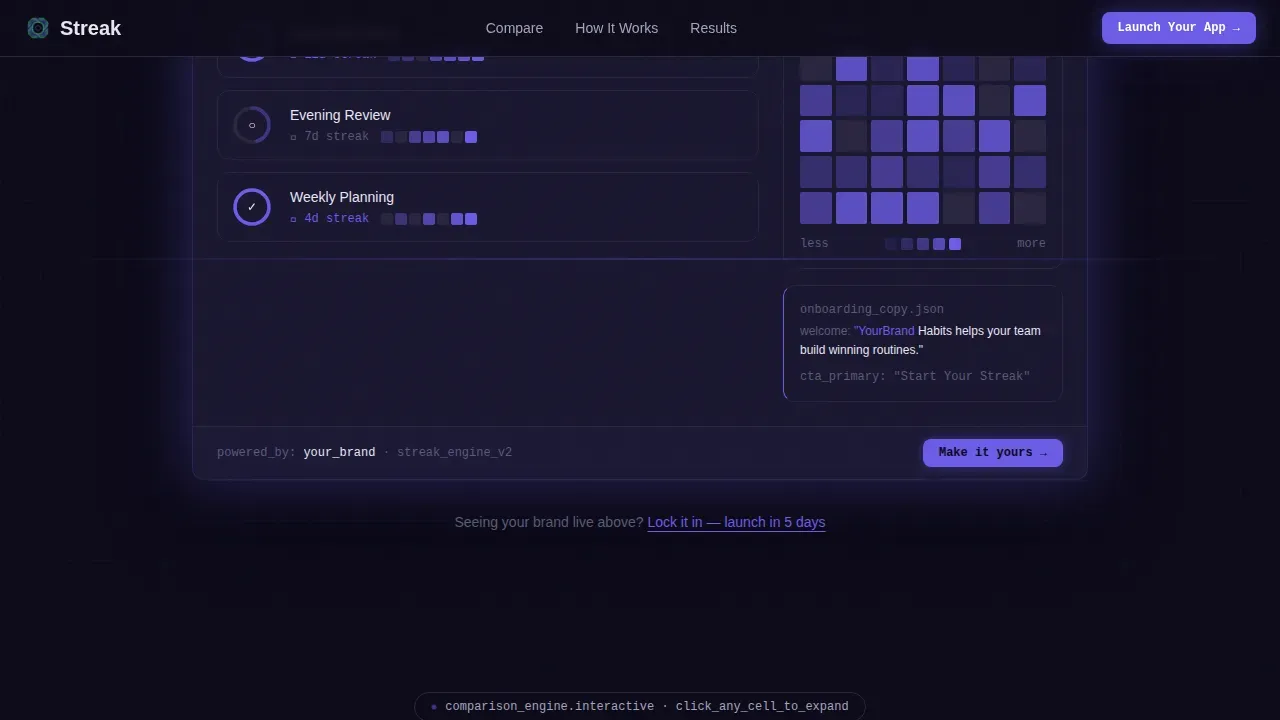
Visitors land on a functioning habit tracker interface rendered directly in the browser. It comes pre-loaded with sample streak counts, completion rings, and a seven-day heatmap. A floating toolbar lets anyone type their company name, set an accent color, and watch the entire screen update in real time. No hero image. No stock photography. The app is the hero.
Animated Comparison Table with Scenario Toggles
The core conversion section displays a three-column table: "Build In-House" versus. "Generic SaaS" versus. "Streak White-Label." Rows cover time-to-launch, branding depth, data ownership, per-seat cost, and API flexibility. Hovering a cell expands a micro-case-study or animates a stat like a live progress bar filling. Visitors toggle between business-size scenarios and every cell updates accordingly.
Sticky Sidebar Call-to-Action
The primary "Launch Your Branded App" button anchors to the right of the comparison table and follows the scroll as a sticky sidebar element. This keeps the conversion goal in view at all times without interrupting the reading flow. Attention stays on the comparison, but the next step is always one click away.
Two-Step Launch Form
Clicking the primary call-to-action opens a focused two-step form. Step one captures company name and target platform: iOS, Android, Web, or all three. Step two asks for monthly active users and desired launch date. The form is short by design so visitors complete it without friction.
Secondary Re-Skin Loop
A secondary call-to-action, "See It With Your Brand," links hesitant visitors back to the live preview header. This loop lets cautious buyers play with the habit tracker interface before committing. It lowers resistance by letting the product answer questions that text cannot.
Mission-Control Visual System
The entire template runs on an Electric Indigo color system: deep terminal black for backgrounds, indigo pulse for primary actions, data-grid gray for supporting text, and neon mint for positive-state indicators and hover confirmations. JetBrains Mono handles code and data display elements while DM Sans covers all body copy.
Page Sections Overview
| Section | Purpose |
|---|---|
| Live Preview Header | Display the branded habit tracker app in real time with swap toolbar |
| Comparison Table | Compare build options across time, cost, data, and branding rows |
| Stakes Escalation | Show what users lose by choosing build-in-house or generic SaaS |
| Social Proof | Share persona-specific metrics, deployment timelines, and cost savings |
| Two-Step Form | Capture company name, platform type, user count, and launch date |
| Footer Flow | Close with a horizontal Vercel-style footer pattern |
Design & Branding System
The design follows a Data Command theme built to feel like a mission-control dashboard. Every color choice is intentional, and the dark palette keeps focus on the numbers and the habit tracker interface itself.
- Color palette: deep terminal black (#0D0B1A), indigo pulse (#6C5CE7), data-grid gray (#A4A4BF), and reactive neon mint (#00E5A0)
- Typography: JetBrains Mono for data and code-style text elements, DM Sans for readable body copy
- Visual style: precision grids, electric glows, and terminal-dark backgrounds that support a calming yet motivated atmosphere
Mobile & Speed Optimization
The template is desktop-first, built for decision-makers working at a workstation. Interactive sections use Client Components and the static shell uses Server Components to keep load performance strong.
- Desktop-first layout prioritizes the full comparison table view and the side-by-side habit tracker preview experience
- Mobile screens get thumb-friendly navigation and single-column layouts so the habit tracker content stays readable on any device
- Performance-focused architecture separates interactive and static elements to support fast initial page loads
How This Template Helps You Convert
Every design and copy decision in this template is made to move a skeptical B2B buyer toward clicking "Launch Your Branded App."
- The live habit tracker preview removes doubt immediately by letting visitors feel ownership before they scroll, making it easy to understand what full customization looks like in practice.
- The animated comparison table makes the cost of not switching visible in every row, so the decision to move forward feels based on clear, real information rather than a sales pitch.
- The secondary re-skin loop keeps hesitant visitors engaged instead of bouncing, giving them another free pass to explore the habit tracker app before filling out the form.
Other Information About This Template
This section covers additional context that helps designers, founders, and platform teams get the most value from this template.
- Hey guys building wellness platforms: this template works equally well for coaching apps and corporate HR portals. Hey guys on the SaaS side, it plugs into retention-feature rollouts without rebuilding your full stack.
- The template is ready to support custom domain setup, which is a key credibility signal when removing all vendor branding from your habit tracker app.
- Streak tracking is a proven engagement mechanic. Streaks help users form a close bond with the habits they are trying to build, giving them that extra motivation when checking in feels hard on a given day.
- Detailed streak stats let users view their current streak count, longest streak, and year-over-year totals, making it easy to visualize progress across weeks and months.
- The GitHub-style contribution grid concept, which surfaces patterns over a full calendar year, is a perfect visual reference for designers building out the habit tracker's data display screens.
- Platforms like Apple Vision and future spatial-computing devices are forward-looking targets that white-label habit tracker apps can support as the ecosystem grows.
- On iPhone and iPad, a home-screen widget showing a user's current streak count can reinforce the daily habit loop without requiring the user to open the full app.
- A customizable day reset time, like setting the reset to Sunday, helps teams accommodate different user schedules and time zones.
- Goal Streak, Increzio, and similar free habit tracker apps offer useful reference points for understanding what users expect from streak-based routines, goal-setting flows, and progress sharing features.
- Tags, comment fields, and workout session logs are common habit tracker app components that this white-label template is designed to support as branded content within your own ecosystem.
- Thanks to the no-code and AI-powered development landscape, white-label platforms enable non-technical teams to create and update production-ready apps without traditional programming skills.
Theme
Data Command
Creative direction
Interactive Explorer
Color system
Electric Indigo
Direction
Comparison/Versus
Page Sections
Live In-browser Brand-swap Preview
Animated Three-column Comparison Table
Sticky Sidebar Call-to-action
Two-step Conversion Form
Secondary Re-skin Engagement Loop
Mission-control Electric Indigo Design System
Related questions
Can I customize the habit tracker app with my own logo and colors?
Does this template work for a mobile app launch page?
What makes this different from a generic SaaS habit tracker?
Can the comparison table handle different business sizes?
How long does it take to launch with this template?



