Advanced API Connectivity Landing Page Template
Endpoint is a bento grid landing page template built for API management tools and platforms. It combines dark glass panel aesthetics with a Void & Violet color system to create a terminal-sharp, developer-first experience. The layout guides visitors from an interactive API health calculator through progressive capability cards to a real-time dashboard mockup, built to generate qualified leads.
by Rocket studio
Quick summary
Endpoint is a single-page bento grid template designed for API management tools and frameworks. It opens with frosted dark glass panels displaying live-data fragments, moves into an interactive API health calculator, and closes with a usage dashboard mockup. Every section is built to earn developer trust before asking for a conversion.
Who this template is for
This template is built for teams shipping and maintaining complex API ecosystems. If your work involves cataloging, versioning, or monitoring dozens of endpoints, this layout speaks your language directly.
- Backend leads managing fifty-plus microservices who need a clear, credible product page
- Platform engineers onboarding third-party integrations at sprint speed and looking for fast documentation of what the tool offers
- DevOps teams that need to communicate the value of consolidated API monitoring to stakeholders or new team members
What problem this template solves
Sprawling API ecosystems are hard to explain and even harder to market. Most developer tool pages either overwhelm visitors with feature lists or under-deliver on showing what the product actually does. This template closes that gap.
- Developers distrust pages that pitch before proving value, so this template leads with a diagnostic tool that delivers a real result before asking for an email address
- Teams struggle to present complex platform capabilities without losing non-technical visitors, and the progressive bento card layout reveals depth without dumping it all at once
- Generic hero images and stock illustrations feel dishonest on infrastructure tools, so this template removes them entirely and makes the product interface the visual
What you get with this template
You get a fully structured, single-page bento grid layout ready to present an API management tool or framework. The template is designed around a lead generation goal, with every section contributing to the conversion flow.
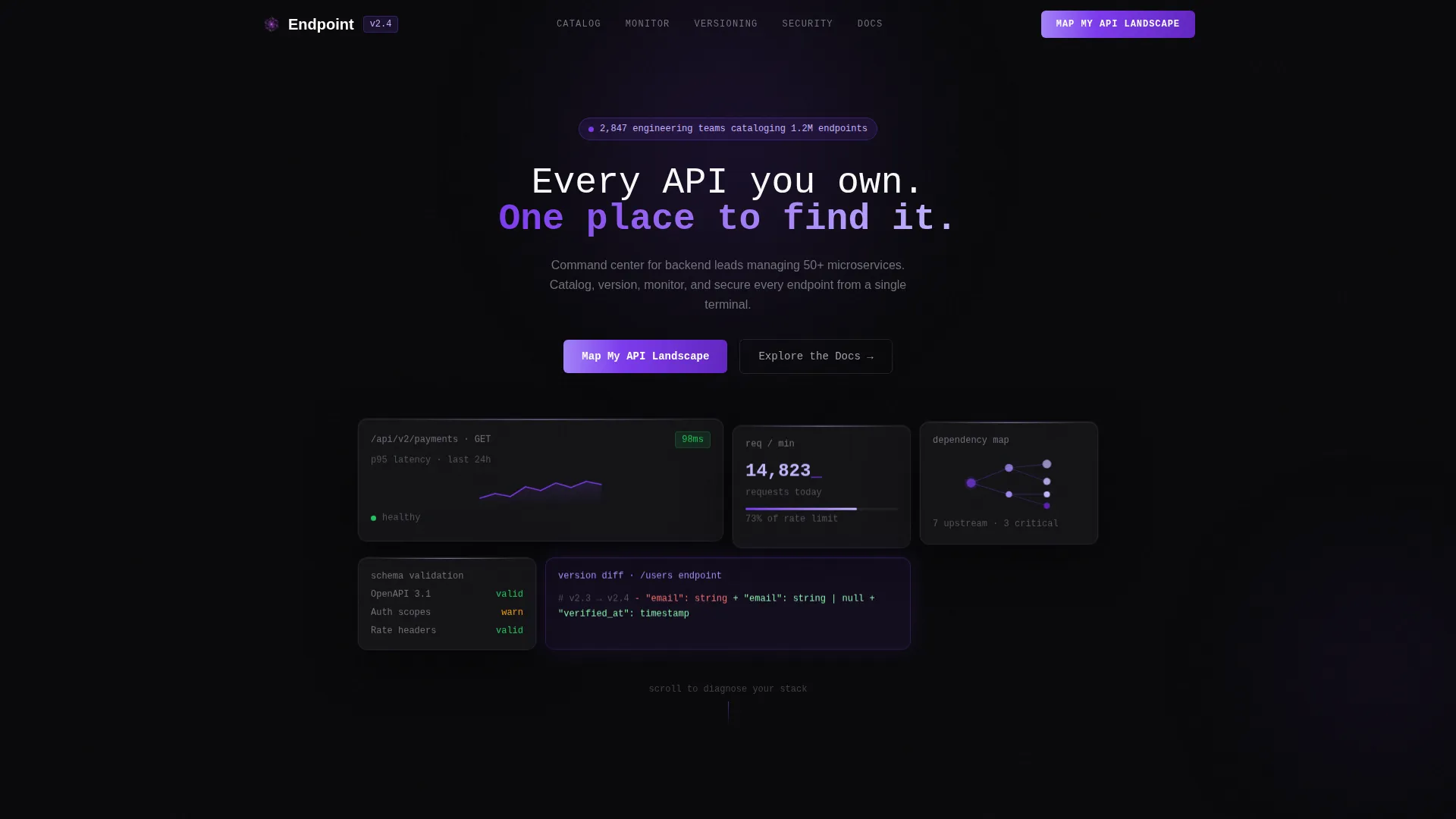
- A dark glass panel header section with live-data fragments including a latency sparkline, request volume counter, dependency graph, and schema validation status badge
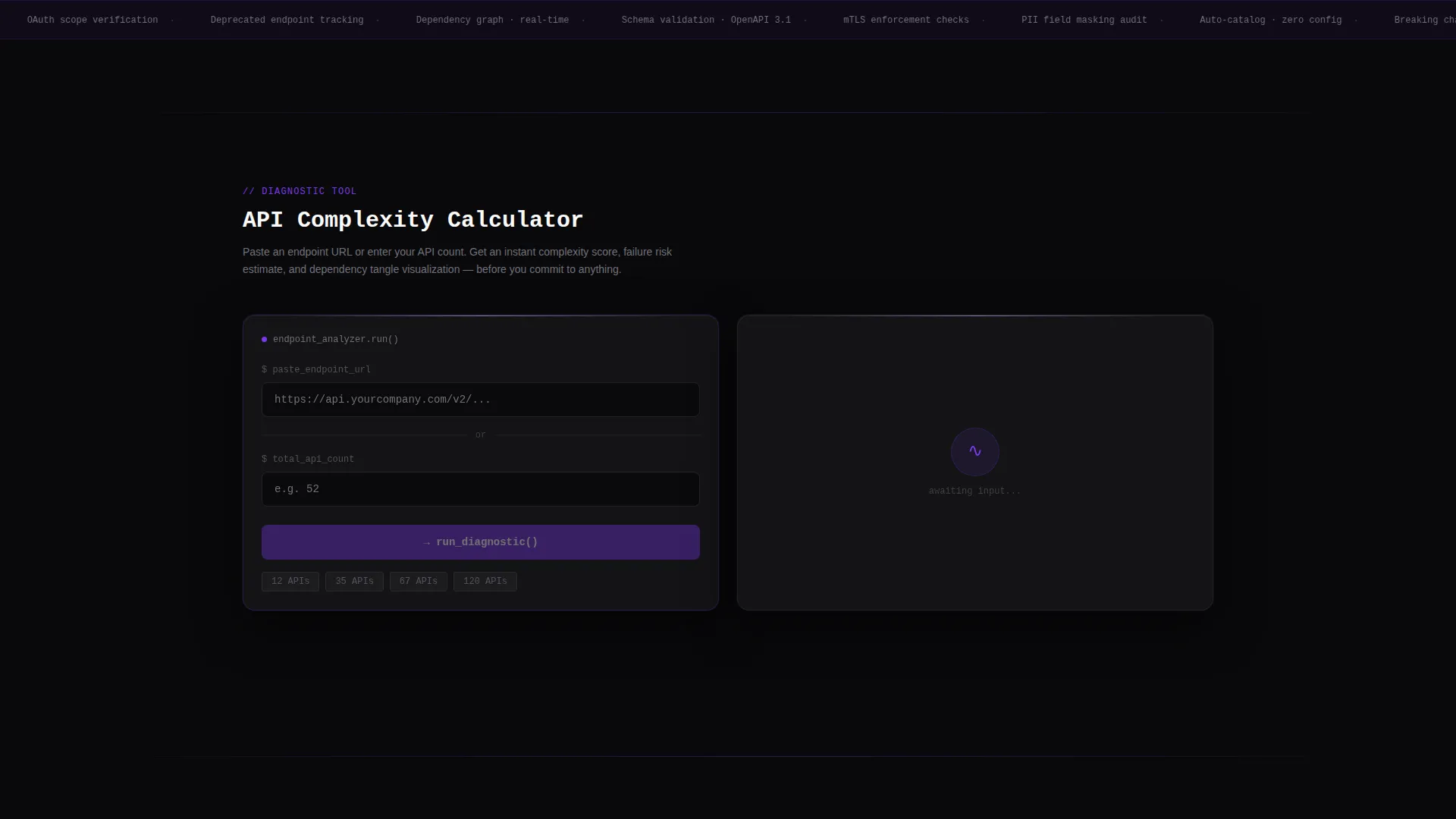
- An interactive API health calculator that accepts an endpoint URL or API count and returns a complexity score, estimated monthly failure risk, and a visual dependency tangle diagram
- A progressive lead capture form with a two-step flow starting with a work email field, followed by company name, estimated API count, and primary language or framework
Feature list
This template is built around six distinct functional and visual building blocks. Each one is grounded in what the source brief specifies for the Endpoint layout.
Dark Glass Panel Header
The header uses frosted, translucent bento cards floating against a void black background. Each card displays a different live-data fragment. A faint violet light source above each card creates a subtle top-edge glow. A single line of monospaced type fades in at center: "Every API you own. One place to find it."
Interactive API Health Calculator
Visitors paste a sample endpoint URL or enter their current API count. The tool instantly returns a complexity score, an estimated monthly failure risk percentage, and a visual dependency tangle diagram. This section is the primary trust-building mechanism and appears before any conversion ask.
Progressive Bento Capability Cards
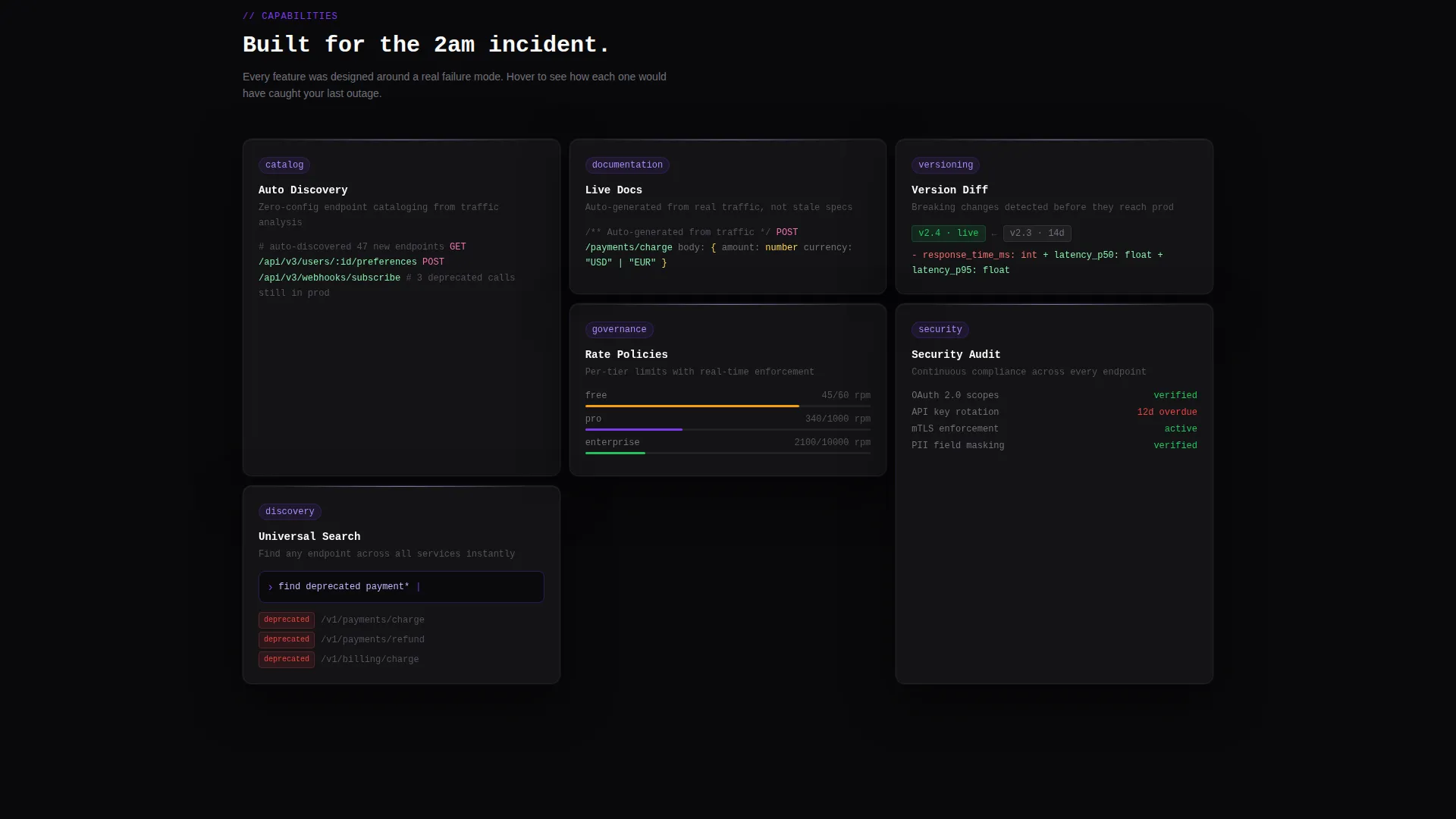
Below the calculator, a grid of capability cards covers discovery search, automated documentation, version diffing, and rate-limit policies. Each card expands on hover to reveal a micro-interaction or inline code snippet. The scroll flow moves from problem awareness to solved-state demonstration.
Real-Time Usage Dashboard Mockup
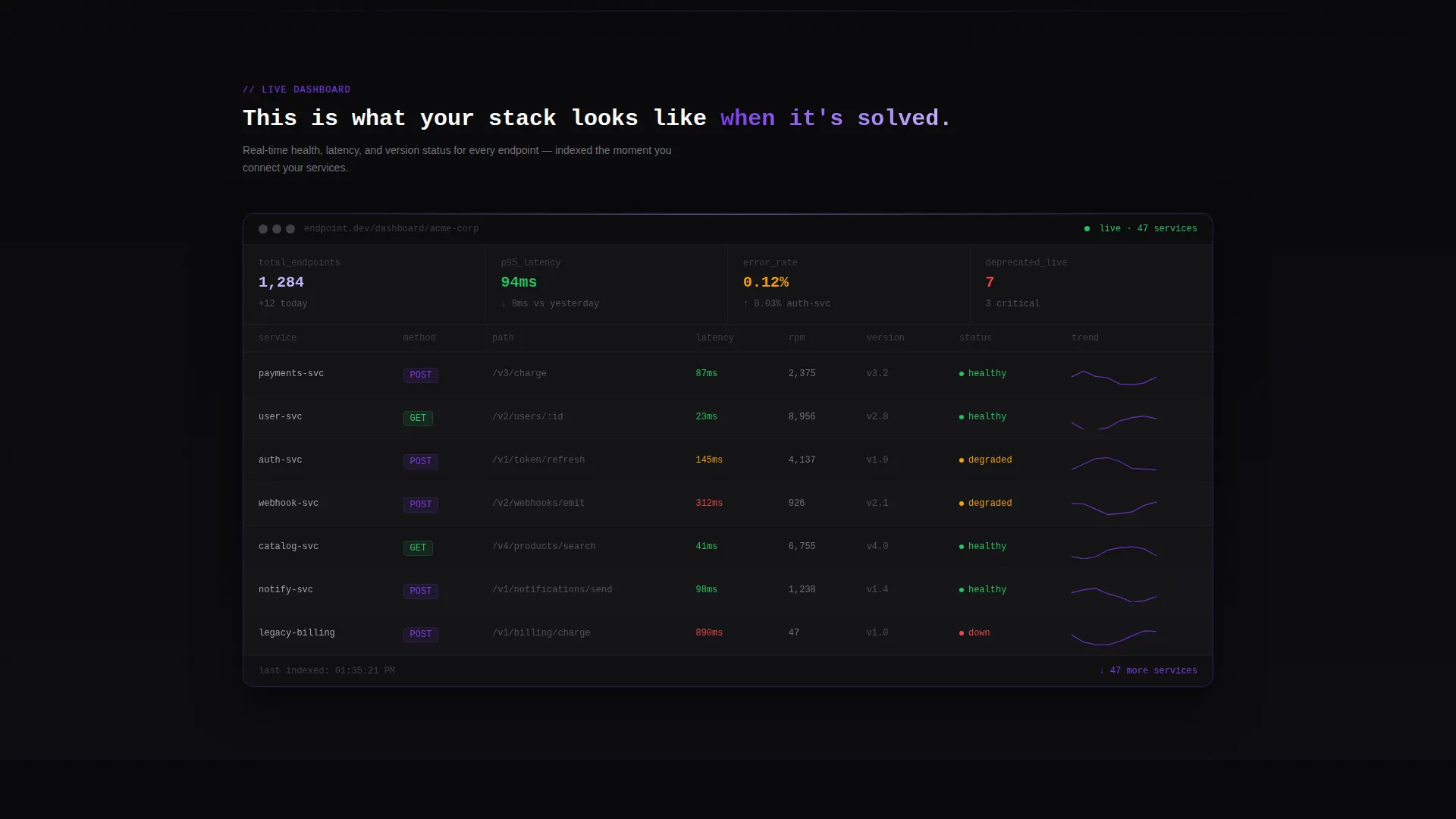
The page closes with a dashboard mockup that visualizes active API usage data. It is designed to make visitors want to see their own data inside the tool, creating a natural pull toward the primary call to action.
Dual Conversion Path Design
The primary call to action, "Map My API Landscape," appears pinned in the top navigation and repeats after the calculator result. A secondary path labeled "Explore the Docs" captures intent from developers not yet ready to speak with a sales team.
Progressive Lead Capture Form
The form opens with a single work email field to reduce friction. After submission, a second step asks for company name, estimated API count, and preferred language or framework. This two-step structure improves completion rates without front-loading the ask.
Page sections overview
| Section | Purpose |
|---|---|
| Dark Glass Header | Establish visual identity and product credibility with live-data panel fragments |
| Monospaced Hero Text | Deliver the core value proposition in a single, fade-in terminal-style line |
| API Health Calculator | Provide diagnostic value before any conversion ask to build genuine trust |
| Calculator Result Display | Show complexity score, failure risk, and dependency diagram as the trust payoff |
| Bento Capability Grid | Reveal discovery, documentation, versioning, and rate-limit features progressively |
| Dashboard Usage Mockup | Let visitors visualize their own data inside the tool to drive call to action clicks |
| Primary call to action Block | Repeat the "Map My API Landscape" prompt after the calculator result |
| Progressive Lead Form | Capture work email first, then company context in a two-step sequence |
| Secondary Docs Path | Offer "Explore the Docs" as an intent-capture route for non-sales-ready visitors |
| Pinned Nav call to action | Keep the primary call to action accessible throughout the full scroll experience |
Design & branding system
The visual identity follows a Directory and Discovery theme built on the Void and Violet color system. Every color decision reinforces the idea of a well-organized server environment viewed at night, where violet light is the only indicator that systems are alive and healthy.
- The four-color palette uses absolute void black (#09090B) for backgrounds and card surfaces, deep interstellar gray (#18181B) for hairline grid separators, electric violet (#7C3AED) for all interactive elements and live data points, and phosphor lilac (#C4B5FD) for hover states, tooltips, and secondary text
- Typography is monospaced throughout the header and data display areas, reinforcing the terminal aesthetic without relying on illustrations or decorative graphics
- Bento grid cells are separated by hairline borders in interstellar gray, keeping the layout dense but never cluttered, with electric violet marking every active indicator and phosphor lilac washing secondary information into a readable but non-dominant layer
Mobile & speed optimization
The bento grid layout is structured to adapt across viewport widths without losing the visual density that makes the template feel like a real product interface. Card-based grids reflow cleanly from multi-column desktop arrangements to single-column mobile stacks.
- Hover-triggered card expansions are designed to translate to tap interactions on touch devices, preserving the micro-interaction experience on smaller screens
- The dark background palette reduces visual noise on mobile displays and keeps the violet accent system legible without requiring high-contrast overrides
How this template helps you convert
Every section in this template has a deliberate role in moving a developer visitor from skepticism to genuine interest. The layout is optimized for lead generation without feeling pushy or interruptive.
- The API health calculator delivers real diagnostic output before requesting any contact information, which earns trust from technically skeptical visitors who would otherwise bounce at a standard lead form
- The primary call to action, "Map My API Landscape," appears in the pinned navigation and again immediately after the calculator result, so the highest-intent moment is never missed
- The progressive two-step form reduces the upfront ask to a single email field, lowering the barrier to entry while still collecting the company context needed for meaningful follow-up
Other information about this template
This template is part of a broader ecosystem of developer-focused landing page templates designed for technology products in the API management tool and framework niche. A few additional details are worth noting for buyers evaluating fit.
- The template style is classified as Bento Grid, which means the layout uses card-based grid cells as its primary organizational structure rather than traditional section stacks
- The header concept is Dark Glass Panels, a design pattern where frosted translucent cards float against a void background and carry live-data content instead of static marketing copy
- The creative direction follows a Calculator and Tool First approach, meaning the most interactive and value-delivering component appears near the top of the page before any conversion ask
- The landing page direction is Lead Generation, with the entire scroll experience architected around capturing qualified developer leads through a combination of diagnostic value and progressive disclosure
- The theme is Directory and Discovery, which shapes how capability cards are organized and how the overall information hierarchy guides visitors from awareness to action
Theme
Directory & Discovery
Creative direction
Calculator/Tool First
Color system
Void & Violet
Style
Bento Grid
Direction
Lead Generation
Page Sections
Dark Glass Panel Header
Interactive API Health Calculator
Progressive Bento Capability Cards
Real-time Dashboard Mockup
Dual Conversion Path Design
Progressive Two-step Lead Form
Related questions
Who is this template designed for?
Can I customize the color system?
Does the API health calculator require backend integration?
What makes a bento grid layout effective for developer audiences?
Is the two-step lead capture form included in the template?



