Manufacturing Software Professional Website Template
The Triage landing page template is built for occupational health platforms that replace plant-floor clipboards with a real-time digital command center. It uses a bento grid layout, a live terminal API animation, glassmorphic dark design, and an animated comparison row to move EHS managers and plant nurses toward a personalized benchmark form submission.
by Rocket studio
Quick Summary
This is the Triage live data command manufacturing patient management landing page template. It is a single-page bento grid layout built for B2B occupational health and Environmental Health and Safety (EHS) software platforms. The page opens with a live terminal animation, flows through an industry-report-style evidence grid, and closes with an amber-accented benchmark form that captures qualified leads from plant nurses and EHS directors.
Who This Template Is For
This template is built for teams selling occupational health software into industrial facilities. It speaks directly to the people who carry the weight of worker health documentation every shift.
- Occupational health coordinators and plant nurses who manage OSHA 300 logs across multiple shifts and need a faster way to communicate the platform's value
- Plant managers at automotive and food processing facilities who lose money to mismanaged workers' compensation claims and want to respond with a credible digital solution
- Corporate EHS directors trying to standardize care delivery and health documentation across ten, twenty, or more sites currently running on paper and spreadsheets
What Problem This Template Solves
Plant-floor health teams deal with a painful gap between how fast incidents happen and how slowly they get documented. Every minute a triage status goes unrecorded, the risk of an escalating claim grows. This template gives your platform a landing page that makes that problem impossible to ignore.
- Visitors arrive to a page that immediately demonstrates the cost of delay, showing incident response benchmarks and workers' compensation cost curves that make the status quo feel expensive
- The paper-versus-digital comparison row forces a direct reckoning with how long incident logging, OSHA 300 accuracy, and average days-away-from-work reduction compare across both methods
- The benchmark form gives undecided visitors a low-friction reason to engage, so even buyers who are not ready to talk still provide contact information through a gated report download
What You Get With This Template
You get a fully structured single-page layout ready to adapt to your platform's brand and data. Every section is intentional and prompt-backed.
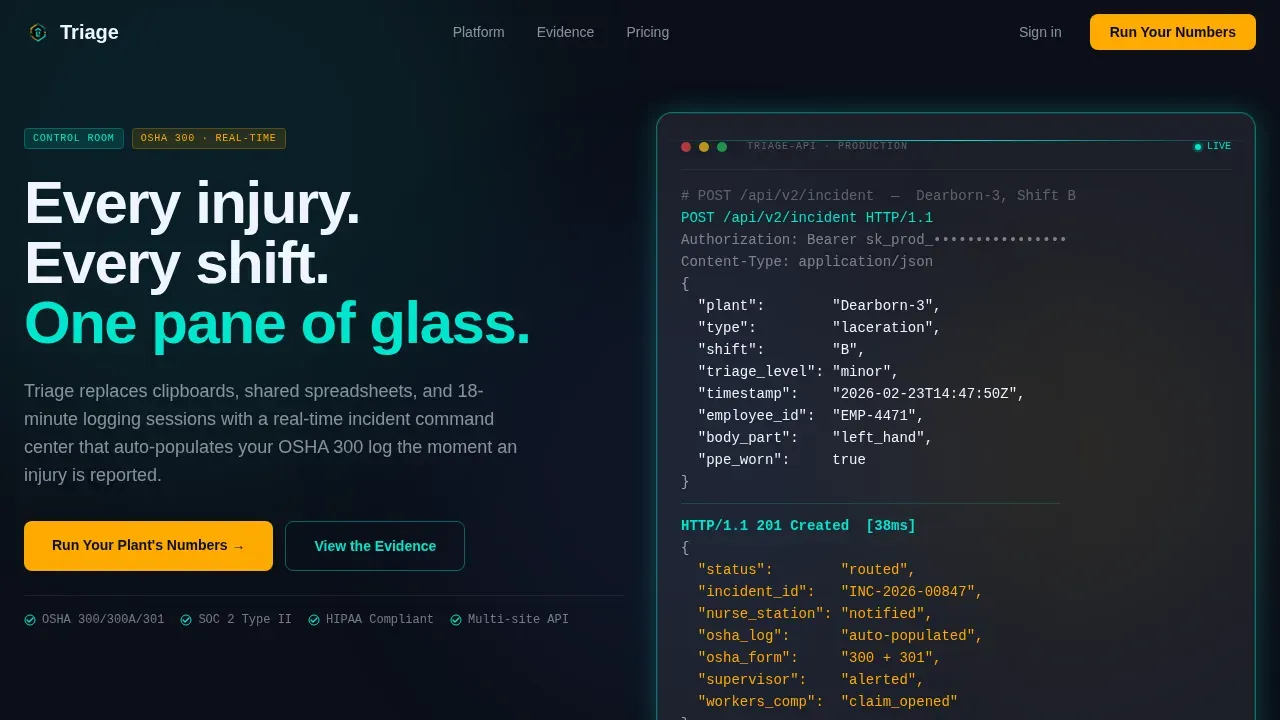
- A live terminal hero section with a typewriter-style API animation showing a POST request resolve into a routed incident response, assembling the bento grid around it as the data completes
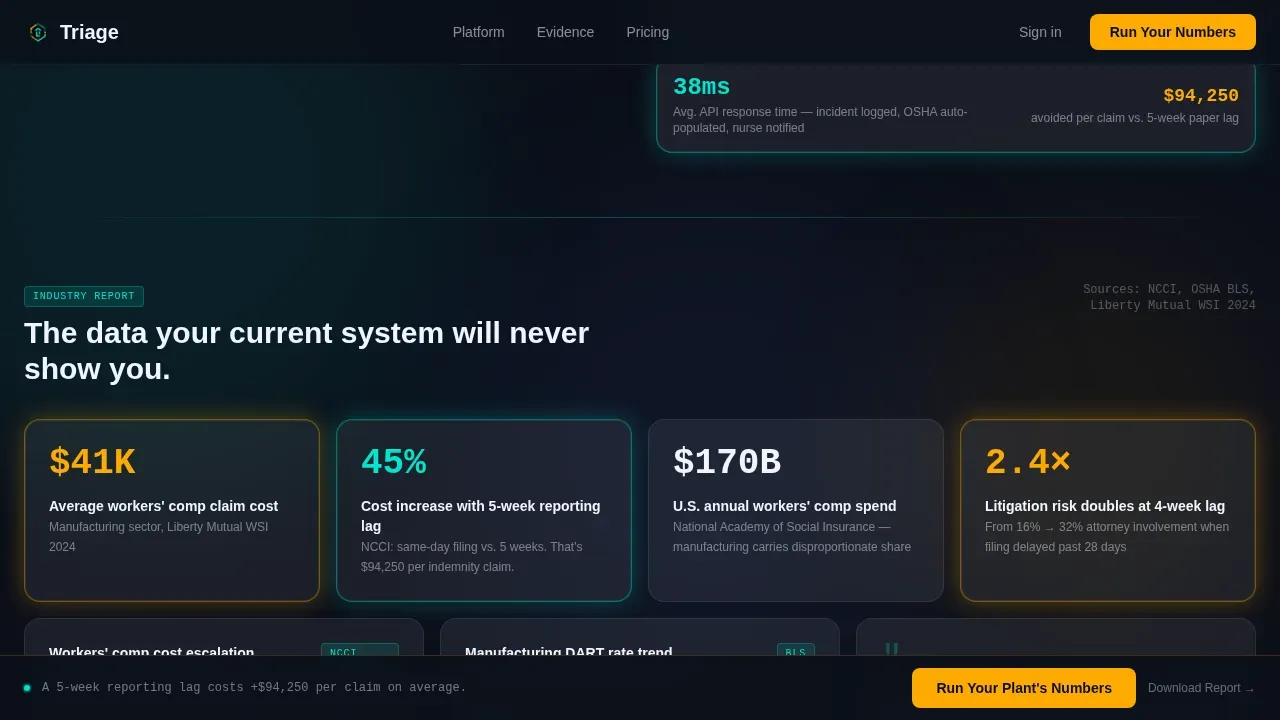
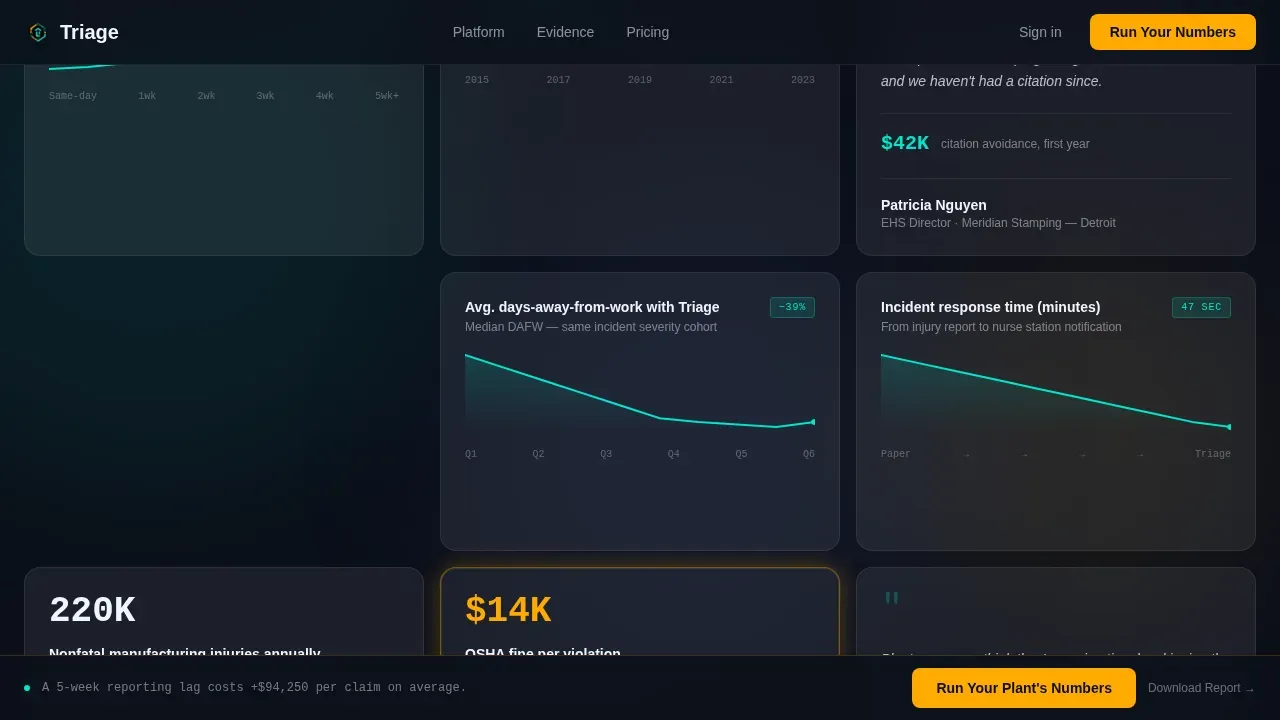
- An industry-report bento section with frosted stat panels, embedded micro-charts showing triage response time trends, and pull-quote testimony blocks from EHS directors
- A sticky amber call-to-action bar that follows the visitor on scroll, a three-field benchmark form, and a secondary gated PDF download path for lower-commitment lead capture
Feature List
This template ships with a focused set of interactive and visual components. Each one serves a specific conversion or credibility function grounded in the source brief.
Live Terminal API Hero Animation
The header opens with a monospace code block that types itself line by line against a near-black field. It simulates a real POST request to a triage incident endpoint, resolving with a routed status response. The bento grid then assembles around it as if the data just built the dashboard. This sequence sets the tone for a platform that responds before you finish asking.
Bento Grid Industry Report Layout
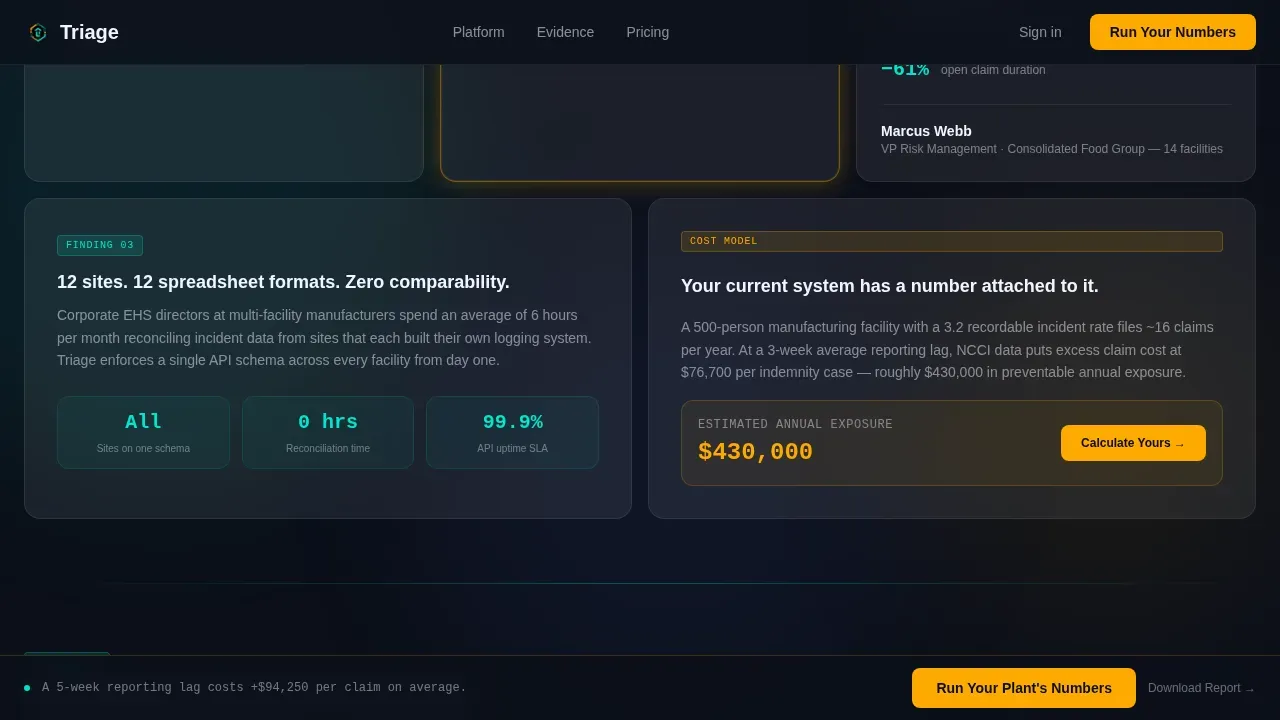
The core content area is organized as a bento grid of frosted-glass cards. Cards alternate between stat panels with large-format numbers, micro-charts with teal trend lines that monitor incident response over time, and pull-quote testimony blocks. The scroll feels like reading a research brief that builds a case row by row, helping visitors assess the gap between their current system and what modern triage systems can deliver.
Animated Comparison Row
A dedicated two-column frosted panel sits midway through the page. The left column is labeled "Paper and Spreadsheets" in muted gray. The right column is labeled "Triage" in electric teal. Row-by-row metrics animate their values as they scroll into view, covering incident logging time, OSHA 300 accuracy rates, and average days-away-from-work reduction. This section is where the comparison becomes unavoidable.
Sticky Amber Call-to-Action Bar
A persistent micro-bar follows the visitor on scroll with the primary call to action rendered in caution amber. It keeps the conversion point visible without interrupting the reading experience. The bar appears after the hero and remains available throughout the evidence section and comparison grid.
Three-Field Benchmark Form
The primary conversion section presents a clean, three-field form: number of employees, current recordable incident rate, and work email. It is paired with a secondary path that offers a gated PDF benchmark report for visitors who are not ready to speak with sales. Both paths collect the same email with different levels of commitment.
Social Proof and Trust Footer
A social proof strip below the comparison row presents EHS director pull-quotes and a logo trust bar. The footer follows a minimal dark horizontal flow pattern, keeping the visual weight consistent with the control-room aesthetic without adding visual noise to the close of the page.
Page Sections Overview
| Section | Purpose |
|---|---|
| Live Terminal Hero | Opens the page with an animated API call that assembles the bento grid around a resolved triage incident response |
| Industry Report Bento | Delivers frosted stat cards, micro-charts, and EHS director testimony that build the evidence case scroll by scroll |
| Comparison Row Panel | Side-by-side animated metrics show paper-based methods versus the platform across three key performance indicators |
| Benchmark Form Block | Three-field form captures employee count, recordable incident rate, and work email for a personalized benchmark report |
| Gated PDF Download | Secondary lead capture path offers a downloadable benchmark report for visitors not yet ready to engage with sales |
| Social Proof Strip | EHS director quotes and a logo trust bar establish credibility before the footer |
| Minimal Dark Footer | Horizontal flow footer closes the page with low visual weight, consistent with the command-room design theme |
Design & Branding System
The visual identity follows a Data Command theme executed through a glassmorphic color system. Every design decision points back to the feeling of a live control room inside a manufacturing plant.
- The background is control-room black (#0B0F19) with layered frosted-glass cards using translucent panel white at 12% opacity (#FFFFFF1F), so content appears to float in depth rather than sit flat on a surface
- Electric teal (#00E5CC) traces the borders of active states, triage status indicators, and live-data micro-chart lines, while caution amber (#FFAA00) is reserved exclusively for alerts and conversion elements including the primary call-to-action button and the sticky scroll bar
- Typography pairs JetBrains Mono for all terminal and code-display contexts with DM Sans for body copy and interface labels, supporting the contrast between machine precision and human readability
Mobile & Speed Optimization
This template is built desktop-first, reflecting how plant nurses, EHS coordinators, and managers actually work. Large screens at nursing stations and workstations are the primary context.
- The hero animation and bento grid are designed for wide-format viewing, where multiple frosted cards are visible simultaneously and the comparison row reads as a true two-column layout
- Client-side components handle the typewriter animation, scroll-triggered counter animations, bento card stagger reveals, and comparison value counters, while the hero section itself is static for fast initial load
- A responsive mobile fallback is included so the page remains functional and readable on smaller devices, preserving the core conversion flow without the full animation density of the desktop experience
How This Template Helps You Convert
A landing page for triage live data commands needs to prioritize speed, clarity, and actionable insights. This template layers conversion logic across the entire scroll path rather than concentrating it in one section.
- The terminal animation in the hero immediately establishes platform credibility by showing a real API response, routing a triage incident to a nurse station and auto-populating an OSHA log before a visitor reads a single headline
- The industry-report bento section builds evidence progressively, so by the time a visitor reaches the comparison row, the data has already framed the cost of inaction and made the benchmark form feel like a logical next step
- The sticky amber call-to-action bar and dual-path conversion block work together to capture both sales-ready visitors and research-phase buyers, maximizing the number of qualified contacts who leave the page identified
Other Information About This Template
This section covers additional context about the template's domain, research foundations, and platform compatibility that buyers and builders may find useful.
The template is rooted in the science of how digital command centers improve patient safety and operational efficiency in health-intensive environments. Command centers in healthcare and manufacturing can monitor patient status in near-real time, allowing teams to coordinate care, manage resources, and respond to incidents before they escalate. Research consistently shows that electronic triage systems reduce triage time and improve patient outcomes compared to traditional paper methods. The e-triage tag concept, for example, allows continuous monitoring of vital signs during mass casualty incidents, which is crucial when multiple patients require simultaneous assessment.
Effective triage during mass casualty incidents requires rapid assessment and prioritization of patients based on their conditions. The SALT method, which stands for Sort, Assess, Lifesaving interventions, and Transport, is a four-step process endorsed by more than a dozen national emergency medicine and EHS providers organizations. SALT was proposed by the National Association of EMS Physicians as part of a CDC-sponsored project and categorizes patients into five groups: Dead, Immediate, Expectant, Delayed, and Minimal. SALT triage is designed to facilitate the transport of patients away from the incident and toward safety and care resources. EMS providers and first responders depend on frameworks like SALT to bring order to chaos and help improve patient outcomes at scale.
Context-driven alerts in modern triage systems compare live data against normal operating thresholds, while drill-down capability lets users view detailed data behind critical alerts. Automated alerts rank issues by severity, which helps healthcare personnel and plant-floor responders assess the most urgent patients first. Mobile-web-based triage systems also enhance communication between field rescuers and emergency room staff during patient transfers, reducing the gap that paper documentation leaves open.
The template is compatible with Rocket.new, an AI-powered platform for building production-ready websites from natural-language prompts. Rocket.new handles backend, integrations, deployment, and code generation, making it a practical tool for product managers, solopreneurs, front-end developers, and small to medium businesses who want to implement this template without building infrastructure from scratch. The platform offers a free trial and subscription plans starting at $25 per month.
This template is well-suited to organizations managing large-scale multi-site health documentation. A vice president of EHS at a multi-plant organization, for example, can use the benchmark form to collect plant-level data across every facility and communicate the business case for digital triage to operations leadership. The implementation path is straightforward: customize the brand colors, swap in real benchmark data, and connect the form to your lead capture or customer relationship management system.
- The page targets USA-based manufacturing facilities operating under OSHA regulatory context, with localization in USD and imperial measurements
- Security verification flows, security service integrations, and protection against malicious bots are handled at the infrastructure level outside the template scope; verify that your hosting environment includes a security service that verifies incoming traffic, uses respond Ray ID headers for logging, and protection that verifies legitimate users while blocking malicious bots to keep the form and gated asset secure
- Buyers should confirm that their deployment environment includes a security service that verifies form submissions, respond Ray ID logging, and a verification successful response flow so that form data is protected from automated abuse
- The template does not include built-in analytics, but the three-field form structure is straightforward to connect to any marketing automation or customer relationship management platform that your organization already uses
Theme
Data Command
Creative direction
Industry Report
Color system
Glassmorphic
Direction
Comparison/Versus
Page Sections
Live Terminal API Hero Animation
Bento Grid Industry Report Layout
Animated Side-by-side Comparison Row
Sticky Amber Call-to-action Bar
Dual-path Benchmark Conversion Block
Related questions
What are the color codes for triage?
What are the four triage categories in the START system?
What are the 5 S's of triage?
What does a triage tag look like?
Can this template be used for multi-site EHS platforms?



