Distributed Ledger Landing Page Template
Chain is a blockchain-powered supply chain management landing page template built for decentralized enterprise software teams. It features a live command dashboard header, an animated comparison table, and an interactive supply chain simulator. The dark Carbon Fiber visual system and freemium conversion flow make it ideal for teams selling traceability, provenance, and end-to-end logistics visibility to mid-market manufacturers and procurement professionals.
by Rocket studio
Quick summary
Chain is a single-page landing page template designed for decentralized supply chain management platforms. It combines a full-width product screenshot header, an interactive comparison table, and a hands-on supply chain simulator. The result is a high-conviction conversion experience that lets prospects see, explore, and feel the product before they sign up.
Who this template is for
This template is built for teams building or selling blockchain-powered supply chain software. It speaks directly to the people who feel the most pain in traditional logistics operations.
- Operations directors managing multiple enterprise resource planning systems who need a single source of truth across every supplier tier
- Freight forwarders and logistics coordinators who lose shipment visibility at every carrier handoff point
- Compliance officers who need audit-ready provenance records and on-chain verification for regulatory reporting
What problem this template solves
Traditional supply chain software cannot show every tier of a product's journey in one place. Visibility gaps, disputed records, and fragmented systems create costly delays and compliance risk. This template gives a decentralized supply chain platform a landing page that matches the sophistication of the product itself.
- Buyers cannot trust a platform they cannot see in action, so the interactive simulator lets them touch the data before committing
- Comparison tables alone feel static, but the animated row interactions and provenance tree micro-interactions make the value gap between old and new methods impossible to ignore
- Freemium conversion flows that demand too much upfront lose qualified leads, so the sandbox path captures intent with minimal friction
What you get with this template
You get a fully structured, visually distinct landing page that communicates immutable ledger traceability, real-time shipment awareness, and smart contract execution to a technically literate audience. Every section serves a conversion purpose.
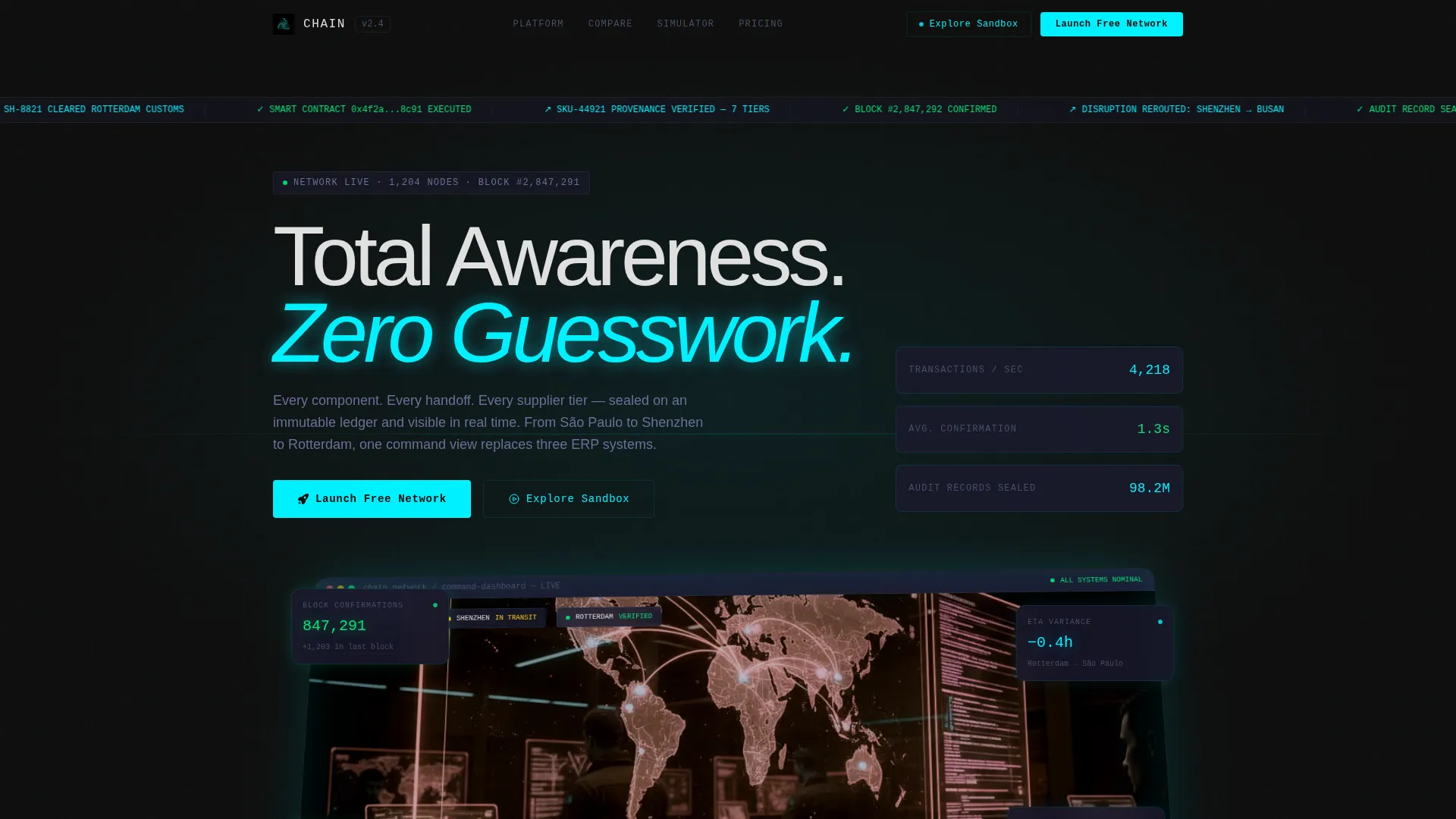
- A full-width product screenshot header showing an active multi-node supply chain map with block confirmations, ETA variance data, and a live smart contract execution log
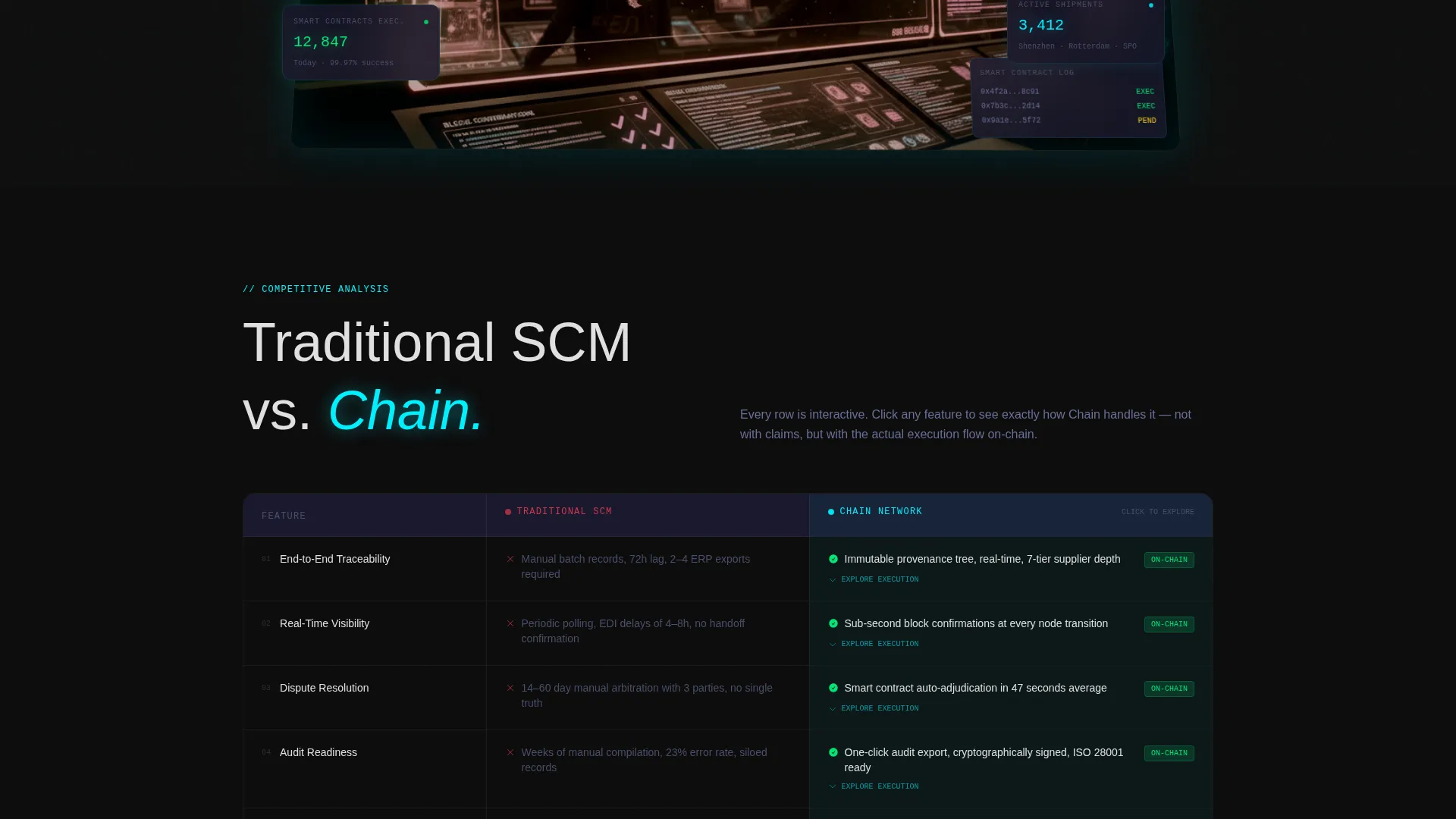
- An animated comparison table contrasting traditional supply chain management with the blockchain-powered platform, with row-level micro-interactions including a provenance tree fan and a smart contract flowchart
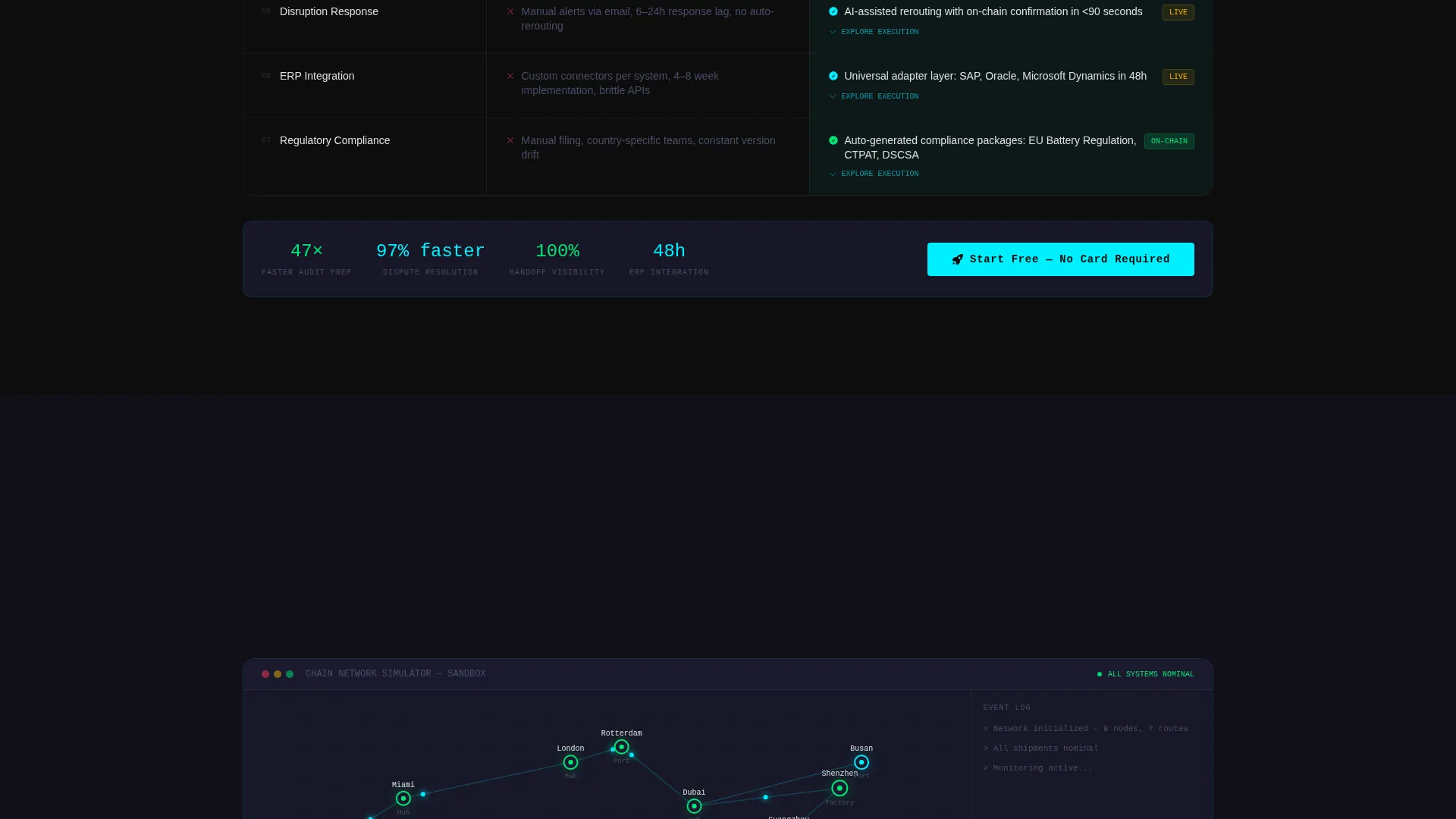
- An interactive supply chain simulator where visitors drag nodes, trigger disruptions, and watch the platform reroute and re-verify in real time
Feature list
The template delivers several purpose-built components that work together to move a visitor from awareness to conviction.
Full-Width Command Dashboard Header
The header is a pixel-perfect product screenshot showing a live multi-node supply chain map. Active shipments pulse between São Paulo, Shenzhen, and Rotterdam. Visible data includes block confirmations, real-time ETA variance, a scrolling smart contract execution log, and a provenance tree expanded to seven supplier tiers. The screenshot sits on a subtle isometric tilt with a soft cyan glow bleeding from the screen edges.
Animated Comparison Table
The comparison table is the structural spine of the page. Visitors toggle between Traditional SCM and Chain columns. Each row animates on hover, and clicking a row triggers a micro-interaction: the Traceability row fans open a provenance tree, and the Dispute Resolution row executes a smart contract flowchart step by step.
Interactive Supply Chain Simulator
Below the comparison table, visitors can drag supply chain nodes, trigger a simulated disruption, and watch the platform reroute and re-verify in real time. This hands-on experience replaces passive reading with active product discovery. It is the most powerful trust-building element on the page.
Anchored Freemium Conversion Flow
The primary call to action, "Launch Free Network," appears in the header and again after the simulator. The signup form collects work email first, then company name, role from a dropdown, and supply chain size by number of active suppliers. The sequence is designed to reduce friction at the point of highest conviction.
Sandbox Secondary Path
A secondary "Explore the Sandbox" option lets visitors use the interactive demo without signing up. An email is only requested when the visitor tries to save their simulated network. This path captures intent from exploratory buyers without gating the experience behind a form wall.
Carbon Fiber Visual Identity System
The Data Command theme uses a five-color Carbon Fiber system: deep carbon black for backgrounds, woven graphite for content layer separation, titanium mid-tone for body text, signal cyan for interactive elements and data highlights, and status green reserved exclusively for verified on-chain states. The palette is matte, engineered, and visually authoritative.
Page sections overview
| Section | Purpose |
|---|---|
| Command Dashboard Header | Anchors attention with a live platform screenshot and the primary "Launch Free Network" call to action |
| Comparison Table | Shows the gap between traditional supply chain management and the blockchain-powered platform through animated, interactive rows |
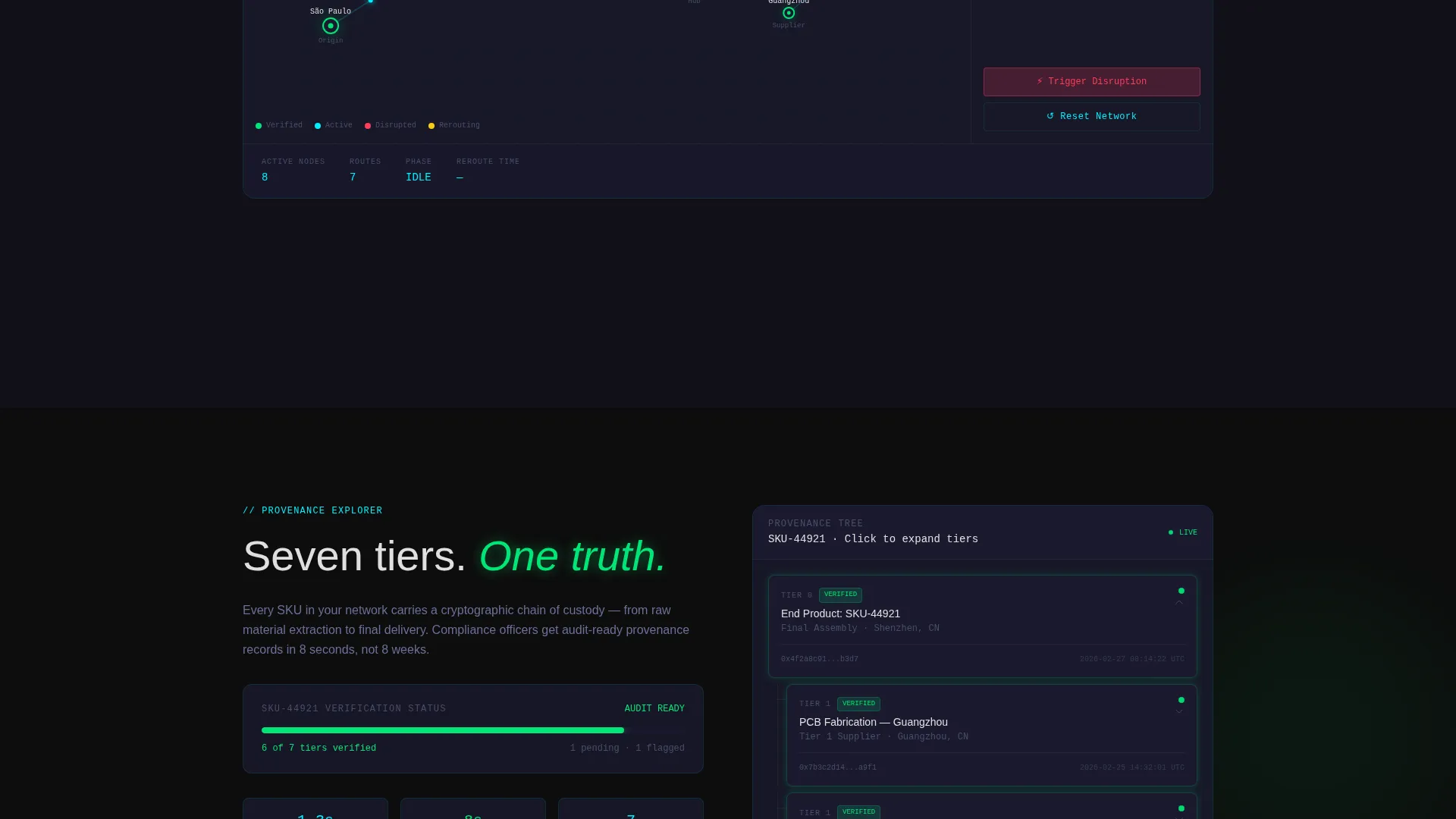
| Provenance Tree Interaction | Lets visitors click into traceability data to see a multi-tier supplier tree fan open in real time |
| Smart Contract Flowchart | Visualizes dispute resolution logic step by step when a visitor clicks the relevant comparison row |
| Supply Chain Simulator | Gives visitors hands-on control to drag nodes, trigger disruptions, and watch rerouting and re-verification |
| Post-Simulator call to action | Repeats the "Launch Free Network" form at the moment of highest visitor conviction |
| Sandbox Entry Point | Offers a no-signup demo path that captures email only when the visitor saves their simulated network |
Design & branding system
The visual language is built around the Data Command theme, using a Carbon Fiber color system that feels engineered rather than decorative. Every color choice is intentional and load-bearing.
- Carbon black (#0D0D0D) and woven graphite (#1A1A2E) handle all backgrounds and content layer separation, creating the darkened control room atmosphere described in the brief
- Signal cyan (#00F0FF) activates on every interactive element, hover state, and data point worth noticing, while status green (#00E676) appears only when something is verified on-chain, making it feel earned rather than cosmetic
- The isometric tilt on the header screenshot and the soft cyan screen-edge glow give the page a physical sense of depth without relying on decorative illustration
Mobile & speed optimization
The template is designed to maintain its immersive dark aesthetic and interactive components across screen sizes without sacrificing the experience on smaller devices.
- The full-width command dashboard header and comparison table reflow cleanly for tablet and mobile viewports, keeping the core conversion path intact
- Interactive elements including the comparison table toggles and simulator nodes are built to respond to touch input, not just mouse hover states
- The signup form sequence, collecting work email first and expanding to role and supplier count, keeps the mobile conversion flow short and focused
How this template helps you convert
The page is structured as an escalating conviction journey. Each stage deepens trust before asking for commitment.
- The product screenshot header and comparison table establish credibility immediately, showing real platform data and a clear performance gap against traditional supply chain management methods
- The interactive simulator shifts the visitor from observer to participant, creating personal investment in the outcome before the second "Launch Free Network" call to action appears
- The sandbox path removes the last remaining objection for hesitant buyers by letting them explore freely, capturing their email only at the natural moment when they want to save their work
Other information about this template
This template is categorized under Technology, specifically in the Decentralized Enterprise Software subcategory with a focus on the Decentralized SCM niche. It was designed with an Intersection Match Score of 13, reflecting a tight alignment between the template style, creative direction, and target audience.
- The Comparison Table template style is paired with the Interactive Explorer creative direction, making this one of the most engagement-dense single-page layouts available in the marketplace
- The freemium and trial conversion model built into this template suits platforms that compete against established enterprise software vendors, where letting prospects experience the product directly is a stronger sales argument than feature lists alone
- The header concept is a Product Screenshot, which is well suited to data-dense platforms where a live dashboard communicates capability faster than any headline could
Theme
Data Command
Creative direction
Interactive Explorer
Color system
Carbon Fiber
Style
Comparison Table
Direction
Freemium/Trial
Page Sections
Animated Comparison Table with Micro-interactions
Interactive Supply Chain Simulator
Full-width Product Screenshot Header
Anchored Dual-path Conversion Flow
Carbon Fiber Data Command Visual System
Role-aware Signup Form
Related questions
Who is this landing page template designed for?
Can I customize the comparison table rows?
Does the interactive simulator require coding knowledge to set up?
How does the sandbox path capture leads without a signup wall?
Is the Carbon Fiber color system easy to adapt to my brand?



