AI-Powered Enterprise Software Specialist Reviews Website Template
Nexus is an AI-powered HRM landing page template built for enterprise workforce platforms. It features a full-viewport dashboard preview header, scroll-reveal feature modules, and a dark Carbon Fiber visual system. Designed for HR directors, talent leads, and COOs, it guides visitors from first impression to app install with confident, data-forward design.
by Rocket studio
Quick summary
Nexus is a scroll-reveal landing page template for AI-powered human resource management platforms. It opens with a live-style dashboard header packed with realistic workforce data, then progressively unveils four AI capability modules as the visitor scrolls. The result is a page that feels like the product itself, built to drive app installs and web demo sign-ups.
Who this template is for
This template is built for teams launching or marketing an AI-powered HRM platform to a mid-market enterprise audience. It speaks directly to decision-makers who evaluate software on outcomes, not feature checklists.
- HR directors managing workforces of 500 to 5,000 employees who need a compelling product showcase
- Talent acquisition leads who want visitors to immediately grasp pipeline intelligence and recruitment automation
- COOs and operations leaders looking for a single-screen view of workforce health metrics
What problem this template solves
Most HRM software landing pages describe features in abstract terms. Visitors leave without understanding what the platform actually does or why it matters. Nexus solves this by showing the product in motion, not just talking about it.
- Generic hero sections fail to communicate real-time data capabilities, leaving prospects unconvinced
- Long feature lists bury the most compelling AI functions, like attrition prediction and compliance monitoring
- Weak calls to action break the momentum before a visitor reaches the install or demo step
What you get with this template
Nexus delivers a complete, production-ready landing page structure with every section pre-built and pre-populated with realistic dummy data. Nothing needs to be invented from scratch.
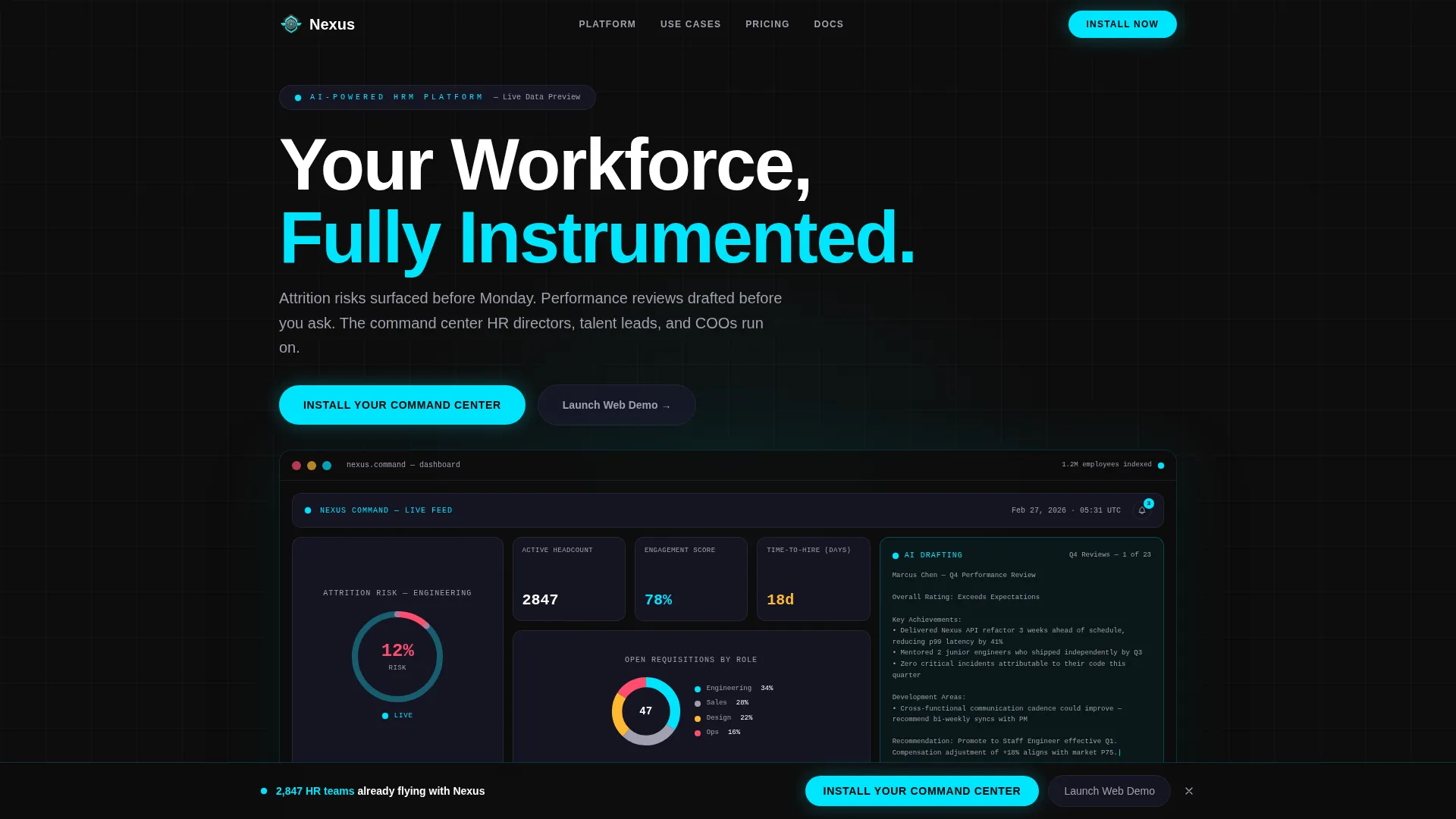
- A full-viewport animated dashboard header showing attrition gauges, open-requisition donut charts, a sentiment ticker, and an AI assistant sidebar
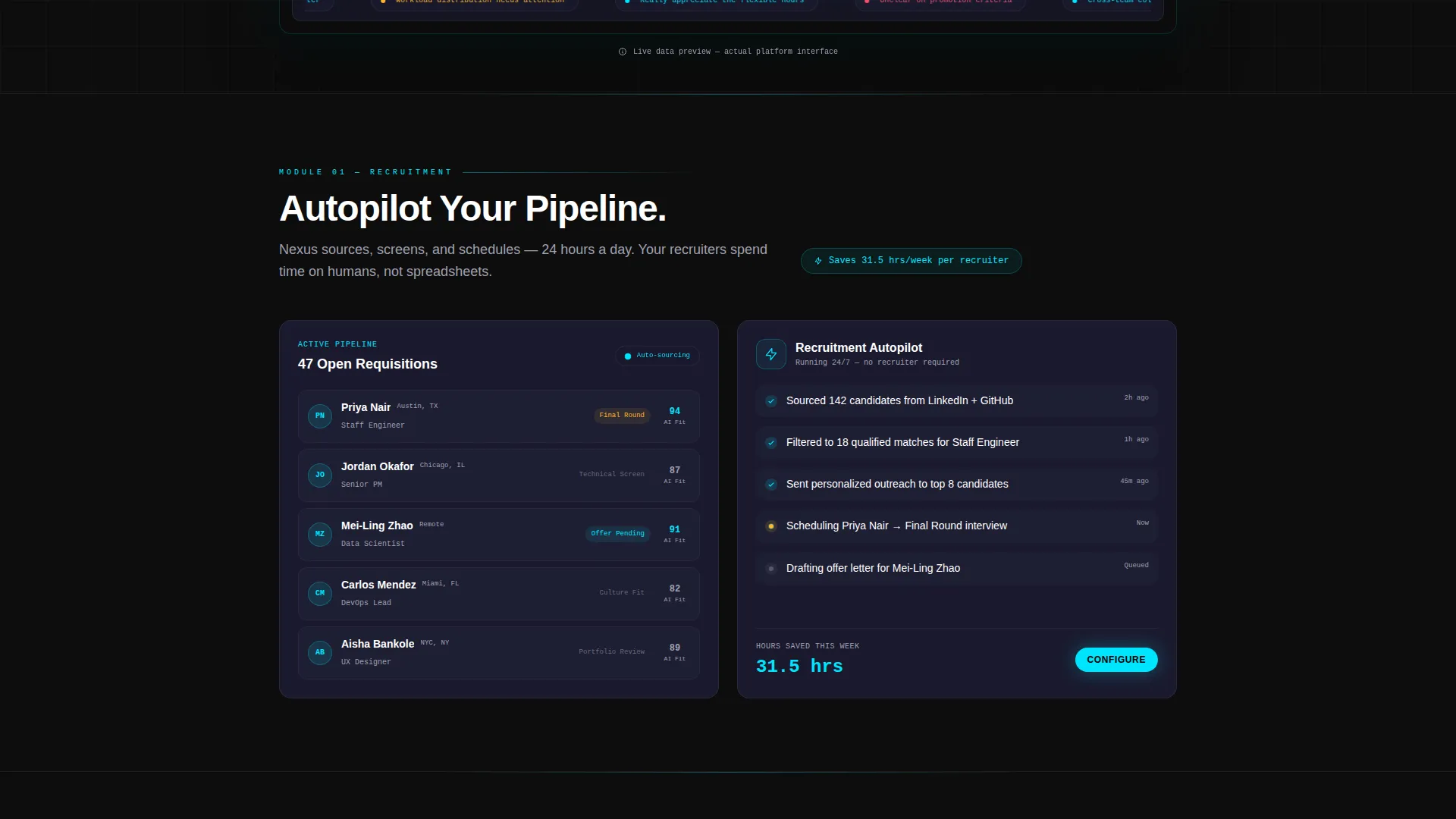
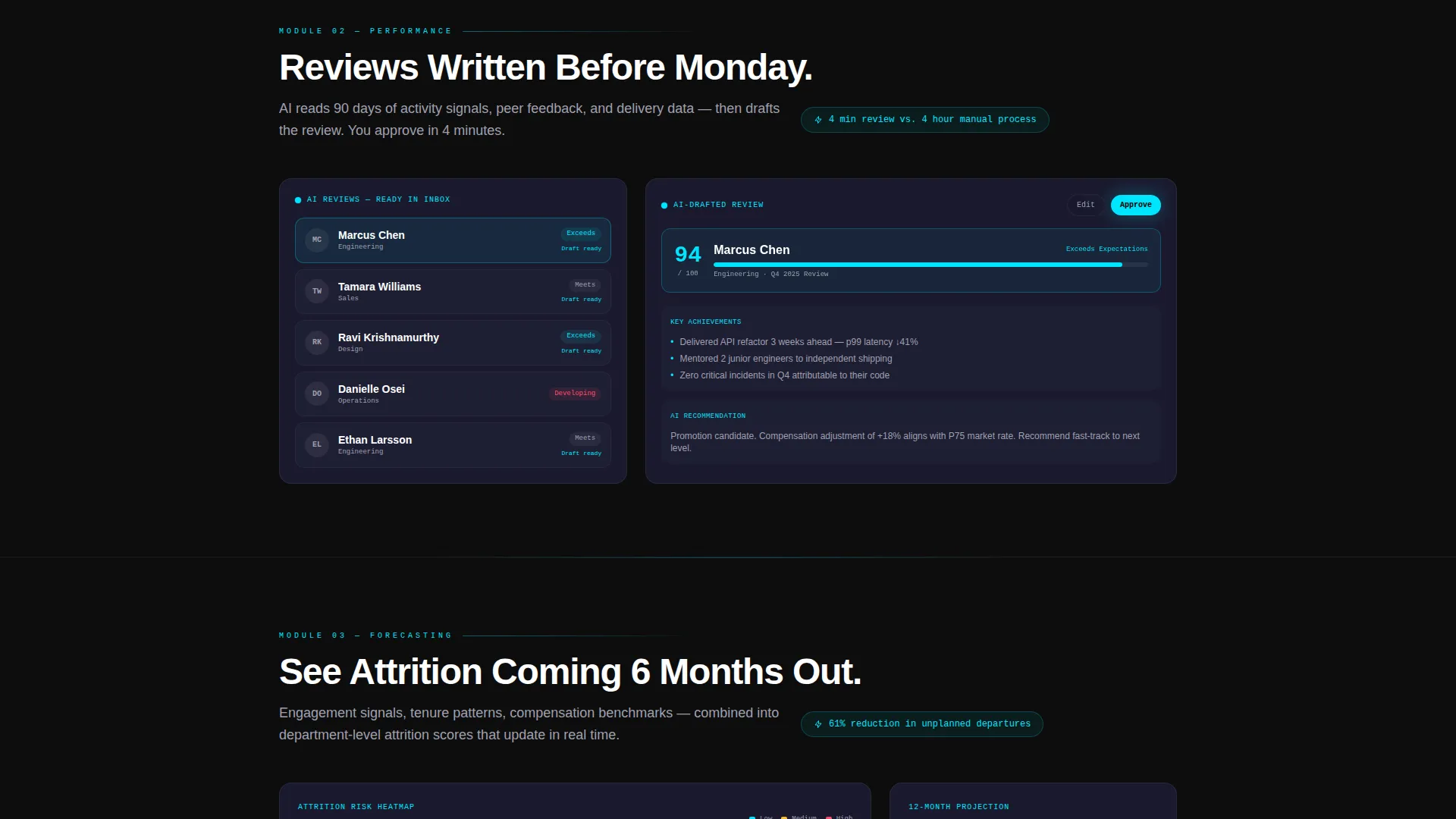
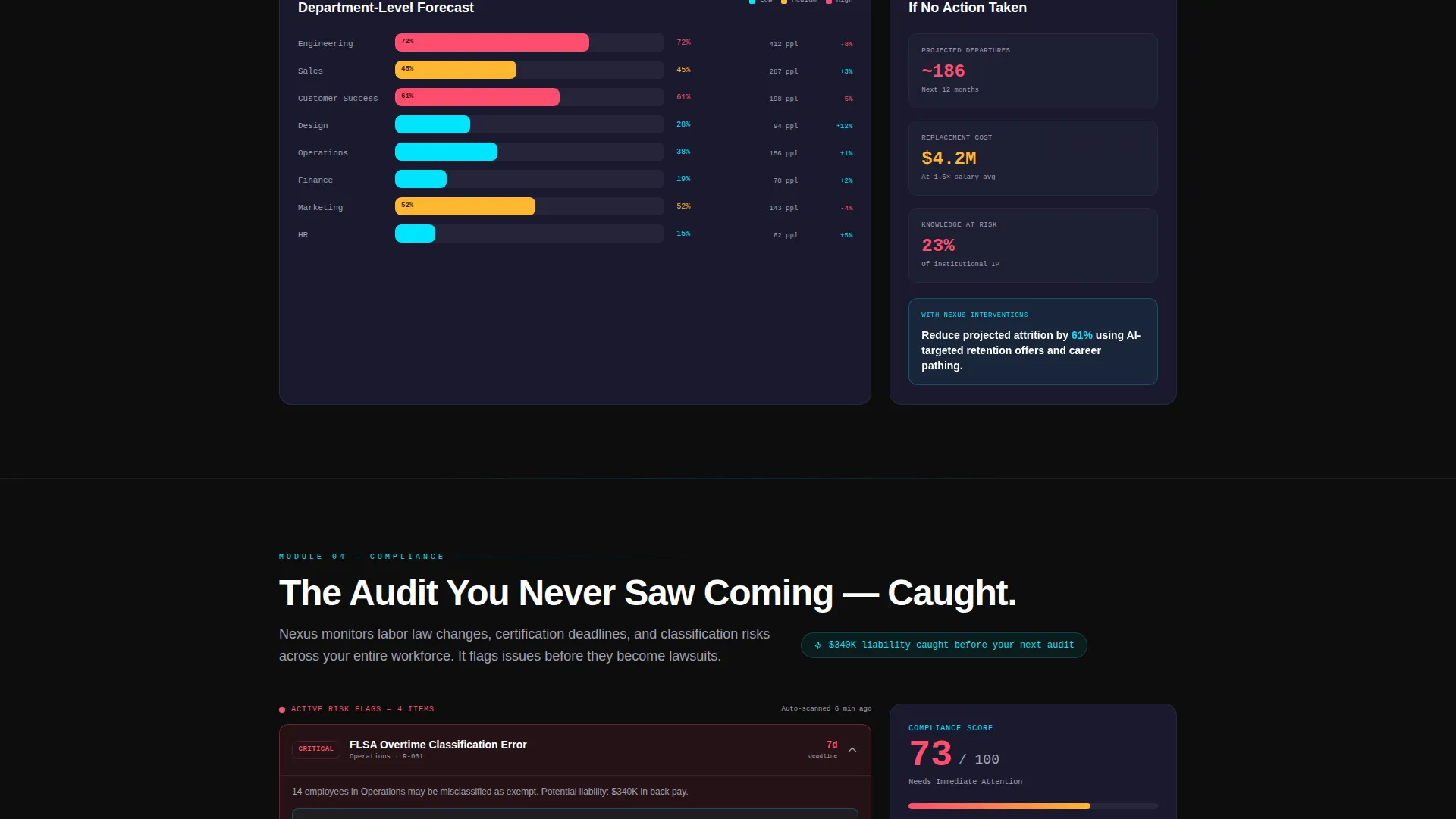
- Four progressive feature modules covering recruitment autopilot, performance intelligence, workforce forecasting, and compliance monitoring, each styled as an interactive user interface vignette
- A persistent bottom-bar call to action and a full-width closing block, both wired to platform-detecting app download flows and a secondary web demo path
Feature list
This section covers the core template capabilities grounded in the source brief.
Animated Dashboard Header
The header occupies the full viewport and replicates the platform's main command screen. On load, numbers count up, charts draw themselves, and a notification badge increments. Visitors instinctively try to interact with it, creating immediate product familiarity.
Scroll-Reveal Feature Modules
Each of the four AI capability sections slides up from darkness as the visitor scrolls, mimicking an instrument panel powering on. The reveal sequence escalates in stakes: from hours saved to legal risk prevented, keeping attention locked from top to bottom.
Interactive user interface Vignettes
Every feature module displays a stylized, hover-responsive user interface panel populated with dummy data. These vignettes let visitors experience the product interface without leaving the page, reducing hesitation before committing to a download or demo.
Platform-Detecting App Download Flow
The primary call to action reads "Install Your Command Center" in electric cyan. It detects the visitor's platform and surfaces the correct App Store or Google Play badge. Desktop visitors see a QR code alongside the badges for seamless cross-device handoff.
Web Demo Secondary Path
A secondary conversion route invites visitors to "Launch Web Demo." It requires only a work email to access a browser sandbox, giving prospects a frictionless first touch with the product before committing to install.
Persistent call to action Bottom Bar
After the second scroll module, a sticky bottom bar carrying the primary install call to action appears and remains visible for the rest of the page. This keeps the conversion action within reach at every point in the scroll journey.
Page sections overview
| Section | Purpose |
|---|---|
| Dashboard Header | Opens with animated, data-populated command screen to hook attention immediately |
| Recruitment Autopilot | First feature module revealing AI-driven hiring pipeline capabilities |
| Performance Intelligence | Second module showcasing AI-drafted reviews and engagement heatmaps |
| Workforce Forecasting | Third module demonstrating predictive attrition risk scoring |
| Compliance Sentinel | Fourth module communicating legal risk prevention and audit readiness |
| Persistent call to action Bar | Sticky bottom bar driving app installs after second scroll module |
| Closing call to action Block | Full-width section reinforcing the install and web demo conversion paths |
Design & branding system
The visual identity follows a Dashboard Pro theme built on a Carbon Fiber color system. Every color decision serves readability in a dark, data-dense environment.
- Deep cockpit black (#0D0D0D) and woven carbon gray (#1A1A2E) form the background layers, creating depth without emptiness
- Brushed titanium (#A0A0B0) handles supporting text and secondary user interface elements, keeping non-critical content recessive
- Electric cyan (#00E5FF) is reserved exclusively for live data points, toggle states, and all call-to-action surfaces, ensuring high-contrast visibility where action is needed
Mobile & speed optimization
The template is structured to load quickly and render cleanly across devices. Scroll-triggered animations are designed to feel responsive rather than heavy.
- Scroll-reveal transitions are staged progressively so initial viewport content loads and displays before deeper sections animate in
- The platform-detecting download flow adapts its displayed badge and QR code based on the visitor's device context, reducing friction on both mobile and desktop
- The persistent call to action bottom bar is sized and spaced for comfortable thumb-reach interaction on small screens
How this template helps you convert
Nexus is engineered to move visitors from curiosity to action without friction at any step.
- The animated dashboard header creates immediate product familiarity, so visitors arrive at the feature modules already engaged rather than skeptical.
- The escalating stakes across four feature modules build a case that grows stronger with each scroll, ending with compliance risk as the final, highest-urgency motivator.
- Two distinct conversion paths, app install and web demo, serve different buyer readiness levels simultaneously, capturing both committed and exploratory prospects in a single page flow.
Other information about this template
This template is part of the Nexus product line, positioned within the Dashboard Pro theme family. It is suited for teams building marketing pages for AI-powered enterprise software in the HRM and workforce management space.
- Template style: Scroll Reveal (Progressive), meaning sections animate into view as the visitor scrolls rather than loading all at once
- Creative direction: Feature Matrix, where each module presents one complete AI capability in sequence rather than listing all features together
- Header concept: Dashboard Preview, a full-viewport interactive replica of the product's main interface populated with realistic dummy data
- Conversion direction: App Download, with the primary flow driving installs and a secondary flow capturing web demo leads via work email
- Color system: Carbon Fiber, a four-tone dark palette built for data-dense interfaces that need clarity without visual noise
- This template is designed for the Technology category, specifically the AI-Powered Enterprise Software subcategory and the AI-Powered HRM niche
Theme
Dashboard Pro
Creative direction
Feature Matrix
Color system
Carbon Fiber
Style
Scroll Reveal (Progressive)
Direction
App Download
Page Sections
Animated Dashboard Header
Scroll-reveal Feature Modules
Interactive User Interface Vignettes
Platform-detecting App Download Flow
Persistent Call to Action Bottom Bar
Web Demo Secondary Path
Related questions
Can I customize the dummy data shown in the dashboard header?
Does the template include both app install and web demo conversion paths?
How many feature modules are included in the scroll sequence?
Is this template suitable for a product that is not yet launched?



