AI Supply Chain Landing Page Template
Nexus is a hub-and-spoke landing page template built for AI-powered supply chain management platforms. It leads with a live-coded API demo in the header, guides visitors through a problem-to-solution narrative, and closes with a progressively disclosed signup form. The design uses a dark terminal palette with electric indigo and sharp cyan to feel like a mission-critical control room.
by Rocket studio
Quick summary
Nexus is a single-page, hub-and-spoke landing page template designed for AI-powered supply chain intelligence platforms. It opens with a character-by-character API code animation, walks visitors through four supply chain pain points via an anchor navigation rail, and converts them through a freemium trial flow with progressive form disclosure.
Who this template is for
This template is built for teams launching or marketing an AI-driven supply chain management platform. It speaks directly to the pain of manual processes, fragmented data, and supplier blind spots.
- Procurement directors who manage vendor scorecards and purchase orders across multiple systems
- Logistics managers coordinating freight forwarders across multiple regions
- Operations VPs who need early warning signals on Tier-2 or Tier-3 supplier risk
What problem this template solves
Supply chain software platforms are hard to explain and harder to sell. Visitors arrive skeptical, unsure whether another tool can actually replace their spreadsheet workflows or predict disruptions before they happen. This template removes that doubt immediately.
- It shows the product's AI output before asking for any user input
- It walks visitors through four specific pain points, each answered by a platform module
- It offers a no-signup sandbox path for visitors who are not yet ready to connect live data
What you get with this template
You get a complete, conversion-focused landing page structure that builds credibility through product fluency. Every section earns the next scroll, and every call to action is introduced at the right moment in the narrative.
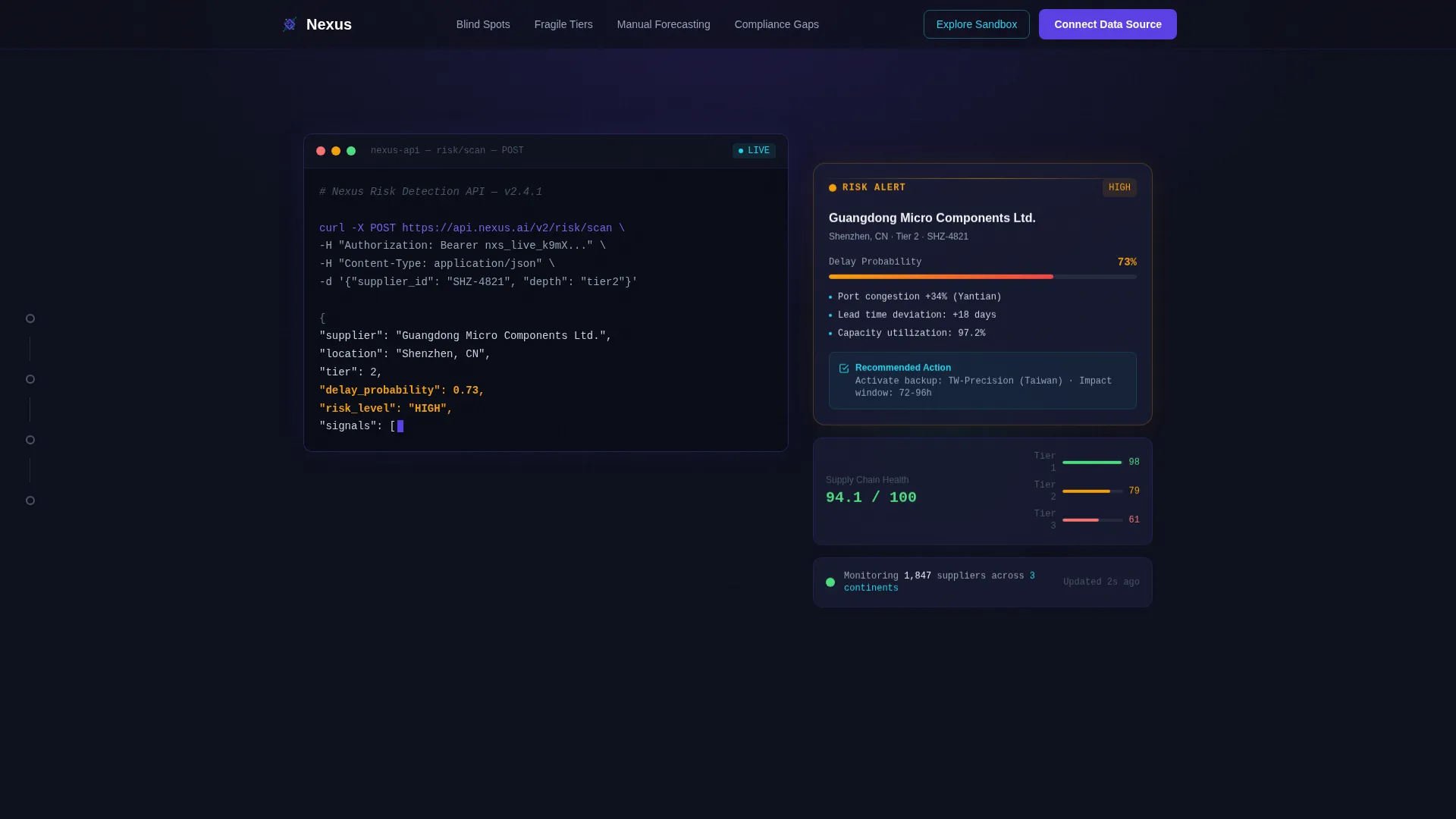
- A terminal-style animated header with a live API code snippet and typed headline
- A pinned left-rail spoke navigation with four labeled pain-point nodes
- A progressively disclosed signup form with email, company size, and ERP dropdown fields
- An "Explore the Sandbox" secondary path for low-intent visitors
- Embedded user interface screenshot slots and micro-animation zones inside each spoke section
Feature list
This section outlines the core structural and interactive capabilities built into the Nexus template.
Animated Code Snippet Header
The header renders an API call to a risk-detection endpoint character by character, like a live terminal session. A JSON response highlighting a supplier delay probability appears in syntax-highlighted indigo and cyan. The headline then types itself beneath the code block.
Hub and Spoke Anchor Navigation
A persistent left-rail navigation pins four pain-point nodes to the viewport throughout the entire scroll. Each node is labeled with a real supply chain challenge: Blind Spots, Fragile Tiers, Manual Forecasting, and Compliance Gaps. Clicking any node jumps directly to its corresponding solution section.
Problem-to-Solution Spoke Sections
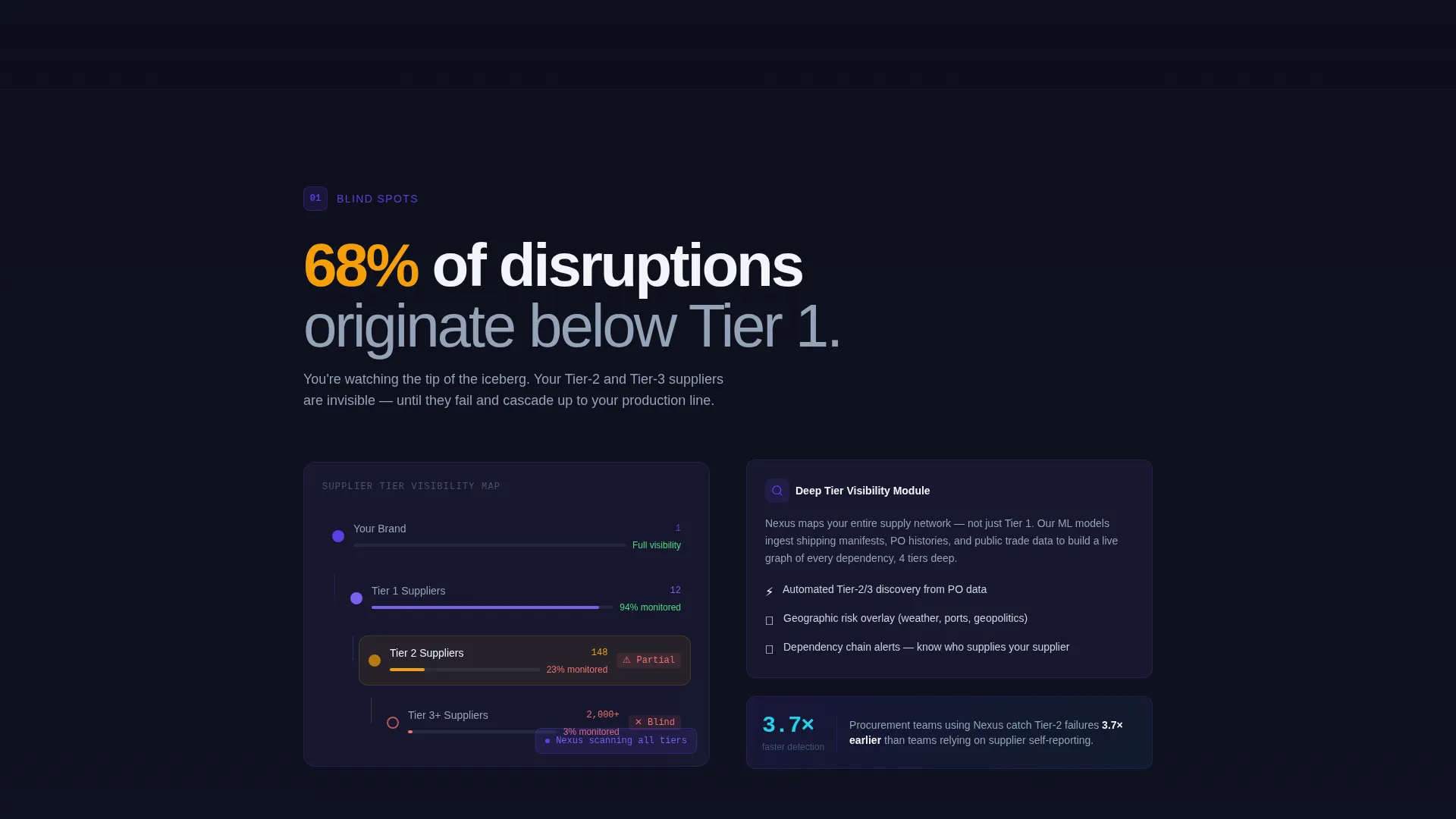
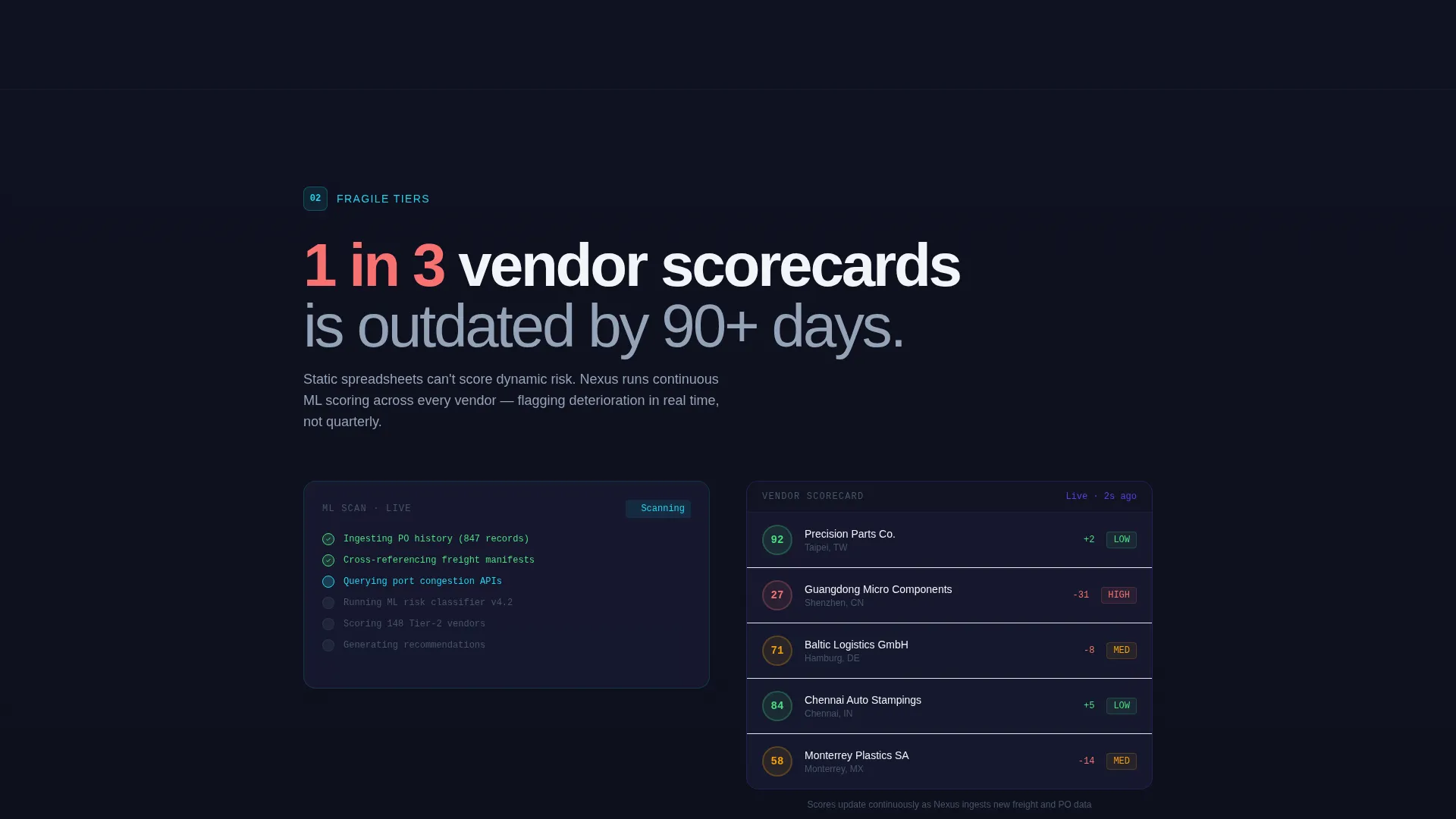
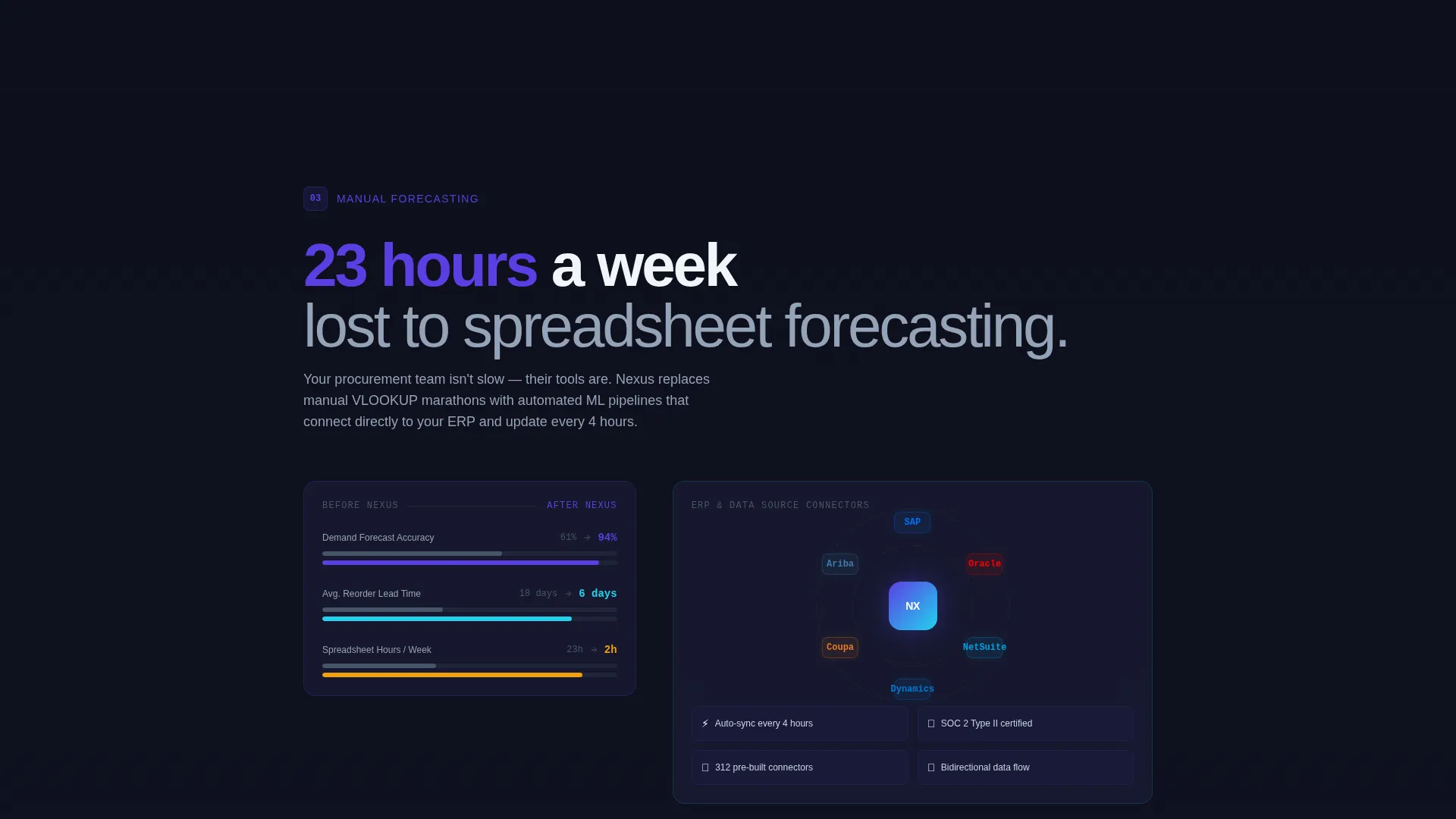
Each spoke section opens with a data statistic that frames the pain, then immediately presents the platform module that solves it. Sections include embedded user interface screenshot placeholders and micro-animation zones showing AI scanning, scoring, and recommending actions.
Progressive Disclosure Signup Form
The conversion form reveals fields in sequence: email first, then a company size selector covering small business, mid-market, and enterprise tiers, then a dropdown for the visitor's primary enterprise resource planning system. This reduces friction and qualifies leads at the same time.
Floating Primary Call to Action
A "Connect Your First Data Source" button floats persistently after the visitor passes the second spoke section. It keeps the conversion path visible without interrupting the narrative scroll. The header also carries the same primary call to action for above-the-fold capture.
Sandbox Secondary Conversion Path
Visitors who are not ready to connect live data can choose "Explore the Sandbox" instead. This secondary path leads to a no-signup interactive demo environment, lowering the barrier to engagement while keeping high-intent visitors on the primary flow.
Page sections overview
| Section | Purpose |
|---|---|
| Animated Header Block | Introduces the platform via a live API code animation and typed headline |
| Left Rail Navigation | Anchors spoke nodes for quick pain-point navigation throughout the page |
| Blind Spots Spoke | Addresses supply chain visibility gaps with a data stat and platform module |
| Fragile Tiers Spoke | Covers Tier-2 and Tier-3 supplier risk with embedded user interface and micro-animation |
| Manual Forecasting Spoke | Shows how machine learning replaces spreadsheet-based demand planning |
| Compliance Gaps Spoke | Presents the platform's compliance monitoring and vendor scorecard module |
| Floating call to action Button | Keeps the primary conversion action visible from the second spoke onward |
| Progressive Signup Form | Collects email, company size, and ERP system in a step-by-step disclosure flow |
| Sandbox Demo Path | Offers a no-signup interactive demo as a secondary conversion entry point |
Design & branding system
The visual identity follows a Directory and Discovery theme executed through a dark terminal aesthetic. The palette is built for perceived precision, making every data point feel like a live signal rather than a design flourish.
- Deep terminal black (#0D0F1C) as the base background, electric indigo (#5B3FE4) for navigation rails and active states
- Cool slate (#94A3B8) applied to secondary text and divider lines throughout the layout
- Sharp cyan (#22D3EE) reserved for data highlights, hover states, and syntax-highlighted code elements
Mobile & speed optimization
The template is structured to translate the desktop control-room experience into a focused, readable layout on smaller screens. The left-rail navigation and spoke sections are designed to reflow cleanly for mobile viewports.
- The pinned spoke navigation adapts to a compact format on mobile without losing its anchor-link functionality
- Micro-animation zones and embedded user interface screenshot slots are sized and positioned to remain readable on smaller displays
- The progressive disclosure form maintains its step-by-step flow on mobile, keeping each field clear and tappable
How this template helps you convert
The conversion strategy is built on a simple principle: earn the click by showing real output before asking for real input. Every structural choice in Nexus reinforces that sequence.
- The animated API header demonstrates the platform's intelligence immediately, establishing credibility before any marketing claim is made.
- The problem-to-solution spoke structure escalates from visibility problems to prediction problems to automation problems, building a cumulative case that a unified intelligence layer outperforms patchwork tools.
- The dual conversion paths, primary form and sandbox demo, capture both high-intent and exploratory visitors without forcing either group toward a path that does not match their readiness.
Other information about this template
Nexus is categorized under Technology and AI-Powered Enterprise Software, making it a strong fit for platforms targeting procurement, logistics, and operations teams. The template style is Hub and Spoke with anchor navigation, and the landing page direction is Freemium and Trial conversion.
- The template's intersection match score is 13, placing it in a tightly aligned niche for AI-powered supply chain management platforms
- The header concept is a Code Snippet, specifically a formatted API call with a JSON response flagging a supplier in Shenzhen with a 73% delay probability
- The creative direction follows a Problem-to-Solution Arc, escalating from visibility issues to prediction challenges to automation opportunities across the spoke sequence
- The ERP dropdown in the signup form includes options for SAP, Oracle, NetSuite, and Other, reflecting the real enterprise tools procurement and operations teams already use
Theme
Directory & Discovery
Creative direction
Problem→Solution Arc
Color system
Electric Indigo
Style
Hub & Spoke (Anchor Nav)
Direction
Freemium/Trial
Page Sections
Animated Terminal Code Header
Hub and Spoke Anchor Navigation
Problem-to-solution Spoke Sections
Progressive Disclosure Signup Form
Floating Persistent Call to Action Button
No-signup Sandbox Demo Path
Related questions
Who is the Nexus template designed for?
What does the progressive disclosure form include?
Is there a path for visitors who are not ready to sign up?
What makes the header different from a typical hero section?
Can I rename the spoke navigation labels?



