Auto Repair Shop Complete Booking Website Template
Torque is a hub-and-spoke anchor-nav landing page template built for auto repair shops. Its Teal Catalyst color system, Dark Glass Panel header, and Spec Sheet creative direction make every service category scannable and trustworthy. Two conversion paths, "Schedule Your Service" and "Get a Quick Estimate", guide visitors from first glance to the online booking system without friction.
by Rocket studio
Quick summary
Torque is a single-page auto repair landing page template using a hub-and-spoke anchor navigation layout. It pairs a cinematic Dark Glass Panel header with a Spec Sheet scroll experience, technical diagrams, flat-rate pricing tables, and part-number transparency, to earn visitor trust and drive bookings through two clear conversion paths.
Who this template is for
This template is built for auto repair shop owners who want a professional online presence that converts. It speaks directly to shops handling everything from routine maintenance to complex mechanical work.
- Independent garage owners wanting a polished, conversion-focused landing page
- Fleet service managers who need to communicate scheduled maintenance programs clearly
- Auto repair shops targeting commuters, families, and local drivers searching for reliable service
What problem this template solves
Most auto repair shop pages look cluttered or generic. They fail to build trust before the visitor bounces. Torque solves this by presenting service information with the precision and confidence of a technical service manual.
- Visitors can not tell what a shop actually specializes in, so they leave without booking
- Pricing and parts transparency is missing, which creates hesitation before scheduling
- There is no clear path from browsing to booking, so potential customers drift away
What you get with this template
You get a fully structured, single-page auto repair landing page with anchor navigation, layered visual design, and two purpose-built conversion paths. Every section is designed to move a visitor from curiosity to commitment.
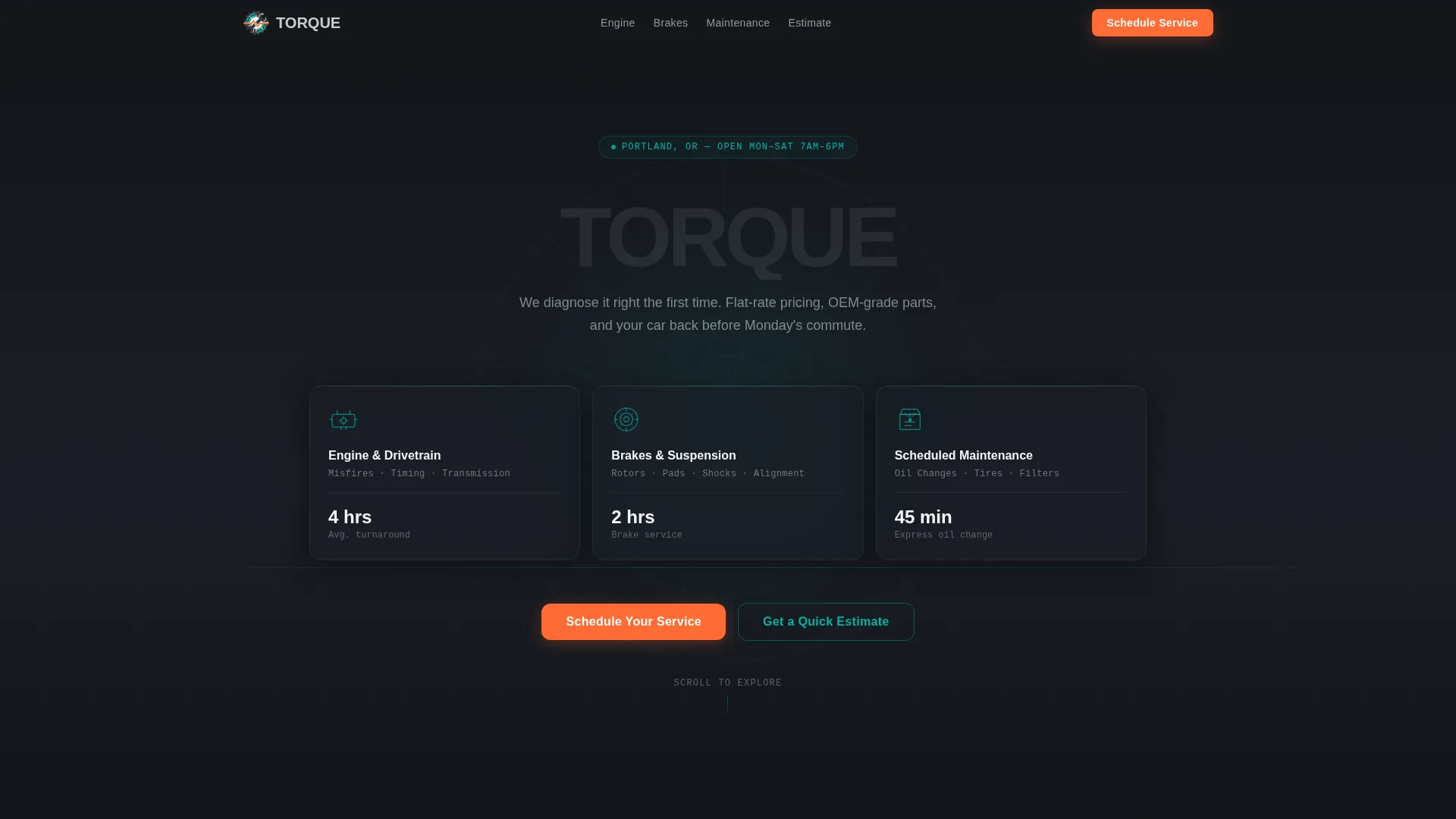
- A Dark Glass Panel header with three service-category nav cards and parallax cursor shift
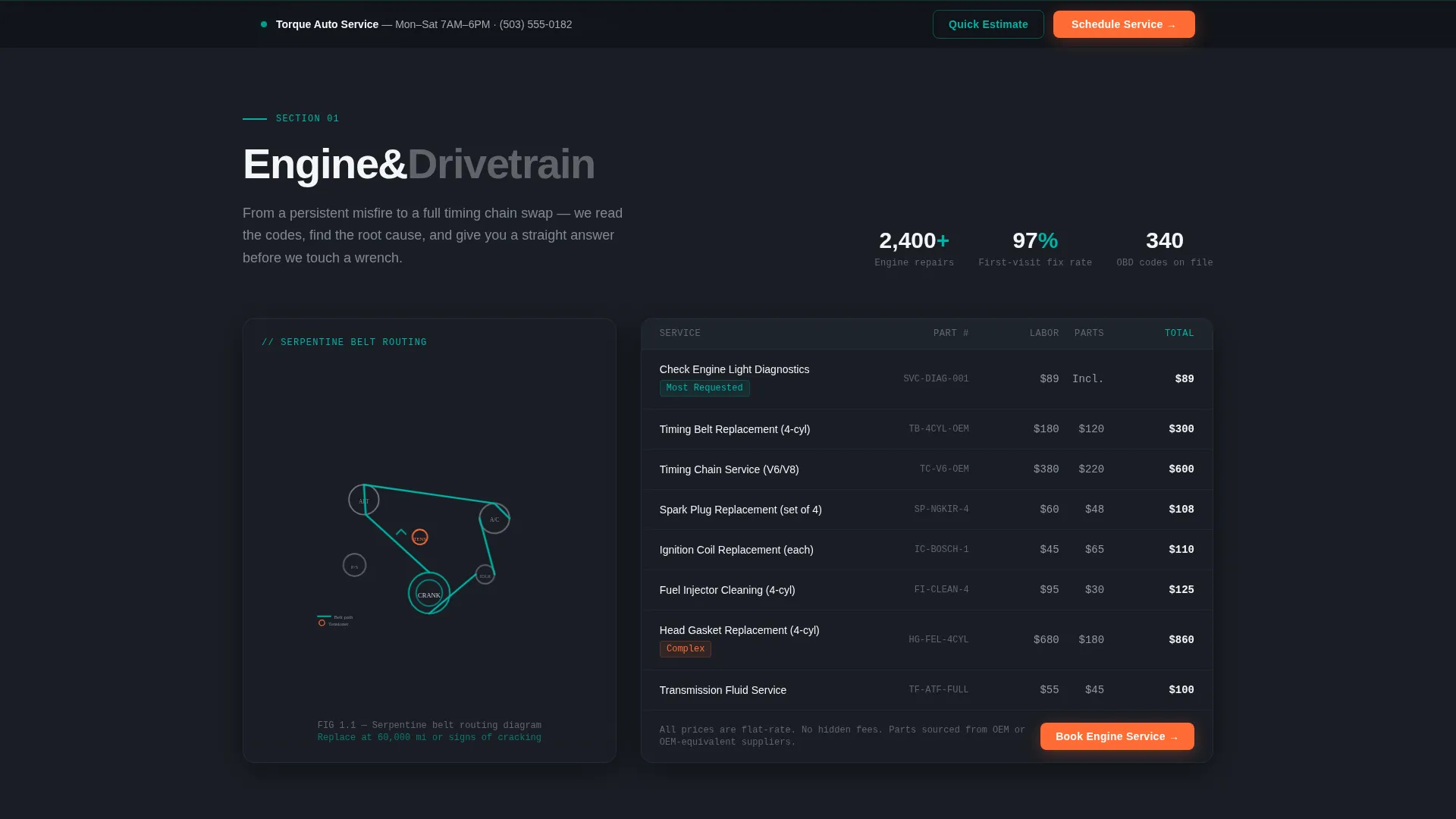
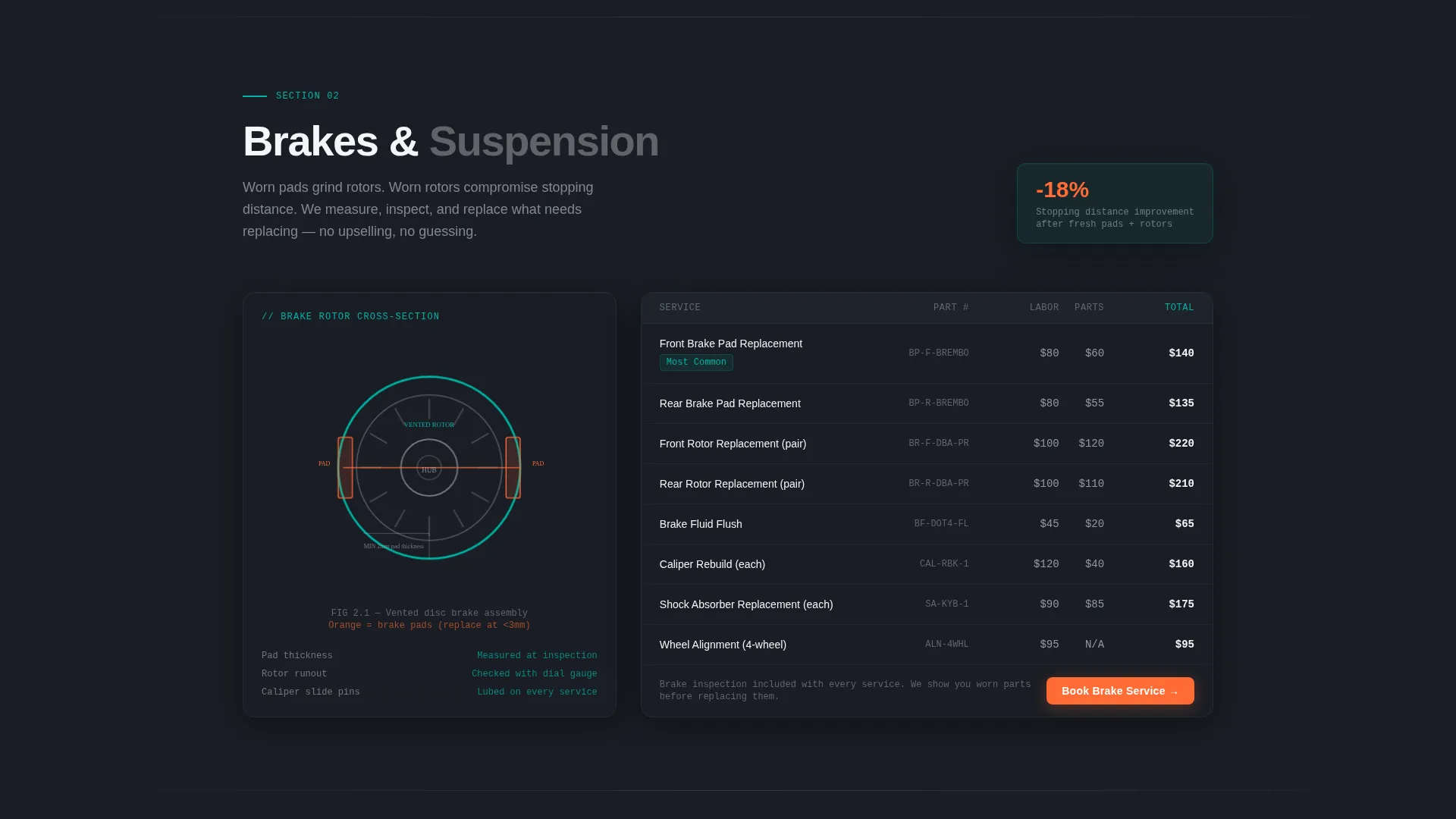
- A Spec Sheet scroll layout with animated technical diagrams, pricing tables, and part-number details
- A persistent bottom-bar call to action and an inline vehicle-selector estimation tool funneling to booking
Feature list
This template delivers a focused set of purposeful components. Each one is grounded in the Torque brief and designed to serve real shop visitors.
Dark Glass Panel Header Navigation
Three translucent, smoke-tinted cards float over a slow-motion wheel-balancing background. Each card holds a service category icon and label, Engine and Drivetrain, Brakes and Suspension, and Scheduled Maintenance, and shifts subtly as the cursor moves. The panels serve as the primary navigation, linking directly to each anchor section below.
Hub-and-Spoke Anchor Navigation
The layout uses a central header that radiates into dedicated service sections below. An anchor nav bar runs alongside the page, and its progress indicators fill like a gauge needle as the visitor scrolls deeper. This keeps orientation clear across a long single-page experience.
Spec Sheet Scroll Sections
Each service section opens with a technical diagram, brake rotor cross-sections, serpentine belt routing, transmission cutaways, followed by plain-language explanations. Flat-rate pricing tables and part-number callouts are built into every section, building trust by showing exactly what work is done and what it costs.
Dual Conversion Path System
The primary call to action, "Schedule Your Service," appears inside the header panels and returns as a persistent bottom bar after the second scroll section. A secondary path, "Get a Quick Estimate," opens an inline year, make, and model dropdown selector that surfaces relevant service recommendations before routing to the same booking page.
Animated Mechanical Motion
Diagrams animate into view with mechanical precision. Torque spec counters increment on scroll, and the anchor nav progress bar fills as sections are reached. Motion is purposeful and tied to content, not decorative.
Teal Catalyst Color System
The palette uses deep shop-floor charcoal (#1A1E25) as the base, diagnostic teal (#00B4A6) for data-stream accents and teal edge reflections on the glass panels, catalytic silver (#C8CDD3) for body text and dividers, and ignition orange (#FF6B35) reserved exclusively for calls to action and urgent callouts.
Page sections overview
| Section | Purpose |
|---|---|
| Dark Glass Header | Service category nav with parallax panels |
| Engine & Drivetrain | Anchor section for engine and drivetrain services |
| Brakes & Suspension | Anchor section for brake and suspension work |
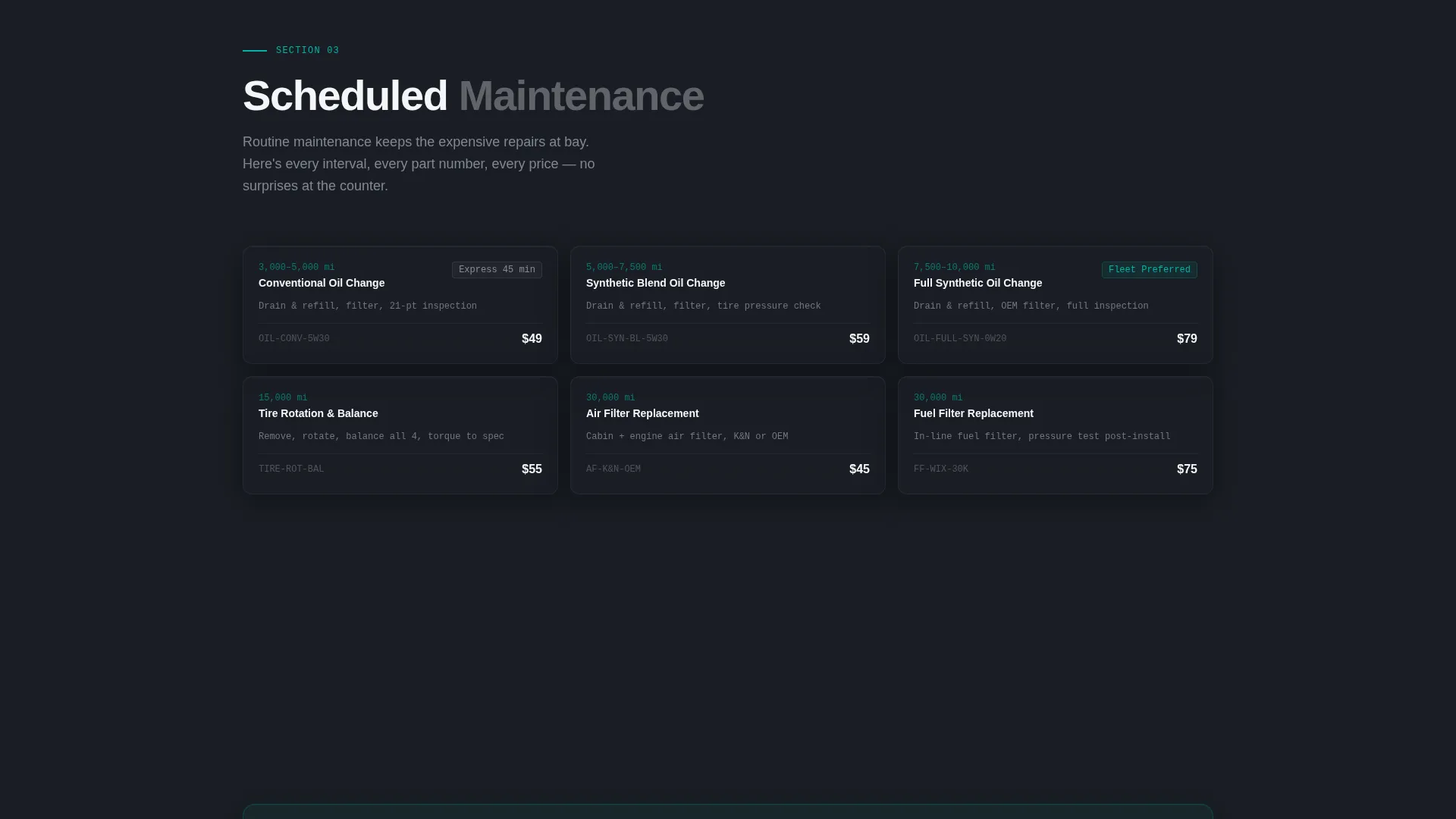
| Scheduled Maintenance | Anchor section for routine service intervals |
| Pricing Spec Tables | Flat-rate pricing with part-number transparency |
| Inline Estimate Tool | Vehicle selector surfacing relevant service options |
| Persistent Booking Bar | Bottom-bar call to action reappearing after second scroll section |
Design & branding system
The visual identity follows a Dynamic Motion theme with a premium scan-tool aesthetic. Every color has a specific role, and the layout feels precise and intentional, like a well-maintained engine bay where nothing is out of place.
- Deep charcoal base (#1A1E25), diagnostic teal accents (#00B4A6), catalytic silver text (#C8CDD3), and ignition orange (#FF6B35) calls to action
- Translucent glass-panel cards with teal edge reflections and slow-motion video background in the header
- Technical diagram illustrations, mechanical counter animations, and a gauge-style anchor nav progress indicator
Mobile & speed optimization
The template is structured for a smooth experience across screen sizes. Its layout prioritizes clarity and tap-friendly interactions on smaller devices.
- Anchor navigation adapts for touch scrolling, keeping section access easy on mobile screens
- Glass panel cards and spec sheet sections reflow cleanly for portrait and landscape orientations
- Animated elements are designed to complement the layout without adding unnecessary visual weight on smaller displays
How this template helps you convert
Every design and layout decision in Torque is tied to moving a visitor toward scheduling a service. The conversion architecture is layered and persistent.
- The header panels double as navigation and calls to action, placing "Schedule Your Service" at the very first interaction point before any scrolling begins.
- The Spec Sheet layout earns trust through pricing and parts transparency, removing hesitation before a visitor reaches the booking step.
- The persistent bottom bar and inline estimate tool create two continuous paths to the booking system, catching visitors at every stage of the page.
Other information about this template
Torque is a strong fit for shops wanting a template that communicates technical credibility without overwhelming visitors. It is built around a single, focused page rather than a multi-page site, keeping all service information in one streamlined scroll.
- The template style is Hub and Spoke with Anchor Navigation, making it straightforward to customize each spoke section for different service specialties
- The Spec Sheet creative direction works particularly well for shops that want to highlight transparent pricing as a competitive differentiator
- The Dynamic Motion theme uses animation purposefully, counters, diagram reveals, and nav indicators, rather than motion for decoration
- This template suits auto repair shop maintenance page use cases, including oil change interval tracking, brake service, timing belt replacement, and differential service presentations
Theme
Dynamic Motion
Creative direction
Spec Sheet
Color system
Teal Catalyst
Style
Hub & Spoke (Anchor Nav)
Direction
Click-Through
Page Sections
Dark Glass Panel Header Navigation
Hub-and-spoke Anchor Navigation
Spec Sheet Scroll Layout
Dual Conversion Path System
Purposeful Mechanical Animations
Teal Catalyst Color System
Related questions
Can I customize the service categories shown in the header panels?
Does the inline estimate tool connect to a live booking system?
Is this template suitable for a shop focused only on routine maintenance?
How does the persistent bottom booking bar work?
Can the Teal Catalyst color palette be updated to match an existing brand?



