Nuclear Vertical SaaS Advanced Professional Website Template
Nucleus is a hub-and-spoke landing page template built for a nuclear CRM platform. It combines a dark, control-room aesthetic with interactive section demos, a fixed anchor navigation, and a three-step lead generation form. The design uses void black, reactor violet, and phosphor glow to signal precision, authority, and technical depth from the first scroll.
by Rocket studio
Quick summary
Nucleus is a single-page, hub-and-spoke landing page template designed for a nuclear CRM platform. It maps reactor site management, maintenance cycles, and regulatory compliance into one living dashboard experience. Visitors interact with a ghost version of the product before ever signing up, building trust through hands-on exploration rather than passive reading.
Who this template is for
This template is built for teams operating in high-compliance nuclear environments. It speaks directly to the people accountable for keeping plants running and filings current.
- Plant operations managers tracking Nuclear Regulatory Commission (NRC) compliance deadlines across active facilities
- Fleet directors overseeing multiple stations across multiple states who need a unified site overview
- Decommissioning leads who require decade-long audit trails that survive staff turnover and regulatory review
What problem this template solves
Nuclear operations teams work with overlapping deadlines, distributed assets, and regulatory filing windows that cannot slip. A generic CRM or scattered spreadsheet system creates dangerous blind spots. This template presents a platform that closes those gaps visually and interactively before a prospect even books a demo.
- Compliance deadlines get lost when maintenance cycles, licensing windows, and inspection schedules live in separate tools
- Fleet directors lack a single view that shows every station's status at a glance without switching systems
- Decommissioning projects span decades, and audit trails break down when key staff members leave
What you get with this template
You get a fully structured, single-page landing page built around anchor navigation spokes that each reveal a working product preview. Every section earns the visitor's attention by letting them operate the interface before committing.
- A fixed hub-and-spoke anchor navigation with four spokes: Licensing, Maintenance, Inspections, and Decommissioning
- Interactive mini-demos inside each section, including a draggable compliance timeline, a filterable asset map, and a simulated audit drawer
- A three-step progressive lead generation form and a secondary whitepaper download path for researchers and analysts
Feature list
This template is built around interactive exploration and precision lead capture. Every element serves the goal of letting the right buyer self-qualify and request a demo with confidence.
Animated Hub-and-Spoke Anchor Navigation
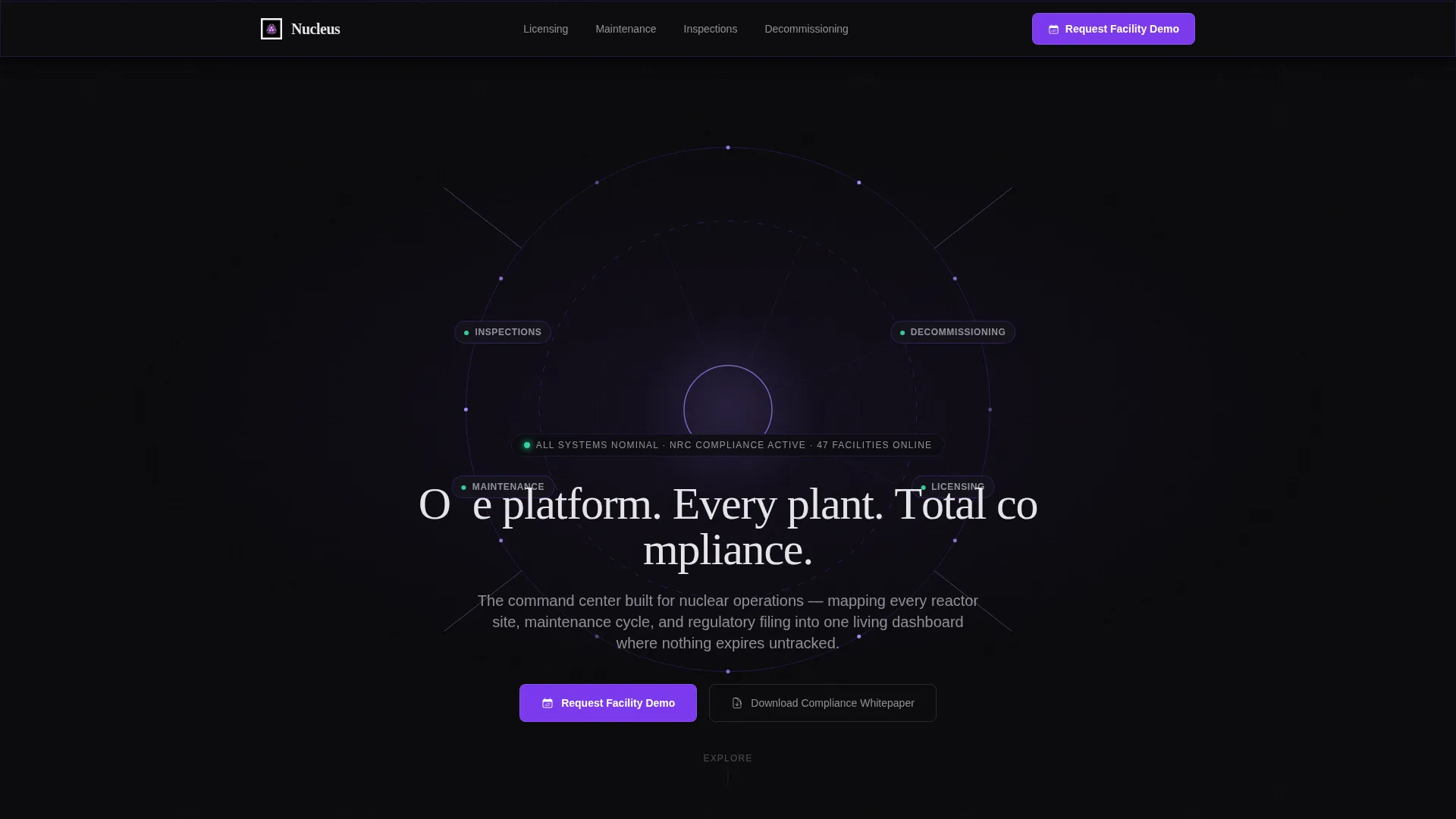
A fixed navigation bar displays four spoke labels drawn from the header wireframe: Licensing, Maintenance, Inspections, and Decommissioning. Clicking any spoke smoothly scrolls to its section. The nav stays pinned while the visitor explores, so they can jump between sections without losing context.
Interactive Compliance Timeline
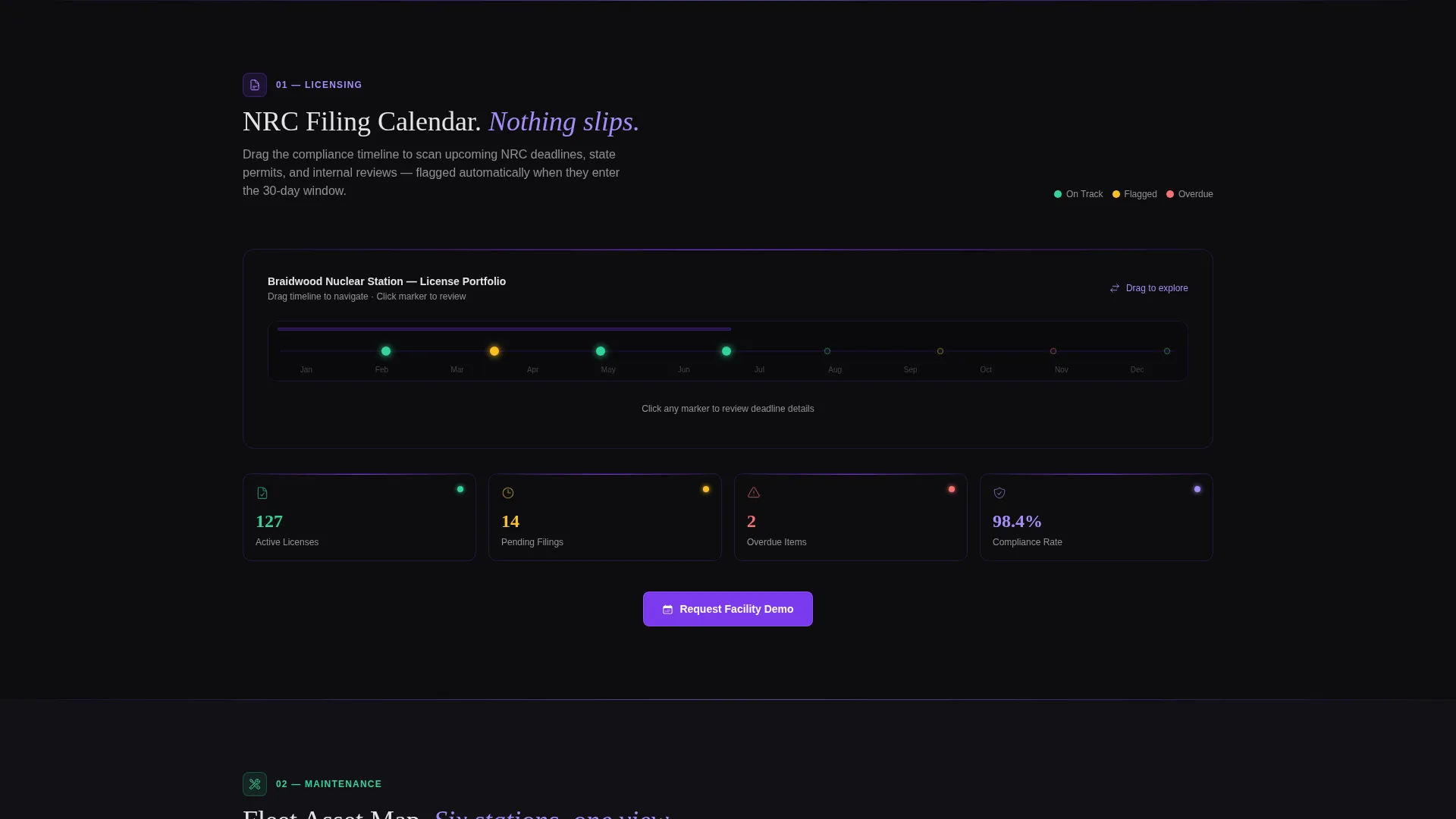
The Licensing section includes a draggable mock compliance timeline. Visitors can move deadline markers and watch the interface auto-flag conflicts or overdue windows. This gives operations managers an immediate feel for how the platform handles NRC compliance scheduling.
Filterable Station Asset Map
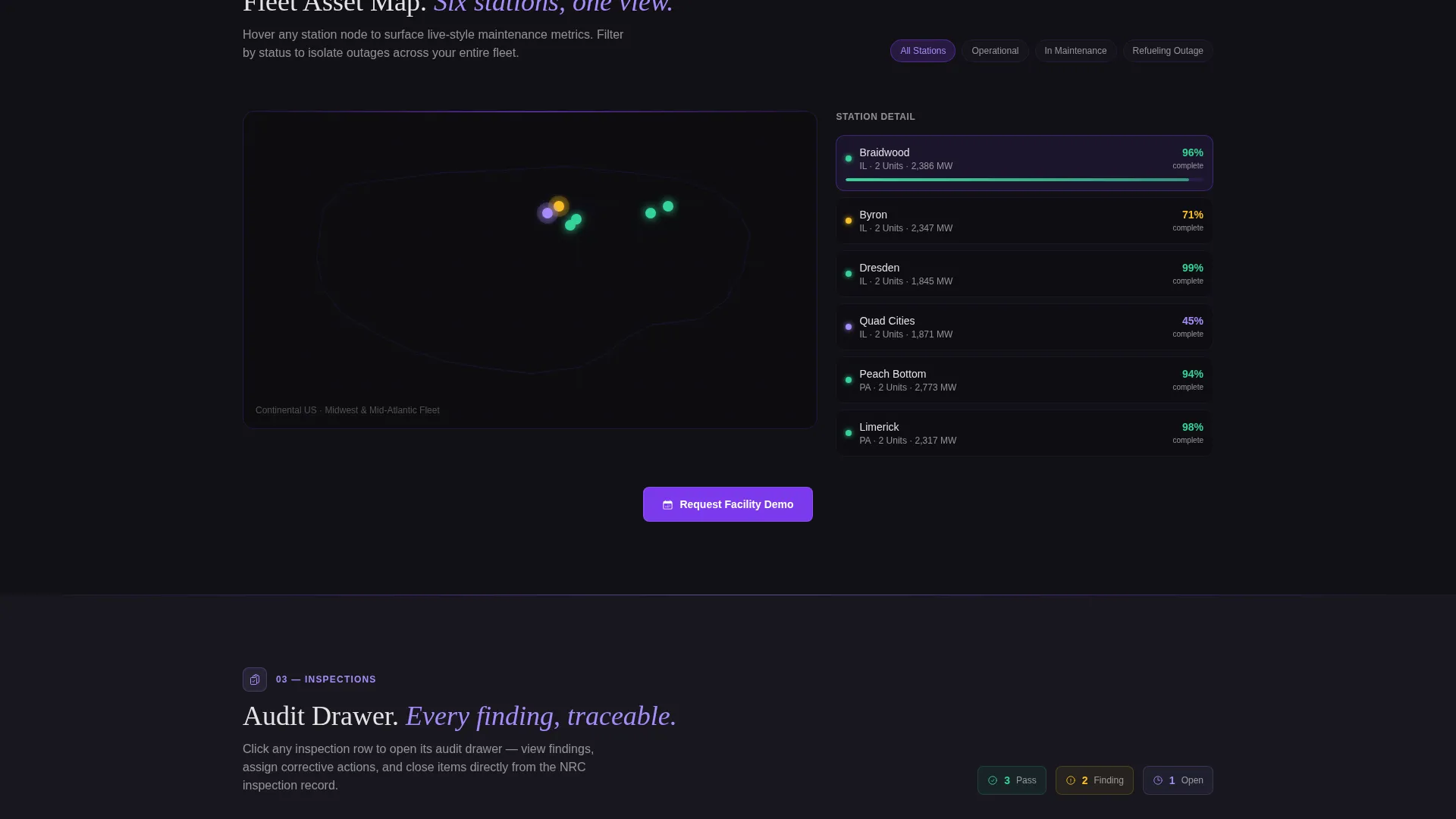
The Maintenance section presents a filterable asset map showing multiple reactor stations. Hovering over a station reveals live-style metrics for that facility. Fleet directors can immediately see how a multi-site view would work for their own portfolio.
Simulated Audit Drawer
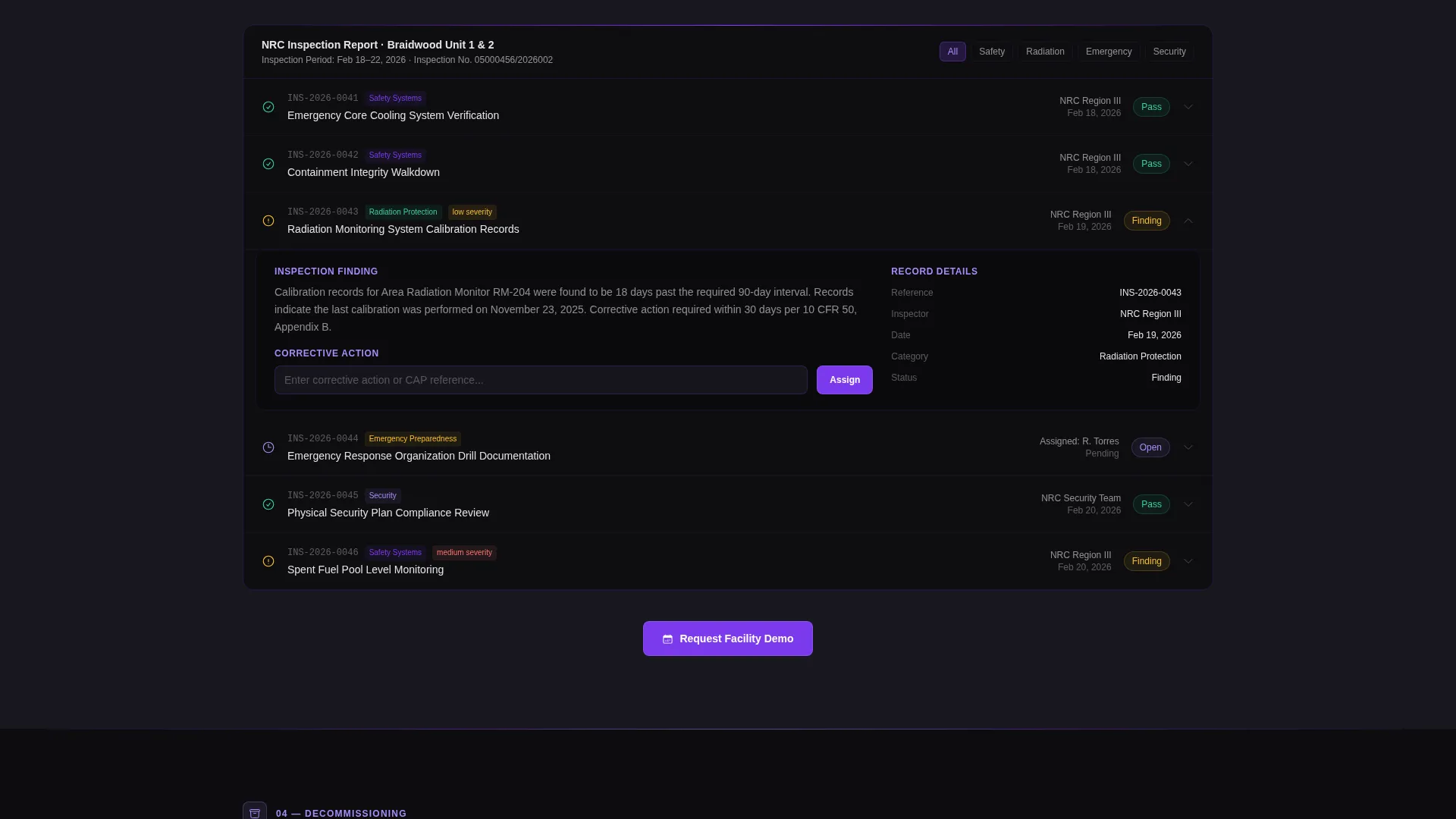
The Inspections section opens a simulated audit record drawer when interacted with. Visitors can explore how inspection data is structured and retrieved. This directly addresses the audit trail needs of decommissioning leads reviewing long-term compliance records.
Three-Step Progressive Lead Form
The primary call to action, "Request Facility Demo," uses a three-step form sequence. Step one captures fleet size, step two captures name and role, and step three captures a work email with domain validation for government and corporate addresses. This staged approach reduces friction while qualifying leads before the first sales call.
Secondary Whitepaper Download Path
A secondary conversion path offers a Nuclear CRM Compliance Whitepaper gated behind email capture only. This path is designed for researchers and analysts who are not yet decision-makers but are influencing a future purchase evaluation.
Page sections overview
| Section | Purpose |
|---|---|
| Full-Bleed Header | Establishes control-room authority with a rotating reactor wireframe and animated headline |
| Anchor Navigation Bar | Provides fixed spoke links for Licensing, Maintenance, Inspections, and Decommissioning |
| Licensing Section | Hosts the draggable compliance timeline interactive with auto-flagging deadlines |
| Maintenance Section | Displays the filterable multi-station asset map with hover-triggered metrics |
| Inspections Section | Opens the simulated audit drawer for inspection record exploration |
| Decommissioning Section | Addresses long-term audit trail use cases for decommissioning leads |
| Demo Request Form | Captures qualified leads via a three-step progressive form sequence |
| Whitepaper Download | Offers secondary email-gated content for researchers and analysts |
Design & branding system
The visual identity follows a Tech Glass theme built on the Void and Violet color system. Every design decision reinforces the feeling of a high-stakes control room operating at full readiness.
- Core palette: absolute void black (#09090B) for backgrounds, deep reactor violet (#7C3AED) for structural elements, phosphor glow (#A78BFA) for hover states and data lines, and containment white (#E4E4E7) for body text on dark fields
- Section dividers are single-pixel violet gradient lines, and interactive elements respond with phosphor glow on contact, like instruments lighting up under touch
- The header uses no photography or stock imagery, only a slowly rotating wireframe mesh of a reactor containment structure rendered in thin violet lines at 40 percent opacity, with vertices pulsing in phosphor glow
Mobile & speed optimization
The template is structured to maintain its interactive depth across different screen sizes without sacrificing the control-room atmosphere that makes the experience compelling.
- The fixed anchor navigation adapts to smaller viewports so spoke links remain reachable during vertical scrolling
- Interactive section components, including the timeline dragger, asset map filters, and audit drawer, are built to function on touch-based devices
- The void-dark background with minimal imagery reduces visual weight, keeping the layout focused and load-ready across connections
How this template helps you convert
This template earns conversions by letting visitors experience the platform before committing to a sales conversation. Every interactive section moves a skeptical buyer closer to a confident request.
- The interactive mini-demos in each spoke section build muscle memory for the real product, making the "Request Facility Demo" call to action feel like a natural next step rather than a cold commitment.
- The three-step progressive form reduces drop-off by asking for low-friction information first, then qualifying role and domain before surfacing the email field, so only relevant leads complete the sequence.
- The secondary whitepaper download captures analysts and researchers who are not yet ready to request a demo, keeping them inside the conversion funnel for a future decision cycle.
Other information about this template
This template is built specifically for the Nuclear Vertical SaaS category within the broader Technology space. It is designed to serve organizations that operate under strict regulatory frameworks and need a CRM presentation that reflects that seriousness.
- The template style is Hub and Spoke with Anchor Navigation, making it well-suited for platforms that offer multiple distinct modules under one product umbrella
- The creative direction is Interactive Explorer, meaning the page is designed to be operated, not just read, rewarding visitors who scroll and click with a deeper product preview at each step
- The header concept is Dark Full-Bleed with Glow, built entirely from geometry and light with no reliance on stock photography
- NuclearCRM is the platform brand this template is built to represent, and the Nucleus template name reflects that positioning directly
Theme
Tech Glass
Creative direction
Interactive Explorer
Color system
Void & Violet
Style
Hub & Spoke (Anchor Nav)
Direction
Lead Generation
Page Sections
Hub-and-spoke Anchor Navigation
Draggable Compliance Timeline
Filterable Multi-station Asset Map
Simulated Audit Record Drawer
Three-step Progressive Lead Form
Gated Whitepaper Download Path
Related questions
Who is this landing page template designed for?
What makes the interactive sections different from a standard feature walkthrough?
How does the three-step lead form work?
What is the secondary whitepaper download path for?
Does the template include the rotating reactor wireframe animation in the header?



