Bento Grid Childcare Team Landing Page Template
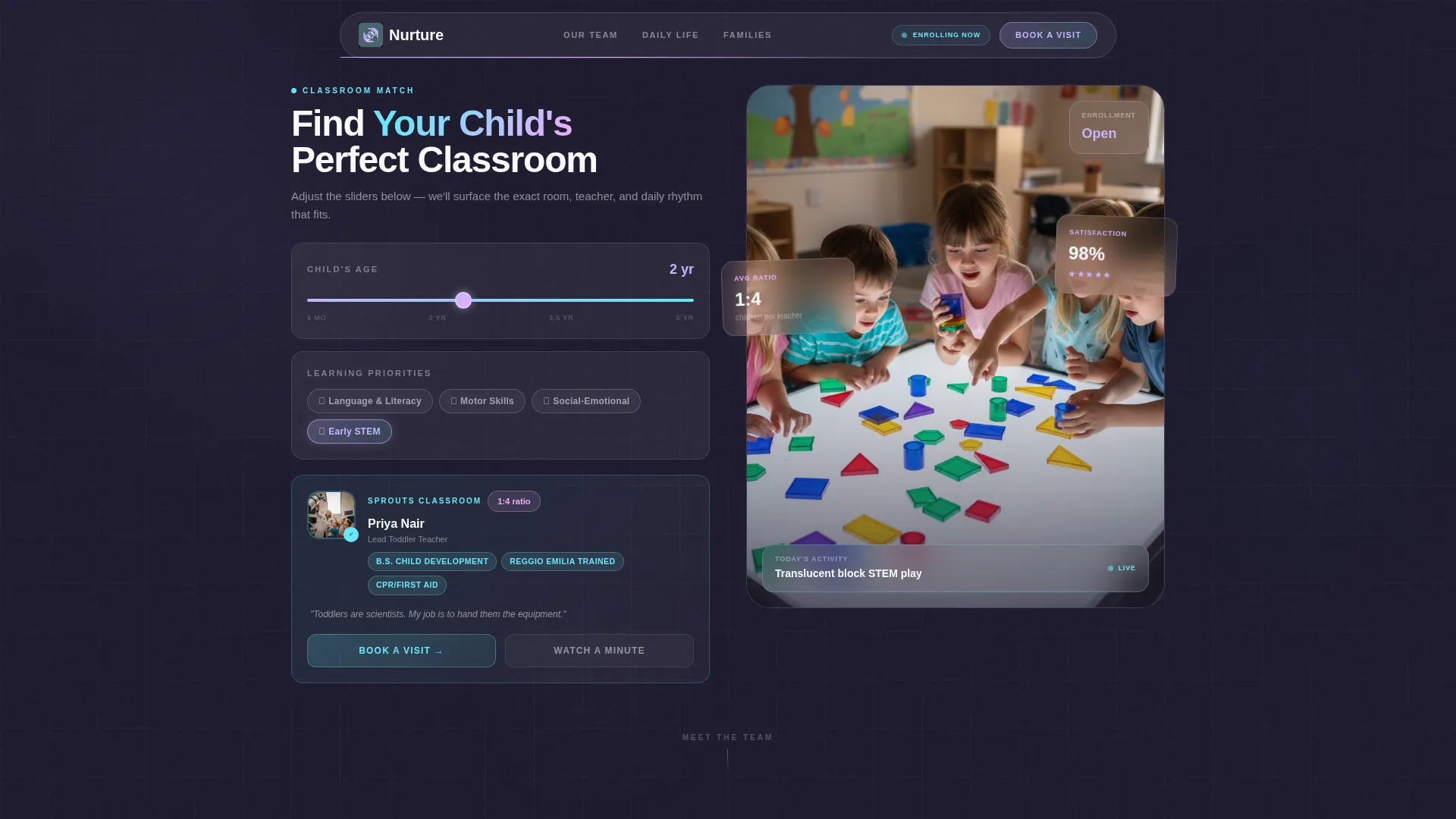
Nurture is a bento grid landing page template built for modern daycare and preschool teams. Its hero features an interactive Classroom Match tool that pairs each child with a teacher and schedule in real time. The frosted-glass, iridescent design speaks directly to tech-savvy parents who expect clarity, warmth, and a reason to book a visit.
by Rocket studio
Quick summary
Nurture is a single-page bento grid template designed for childcare centers serving tech-corridor families. The hero embeds a live Classroom Match tool so parents instantly see their child's matched teacher, ratio, and daily schedule. The page flows from curiosity to commitment, ending at a tour scheduler pre-filled with the matched classroom.
Who this template is for
This template is built for childcare directors and preschool teams who want to present their staff as trusted, credible professionals rather than a flat roster. It suits centers that attract dual-income, tech-savvy families who research carefully before booking a visit.
- Daycare and preschool centers looking to modernize their team page
- Childcare marketing leads who need a click-through landing page that converts parent interest into scheduled tours
- Small preschool teams wanting a visually rich, easy-to-navigate single page that showcases every educator
What problem this template solves
Most childcare team pages feel impersonal. A list of headshots and job titles does not help a parent feel confident. This template closes that gap by turning the staff directory into a curated, personalized experience from the first interaction.
- Parents can not easily picture which teacher will care for their child, creating hesitation before a tour
- Generic contact forms waste parent attention by asking for commitment before giving any value in return
- Flat staff grids fail to communicate credentials, ratios, or the rhythm of a classroom day
What you get with this template
You get a fully structured bento grid landing page with every section, component, and interaction pattern built in. Nothing is left as a wireframe placeholder. The layout is ready to populate with your team's real photos, credentials, and schedules.
- An interactive Classroom Match hero tool with age slider, learning priority toggles, and an instant result card showing teacher photo, credentials, ratio, and sample daily schedule
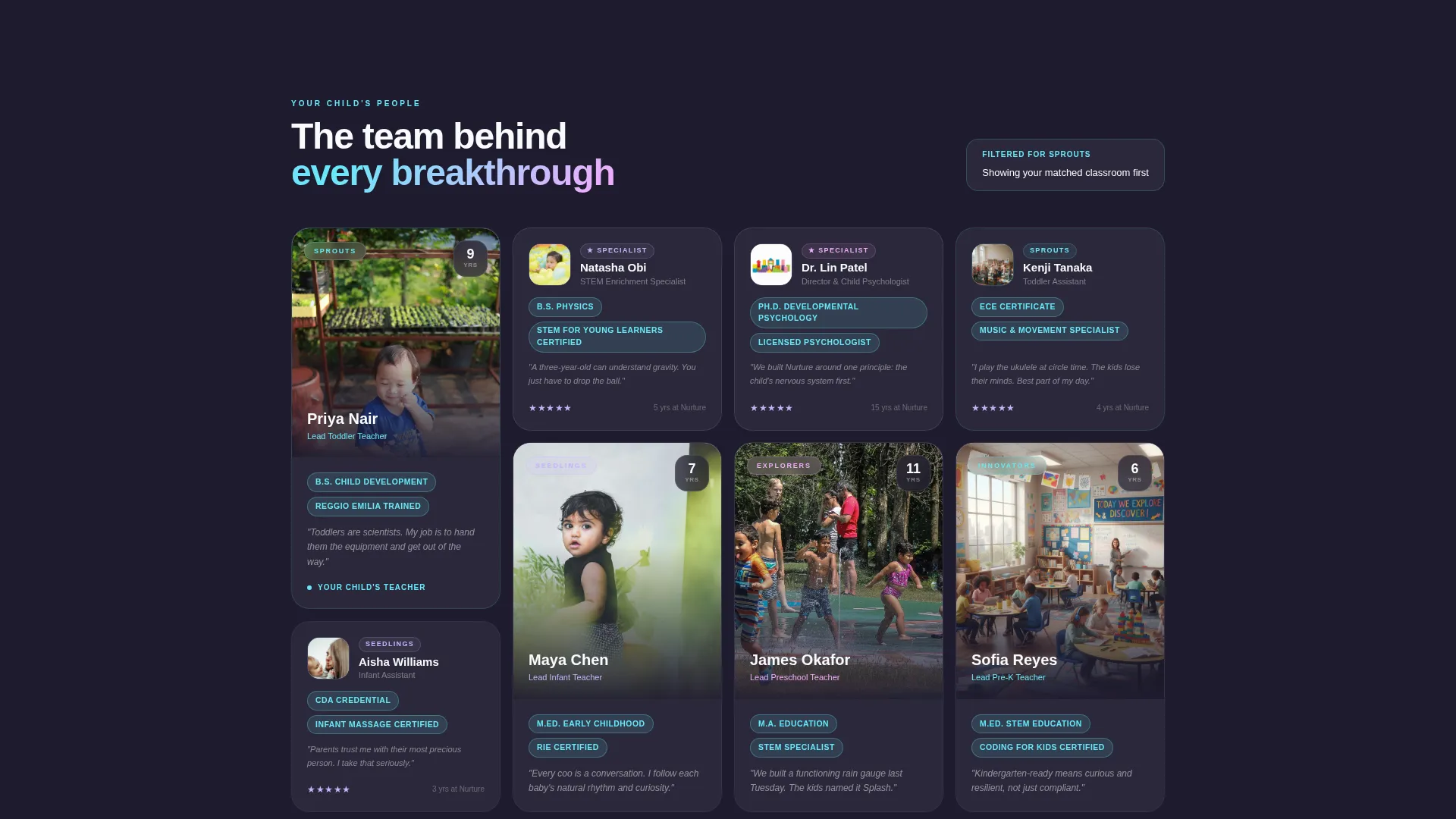
- A dynamic bento grid team section with tall portrait cards for lead teachers, smaller credential-badge cells for assistants, and a classroom-grouped scroll reorganization tied to the match result
- A primary "Book a Visit" call to action inside the result card, a floating frosted-glass scroll button, and a secondary soft-conversion path for a sixty-second recorded classroom walkthrough
Feature list
The template ships with six purpose-built components that work together as a single persuasive page.
Interactive Classroom Match Tool
Parents move a slider from six months to five years, then toggle learning priorities across language, motor skills, social-emotional development, and early STEM. The tool instantly surfaces one matched classroom with the lead teacher's photo, credentials, student-to-teacher ratio, and a sample daily schedule. The frosted-glass result card shifts iridescent at its edges as each selection changes.
Bento Grid Team Layout
Lead teachers occupy tall portrait bento cells with a looping three-second clip from circle time. Assistant teachers and specialists fill smaller square cells, each carrying a credential badge and a single parent-review quote. The grid reorganizes by classroom as parents scroll, so every face connects back to the matched result above.
Persistent Sticky Match Bar
After the hero interaction, the matched classroom and teacher stay visible in a sticky reference bar. The team grid below reads as personally curated rather than a generic directory, reinforcing the sense that "these are your child's people."
Primary and Secondary Conversion Paths
The "Book a Visit" button appears first inside the match result card, then again as a floating frosted-glass button on scroll. Clicking through opens a tour scheduler pre-filled with the matched classroom. A secondary path, "Watch a Live Classroom Minute," captures parent email in exchange for a sixty-second recorded walkthrough, feeding a follow-up nurture sequence.
Tech Glass Frosted-Card Surfaces
Every bento cell uses frosted-glass panel styling with subtle backdrop blur layered over a deep graphite base. Iridescent gradients trace cell borders, and hover states reveal a warm iridescent rose edge, making the interface feel responsive and tactile without distracting from the content.
AI Iridescent Color System
The palette uses soft holographic lilac, shifting aqua, frosted panel white, deep graphite, and warm iridescent rose as a hover accent. The colors feel like light refracting through glass, producing a futuristic yet tender visual mood that fits both the tech-corridor audience and the warmth of a childcare setting.
Page sections overview
| Section | Purpose |
|---|---|
| Classroom Match Hero | Lets parents configure child age and learning priorities to receive an instant matched teacher and classroom result |
| Match Result Card | Displays matched teacher photo, credentials, student-to-teacher ratio, and sample daily schedule with a primary "Book a Visit" call to action |
| Sticky Match Reference Bar | Keeps the matched classroom visible as parents scroll the team grid below |
| Bento Grid Team | Presents lead teachers in tall portrait cells and assistants in smaller square cells, reorganized by classroom on scroll |
| Soft Conversion Path | Offers a sixty-second classroom walkthrough recording in exchange for a parent email address |
| Tour Scheduler | Pre-filled Calendly-style booking interface tied to the matched classroom from the hero tool |
Design & branding system
The visual identity uses a Tech Glass theme built on the AI Iridescent color system. Every surface, edge, and hover state is intentional, creating a page that feels as considered as the curriculum it represents.
- Color palette: soft holographic lilac (#C4B5FD), shifting aqua (#67E8F9), frosted panel white (#F8FAFC), deep graphite (#1E1B2E), and warm iridescent rose (#F0ABFC) reserved for hover states and interactive edges
- Surface treatment: frosted-glass card panels with subtle backdrop blur sit over the deep graphite base, while iridescent gradients trace the border of each bento cell like light leaking through seams
- Interaction mood: the palette and surface language evoke light refracting through a glass prism, futuristic yet tender, clinical in its precision yet full of warmth and color
Mobile & speed optimization
The bento grid layout is structured to reflow cleanly on smaller screens. Parents checking the page between work meetings or during a school pickup will get the same clear, interactive experience as on desktop.
- Bento cells stack and resize gracefully so portrait cards and square cells remain readable on phone screens
- The floating "Book a Visit" button and sticky match bar are designed to stay accessible during mobile scroll without obscuring content
- The Classroom Match tool's slider and toggles are built for touch interaction, keeping the configuration experience smooth on any device
How this template helps you convert
Every section of this template is arranged to reduce parent hesitation and move them toward a scheduled tour without pressure.
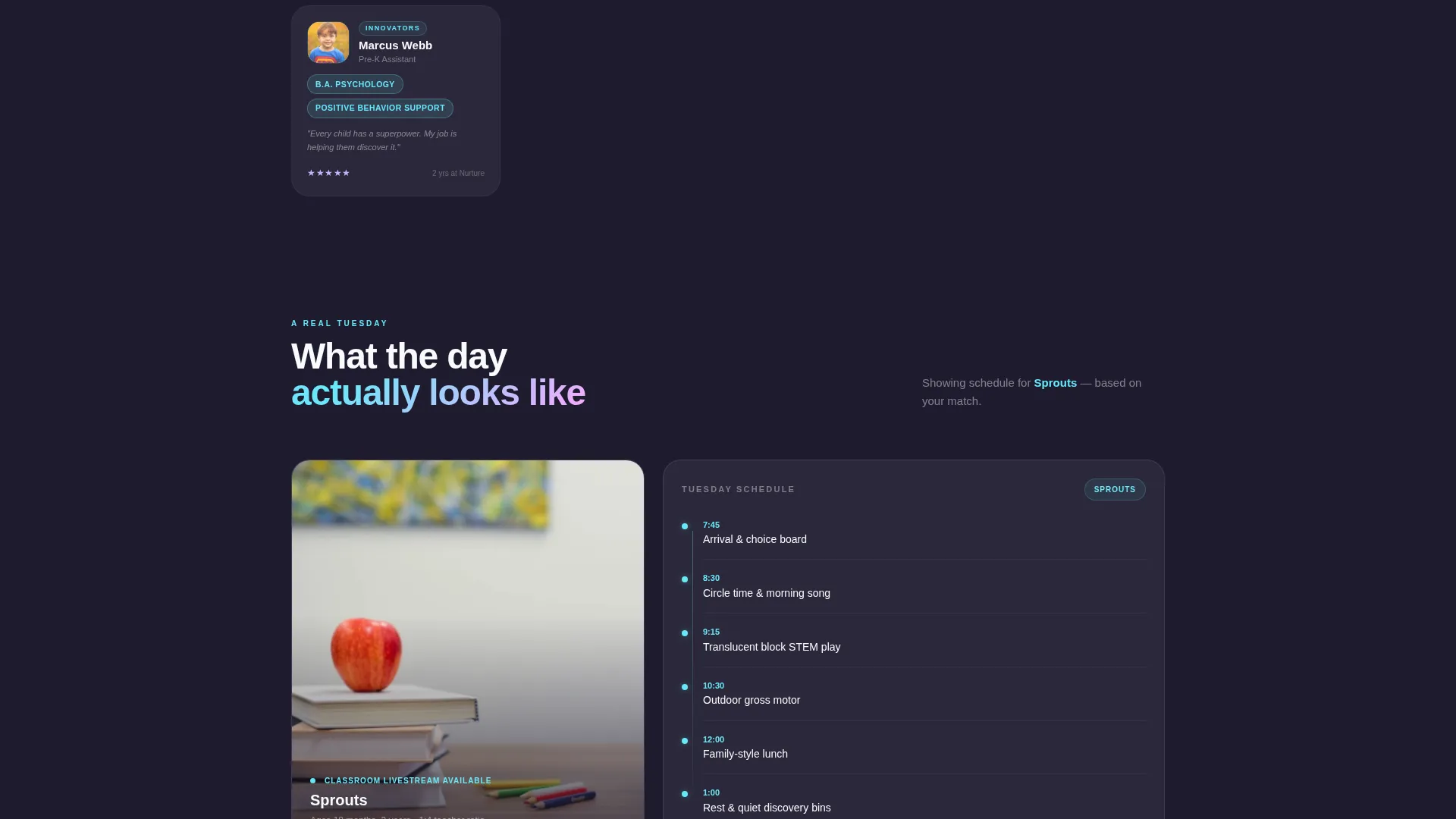
- The Classroom Match tool delivers specific, personal value before any call to action appears, so by the time parents see "Book a Visit" they already know the teacher's name, the classroom ratio, and what Tuesday morning looks like in that room.
- The sticky match bar and grid reorganization keep the result visible throughout the page, making the team feel personally selected rather than generic, which shortens the trust gap that normally delays a booking.
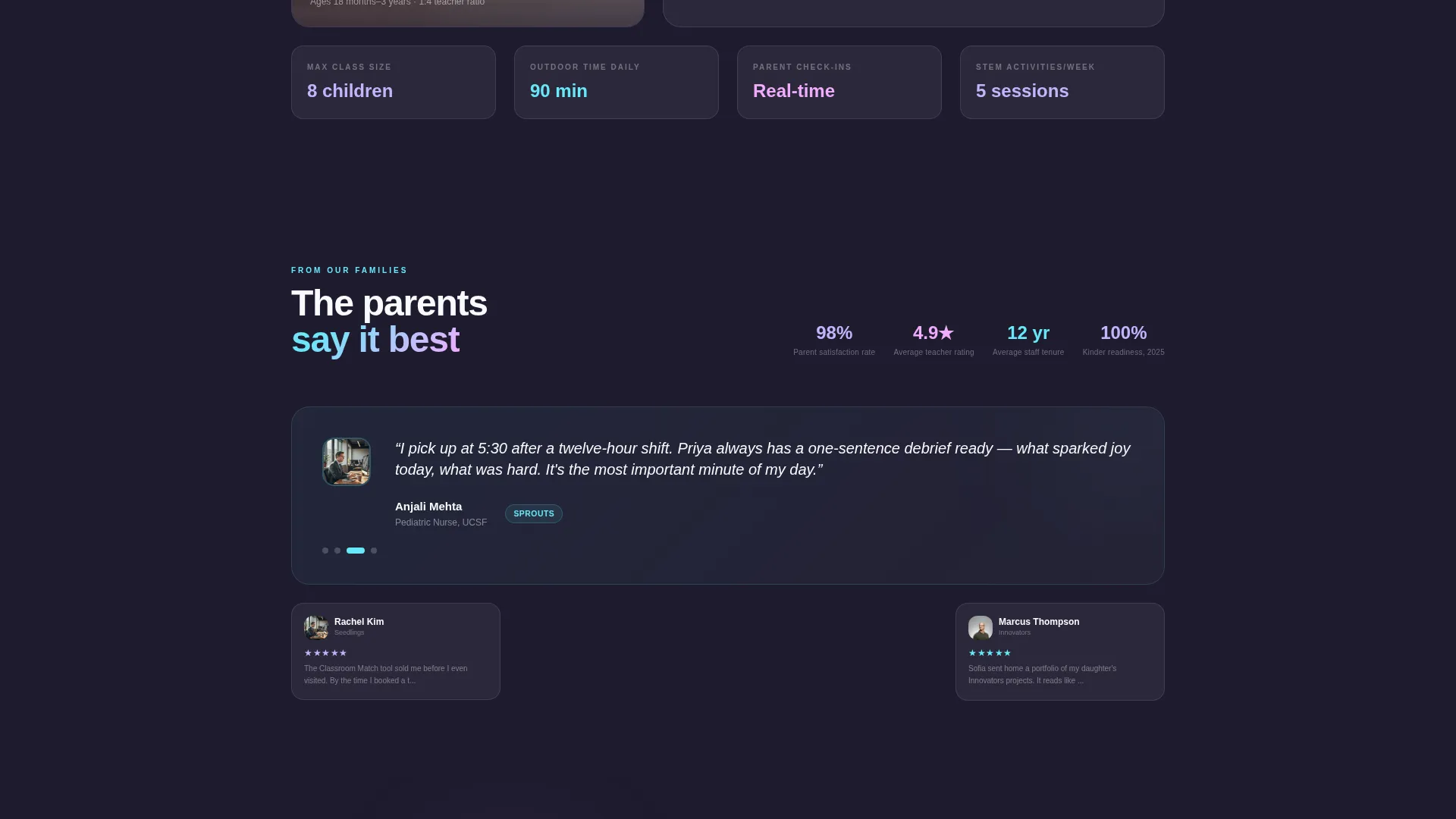
- The soft-conversion path captures undecided parents with a low-commitment sixty-second classroom video, turning a "not yet" into an email address and a follow-up opportunity.
Other information about this template
This template is categorized under Technology and sits within the Daycare and Preschool Website Templates subcategory, specifically targeting the Daycare and Preschool Team Page niche. It carries an intersection match score of 13, indicating a strong alignment between its creative direction, design system, and the niche it serves.
- The Creative Direction is Calculator and Tool First, meaning the interactive Classroom Match tool drives the entire page narrative from the very first section
- The Header Concept is Interactive Preview, placing a functioning configuration tool in the hero rather than a static image or tagline
- The Landing Page Direction is Click-Through, with every section designed to move parents toward the tour scheduler rather than simply inform them
- The Template Style is Bento Grid, which allows cells of varying sizes to give lead teachers more visual weight while keeping the full team present on one scrollable page
- The Theme is Tech Glass and the Color System is AI Iridescent, both of which reinforce the futuristic yet tender brand mood that resonates with families in technology-industry households
Theme
Tech Glass
Creative direction
Calculator/Tool First
Color system
AI Iridescent
Style
Bento Grid
Direction
Click-Through
Page Sections
Interactive Classroom Match Tool
Bento Grid Team Layout
Persistent Sticky Match Bar
Dual Conversion Path Design
Tech Glass Frosted-card Surfaces
AI Iridescent Color System
Related questions
Can I replace the sample teacher photos and credentials with my own team's content?
Does the Classroom Match tool require a developer to set up?
How does the soft-conversion path work for undecided parents?
Is the bento grid layout suitable for a small team with only a few teachers?
Can I use this template if my childcare center does not focus on STEM?



