Quality Preschool Landing Page Template
Enroll is a single-page daycare and preschool landing page template built around structured comparison tables, a frosted-glass hero header, and a trust-first layout. It helps childcare programs turn late-night parent searches into booked visits, with a progressive booking form, a gated handbook download, and live availability indicators organized by age group.
by Rocket studio
Quick summary
Enroll is a comparison-table landing page template designed for daycare and preschool programs. It leads with operational credibility, licensed status, hours, and age range, before asking for anything. Parents get the full picture fast: ratios, schedules, curriculum, and tuition, all organized in scannable side-by-side tables that make the decision easier.
Who this template is for
This template is built for childcare operators who need a page that works as hard as their staff does. It suits programs that want to convert online research into scheduled tours without a phone call.
- Independent daycare centers and preschool programs seeking more enrollment inquiries
- Multi-room childcare facilities with distinct infant, toddler, and pre-K offerings to compare
- Relocating families or dual-income households on tight decision timelines who need clear, immediate answers
What problem this template solves
Most childcare pages make parents work too hard. They bury ratios, hide tuition ranges, and force a phone call before sharing basic facts. Enroll flips that sequence: lead with data, earn the click later.
- Parents researching late at night need fast, specific answers, not vague taglines or generic photos
- Programs with multiple age groups struggle to present curriculum and ratio differences clearly in one view
- Facilities lose warm leads from visitors who are not ready to call but would happily download a handbook or check availability
What you get with this template
You get a fully structured single-page layout that walks a prospective parent from first glance to form submission. Every section is purposeful and sequenced for trust-building before conversion.
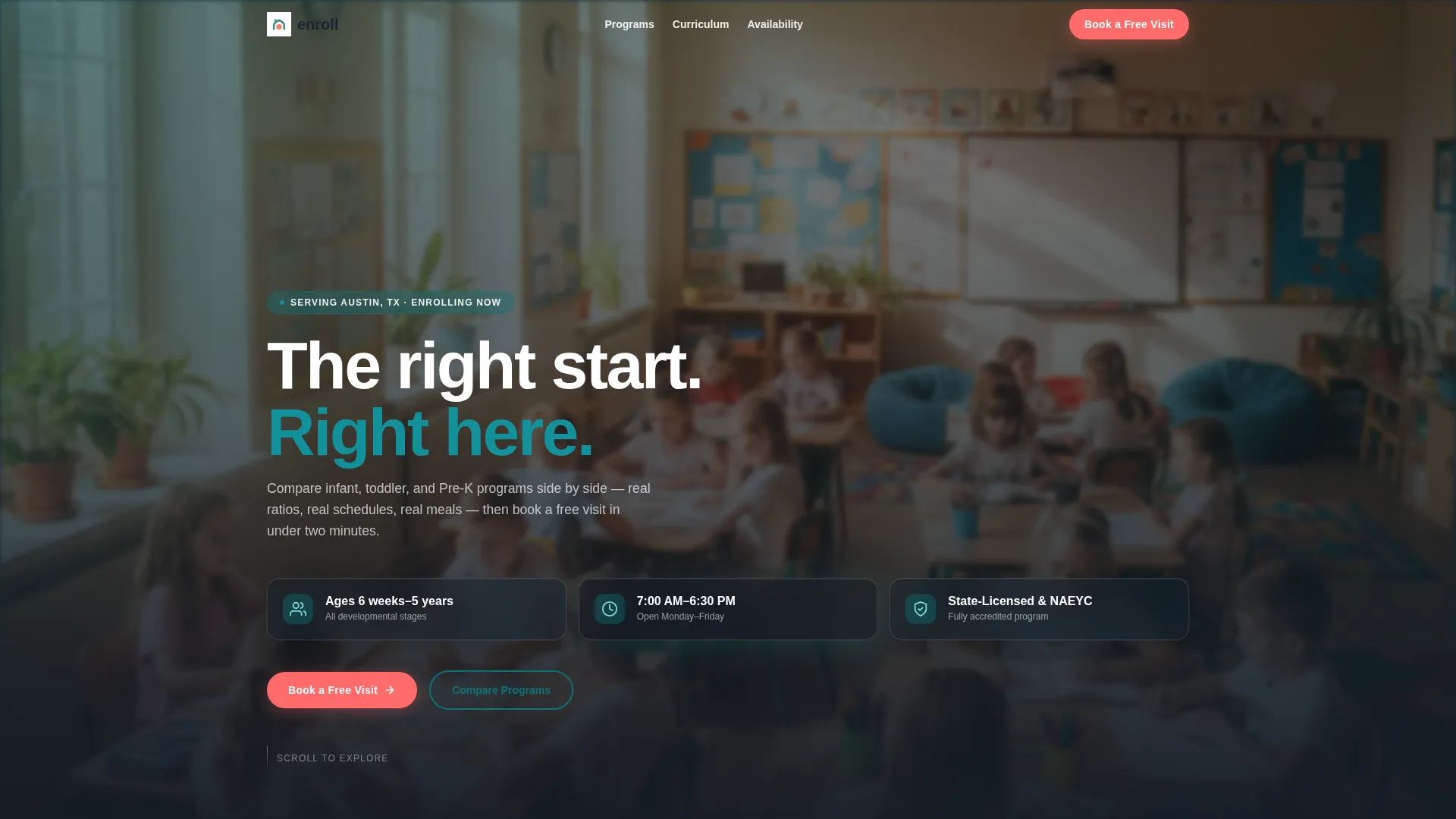
- A frosted-glass hero header with three credential panels showing age range, operating hours, and accreditation status
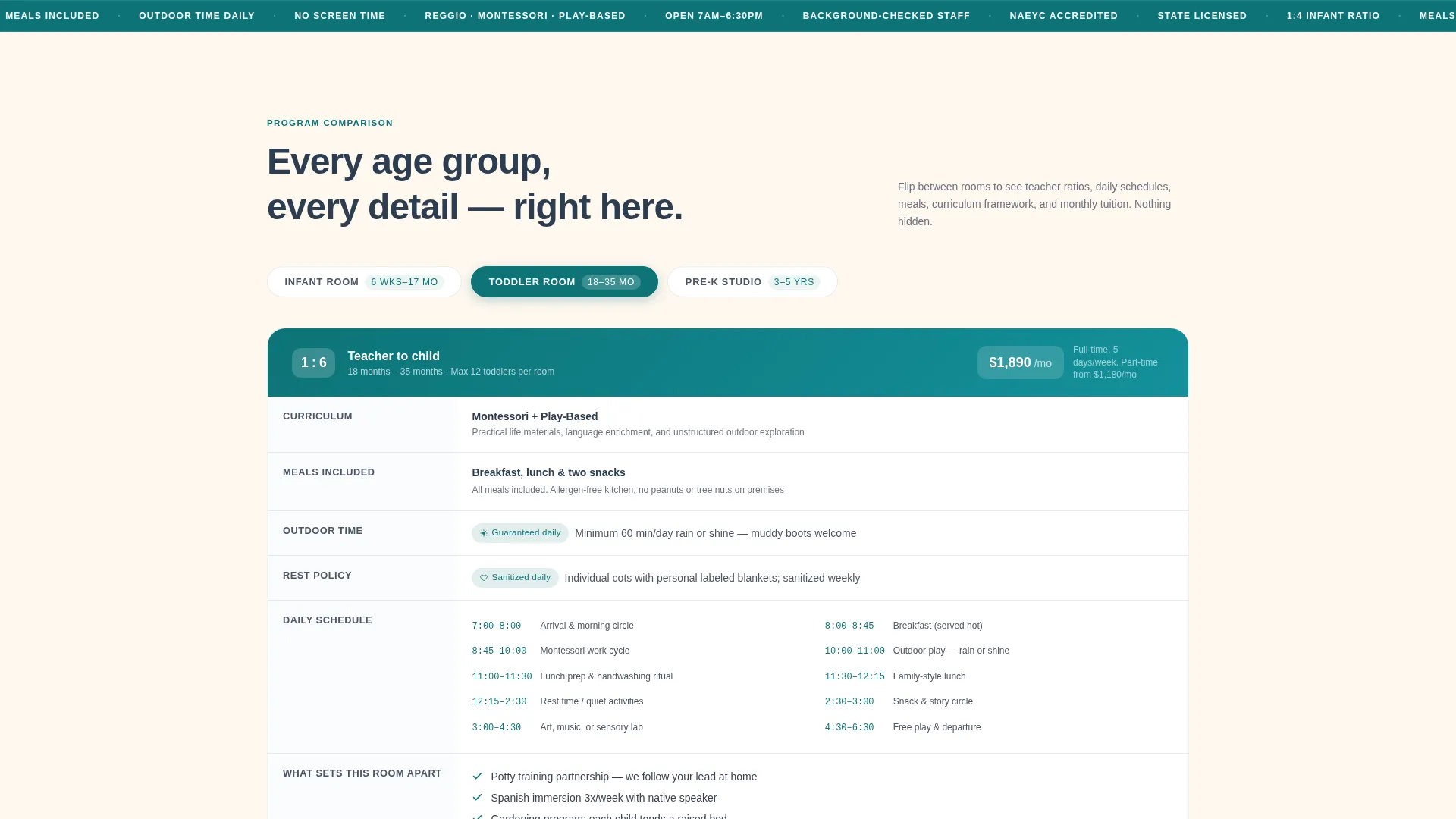
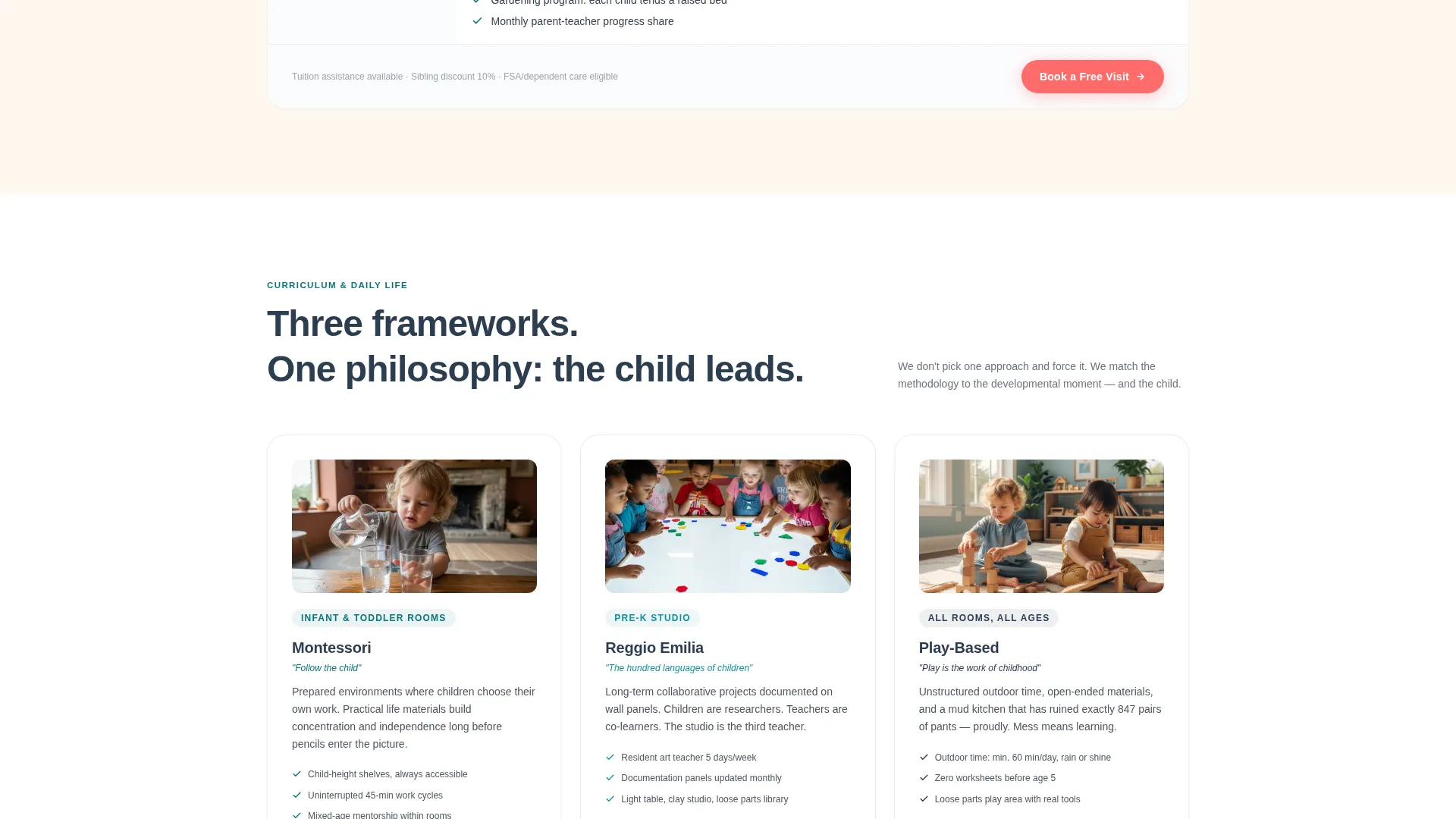
- Side-by-side comparison tables covering infant, toddler, and pre-K programs with ratios, schedules, meal plans, curriculum frameworks, and tuition tiers
- A three-step progressive booking form, a gated parent handbook download, and a live availability calendar with open-spot indicators by age group
Feature list
This template includes several purpose-built components. Each one is designed around how parents actually research and choose a childcare program.
Frosted-Glass Hero Header
Three translucent dark-glass panels float over a softly blurred classroom background. Each panel displays one key credential in large type: ages served, daily operating hours, and licensing and accreditation status. The layout communicates operational trustworthiness in under two seconds.
Age-Group Comparison Tables
Side-by-side tables compare the infant, toddler, and pre-K programs across teacher-to-child ratios, daily schedule breakdowns, meal plans, curriculum frameworks, and tuition tiers. Micro-detail rows signal genuine care, with specifics like nap mat sanitation notes and minimum outdoor time per day.
Progressive Three-Step Booking Form
The primary call to action opens a three-step form that reduces friction by asking one thing at a time. Step one collects the child's birthdate and needed start date. Step two asks for parent name and zip code. Step three presents an inline calendar picker for selecting a preferred visit day.
Gated Parent Handbook Download
A secondary conversion path offers a downloadable parent handbook in exchange for an email address alone. This captures research-phase leads who are not yet ready to schedule a tour but are actively comparing programs.
Live Availability Calendar
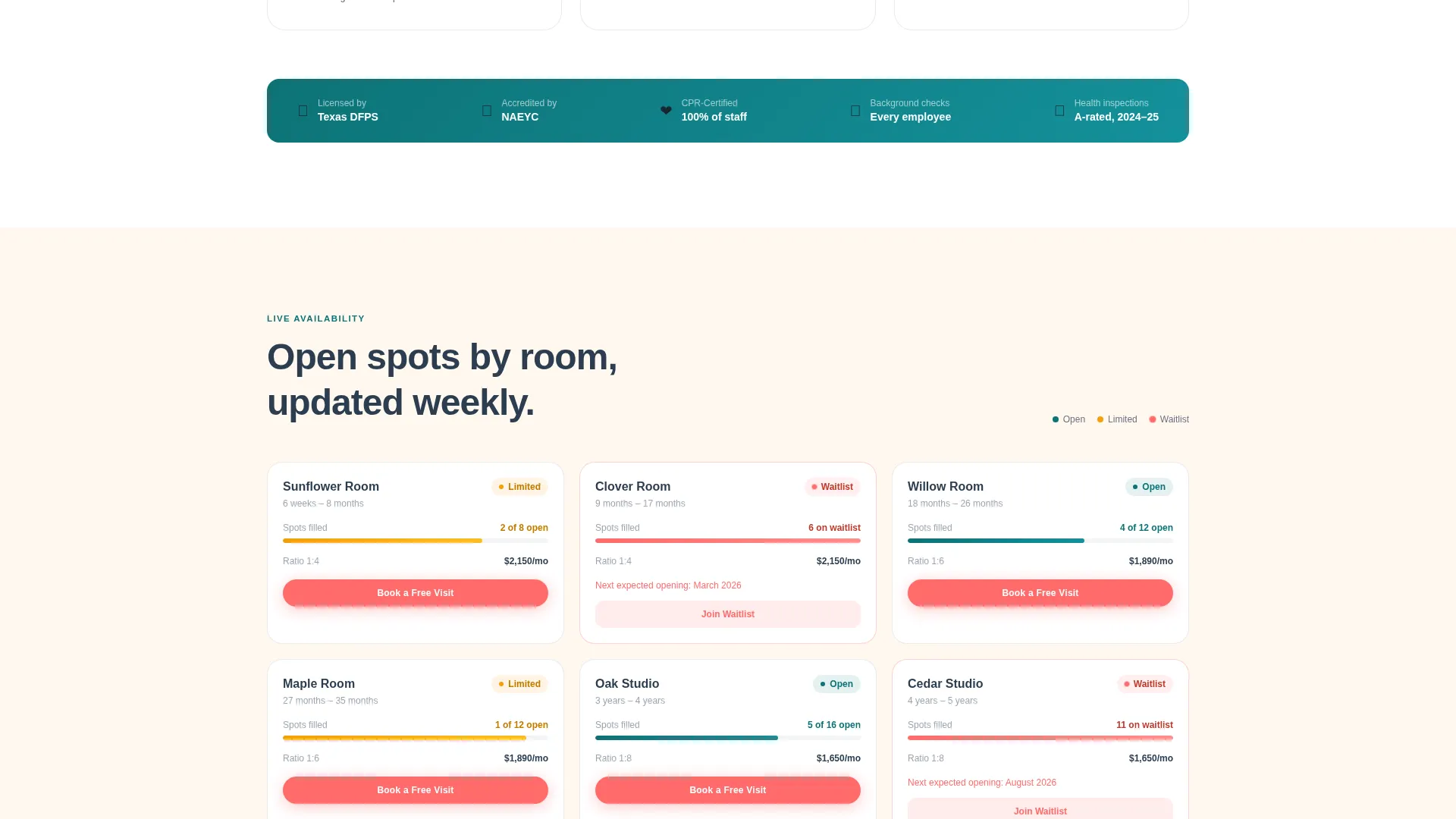
An embedded availability calendar shows open spots by age group. Waitlisted rooms display pulsing coral badges, giving parents real-time context about demand and urgency without requiring a phone call.
Neighborhood Map with Drive-Time Radii
A map section shows the facility location with drive-time radii overlaid. Relocating families and commuting parents can instantly assess whether the program fits their daily route before investing time in a visit.
Page sections overview
| Section | Purpose |
|---|---|
| Hero Header Panels | Display key credentials at a glance |
| Infant Program Table | Compare ratios, schedule, and tuition |
| Toddler Program Table | Compare ratios, curriculum, and meals |
| Pre-K Program Table | Compare ratios, outdoor time, and cost |
| Virtual Classroom Tour | Embedded video walkthrough of the space |
| Neighborhood Map | Show location with drive-time overlays |
| Availability Calendar | Show open spots and waitlist status |
| Book a Free Visit | Three-step progressive booking form |
| Parent Handbook Download | Gated email lead capture for PDF |
| Sticky Mobile Bar | Persistent booking call to action on mobile devices |
Design & branding system
The visual identity follows a Directory and Discovery theme using the Teal Catalyst color system. The palette feels warm and grounded, like a well-loved children's book with matte pages and rounded corners.
- Core colors include deep nursery teal (#0D7377), soft chalkboard slate (#2C3E50), and warm blanket cream (#FFF8F0) for all primary layouts and content areas
- Catalyst coral (#FF6B6B) is reserved exclusively for calls to action and interactive highlights, including the booking button, coral availability badges, and hover states
- The frosted-glass header panels carry a faint teal gradient at their edges, tying the header visually to the overall palette without competing with content
Mobile & speed optimization
The layout is built with mobile parents in mind. Someone checking options on a phone during a lunch break should reach the booking form just as easily as someone on a desktop at midnight.
- A sticky mobile bar keeps the "Book a Free Visit" call to action visible at all times during scroll on smaller screens
- Comparison tables are structured to remain readable on narrow viewports without losing the side-by-side context that makes them useful
How this template helps you convert
Enroll is built on a freemium and trial model reframed for childcare. The page earns trust with data before asking for any contact information.
- The comparison tables and credential panels do the convincing first. By the time a parent reaches a call-to-action button, they already know ratios, costs, and curriculum details, making the decision to book feel low-risk.
- Two conversion paths serve different parent readiness levels. The "Book a Free Visit" form captures parents ready to act now. The handbook download captures parents still in the research phase, turning a passive visitor into a named lead with a single email address.
Other information about this template
This template sits within the Daycare and Preschool Website Templates subcategory and is specifically designed for lead capture in the childcare niche. A few additional details worth noting before you get started:
- The template style is a Comparison Table layout, making it particularly effective for programs with multiple age-group tiers or curriculum tracks to differentiate
- The header concept uses Dark Glass Panels over a blurred classroom background, deliberately avoiding stock photography of children to keep the visual feel personal and imagination-led
- The creative direction follows a Spec Sheet approach, meaning the scroll experience is designed to feel like flipping through a program brochure at an open house
- The lp direction is Freemium and Trial, structuring the page so visitors receive full program information before any form or gate appears
- The theme is Directory and Discovery, which means the layout prioritizes findability, comparison, and clear program differentiation over brand storytelling
Theme
Directory & Discovery
Creative direction
Spec Sheet
Color system
Teal Catalyst
Style
Comparison Table
Direction
Freemium/Trial
Page Sections
Frosted-glass Hero Header
Age-group Comparison Tables
Progressive Three-step Booking Form
Gated Parent Handbook Download
Live Availability Calendar
Neighborhood Map with Drive-time Radii
Related questions
Can I customize the comparison table columns for my program?
Does the booking form require a third-party tool to work?
Is this template suitable for a single-room daycare with one age group?
What makes the availability calendar section work?
Can I use this template if my program is not yet accredited?



