Preschool Comparison Landing Page Template
Nurture is a data-driven preschool landing page template built for daycare providers who want to win over research-minded parents. A Feature Tab Switcher, Stats-First scroll rhythm, and a nine-metric comparison table work together to surface every number a skeptical parent needs. One clear call to action moves visitors straight from browsing to tour booking.
by Rocket studio
Quick summary
Nurture is a single-page preschool template designed around one goal: turning a parent's research session into a scheduled tour. It opens with a Feature Tab Switcher covering curriculum, safety, and daily schedule data. A Stats-First scroll pattern delivers oversized numbers before context, and a comparison table lets parents weigh this school against industry averages across nine honest metrics.
Who this template is for
This template is built for preschool directors, daycare owners, and early childhood education providers who need to convert cautious, comparison-shopping parents. It suits programs that have real numbers to show and want their website to reflect that confidence.
- Daycare and preschool owners who compete in search-heavy local markets
- Early childhood education centers ready to lead with transparency and data
- Admissions teams looking to reduce back-and-forth by answering every parent question upfront
What problem this template solves
Most preschool websites bury the details parents actually want. Ratios hide in PDFs. Tuition lives behind a contact form. Safety credentials appear nowhere at all. That silence makes already anxious parents click away to a competitor.
- Parents comparison-shopping across multiple tabs need numbers, not paragraphs
- Busy families need a single page that answers every critical question without a phone call
- Programs with strong stats lose enrollments simply because their site never shows those stats
What you get with this template
You get a fully structured, single-page layout built to present a preschool's full value in one confident scroll. Every section is designed to reward skeptical readers with specifics rather than reassurances.
- A Feature Tab Switcher header with three data panels: Curriculum, Safety, and Daily Schedule
- A Stats-First scroll rhythm with oversized hero numbers followed by comparison tables across nine program metrics
- A Click-Through call-to-action system linking directly to a calendar, with a secondary email-capture text link
Feature list
This template's layout earns parent trust through deliberate structure and visible data. Each component below is included in the template as described in the source design brief.
Feature Tab Switcher Header
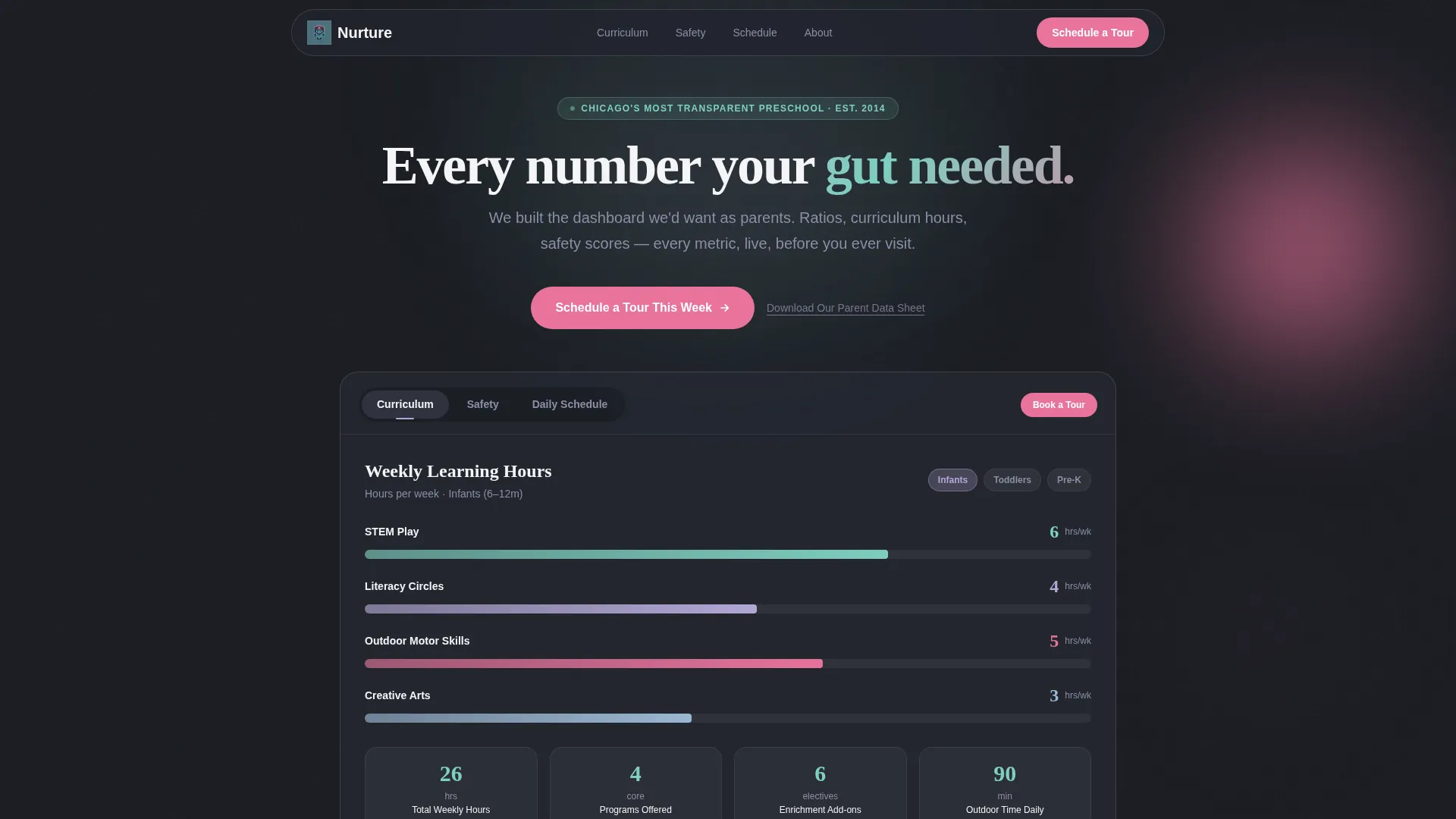
The header contains three clickable tabs labeled "Curriculum," "Safety," and "Daily Schedule." Each tab reveals its own data panel. The default Curriculum tab shows a horizontal bar chart of weekly hours split across STEM play, literacy circles, outdoor motor skills, and creative arts, complete with real hour values and age-group filters. The Safety tab surfaces staff-to-child ratios, camera coverage details, and licensing scores. The Daily Schedule tab renders a visual timeline from 7:00 AM to 6:00 PM using color-coded time blocks.
Nine-Metric Comparison Table
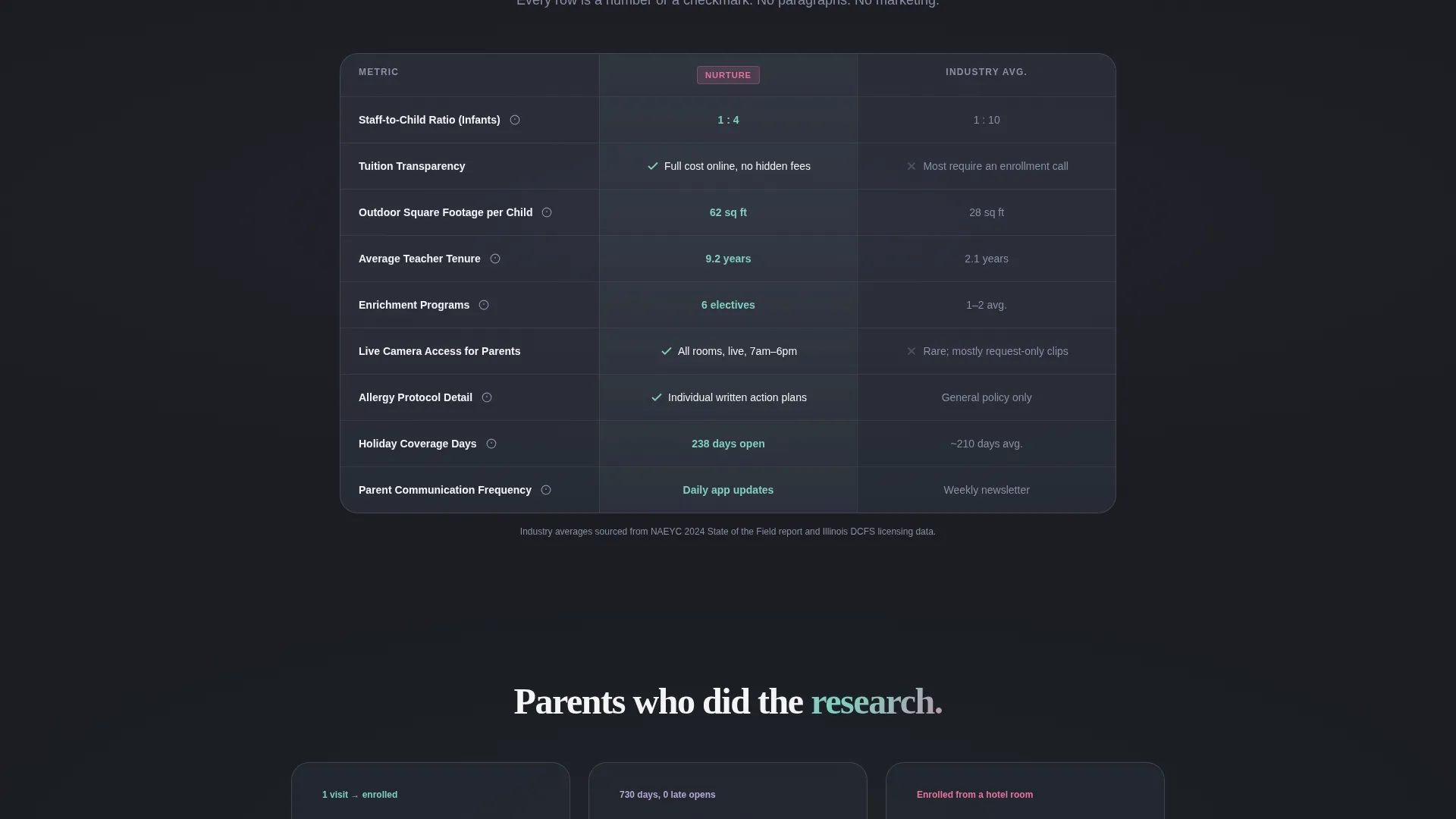
The template includes a stacked comparison table that lets parents measure this preschool against industry averages. Metrics covered include staff-to-child ratio, tuition transparency, outdoor square footage per child, teacher tenure, enrichment programs, camera access, allergy protocol detail, holiday coverage days, and parent communication frequency. Every row uses a checkmark or a number rather than a paragraph.
Stats-First Scroll Pattern
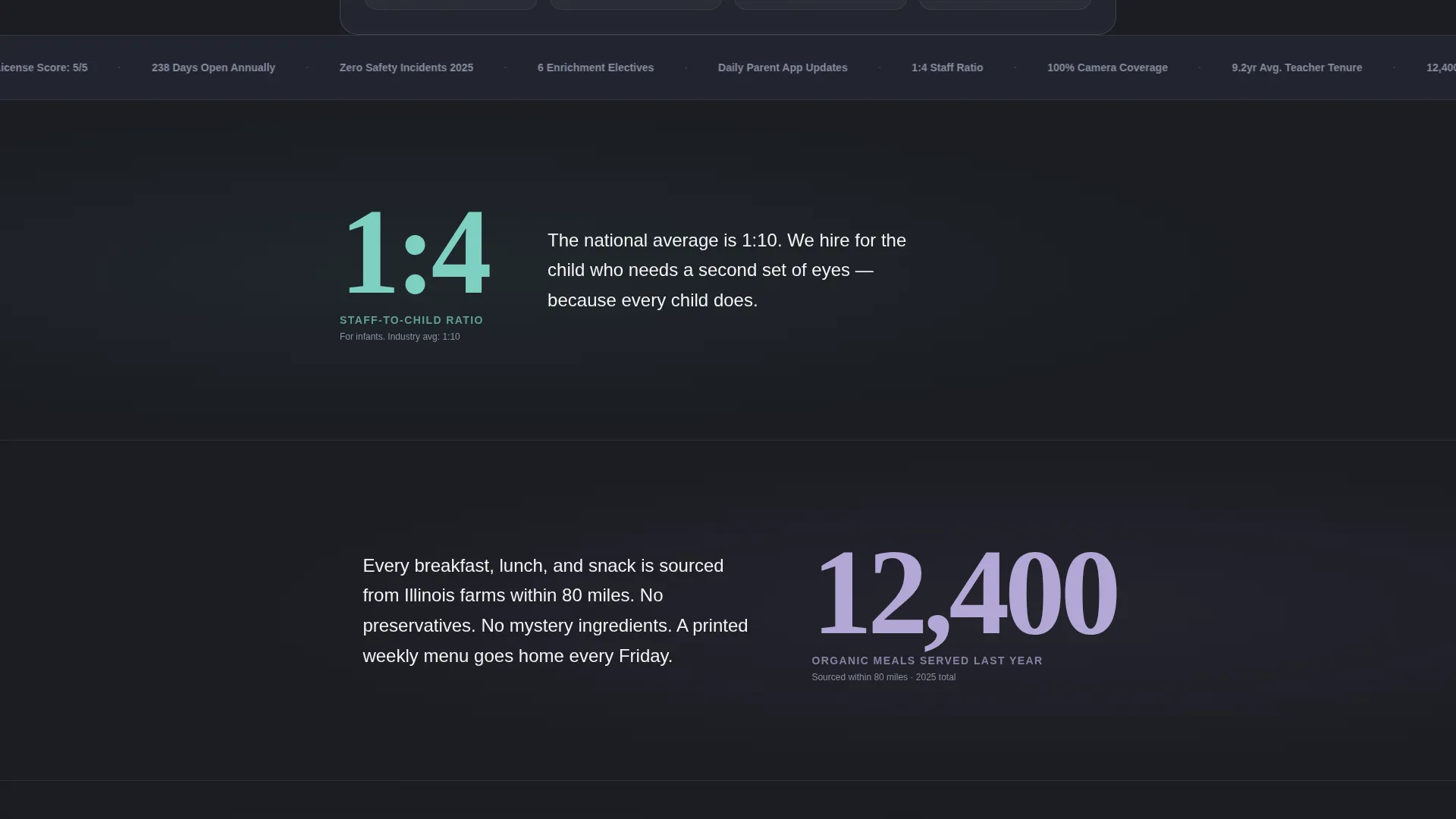
Each major section opens with a single oversized number that fills the viewport before any explanation appears. For example, "1:4" leads the staff ratio section, and "12,400" introduces the meals section. This rhythm is designed to stop the scroll, create a moment of recognition, then reward it with context.
Click-Through Call-to-Action System
The primary call to action reads "Schedule a Tour This Week" and appears in three positions: inside the header tabs, as a sticky bottom bar on mobile, and as a full-width block after the final comparison table. No form lives on this page. Every click routes to a calendar picker. A secondary text link, "Download Our Parent Data Sheet," captures email addresses for parents not yet ready to visit.
AI Iridescent Visual System
The color palette uses deep graphite as the primary background, holographic lavender for highlighted table rows and hover states, soft iridescent teal on key stat callouts, and warm signal pink exclusively on calls to action and trust badges. Iridescent gradients shimmer behind comparison columns to suggest quiet intelligence at work.
Page sections overview
| Section | Purpose |
|---|---|
| Feature Tab Switcher | Present curriculum, safety, and schedule data in three switchable panels |
| Curriculum Tab Panel | Show weekly hour breakdown by subject area with age-group filters |
| Safety Tab Panel | Display staff ratios, camera coverage stats, and licensing scores |
| Daily Schedule Panel | Render a color-coded visual timeline from 7:00 AM to 6:00 PM |
| Stats-First Hero Block | Open each section with an oversized number before context arrives |
| Comparison Table Stack | Let parents compare nine program metrics against industry averages |
| Primary call to action Block | Drive tour bookings with a full-width warm signal pink button |
| Sticky Mobile Bar | Keep the tour call to action visible as a fixed bottom bar on mobile screens |
| Secondary Capture Link | Offer a parent data sheet download for email capture below the main call to action |
Design & branding system
The visual identity follows a Data Command theme using an AI Iridescent color system. The palette is clinical enough to signal trust and luminous enough to feel warm. White text sits clean against dark panels while iridescent gradients shift subtly behind comparison columns.
- Deep graphite (#1B1D23) background, holographic lavender (#B4A7D6) for table row highlights and hover states, soft iridescent teal (#7ECFC0) on stat callouts
- Warm signal pink (#E8739A) used exclusively on calls to action and trust badges; off-white (#F4F4F6) for body text
- Iridescent gradient shimmer behind comparison columns reinforces the sense of intelligent, data-backed presentation
Mobile & speed optimization
The template is structured with mobile parent behavior in mind. Parents researching preschools often browse during short windows, on a phone, under time pressure.
- The sticky bottom bar keeps "Schedule a Tour This Week" reachable without scrolling back to the top
- The tab switcher and comparison table are laid out to remain scannable on smaller screens
- Oversized stat blocks are designed to read clearly at a glance even on compact viewports
How this template helps you convert
Every layout decision in this template is pointed at one outcome: a parent clicking to book a tour. The page removes friction at every step.
- The Feature Tab Switcher answers the three questions parents ask first, curriculum depth, safety protocols, and daily routine, before they have to hunt for them.
- The Stats-First scroll pattern creates momentum by leading with a number that stops the scroll, then delivering the context that earns trust.
- The three-position call-to-action placement ensures the tour booking prompt is always one tap away, whether a parent is in the header, mid-scroll, or at the bottom of the page.
Other information about this template
This template sits within the Daycare and Preschool Website Templates subcategory and is designed specifically for the Daycare and Preschool Portfolio Page niche. It is categorized under Technology, reflecting its data-forward presentation approach. The template style is Comparison Table, the creative direction is Stats-First Impact, and the landing page direction is Click-Through, all drawn from the matched intersection context.
- Template style: Comparison Table with a Click-Through landing page direction
- Theme: Data Command with an AI Iridescent color system
- Header concept: Feature Tab Switcher with three data-rich panels
- Niche alignment: Daycare and Preschool Portfolio Page within Daycare and Preschool Website Templates

Theme
Data Command
Creative direction
Stats-First Impact
Color system
AI Iridescent
Style
Comparison Table
Direction
Click-Through
Page Sections
Feature Tab Switcher Header
Nine-metric Comparison Table
Stats-first Scroll Rhythm
Click-through Call to Action System
AI Iridescent Color System
Related questions
Does this template include a contact form?
Can I update the comparison table with my program's real numbers?
How does the Feature Tab Switcher work for visitors?
Is this template a good fit for a small or home-based daycare?
Where does the tour booking call to action appear on the page?



