Specialist Fleet & Transportation Management Cost Estimator Website Template
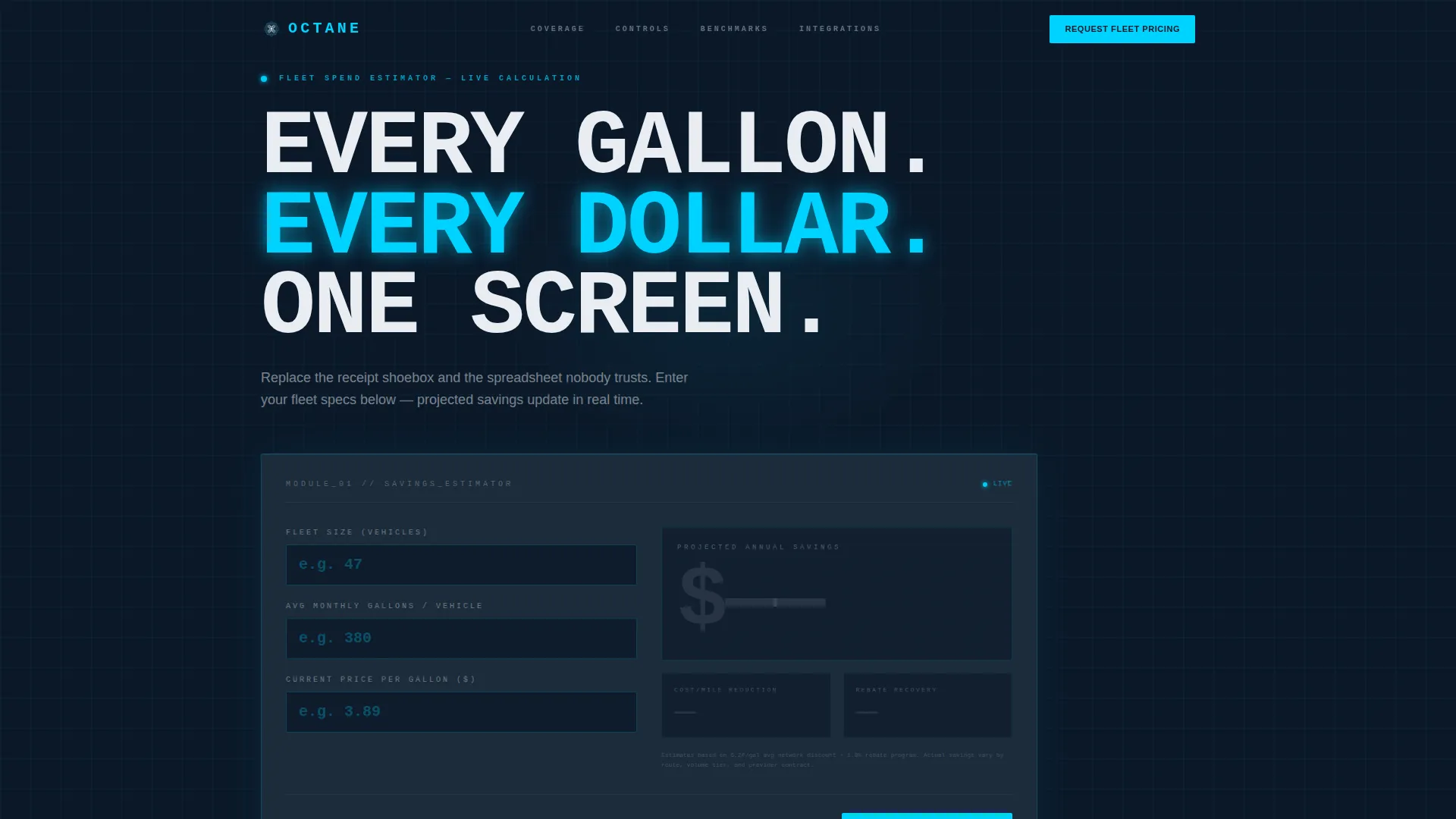
Octane is a fleet fuel management landing page template built for logistics-focused B2B platforms. It opens with a live fuel-spend calculator above the fold and flows through data-module sections covering card network coverage, fraud controls, fuel economy benchmarks, and integration compatibility. The design follows an Engineering Blueprint command-center aesthetic in dark navy, charcoal, and cyan.
by Rocket studio
Quick summary
Octane is a single-page, dashboard-style template for fleet fuel management platforms targeting logistics directors, fleet managers, and CFOs. A working fuel-spend calculator sits above the fold, and every scroll section reads like a technical data sheet, precise metrics, labeled modules, and a clear dual-path conversion flow built for B2B fleet pricing conversations.
Who this template is for
This template is built for B2B SaaS companies and platform operators in the fleet fuel management space. It speaks directly to buyers who run numbers before they talk to sales.
- Logistics directors managing regional fleets of 40 to 200 trucks
- CFOs at mid-market distributors tracking fuel budget overruns
- Owner-operators and fleet managers evaluating fuel card platforms
What problem this template solves
Fleet fuel spending is hard to control when data lives across receipts, spreadsheets, and disconnected systems. Buyers in this space need proof before they commit to a demo call. This template replaces vague marketing copy with structured, evidence-first presentation.
- No credible way to show projected savings before asking for contact details
- Fragmented page layouts that fail to communicate platform depth to technical evaluators
- Missing a secondary conversion path for buyers who need spec verification before engaging sales
What you get with this template
You get a fully structured, single-page layout that moves a fleet buyer from curiosity to conversion. Every section is a discrete data module. Every claim has a number behind it.
- A live fuel-spend calculator with odometer-style savings output above the fold
- Five data-module scroll sections covering coverage, fraud controls, benchmarks, integrations, and dual calls to action
- Two conversion paths: a fleet pricing intake form and a gated spec sheet download
Feature list
This template includes the following built-in features and design capabilities.
Live Fuel-Spend Calculator
Three input fields sit above the fold: fleet size, average monthly gallons, and current price per gallon. Results display projected annual savings, cost-per-mile reduction, and rebate recovery as cyan odometer figures that count upward on entry. The calculator earns visitor trust before asking for any contact information.
Odometer Animation and Scroll Reveals
Metric figures use a count-up animation styled like readings on a fuel management terminal. Subsequent data modules trigger scroll-activated reveals. This pacing reinforces the spec-sheet experience and keeps visitors engaged through each section.
Blueprint Grid Overlay
A thin technical grid overlays the hero background, reinforcing an engineering infrastructure aesthetic. The visual treatment signals precision and separates the template from generic SaaS marketing layouts.
Dual Conversion Path Layout
The primary call to action is "Request Fleet Pricing," anchored to a short intake form with company name, fleet size range dropdown, current fuel card provider, and work email. A secondary path offers "Download the Integration Spec Sheet" gated behind email only, capturing technical evaluators who are not ready for a sales conversation.
Data Module Section Architecture
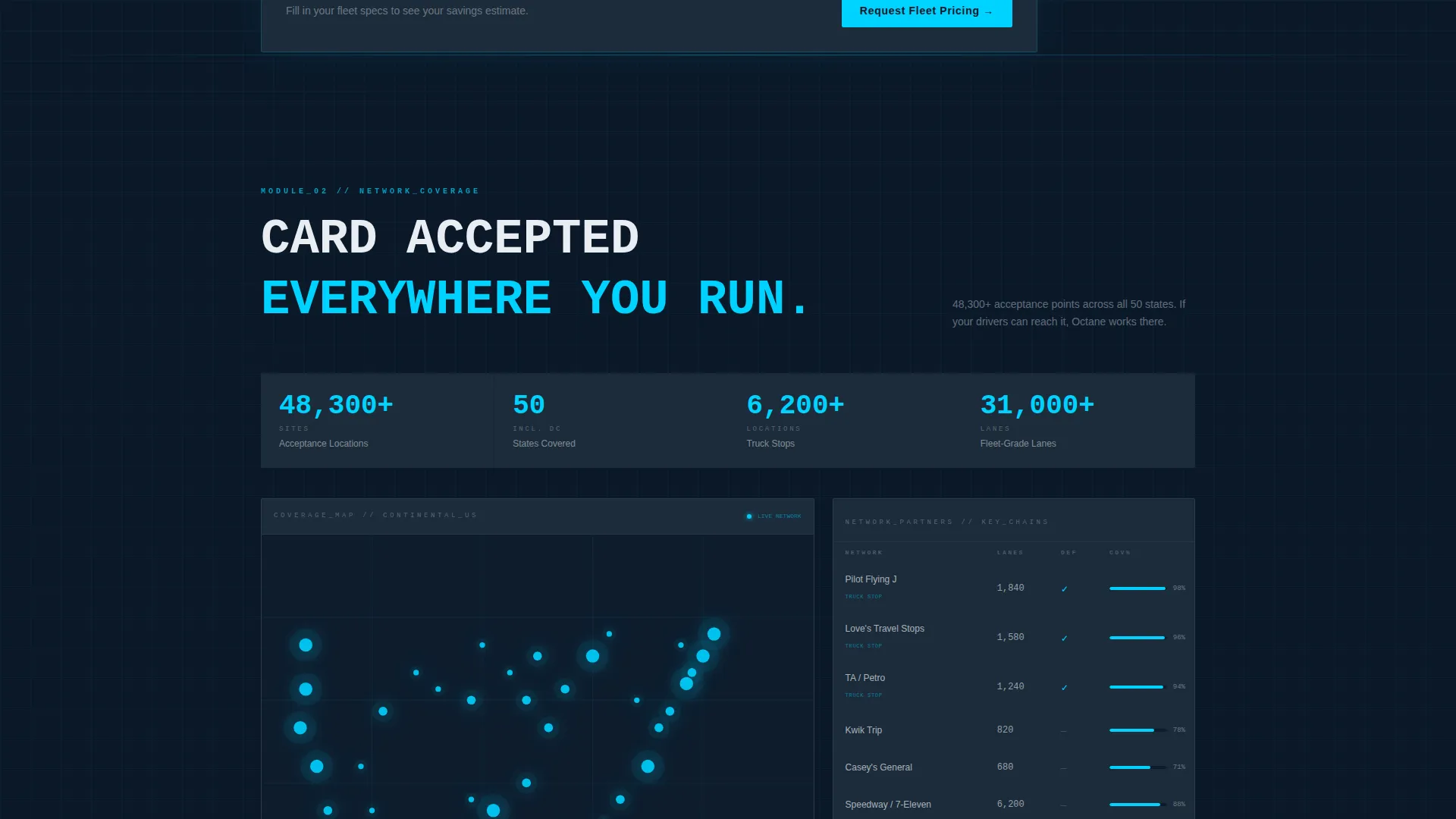
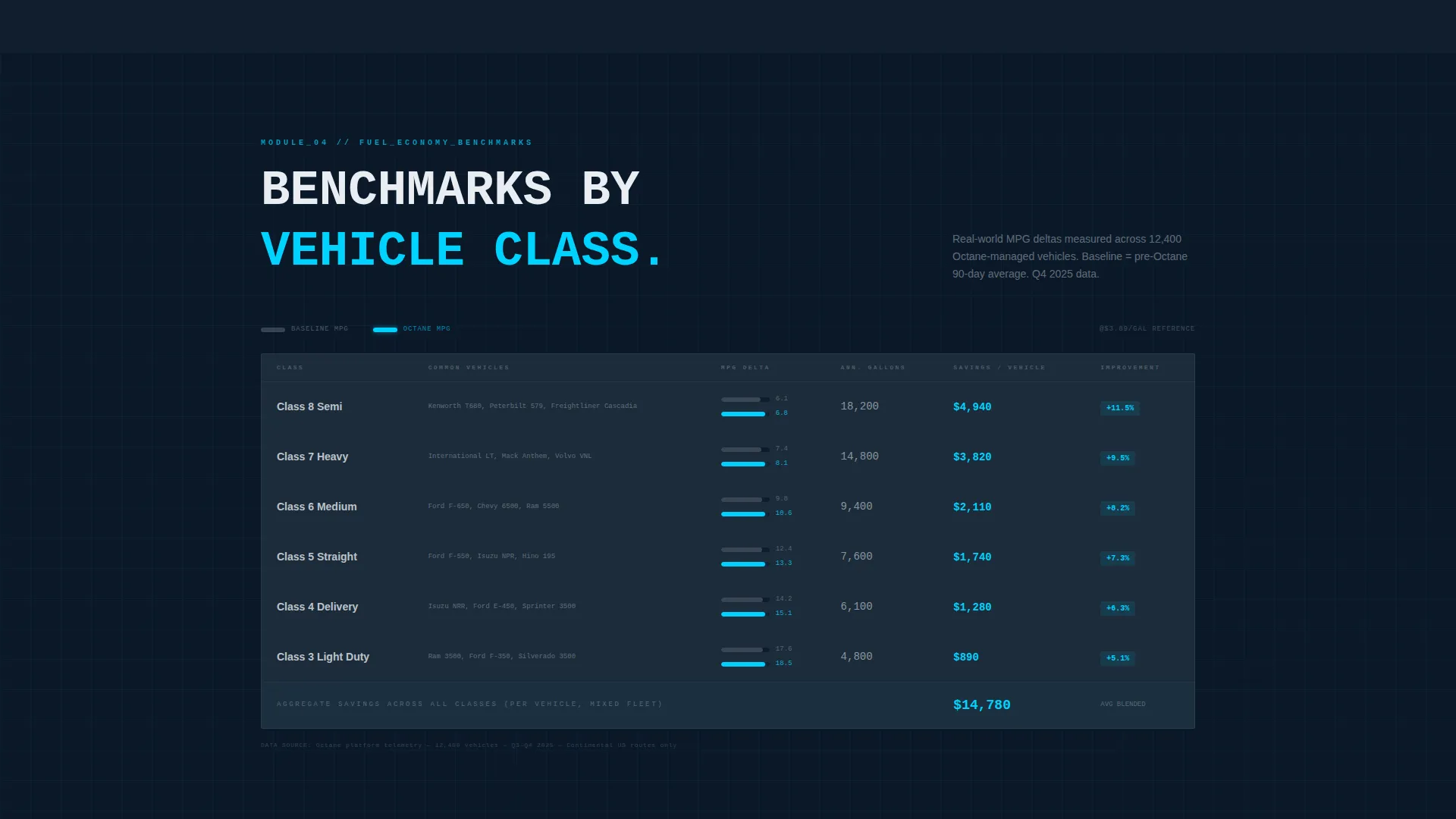
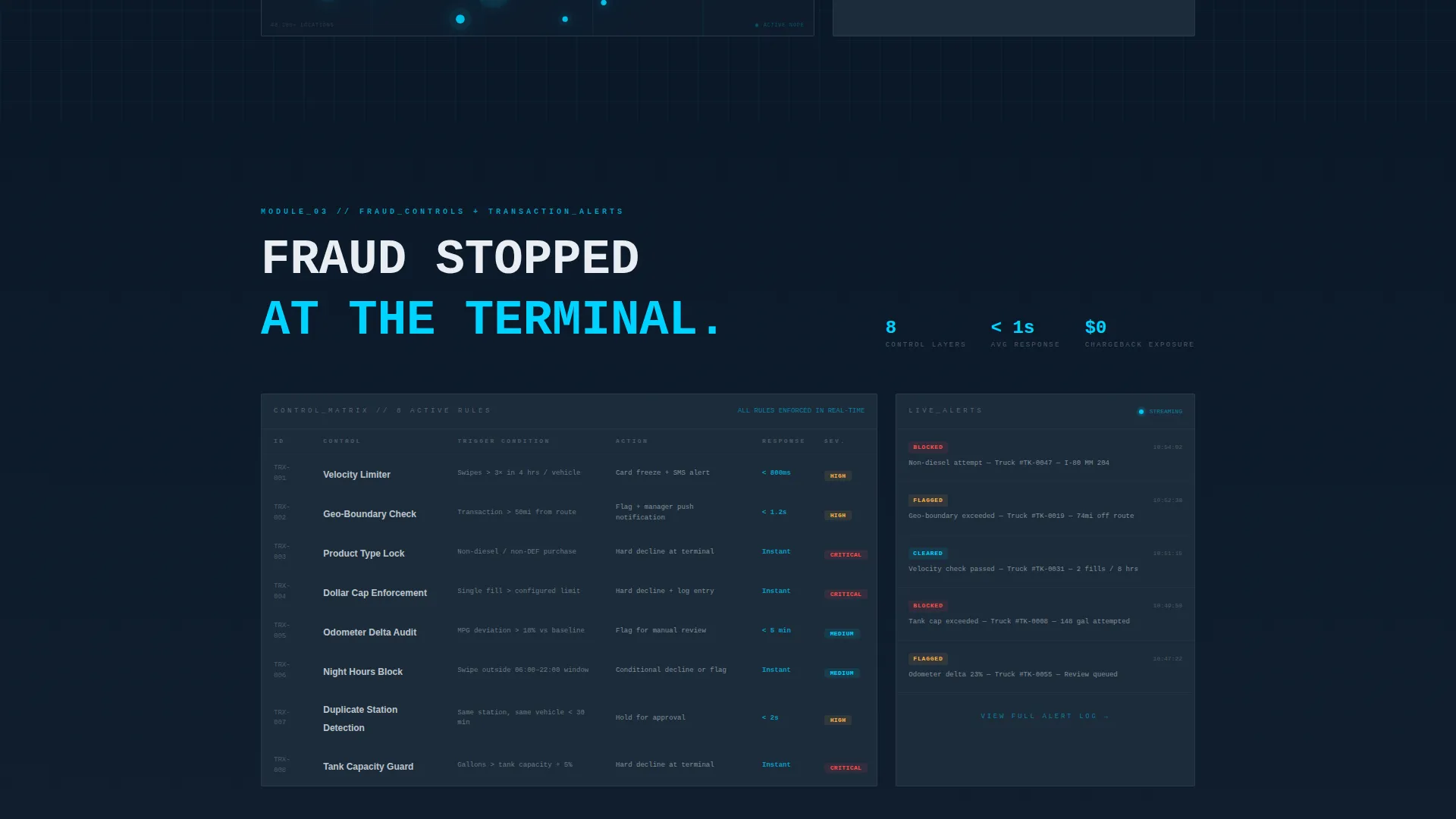
Each scroll section is a self-contained module with a labeled header, an oversized key metric, and a supporting data grid or micro-chart. Sections cover card network coverage statistics, fraud controls with transaction-level alert grids, fuel economy benchmarks by vehicle class, and a TMS and ERP (Transportation Management System and Enterprise Resource Planning) compatibility table.
Command-Center Typography System
JetBrains Mono handles all data values and monospaced figures. DM Sans carries body copy and section labels. The combination reads as precision instrumentation, keeping numbers visually distinct from explanatory text throughout the layout.
Page sections overview
| Section | Purpose |
|---|---|
| Hero Calculator Module | Live savings estimator with odometer output above the fold |
| Coverage Map Specs | Card network statistics and coverage data module |
| Fraud Controls Grid | Transaction-level alert grid and fraud prevention data |
| Fuel Economy Benchmarks | Vehicle class comparison grid with micro-charts |
| Integrations and calls to action | TMS/ERP compatibility table with dual conversion forms |
| Footer | Linear single-row footer with supporting links |
Design & branding system
The visual identity is built around an Engineering Blueprint theme. Every color decision reinforces the command-center environment the template projects.
- Deep midnight navy (#0B1929) as the primary background, instrument-panel charcoal (#1C2B3A) for section panels, live-data cyan (#00D2FF) for active metrics and hover states, and signal white (#E8EDF2) for typography and grid lines
- JetBrains Mono for all numeric and data displays; DM Sans for body text and section labels
- Blueprint grid overlay on the hero background, with no warm tones or lifestyle imagery anywhere in the layout
Mobile & speed optimization
The template is built desktop-first, prioritizing the workstation experience used by logistics directors and fleet managers. It also responds cleanly to tablet viewports.
- Desktop-first layout with tablet-responsive structure for field and operations use
- Server Components handle static section rendering; Client Components manage the live calculator and scroll animations
- High-interactivity elements including the live calculator, dropdown intake form, and spec sheet gate modal are scoped to client-side rendering only
How this template helps you convert
The conversion architecture is built to move two distinct buyer types: the fleet decision-maker ready to price, and the technical evaluator who needs spec verification first.
- The fuel-spend calculator delivers personalized savings figures before the visitor scrolls, making the value proposition concrete and reducing friction on the primary "Request Fleet Pricing" form submission.
- The gated spec sheet download captures technical evaluators at an earlier stage, collecting work email addresses from buyers who need to verify integration compatibility before committing to a sales conversation.
Other information about this template
Octane is designed for the US fleet fuel market context, with USD pricing, imperial units, and US fuel market data framing built into the layout structure.
- Animation intensity is high throughout: odometer count-up on calculator results, scroll-triggered data reveals on each module, and cyan pulse effects on live metrics
- The intake form includes a fleet size range dropdown with four tiers: 10 to 50, 51 to 200, 201 to 1000, and 1000 or more vehicles
- Social proof in this template is metric-driven rather than testimonial-based, using coverage numbers, transaction volume statistics, and benchmark data instead of quotes
- The template carries no lifestyle imagery or warm visual tone; the creative direction is strict Spec Sheet, meaning every section communicates through data and labeled structure
Theme
Engineering Blueprint
Creative direction
Spec Sheet
Color system
Midnight Blue
Style
Dashboard/Data Grid
Direction
Partnership/B2B
Page Sections
Live Fuel-spend Calculator
Odometer Count-up Animation
Blueprint Grid Hero Overlay
Dual Conversion Path Forms
Data Module Section Architecture
Precision Typography Pairing
Related questions
Can I customize the calculator inputs and savings outputs?
Is the spec sheet download gated separately from the pricing form?
What does the integrations section include?
Is this template built for desktop or mobile use?
Can the individual data modules be reordered or removed?