Open-Source Enterprise Software Specialist Professional Website Template
Openmes is a split-screen landing page template built for open-source manufacturing execution system (MES) projects. It combines a live-dashboard header screenshot with an industry-report scroll structure, a terminal animation, and a two-step deploy flow. The design uses a SCADA-inspired teal and charcoal palette to earn trust from engineers before asking for a single click.
by Rocket studio
Quick summary
Openmes is a single-page landing page template designed for open-source MES (Manufacturing Execution System) platforms. It pairs a 50/50 split-screen header with an industry-report scroll structure, using real deployment metrics, architecture diagrams, and a comparison table to move engineers from curiosity to a deploy decision without a procurement cycle.
Who this template is for
This template speaks directly to technical and operational buyers in industrial environments. It is built for people who evaluate software the same way they read a spec sheet, not a brochure.
- Production engineers at mid-size discrete manufacturers tired of six-figure MES licensing contracts
- Plant managers at contract electronics assemblers who need traceability without vendor lock-in
- DevOps teams at industrial startups connecting OPC-UA endpoints and wiring shop floor integrations
What problem this template solves
Proprietary MES platforms are expensive, opaque, and hard to escape. Most landing pages for open-source alternatives still feel like vendor pitches, which breaks trust with the exact engineers they are trying to reach. Openmes solves that credibility gap.
- It replaces the sales-pitch format with a findings-document cadence that engineers naturally trust
- It shows the running product first, then proves community traction, so the deploy decision feels earned
- It removes procurement friction by making installation feel like three terminal commands, not a contract negotiation
What you get with this template
You get a fully structured, single-page layout built around the specific conversion journey of a technical manufacturing audience. Every section is purposeful and sourced from real deployment context.
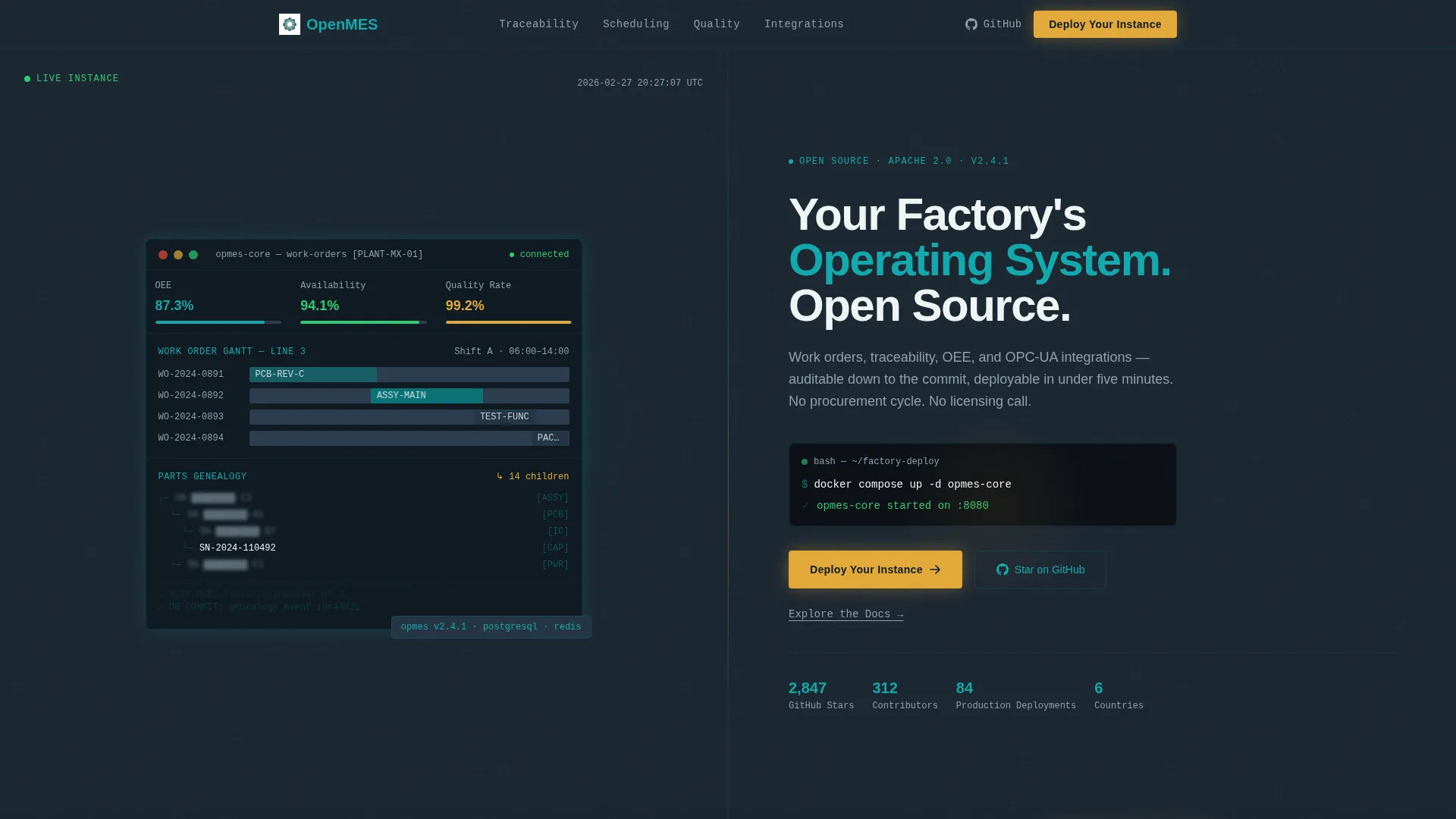
- A 50/50 split-screen header with a live-look MES dashboard screenshot and a terminal animation typing the deploy command
- A persistent left-panel navigation spine covering Traceability, Scheduling, Quality, Integrations, and Community sections
- A two-step deploy flow call to action, a sticky bottom bar trigger, and secondary "Explore the Docs" text links beneath every primary call to action
Feature list
This section covers the distinct functional components built into the Openmes template. Each one serves a specific role in guiding a technical visitor toward deployment.
Split-Screen Header with Dashboard Screenshot
The header divides into two equal halves. The left side holds a product screenshot of the MES dashboard mid-operation, showing a live work order Gantt chart, OEE gauges at 87.3%, a parts genealogy tree, and partially blurred real serial numbers. The right side delivers the headline and a terminal animation on a charcoal background.
Terminal Animation Deploy Prompt
A single-line animation types docker compose up -d opmes-core in the header, followed by a blinking green checkmark. This component immediately signals to DevOps and engineering visitors that deployment is a command, not a conversation with a sales team.
Industry-Report Scroll Structure
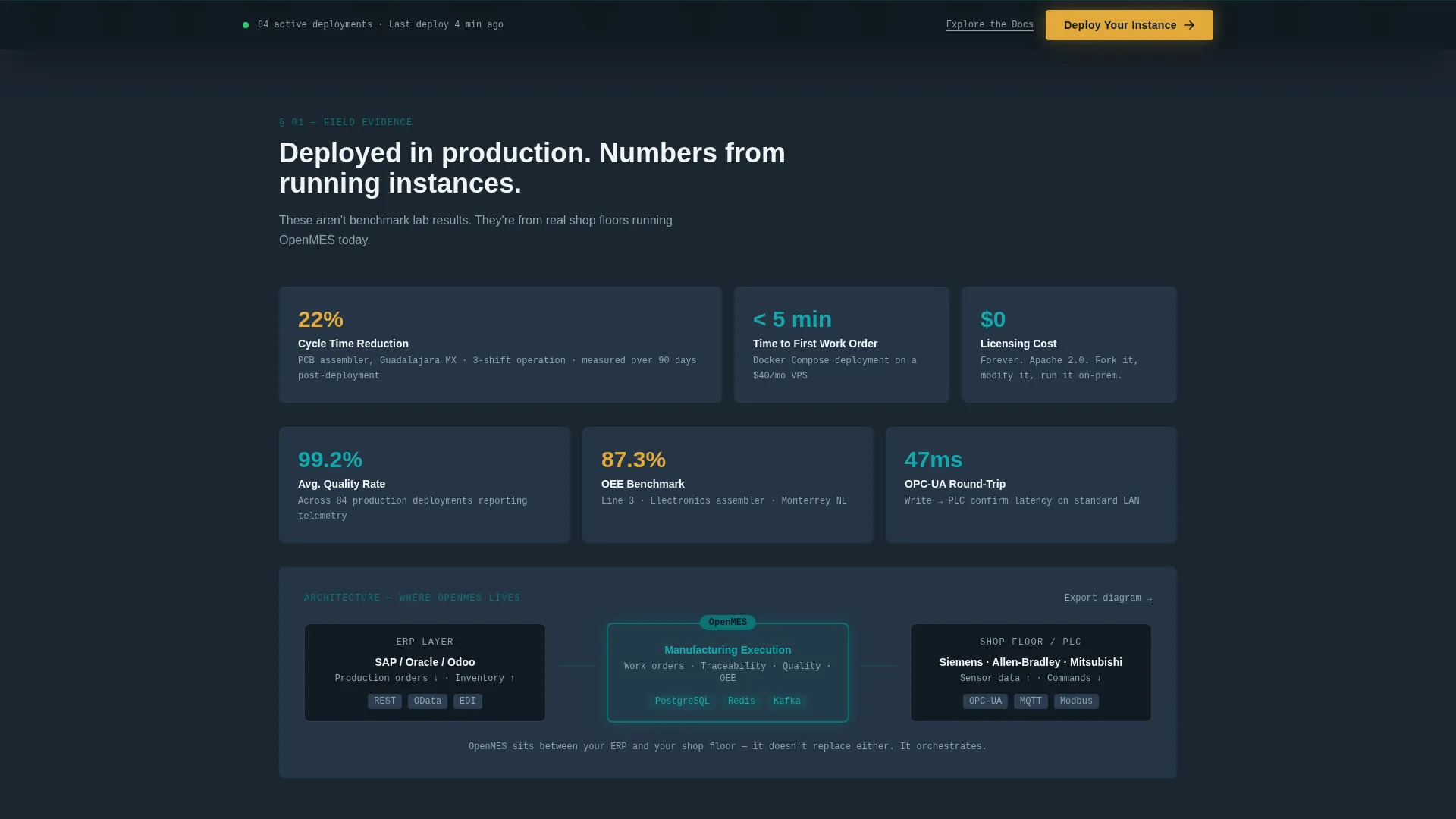
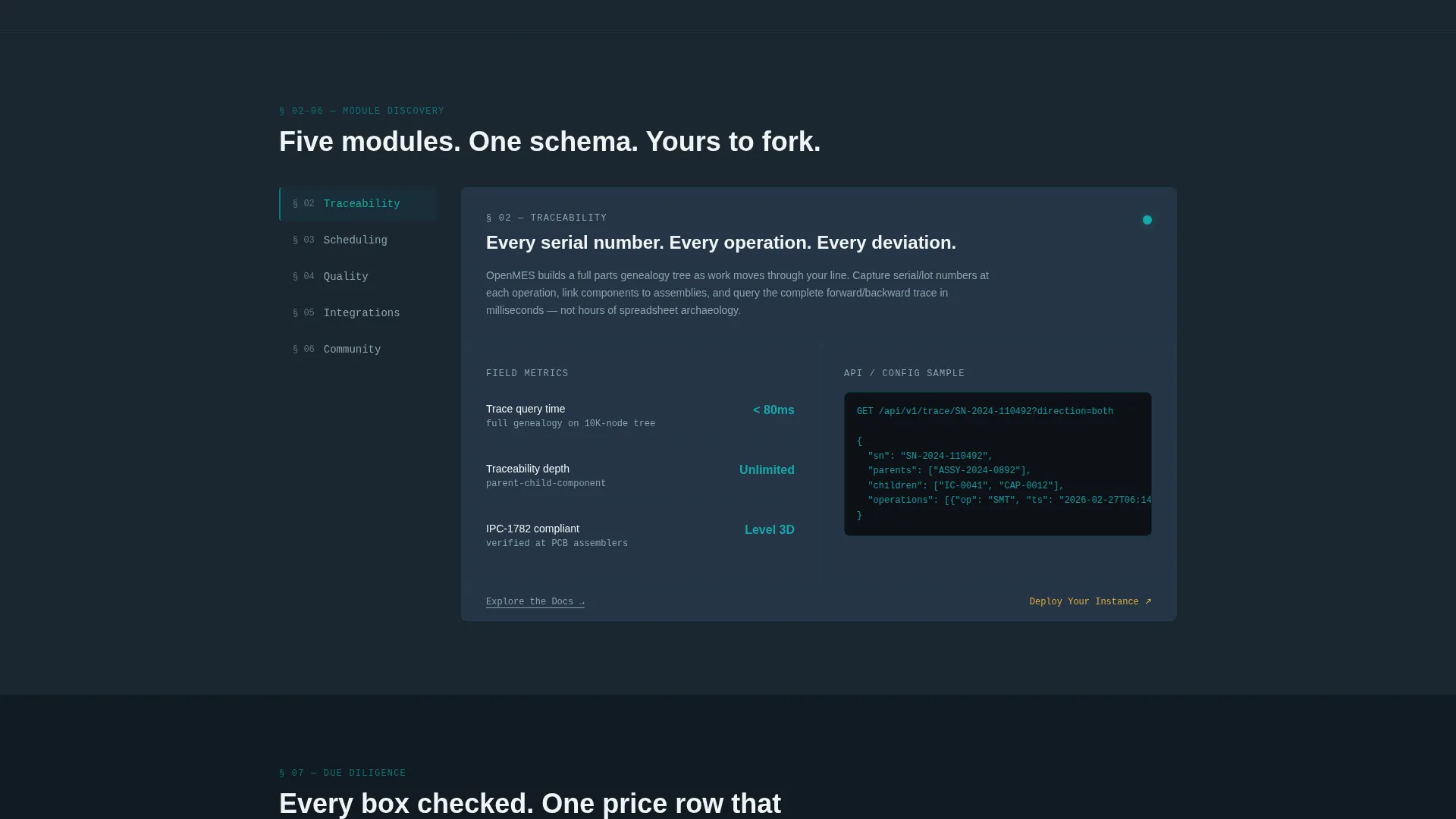
After the header, the page scrolls through five discovery cards: Traceability, Scheduling, Quality, Integrations, and Community. Each card escalates from explaining what the module does to proving it works at scale, with real metrics such as a 22% cycle time reduction reported at a PCB assembler.
Persistent Left-Panel Navigation Spine
A fixed left panel lists the five main content sections as the visitor scrolls. This keeps orientation clear on a long-form page and reinforces the findings-document feel that builds credibility with technical readers.
Comparison Table Against Proprietary Platforms
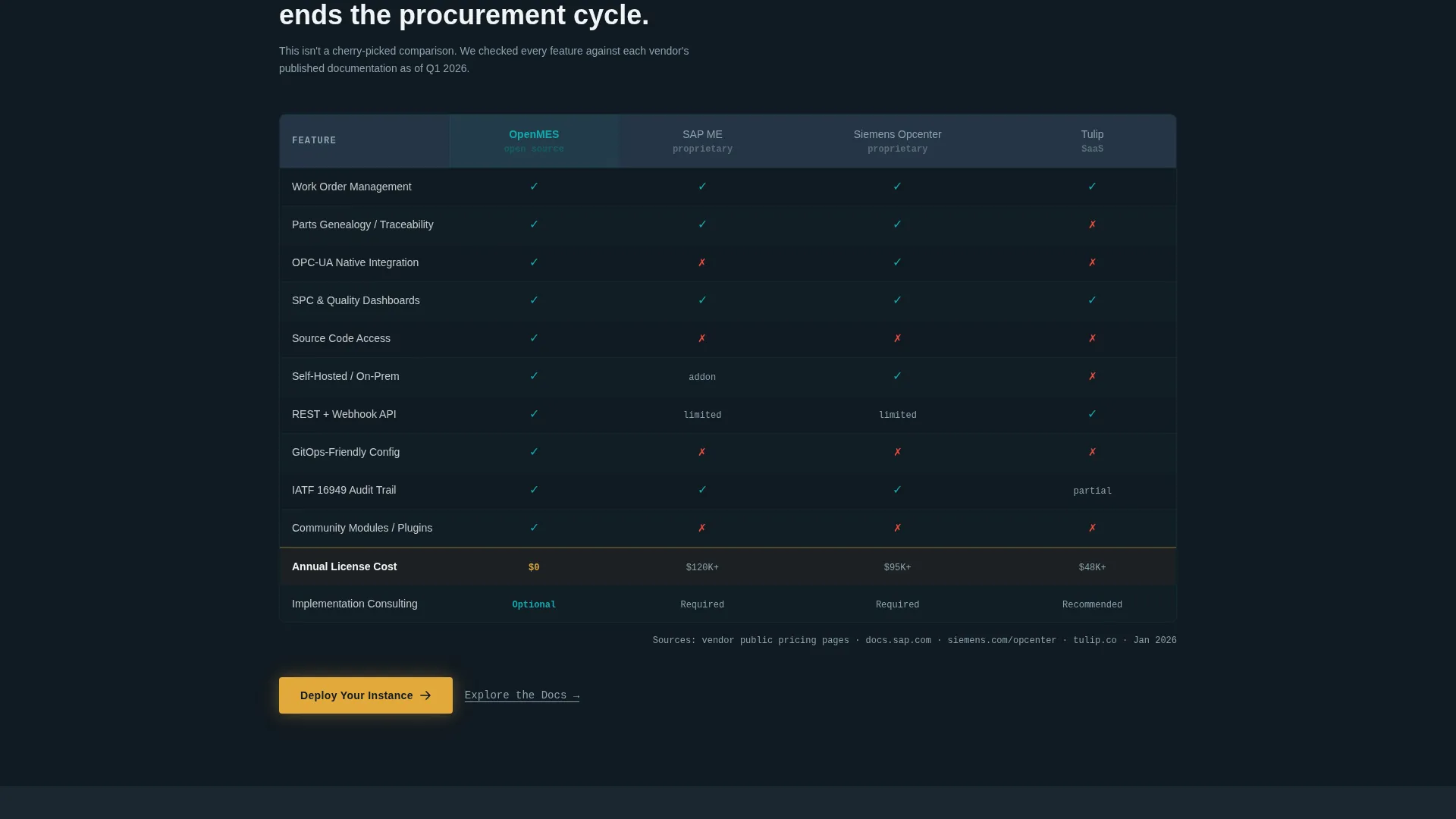
A dedicated section presents a feature-by-feature comparison between the open-source platform and proprietary MES products. Every capability row checks the open-source column, and the price row reads $0, making the value case without requiring a sales call.
Two-Step Freemium Deploy Flow
The primary call-to-action button opens a two-step modal. Step one lets the visitor select deployment method (Docker, Kubernetes, or bare metal) and plant size (1 line, 2 to 5 lines, or 6 or more). Step two collects a work email and an optional GitHub handle, keeping the barrier low for technical users.
Page sections overview
| Section | Purpose |
|---|---|
| Split-screen header | Introduce product and deploy prompt |
| Traceability discovery card | Explain parts genealogy and audit trail |
| Scheduling discovery card | Show work order and Gantt functionality |
| Quality discovery card | Cover inspection and defect tracking |
| Integrations discovery card | Present OPC-UA and ERP layer architecture |
| Community discovery card | Display contributor graphs and adoption proof |
| Comparison table | Compare open-source versus proprietary MES |
| Deploy flow call to action | Capture deployment intent in two steps |
| Sticky bottom bar | Re-surface deploy call to action after third section |
Design & branding system
The visual identity is built on the Teal Catalyst color system, which references the look of a SCADA dashboard during a night shift. Every color carries a specific role, keeping the interface calm, operational, and legible under any lighting condition.
- Deep reactor teal (#0D7377) anchors the primary brand identity and key structural elements
- Control-room charcoal (#1B2631) provides the background tone for code blocks, dark panels, and the right-side header
- Signal white (#F0F4F5) surfaces content areas for clear readability, while catalyst amber (#E2A93B) is reserved exclusively for calls to action, status indicators, and interactive highlights
Mobile & speed optimization
The template is structured for visitors who may land on a mobile device but are most likely to convert on a desktop or laptop in a plant-floor environment. The layout priorities reflect this context.
- The 50/50 split-screen header is designed to reflow cleanly at smaller screen widths without losing the dashboard screenshot or headline hierarchy
- The persistent left-panel navigation adapts to the scroll experience on touch devices, keeping section orientation intact
- Lightweight terminal animation and static discovery cards minimize rendering complexity on factory-floor devices with varying network conditions
How this template helps you convert
The page earns conversion through credibility before it asks for commitment. Every structural choice is designed to reduce friction for a technical buyer who is skeptical of vendor marketing.
- The header shows the running product first, using a real-looking dashboard screenshot and a live deploy command, so engineers see proof before they read a single marketing claim.
- The industry-report scroll structure presents sourced metrics, architecture diagrams, and a zero-cost comparison table, letting the product make its own case through evidence rather than persuasion.
- The two-step deploy flow and secondary documentation links capture both ready-to-deploy visitors and engineers who need more time, so no intent is lost at any scroll depth.
Other information about this template
Openmes fits naturally within the broader open-source enterprise software landscape, where platforms like Odoo Manufacturing, ERPNext, and similar community-driven tools have proven that enterprise-grade functionality does not require enterprise-grade licensing costs. The template is designed to serve that positioning clearly.
- The Directory and Discovery theme makes the page feel like a curated resource rather than a product pitch, which aligns well with how open-source communities share and evaluate tools
- The Freemium and Trial conversion direction means the template supports both self-hosted deploy paths and community onboarding flows without requiring a demo-request gate
- The template style is Split Screen 50/50, the header concept is Product Screenshot, and the creative direction follows an Industry Report cadence, all of which are captured in the matched intersection context for this template
Theme
Directory & Discovery
Creative direction
Industry Report
Color system
Teal Catalyst
Style
Split Screen (50/50)
Direction
Freemium/Trial
Page Sections
Split-screen Header with Live Dashboard
Terminal Animation Deploy Command
Industry-report Scroll Layout
Proprietary MES Comparison Table
Two-step Freemium Deploy Flow
Sticky Bottom Bar and Docs Links
Related questions
Who is this landing page template designed for?
Can I customize the dashboard screenshot in the header?
What is the two-step deploy flow and how does it work?
Does the template include the comparison table content?
Is this template suitable for a self-hosted or cloud-deployed MES product?



