Dental Software & SaaS Cost Calculator Website Template
Operatory is a dental CRM landing page template built for revenue operations. It pairs an interactive Revenue Recovery Calculator with an animated comparison table, a live-looking dashboard screenshot header, and a focused lead generation form. The result is a single-page experience that shows dental practices exactly what revenue they are losing and makes requesting a demo the obvious next step.
by Rocket studio
Quick summary
Operatory is a conversion-focused dental CRM landing page template. It leads with a full-width dashboard screenshot, drops visitors into an interactive revenue calculator, then walks them through an animated side-by-side comparison of old workflows versus the CRM platform. Every section is designed to build urgency and move practice decision-makers toward booking a demo.
Who this template is for
This template is built for dental software and SaaS businesses targeting practice-level buyers. It speaks directly to the people who control scheduling, patient follow-up, and revenue reporting inside a dental practice.
- Dental office managers handling manual recall workflows at practices of any size
- Associate dentists who currently track case acceptance in spreadsheets
- DSO regional directors who need unified reporting across thirty or more locations
What problem this template solves
Dental CRM platforms often struggle to communicate their value clearly. Potential buyers see a product demo request form before they understand what revenue they are actually missing. This template solves that problem by leading with proof before asking for anything.
- Visitors leave without understanding their recoverable revenue because nothing shows the financial gap in concrete numbers
- Generic feature lists fail to convince office managers who are already overwhelmed with daily tasks
- Multi-location buyers need a separate conversion path and do not respond to single-practice messaging
What you get with this template
You get a fully structured, single-page layout with five purpose-built sections and a footer. Every section is designed to carry a visitor from curiosity to commitment without friction.
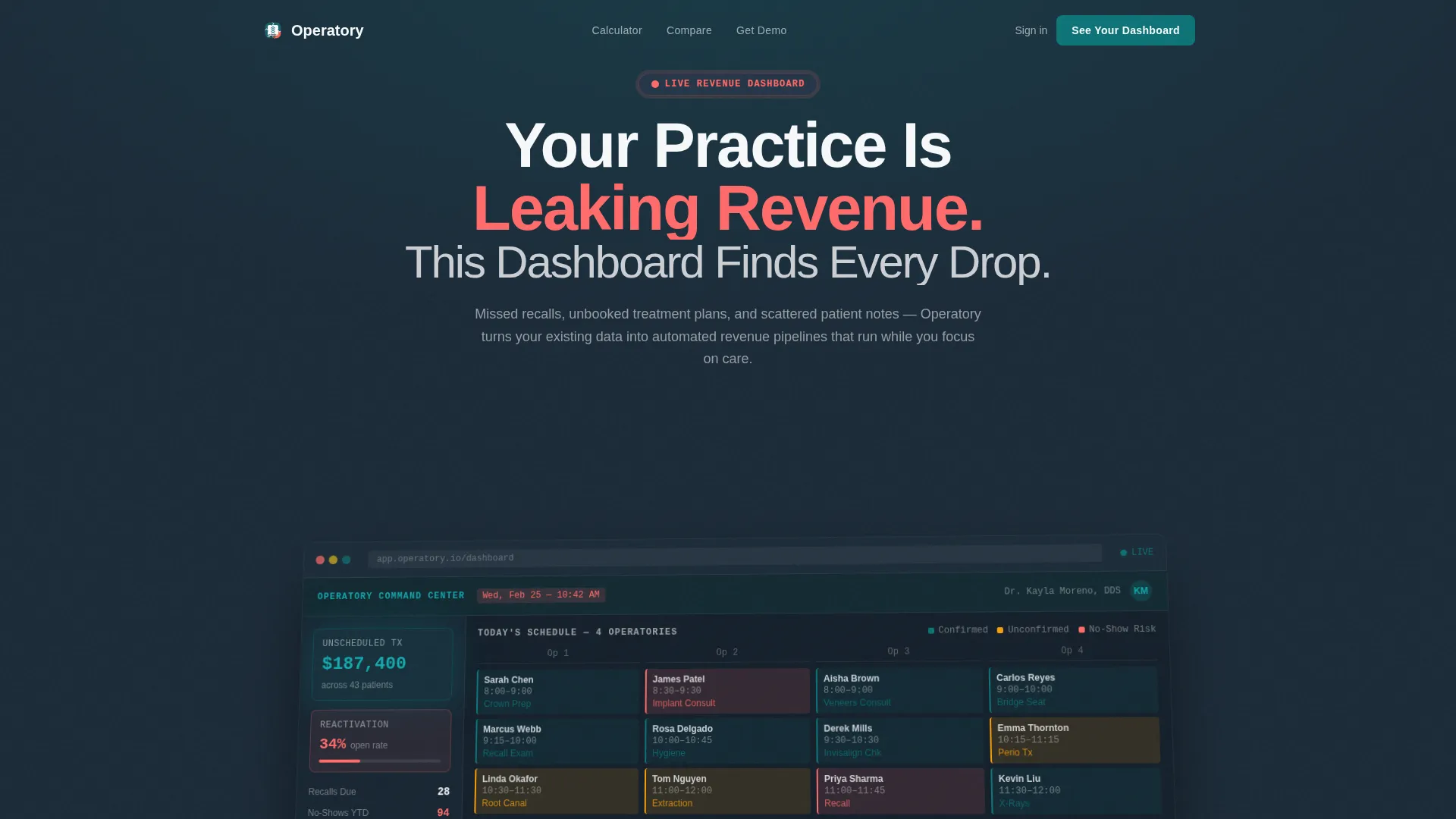
- A full-width angled dashboard screenshot header with a bold headline and coral notification badge
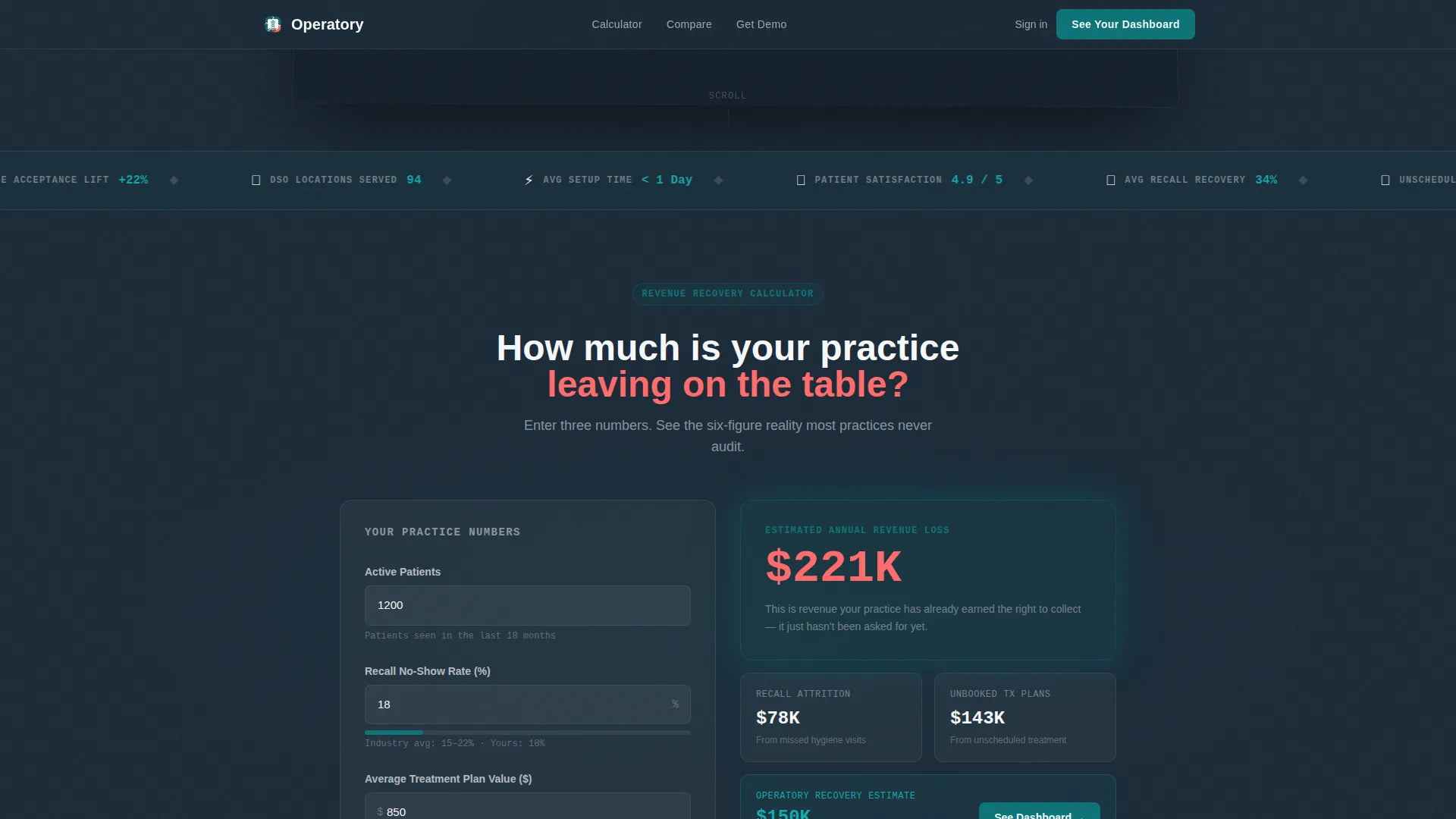
- An interactive Revenue Recovery Calculator with three live inputs and a six-figure output display
- An animated comparison table, a metrics marquee, a lead generation form with a secondary DSO download path, and a linear single-row footer
Feature list
This template includes the following built-in components and layout capabilities grounded in the source brief.
Interactive Revenue Recovery Calculator
Visitors enter their number of active patients, average recall no-show rate, and average treatment plan value. The tool instantly calculates estimated annual revenue lost to attrition and unbooked plans. Seeing a six-figure result labeled "your recoverable revenue" makes the demo form feel like a logical next step, not a sales ask.
Animated Comparison Table
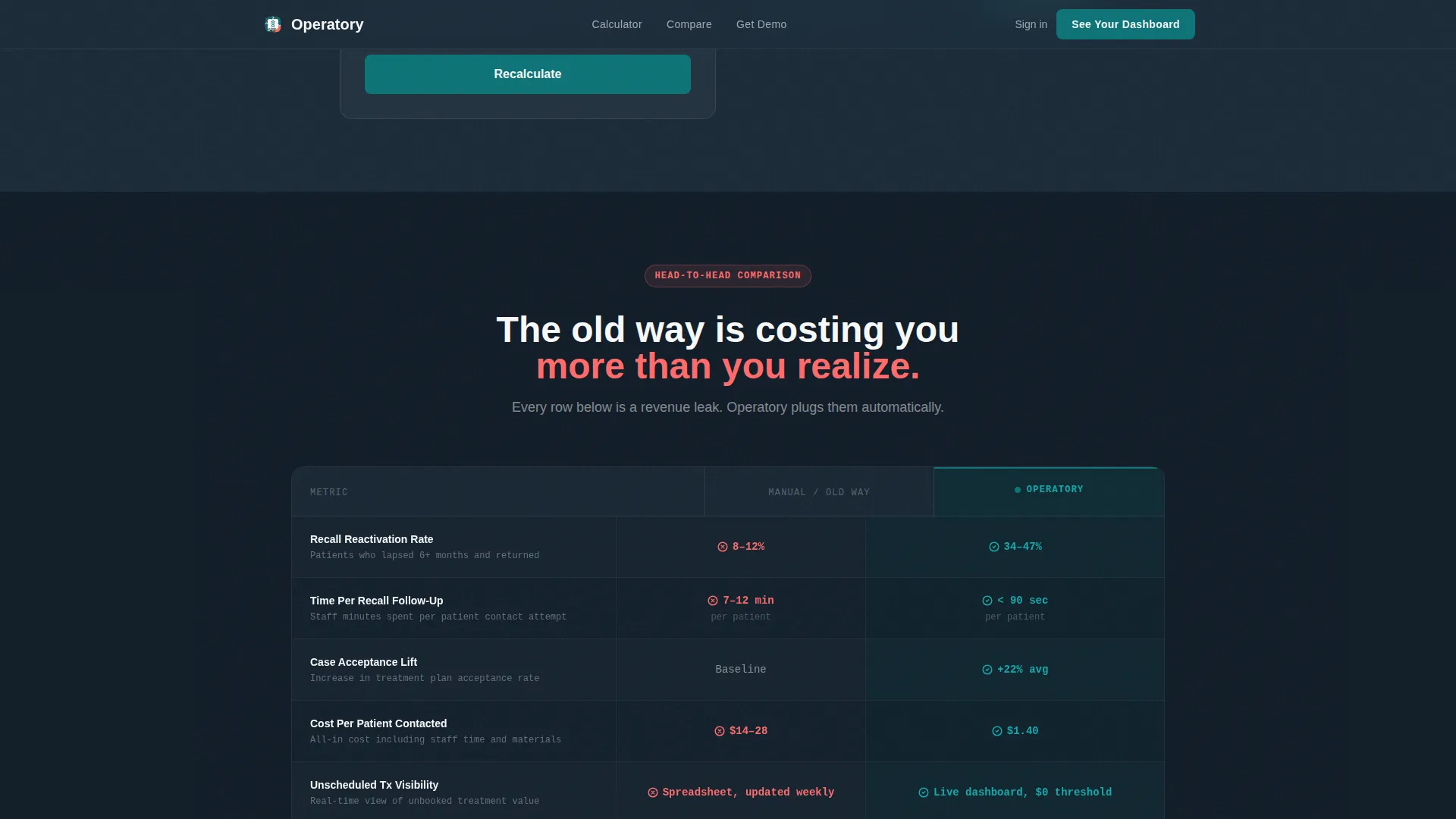
The comparison table pits the old manual workflow against the CRM column by column. Rows animate into view on scroll using GSAP ScrollTrigger, with data points for reactivation rate, time per task, case acceptance lift, and cost per patient contacted. The visual gap between columns widens as stakes escalate, making the contrast unmistakable.
Live-Look Dashboard Screenshot Header
The hero section features a full-width, pixel-sharp product screenshot shown at a slight angle with a soft drop shadow. The screenshot shows a color-coded operatory schedule, a sidebar widget displaying $187,400 in unscheduled treatment, and a reactivation campaign with a 34% open rate. A single bold headline sits above the image, and a coral badge draws the eye immediately.
Dual-Path Lead Generation Form
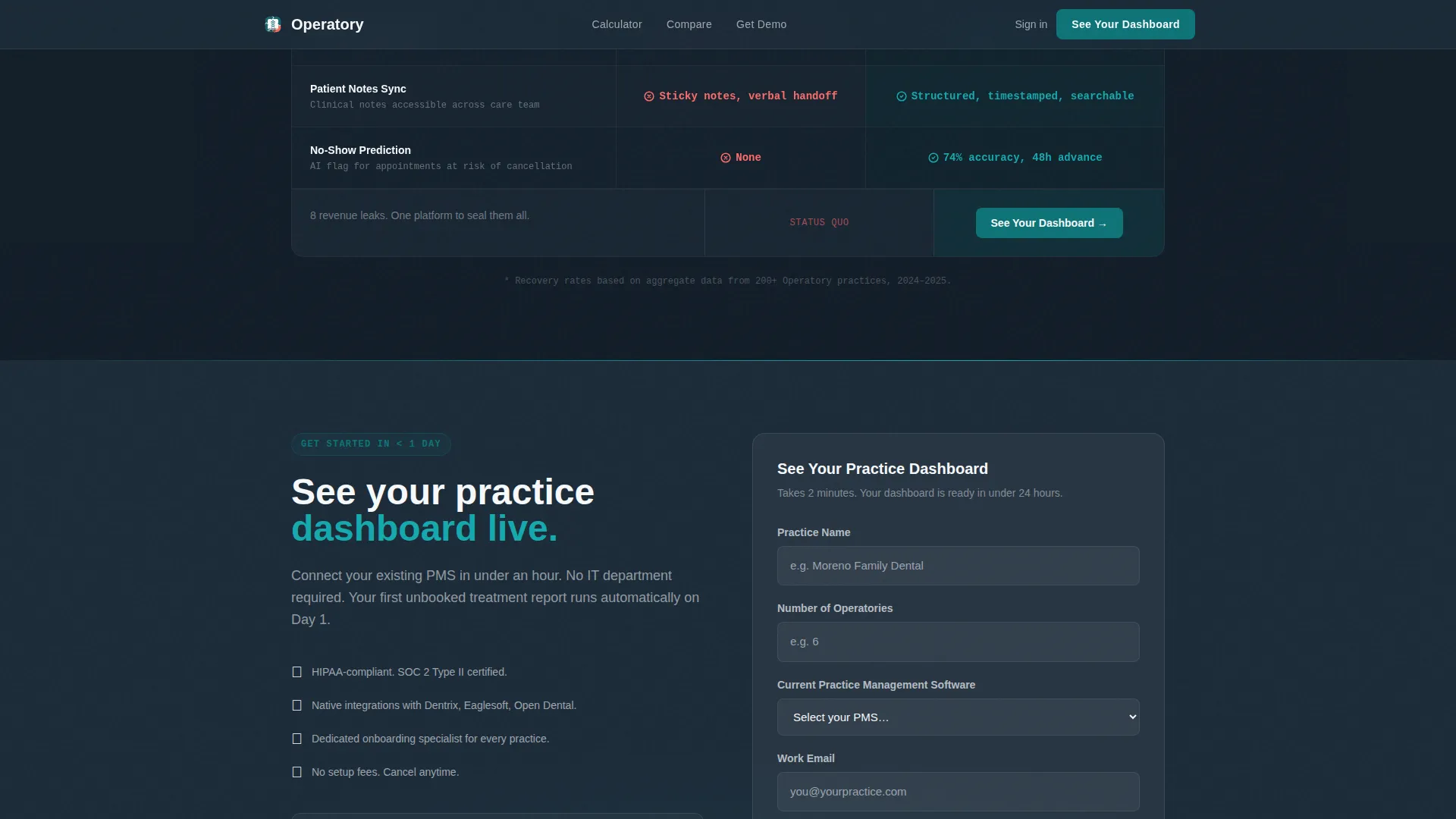
The primary call to action, "See Your Practice Dashboard," appears below the calculator and again after the comparison table. The form collects practice name, number of operatories, current software selection, and work email. A secondary path offers a DSO Playbook download for multi-location prospects who are not yet ready to book a demo.
Scrolling Metrics Marquee
A high-contrast teal metrics marquee sits between the comparison table and the lead generation section. It displays scrolling social proof numbers in bold, reinforcing credibility with practice count, reactivation rate statistics, and other embedded performance metrics from the platform.
Sticky Call-to-Action Bar
A pinned call-to-action element follows the visitor through the comparison table section, keeping the primary conversion action visible without interrupting the reading experience. The sticky bar uses the deep teal primary color so it reads as part of the dashboard aesthetic rather than an intrusive overlay.
Page sections overview
| Section | Purpose |
|---|---|
| Hero Dashboard Header | Anchors attention with a product screenshot and urgency headline |
| Revenue Recovery Calculator | Personalizes revenue loss with live three-input calculation |
| Old versus. CRM Table | Animated row-by-row contrast of manual versus automated workflow |
| Metrics Marquee | Scrolling social proof numbers in bold teal |
| Lead Gen Form | Collects demo requests and routes DSO prospects to a secondary download |
| Single-Row Footer | Closes the page with a clean, minimal linear footer layout |
Design & branding system
The visual identity follows a Dashboard Pro theme using the Teal Catalyst color system. The palette references the glow of a mounted monitor in a dim treatment room, cool, focused, and data-dense.
- Deep operatory teal (#0D7377) for primary buttons and header bars; clinical charcoal (#1B2A38) for backgrounds and data-heavy sections; sterile white (#F7F9FB) for card surfaces and table cells; catalyst coral (#FF6B6B) for urgent metrics and notification badges
- DM Sans handles headings for clean readability; JetBrains Mono renders data fields and metric values for a precise, clinical feel
- The angled hero screenshot with soft shadow, the widening column gap in the comparison table, and the coral badge system all reinforce a clinical dashboard aesthetic throughout
Mobile & speed optimization
The template is designed desktop-first to match the primary audience of office managers working at workstations. A solid mobile fallback is included for secondary access on tablets or phones.
- Server Components power the static sections for faster initial load; Client Components handle the live calculator, form validation, and GSAP scroll animations
- The sticky call-to-action bar, calculator inputs, and comparison table are all structured to remain usable on smaller screens without losing the data-dense layout intent
How this template helps you convert
This template earns conversion by building financial urgency before making any ask. The sequence is deliberate and moves visitors from awareness to action in a logical order.
- The Revenue Recovery Calculator outputs a personalized six-figure number early in the page visit, creating immediate financial context that no generic feature list can match.
- The animated comparison table removes objections row by row, showing measurable gaps in reactivation rate, task time, and case acceptance lift between old workflows and the CRM.
- The dual-path form closes the page by offering two exits: a demo for ready buyers and a DSO Playbook for multi-location prospects still evaluating, capturing both segments without losing either.
Other information about this template
This template is categorized under Technology, specifically within the Dental Software and SaaS subcategory, and is precision-built for the dental CRM niche. It carries an Intersection Match Score of 13, indicating strong alignment between the template style, creative direction, and niche intent.
- The template style is a Comparison Table layout paired with a Calculator/Tool First creative direction, a combination that is particularly effective for B2B SaaS in regulated or data-sensitive industries
- Localization defaults are set for the United States market: USD currency, MM/DD/YYYY date format, and dental industry terminology throughout
- Animation intensity is high by design; GSAP ScrollTrigger drives table row entries, counter animations, and the hero reveal sequence
- The secondary DSO Playbook download path is a deliberate content offer for regional directors managing thirty or more locations who need a longer decision cycle
Theme
Dashboard Pro
Creative direction
Calculator/Tool First
Color system
Teal Catalyst
Style
Comparison Table
Direction
Lead Generation
Page Sections
Interactive Revenue Recovery Calculator
Animated Comparison Table
Live-look Dashboard Screenshot Hero
Dual-path Lead Generation Form
Scrolling Metrics Marquee
Sticky Call-to-action Bar
Related questions
Who is this landing page template designed for?
Can this template support a multi-location dental group audience?
What makes the Revenue Recovery Calculator an effective conversion tool?
What animation and interactivity does this template include?
Is this a single landing page or a multi-page website?



