Complete Optometry Software Professional Website Template
Optic is a split-screen landing page template built for optometry property management firms. It leads with bold performance stats, a code-snippet header animation, and a three-step lead capture form. The Acid Digital color system and Tech Glass visual theme make every metric feel like a diagnostic readout, guiding independent ODs, optical chains, and private equity groups straight to the primary call to action.
by Rocket studio
Quick summary
Optic is a single-page, stats-first landing page template designed for optometry property management. It opens with a terminal-style code animation and escalating performance metrics. The layout splits 50/50 on every section, pairing hard numbers with interactive visuals. Two conversion paths capture both ready buyers and research-stage visitors.
Who this template is for
This template is built for firms that handle the physical infrastructure of eye care practices. It speaks directly to the people selling that service and the clients they want to attract.
- Independent optometrists (ODs) managing patient care alongside building maintenance headaches
- Multi-location optical chains expanding into new markets who need a scalable property partner
- Private equity groups rolling up eye care practices and requiring a specialist who understands clinical facility requirements
What problem this template solves
Running an optometry practice involves more than patient care. The building itself demands constant attention, from ophthalmology-zoned leases to exam-room HVAC calibration. Most generic property management pages fail to communicate that specialized expertise clearly.
- Visitors cannot quickly grasp why optometry property management is different from standard commercial real estate
- Decision-makers need hard proof before committing to a property partner, not just a service description
- The page must convert both fast-moving buyers and cautious researchers who want data first
What you get with this template
You get a fully structured, single-page layout that leads with credibility and closes with a capture form. Every section is purpose-built for a property management firm serving the eye care industry.
- A code-snippet header with a live-scrolling property automation script and an animated stat counter
- Four split-screen stat sections, each pairing a bold metric with an interactive or animated visual
- A three-step progressive lead form and a secondary email-gated PDF download path
Feature list
This template includes a focused set of interactive and layout components drawn directly from the brief.
Code Snippet Header Block
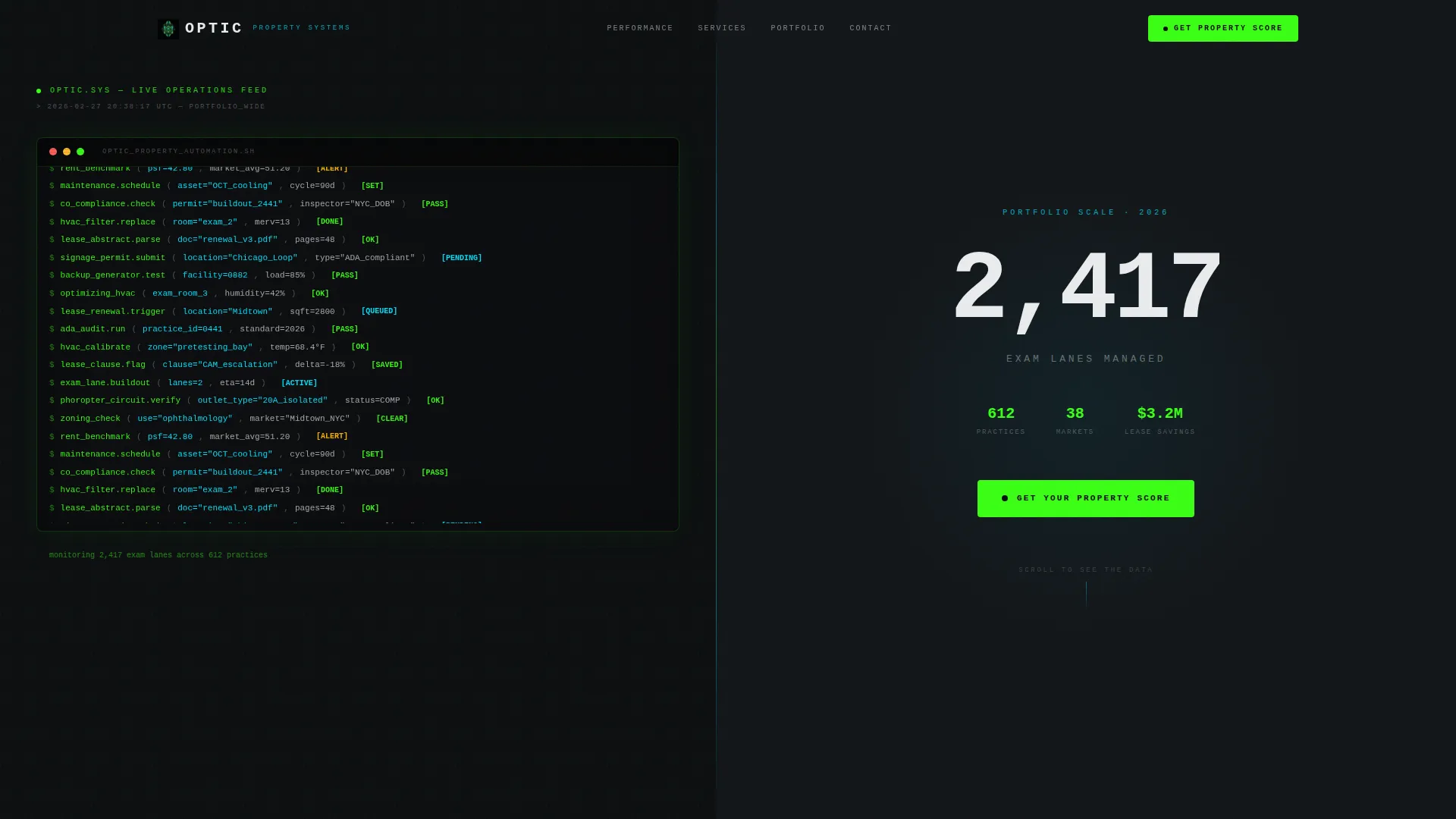
The left half of the header displays a stylized terminal block. Lines like optimizing_hvac(exam_room_3, humidity=42%) scroll upward in monospaced reactive green on a void black background. The right half shows a single oversized stat with a real-time animated counter beneath it.
Stats-First Split Screen Sections
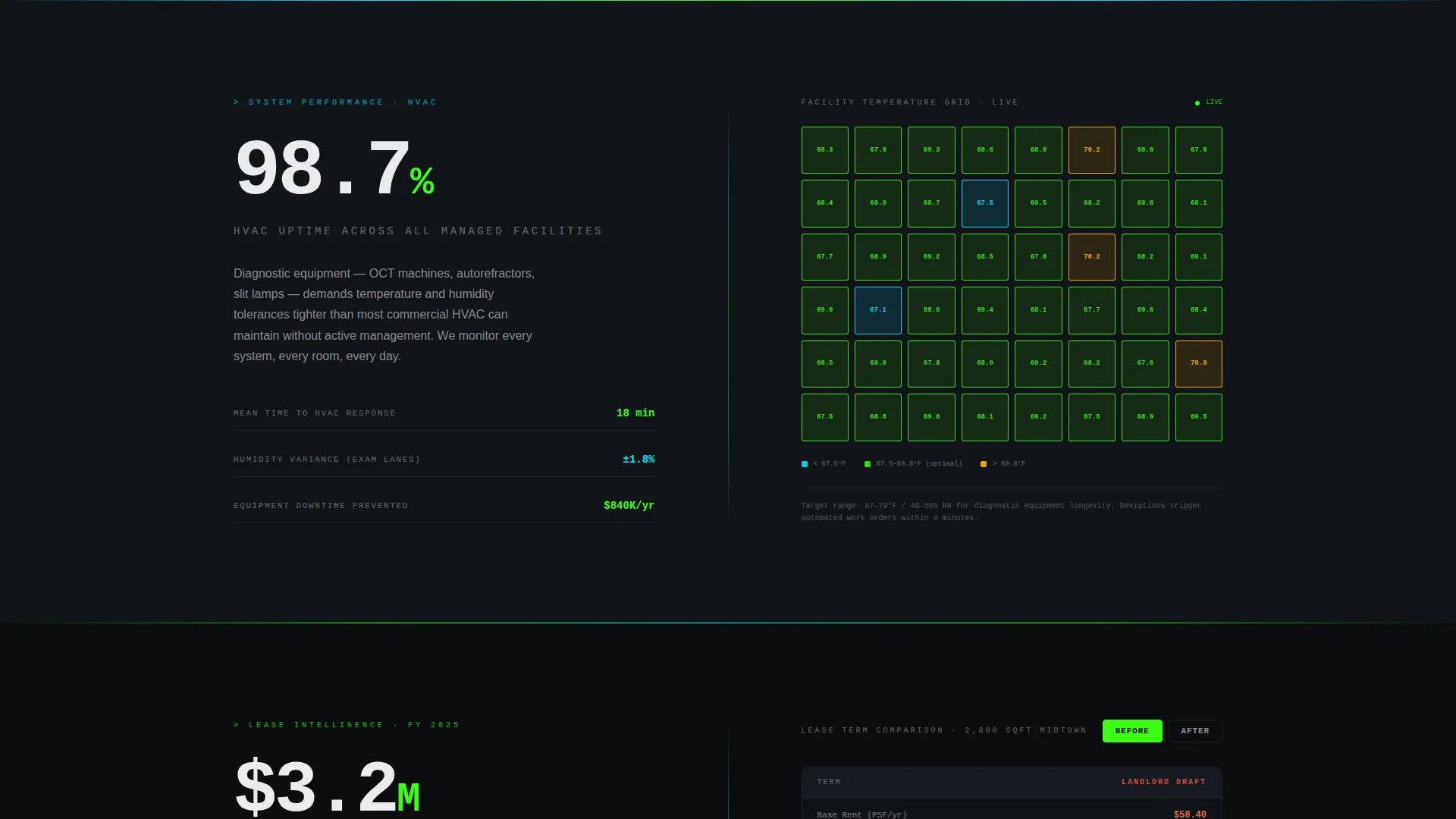
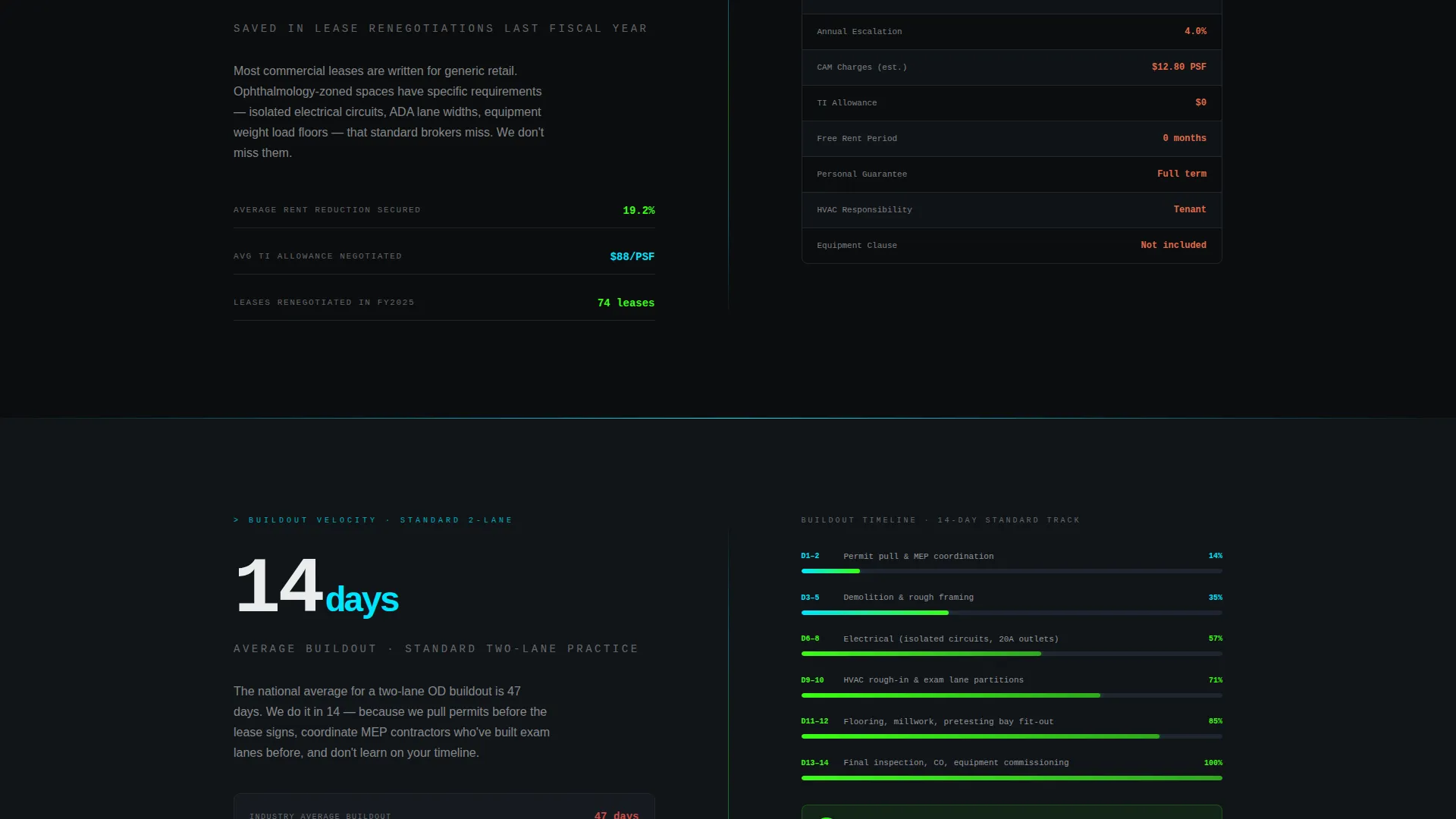
Each of the four content sections divides the screen 50/50. The left side opens with a dominant number, such as "98.7% uptime across all managed HVAC systems" or "$3.2M saved in lease renegotiations last fiscal year." The right side pairs each stat with a supporting visual: a live-style temperature heatmap, an interactive before/after lease comparison, or a time-lapse progress bar.
Three-Step Progressive Lead Form
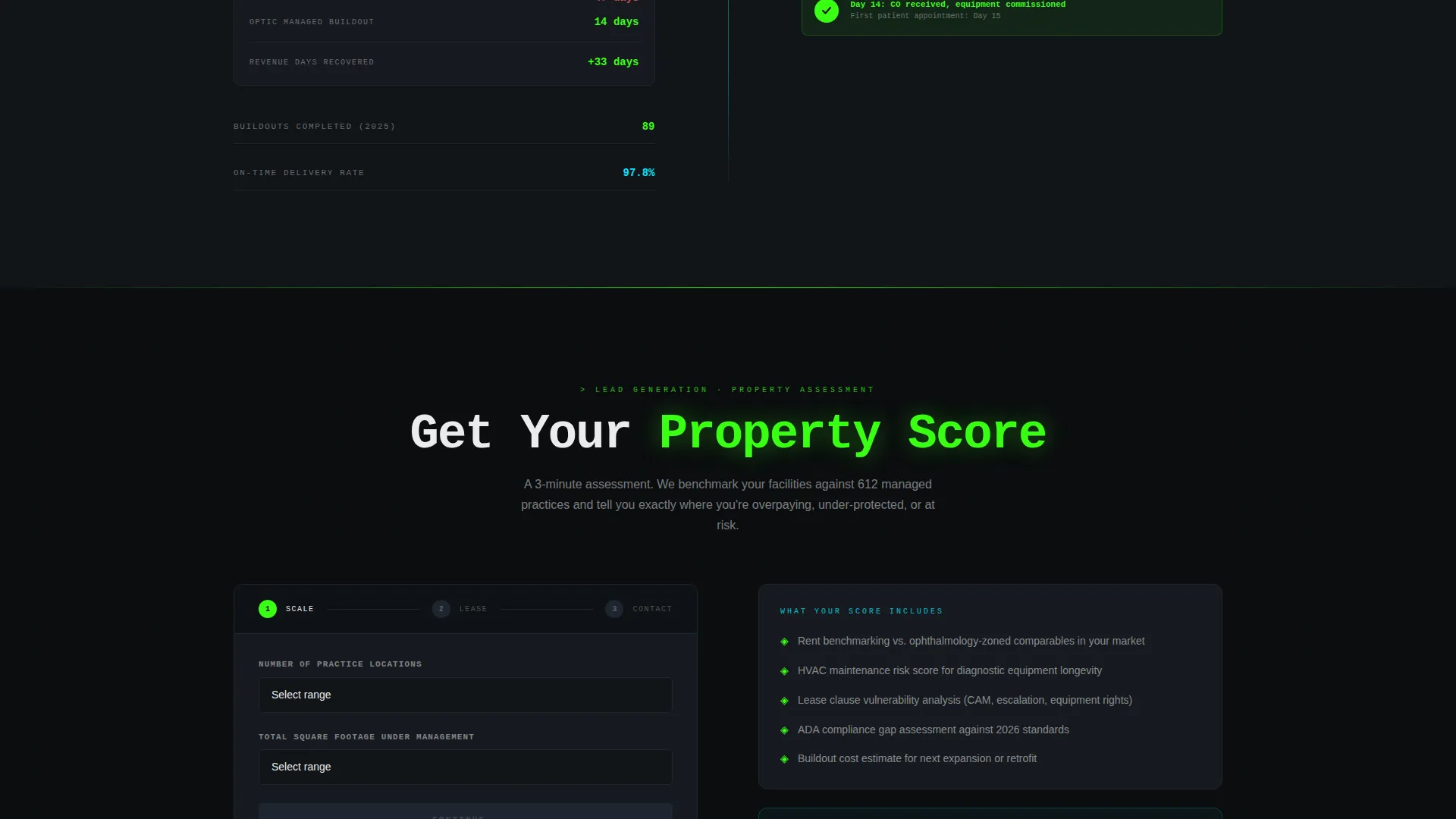
The primary conversion form uses progressive disclosure across three steps. Step one collects the number of practice locations and total square footage. Step two asks for lease expiration dates and ownership status. Step three captures name, email, and phone number to complete the inquiry.
Email-Gated PDF Download
A secondary conversion path offers "The OD's Facility Benchmarking Report" as a free downloadable PDF. It is gated behind an email field only, capturing visitors who are not yet ready to speak with the firm but want facility benchmarking data.
Floating Mobile Call to Action
The primary call to action button reads "Get Your Property Score" in reactive green on black. On mobile, this button is pinned as a floating element so it stays visible as the user scrolls through every stat section.
Acid Digital Color and Tech Glass Theme
The visual system uses four colors: void black (#0B0D0F), reactive green (#39FF14), lens-coating cyan (#00E5FF), and clinical white (#EAECEE). Reactive green marks primary calls to action and hover states. Cyan traces borders and icon strokes. White floats on cards and body text against the dark background.
Page sections overview
| Section | Purpose |
|---|---|
| Code Snippet Header | Opens with terminal animation and a live stat counter to establish immediate credibility |
| HVAC Uptime Stat | Pairs a 98.7% uptime figure with a real-time facility temperature heatmap |
| Lease Savings Stat | Shows $3.2M in renegotiation savings alongside an interactive before/after lease comparison |
| Buildout Speed Stat | Highlights a 14-day average buildout time with an animated time-lapse progress bar |
| Lead Capture Form | Three-step progressive form collecting location data, lease details, and contact information |
| PDF Download Offer | Secondary email-only gate for the OD Facility Benchmarking Report |
Design & branding system
The design language is Tech Glass, rendered through the Acid Digital color system. The overall effect resembles a diagnostic readout projected onto a darkened exam room wall.
- Void black (#0B0D0F) dominates backgrounds and section dividers, keeping focus on the data
- Reactive green (#39FF14) drives primary calls to action, hover states, and live data point markers
- Lens-coating cyan (#00E5FF) traces secondary accents including borders, chart lines, and icon strokes
- Clinical white (#EAECEE) sits on card surfaces and body text, floating above the dark like a Snellen chart in a dim lane
Mobile & speed optimization
The mobile layout is built around the pinned floating call to action and a clean, scrollable single-column flow through each stat section.
- The "Get Your Property Score" button is pinned as a floating element on mobile so it is always reachable
- The three-step form breaks complex data collection into short, focused steps that are easy to complete on a small screen
How this template helps you convert
The page is engineered around two conversion paths that serve different buyer readiness levels.
- The primary path moves fast-moving decision-makers through a three-step progressive form, filtering for qualified leads by asking for location count, square footage, and lease details before capturing contact information.
- The secondary path offers the free OD Facility Benchmarking Report gated behind email only, converting research-stage visitors who are not yet ready to book a call but will trade their email for credible data.
Other information about this template
This template is well-suited for firms positioned at the intersection of technology-driven property operations and the specialized demands of clinical eye care facilities.
- The template style is Split Screen (50/50), meaning every section is visually balanced between a stat and a supporting element
- The creative direction is Stats-First Impact, escalating from maintenance metrics to financial outcomes to speed benchmarks across four sections
- The header concept is a Code Snippet block, using monospaced terminal typography to reinforce an automated, data-driven brand image
- The landing page direction is Lead Generation, with both a high-intent form and a low-friction email capture working in parallel
- No stock photography or human faces appear anywhere in the layout; the visual story is told entirely through numbers, animations, and the Tech Glass color system
Theme
Tech Glass
Creative direction
Stats-First Impact
Color system
Acid Digital
Style
Split Screen (50/50)
Direction
Lead Generation
Page Sections
Code Snippet Terminal Header
Stats-first Split Screen Layout
Three-step Progressive Lead Form
Email-gated PDF Offer
Floating Mobile Call to Action Button
Acid Digital Color System
Related questions
What kind of business is this template designed for?
How does the three-step lead capture form work?
Can the template capture leads from visitors who are not ready to book a call?
What makes the visual design different from a standard property management page?
Is the primary call to action always visible on mobile?



