Agile Event Planning Landing Page Template
Planboard is a bento grid landing page template built for a mobile event planning app. It uses an Electric Indigo color system, spring-physics animations, and an interactive Feature Tab Switcher hero to showcase drag-and-drop event management workflows. The template drives app store clicks through hands-on bento cells, vibrant visuals, and a pinned magenta call-to-action bar optimized for mobile devices.
by Rocket studio
Quick summary
Planboard is a single-page, bento grid landing page template designed to promote a mobile event planning app. It pairs a deep indigo app-shell aesthetic with spring-physics motion and interactive explorer cells. Every section is structured to move an event planner from curiosity to confident app store click, without a single form field slowing them down.
Who this template is for
This template is built for anyone who needs a high-converting landing page that sells an event planning app to real, busy people. The app design and content structure speak directly to planners who live on their phones and need to see the product working before they commit.
- Independent event planners managing multiple events simultaneously, from weddings to corporate galas, who need speed and a clear event overview at a glance.
- DIY couples handling their own wedding event planning process without a professional coordinator, looking for a user friendly tool that handles all the tasks.
- Nonprofit teams stretching donated budgets across community events, silent auctions, and seated dinners, who need to allocate resources carefully and monitor progress in real time.
What problem this template solves
Event planning is controlled chaos. An event planner juggles vendors, venues, guest lists, budgets, and timelines across multiple event types at once. Most landing page templates are too generic to communicate that kind of complexity in a way that builds instant trust. This template solves that gap directly.
- Generic templates fail to demonstrate app interactivity, leaving potential attendees and planners unconvinced before they even reach the call-to-action.
- Static layouts cannot show the smooth flow of a drag-and-drop event management tool, so visitors leave without understanding the product's real value.
- A high bounce rate results when a landing page does not reflect the energy and pace of the product it promotes, costing downloads before the call to action is ever seen.
What you get with this template
You get a fully structured, single-page landing page template built around the Planboard app design system. The layout covers every essential element a high-converting event landing page needs, from a benefit-driven hero section to a social proof bar and a magenta-accented close with app store buttons.
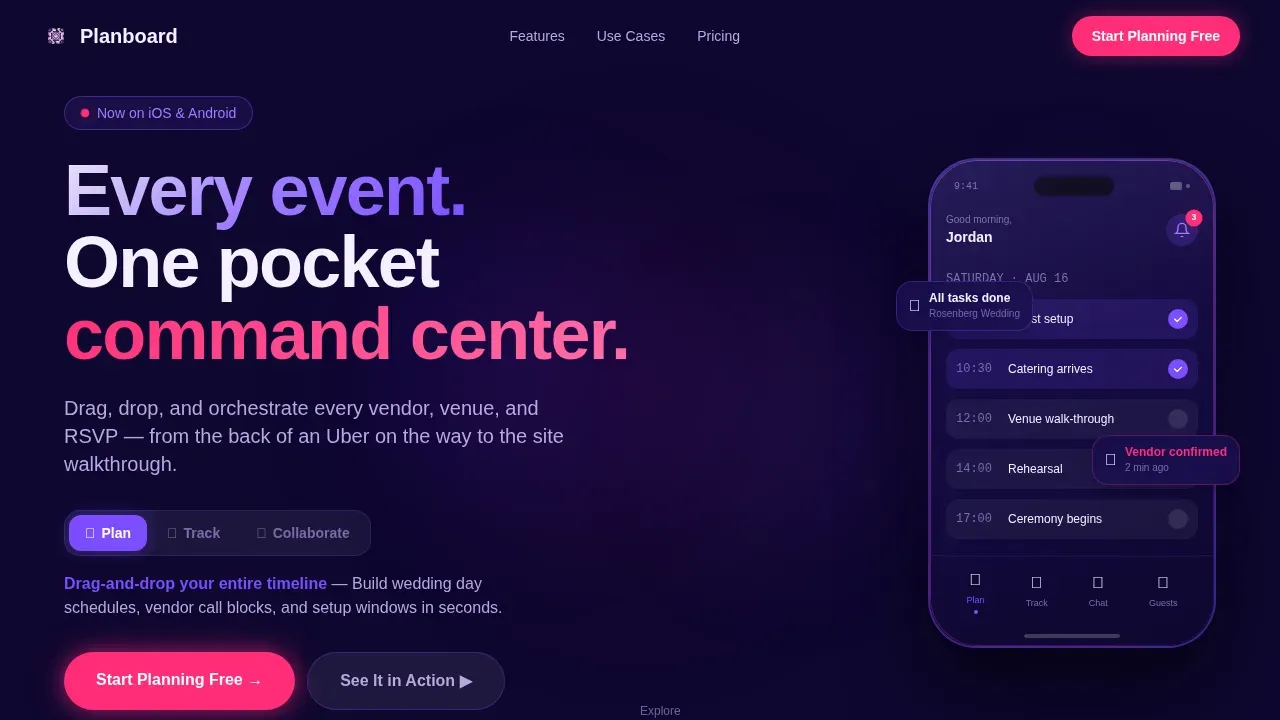
- A Feature Tab Switcher hero with a floating phone mockup, three animated workflow tabs (Plan, Track, Collaborate), and spring-transition screen content showing a drag-and-drop timeline builder, a live budget tracker, and a shared vendor chat thread.
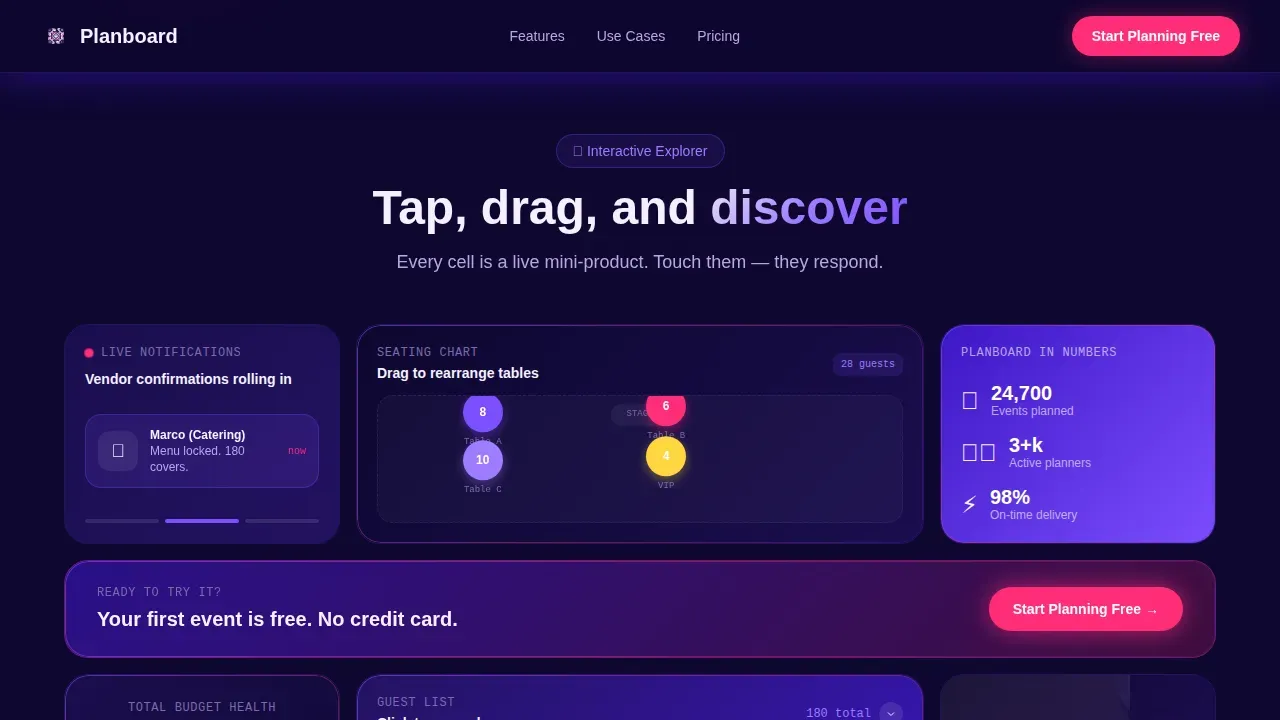
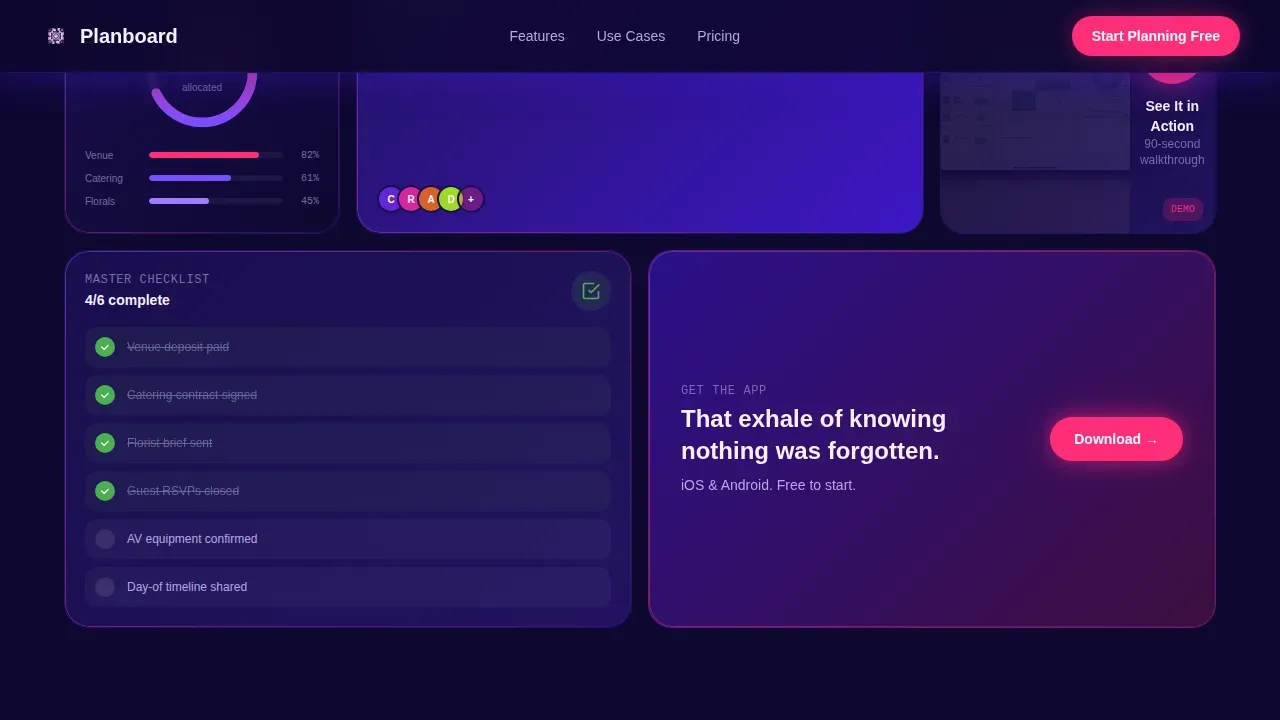
- An Interactive Explorer bento grid with self-contained cells: a draggable seating chart sample, a push notification loop, an expandable guest-list filter panel, and a muted inline demo video that auto-plays inside its own bento cell.
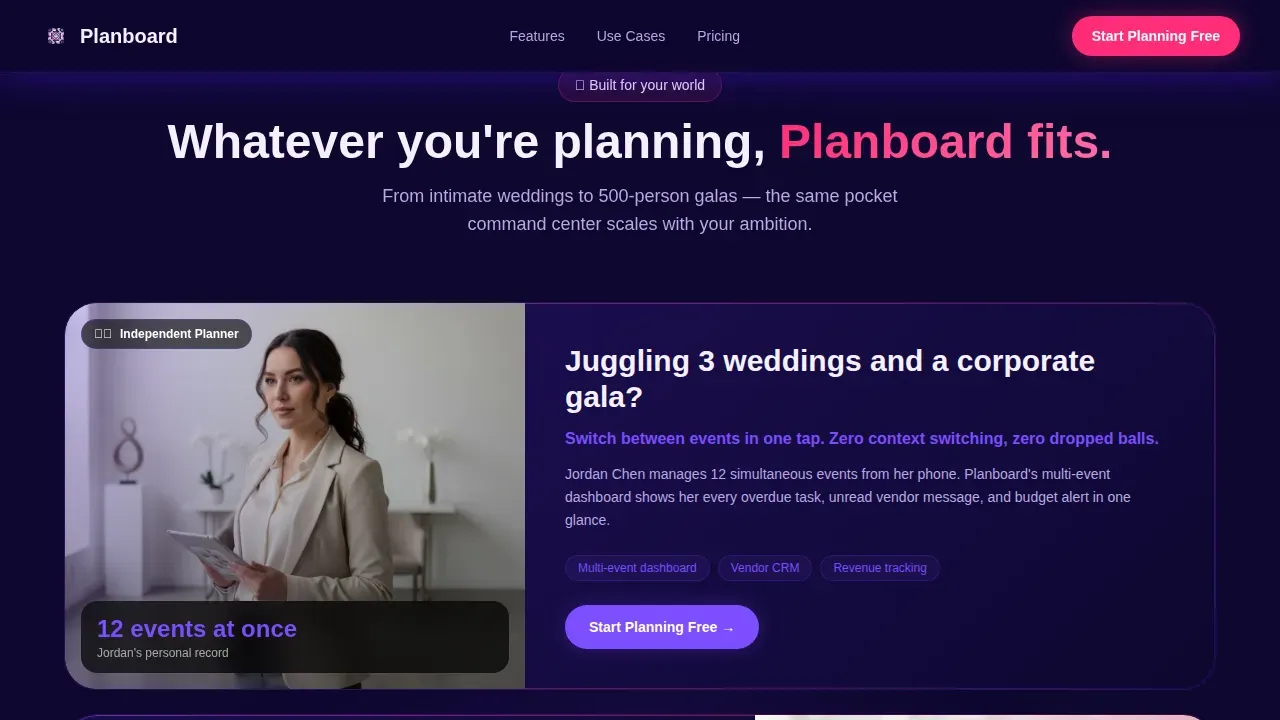
- Use case cards for three distinct planner profiles, a social proof metrics bar with testimonial cards, a full-width call to action close section, and a horizontal-flow footer with social media links included.
Feature list
This template delivers a wide array of purpose-built components. Each feature is grounded in the project brief and designed to make the event planning app feel tangible before the visitor taps the download button.
Feature Tab Switcher Hero
The hero section leads with a floating phone mockup anchored by three labeled tabs: Plan, Track, and Collaborate. Clicking each tab triggers smooth spring-transition animations that swap the phone screen content, showing a different core event management workflow. The phone tilts subtly on hover, catching a gradient reflection that mirrors real stage lighting, giving the event highlights section a cinematic opening.
Interactive Bento Grid Explorer
The bento grid is the heart of this landing page template. Each cell is a self-contained interactive moment: visitors can drag a seating chart tile, watch a five-second push notification loop confirm a vendor, expand a guest-list filter panel with a single click, or play a muted demo video. The grid reflows with staggered easing as the visitor scrolls, so the page feels alive and in motion, mirroring the controlled energy of event day itself.
Benefit-Driven Headline and call to action System
The hero features a bold, benefit-driven headline built to communicate the app's core value in seconds. The primary call-to-action reads "Start Planning Free" in magenta and appears as a pinned floating bottom bar on mobile devices, ensuring easy access to the download trigger at all times. On desktop, the call to action repeats at the close of every second bento row so potential attendees never scroll past it.
Use Case Asymmetric Cards
Three asymmetric cards give center stage to each target audience: the independent event planner, the DIY couple, and the nonprofit team. Each card presents a specific outcome tied to that planner's event details, making the messaging precise and credible. This structure helps visitors self-select and immediately recognize that this template was built with their next event in mind.
Social Proof and Metrics Bar
A dedicated metrics bar pairs quantified results with real testimonial cards. Trust-building elements like named reviewer quotes and planner roles are displayed alongside event coordination stats. Including this kind of social proof is essential for a successful event app landing page, as it reassures potential attendees and project managers alike that the product delivers on its promises.
Inline Demo Video Cell
One bento cell is reserved for a muted, auto-playing demo video of the app interface. This gives visitors detailed information about the product's user friendly interface without requiring them to leave the page or fill in form fields. High quality images and vibrant visuals support the video cell on all sides, keeping the overall app design cohesive and engaging.
Page sections overview
| Section | Purpose |
|---|---|
| Feature Tab Hero | Showcase three core app workflows with animated tab switching and a floating phone mockup |
| Bento Grid Explorer | Let visitors interact with draggable, expandable, and looping product cells |
| Use Case Cards | Connect each planner profile to a specific outcome and event type |
| Social Proof Bar | Display metrics, testimonial cards, and credibility signals |
| call to action Close Section | Drive app store clicks with a full-width magenta-accented download prompt |
| Horizontal Flow Footer | Provide navigation, social media links, and brand anchoring |
Design & branding system
The app design uses an Electric Indigo color system that feels like a phone screen glowing in a dimly lit venue during setup. Every color has an assigned role, and the palette stays consistent across the entire site, producing immersive design cohesion that reinforces the product's digital-native identity.
- Deep app-shell indigo (#3D17C6) dominates backgrounds and navigation; bright interactive violet (#7C4DFF) marks active states and tab toggles; soft lavender (#EDE7F6) gives the bento cards breathing room and a clean layout feel.
- Hot accent magenta (#FF2D78) is reserved exclusively for calls to action, notification badges, and the pinned bottom bar, ensuring the most important actions always stand out with stunning visuals contrast.
- Typography uses Plus Jakarta Sans for headings, DM Sans for body copy, and JetBrains Mono for data and metrics displays, creating a layered typographic hierarchy that feels confident and unmistakably digital.
Mobile & speed optimization
This is a mobile-first landing page template built for an app product, so the experience on small screens is treated as the primary use case. The app design relies on CSS transforms only and Intersection Observer for scroll-based reveals, keeping the page light and responsive across all mobile devices without leaning on heavy animation libraries.
- The pinned floating call to action bar ensures the "Start Planning Free" button stays visible while scrolling on mobile, reducing friction at the moment a visitor is ready to attend to the download prompt.
- Staggered spring easing, tab transitions, and hover-tilt effects are all implemented with performance-conscious CSS transforms, keeping the interactive elements smooth and the overall planning process for the visitor uninterrupted.
How this template helps you convert
A well-designed event landing page converts by giving visitors something to do before they commit. This template builds trust through interaction, not persuasion copy alone. By the time a visitor reaches the app store button, they already feel like a user because they have physically engaged with miniature versions of the product.
- Interactive bento cells let visitors drag, expand, and play with the app's core features directly on the landing page site, removing doubt and enhancing user experience before the download decision is made.
- The benefit-driven headline, sticky call to action bar, and no-form-fields approach remove every barrier between interest and action, lowering the bounce rate and improving conversion at every scroll depth.
- Social proof elements, including named testimonials and a metrics bar, give potential attendees and project managers the credibility signals needed to trust a free event app they have never used before.
Other information about this template
This template is a suitable template choice for any team promoting a mobile-first event management product. It was designed to generate interest quickly, present event details with clarity, and guide visitors toward a single, frictionless action. The structure supports a wide array of event types, from intimate gatherings to large-scale community events.
- The planning template is reusable across product launches or seasonal campaigns. Teams can adapt the event overview section, swap out use case cards for past events or upcoming event announcements, and update the schedule or event date references without rebuilding from scratch.
- The event template supports detailed information displays through the bento grid, meaning project managers and project teams can showcase speaker profiles, ticket sales information, or event highlights without cluttering the clean layout.
- All these elements work together to give visitors easy access to the right tools at the right moment: interactive cells that demonstrate drag and drop functionality, a countdown timer cell that creates urgency around important dates, and a demo video that answers questions before they are asked.
- The landing page is structured so search engines can index a clear content hierarchy, with benefit-focused headings and descriptive section labels that reflect the full scope of the event planning process, from initial ideas to day-of execution.
- The Planboard dynamic event planning mobile app landing page template is the reference implementation for this bento grid design system. It is available on the template marketplace and covers every section needed for a high-converting app promotion site.
- Teams building for community events or recurring annual gatherings can reuse and customize the planning template each cycle, maintaining consistent branding and saving time on the event planning process across semesters or seasons.
- The footer uses a Vercel Horizontal Flow pattern, keeping form submissions paths clear and social media links prominent for any team that wants to extend reach beyond the app store click itself.
- Gather feedback on visitor behavior by observing which bento cells receive the most interaction, then use those signals to refine messaging for your next event campaign and better serve your target audience.
Theme
Dynamic Motion
Creative direction
Interactive Explorer
Color system
Electric Indigo
Style
Bento Grid
Direction
Click-Through
Page Sections
Feature Tab Switcher Hero Section
Interactive Bento Grid Explorer
Pinned Magenta Call to Action System
Use Case Asymmetric Cards
Social Proof Metrics and Testimonials
Electric Indigo Visual Design System
Related questions
Who is this landing page template designed for?
Does this template include interactive components out of the box?
Can I reuse this template for different events or campaigns?
How does the template handle calls-to-action on mobile?
Does this template require coding skills to customize?



