Intelligent Legal Operations Landing Page Template
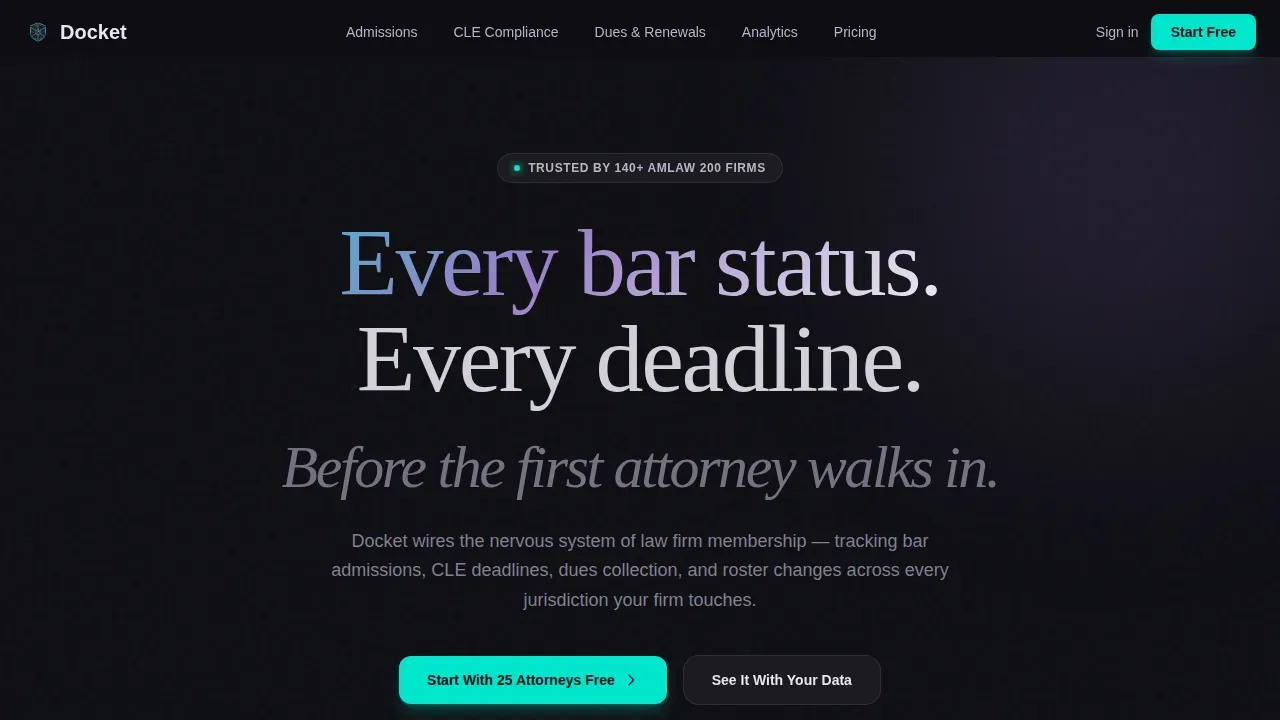
Docket is a hub-and-spoke landing page template built for law firm membership management software. It uses a dark command-center aesthetic with iridescent teal and violet accents, an animated Feature Tab Switcher, and a scrolling Feature Matrix to show how firms can track bar admissions, CLE deadlines, dues, and roster changes across every jurisdiction they serve.
by Rocket studio
Quick summary
Docket is a single-page landing page template designed for legal operations software. It helps law firms move from spreadsheet chaos to a real-time compliance dashboard. The layout follows a hub-and-spoke anchor navigation structure, with each section unpacking one capability pillar through live micro-animations and comparison grids.
Who this template is for
This template serves teams that manage attorney membership at scale. It speaks directly to people who feel the daily pressure of compliance tasks across multiple jurisdictions.
- Operations directors at large law firms juggling 400 or more attorney profiles across many bar admissions
- Legal administrators at mid-size partnerships who still reconcile dues and renewals in spreadsheets
- Compliance officers responsible for catching lapsed bar statuses before partners or clients do
What problem this template solves
Managing a large case docket can overwhelm your inbox and test your organizational skills. Law firms that track admissions, continuing legal education (CLE) credits, and dues manually are exposed to missed deadlines and costly errors. Clients expect current status updates, and a lapsed bar record found late can damage firm credibility instantly.
- Spreadsheet-based practice creates human errors and missed deadlines that no checklist can fully prevent
- Attorneys and counsel spread across jurisdictions make it hard to organize and track every due date in one place
- Manual follow-up tasks drain valuable time that operations teams could spend on higher-priority firm matters
What you get with this template
Docket delivers a fully built landing page that performs the product's promise visually before asking visitors to sign up. Every section is designed to create trust and lead visitors toward a free trial with minimal friction.
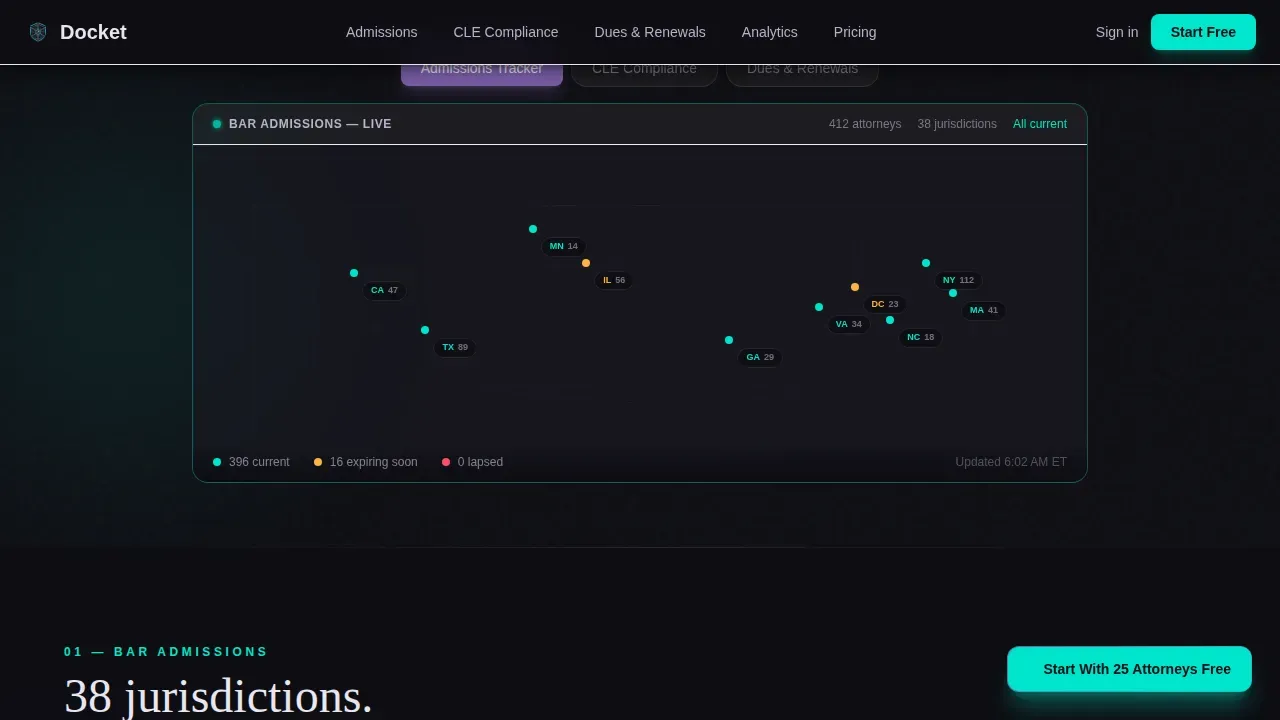
- An animated Feature Tab Switcher hero with a live jurisdiction map, CLE radial progress rings, and a dues waterfall timeline
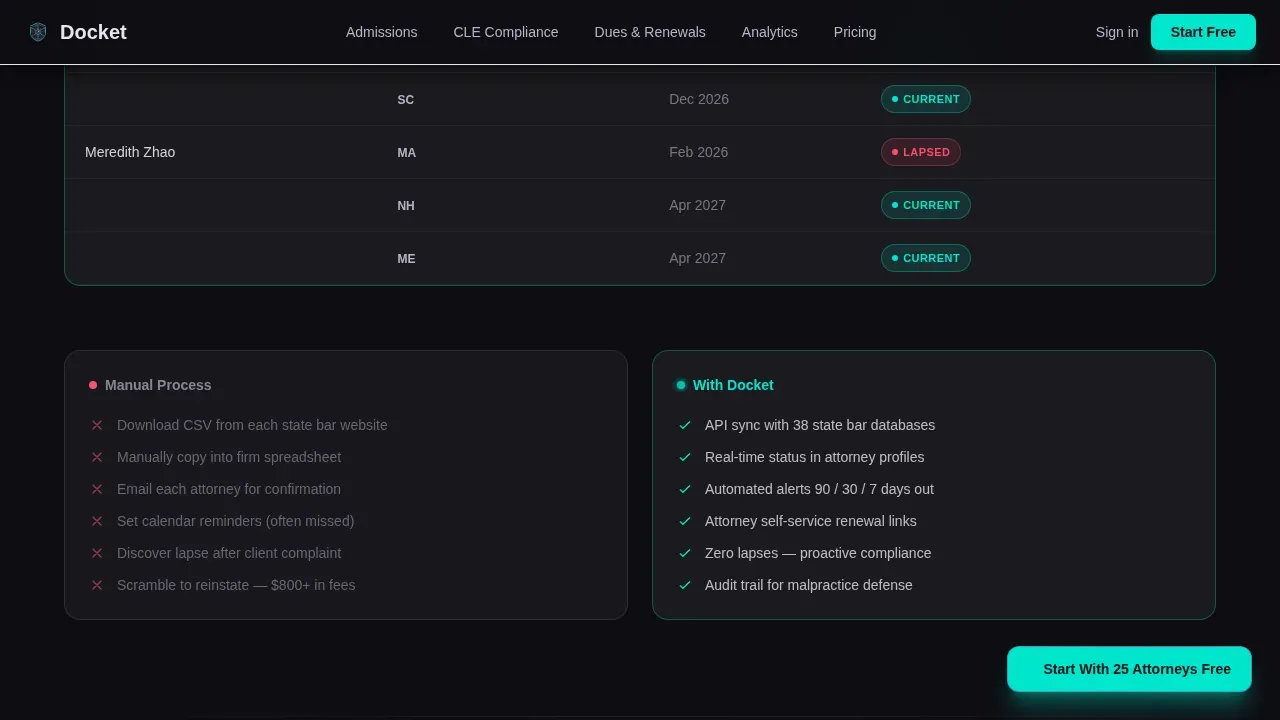
- A scrolling Feature Matrix showing manual process versus docket automation, with rows that populate in real time and status badges that flip from red to green
- A three-field freemium signup form covering firm name, attorney headcount slider, and work email, with no credit card required
Feature list
This template includes purpose-built sections and interaction patterns that reflect exactly how legal operations software earns trust.
Animated Feature Tab Switcher
The header opens with three clickable tabs: Admissions Tracker, CLE Compliance, and Dues and Renewals. Each tab triggers a smooth dimensional rotation of the interface panel, revealing the matching dashboard view. The default state shows a jurisdiction map with attorney pins glowing teal for current statuses and violet for approaching deadlines.
Scrolling Feature Matrix
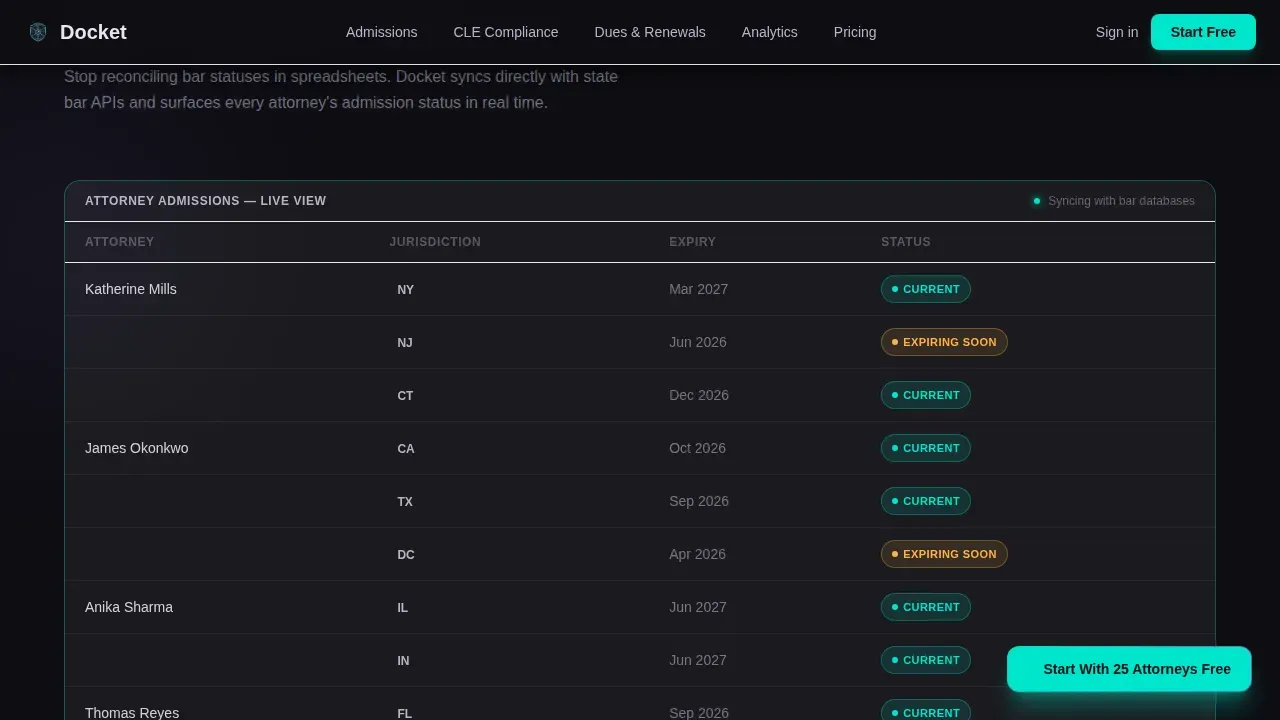
Scrolling past the hero reveals a comparison grid. Each row contrasts a manual process against docket automation. Rows populate in real time as visitors scroll, and status badges flip from red to green. Visitors watch the software's efficiency play out rather than simply reading about it.
Multi-Jurisdiction Compliance Dashboard
A bento-grid section visualizes firm-wide data across every jurisdiction a practice touches. CLE hours appear as radial progress rings. Deadline countdowns update live. The section helps operations teams see how the platform organizes reporting across a large attorney portfolio at a glance.
Freemium Pricing and Signup
The pricing section includes an attorney headcount slider ranging from 10 to 1,000 or more. Visitors fill in three fields: firm name, headcount range, and work email. No credit card is needed to start. A secondary path lets enterprise clients explore a guided data import instead.
Persistent Floating Call to Action
A floating "Start With 25 Attorneys Free" button appears after the first scroll. It stays accessible throughout the page so visitors can act the moment they are ready, without submitting to any extra steps or form pages.
Social Proof and Trust Signals
The template includes dedicated space for firm logos, attorney count statistics, and compliance rate metrics. Trust signals placed near the signup form help clients feel confident before submitting their details. Authority references and compliance data reinforce the software's reliability without overstating it.
Page sections overview
| Section | Purpose |
|---|---|
| Hero Tab Switcher | Showcase admissions, CLE, and dues dashboards via animated tabs |
| Feature Matrix | Compare manual tasks to docket automation with live row animations |
| CLE Compliance | Display radial progress rings, deadline countdowns, and status flips |
| Firm-Wide Dashboard | Present multi-jurisdiction analytics in a bento-grid layout |
| Pricing and Signup | Deliver a three-field freemium form with an attorney headcount slider |
| Footer | House brand notes and a linear single-row link pattern |
Design & branding system
The visual identity follows a Dynamic Motion theme layered over an AI Iridescent color system. The result feels like institutional gravity meeting futuristic intelligence, a command center that looks alive at six in the morning.
- Color palette: deep obsidian (#0D0D12) background, electric teal (#00E5CC) for data points and progress indicators, shifting violet (#7B5EA7) for active navigation states, and soft holographic white (#E8E6F0) for card surfaces and body text
- Typography: DM Sans handles body copy for readability at small sizes; Fraunces display serif provides gravitas in headings, reinforcing the platform's institutional tone
- Motion: iridescent gradients pulse on hover states and section transitions; tab switcher panels rotate in three dimensions; status badges animate; all motion uses GPU-accelerated transforms
Mobile & speed optimization
The template is designed desktop-first to match how operations directors work at their workstations. Layouts are structured to remain clean and readable as screen sizes change.
- Animations rely on GPU-accelerated transforms to keep motion smooth across devices
- Section reveals use IntersectionObserver so content loads progressively as visitors scroll
- The signup form is short by design: three fields reduce friction and help deliver higher conversion rates on any screen size
How this template helps you convert
Every design and copy decision in this template is built around earning the click before asking for it. Visitors gain confidence through demonstration, not description.
- The Feature Tab Switcher lets prospects interact with live product mockups in the hero before they read a single benefit claim, making the free tier feel like a gift rather than a gate.
- The Feature Matrix makes automation visible. Watching rows populate and status badges flip from red to green lets clients understand the software's impact without effort on their part.
- The three-field signup form and persistent floating button keep the path to "Start With 25 Attorneys Free" always one click away, while a secondary enterprise path serves larger firms who prefer a guided import before committing.
Other information about this template
This template is applicable to a broad range of legal technology use cases beyond core bar admission tracking. It can support practices that need to organize intellectual property (IP) filings, trademarks, and related documents across a client portfolio.
- Docket intelligent law firm membership management landing page template is the complete reference title for this asset in the marketplace
- IP docketing software automates time-consuming manual tasks; automated IP docketing systems can detect new filings and calculate deadlines without manual data entry, reducing missed deadlines significantly
- Docketing software allows documents to be stored and kept accessible; IP docketing systems can generate customizable reports providing insights into deadlines, trademarks, and marks that require attention
- Using spreadsheets for IP management can lead to human errors; this template is designed to help law firms communicate why fully automated software eliminates those risks
- Cloud-based access lets lawyers organize and review case notes and references from any office location, which is a key benefit to communicate to prospective customers
- Lead Docket helps law firms capture leads and automate follow-ups; AI insights in Lead Docket summarize lead details and messages to prioritize high-potential clients, making it a relevant example of technology that improves firm strategies
- Lead Docket's automated workflows eliminate manual tasks and ensure consistent follow-up, which aligns with the conversion strategies this template is designed to showcase
- The consent checkbox near the signup form and the secure payment trust symbol placement near decision points help build confidence with prospective members before submitting
Theme
Dynamic Motion
Creative direction
Feature Matrix
Color system
AI Iridescent
Style
Hub & Spoke (Anchor Nav)
Direction
Freemium/Trial
Page Sections
Animated Feature Tab Switcher Hero
Scrolling Feature Matrix
Multi-jurisdiction Compliance Dashboard
Freemium Signup with Headcount Slider
Persistent Floating Call to Action
Social Proof and Authority Section
Related questions
What types of law firms is this template best suited for?
Can the signup form be adjusted to collect different details?
Does this template support IP and trademark management use cases?
How does the Feature Matrix section work for prospective clients?
Is this a good fit for a freemium software launch?



