Packet - Intelligent Telecom Landing Page Template
Packet is a dashboard-style landing page template built for telecommunications AI document processing platforms. It opens with a live-parsing data grid animation, reveals capabilities through an expanding feature matrix, and drives visitors toward a no-gate sandbox call to action. The design uses void black, electric chartreuse, and synthetic cyan to create a network operations center aesthetic that feels operational from the first scroll.
by Rocket studio
Quick summary
Packet is a single-page landing page template designed for AI platforms that process telecom documents at scale. It combines a real-time dashboard header animation with a layered feature matrix and a persistent, click-focused call to action. The visual system makes every interactive element feel live, giving operations-focused buyers confidence before they ever click a button.
Who this template is for
This template is built for teams selling or showcasing AI-powered document processing tools inside the telecommunications industry. It speaks directly to buyers who understand carrier operations and need to see the product working before they commit.
- Operations directors at regional carriers managing high volumes of monthly documents from CLECs (Competitive Local Exchange Carriers) and ILECs (Incumbent Local Exchange Carriers)
- Revenue assurance teams reconciling carrier access billing against contract terms clause by clause
- Compliance officers managing FCC filing deadlines with limited tooling and tight turnaround windows
What problem this template solves
Telecom operations teams deal with a constant flood of structured and unstructured documents. Rate sheets, interconnect agreements, regulatory filings, and porting requests pile up faster than any manual review process can handle. A generic SaaS landing page fails to communicate the precision and speed that these buyers actually need to see.
- No standard template conveys the real-time intelligence of an AI parsing engine the way this dashboard-first design does
- Buyers in this niche require proof of capability before they engage, and most landing pages ask for trust before demonstrating value
- The template eliminates that gap by showing the product working in the header before a single word of marketing copy appears
What you get with this template
The template delivers a complete single-page layout optimized for telecom AI platforms. Every section is purpose-built to move a technically skeptical buyer from first impression to action.
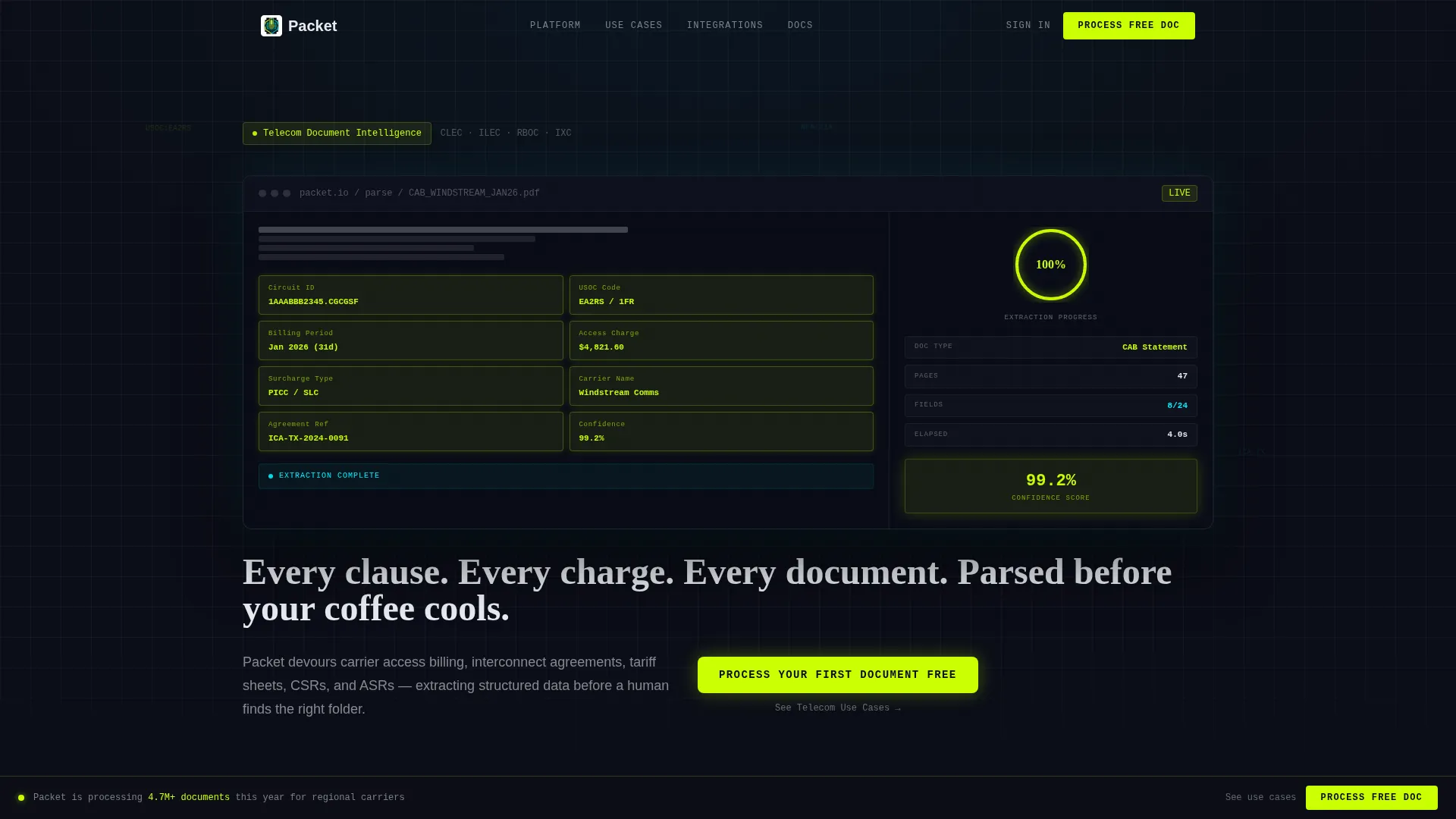
- A header section with an animated data grid that simulates a carrier access billing statement being parsed field by field in real time
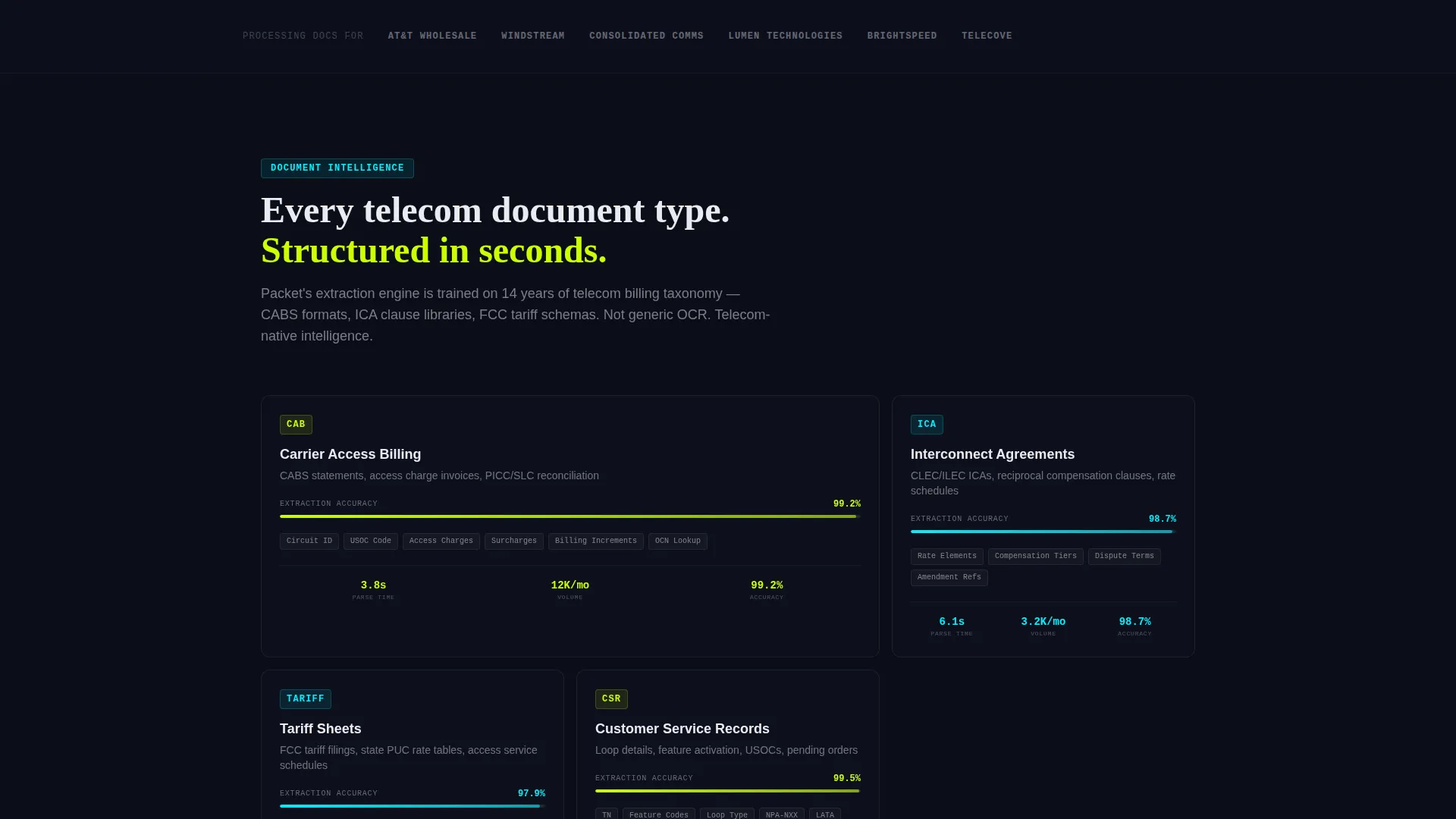
- An expanding feature matrix organized by telecom document type, with micro-animations showing extraction accuracy, processing speed, and field-mapping diagrams
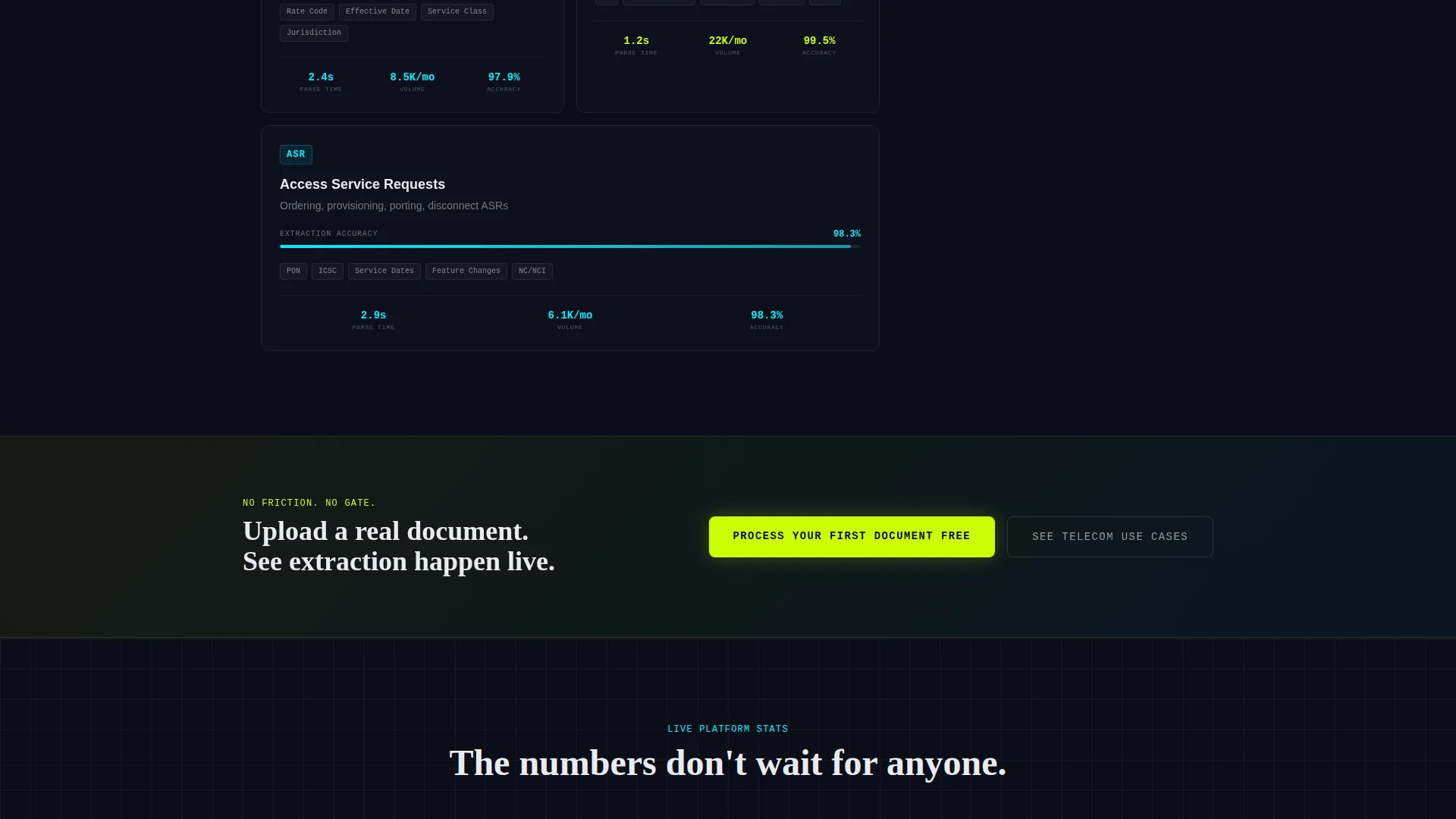
- A three-placement call to action system: a persistent bottom bar, a full-width mid-page break, and a terminal closing section, all driving to a live sandbox
Feature list
This template includes purpose-built components that reflect the operational reality of telecom document processing. Each one is designed to build credibility with a technically informed audience.
Animated Dashboard Header
The header opens with a data grid showing a telecom carrier access billing statement being parsed in real time. Fields light up sequentially in electric chartreuse as circuit IDs, USOC (Universal Service Order Code) codes, billing increments, access charges, and surcharges are identified. A progress ring counts from 0% to 100% over four seconds, and a document metadata sidebar populates with carrier name, agreement reference number, and a confidence score of 99.2%.
Self-Typing Headline
Once the dashboard animation completes, the headline types itself into frame. This sequenced reveal ties the copy directly to the visual demonstration, reinforcing that the product is fast and precise before the visitor reads a single marketing claim.
Expanding Feature Matrix
The feature matrix organizes capabilities by telecom document type: interconnect agreements, tariff sheets, Customer Service Records (CSRs), Access Service Requests (ASRs), and carrier invoices. Each card expands on hover or tap to reveal extraction accuracy percentages climbing, processing times counting down, and field-mapping diagrams connecting raw PDF zones to structured database columns.
Layered Motion System
Subtle particle trails connect sections to suggest data in transit between processing stages. Each feature matrix row loads with a staggered cascade that mirrors packet delivery behavior, keeping the visitor visually engaged as they scroll deeper into the capability reveal.
Integration Panel Grid
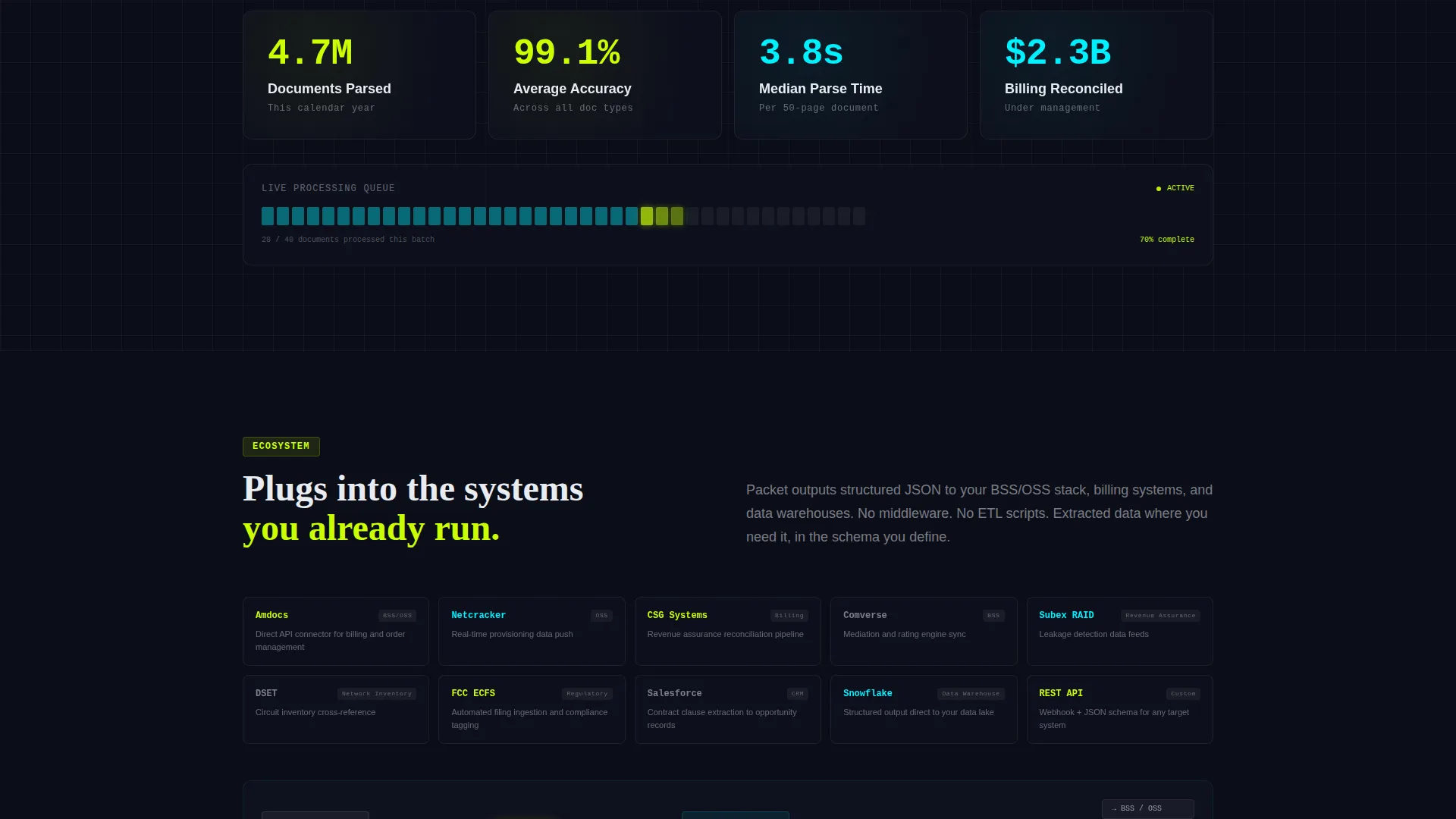
The lower portion of the feature matrix surfaces integration panels covering OSS/BSS (Operations Support System and Business Support System) connectors, billing system APIs, and compliance report generators. These panels give technical evaluators a clear view of how the platform fits into an existing operational stack.
Three-Placement call to action Architecture
The primary call to action, "Process Your First Document Free," appears as a persistent bottom bar after the header animation, as a full-width section break after the third feature matrix row, and again as the terminal closing section. A secondary path labeled "See Telecom Use Cases" provides a lower-commitment option for visitors still in research mode.
Page sections overview
| Section | Purpose |
|---|---|
| Animated Dashboard Header | Simulates live document parsing to demonstrate product speed and precision immediately |
| Self-Typing Headline | Delivers the core value statement after the animation builds trust visually |
| Feature Matrix Row 1 | Covers interconnect agreements and tariff sheet extraction with expanding card detail |
| Feature Matrix Row 2 | Covers CSRs, ASRs, and carrier invoice processing with animated accuracy indicators |
| Feature Matrix Row 3 | Reveals integration panels for OSS/BSS connectors and billing system APIs |
| Mid-Page call to action Break | Full-width primary call to action after the third feature row reinforces the sandbox offer |
| Integration Panel Grid | Shows compliance report generators and system connection points for technical buyers |
| Terminal call to action Section | Closes the page with the primary and secondary calls to action as the final conversion prompt |
Design & branding system
The visual identity follows a Dynamic Motion theme built on the Acid Digital color system. The palette is designed to feel like a network operations center at 2 AM: every bright element signals something active and working, while the dark background communicates loaded readiness rather than empty space.
- Void black (#0B0D17) forms the primary canvas, electric chartreuse (#CAFF04) drives calls to action and document-count highlights, synthetic cyan (#00F0FF) traces connection lines and graph indicators, and signal white (#E8ECF1) carries body text and grid borders
- Chartreuse dominates active states and processed-document counts to direct attention instantly; cyan marks data relationships and secondary indicators without competing for visual priority
- The overall motion system uses particle trails, staggered row loads, and sequential field illumination to keep the interface feeling alive throughout the full scroll
Mobile & speed optimization
The template is structured to maintain visual clarity and animation integrity across screen sizes. The dashboard grid and feature matrix adapt to narrower viewports without losing the layered motion logic that drives engagement.
- The expanding feature matrix cards support both hover interactions on desktop and tap interactions on mobile, so the capability reveal works for visitors on any device
- The persistent call to action bottom bar remains accessible throughout the scroll experience on both mobile and desktop, keeping the primary action within reach at all times
- Animation sequences are designed to complete within defined time windows (the progress ring runs on a four-second cycle) so the pacing feels intentional rather than slow on any connection
How this template helps you convert
The page earns the click by demonstrating product capability before making any request of the visitor. The conversion architecture is sequenced to match how a skeptical technical buyer actually builds confidence.
- The header animation shows the AI parsing a real telecom document type with specific field names and a visible confidence score, so the visitor understands what the product does before reading a headline.
- The feature matrix escalates proof progressively, moving from document-type extraction to system integration, so the visitor arrives at the call to action already convinced of the platform's operational scope.
- The primary call to action routes to a hosted sandbox where visitors upload a real telecom document and watch live extraction with no form, no gate, and no sales call required, removing every friction point between interest and first use.
Other information about this template
This template is well suited for teams presenting at industry events, running paid campaigns targeting telecom operations roles, or embedding as a product-specific microsite within a broader platform. The Acid Digital color system and Dynamic Motion theme are purpose-matched to the Dashboard/Data Grid template style and the Click-Through landing page direction specified in the design brief.
- The template style is categorized as Dashboard/Data Grid, making it a natural fit for AI platforms where showing data in motion is more persuasive than describing it in static copy
- The header concept is classified as Dashboard Preview, which is specifically designed to front-load product credibility for technically literate buyers
- The creative direction follows a Feature Matrix structure, which is proven for products with multiple document-type or use-case categories that each need individual explanation
Theme
Dynamic Motion
Creative direction
Feature Matrix
Color system
Acid Digital
Style
Dashboard/Data Grid
Direction
Click-Through
Page Sections
Animated Real-time Dashboard Header
Self-typing Headline Reveal
Expanding Feature Matrix by Document Type
Layered Particle Motion System
Oss/bss Integration Panel Grid
Three-placement Call to Action System
Related questions
What types of telecom documents does this template showcase?
Do visitors need to fill out a form to try the product through this landing page?
Who is the primary audience this landing page is designed to reach?
Can this template work for a platform that handles regulatory filings and porting requests?
Is the dashboard animation in the header purely visual or does it connect to real data?



