Micro-SaaS & Developer Tools Comparison Website Template
Parse is a browser-based regex workbench landing page template built for developer tools. It features a live regex input header, a scrolling comparison table, and a freemium conversion flow. The design follows a Data Command theme with a deep terminal aesthetic, making it ideal for launching a regex builder and tester product to technical audiences.
by Rocket studio
Quick summary
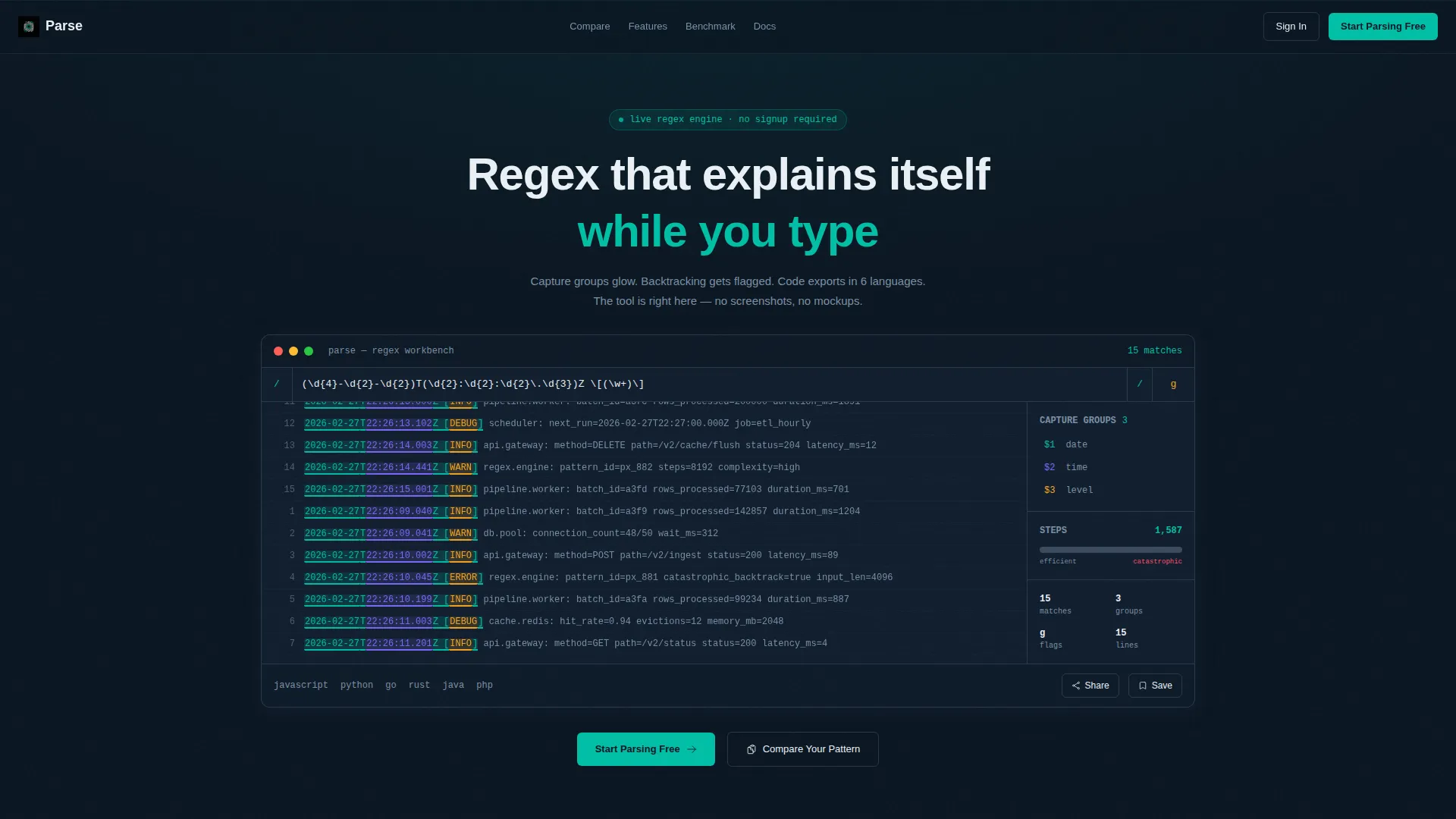
Parse is a single-page landing page template for a regex builder and tester. It opens with a fully functional regex input that runs live against sample log text. Visitors see capture group highlights and a real-time performance gauge before scrolling into a structured comparison table. The freemium conversion model gates saving and sharing, not the core tool.
Who this template is for
This template is built for technical founders and developer-tool makers who need to convert skeptical engineering audiences. It speaks directly to the people who will actually use a regex workbench every day.
- Backend developers who debug log parsers and need a credible, no-nonsense product page
- QA engineers and data engineers evaluating tools for pipeline extraction and input validation
- Micro-SaaS builders launching a regex builder and tester product with a freemium model
What problem this template solves
Most developer tool landing pages rely on static screenshots and vague feature lists. Engineers do not trust what they cannot touch. This template replaces the passive hero with a live tool, letting visitors evaluate the product before a single scroll.
- Visitors cannot engage with a static mockup the way they can with a live regex input
- Comparison tables that lack concrete data fail to move technical decision-makers
- Friction-heavy sign-up gates push developers away before they see real value
What you get with this template
You get a complete, single-page landing page structured around a live regex tool header, a scrolling spec-sheet comparison section, and a pinned freemium call-to-action bar. Every section is designed to move a technical visitor from curiosity to activation.
- A functioning regex input pre-loaded with an ISO timestamp pattern running against a scrolling log block
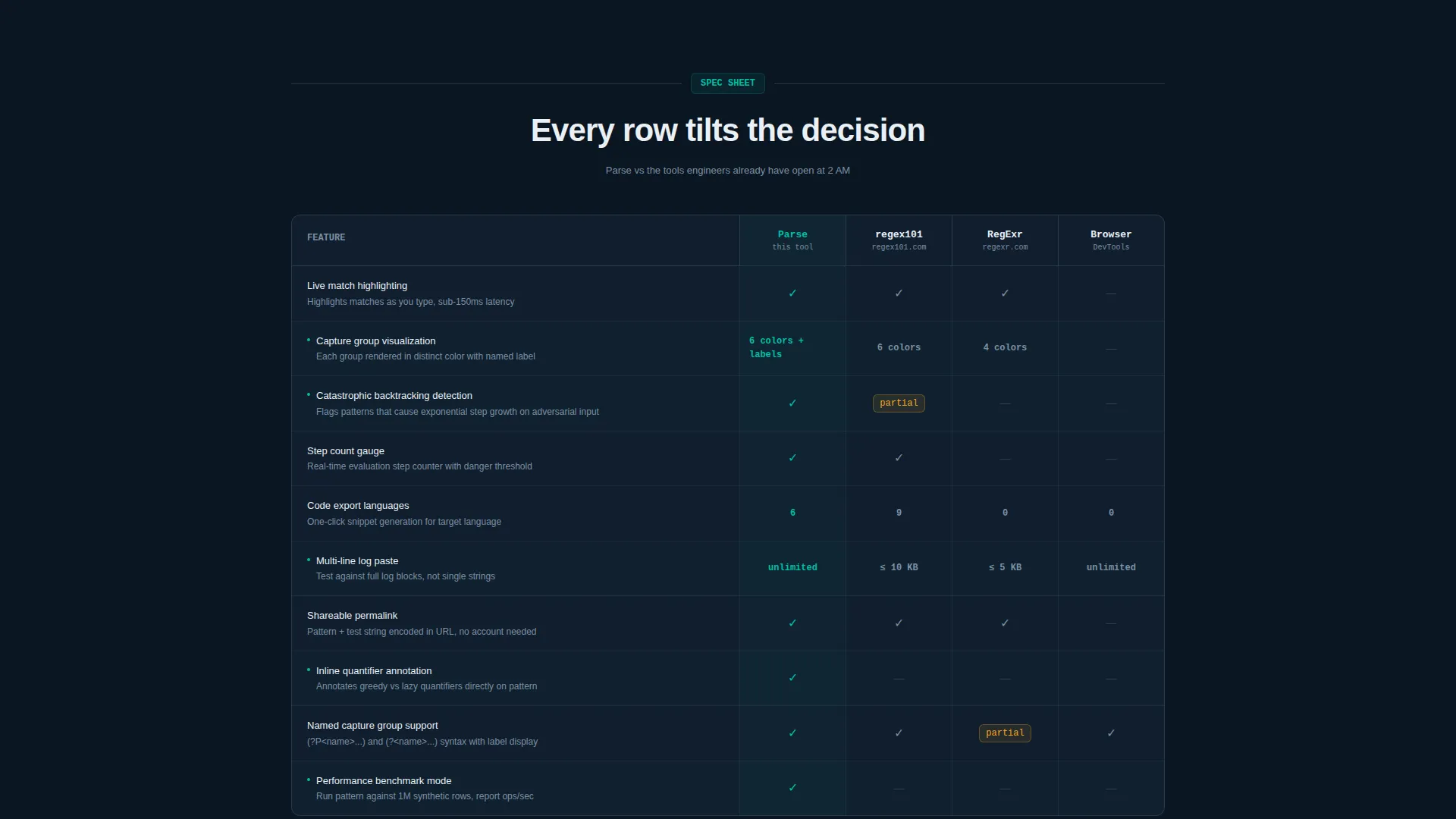
- A multi-column comparison table contrasting debugger depth, language export count, backtracking detection, and sharing features
- A dual call-to-action system with a pinned "Start Parsing Free" bar and a secondary "Compare Your Pattern" prompt
Feature list
This section outlines the core built-in capabilities that make Parse a purpose-built landing page for a regex builder and tester product.
Live Regex Header Tool
The header is a fully interactive regex workbench, not a screenshot. Visitors type or edit a pattern immediately. Capture groups glow in teal, quantifier greediness is annotated inline, and a performance gauge tracks evaluation step count in real time.
Scrolling Comparison Table
Each scroll section renders as a technical comparison row. The table measures Parse against competing tools across debugger depth, language export count, backtracking detection, and sharing capabilities. Checkmarks and concrete numbers replace vague marketing claims.
Six-Language Code Snippet Export
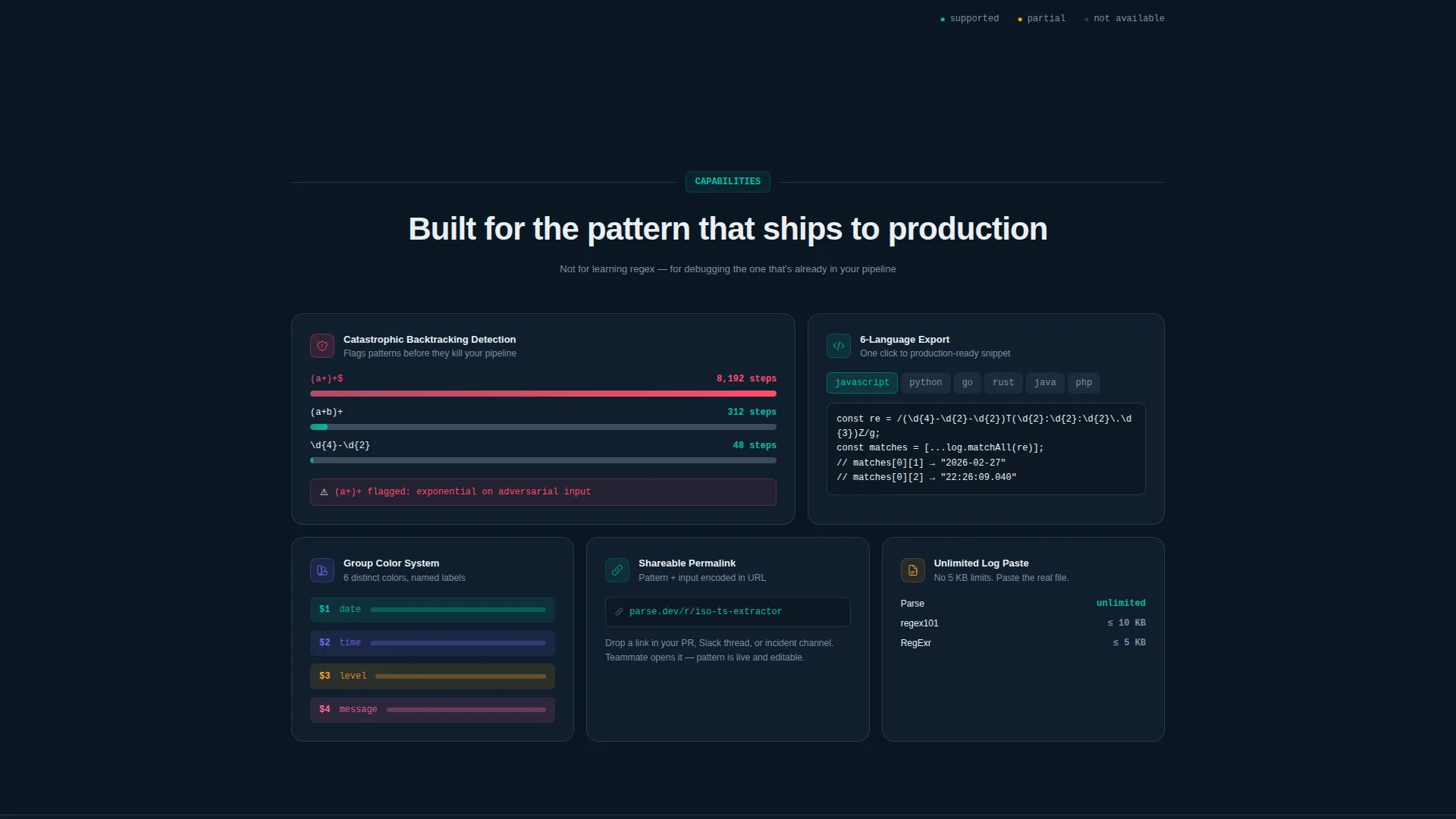
The template showcases the ability to generate ready-to-use code snippets in six programming languages. This feature is surfaced prominently in the comparison section so visitors immediately understand the practical output of the tool.
Backtracking Detection Panel
Catastrophic backtracking is flagged inline as part of the live tool experience. This panel is highlighted in the comparison table as a differentiating capability, showing visitors exactly what makes the debugger deeper than a standard browser console.
Pinned Freemium Conversion Bar
A slim top bar with the primary call to action appears after the first scroll. It stays visible as the visitor reads the comparison data. No sign-up is required to use the live header tool; the gate appears only when the visitor tries to save, share, or export.
Secondary Activation call to action
The "Compare Your Pattern" secondary call to action lets visitors paste their own regex into the live comparison engine. This turns the evaluation process into direct product activation, reducing the gap between interest and commitment.
Page sections overview
| Section | Purpose |
|---|---|
| Live Regex Header | Interactive workbench that functions as the hero |
| Pinned call to action Bar | Freemium conversion bar pinned after first scroll |
| Comparison Table Rows | Spec-sheet rows contrasting tool capabilities |
| Language Export Showcase | Highlights six-language code snippet generation |
| Backtracking Detection Row | Surfaces inline backtracking flagging as a differentiator |
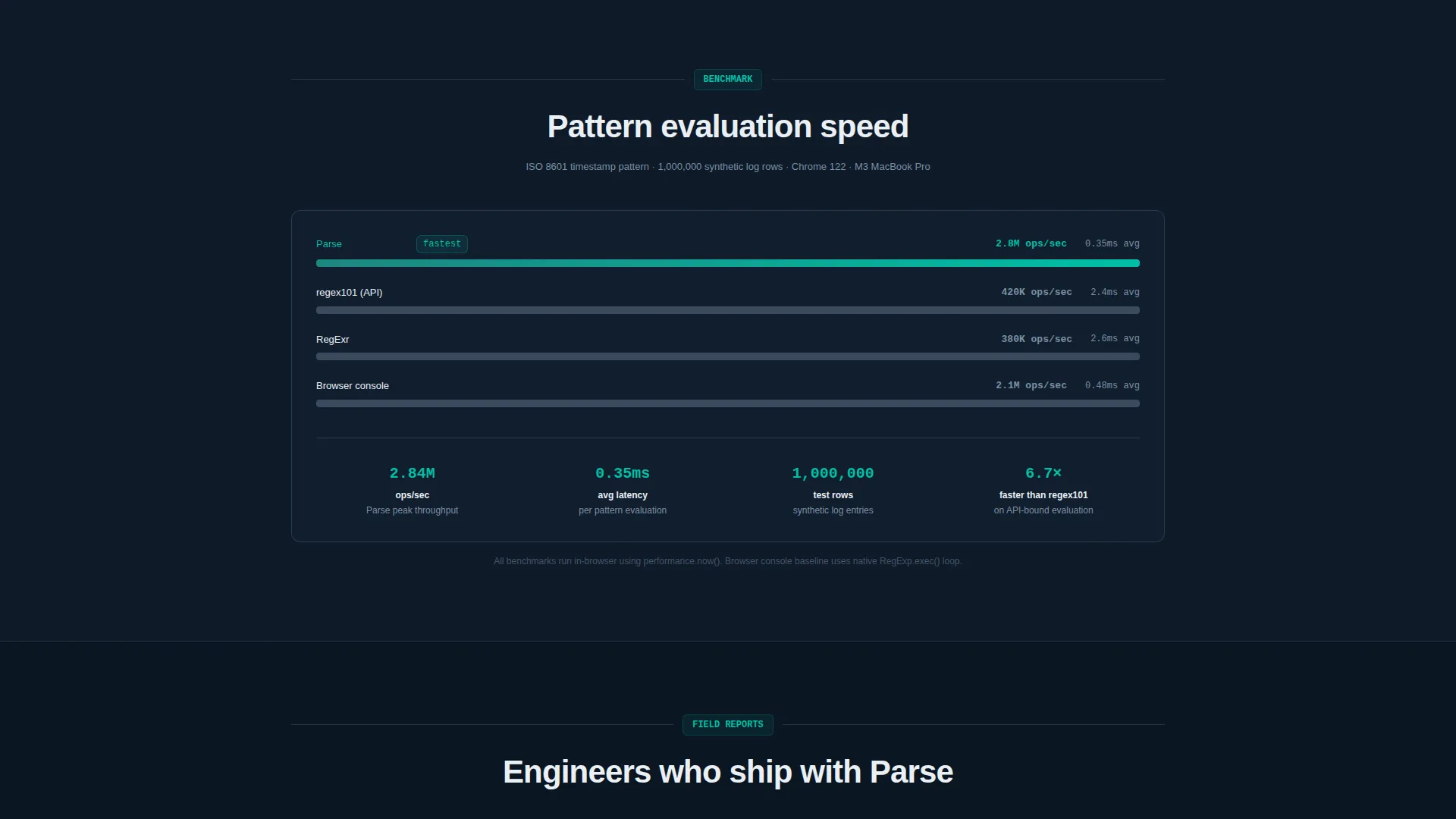
| Performance Benchmark | Visualizes pattern evaluation speed at page end |
| Secondary call to action Block | "Compare Your Pattern" activation prompt |
Design & branding system
The visual identity follows a Data Command theme built on the Teal Catalyst color system. The palette reads like a syntax-highlighted terminal where every color carries a clear functional meaning.
- Deep terminal black (#0B1622) for the base background, catalyst teal (#00BFA6) for matches and active states, muted slate (#3B4B5E) for secondary surfaces, and sharp white (#EAF0F5) for monospaced body text
- Teal acts as the primary signal color, used for highlighted capture groups, active input states, and call-to-action elements throughout the page
- The overall feel is clinical and electric, resembling a perfectly configured terminal environment where every element is exactly where an engineer expects it
Mobile & speed optimization
The template is structured to remain readable and functional on smaller screens, keeping the live tool experience accessible without sacrificing the dense technical layout.
- The comparison table columns are designed to stack or scroll horizontally on narrow viewports, preserving data readability
- The pinned freemium bar is lightweight and non-intrusive, ensuring it does not add visual weight on mobile displays
How this template helps you convert
The conversion strategy is built around letting engineers experience the product before asking for anything. Every layout decision reduces resistance and builds trust through direct interaction.
- The live regex input in the header removes doubt instantly. Visitors evaluate the real tool, not a promise, before reading a single line of copy.
- The comparison table applies cumulative pressure with each scroll. Concrete numbers and checkmarks make the decision feel like a logical conclusion, not a sales pitch.
- The freemium gate appears only at the moment of intent, when a visitor tries to save or export, making the sign-up feel like a natural next step rather than a barrier.
Other information about this template
This template is categorized under Technology, specifically within the Micro-SaaS and Developer Tools subcategory, targeting the regex builder and tester niche. It is a strong fit for founders positioning a developer tool against established alternatives.
- The Spec Sheet creative direction means each scroll section functions as a technical datasheet row, a format that resonates with engineering audiences who distrust marketing language
- The Calculator/Estimator header concept is implemented as a live tool rather than a visual widget, making the header itself the most compelling proof point on the page
- The Comparison Table template style is well-suited for products with clear, quantifiable advantages over existing tools in a competitive niche
Theme
Data Command
Creative direction
Spec Sheet
Color system
Teal Catalyst
Style
Comparison Table
Direction
Freemium/Trial
Page Sections
Live Interactive Regex Header
Scrolling Spec-sheet Comparison Table
Six-language Code Snippet Export Display
Inline Backtracking Detection Panel
Pinned Freemium Conversion Bar
Secondary Pattern Comparison Call to Action
Related questions
Do visitors need to sign up to use the live regex tool in the header?
What does the comparison table actually compare?
How many programming languages does the code snippet export cover?
Can visitors test their own regex patterns on the landing page?
Is this template suitable for a freemium product launch?



