Software & SaaS Professional Website Template
This HR and payroll landing page template is built for software platforms that manage the full employee lifecycle. It uses a dark, data-command visual style with scroll-triggered spec card reveals, live-simulated dashboard metrics, and two carefully staged calls to action. The result is a page that feels like a product demo before the visitor ever clicks a button.
by Rocket studio
Quick summary
This is a single-page, scroll-reveal landing page template for HR and payroll software platforms. It opens with a dark glass panel header showing three live-simulated metrics, then walks visitors through seven capability modules formatted as spec cards. The design uses a near-black base with iridescent violet and cyan accents, and every scroll trigger is tuned to build confidence before the final call to action appears.
Who this template is for
This template is built for teams marketing HR and payroll software to mid-market buyers. It speaks directly to the people who feel the pain of fragmented tools every end-of-month cycle.
- Operations directors at companies with 200 to 2,000 employees who have outgrown spreadsheets but want to avoid a heavy enterprise migration
- Payroll coordinators who toggle daily between benefits portals and tax filing systems
- CFOs who need headcount cost modeling on demand, without waiting on a report from their IT team
What problem this template solves
HR and payroll platforms are powerful, but their marketing pages often fail to communicate that power. Visitors arrive, see generic stock photography, and leave before understanding what the product actually does.
- The fragmented-tools problem is invisible on most landing pages, so buyers never feel understood
- Dense feature lists without context fail to show how modules connect into a single workflow
- Weak calls to action ask for commitment before the visitor has seen enough evidence to trust the product
What you get with this template
You get a fully structured, scroll-reveal landing page built around a Data Command visual theme. Every section is designed to present one focused capability at a time, building a layered argument across the full page.
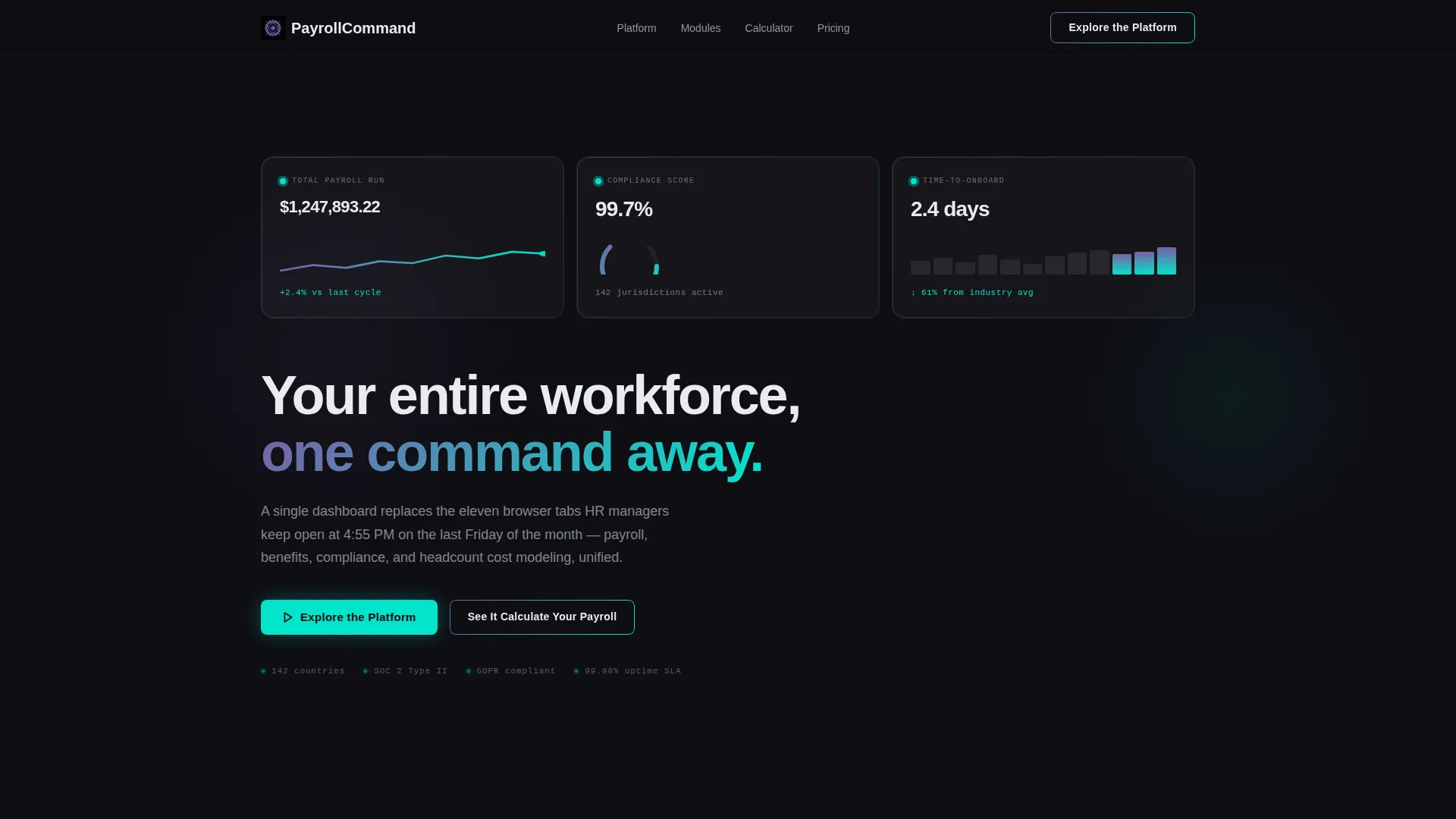
- A dark glass panel header with three live-simulated metric cards showing total payroll run, compliance score, and time-to-onboard figures
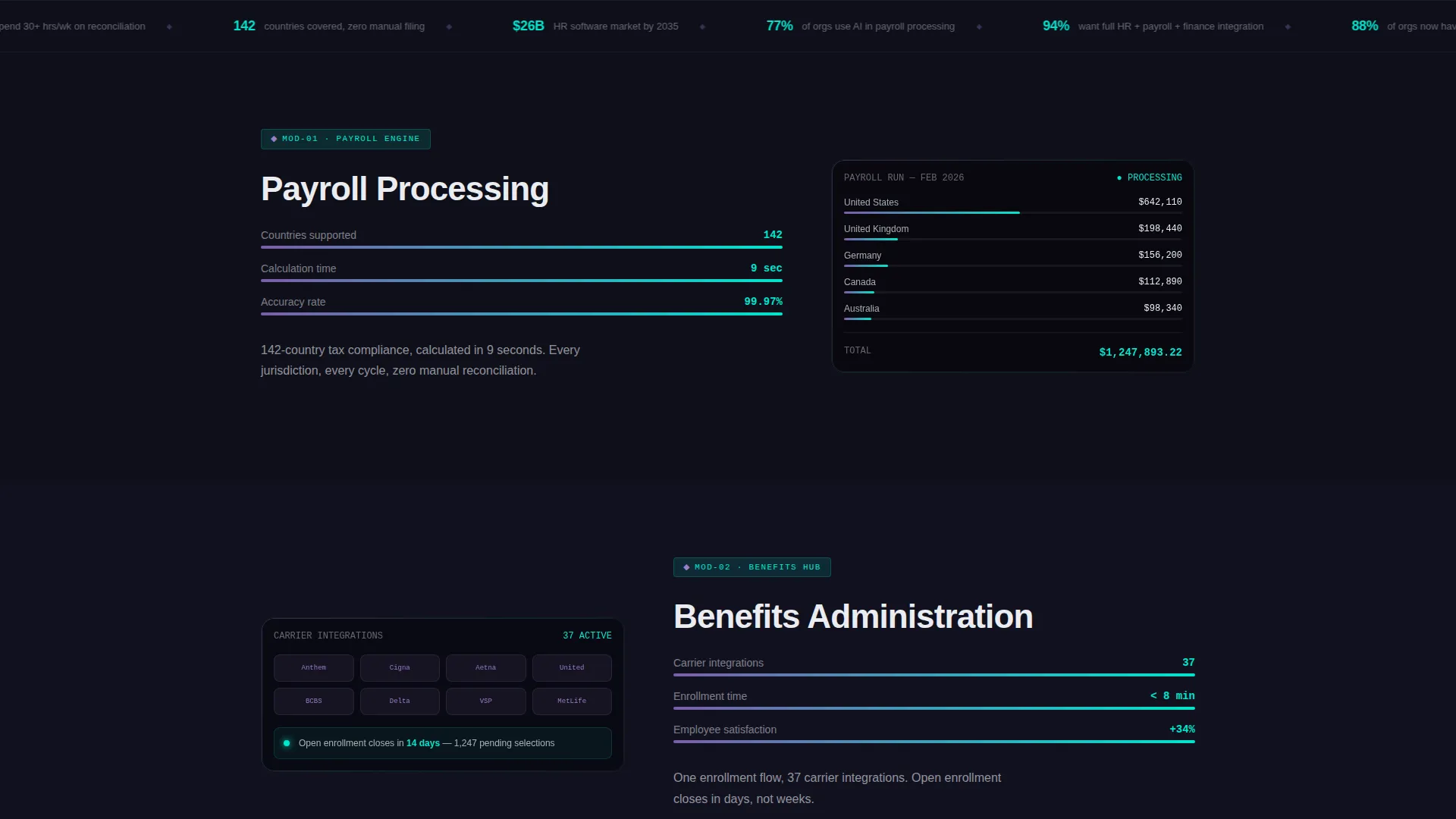
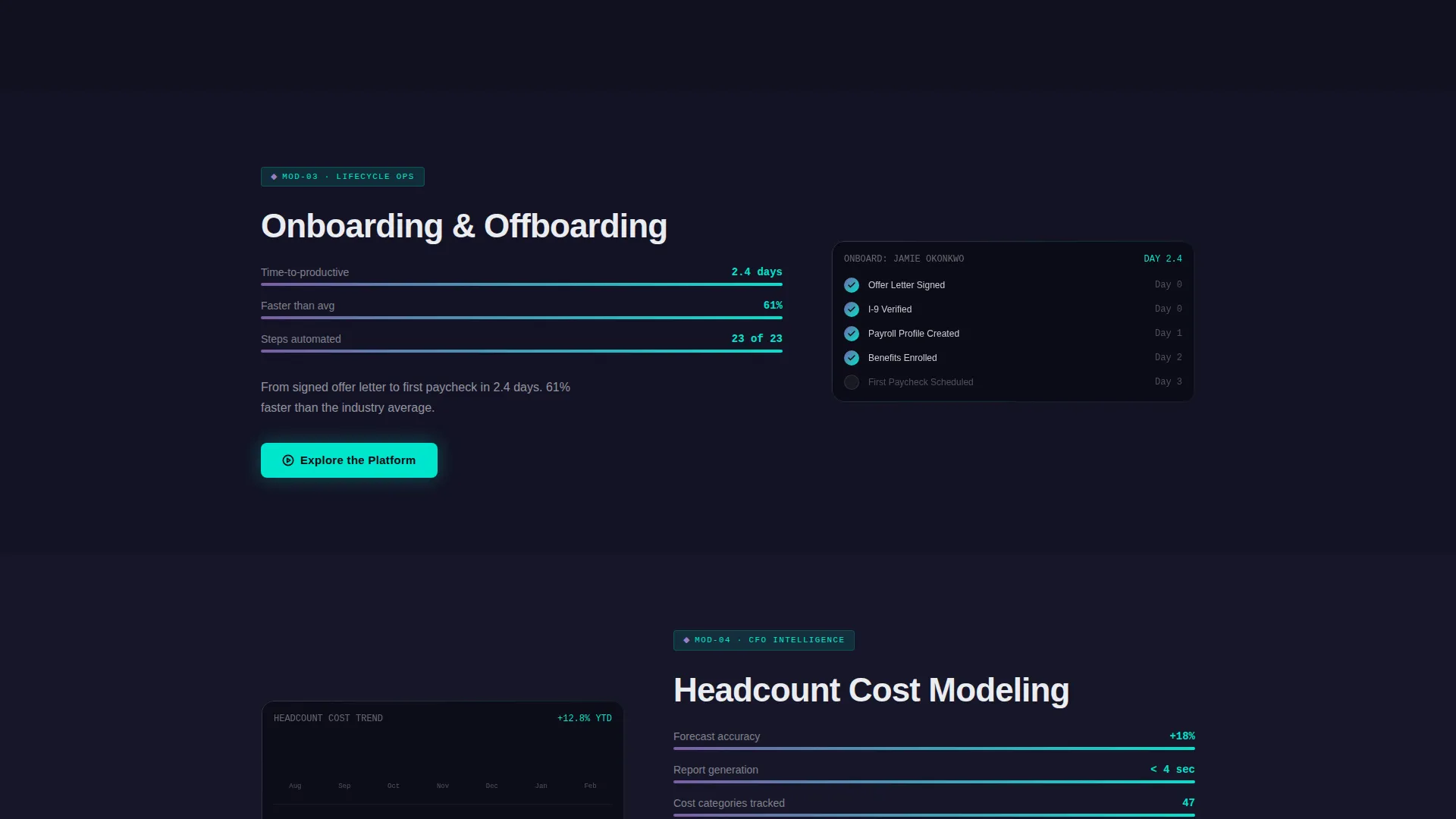
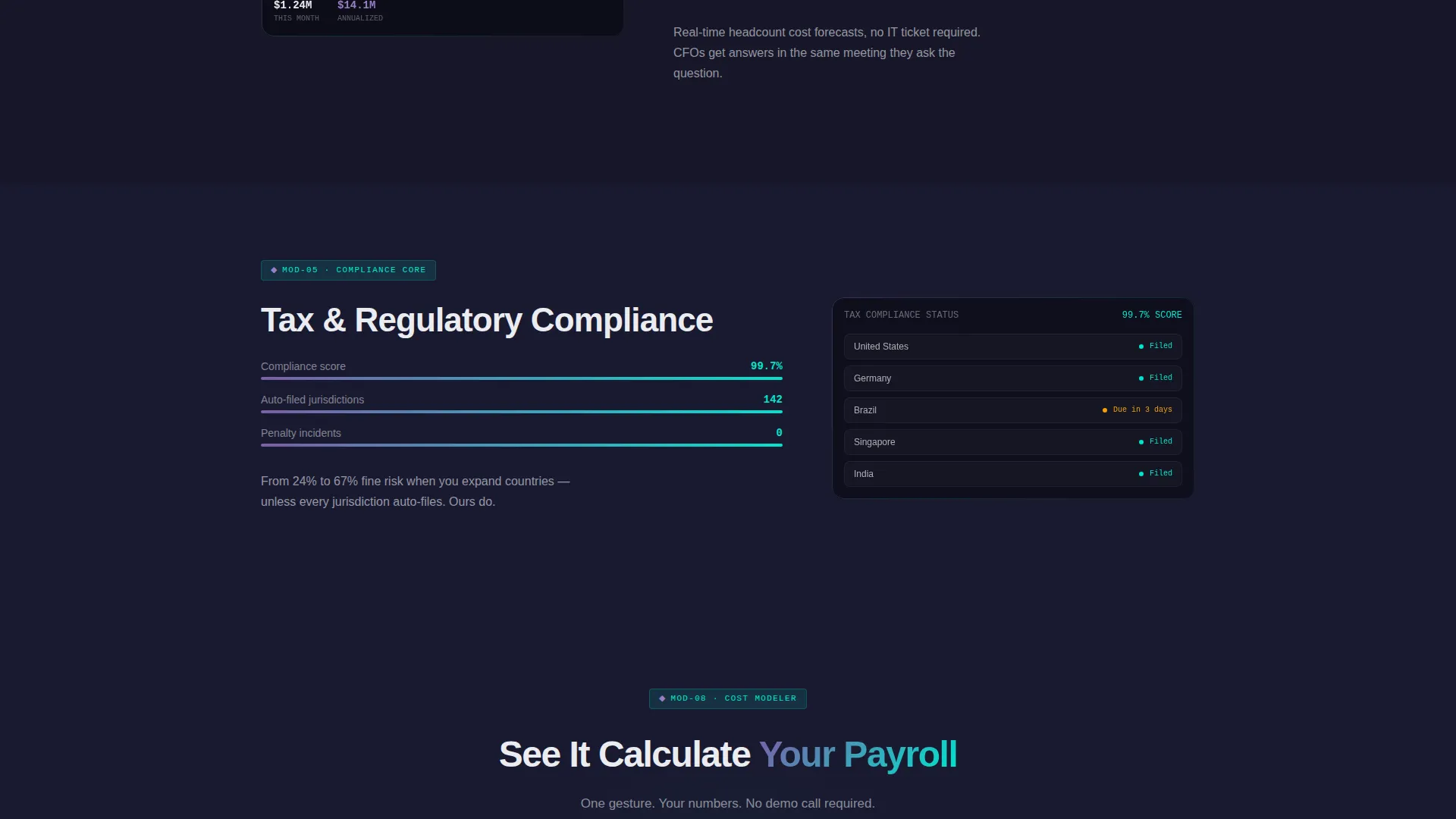
- Seven scroll-triggered spec card sections, each revealing one platform capability with module name, three key metrics, one animated user interface preview, and a one-line performance claim
- A dual call-to-action system with a ghost button in the header that solidifies into a filled cyan button after the third spec card, plus a secondary calculator call to action with a single employee-count slider
Feature list
This section covers the core capabilities built into the template design and interaction system.
Live-Simulated Metric Header
Three frosted-glass panel cards float over the obsidian background in the header. Each displays a realistic live-simulated figure: total payroll run at $1,247,893.22 with a green micro-sparkline, compliance score at 99.7% with a radial gauge, and time-to-onboard at 2.4 days with a downward trend arrow. The panels respond to mouse movement with a subtle parallax tilt, with light catching their edges in iridescent violet.
Scroll-Triggered Spec Card Sections
Each of the seven capability modules reveals on scroll in the style of a technical datasheet. The reveal is crisp and self-contained, presenting a module name, three key metrics, one animated user interface preview, and a single performance claim per card. Examples built into the template include payroll processing at 142-country tax compliance calculated in 9 seconds, and benefits administration with one enrollment flow covering 37 carrier integrations.
Progressive Background Lighting
The page background transitions from pure obsidian at the top through deep charcoal tones as the visitor scrolls down. By the final module, the page feels noticeably lighter, giving the experience a sense of momentum and arrival, like dawn breaking across a control room.
Dual Call-to-Action System
The primary call to action, "Explore the Platform," first appears as a ghost button with an iridescent border in the header. After the visitor scrolls past the third spec card, it solidifies into a filled cyan button. This staged approach rewards scroll engagement before asking for a click.
Single-Slider Payroll Calculator
The secondary call to action links to a live payroll calculator that pre-fills with data from one slider input: number of employees. Reducing the interaction to a single gesture lowers friction and connects the visitor's specific company size to a real product demonstration.
Iridescent Hover State System
Interactive elements use accent gradients that shift between violet and cyan on hover. Charts and data visualizations use the same cyan-to-violet gradient range, making them feel like active, living data displays rather than static report graphics.
Page sections overview
| Section | Purpose |
|---|---|
| Dark Glass Header | Display three live-simulated HR metrics with parallax tilt panels and the primary ghost-button call to action |
| Hero Headline Block | Deliver the single headline "Your entire workforce, one command away" in phosphor white below the metric panels |
| Spec Card One | Present payroll processing module with 142-country compliance claim and animated user interface preview |
| Spec Card Two | Present benefits administration module with single enrollment flow and 37 carrier integrations |
| Spec Card Three | Introduce third platform capability; triggers call to action state change from ghost to filled cyan button |
| Spec Cards Four to Seven | Reveal four remaining platform modules progressively, each with metrics and performance claim |
| Payroll Calculator call to action | Offer a single-slider calculator pre-filled by employee count to reduce conversion friction |
| Final call to action Block | Deliver the closing "Explore the Platform" filled button after all seven modules are visible |
Design & branding system
The visual identity follows a Data Command theme using an AI Iridescent color system. The palette is built for technology and software contexts where precision and confidence matter equally.
- Base colors are obsidian (#0D0D12) for backgrounds, liquid holographic violet (#7B5EA7) and neural-pulse cyan (#00E5CC) for accents and gradients, and phosphor white (#EAECF0) for all typography and data labels
- Cards and panels float on 1-pixel luminous borders against the near-black background, and interactive elements carry hover-state gradients that shift between violet and cyan like light refracting through a prism
Mobile & speed optimization
The scroll-reveal structure and dark glass panel design are built with a lean visual approach. No hero images or stock photography are used anywhere on the page, keeping asset weight low from the start.
- All visual depth comes from CSS-based gradients, border effects, and color transitions rather than large image files
- Scroll-triggered animations are contained to individual section reveals, keeping each interaction lightweight and predictable on smaller screens
How this template helps you convert
The conversion architecture is intentional. The page earns each click by presenting evidence before asking for action.
- The header metric panels immediately show the product in context, replacing a generic headline with simulated real output, so the visitor understands the platform's scope within the first three seconds of the page
- Seven spec card modules build a cumulative case across the scroll, so by the time the filled cyan call to action appears, the visitor has seen concrete numbers for seven distinct capabilities and the product tour feels like a natural next step rather than a sales prompt
Other information about this template
This template is categorized under Technology, specifically within the Software and SaaS subcategory, with a niche focus on HR and payroll software platforms. It is well suited for product-led growth marketing strategies where the page itself acts as a pre-qualification tool.
- The template style is Scroll Reveal (Progressive), meaning each section animates into view as the visitor scrolls, keeping attention focused on one idea at a time
- The creative direction follows a Spec Sheet format, presenting each platform module the way a technical datasheet presents a component: contained, precise, and evidence-led
- The header concept is Dark Glass Panels, a design approach using translucent frosted-glass card elements over a dark background to frame live-simulated data
- The landing page direction is Click-Through, optimized to move visitors into a self-guided product tour rather than capturing a form lead on the page itself
Theme
Data Command
Creative direction
Spec Sheet
Color system
AI Iridescent
Style
Scroll Reveal (Progressive)
Direction
Click-Through
Page Sections
Live-simulated Dark Glass Header
Scroll-triggered Spec Card Reveals
Progressive Page Lighting Effect
Staged Dual Call-to-action System
Iridescent Gradient Interaction Design
No-image Visual Architecture
Related questions
What type of businesses is this landing page template designed for?
Does the template include the payroll calculator section?
Can I update the metric figures shown in the header panels?
How many capability modules does this template include?
How does the call-to-action button change as a visitor scrolls?



