Tutoring & Coaching Center FAQ Website Template
Peertutor is a playful, geometric-styled landing page template built for peer tutoring networks at the college level. It opens with an interactive subject quiz, guides visitors through a FAQ-driven scroll, and captures leads through a three-step progressive form. The layout feels casual and trustworthy, exactly right for students, administrators, and parents looking for relatable academic support.
by Rocket studio
Quick summary
Peertutor is a single-page, hub-and-spoke landing page template designed for college peer tutoring networks. It combines a quiz-starter header, FAQ-anchored scroll sections, and a progressive lead capture form. The visual identity uses a Slate and Sky color system to feel academic yet approachable. Every section is built to reduce anxiety and guide visitors toward booking a tutor or applying to become one.
Who this template is for
This template is built for people running or launching peer tutoring programs at the college level. It speaks directly to the anxious student, the resourceful administrator, and the supportive parent all at once.
- University administrators who want to improve student retention through structured academic support programs
- Student government leaders building peer tutoring networks with limited budget and time
- Parents and students searching for affordable, relatable tutoring that feels less formal than traditional services
What problem this template solves
Finding the right academic help on campus often feels impersonal or overwhelming. Students don't know who to ask, administrators lack a clear sign-up funnel, and parents worry about cost and quality. This template solves the trust gap before it becomes a drop-off.
- No clear starting point for students who need subject-specific help quickly
- Tutoring programs that look institutional rather than friendly, reducing sign-up rates
- Lead capture flows that ask for too much too soon, causing visitors to abandon the page
What you get with this template
You get a complete, ready-to-customize landing page that handles the full visitor journey from curiosity to contact. Every section works together to answer objections, build confidence, and collect leads without friction.
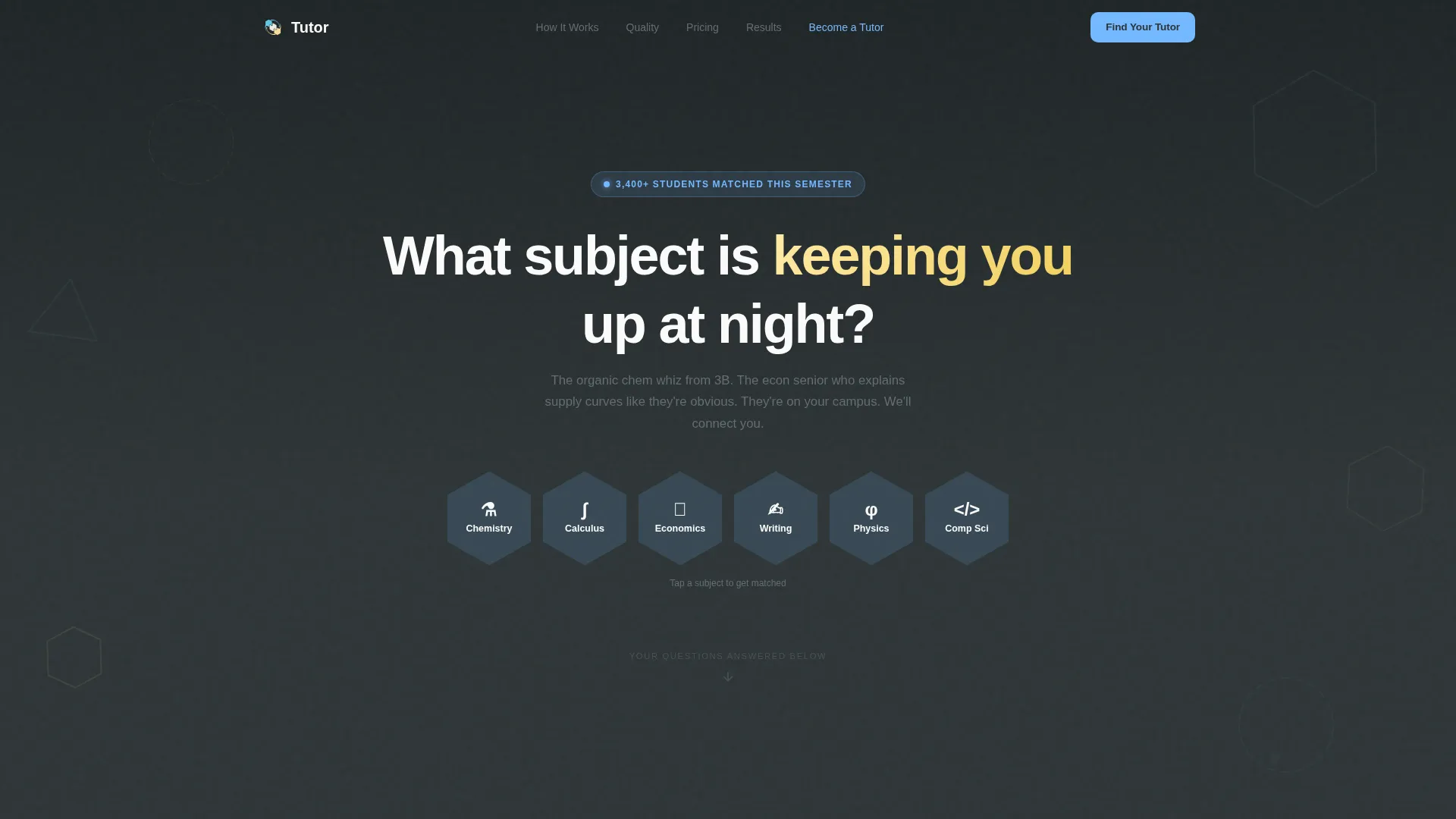
- A quiz-starter header with six subject hexagon tiles that personalize the page experience on click
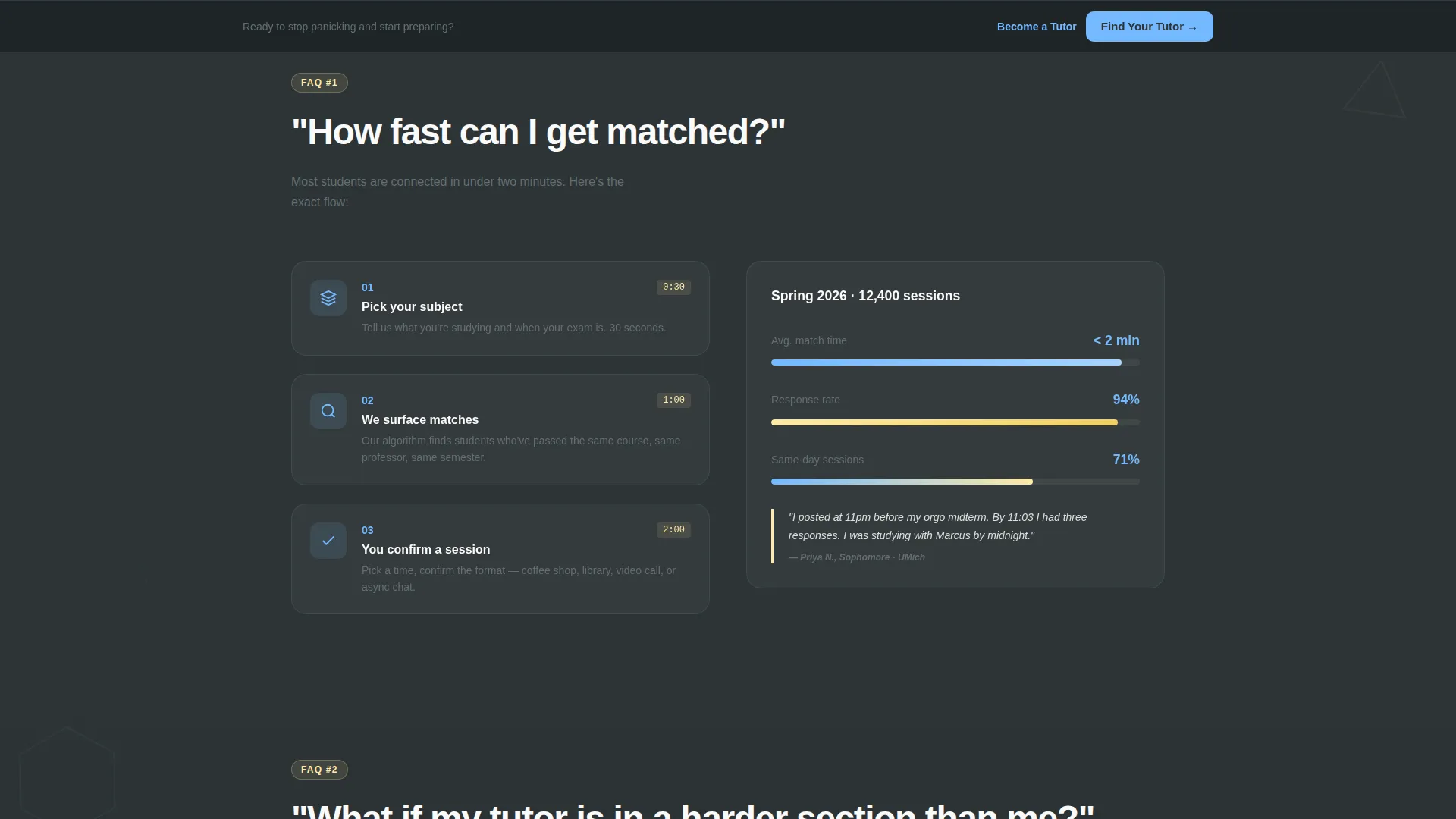
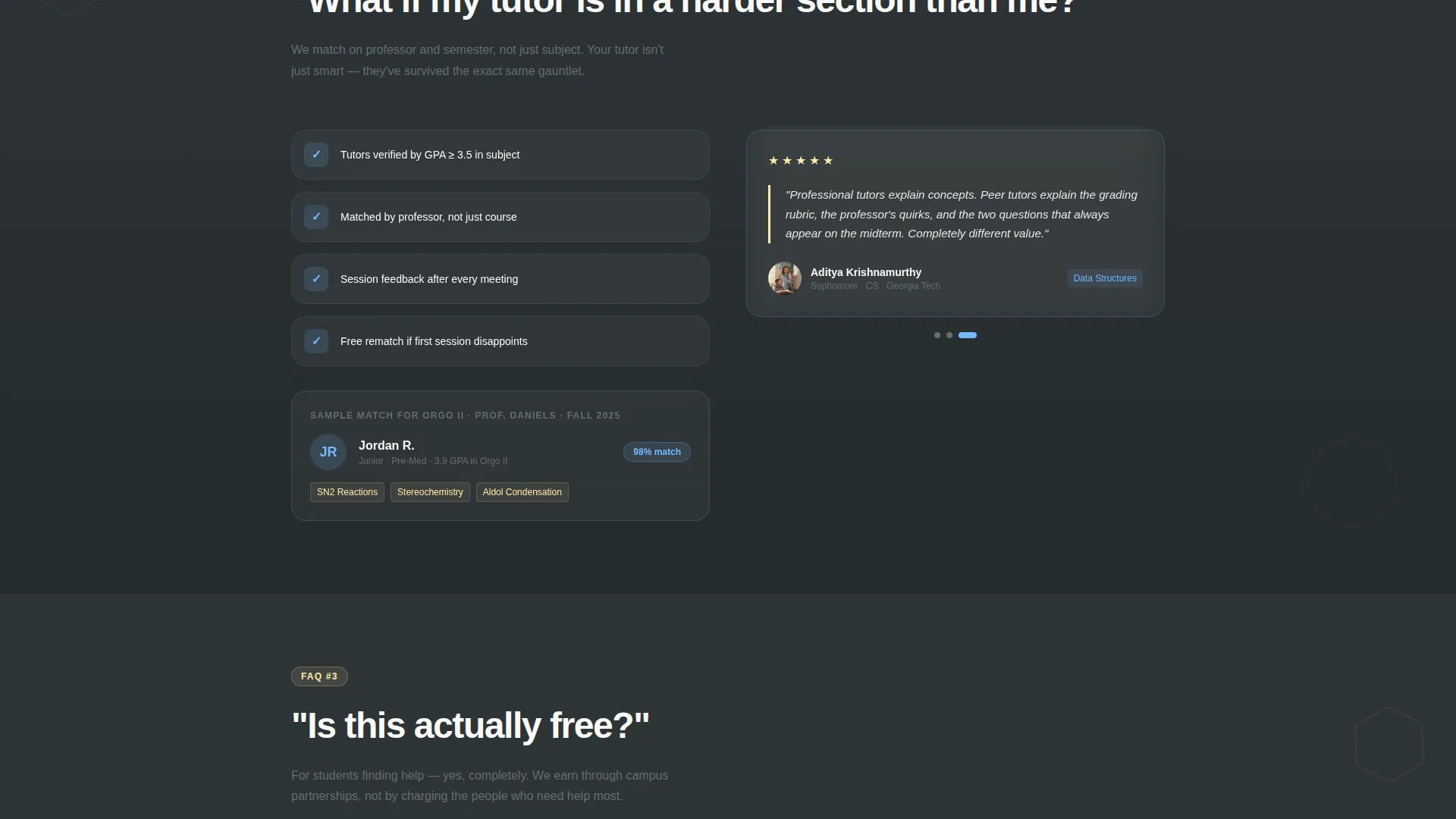
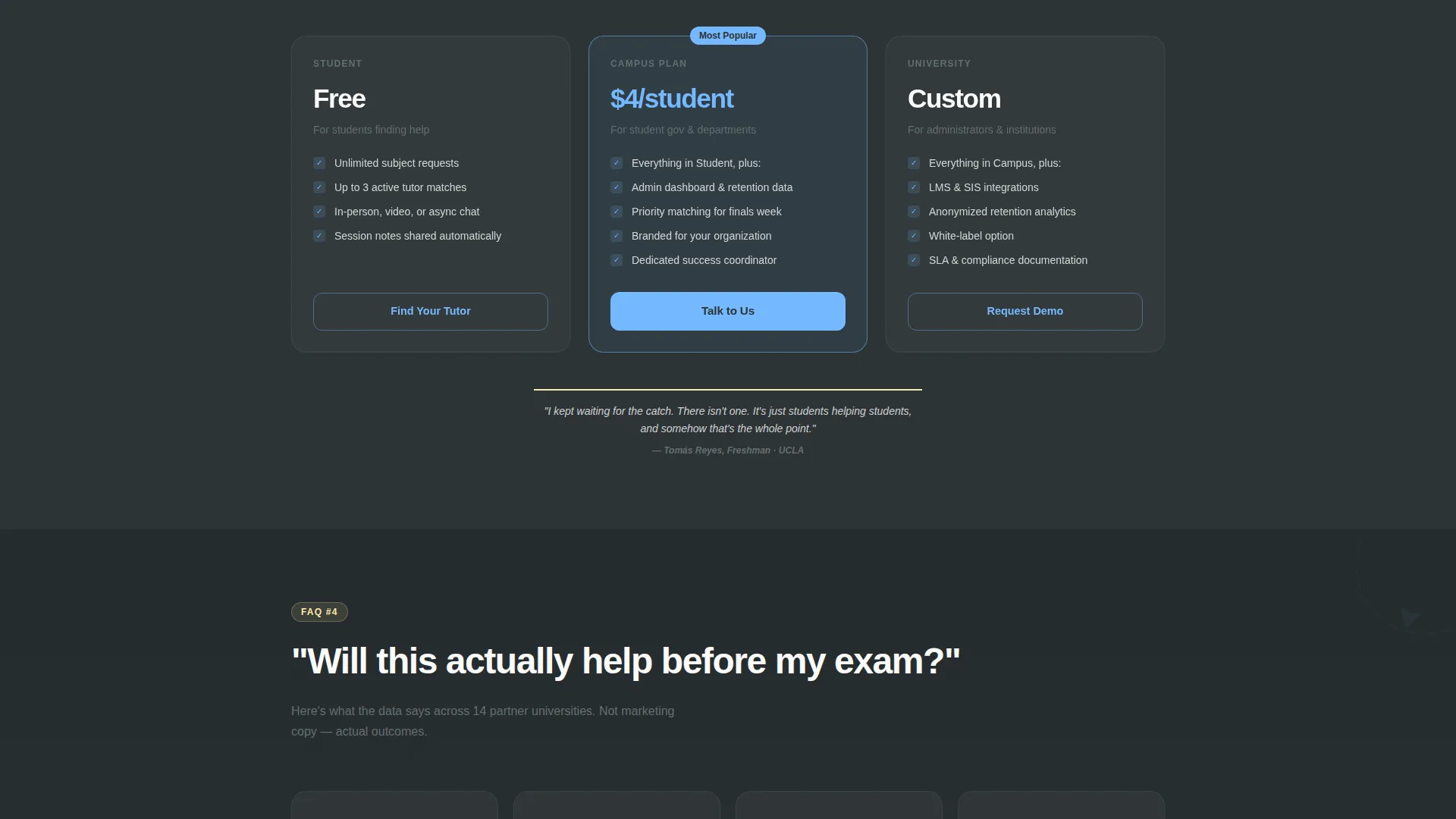
- A FAQ-driven scroll structure with anchor navigation, pull quotes, and geometric data visualizations
- A three-step progressive lead capture form plus a separate "Become a Tutor" application spoke
Feature list
This template packs several purpose-built components into a single, cohesive landing page flow. Each feature below reflects a direct element described in the source brief.
Subject-Selector Quiz Header
The header opens with a bold question, "What subject is keeping you up at night?", set in oversized geometric type against the deep slate background. Six hexagonal subject tiles in sky blue let visitors self-identify their need. Clicking a tile animates it forward and reveals a two-question micro-quiz before the page unfolds with a personalized feel.
FAQ-Driven Anchor Navigation
The scroll is structured around real student questions, such as "How fast can I get matched?" and "Is this actually free?" Each question acts as a spoke in the sticky side navigation. Visitors click a question and scroll directly to a section that answers with a short paragraph, a visual, and a student pull quote.
Progressive Three-Step Lead Form
The primary call to action, "Find Your Tutor," triggers a three-screen form. The first screen collects school name and subject, pre-filled from quiz answers. The second asks for availability and preferred format. The third captures email and phone, keeping each step light and focused.
Persistent Bottom Conversion Bar
After the third scroll section, a fixed bottom bar carries the "Find Your Tutor" call to action throughout the rest of the page. This ensures the primary conversion path stays visible without interrupting the reading flow.
Become a Tutor Application Spoke
A secondary conversion path lives as a text link in the anchor navigation. It expands into its own page section with an application form covering grade point average range, subjects taught, and a one-sentence teaching philosophy field. It gives skilled students an easy on-ramp to join the network.
Playful Geometric Motion System
Hexagons, triangles, and offset circles float in the page margins and rotate subtly on scroll. This kinetic layer adds visual energy to the slate background without distracting from content. It reinforces the template's identity as serious enough for academics but loose enough to feel peer-to-peer.
Page sections overview
| Section | Purpose |
|---|---|
| Quiz Starter Header | Personalizes the page flow through subject selection and a two-question micro-quiz |
| Subject Hex Tiles | Lets visitors identify their subject need before any form appears |
| Anchor Side Nav | Provides a sticky hub linking to each FAQ spoke section on the page |
| FAQ Spoke Sections | Answers specific student anxieties with paragraphs, visuals, and pull quotes |
| Find Your Tutor Form | Collects lead details across three progressive, low-friction screens |
| Persistent Bottom Bar | Keeps the primary call to action visible after the third scroll section |
| Become a Tutor Spoke | Offers a secondary path for students who want to teach, with an application form |
Design & branding system
The Slate and Sky color system gives this template a look that feels like a well-loved academic notebook. Dark backgrounds anchor the layout while clean content panels and bright accents keep it readable and energetic.
- Deep chalkboard slate (#2D3436) for primary backgrounds, soft graphite (#636E72) for secondary text, and wide-open sky blue (#74B9FF) for buttons and interactive accents
- Notebook white (#FAFAFA) for content panels and readable body areas, with highlighter yellow (#FFEAA7) marking active navigation states and hover moments
- Playful Geometric shapes including hexagons, triangles, and offset circles used as floating margin elements with subtle scroll-triggered rotation
Mobile & speed optimization
The template is built with a mobile-first layout structure that keeps the quiz flow, anchor navigation, and form screens usable on smaller screens. Content panels stack cleanly and the persistent bottom bar remains accessible on touch devices.
- Hexagonal subject tiles reflow into a compact grid on narrow viewports without losing their interactive behavior
- The sticky side anchor navigation adapts to a compact top or bottom bar format on mobile so spoke links stay reachable
- Progressive form screens present one focused step at a time, reducing cognitive load on mobile users filling out contact details
How this template helps you convert
Every design and content decision in this template is built to lower resistance and move visitors toward a specific action. The page earns the click by resolving doubts before asking for anything.
- The quiz header creates immediate personal relevance, so visitors feel the page was built for their specific subject and situation rather than a generic audience.
- The FAQ-driven scroll dissolves objections one by one using a question-tension-relief rhythm, building trust through accumulated honesty rather than promotional claims.
- The three-step progressive form spreads the commitment across small, manageable steps, making it far easier to complete than a single long sign-up screen.
Other information about this template
This template sits inside the Education and Training category under the Tutoring and Coaching Center subcategory. It is purpose-built for the peer tutoring network niche, where the emotional tone of the page matters as much as its structure.
- The template style is Hub and Spoke with anchor navigation, meaning each FAQ section is a self-contained spoke connected to a central sticky nav hub
- The creative direction is FAQ-Driven, making it especially well-suited for programs that need to overcome visitor skepticism before asking for contact information
- The header concept is a Quiz Starter, which distinguishes this template from static hero layouts by creating an interactive, personalized first impression
- The lead generation direction means the entire page flow is oriented around two conversion goals: finding a tutor and becoming one
- This template uses the Playful Geometric theme, which makes it visually distinct from clinical or corporate education templates while remaining credible for an academic context
Theme
Playful Geometric
Creative direction
FAQ-Driven
Color system
Slate & Sky
Style
Hub & Spoke (Anchor Nav)
Direction
Lead Generation
Page Sections
Subject-selector Quiz Header
Faq-driven Anchor Navigation
Three-step Progressive Lead Form
Persistent Bottom Conversion Bar
Become a Tutor Application Spoke
Playful Geometric Motion Layer
Related questions
Can I use this template for a single subject tutoring program, not a full network?
Do I need to configure the quiz logic and form pre-fill myself?
Can the Become a Tutor section be removed if I only want student leads?
Is this template suitable for a university department or only a student-run program?
How many FAQ spoke sections are included in the template?



